


依赖
<dependency>
            <groupId>org.seleniumhq.selenium</groupId>
            <artifactId>selenium-java</artifactId>
            <version>4.1.2</version> <!-- 确保使用与你的项目兼容的版本 -->
        </dependency>
1.指定驱动路径
(注意:这里chromedriver.exe和chrome.exe的版本必须要一致,否则会报错。)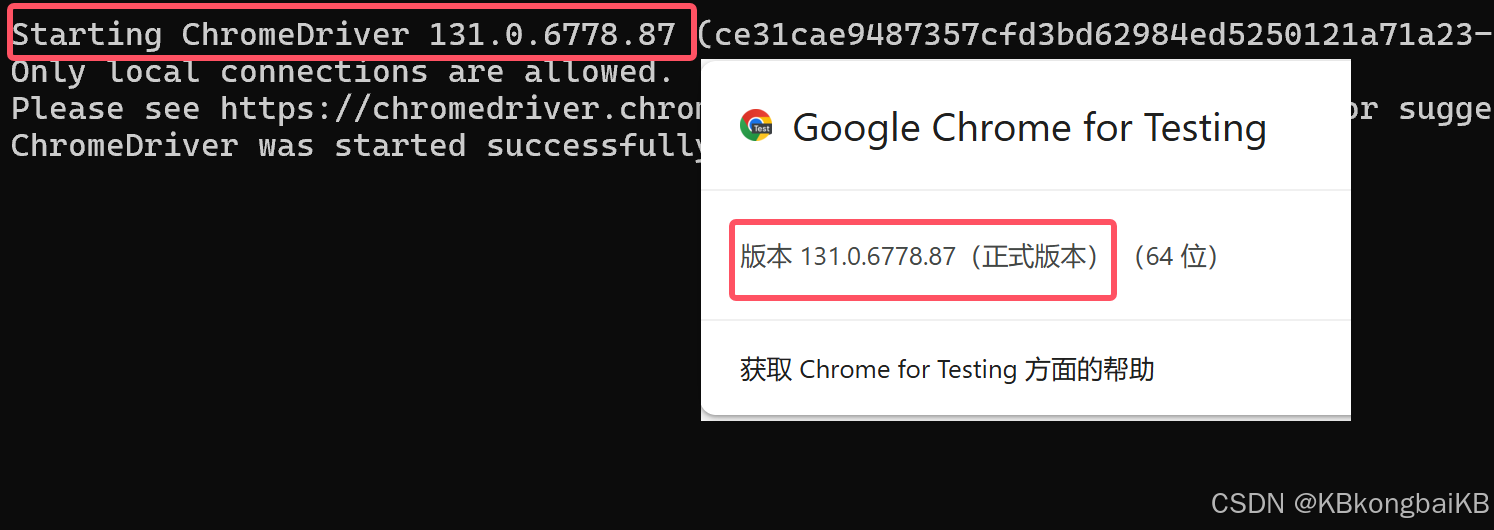
    System.setProperty("webdriver.chrome.driver","D:\\google\\chromedriver-win64\\chromedriver-win64\\chromedriver.exe");
    ChromeOptions options = new ChromeOptions();
    options.setBinary("D:\\google\\chrome-win64\\chrome-win64\\chrome.exe");
    WebDriver chromeDriver = new ChromeDriver(options);
2.设定url
    String url = "https://wow.liepin.com/t1012653/01ab459c.html?mscid=s_00_pz0";
    chromeDriver.get(url);
3.等待一定时间
(注意,一定要给页面缓存的时间,否则根据正确的路径无法找到对应的元素)
    try {
        Thread.sleep(3000);
    } catch (InterruptedException e) {
        e.printStackTrace();
    }
4.根据xpath找到对应元素
WebElement login = chromeDriver.findElement(By.xpath("/html/body/div/header/div[1]/div[2]/ul/li[1]/a"));
5.对元素进行操作
    点击 :send.click();
    输入值 :input.sendKeys("17332419354");
demo
@Test
void contextLoads() {
//指定驱动路径
System.setProperty("webdriver.chrome.driver","D:\\google\\chromedriver-win64\\chromedriver-win64\\chromedriver.exe");
ChromeOptions options = new ChromeOptions();
options.setBinary("D:\\google\\chrome-win64\\chrome-win64\\chrome.exe");
WebDriver chromeDriver = new ChromeDriver(options);
// 启动需要打开的网页
String url = "https://www.baidu.com/";
WebElement kw = chromeDriver.findElement(By.id("kw"));
kw.sendKeys("java");
WebElement su = chromeDriver.findElement(By.id("su"));
su.click();
}
拖动滑块验证
1.在idea上安装opencv,引入opencv的dll
使用Intellij IDEA在Java环境中安装OpenCV_org.opencv.core-优快云博客
    //指定驱动路径
    System.setProperty("webdriver.chrome.driver","D:\\google\\chromedriver-win64\\chromedriver-win64\\chromedriver.exe");
    // 引入opencv的dll
    System.load("D:\\code\\OpenCV\\opencv\\build\\java\\x64\\opencv_java4100.dll");
    ChromeOptions options = new ChromeOptions();
    options.setBinary("D:\\google\\chrome-win64\\chrome-win64\\chrome.exe");
    WebDriver chromeDriver = new ChromeDriver(options);
2.获取滑块和背景所在元素的url,并将图片下载到本地
// 滑块
WebElement slider = chromeDriver.findElement(By.xpath("/html/body/div[4]/div[1]/div[1]/div[2]/div/div/div[1]/div[1]/div[1]"));
// 获取滑块的URL
String sliderStyle = slider.getAttribute("style");
int startIndex = 23; // 第23个字符的索引
int endIndex = sliderStyle.length() - 3; // 倒数第4个字符的索引
String sliderUrl = sliderStyle.substring(startIndex, endIndex);
System.out.println("sliderUrl = " + sliderUrl);
// 背景图
WebElement homepage = chromeDriver.findElement(By.xpath("/html/body/div[4]/div[1]/div[1]/div[2]/div/div/div[1]/div[2]"));
String homepageStyle = homepage.getAttribute("style");
// 获取背景图的URL
int end = homepageStyle.length() - 3;
String homepageUrl = homepageStyle.substring(startIndex, end);
System.out.println("homepageUrl = " + homepageUrl);
    // 通过图片的url将图片下载到本地
    downloadPicture(sliderUrl, "D:\\code\\OpenCV\\test\\" + "slider.png");
    downloadPicture(homepageUrl, "D:\\code\\OpenCV\\test\\" + "homepage.png");
3.从本地获取图片存储到Mat中
    // 从本地读取背景原图
    Mat srcBenDiHK = Imgcodecs.imread("D:\\code\\OpenCV\\test\\slider.png");
    Mat src = Imgcodecs.imread("D:\\code\\OpenCV\\test\\homepage.png");
4.对图片进行
滑块 灰度化
    // 滑块 灰度化图片
    Imgproc.cvtColor(srcBenDiHK,srcBenDiHK,Imgproc.COLOR_BGR2GRAY);
滑块 去除周围黑边
    // 滑块 去除周围黑边
    for (int row = 0; row < srcBenDiHK.height(); row++) {
        for (int col = 0; col < srcBenDiHK.width(); col++) {
            if (srcBenDiHK.get(row, col)[0] == 0) {
                srcBenDiHK.put(row, col, 96);
            }
        }
    }
滑块 二值化
    // 滑块 转黑白图
    Core.inRange(srcBenDiHK, Scalar.all(96), Scalar.all(96), srcBenDiHK);
背景图 灰度化
    // 背景图 灰度化图片
    Imgproc.cvtColor(slideBgMat,slideBgMat,Imgproc.COLOR_BGR2GRAY);
背景图 二值化
    // 背景图 二值化
    Imgproc.threshold(slideBgMat,slideBgMat,127,255, Imgproc.THRESH_BINARY);
两者匹配算距离
    //将凹槽背景和拼图图形进行匹配
    Mat g_result = new Mat();
    Imgproc.matchTemplate(slideBgMat,srcBenDiHK,g_result, Imgproc.TM_CCOEFF_NORMED);
    Point matchLocation= Core.minMaxLoc(g_result).maxLoc;
    System.out.println(matchLocation.x);
5.模拟滑动
    // 模拟滑动
    Actions actions = new Actions(chromeDriver);
        actions.clickAndHold(slider);//模拟鼠标动作,按住滑块
    try {
        Thread.sleep(300);
    } catch (InterruptedException e) {
        e.printStackTrace();
    }
    actions.moveByOffset((int)matchLocation.x,0);
    try {
        Thread.sleep(1000);
    } catch (InterruptedException e) {
        e.printStackTrace();
    }
downloadPicture方法
public static void downloadPicture(String urlList, String path) {
URL url = null;
try {
url = new URL(urlList);
DataInputStream dataInputStream = new DataInputStream(url.openStream());
FileOutputStream fileOutputStream = new FileOutputStream(new File(path));
ByteArrayOutputStream output = new ByteArrayOutputStream();
byte[] buffer = new byte[1024];
int length;
while ((length = dataInputStream.read(buffer)) > 0) {
output.write(buffer, 0, length);
}
fileOutputStream.write(output.toByteArray());
dataInputStream.close();
fileOutputStream.close();
} catch (MalformedURLException e) {
e.printStackTrace();
} catch (IOException e) {
e.printStackTrace();
}
}
demo
@Test
void LaGou2(){
//指定驱动路径
System.setProperty("webdriver.chrome.driver","D:\\google\\chromedriver-win64\\chromedriver-win64\\chromedriver.exe");
// 引入opencv的dll
System.load("D:\\code\\OpenCV\\opencv\\build\\java\\x64\\opencv_java4100.dll");
ChromeOptions options = new ChromeOptions();
options.setBinary("D:\\google\\chrome-win64\\chrome-win64\\chrome.exe");
WebDriver chromeDriver = new ChromeDriver(options);
String url = "https://www.lagou.com/wn/";
chromeDriver.get(url);
try {
Thread.sleep(3000);
} catch (InterruptedException e) {
e.printStackTrace();
}
WebElement login = chromeDriver.findElement(By.xpath("/html/body/div/header/div[1]/div[2]/ul/li[1]/a"));
login.click();
try {
Thread.sleep(10000);
} catch (InterruptedException e) {
e.printStackTrace();
}
WebElement input = chromeDriver.findElement(By.xpath("/html/body/div[3]/div/div[2]/div/div[2]/div/div[2]/div[3]/div[1]/div/div[2]/div[1]/input"));
input.sendKeys("17332419354");
// 等待按钮加载
WebElement send = chromeDriver.findElement(By.xpath("/html/body/div[3]/div/div[2]/div/div[2]/div/div[2]/div[3]/div[1]/div/div[2]/div[2]/div/button"));
send.click();
try {
Thread.sleep(3000);
} catch (InterruptedException e) {
e.printStackTrace();
}
// 滑块
WebElement slider = chromeDriver.findElement(By.xpath("/html/body/div[4]/div[1]/div[1]/div[2]/div/div/div[1]/div[1]/div[1]"));
// 获取滑块的URL
String sliderStyle = slider.getAttribute("style");
int startIndex = 23; // 第23个字符的索引
int endIndex = sliderStyle.length() - 3; // 倒数第4个字符的索引
String sliderUrl = sliderStyle.substring(startIndex, endIndex);
System.out.println("sliderUrl = " + sliderUrl);
// 背景图
WebElement homepage = chromeDriver.findElement(By.xpath("/html/body/div[4]/div[1]/div[1]/div[2]/div/div/div[1]/div[2]"));
String homepageStyle = homepage.getAttribute("style");
// 获取背景图的URL
int end = homepageStyle.length() - 3;
String homepageUrl = homepageStyle.substring(startIndex, end);
System.out.println("homepageUrl = " + homepageUrl);
// 将图片下载到本地
downloadPicture(sliderUrl, "D:\\code\\OpenCV\\test\\" + "slider.png");
downloadPicture(homepageUrl, "D:\\code\\OpenCV\\test\\" + "homepage.png");
// 从本地读取滑块
Mat srcBenDiHK = Imgcodecs.imread("D:\\code\\OpenCV\\test\\slider.png");
// 滑块 灰度化图片
Imgproc.cvtColor(srcBenDiHK,srcBenDiHK,Imgproc.COLOR_BGR2GRAY);
// 滑块 去除周围黑边
for (int row = 0; row < srcBenDiHK.height(); row++) {
for (int col = 0; col < srcBenDiHK.width(); col++) {
if (srcBenDiHK.get(row, col)[0] == 0) {
srcBenDiHK.put(row, col, 96);
}
}
}
// 滑块 转黑白图
Core.inRange(srcBenDiHK, Scalar.all(96), Scalar.all(96), srcBenDiHK);
// 背景图
Mat slideBgMat = Imgcodecs.imread("D:\\code\\OpenCV\\test\\homepage.png");
// 背景图 灰度化图片
Imgproc.cvtColor(slideBgMat,slideBgMat,Imgproc.COLOR_BGR2GRAY);
// 背景图 二值化
Imgproc.threshold(slideBgMat,slideBgMat,127,255, Imgproc.THRESH_BINARY);
Mat g_result = new Mat();
//将凹槽背景和拼图图形进行匹配
Imgproc.matchTemplate(slideBgMat,srcBenDiHK,g_result, Imgproc.TM_CCOEFF_NORMED);
Point matchLocation= Core.minMaxLoc(g_result).maxLoc;
System.out.println(matchLocation.x);
// 模拟滑动
Actions actions = new Actions(chromeDriver);
actions.clickAndHold(slider);//模拟鼠标动作,按住滑块
try {
Thread.sleep(300);
} catch (InterruptedException e) {
e.printStackTrace();
}
actions.moveByOffset((int)matchLocation.x,0);
try {
Thread.sleep(1000);
} catch (InterruptedException e) {
e.printStackTrace();
}
actions.release();
actions.perform();
}





 扫一扫
扫一扫


 1万+
1万+

 被折叠的 条评论
为什么被折叠?
被折叠的 条评论
为什么被折叠?
 到【灌水乐园】发言





