



 本文详细介绍了C++中<iomanip>头文件提供的IO操纵器,包括setiosflags、resetiosflags、setbase、setfill、setprecision、setw等函数的使用方法和实例,以及get_money、put_money、get_time、put_time等与格式化输出相关的函数。
<iomanip>
IO Manipulators //IO 操纵器
Header providing parametric manipulators:
头文件提供了参数化的操纵器,包括:
Set format flags (function )
Reset format flags (function )
Set basefield flag (function )
Set fill character (function )
Set decimal precision (function )
Set field width (function )
get_money (C++11)
Get monetary value (function )
put_money (C++11)
Put monetary value (function )
get_time (C++11)
Get date and time (function )
put_time (C++11)
Put date and time (function )
-------------------------------------------------------------------------------------------------------------------------------------------------------------------------
setiosflags-----------设置格式标志
Set format flags
设置参数封装规范化格式标志
Example:
// setiosflags example
#include <iostream>     // std::cout, std::hex, std::endl
#include <iomanip>      // std::setiosflags

int main () {
  std::cout << std::hex;
  std::cout << std::setiosflags (std::ios::showbase | std::ios::uppercase);
  std::cout << 100 << std::endl;
  return 0;
}
//result: 0X64
//showbase:显示当前进制数(例中即0x),使用noshowbase可取消(则结果为:64)
//uppercase:以大写字母显示,即本来为(0x64),设置后变为(0X64)
-------------------------------------------------------------------------------------------------------------------------------------------------------------------------
resetiosflags-----重新设置格式标志
取消先前设置再进行新的格式设置
// resetiosflags example
#include <iostream>     // std::cout, std::hex, std::endl
#include <iomanip>      // std::setiosflags, std::resetiosflags

int main () {
  std::cout << std::hex << std::setiosflags (std::ios::showbase);
  std::cout << 100 << std::endl;
  std::cout << std::resetiosflags(std::ios::showbase) << 100 << std::endl;
  return 0;
}
//result:0x64
//       64
-------------------------------------------------------------------------------------------------------------------------------------------------------------------------
setbase-----设置显示位制
Set basefield flag
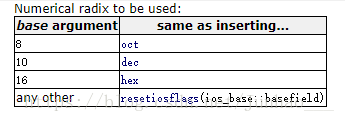
// setbase example
#include <iostream>     // std::cout, std::endl
#include <iomanip>      // std::setbase

int main () {
  std::cout << std::setbase(16);
  std::cout << 110 << std::endl;
  return 0;
}
//result:6e
//110的16进制显示
-------------------------------------------------------------------------------------------------------------------------------------------------------------------------
setfill-----设置填充字符
Set fill character
// setfill example
#include <iostream>     // std::cout, std::endl
#include <iomanip>      // std::setfill, std::setw

int main () {
  std::cout << std::setfill ('x') << std::setw (10);
  std::cout << 77 << std::endl;
  return 0;
}
//result:xxxxxxxx77
//setw:设置显示的位数为10
//77占两位,其余为字符x填充;
-------------------------------------------------------------------------------------------------------------------------------------------------------------------------
setprecision--设置显示精度
Set decimal (小数的)precision(精度)
// setprecision example
#include <iostream>     // std::cout, std::fixed
#include <iomanip>      // std::setprecision

int main () {
  double f =3.14159;
  std::cout << std::setprecision(5) << f << '\n';
  std::cout << std::setprecision(9) << f << '\n';
  std::cout << std::fixed;
  std::cout << std::setprecision(5) << f << '\n';
  std::cout << std::setprecision(9) << f << '\n';
  return 0;
}
//3.1416 setprecision(5)
//3.14159 setprecision(9)
//3.14159
//3.141590000
-------------------------------------------------------------------------------------------------------------------------------------------------------------------------
setw--设置区域宽度
Set field width
// setw example
#include <iostream>     // std::cout, std::endl
#include <iomanip>      // std::setw

int main () {
  std::cout << std::setw(10);
  std::cout << 77 << std::endl;
  return 0;
}
//result:       77
//there are 8 spaces
-------------------------------------------------------------------------------------------------------------------------------------------------------------------------
get_money --获取货币输入
template <class moneyT>
/*unspecified*/ get_money (moneyT& mon, bool intl = false);
参数解释:
mon
Object where the monetary value is stored.
moneyT shall be eitherlong doubleor a basic_string instantiation.intl
truefor international representations(国际单位),falseotherwise.
This is used internally(内部的) to instantiate(举例) the proper moneypunct class.
// get_money manipulator example
#include <iostream>     // std::cin, std::cout
#include <iomanip>      // std::get_money

int main ()
{
  long double price;
  std::cout << "Please, enter the price: ";
  std::cin >> std::get_money(price);

  if (std::cin.fail()) std::cout << "Error reading price\n";
  else std::cout << "The price entered is: " << price << '\n';

  return 0;
}
-------------------------------------------------------------------------------------------------------------------------------------------------------------------------
Internally, the function accesses the output sequence by first constructing an object of type basic_ostream::sentry. Then (if evaluating the sentry object is true), it calls money_put::put (using the stream's selected locale) to perform both the formatting and the insertion operations, adjusting the stream's internal state flags accordingly. Finally, it destroys the sentry object before returning.
在内部,函数通过首先构造一个basic_ostream::sentry类型的对象来访问输出序列。然后(如果对sentry对象求值为true),它调用money_put::put(使用流的选定区域设置)来执行格式化和插入操作,相应地调整流的内部状态标志。最后,它在返回之前销毁sentry对象。
template <class moneyT>
/*unspecified*/ put_money (const moneyT& mon, bool intl = false);
mon
Monetary value.
moneyT shall be eitherlong doubleor a basic_string instantiation.intl
truefor international representations,falseotherwise.
This is used internally to instantiate the proper moneypunct class.
// put_money manipulator example
#include <iostream>     // std::cout
#include <iomanip>      // std::put_money

int main ()
{
  std::cout << "Price:" << std::put_money(10.50L) << '\n';
  return 0;
}
-------------------------------------------------------------------------------------------------------------------------------------------------------------------------
template <class charT>
/*unspecified*/ get_time (struct tm* tmb, const charT* fmt);
tmb
Pointer to an object of type struct tm where the time and date information extracted is stored.
struct tm is a class defined in header<ctime>.指向存储时间和日期信息的tm结构的一个指针。tm结构在头文件ctime定义
fmt
C-string used by time_get::get as format string (see time_get::get).
charT is the character type in the c-string.
// get_time example
#include <iostream>     // std::cin, std::cout
#include <iomanip>      // std::get_time
#include <ctime>        // struct std::tm

int main ()
{
  struct std::tm when;
  std::cout << "Please, enter the time: ";
  std::cin >> std::get_time(&when,"%R");   // extract time (24H format)

  if (std::cin.fail()) std::cout << "Error reading time\n";
  else {
    std::cout << "The time entered is: ";
    std::cout << when.tm_hour << " hours and " << when.tm_min << " minutes\n";
  }

  return 0;
}
-------------------------------------------------------------------------------------------------------------------------------------------------------------------------
Inserts the representation of the time and date information pointed by tmb, formatting it as specified by argument fmt.
按照fmt的所表达格式插入被tmb指向的时间和日期信息。
tmb
Pointer to the object of type struct tm with the date and time information to format.
struct tm is a class defined in header<ctime>.fmt
C-string used by time_put::put as format string. It contains any combination of regular characters and special format specifiers. These format specifiers are replaced by the function to the corresponding values to represent the time specified in tmb. They all begin with a percentage (
%) sign, and are:
specifier Replaced by Example %aAbbreviated weekday name * Thu%AFull weekday name * Thursday%bAbbreviated month name * Aug%BFull month name * August%cDate and time representation * Thu Aug 23 14:55:02 2001%CYear divided by 100 and truncated to integer ( 00-99)20%dDay of the month, zero-padded ( 01-31)23%DShort MM/DD/YYdate, equivalent to%m/%d/%y08/23/01%eDay of the month, space-padded ( 1-31)23%FShort YYYY-MM-DDdate, equivalent to%Y-%m-%d2001-08-23%gWeek-based year, last two digits ( 00-99)01%GWeek-based year 2001%hAbbreviated month name * (same as %b)Aug%HHour in 24h format ( 00-23)14%IHour in 12h format ( 01-12)02%jDay of the year ( 001-366)235%mMonth as a decimal number ( 01-12)08%MMinute ( 00-59)55%nNew-line character ( '\n')%pAM or PM designation PM%r12-hour clock time * 02:55:02 pm%R24-hour HH:MMtime, equivalent to%H:%M14:55%SSecond ( 00-61)02%tHorizontal-tab character ( '\t')%TISO 8601 time format ( HH:MM:SS), equivalent to%H:%M:%S14:55:02%uISO 8601 weekday as number with Monday as 1(1-7)4%UWeek number with the first Sunday as the first day of week one ( 00-53)33%VISO 8601 week number ( 00-53)34%wWeekday as a decimal number with Sunday as 0(0-6)4%WWeek number with the first Monday as the first day of week one ( 00-53)34%xDate representation * 08/23/01%XTime representation * 14:55:02%yYear, last two digits ( 00-99)01%YYear 2001%zISO 8601 offset from UTC in timezone (1 minute=1, 1 hour=100)
If timezone cannot be termined, no characters+100%ZTimezone name or abbreviation *
If timezone cannot be termined, no charactersCDT%%A %sign%* The specifiers marked with an asterisk (*) are locale-dependent.
Two locale-specific modifiers can also be inserted between the percentage sign (%) and the specifier proper to request an alternative format, where applicable:
Modifier Meaning Applies to EUses the locale's alternative representation %Ec %EC %Ex %EX %Ey %EYOUses the locale's alternative numeric symbols %Od %Oe %OH %OI %Om %OM %OS %Ou %OU %OV %Ow %OW %OycharT is the character type in the c-string.
// put_time example
#include <iostream>     // std::cout
#include <iomanip>      // std::put_time
#include <ctime>        // std::time_t, struct std::tm, std::localtime
#include <chrono>       // std::chrono::system_clock

int main ()
{
  using std::chrono::system_clock;
  std::time_t tt = system_clock::to_time_t (system_clock::now());

  struct std::tm * ptm = std::localtime(&tt);
  std::cout << "Now (local time): " << std::put_time(ptm,"%c") << '\n';

  return 0;
}
//Now (local time): 03/07/13 11:41:34
翻译可能不尽得当,属于个人笔记,仅供参考





 扫一扫
扫一扫


 3582
3582

 被折叠的 条评论
为什么被折叠?
被折叠的 条评论
为什么被折叠?
 到【灌水乐园】发言





