



一、File类
- Java中,使用File类的一个对象,代表一个文件或一个文件夹
- File类声明在java.io包下
1. 创建File类的实例
- 相对路径:
- DEA中:单元测试中相对路径为相对于当前module下,在main方法中为相对于当前工程下
- Eclipse中:不管使用单元测试方法还是使用main()测试,相对路径都是当前project下。
1. 构造器
File(String filepath):传入一个文件的路径- 该路径可以是相对路径,也可以是绝对路径
    @Test
    public void createFileTest1(){
        File file1 = new File("Hello.txt");。
        File file2 = new File("Z:\\IDEA\\JavaTest\\IO_Streams\\src\\Hello.txt");// 绝对路径
        System.out.println(file1);
        System.out.println(file2);
    }
File(String parentPath,Stirng childPath):传入上层路径,和子路径
    @Test
    public void createFileTest2(){
        // 构造器2:
        File file3 = new File("Z:\\IDEA\\JavaTest\\IO_Streams\\src", "Hello.txt");
        System.out.println(file3);
    }
File(File parentFile,String childPath):传入一个File实例和子路径
    public void createFileTest3(){
        // 构造器3:
        File file4 = new File(new File("MyDir"), "Hello.txt");
        System.out.println(file4);
    }
2. 静态成员变量
File.pathSeparator:与系统有关的路径分隔符 , windows:分号, linux:冒号File.separator;文件名称分隔符 windows:反斜杠\ linux:正斜杠/File.pathSeparatorChar;File.separatorChar;
3 4 同1 2 ,不过一个是char类型,一个是String类型
- 操作路径时不能写死了:使用File.separator代替文件分隔符
2. File类常用方法
- File类中涉及到关于文件/文件夹目录的删除、创建、重命名、修改时间、文件大小等方法,并未涉及到写入/读取文件内容的操作
- 如果需要读取或写入内容,必须使用IO流来完成。
- 后续File类的对象会中作为参数传递给给流的构造器中,指明读取/写入的"终点"
1. 获取功能 :
public String getAbsolutePath() :获取绝对路径public String getPath():获取路径(创建File对象时写的路径)public String getName():获取文件/文件夹名称public String getParent():获取上层文件目录。- 当创建File对象,使用的是相对路径创建的File对象,则调用该方法返回的是文件名前面的部分
public long length():获取文件长度,(字节数),不能获取目录的长度public long lastModified():获取最后一次的修改时间,毫秒值- // 如下两个方法适用于文件目录:
public String[] list() :获取指定目录下的所有文件或文件目录的名称数组public File[] listFiles():获取指定目录下的所有文件或文件目录的File数组
2. 文件重命名:
public boolean renameTo(File dest):把文件重命名为指定的文件路径-
file1.renameTo(File file); // 要想保证返回true,需要file1在硬盘中是存在的,且file2不能再硬盘中存在
3.判断方法
public boolean isFile():判断是否是一个文件public boolean isDirectory():判断是否是一个目录public boolean exists():判断文件真实是否存在public boolean isHidden():判断是否是隐藏文件public boolean canRead() :判断是否可读public boolean canWrite():判断是否可写
- 当File实例所表示的文件并不是真实存在与硬盘中,则以上判断方法均为默认值false
4. 创建方法:
- 在硬盘中新建一个真实文件/文件目录(并非创建一个File对象)
createNewFile():新建一个文件mkdir():创建文件目录,如果文件目录存在,就不创建。如果此文件上层目录。如果文件存在则不进行创建mkdirs():创建文件目录,如果上层文件目录不存在,一并创建.如果文件存在,则不进行创建
    @Test
    public void createDirTest() {
        // 文件目录的创建:
        File file1 = new File("MyDirTest1\\MyDircreateTest1");
        if ( file1.mkdir())
            System.out.println("创建成功1");
        File file2 = new File("MyDirTest2\\MyDircreateTest2");
        if ( file2.mkdirs())
            System.out.println("创建成功2");
        /*
            运行结果:创建成功2:这表明,在构造file对象时传入的文件路径同样没有上层目录时,mkdir()选择不进行创建,而mkdirs()则将上层目录一并创建
         */
        File file3 = new File("mkdirTestBaseTest");
        if(file3.mkdir())
            System.out.println("创建成功3");
    }
4. 删除方法:
- 删除文件/文件夹:delete()
- 注意:java中的删除不走回收站; 删除文件夹时,该文件夹下必须不存在子目录/文件,否则会删除失败
二、I/O流
1. Java I/O概述:
- I/O技术用于处理设备之间的数据传输,入读/写文件,网络通讯等
- Java程序中,对于数据的输入/输出操作以 流Stream的方式进行
- java.io包下提供了各种流类和接口,以获取不同种类的数据,并通过标准的方法输入/输出数据
2. 流的分类:
- 操作单位不同,分为字节流(一次写入/读出一个字节)和 字符流(一次写入/读出两个字节)
- 数据流向不同,分为输入流和输出流(站在程序的角度,读取文件为输入流,写入文件为输出流)
- 流的作用角色不同,分为结点流(直接作用在文件上)和处理流(作用在其他流上)
3. 流的体系结构
		抽象基类    	字节流             	字符流
        输入流    	InputStream       	Reader
        输出流   	OutputStream      	Writer
- java的I/O流涉及40多个类,实际上非常规则,都是由上述4个抽象基类派生的
- 由这四个类派生出来的子类名称都是以其父类名作为子类名后缀
文件流(节点流):
- 字节流和字符流的区别和使用情景:
字节流:以一个字节为单位进行文件的读取/写入
字符流:以一个字符(;两个字节)为单位进行文件的读取/写入
使用情景:字符流:处理文本文件(.txt , .c, .java, .cpp)
字节流:处理非文本文件
- FileInputStream (read(byte[] buffer) ) :以字节为单位读取文件
- FileOutputStream ( write(byte[] buffer, 0 ,len):以字节为单位对文件进行写入
- FileReader ( read(char[] cbuf) ) : 以字符为单位读取文件
- FileWriter ( write(char[] cbuf, 0 ,len) ):以字符为单位对文件进行写入
缓冲流(处理流的一种):
就是套接在已有的流的基础上
- BufferedInputStream( read(byte[] buffer))
- BufferedOutputStream (writer(byte[] buffer,0,len))
- BufferedReader(read(char[] cbuf) / readLine())
- BufferedWriter (write(char[] cbuf,0,len))
- 缓冲流的作用:
- 提供流的读取、写入的速度
- 提高读写速度额的原因:内部提供了一个缓冲取:大小为8192
- BufferedOutputStream中有一个方法flust():进行缓冲区刷新
转换流(处理流):
- InputStreamReader:将一个字节的输入流转化为字符的输入流
- OutputStreamWriter :将一个字符的输出流转化为字节的输出流

-
(这两个流属于字符流)
-
作用:提供字节流与字符流的转化流
-
解码: 字节、字节数组 —> 字符数组、字符串
-
编码:字符数组、字符串 —> 字节、字节数组
三、流的使用
1. 流的基本使用步骤
- File类的实例化
- 流的实例化
- 调用该流的处理方法:read/write
- 资源关闭 (先创建的流后关闭)
2. 文件流
- 常用的文件流:
FileInputStream/FileOutputStream, FileReader/FileWriter
字符流:
- 将要读取的文件中的内容:
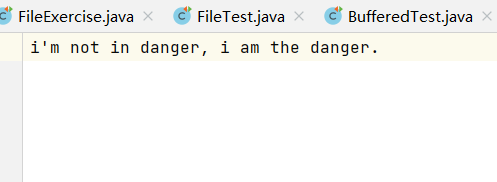
FileReader
    /*
    将当前module下的StreamFile下的HelloFile.txt的文件内容读入程序,并输出到控制台
        说明:
         1. read()理解
         2. 异常的处理:为了保证流资源一定可以执行关闭操作,需要使用try-catch-finally处理
         3. 读入的文件一定要存在,否则就会报FileNotFoundException
     */
 @Test
    public void testFileReader2() {
        // 对read()操作升级:使用read的重载方法:
        // public int read(char cbuf[]) throws IOException:返回每次读入cbuf数组中的字符的个数,如果达到文件末尾,返回-1
        // 1. File类的实例化
        File file = new File("StreamFile\\HelloFile.txt");
        // 2. FileReader流的实例化
        FileReader fr = null;
        try {
            fr = new FileReader(file);
            // 3. 读入的操作
            char[] cbuf = new char[7];
            int len = 0;
            // read(char[] buffer): 一次读取一段字符
            while (-1 != (len = fr.read(cbuf))) {

                // 正确写法一:
                for (int i = 0; i < len; i++) {
                    System.out.print(cbuf[i]);
                }
                /*
                   // 正确写法2:
                   String str = new String(cbuf,0,len);
                   System.out.print(str)   ;
                */
                /* 错误写法一:
                for(int i = 0 ; i < cbuf.length ; i++ ){
                    System.out.print(cbuf[i])   ;
                }
                 */
                /* 错误写法二:
                    String str = String.valueOf(cbuf);// 或 String str = new String(cbuf);
                    System.out.print(str)   ;
                 */
            }
        } catch (IOException e) {
            e.printStackTrace();
        } finally {
            if (null != fr)
                try {
                    // 4. 资源的关闭
                    fr.close();
                } catch (IOException e) {
                    e.printStackTrace();
                }
        }
    }
// 运行结果:
i'm not in danger, i am the danger.
FileWriter
// 从内存中写出数据到硬盘的文件里
/*
    写入操作,对应的File可以不存在
        如果不存在,在输出的过程中,会自动创建此文件。并不会报异常
        如果存在,
             如果流使用的构造器是FileWriter(file,false) / FileWriter(file):对原有文件的覆盖
             如果流使用的构造器是FileWriter(file,true):不会对原有文件覆盖,而是在原有文件后面追加要写入的内容
*/
    // 将一个文件中的内容读出并写入到另一个文件当中
    @Test
    public void testFileReaderFileWriter() {
    	// 这里可写你自己的源文件名
        File file1 = new File("StreamFile\\HelloFile.txt");
		// 这里可以写你自己的目标文件名
		// separator:文件名称分隔符,为了源程序的可已执行,一般将文件分隔符使用File的静态变量进行替换,这里进行一次演示
        File file2 = new File(file1.getParent()+File.separator+File.separator+"writeFile");
        FileReader fr = null;
        FileWriter fw = null;

        try {
            fr = new FileReader(file1);
            fw = new FileWriter(file2, true);

            char[] charBuffer = new char[10];
            int len = 0;
            while (-1 != (len = fr.read(charBuffer))) {
//                fw.write(new String(charBuffer,0,len));
                fw.write(charBuffer, 0, len);
            }
            fw.write("\n");
        } catch (IOException e) {
            e.printStackTrace();
        } finally {

            /* 错误写法:如果fr.close()抛出异常,则会导致fw无法关闭,因此要在finally中对其进行关闭
            try{
                if( null != fr)
                    fr.close();
                if( null != fw )
                    fw.close();
            }catch(IOException e){
                e.printStackTrace();
            }
            */
            try {
                if (null != fr)
                    fr.close();
            } catch (IOException e) {
                e.printStackTrace();
            }
            try {
                if (null != fw)
                    fw.close();
            } catch (IOException e) {
                e.printStackTrace();
            }
        }
    }
字节流
FileInputStream
 @Test
    public void testFileInputStream() {
        // 1. 创建File对象
        File file = new File("StreamFile\\HelloFile.txt");
        // 2. 创建流对象
        FileInputStream fileInputStream = null;
        try {
            fileInputStream = new FileInputStream(file);
            // 3. 读数据
            byte[] bytes = new byte[10];
            int len = 0; // 存储每次读取的字节数
            while (-1 != (len = fileInputStream.read(bytes))) {
                String str = new String(bytes, 0, len);
                System.out.println(str);
            }
        } catch (IOException e) {
            e.printStackTrace();
        } finally {
            try {
                if (null != fileInputStream)
                    // 4. 关闭资源
                    fileInputStream.close();
            } catch (IOException e) {
                e.printStackTrace();
            }
        }
    }
文件与FileReader测试中使用的是同一个文件,但由于输出方式不同,结果不同:
i'm not in
 danger, i
 am the da
nger. (这个程序进行输出时使用的是println())
FileOutputStream
	// 将字符串写入到文件中
    @Test
    public void testFileOutputStream() {
        String str = "it's all good,man";
        File file = new File("StreamFile\\testFileOutputStream.txt");
        FileOutputStream fos = null;
        try {
            fos = new FileOutputStream(file);
            byte[] bytes = str.getBytes();
            fos.write(bytes);
        } catch (IOException e) {
            e.printStackTrace();
        } finally {
            if (fos != null) {
                try {
                    fos.close();
                } catch (IOException e) {
                    e.printStackTrace();
                }
            }
        }
    }
结果:
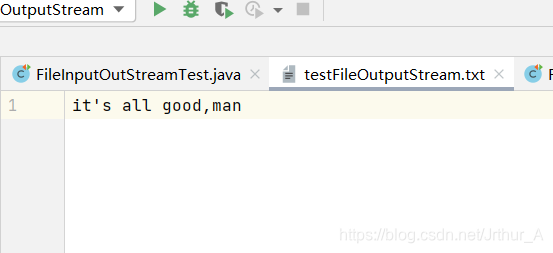
字符流和字节流的对比使用
- 分别使用字节流和字符流对图片进行复制
@Test
    public void userFileReaderToDealPic() {
        File file1 = new File("StreamFile\\绝命毒师.jpg");
        File file2 = new File("StreamFile\\绝命毒师_字符流处理.jpg");

        FileReader reader = null;
        FileWriter writer = null;

        try {
            reader = new FileReader(file1);
            writer = new FileWriter(file2);
            char[] charBuffer = new char[10];
            int len = 0;
            while (-1 != (len = reader.read(charBuffer))) {
                String str = new String(charBuffer, 0, len);
                writer.write(str);
            }
        } catch (IOException e) {
            e.printStackTrace();
        } finally {
            if (null != reader) {
                try {
                    reader.close();
                } catch (IOException e) {
                    e.printStackTrace();
                }
            }
            if (null != writer) {
                try {
                    writer.close();
                } catch (IOException e) {
                    e.printStackTrace();
                }
            }
        }


    }
@Test
    public void userFileInputStreamToDealPic() {
        File file1 = new File("StreamFile\\绝命毒师.jpg");
        File file2 = new File("StreamFile\\绝命毒师_字节流处理.jpg");

        FileInputStream reader = null;
        FileOutputStream writer = null;

        try {
            reader = new FileInputStream(file1);
            writer = new FileOutputStream(file2);
            byte[] byteBuffer = new byte[10];
            int len = 0;
            while (-1 != (len = reader.read(byteBuffer))) {
                writer.write(byteBuffer, 0, len);
            }
        } catch (IOException e) {
            e.printStackTrace();
        } finally {
            if (null != reader) {
                try {
                    reader.close();
                } catch (IOException e) {
                    e.printStackTrace();
                }
            }
            if (null != writer) {
                try {
                    writer.close();
                } catch (IOException e) {
                    e.printStackTrace();
                }
            }
        }
    }
// 结果:
字符流处理的图片无法打开
字节流处理的图片可以打开
- 结论:
1. 对于文本文件(.txt, .java, .c, .cpp),使用字符流处理 Reader/Writer
2. 对于非文本文件(.jpg, .mp3, .mp4, avi, doc, ppt, .... ),使用字节流处理 Input/Output
3. 缓冲流
1. BufferedInputStream / BufferedOutputStream
    @Test
    public void testBufferedInput_OutputStream() {
        // 1. 造文件
        File srcFile = new File("StreamFile\\绝命毒师.jpg");
        File destFile = new File("StreamFile\\绝命毒师_缓冲流测试.jpg");

        // 2. 造流
        // 2.1 造结点流
        BufferedInputStream bis = null;
        BufferedOutputStream bos = null;
        try {
            FileInputStream reader = new FileInputStream(srcFile);
            FileOutputStream writer = new FileOutputStream(destFile);

            //2.2 造缓冲流
            bis = new BufferedInputStream(reader);
            bos = new BufferedOutputStream(writer);

            // 3. 复制的细节:读取、写入
            byte[] buffer = new byte[10];
            int len ;
            while (-1 != (len = bis.read(buffer))) {
                bos.write(buffer, 0, len);
            }
        } catch (IOException e) {
            e.printStackTrace();
        } finally {

            // 4. 资源关闭
            // 要求:先关闭外层的流,再关闭内层的流
            // 说明:在关闭外城流的时候,内层流也会自动的进行关闭,我们可以省略对内层流的关闭

            if (bis != null) {
                try {
                    bis.close();
                } catch (IOException e) {
                    e.printStackTrace();
                }
            }
            if (bos != null) {
                try {
                    bos.close();
                } catch (IOException e) {
                    e.printStackTrace();
                }
            }
        }
    }
2. BufferedReader / BufferedWriter
@Test
    public void bufferedReaderWriterTest() {
        BufferedReader br = null;
        BufferedWriter bw = null;
        try {
            br = new BufferedReader(new FileReader(new File("Z:\\IDEA\\JavaTest\\IO_Streams\\StreamFile\\dbcp连接池常用基本配置属性.txt")));
                bw = new BufferedWriter(new FileWriter(new File("Z:\\IDEA\\JavaTest\\IO_Streams\\StreamFile\\BufferedReaderWriterTest.txt")));
            // 方式一:使用char[]数组
//            char[] buffer = new char[20];
//            int len = 0;
//            while (-1 != (len = br.read(buffer))) {
//                bw.write(buffer, 0, len);
//            }
            // 方式二:使用String
            String data;
            // readLine()读取一行的字符串,但不包括换行符
            while (null != (data = br.readLine())) {
                // 方法一:
//                bw.write(data+"\n");
                // 方法2:
                bw.write(data);
                bw.newLine(); // BufferedWriter提供了添加换行符的操作
            }
        } catch (IOException e) {
            e.printStackTrace();
        } finally {
            if (null != br) {
                try {
                    br.close();
                } catch (IOException e) {
                    e.printStackTrace();
                }
            }
            if (null != bw) {
                try {
                    bw.close();
                } catch (IOException e) {
                    e.printStackTrace();
                }
            }
        }
    }
4. 转换流
- 使用转换流
    // 使用输入转换流
    @Test
    public void InputStreamReader_OutputStreamWriterTest() {
        // 创建一个字节流对象
        InputStreamReader isr = null; //  参数2指明了字符集,具体使用哪个字符集,取决于文件保存时使用的字符集
        try {
            FileInputStream fis = new FileInputStream("StreamFile\\统计CountTheNumberOfChar的字符个数.txt");
            // 将字节流对象作为参数传递给转化流构造器,从而实例化一个转换流对象
            isr = new InputStreamReader(fis, "UTF-8");
//        InputStreamReader isr = new InputStreamReader(fis); // 使用系统默认的字符集
            char[] buffer = new char[20]; // 创建的按字节读取的输出流,经过转化流转换后,可以使用字符数组进行读取(表现了将字节流转换为字符流)
            int len = 0;
            while (-1 != (len = isr.read(buffer))) {
                System.out.println(String.valueOf(buffer, 0, len));
            }
        } catch (IOException e) {
            e.printStackTrace();
        } finally {
            if (null != isr) {
                try {
                    isr.close();
                } catch (IOException e) {
                    e.printStackTrace();
                }
            }
        }
    }
- 综合使用两种转换流
@Test
    public void InputStreamReader_OutputStreamWriter() {
        // (省略了File对象的创建)
        // 1.  创建流对象
        // 1.1 创建结点流
        InputStreamReader isr = null;
        OutputStreamWriter osw = null;
        try {
            FileInputStream fis = new FileInputStream("StreamFile\\统计CountTheNumberOfChar的字符个数.txt");
            FileOutputStream fos = new FileOutputStream("StreamFile\\转换流测试_gbk编码.txt");

            // 1.2 创建处理流
            isr = new InputStreamReader(fis,"UTF-8");
            osw = new OutputStreamWriter(fos,"gbk");

            // 2. 读写过程
            char[] buffer = new char[20];
            int len = 0;
            while (-1 != (len = isr.read(buffer))) {
                osw.write(String.valueOf(buffer, 0, len));
            }
        } catch (IOException e) {
            e.printStackTrace();
        } finally {
            // 3. 资源关闭
            if (null != isr) {
                try {
                    isr.close();
                } catch (IOException e) {
                    e.printStackTrace();
                }
            }
            if (null != osw) {
                try {
                    osw.close();
                } catch (IOException e) {
                    e.printStackTrace();
                }
            }
        }
    }
四、三种可了解的流
1. 标准输入/输出流
- System.in: 标准输入流,默认的输入设备是:键盘
- System.out: 标准输出流,输出设备是:从控制台输出
- System类的setIn(InputStream is)/setOut(PrintStream ps)方法重新指定输入和输出的设备(重定向) (类似于linux系统中的>/<命令)
    System.in的类型是InputStream
    System.out的类型是PrintStream,其是OutputStream的子类
标准输入/输出流测试:
对标准输入/输出流进行包装,使用其从键盘上接收一串字符。
转换成大写输出,当输入为null或输入e/exit时退出
    @Test
    public void testSystemInOut(){
        // 两个转换流
        // 对标准输入/输入流进行包装
        InputStreamReader isr = new InputStreamReader(System.in);
        OutputStreamWriter osw = new OutputStreamWriter(System.out);

        // 两个缓存流
        BufferedReader br = new BufferedReader(isr);
        BufferedWriter bw = new BufferedWriter(osw);
        try {
            while(true){
                bw.write("\n请输入一串字符\n");
                bw.flush(); // 刷新缓冲区,使数据打印到控制台
                String data = br.readLine();
                if(data == null || "e".equalsIgnoreCase(data)|| "exit".equals(data))
                    break;

                bw.write(data.toUpperCase());
                bw.flush();
            }
        } catch (IOException e) {
            e.printStackTrace();
        } finally {
            if( null != br) {
                try {
                    br.close();
                } catch (IOException e) {
                    e.printStackTrace();
                }
            }
            if( null != bw) {
                try {
                    bw.close();
                } catch (IOException e) {
                    e.printStackTrace();
                }
            }
        }

    }
// 运行结果:
请输入一串字符
helloworld
HELLOWORLD
请输入一串字符
qianzhisanyao
QIANZHISANYAO
请输入一串字符
wocongnalilai
WOCONGNALILAI
请输入一串字符
chuliu
CHULIU
请输入一串字符
e
2. 数据流
- 两个数据流: DataInputStream和DataOutputStream
- 作用: 用于读取或写出java的基本数据类型和String的数据
将基本类型输出写入到文件中再读取出来
InputStream测试
    @Test
    public void inputStream(){
        // 将内存中的字符串、基本数据类型的变量写出到文件中
        // 1. 创建流
        DataOutputStream dos = null;
        // 进行写入
        try {
            dos = new DataOutputStream(new FileOutputStream("StreamFile\\数据流测试文件.txt"));
            dos.writeUTF("HelloWorld");
            dos.flush(); // 刷新缓冲区
            dos.writeInt(123);
            dos.flush();
            dos.writeBoolean(false);
        } catch (IOException e) {
            e.printStackTrace();
        } finally {
            if(dos!=null) {
                try {
                    dos.close();
                } catch (IOException e) {
                    e.printStackTrace();
                }
            }
        }
    }
OutputStream测试
    @Test
    public void dataInputStream(){
        // 将文件中存储的基本数据类型变量和字符串读取到内存中,保存在变量中
        // 注意点:读取不同类型的数据的顺序要与当初写入文件时,保存的数据的顺序一致
        DataInputStream dis = null;
        try {
        	// 将InputStream数据流写入到文件中的数据读取数据并打印
            dis = new DataInputStream(new FileInputStream("StreamFile\\数据流测试文件.txt")); //
            System.out.println(dis.readUTF());
            System.out.println(dis.readInt());
            System.out.println(dis.readBoolean());
        } catch (IOException e) {
            e.printStackTrace();
        } finally {
            if(dis != null) {
                try {
                    dis.close();
                } catch (IOException e) {
                    e.printStackTrace();
                }
            }
        }
    }
3. 打印流
- 打印流像处理流一样,是包装在已有流基础上的。
测试功能:
将一个字符串输出到文件中
PrintStream测试:
    @Test
    public void testPrintStream() {
        String str = "better call saul ";
        PrintStream printStream = null;
        try {
            FileOutputStream fos = new FileOutputStream("StreamFile\\打印流测试2.txt");
            printStream = new PrintStream(fos);
            printStream.print(str); // 打印流重载了一系列print方法
        } catch (FileNotFoundException e) {
            e.printStackTrace();
        } finally {
            if (printStream != null)
                printStream.close();
        }
    }
PrintWriter测试:
    @Test
    public void testPrintWriter() {
        String str = "it's all good, man";
        PrintWriter printWriter = null;
        try {
            FileOutputStream fos = new FileOutputStream("StreamFile\\打印流测试1.txt");
            printWriter = new PrintWriter(fos);
            printWriter.print(str);
        } catch (FileNotFoundException e) {
            e.printStackTrace();
        } finally {
            if (printWriter != null)
                printWriter.close();
        }
    }
五、对象流与序列化
1. 对象流
- 对象流:
ObjectOutputStream / ObjectInputStream - 用于存储和读取剧本数据类型数据或对象的处理流,可以把Java中的对象写入到数据源中,也能把对象从数据源中还原回来
   序列化:用ObjectOutputStream类保存基本数据类型数据或对象的机制
   反序列化:用ObjectInputStream类读取剧本数据类型数据或对象的机制
2. 序列化机制
- 允许把内存中的java对象转换成平台无关的二进制流,从而允许把这种二进制流持久的保存在磁盘上,
- 或通过网络将这种二进制流传输到留一个网络节点,当其他程序获取了这种二进制流,就可以恢复成原来的java对象
3. 对象可序列化要满足的条件
-
Person需要满足如下要求,方可实现序列化- 需要实现接口:Serializable
- 需要当前类提供一个全局常量:serialVersionUID
- 处理Perosn类需要实现Serializable接口之外,还必须保证其内部所有属性也必须是可序列化的(默认情况下,基本数据类型可序列化)
补充:ObjectOutputStream和ObjectInputStream不能序列化static和transient修饰的成员变量
transient: 这个字段的生命周期仅存于调用者的内存中而不会写到磁盘里持久化,用于将不需要序列化的属性进行标记。- 你只需要实现
Serilizable接口,将不需要序列化的属性前添加关键字transient,序列化对象的时候,这个属性就不会序列化到指定的目的地中。
1. serialVersionUID用来表明类的不同版本间的兼容性,
简而言之,其目的是以序列化对象进行版本控制,有关个版本反序列化时是否兼容

2. 如果类没有显示定义这个静态常量,它的值是java运行环境根据类的内部细节自动生成的
若类的实例变量作类修改,serialVersionUID可能发生变化,故建议显式声明

3. Serializable是一个表示接口,其中没有任何方法,仅仅表示实现了该接口的类,是可以被序列化的
对象序列化机制测试:
4. 定义一个类Person,并将其序列化
public class Person implements Serializable {
        public static final long serialVersionUID = 5465165465989870L; // 1
    private  String name ;
    private int age ;

    public Person() {
    }
    public Person(String name, int age) {
        this.name = name;
        this.age = age;
    }
    public String getName() {
        return name;
    }

    public void setName(String name) {
        this.name = name;
    }

    public int getAge() {
        return age;
    }

    public void setAge(int age) {
        this.age = age;
    }

    @Override
    public String toString() {
        return "Person{" +
                "name='" + name + '\'' +
                ", age=" + age +
                '}';
    }

}
- 测试
ObjectOutputStream,将对象输出到文件中
    @Test
    public void objectOutputStreamTest(){
        ObjectOutputStream oos = null;
        try {
            // 1.创建流
            oos = new ObjectOutputStream(new FileOutputStream("StreamFile\\Object.txt"));
            // 2. 写入对象
            oos.writeObject(new String("it's all good,man"));// 写入字符串
            oos.flush();
            oos.writeObject(new Person("saul_goodMan",18)); // 写入一个Person类
            oos.flush();
        } catch (IOException e) {
            e.printStackTrace();
        } finally {
            //3.
            if(oos != null) {
                try {
                    oos.close();
                } catch (IOException e) {
                    e.printStackTrace();
                }
            }
        }
    }
- 测试
ObjectInputStream,从文件中读取对象并打印到控制台
- 注意: 进行读取时,读取对象的顺序入写入的顺序必须相同
    @Test
    public void objectInputStreamTest(){
        ObjectInputStream ois = null;
        try {
            ois = new ObjectInputStream(new FileInputStream("StreamFile\\Object.txt"));
            Object o = ois.readObject();
            String str = (String) o;
            System.out.println(str);
            Person p = (Person)ois.readObject();
            System.out.println(p);
        } catch (IOException e) {
            e.printStackTrace();
        } catch (ClassNotFoundException e) {
            e.printStackTrace();
        } finally {
            if(ois != null) {
                try {
                    ois.close();
                } catch (IOException e) {
                    e.printStackTrace();
                }
            }
        }
    }
- 比较
serialVersionUID显式声明和隐式声明的区别
serialVersionUID用来表明类的不同版本间的兼容性,简而言之,其目的是以序列化对象进行版本控制,有关个版本反序列化时是否兼容
如果类没有显示定义这个静态常量,它的值是java运行环境根据类的内部细节自动生成的,若类的实例变量作类修改,serialVersionUID可能发生变化,故建议显式声明
- 定义一个Person类,实现
Serializable接口 - 在Person类中显式声明serialVersionUID
- 在测试程序中将Person类中进行实例化并添加到磁盘文件中
- 对类进行修改,添加一个属性Id,再通过测试程序对该文件进行读取,记录结果(测试程序使用上述对象流的测试程序)
- 将Person类的显式声明去掉,再通过测试程序读取该文件,比较两次读取结果的差异
结果比较:
-
显式声明serialVersionUID:正确读取并输出了文件中的对象

-
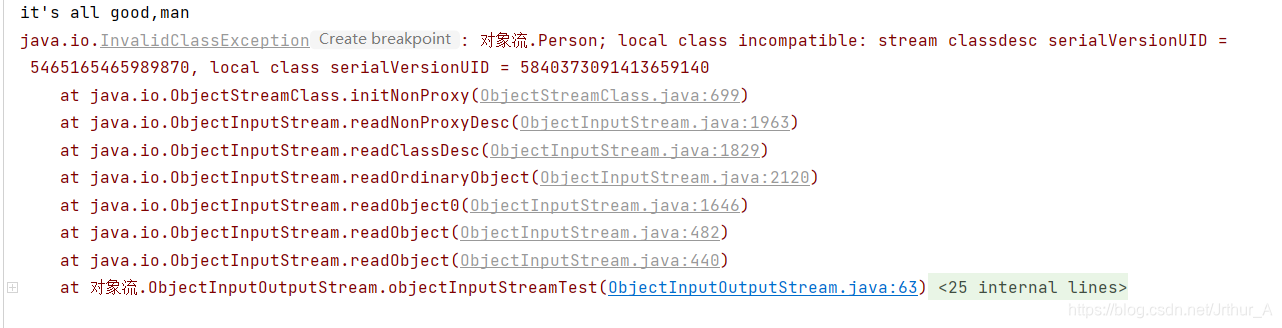
隐式声明serialVersionUID:文件中的Person对象无法被读取,异常信息表明:在不进行显式声明serialVersionUID的情况下,对类进行修改,虚拟机自动提供的序列号会改变,从而不能正确的从文件中读取存储的对象
六、随机读取文件流
RandomAccessFile
1. RandomAccessFile 的特点:
-
- RandomAccessFile声明在java.io包下,但直接继承于java.lang.Object
- 它实现了DataInput、DataOutput这两个接口,这就意味着这个类既可以作为一个输入流,又可以作为一个输出流
-
RandomArressFile类支持"随机访问"的方式,程序可以直接跳到文件的任意地方来读、写文件
- 支持只访问文件的部分内容
- 可以向已存在的文件后追加内容
-
如果RandomArressFile作为输出流时
- 写出到的文件如果不存在,则再执行过程中自动创建
- 如果写出到的文件存在,则会对原有文件内容进行覆盖(默认情况下从头覆盖)
-
RandomAccessFile对象包含一个记录指针,用以表示当前读写处的位置。
RandomAccessFile类对象可以自由移动记录指针:
      long getFilePointer():获取文件记录指针的当前位置
       void seek(long pos):将文件记录指针定位到pos位置
若要对文件进行插入:应该先将插入位置之后的所有内容从文件中复制出来,再进行内容插入,最后将复制出来的内容再放回文件中
2. RandomAccessFile类的实例
- 创建RandomAccessFile类实例需要指定一个mode参数,该参数指定RandomAccessFile的访问模式
//访问模式:
r: 以只读方式打开
rw:打开以便读取和写入
rwd:打开以便读取和写入;同步文件内容的过呢更新
rws:打开以便读取和写入;同步文件内容和元数据的更新
// 如果模式为只读r,则不会创建文件,而是会去读取一个已经存在的文件,如果读取的文件不存在则会出现异常。
// 如果模式为rw读写。如果文件不存在则会去创建文件,如果存在则不会创建。
3. Seek()方法
public void seek(long pos) throws IOException: 设置文件指针的偏移量,从该文件开始计算,在此位置发生下一个读或写操作。
- 形参pos: 从文件开始的偏移位置,以字节为单位,在该位置设置文件指针。pos的值不能为负数
4. 测试随机读取文件流RandomAccessFile
HelloFile.txt中的内容:
	Hello World!
RandomAccessFileTest.txt中的内容:
	i'm not in danger, i am the danger.
- 从一个文件中读取数据,并追加到另一个文件中
@Test
public void testAddtoWrite(){ // 追加内容测试:
   RandomAccessFile raf1 = null;
   RandomAccessFile raf2 = null;
   File file1 = new File("StreamFile\\HelloFile.txt");
   File file2 = new File("StreamFile\\RandomAccessFileTest.txt");
   try {
       raf1 = new RandomAccessFile(file1,"r"); // 只读
       raf2 = new RandomAccessFile(file2,"rw"); // 可读可写
       raf2.seek(file2.length()); // 移动指针到文件末尾方便追加内容
		// 从这里可以看出输入/输出单位为字节,相当于字节流
       byte[] buffer = new byte[1024];
       int len ;
       while( -1 != (len = raf1.read(buffer))){
           raf2.write(buffer,0,len);
       }
   } catch (IOException e) {
       e.printStackTrace();
   } finally {
       if( null  != raf1) {
           try {
               raf1.close();
           } catch (IOException e) {
               e.printStackTrace();
           }
       }
       if( null != raf2) {
           try {
               raf2.close();
           } catch (IOException e) {
               e.printStackTrace();
           }
       }
   }
}
结果:

- 使用seek方法移动指针,读取文件并输出结果
@Test
public void seekMethodTest(){
    RandomAccessFile raf = null;
    try {
        raf = new RandomAccessFile(new File("StreamFile\\RandomAccessFileSeekTest.txt"),"r");
        raf.seek(3); // 移动了3个字节的位置
        byte[] buffer = new byte[128];
        int len ;
        while(-1 != (len = raf.read(buffer))){
            System.out.println(new String(buffer,0,len));
        }
    } catch (IOException e) {
        e.printStackTrace();
    } finally {
        if( null != raf) {
            try {
                raf.close();
            } catch (IOException e) {
                e.printStackTrace();
            }
        }
    }
}
// 结果:
 not in danger, i am the danger.Hello World!
- 使用seek方法移动指针,在改位置写入数据
- 若要对文件进行插入:应该先将插入位置之后的所有内容从文件中复制出来,再进行内容插入,最后将复制出来的内容再放回文件中
@Test
public void insertTest(){
    RandomAccessFile raf = null;
    File file = new File("StreamFile\\RandomAccessFileTest.txt");
    try {
        raf = new RandomAccessFile(file,"rw");
        // 先移动到第3个字节的位置,将其后面所有的数据读取出来,暂时存储在StringBuilder对象中
        raf.seek(3);
        StringBuilder sb = new StringBuilder((int)file.length());
        byte[] bytes = new byte[20];
        int len ;
        while( -1 != (len = raf.read(bytes))){
            sb.append(new String(bytes,0,len));
        }
        // 在移动到第3个字节的位置,插入字符串 i am Saul goodman
        raf.seek(3);
        raf.write("i am Saul goodman".getBytes());
        raf.write(sb.toString().getBytes());
        // 从头读取文件中的数据,打印输出
        raf.seek(0);
        while( -1 != (len = raf.read(bytes))){
            System.out.print(new String(bytes,0,len));
        }
    } catch (IOException e) {
        e.printStackTrace();
    } finally {
        if( null != raf) {
            try {
                raf.close();
            } catch (IOException e) {
                e.printStackTrace();
            }
        }
    }
}
// 结果:
i'mi am Saul goodman not in danger, i am the danger.Hello World!





 扫一扫
扫一扫


 836
836

 被折叠的 条评论
为什么被折叠?
被折叠的 条评论
为什么被折叠?
 到【灌水乐园】发言





