


 本文介绍如何使用 DocArray,一个由 Jina AI 推出的数据结构库,来搭建一个简单的服装搜索系统。通过这个教程,你可以学习到如何处理非结构化数据,进行图片上传、预处理、嵌入、搜索匹配,并使用 Jina 的 Finetuner 工具进行模型调优。
文章导读
DocArray 是由 Jina AI 近期发布的、适用于嵌套及非结构化数据传输的库,本文将演示如何利用 DocArray,搭建一个简单的服装搜索引擎。
开工第一天,各位同学大家好哇!

节前我们发起了一个抽奖活动,送出了 5 份 Jina AI 周边大礼包,今天上午 10:00 已开奖,中奖的幸运粉丝记得及时填写个人信息领奖哦~
此外,我们也为大家精心准备了一学就会的 Demo 以及开箱即用的工具,新的一年,让我们借助这个无敌 buff,解决非结构化数据传输这个让人头疼的障碍吧~
DocArray:深度学习工程师必备 library
DocArray: The data structure for unstructured data.
DocArray 是一种可扩展数据结构,完美适配深度学习任务,主要用于嵌套及非结构化数据的传输,支持的数据类型包括文本、图像、音频、视频、3D mesh 等。
与其他数据结构相比:
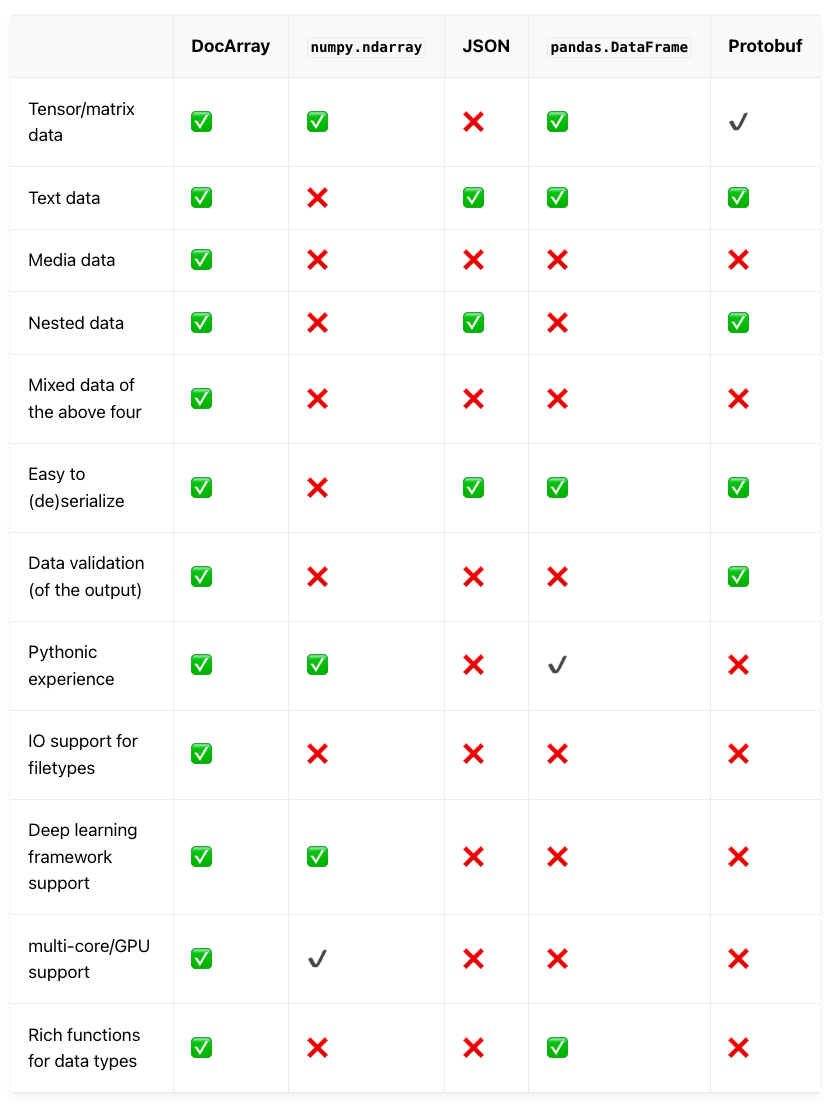
✅ 表示完全支持,✔ 表示部分支持,❌ 表示不支持
利用 DocArray,深度学习工程师可以借助 Pythonic API,有效地处理、嵌入、搜索、推荐、存储和传输数据。
在后续教程示例中,你将了解:
* 借助 DocArray,搭建一个简单的服装搜索系统;
* 上传服装图片,并在数据集中找到相似匹配
注:本教程所有代码都可以在 GitHub 下载,下载地址见:
https://github.com/alexcg1/neural-search-notebooks
手把手教你搭建一个服装搜索系统
准备工作:观看 DocArray 视频
5min 买不了吃亏买不了上当,反而会扫除知识障碍,为后续步骤做好准备。
野生字幕君在线翻译中,预计本周发布中文字幕视频
如果你有志加入 Jina AI 字幕组,欢迎后台留言
来了,就是一家人
from IPython.display import YouTubeVideo
YouTubeVideo("Amo19S1SrhE", width=800, height=450)
配置:设置基本变量,并依项目调整
DATA_DIR = "./data"
DATA_PATH = f"{DATA_DIR}/*.jpg"
MAX_DOCS = 1000
QUERY_IMAGE = "./query.jpg" # image we'll use to search with
PLOT_EMBEDDINGS = False # Really useful but have to manually stop it to progress to next cell


# Toy data - If data dir doesn't exist, we'll get data of ~800 fashion images from here
TOY_DATA_URL = "https://github.com/alexcg1/neural-search-notebooks/raw/main/fashion-search/data.zip?raw=true"
设置
# We use "[full]" because we want to deal with more complex data like images (as opposed to text)
!pip install "docarray[full]==0.4.4"
from docarray import Document, DocumentArray加载图片
# Download images if they don't exist
import os


if not os.path.isdir(DATA_DIR) and not os.path.islink(DATA_DIR):
    print(f"Can't find {DATA_DIR}. Downloading toy dataset")
    !wget "$TOY_DATA_URL" -O data.zip
    !unzip -q data.zip # Don't print out every darn filename
    !rm -f data.zip
else:
    print(f"Nothing to download. Using {DATA_DIR} for data")
# Use `.from_files` to quickly load them into a `DocumentArray`
docs = DocumentArray.from_files(DATA_PATH, size=MAX_DOCS)
print(f"{len(docs)} Documents in DocumentArray")docs.plot_image_sprites() # Preview the images图片预处理
from docarray import Document


# Convert to tensor, normalize so they're all similar enough
def preproc(d: Document):
    return (d.load_uri_to_image_tensor()  # load
             .set_image_tensor_shape((80, 60))  # ensure all images right size (dataset image size _should_ be (80, 60))
             .set_image_tensor_normalization()  # normalize color
             .set_image_tensor_channel_axis(-1, 0))  # switch color axis for the PyTorch model later
# apply en masse
docs.apply(preproc)图片嵌入
!pip install torchvision==0.11.2# Use GPU if available
import torch
if torch.cuda.is_available():
device = "cuda"
else:
device = "cpu"import torchvision
model = torchvision.models.resnet50(pretrained=True) # load ResNet50docs.embed(model, device=device)可视化嵌入向量
if PLOT_EMBEDDINGS:
    docs.plot_embeddings(image_sprites=True, image_source="uri")
创建 query Document
此处使用的是数据集中的第一张图片
# Download query doc
!wget https://github.com/alexcg1/neural-search-notebooks/raw/main/fashion-search/1_build_basic_search/query.jpg -O query.jpg


query_doc = Document(uri=QUERY_IMAGE)
query_doc.display()
# Throw the one Document into a DocumentArray, since that's what we're matching against
query_docs = DocumentArray([query_doc])# Apply same preprocessing
query_docs.apply(preproc)# ...and create embedding just like we did with the dataset
query_docs.embed(model, device=device) # If running on non-gpu machine, change "cuda" to "cpu"匹配
query_docs.match(docs, limit=9)查看结果
模型会依据输入图片进行匹配,此处的匹配甚至会涉及到对模特的匹配。
我们只希望模型针对服装进行匹配,因此这里使用 Jina AI 的结果调优工具 Finetuner 进行调优。
详见:
https://finetuner.jina.ai/
(DocumentArray(query_doc.matches, copy=True)
    .apply(lambda d: d.set_image_tensor_channel_axis(0, -1)
                      .set_image_tensor_inv_normalization())).plot_image_sprites()
if PLOT_EMBEDDINGS:
query_doc.matches.plot_embeddings(image_sprites=True, image_source="uri")进阶教程预告
1、微调模型
后续 notebook 中,我们将展示如何借助 Jina Finetuner 提高模型的性能。
详见:https://finetuner.jina.ai/
2、创建应用
后续教程中,我们将演示如何利用 Jina 的神经搜索框架和 Jina Hub Executors,打造和扩展搜索引擎。
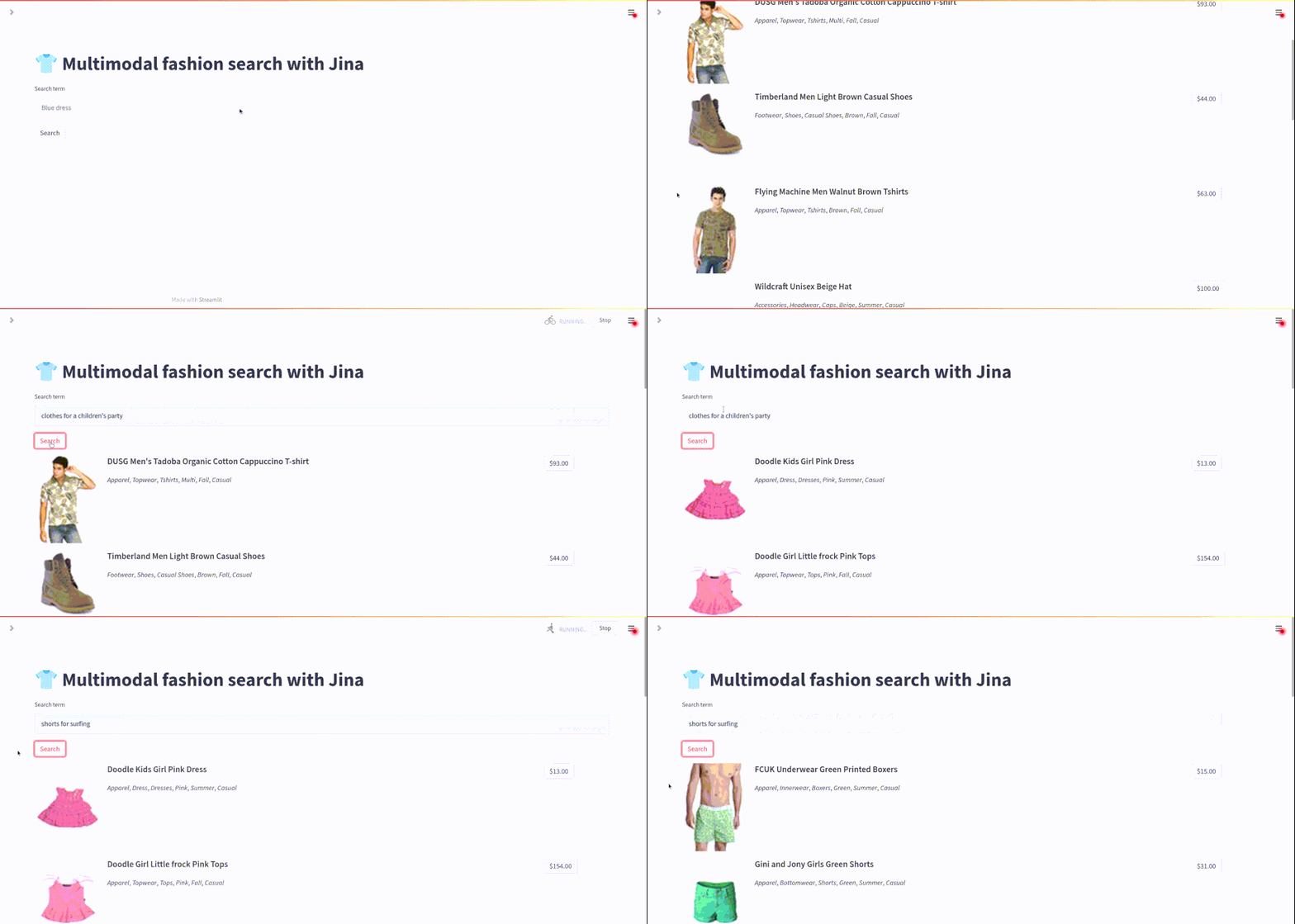
查看高清动图,请访问:https://reurl.cc/RjLy5z
本文相关链接:
Jina Hub:https://hub.jina.ai/
Jina GitHub:https://github.com/jina-ai/jina/
Finetuner:https://finetuner.jina.ai/
加入 Slack:https://slack.jina.ai/
在 Colab 中查看以上全部代码:
https://reurl.cc/RjLy5z

下一代开源神经搜索引擎
在 GitHub 找到我们
更多精彩内容(点击图片阅读)







 扫一扫
扫一扫


 1113
1113

 被折叠的 条评论
为什么被折叠?
被折叠的 条评论
为什么被折叠?
 到【灌水乐园】发言





