


话不多说上代码
index.jsp
<%@ page language="java" import="java.util.*" pageEncoding="UTF-8"%>
<!DOCTYPE html PUBLIC "-//W3C//DTD XHTML 1.0 Transitional//EN" "http://www.w3.org/TR/xhtml1/DTD/xhtml1-transitional.dtd">
<html xmlns="http://www.w3.org/1999/xhtml">
<head>
<%@ include file="/common/core/taglib_omcs.jsp"%>
<script src="${ctx }/common/plugin/echart/echarts.min.js"></script>
<script src="new.js"></script>
<html>
	<head>
	<meta charset="UTF-8">
	<script type="text/javascript">
		$(document).ready(function() {
			initCharts();
		});
	</script>
 </head>
	<body style="background-color:#f7f8fa;">
			<div style="width: 100%; height: 150px;">
				<div style="width: 30%; height: 100%; float: left;">
					<div id="chartA" class="" style="width: 100%; height: 100%"></div>
				</div>
				<div style="width: 25%; height: 100%; float: left;">
					<div id="chartB" class="" style="width: 100%; height: 100%"></div>
				</div>
				<div style="width: 20%; height: 100%; float: left;">
					<div id="chartC" class="" style="width: 100%; height: 100%"></div>
				</div>
				<div style="width: 25%; height: 100%; float: left;">
					<div id="chartD" class="" style="width: 100%; height: 100%"></div>
				</div>
			</div>
			<div style="width: 100%; height: 250px;">
				<div style="width: 33%; height: 100%; float: left;">
					<div id="chartE" class="" style="width: 100%; height: 50%"></div>
					<div id="chartF" class="" style="width: 100%; height: 50%"></div>
				</div>
				<div style="width: 33%; height: 100%; float: left;">
					<div id="chartMap" style="width: 100%; height: 100%"></div>
				</div>
				<div style="width: 33%; height: 100%; float: left;">
					<div id="chartH" class="" style="width: 100%; height: 50%"></div>
					<div id="chartI" class="" style="width: 100%; height: 50%"></div>
				</div>
			</div>
			<div style="width: 100%; height: 150px;">
				<div style="width: 25%; height: 100%; float: left;">
					<div id="chartJ" class="" style="width: 100%; height: 100%"></div>
				</div>
				<div style="width: 25%; height: 100%; float: left;">
					<div id="chartK" class="" style="width: 100%; height: 100%"></div>
				</div>
				<div style="width: 25%; height: 100%; float: left;">
					<div id="chartL" class="" style="width: 100%; height: 100%"></div>
				</div>
				<div style="width: 25%; height: 100%; float: left;">
					<div id="chartM" class="" style="width: 100%; height: 100%"></div>
				</div>
			</div>
	</body>
</html>
new.js
function initWTSYQK(){
var myChartA = echarts.init(document.getElementById('chartA'));
myChartA.clear();
getWTSUQK(myChartA);
}
function initFLZBQK(){
var myChartA = echarts.init(document.getElementById('chartB'));
myChartA.clear();
getFLZBQK(myChartA);
}
function initSYWTLQK(){
var myChartA = echarts.init(document.getElementById('chartC'));
myChartA.clear();
getSYWTLQK(myChartA);
}
function initWTSYHTK(){
var myChartA = echarts.init(document.getElementById('chartD'));
myChartA.clear();
getWTSYHTK(myChartA);
}
function initGSSYWTLQK(){
var myChartA = echarts.init(document.getElementById('chartE'));
myChartA.clear();
getGSSYWTLQK(myChartA);
}
function initGSSYJJLQK(){
var myChartA = echarts.init(document.getElementById('chartF'));
myChartA.clear();
getGSSYJJLQK(myChartA);
}
function initWJJSYWTQK(){
var myChartA = echarts.init(document.getElementById('chartH'));
myChartA.clear();
getWJJSYWTQK(myChartA);
}
function initSYHTKWTLQK(){
var myChartA = echarts.init(document.getElementById('chartI'));
myChartA.clear();
getSYHTKWTLQK(myChartA);
}
function initWTSUXFQQK(){
var myChartA = echarts.init(document.getElementById('chartJ'));
myChartA.clear();
getWTSUXFQQK(myChartA);
}
function initWTSUXFQZB(){
var myChartA = echarts.init(document.getElementById('chartK'));
myChartA.clear();
getWTSUXFQZB(myChartA);
}
function initGSSYWTLXFQQK(){
var myChartA = echarts.init(document.getElementById('chartL'));
myChartA.clear();
getGSSYWTLXFQQK(myChartA);
}
function initWTSUHTKXFQQK(){
var myChartA = echarts.init(document.getElementById('chartM'));
myChartA.clear();
getWTSUHTKXFQQK(myChartA);
}
function initMap(){
var myChartA = echarts.init(document.getElementById('chartMap'));
myChartA.clear();
getMap(myChartA);
}
function initCharts() {
initWTSYQK();
initFLZBQK();
initSYWTLQK();
initWTSYHTK();
initGSSYWTLQK();
initGSSYJJLQK();
initWJJSYWTQK();
initSYHTKWTLQK();
initWTSUXFQQK();
initWTSUXFQZB();
initGSSYWTLXFQQK();
initWTSUHTKXFQQK();
initMap();
}
function getWTSUQK(myChart){
var option;
option = {
title:{
text:'2021年1-x月问题溯源情况',
left:'center',
textStyle: {
fontSize: 12
},
top: 10,
},
color: ['#4f81bd', '#f79646', '#a5a5a5', '#bbbbbb'],
tooltip: {},
grid: {
top: 40,
bottom: 30,
},
legend: {
bottom: 0,
itemWidth: 16,
itemHeight: 4,
itemGap: 6,
textStyle: {
fontSize: 8
},
data:['问题量','已解决','未解决','解决率']
},
xAxis: {
data: ["市场类","移动网络质量","家宽网络质量","投标处理质量"],
axisLabel: {
margin: 2,
fontSize: 8
},
axisTick: {
show: false
}
},
yAxis: [
{
show:false
},
{
type: 'value',
name: '解决率',
min: 0,
max: 100,
interval: 10,
show:false
}
],
series: [{
barGap: 0,
name: '问题量',
type: 'bar',
data: [188, 429, 530, 4],
itemStyle: {
normal: {
label: {
show: true, //开启显示
position: 'top', //在上方显示
textStyle: { //数值样式
color: 'black',
fontSize: 8
}
}
}
},
},{
name: '已解决',
type: 'bar',
data: [114, 336, 441, 1],
itemStyle: {
normal: {
label: {
show: true, //开启显示
position: 'top', //在上方显示
textStyle: { //数值样式
color: 'black',
fontSize: 8
}
}
}
},
},{
name: '未解决',
type: 'bar',
data: [7, 20, 30, 20],
itemStyle: {
normal: {
label: {
show: true, //开启显示
position: 'top', //在上方显示
textStyle: { //数值样式
color: 'black',
fontSize: 8
}
}
}
},
},
{
name: '解决率',
type: 'line',
yAxisIndex: 1,
data: [60.6, 78.3, 83.2, 25],
itemStyle: {
normal: {
label: {
show: true,
position: 'top',
formatter: '{c}%',
fontSize: 8
}
}
},
}]
};
myChart.setOption(option);
}
function getFLZBQK(myChart){
var option;
option = {
title:{
text:'2021年1-x月溯源问题分类占比情况',
left:'center',
textStyle: {
fontSize: 12
},
top: 10,
},
color: [ '#ffdc73', '#deebf7', '#5b9bd5','#bfbfbf'],
tooltip: {
trigger: 'item'
},
series: [
{
name: '访问来源',
center: ['50%','60%'],
type: 'pie',
radius: '70%',
itemStyle: {
normal: {
label: {
formatter:'{b} : ({d}%)',
textStyle: {
fontSize: 8
}
}
}
},
data: [
{value: 1048, name: '投诉处理质量'},
{value: 735, name: '市场类'},
{value: 580, name: '移动网络质量'},
{value: 884, name: '家宽网络质量'},
],
emphasis: {
itemStyle: {
shadowBlur: 10,
shadowOffsetX: 0,
shadowColor: 'rgba(0, 0, 0, 0.5)'
}
}
},
]
};
myChart.setOption(option);
}
function getSYWTLQK(myChart){
var option;
option = {
title:{
text:'超过3个月未解决溯源问题量情况',
left:'center',
textStyle: {
fontSize: 12
},
top: 10,
},
grid: {
top: 40,
bottom: 30,
},
tooltip: {},
xAxis: {
type: 'category',
data: ['市场类', '移动网络质量'],
axisLabel: {
margin: 2,
fontSize: 8
},
axisTick: {
show: false
}
},
yAxis: {
show:false
},
series: [{
data: [{
value: 66,
itemStyle: {
color: '#deebf7'
}
},{
value: 15,
itemStyle: {
color: '#5b9bd5'
}
}],
type: 'bar',
barWidth: "40%",
itemStyle: {
normal: {
label: {
show: true, //开启显示
position: 'top', //在上方显示
formatter:'{b}:{c}',
textStyle: { //数值样式
color: 'black',
fontSize: 8
}
}
}
}
}]
};
myChart.setOption(option);
}
function getWTSYHTK(myChart){
var option;
option = {
title:{
text:'2021年1-x问题溯源回头看',
left:'center',
textStyle: {
fontSize: 12
},
top: 10,
},
grid: {
top: 40,
bottom: 30,
},
color: [ '#4f81bd', '#f79646'],
tooltip: {},
legend: {
data:['发起量','解决量'],
bottom: 0,
itemWidth: 16,
itemHeight: 4,
itemGap: 6,
textStyle: {
fontSize: 8
},
},
xAxis: {
data: ["市场类","移动网络质量","家宽网络质量"],
axisLabel: {
margin: 2,
fontSize: 8
},
axisTick: {
show: false
}
},
yAxis: {
show:false
},
series: [
{
barGap: 0,
name: '发起量',
type: 'bar',
data: [5, 20, 36],
itemStyle: {
normal: {
label: {
show: true, //开启显示
position: 'top', //在上方显示
textStyle: { //数值样式
color: 'black',
fontSize: 8
}
}
}
},
},{
barGap: 0,
name: '解决量',
type: 'bar',
data: [6, 24, 18],
itemStyle: {
normal: {
label: {
show: true, //开启显示
position: 'top', //在上方显示
textStyle: { //数值样式
color: 'black',
fontSize: 8
}
}
}
},
}]
};
myChart.setOption(option);
}
function getGSSYWTLQK(myChart){
var option;
option = {
title:{
text:'2021年1-x月各市级溯源问题量情况',
left:'center',
textStyle: {
fontSize: 12
},
top: 10,
},
grid: {
top: 40,
bottom: 30,
},
color: [ '#5b9bd5', '#7bb355'],
tooltip: {},
legend: {
bottom: 0,
itemWidth: 16,
itemHeight: 4,
itemGap: 6,
textStyle: {
fontSize: 8
},
data:['2021年1-5月溯源问题量','占比']
},
xAxis: {
data: ["沈阳","大连","鞍山","辽阳","丹东","营口","本溪","广州"],
axisLabel: {
margin: 2,
fontSize: 8
},
axisTick: {
show: false
}
},
yAxis: [
{
show:false
},
{
type: 'value',
name: '占比',
min: 0,
max: 100,
interval: 10,
show:false
}
],
series: [{
name: '2021年1-5月溯源问题量',
type: 'bar',
data: [5, 20, 36, 10, 30, 50, 20, 10],
itemStyle: {
normal: {
label: {
show: true, //开启显示
position: 'top', //在上方显示
textStyle: { //数值样式
color: 'black',
fontSize: 8
}
}
}
},
},
{
name: '占比',
type: 'line',
data: [40, 28, 27, 23, 27, 25, 20, 15],
itemStyle: {
normal: {
label: {
show: true,
position: 'top',
formatter: '{c}%',
fontSize: 8
}
}
},
}]
};
myChart.setOption(option);
}
function getGSSYJJLQK(myChart){
var option;
option = {
title:{
text:'2021年1-x月各市级溯源解决率情况',
left:'center',
textStyle: {
fontSize: 12
},
top: 10,
},
grid: {
top: 40,
bottom: 30,
},
color: [ '#5b9bd5'],
tooltip: {},
xAxis: {
data: ["沈阳","大连","鞍山","辽阳","丹东","营口","本溪","广州"],
axisLabel: {
margin: 2,
fontSize: 8
},
axisTick: {
show: false
}
},
yAxis: {
show:false
},
series: [
{
name: '占比',
type: 'line',
data: [80, 70, 66, 72, 70, 75, 66, 82],
itemStyle: {
normal: {
label: {
show: true,
position: 'top',
formatter: '{c}%',
fontSize: 8
}
}
},
}]
};
myChart.setOption(option);
}
function getWJJSYWTQK(myChart){
var option;
option = {
title:{
text:'各单位超3个月未解决溯源问题情况',
left:'center',
textStyle: {
fontSize: 12
},
top: 10,
},
grid: {
top: 40,
bottom: 30,
},
color: [ '#a6a6a6', '#deebf7', '#5b9bd5','#ffc000'],
legend: {
bottom: 0,
itemWidth: 16,
itemHeight: 4,
itemGap: 6,
textStyle: {
fontSize: 8
},
data:['超6个月','超5个月']
},
tooltip: {
trigger: 'axis',
axisPointer: {
type: 'shadow'
}
},
xAxis: [
{
type: 'category',
data: ["沈阳","大连","鞍山","辽阳","丹东","营口","本溪","广州"],
axisLabel: {
margin: 2,
fontSize: 8
},
axisTick: {
show: false
}
}
],
yAxis: [
{
show:false
}
],
series: [
{
name: '超6个月',
type: 'bar',
stack: '广告',
emphasis: {
focus: 'series'
},
data: [6, 3, 2, 4, 6, 1, 5, 3]
},
{
name: '超5个月',
type: 'bar',
stack: '广告',
emphasis: {
focus: 'series'
},
data: [7, 7, 8, 2, 1, 4, 4, 5]
},
{
name: '3',
type: 'bar',
stack: '广告',
emphasis: {
focus: 'series'
},
data: [5, 5, 4, 8, 2, 6, 7, 3]
},
{
name: '4',
type: 'bar',
stack: '广告',
emphasis: {
focus: 'series'
},
data: [3, 6, 4, 8, 2, 5, 6, 8]
}
]
};
myChart.setOption(option);
}
function getSYHTKWTLQK(myChart){
var option;
option = {
title:{
text:'2021年1-5月各市溯源回头看问题量情况',
left:'center',
textStyle: {
fontSize: 12
},
top: 10,
},
grid: {
top: 40,
bottom: 30,
},
color: [ '#5b9bd5', '#7bb355'],
tooltip: {},
legend: {
bottom: 0,
itemWidth: 16,
itemHeight: 4,
itemGap: 6,
textStyle: {
fontSize: 8
},
data:['2021年1-5月溯源回头看问题量','占比']
},
xAxis: {
data: ["沈阳","大连","鞍山","辽阳","丹东","营口","本溪","广州"],
axisLabel: {
margin: 2,
fontSize: 8
},
axisTick: {
show: false
}
},
yAxis: [
{
show:false
},
{
type: 'value',
name: '占比',
min: 0,
max: 100,
interval: 10,
show:false
}
],
series: [{
name: '2021年1-5月溯源回头看问题量',
type: 'bar',
data: [5, 20, 36, 10, 30, 50, 20, 10],
itemStyle: {
normal: {
label: {
show: true, //开启显示
position: 'top', //在上方显示
textStyle: { //数值样式
color: 'black',
fontSize: 8
}
}
}
},
},
{
name: '占比',
type: 'line',
data: [40, 28, 27, 23, 27, 25, 20, 15],
itemStyle: {
normal: {
label: {
show: true,
position: 'top',
formatter: '{c}%',
fontSize: 8
}
}
},
}]
};
myChart.setOption(option);
}
function getWTSUXFQQK(myChart){
var option;
option = {
title:{
text:'2021年x+1月问题溯源新发起情况',
left:'center',
textStyle: {
fontSize: 12
},
top: 10,
},
grid: {
top: 40,
bottom: 30,
},
color: [ '#4f81bd'],
tooltip: {},
xAxis: {
type: 'category',
data: ['市场类', '移动网络质量','家宽网络质量'],
axisLabel: {
margin: 2,
fontSize: 8
},
axisTick: {
show: false
}
},
yAxis: {
show:false
},
series: [{
data: [3, 39, 144],
barWidth: "40%",
type: 'bar',
itemStyle: {
normal: {
label: {
show: true, //开启显示
position: 'top', //在上方显示
textStyle: { //数值样式
color: 'black',
fontSize: 8
}
}
}
},
}]
};
myChart.setOption(option);
}
function getWTSUXFQZB(myChart){
var option;
option = {
title:{
text:'2021年x+1月问题溯源新发起占比',
left:'center',
textStyle: {
fontSize: 12
},
top: 10,
},
grid: {
top: 40,
bottom: 30,
},
color: [ '#ffdc73', '#deebf7', '#5b9bd5','#bfbfbf'],
tooltip: {
trigger: 'item'
},
series: [
{
name: '访问来源',
center: ['50%','60%'],
type: 'pie',
radius: '70%',
itemStyle: {
normal: {
label: {
formatter:'{b} : ({d}%)',
textStyle: {
fontSize: 8
}
}
}
},
data: [
{value: 220, name: '市场类'},
{value: 310, name: '移动网络质量'},
{value: 10, name: '投诉处理质量'},
{value: 460, name: '家宽网络质量'},
],
emphasis: {
itemStyle: {
shadowBlur: 10,
shadowOffsetX: 0,
shadowColor: 'rgba(0, 0, 0, 0.5)'
}
}
},
]
};
myChart.setOption(option);
}
function getGSSYWTLXFQQK(myChart){
var option;
option = {
title:{
text:'2021年x+1月各市溯源问题量新发起情况',
left:'center',
textStyle: {
fontSize: 12
},
top: 10,
},
grid: {
top: 40,
bottom: 30,
},
color: [ '#5b9bd5', '#7bb355'],
tooltip: {},
xAxis: {
data: ["沈阳","大连","鞍山","辽阳","丹东","营口","本溪","广州"],
axisLabel: {
margin: 2,
fontSize: 8
},
axisTick: {
show: false
}
},
yAxis: [
{
show:false
},
{
type: 'value',
name: '占比',
min: 0,
max: 100,
interval: 10,
show:false
}
],
series: [{
name: '2021年1-5月溯源回头看问题量',
type: 'bar',
data: [5, 20, 36, 10, 30, 50, 20, 10],
itemStyle: {
normal: {
label: {
show: true, //开启显示
position: 'top', //在上方显示
textStyle: { //数值样式
color: 'black',
fontSize: 8
}
}
}
},
},
{
name: '占比',
type: 'line',
data: [40, 28, 27, 23, 27, 25, 20, 15],
itemStyle: {
normal: {
label: {
show: true,
position: 'top',
formatter: '{c}%',
fontSize: 8
}
}
},
}]
};
myChart.setOption(option);
}
function getWTSUHTKXFQQK(myChart){
var option;
option = {
title:{
text:'2021年x+1月问题溯源回头看新发起占比',
left:'center',
textStyle: {
fontSize: 12
},
top: 10,
},
grid: {
top: 40,
bottom: 30,
},
color: [ '#4f81bd'],
tooltip: {},
xAxis: {
type: 'category',
data: ['市场类', '移动网络质量','家宽网络质量'],
axisLabel: {
margin: 2,
fontSize: 8
},
axisTick: {
show: false
}
},
yAxis: {
show:false
},
series: [{
data: [3, 39, 144],
barWidth: "40%",
type: 'bar',
itemStyle: {
normal: {
label: {
show: true, //开启显示
position: 'top', //在上方显示
textStyle: { //数值样式
color: 'black',
fontSize: 8
}
}
}
},
}]
};
myChart.setOption(option);
}
function getMap(myChart){
var geoJson = 自己找对应的Json,下面有例子+网址
echarts.registerMap('辽宁省', geoJson);
option = {
series: [{
label: {
normal: {
show: true,
},
emphasis: {
show: true
}
},
itemStyle: {
color: '#ddb926'
},
type: 'map',
map: '辽宁省',
emphasis: {
label: {
show: true
}
},
top:0,
bottom:0,
left:0,
right:0,
data: [{
name: '沈阳市',
value: 4822023,
},
{
name: '大连市',
value: 731449
},
{
name: '鞍山市',
value: 6553255
},
{
name: '抚顺市',
value: 949131
},
{
name: '本溪市',
value: 8041430
},
{
name: '丹东市',
value: 5187582
},
{
name: '锦州市',
value: 3590347
},
{
name: '营口市',
value: 917092
},
{
name: '阜新市',
value: 632323
},
{
name: '辽阳市',
value: 9317568
},
{
name: '盘锦市',
value: 9919945
},
{
name: '铁岭市',
value: 1392313
},
{
name: '朝阳市',
value: 1595728
},
{
name: '葫芦岛市',
value: 12875255
}
]
}],
};
myChart.setOption(option);
}事件
myChart.on('click', function (params) {
    alert(params.name);
});
效果图
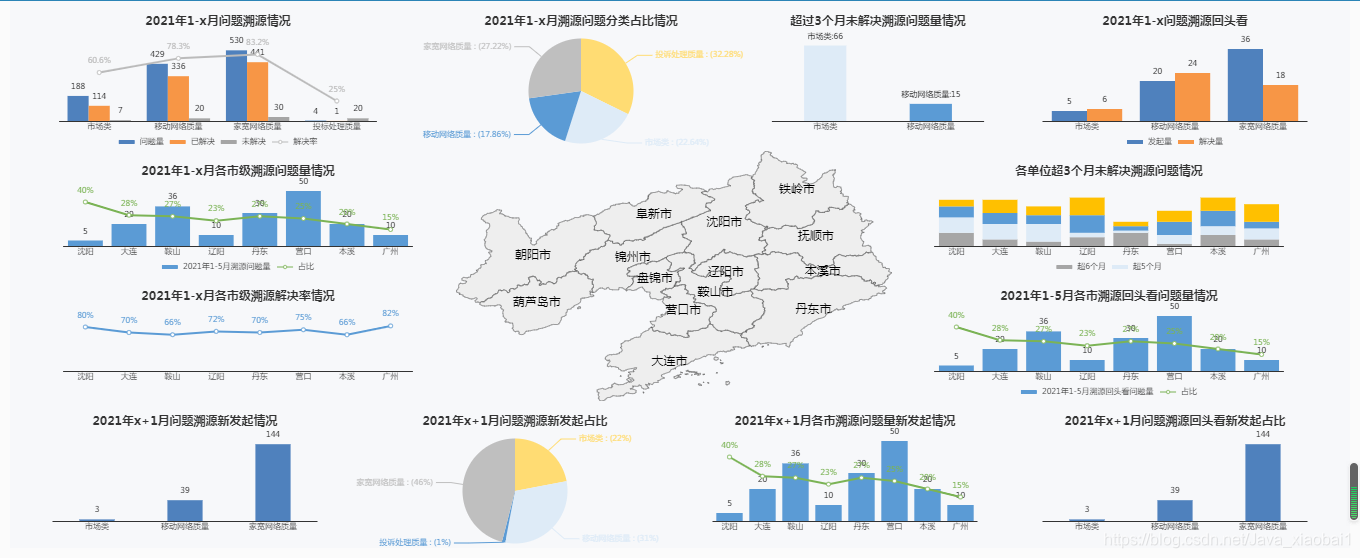
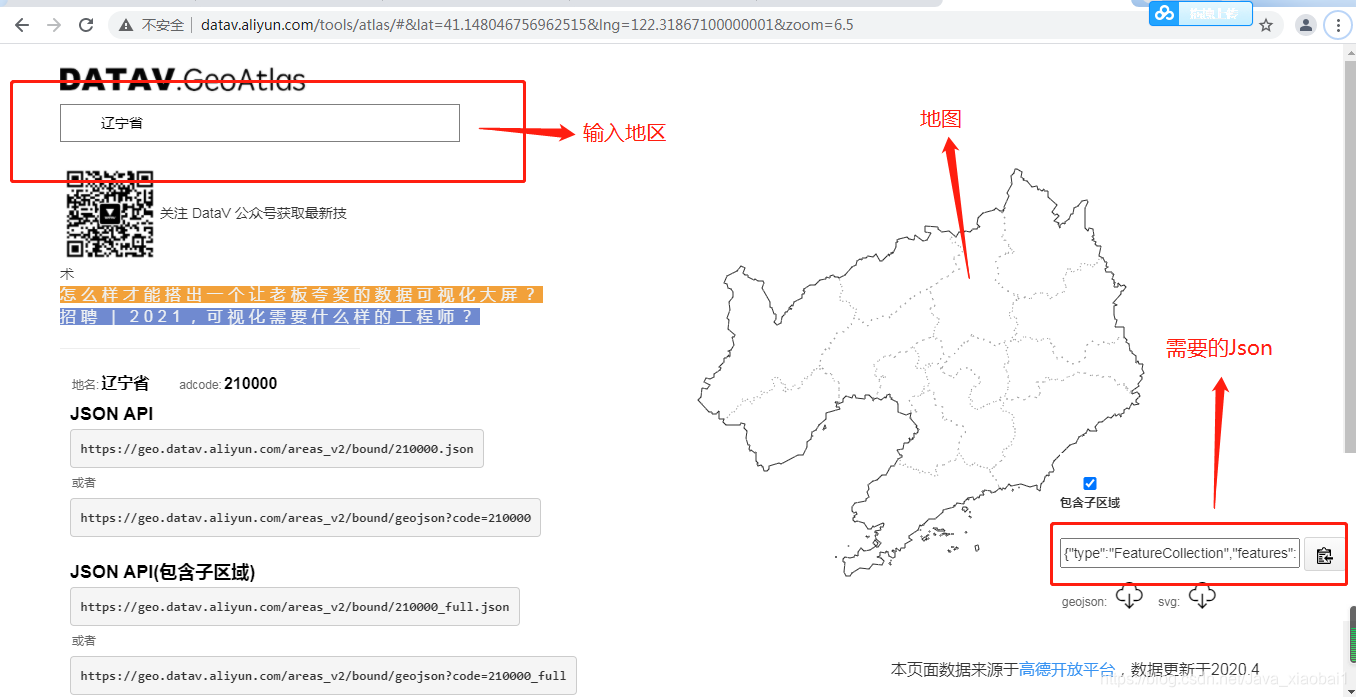
注:地图那块的Json自己下载
geoJson
网址:http://datav.aliyun.com/tools/atlas/#&lat=33.521903996156105&lng=104.29849999999999&zoom=4

 3174


 扫一扫


 被折叠的 条评论
为什么被折叠?
 到【灌水乐园】发言


