什么是多产物构建

在鸿蒙应用开发中,一个应用可定义多个 product,每一个 product 对应一个定制的 APP 包,每个 product 中支持对 bundleName、bundleType、输出产物名称、icon 和 label 以及包含的 target 资源文件等内容进行定制。与此同时,也可以将环境配置和签名信息通过 product 进行隔离,通过选项切换环境进行构建,避免频繁的手动修改关键参数而造成打包遗漏的情况。
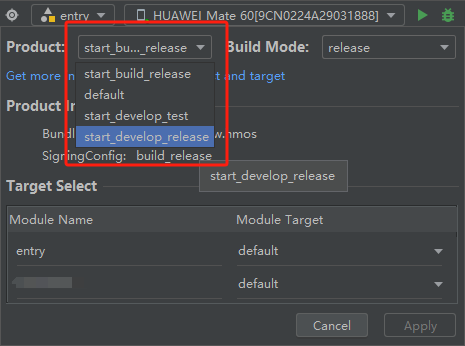
【HarmonyOS NEXT】多目标产物构建实践_环境控制

如何定义多个构建产物

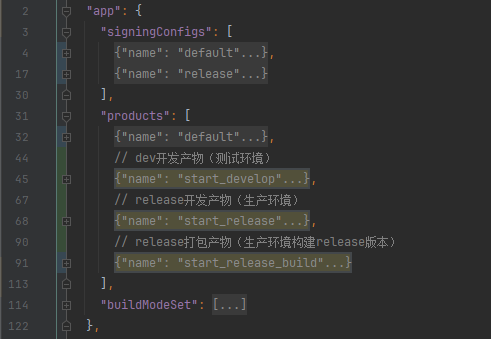
在项目最外层的 build-profile.json5 文件中的 products 字段中新增 product,字段解释可参考文章: 工程级build-profile.json5文件

这里我们针对环境控制做演示,需要用到 buildOption arkOptions buildProfileFields 字段,该字段中的参数设置后,切换产物后会重新生成一份 BuildProfile.ets 文件,该文件可被项目导入并使用。

需要注意的是:在定制 product 时,必须存在 "default" 的 product,否则编译时会出现错误。
【HarmonyOS NEXT】多目标产物构建实践_字段_02

示例 JSON:

{ 
  "app": { 
    "signingConfigs": [
      {
        "name": "default",    // debug类型签名配置
        "type": "HarmonyOS",
        "material": {
          "storePassword": "xxxxxxxxxx",
          "certpath": "C:/Users/pc/xxxxxxxxxx.cer",
          "keyAlias": "xxxxxxxxxx",
          "keyPassword": "xxxxxxxxxx",
          "profile": "C:/Users/pc/xxxxxxxxxx.p7b",
          "signAlg": "SHA256withECDSA",
          "storeFile": "C:/Users/pc/xxxxxxxxxx.p12"
        }
      },
      {
        "name": "release",    // release类型签名配置
        "type": "HarmonyOS",
        "material": {
          "storePassword": "xxxxxxxxxx",
          "certpath": "C:/Users/pc/xxxxxxxxxx.cer",
          "keyAlias": "xxxxxxxxxx",
          "keyPassword": "xxxxxxxxxx",
          "profile": "C:/Users/pc/xxxxxxxxxx.p7b",
          "signAlg": "SHA256withECDSA",
          "storeFile": "C:/Users/pc/xxxxxxxxxx.p12"
        }
      }
    ], 
    "products": [ 
      {
        "name": "default",
        "signingConfig": "default",
        "compatibleSdkVersion": "5.0.1(13)",
        "runtimeOS": "HarmonyOS",
        "buildOption": {
          "strictMode": {
            "caseSensitiveCheck": true,
            "useNormalizedOHMUrl": true
          },
          "arkOptions": {
            "buildProfileFields": {
              // 接口base
              "baseApiUrl": "https://default.test.cn"
            }
          }
        }
      }, 
      // dev开发产物(测试环境)
      { 
        "name": "start_develop", // 产物名称
        "compatibleSdkVersion": "5.0.2(14)", 
        "runtimeOS": "HarmonyOS", 
        "signingConfig": "default",
        "compatibleSdkVersion": "5.0.1(13)",
        "runtimeOS": "HarmonyOS",
        "buildOption": {
          "strictMode": {
            "caseSensitiveCheck": true,
            "useNormalizedOHMUrl": true
          },
          "arkOptions": {
            "buildProfileFields": { // 构建配置自定义参数
              // 接口base
              "baseApiUrl": "https://debug.develop.cn"
            }
          }
        }
      }, 
      // release开发产物(生产环境)
      { 
        "name": "start_release", // 产物名称 
        "compatibleSdkVersion": "5.0.2(14)", 
        "runtimeOS": "HarmonyOS", 
        "signingConfig": "default",
        "compatibleSdkVersion": "5.0.1(13)",
        "runtimeOS": "HarmonyOS",
        "buildOption": {
          "strictMode": {
            "caseSensitiveCheck": true,
            "useNormalizedOHMUrl": true
          },
          "arkOptions": {
            "buildProfileFields": { // 构建配置自定义参数
              // 接口base
              "baseApiUrl": "https://release.produce.cn"
            }
          }
        }
      }, 
      // release打包产物(生产环境构建release版本)
      { 
        "name": "start_release_build", // 产物名称 
        "compatibleSdkVersion": "5.0.2(14)", 
        "runtimeOS": "HarmonyOS", 
        "signingConfig": "release",
        "compatibleSdkVersion": "5.0.1(13)",
        "runtimeOS": "HarmonyOS",
        "output": { 
          "artifactName": "customizedProductOutputNameB" // 自定义打包后的app产物名称
        }, 
        "buildOption": {
          "strictMode": {
            "caseSensitiveCheck": true,
            "useNormalizedOHMUrl": true
          },
          "arkOptions": {
            "buildProfileFields": { // 构建配置自定义参数
              // 接口base
              "baseApiUrl": "https://release.produce.cn"
            }
          }
        }
      } 
    ], 
    "buildModeSet": [ 
      { 
        "name": "debug", 
      }, 
      { 
        "name": "release" 
      } 
    ] 
  }, 
}
  • 1.
  • 2.
  • 3.
  • 4.
  • 5.
  • 6.
  • 7.
  • 8.
  • 9.
  • 10.
  • 11.
  • 12.
  • 13.
  • 14.
  • 15.
  • 16.
  • 17.
  • 18.
  • 19.
  • 20.
  • 21.
  • 22.
  • 23.
  • 24.
  • 25.
  • 26.
  • 27.
  • 28.
  • 29.
  • 30.
  • 31.
  • 32.
  • 33.
  • 34.
  • 35.
  • 36.
  • 37.
  • 38.
  • 39.
  • 40.
  • 41.
  • 42.
  • 43.
  • 44.
  • 45.
  • 46.
  • 47.
  • 48.
  • 49.
  • 50.
  • 51.
  • 52.
  • 53.
  • 54.
  • 55.
  • 56.
  • 57.
  • 58.
  • 59.
  • 60.
  • 61.
  • 62.
  • 63.
  • 64.
  • 65.
  • 66.
  • 67.
  • 68.
  • 69.
  • 70.
  • 71.
  • 72.
  • 73.
  • 74.
  • 75.
  • 76.
  • 77.
  • 78.
  • 79.
  • 80.
  • 81.
  • 82.
  • 83.
  • 84.
  • 85.
  • 86.
  • 87.
  • 88.
  • 89.
  • 90.
  • 91.
  • 92.
  • 93.
  • 94.
  • 95.
  • 96.
  • 97.
  • 98.
  • 99.
  • 100.
  • 101.
  • 102.
  • 103.
  • 104.
  • 105.
  • 106.
  • 107.
  • 108.
  • 109.
  • 110.
  • 111.
  • 112.
  • 113.
  • 114.
  • 115.
  • 116.
  • 117.
  • 118.
  • 119.
  • 120.
  • 121.
  • 122.
  • 123.
  • 124.
  • 125.
  • 126.

上方 JSON 中配置了 3 个产物与 2 个签名,3 个产物分别为 develop 开发环境产物, release 生产环境产物,release 生产环境构建产物。其中生产构建产物绑定了 "release" 签名,这样做的好处是,当我们切换环境选项时,签名相关配置也将一同被改变,无需手动更换签名。

如何在项目中使用产物

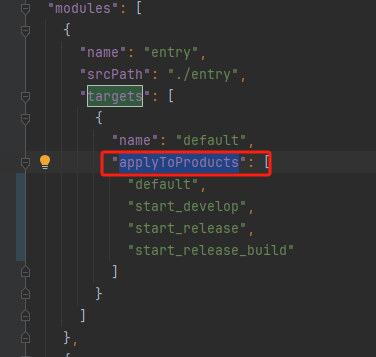
1. 在第一步配置完 product 后,还需在 modules 中的 applyToProducts 字段添加刚才配置的 product 产物,项目中创建的其他 hsp 也需一同配置,不然编译报错。
【HarmonyOS NEXT】多目标产物构建实践_生产环境_03

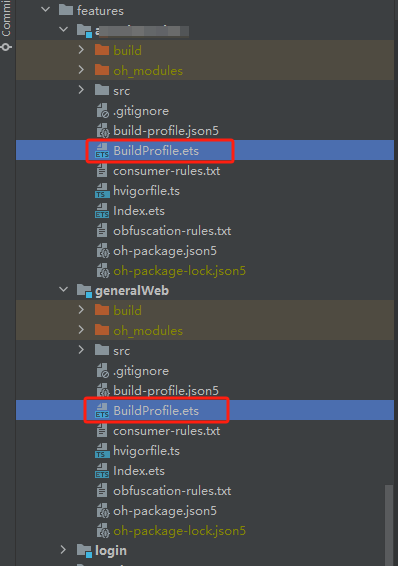
2. 配置完 products 与 modules 后,重新运行项目后,每个模块下均会生成新的 BuildProfile.ets 文件,在项目中使用相对路径导入即可。
【HarmonyOS NEXT】多目标产物构建实践_字段_04

// 导入
import BuildProfile from '../../../../BuildProfile'

// 使用
let BASE_URL: string = BuildProfile.baseApiUrl
  • 1.
  • 2.
  • 3.
  • 4.
  • 5.

参考文章

 配置APP多目标构建产物


