


导入开发包
整合Spring与Mybatis
相关的配置文件
log4j.properties
# Rules reminder:# DEBUG < INFO < WARN < ERROR < FATAL# Global logging configurationlog4j.rootLogger=debug,stdout# My logging configuration...log4j.logger.cn.jbit.mybatisdemo=DEBUG## Console output...log4j.appender.stdout=org.apache.log4j.ConsoleAppenderlog4j.appender.stdout.layout=org.apache.log4j.PatternLayoutlog4j.appender.stdout.layout.ConversionPattern=%5p %d %C: %m%nlog4j.logger.org.apache.ibatis=DEBUG## log4j.logger.org.apache.jdbc.SimpleDataSource=DEBUGlog4j.logger.org.apache.ibatis.jdbc.ScriptRunner=DEBUG## log4j.logger.com.ibatis.sqlmap.engine.impl.SqlMapclientDelegate=DEBUGlog4j.logger.java.sql.Connection=DEBUGlog4j.logger.java.sql.Statement=DEBUGlog4j.logger.java.sql.PreparedStatement=DEBUG

# Global logging configuration
log4j.rootLogger=debug,stdout

# My logging configuration...
log4j.logger.cn.jbit.mybatisdemo=DEBUG


## Console output...
log4j.appender.stdout=org.apache.log4j.ConsoleAppender
log4j.appender.stdout.layout=org.apache.log4j.PatternLayout
log4j.appender.stdout.layout.ConversionPattern=%5p %d %C: %m%n

log4j.logger.org.apache.ibatis=DEBUG
## log4j.logger.org.apache.jdbc.SimpleDataSource=DEBUG
log4j.logger.org.apache.ibatis.jdbc.ScriptRunner=DEBUG
## log4j.logger.com.ibatis.sqlmap.engine.impl.SqlMapclientDelegate=DEBUG
log4j.logger.java.sql.Connection=DEBUG
log4j.logger.java.sql.Statement=DEBUG
log4j.logger.java.sql.PreparedStatement=DEBUG
myBatis-config.xml文件
通过package, 可以直接指定package的名字, mybatis会自动扫描你指定包下面的javabean,并且默认设置一个别名,默认的名字为非限定类名来作为它的别名。
<?xml version="1.0" encoding="UTF-8" ?> <!DOCTYPE configuration PUBLIC "-//mybatis.org//DTD Config 3.0//EN" "http://mybatis.org/dtd/mybatis-3-config.dtd"><configuration><!-- 通过别名简化对类的使用 --><typeAliases><!--         <typeAlias type="cn.itcast.scm.entity.Dept" alias="Dept" /> --> <!--         通过package, 可以直接指定package的名字, mybatis会自动扫描你指定包下面的javabean,      并且默认设置一个别名,默认的名字为非限定类名来作为它的别名。           --> <package name="zhongfucheng.entity"/> </typeAliases><!--     <mappers>        <mapper resource="cn/itcast/scm/entity/DeptMapper.xml" />    </mappers>         --></configuration>
<!DOCTYPE configuration PUBLIC "-//mybatis.org//DTD Config 3.0//EN"
"http://mybatis.org/dtd/mybatis-3-config.dtd">
<configuration>
<!-- 通过别名简化对类的使用 -->
<typeAliases>
<!--         <typeAlias type="cn.itcast.scm.entity.Dept" alias="Dept" />
 -->
<!--
        通过package, 可以直接指定package的名字, mybatis会自动扫描你指定包下面的javabean,
      并且默认设置一个别名,默认的名字为非限定类名来作为它的别名。
       -->

<package name="zhongfucheng.entity"/>
</typeAliases>

<!--     <mappers>
        <mapper resource="cn/itcast/scm/entity/DeptMapper.xml" />
    </mappers>
         -->
</configuration>
applicationContext.xml
<?xml version="1.0" encoding="UTF-8"?><beans xmlns="http://www.springframework.org/schema/beans" xmlns:xsi="http://www.w3.org/2001/XMLSchema-instance" xmlns:tx="http://www.springframework.org/schema/tx" xmlns:aop="http://www.springframework.org/schema/aop" xmlns:context="http://www.springframework.org/schema/context" xmlns:p="http://www.springframework.org/schema/p" xsi:schemaLocation="http://www.springframework.org/schema/beans http://www.springframework.org/schema/beans/spring-beans-3.2.xsd http://www.springframework.org/schema/context http://www.springframework.org/schema/context/spring-context-3.2.xsd http://www.springframework.org/schema/tx http://www.springframework.org/schema/tx/spring-tx-3.2.xsd http://www.springframework.org/schema/aop http://www.springframework.org/schema/aop/spring-aop-3.2.xsd"> <!-- 配置数据源,记得去掉myBatis-config.xml的数据源相关配置 --> <bean id="dataSource" class="com.mchange.v2.c3p0.ComboPooledDataSource"> <property name="driverClass" value="com.mysql.jdbc.Driver" /> <property name="jdbcUrl" value="jdbc:mysql://localhost:3306/scm?useUnicode=true&characterEncoding=UTF-8" /> <property name="user" value="root" /> <property name="password" value="root" /> </bean> <!-- 配置session工厂 --> <bean id="sqlSessionFactory" class="org.mybatis.spring.SqlSessionFactoryBean"> <property name="dataSource" ref="dataSource" /> <property name="configLocation" value="classpath:myBatis-config.xml" /> <!--配置扫描式加载SQL映射文件,记得去掉mybatis-config配置--> <!-- <property name="mapperLocations" value="classpath:zhongfucheng/dao/*.xml"/>--> </bean> <!-- 配置事务管理器,管理数据源事务处理 --> <bean id="transactionManager" class="org.springframework.jdbc.datasource.DataSourceTransactionManager"> <property name="dataSource" ref="dataSource" /> </bean> <!-- 配置事务通知 --> <tx:advice id="advice" transaction-manager="transactionManager"> <tx:attributes> <!-- 默认只处理运行时异常,可加rollback-for="Exception/Throwable"等处理所有异常或包括错误 --> <tx:method name="insert*" propagation="REQUIRED" rollback-for="Exception" /> <tx:method name="update*" propagation="REQUIRED" rollback-for="Exception" /> <tx:method name="delete*" propagation="REQUIRED" rollback-for="Exception" /> <tx:method name="*" propagation="SUPPORTS" /> </tx:attributes> </tx:advice> <!-- 配置切面织入的范围,后边要把事务边界定在service层 --> <aop:config> <aop:advisor advice-ref="advice" pointcut="execution(* cn.itcast.scm.service.impl.*.*(..))" /> </aop:config> <!-- 配置SessionTemplate,已封装了繁琐的数据操作,提交事务都不用做了。 --> <bean id="sqlSessionTemplate" class="org.mybatis.spring.SqlSessionTemplate"> <constructor-arg name="sqlSessionFactory" ref="sqlSessionFactory" /> </bean> <!-- <context:component-scan base-package="*" /> --> <!-- 自动扫描组件,要把controller去除,他们是在spring-mvc.xml中配置,如果不去除会影响事务管理。 --> <context:component-scan base-package="cn.itcast"> <context:exclude-filter type="annotation" expression="org.springframework.stereotype.Controller" /> </context:component-scan> <!-- 配置 转换器,对于在basePackage设置的包(包括子包)下的接口类, 如果接口类的全类名在Mapper.xml文件中和定义过命名空间一致, 将被转换成spring的BEAN,在调用 的地方通过@Autowired方式将可以注入接口实例 --><!-- <bean class="org.mybatis.spring.mapper.MapperScannerConfigurer"> <property name="sqlSessionFactory" ref="sqlSessionFactory" /> <!–这里包名留意要不要改–> <property name="basePackage" value="zhongfucheng.dao" /> </bean>--></beans>
<beans xmlns="http://www.springframework.org/schema/beans"
xmlns:xsi="http://www.w3.org/2001/XMLSchema-instance" xmlns:tx="http://www.springframework.org/schema/tx"
xmlns:aop="http://www.springframework.org/schema/aop" xmlns:context="http://www.springframework.org/schema/context"
xmlns:p="http://www.springframework.org/schema/p"
xsi:schemaLocation="http://www.springframework.org/schema/beans
http://www.springframework.org/schema/beans/spring-beans-3.2.xsd
http://www.springframework.org/schema/context
http://www.springframework.org/schema/context/spring-context-3.2.xsd
http://www.springframework.org/schema/tx
http://www.springframework.org/schema/tx/spring-tx-3.2.xsd
http://www.springframework.org/schema/aop http://www.springframework.org/schema/aop/spring-aop-3.2.xsd">
<!-- 配置数据源,记得去掉myBatis-config.xml的数据源相关配置 -->
<bean id="dataSource" class="com.mchange.v2.c3p0.ComboPooledDataSource">
<property name="driverClass" value="com.mysql.jdbc.Driver" />
<property name="jdbcUrl"
value="jdbc:mysql://localhost:3306/scm?useUnicode=true&characterEncoding=UTF-8" />
<property name="user" value="root" />
<property name="password" value="root" />
</bean>
<!-- 配置session工厂 -->
<bean id="sqlSessionFactory" class="org.mybatis.spring.SqlSessionFactoryBean">
<property name="dataSource" ref="dataSource" />
<property name="configLocation" value="classpath:myBatis-config.xml" />
<!--配置扫描式加载SQL映射文件,记得去掉mybatis-config配置-->
<!-- <property name="mapperLocations" value="classpath:zhongfucheng/dao/*.xml"/>-->
</bean>
<!-- 配置事务管理器,管理数据源事务处理 -->
<bean id="transactionManager"
class="org.springframework.jdbc.datasource.DataSourceTransactionManager">
<property name="dataSource" ref="dataSource" />
</bean>
<!-- 配置事务通知 -->
<tx:advice id="advice" transaction-manager="transactionManager">
<tx:attributes>
<!-- 默认只处理运行时异常,可加rollback-for="Exception/Throwable"等处理所有异常或包括错误 -->
<tx:method name="insert*" propagation="REQUIRED"
rollback-for="Exception" />
<tx:method name="update*" propagation="REQUIRED"
rollback-for="Exception" />
<tx:method name="delete*" propagation="REQUIRED"
rollback-for="Exception" />
<tx:method name="*" propagation="SUPPORTS" />
</tx:attributes>
</tx:advice>
<!-- 配置切面织入的范围,后边要把事务边界定在service层 -->
<aop:config>
<aop:advisor advice-ref="advice"
pointcut="execution(* cn.itcast.scm.service.impl.*.*(..))" />
</aop:config>
<!-- 配置SessionTemplate,已封装了繁琐的数据操作,提交事务都不用做了。 -->
<bean id="sqlSessionTemplate" class="org.mybatis.spring.SqlSessionTemplate">
<constructor-arg name="sqlSessionFactory" ref="sqlSessionFactory" />
</bean>
<!-- <context:component-scan base-package="*" /> -->
<!-- 自动扫描组件,要把controller去除,他们是在spring-mvc.xml中配置,如果不去除会影响事务管理。 -->
<context:component-scan base-package="cn.itcast">
<context:exclude-filter type="annotation"
expression="org.springframework.stereotype.Controller" />
</context:component-scan>
<!-- 配置 转换器,对于在basePackage设置的包(包括子包)下的接口类,
如果接口类的全类名在Mapper.xml文件中和定义过命名空间一致,
将被转换成spring的BEAN,在调用
的地方通过@Autowired方式将可以注入接口实例 -->
<!--
<bean class="org.mybatis.spring.mapper.MapperScannerConfigurer">
<property name="sqlSessionFactory" ref="sqlSessionFactory" />
<!–这里包名留意要不要改–>
<property name="basePackage" value="zhongfucheng.dao" />
</bean>
-->
</beans>
编写实体及sql映射文件
SQL脚本
drop database if exists mybatis;create database mybatis CHARACTER SET UTF8;use mybatis;create table dept(    dept_id int primary key auto_increment,    dept_name varchar(50),    dept_address varchar(50));insert into dept(dept_name,dept_address) values('研发部一部','广州');insert into dept(dept_name,dept_address) values('研发部二部','广州');insert into dept(dept_name,dept_address) values('研发部三部','深圳');select * from dept;database if exists mybatis;
create database mybatis CHARACTER SET UTF8;
use mybatis;

create table dept(
    dept_id int primary key auto_increment,
    dept_name varchar(50),
    dept_address varchar(50)
);


insert into dept(dept_name,dept_address) values('研发部一部','广州');
insert into dept(dept_name,dept_address) values('研发部二部','广州');
insert into dept(dept_name,dept_address) values('研发部三部','深圳');
select * from dept;
实体:
package zhongfucheng.entity;import java.io.Serializable;public class Dept implements Serializable {    private Integer deptId;    private String deptName;    private String deptAddress;    public Integer getDeptId() {        return deptId;    }    public void setDeptId(Integer deptId) {        this.deptId = deptId;    }    public String getDeptName() {        return deptName;    }    public void setDeptName(String deptName) {        this.deptName = deptName;    }    public String getDeptAddress() {        return deptAddress;    }    public void setDeptAddress(String deptAddress) {        this.deptAddress = deptAddress;    }    @Override    public String toString() {        return "Dept [deptId=" + deptId + ", deptName=" + deptName                + ", deptAddress=" + deptAddress + "]";    }}

import java.io.Serializable;

public class Dept implements Serializable {
    private Integer deptId;
    private String deptName;
    private String deptAddress;
    public Integer getDeptId() {
        return deptId;
    }
    public void setDeptId(Integer deptId) {
        this.deptId = deptId;
    }
    public String getDeptName() {
        return deptName;
    }
    public void setDeptName(String deptName) {
        this.deptName = deptName;
    }
    public String getDeptAddress() {
        return deptAddress;
    }
    public void setDeptAddress(String deptAddress) {
        this.deptAddress = deptAddress;
    }
    @Override
    public String toString() {
        return "Dept [deptId=" + deptId + ", deptName=" + deptName
                + ", deptAddress=" + deptAddress + "]";
    }

}
映射文件
<?xml version="1.0" encoding="UTF-8" ?><!DOCTYPE mapper PUBLIC "-//mybatis.org//DTD Mapper 3.0//EN" "http://mybatis.org/dtd/mybatis-3-mapper.dtd"><mapper namespace="zhongfucheng.entity.DeptMapper">    <resultMap type="Dept" id="deptResultMap">        <id property="deptId" column="dept_id" />        <result property="deptName" column="dept_name" />        <result property="deptAddress" column="dept_address" />    </resultMap>    <!-- id和命名空间用来定位SQL语句,parameterType表示参数的类型,resultMap返回类型 -->    <select id="selectDept" parameterType="Integer" resultMap="deptResultMap">        <!--参数的写法#{deptID} -->        select * from dept where dept_id=#{deptID}    </select>    <insert id="insertDept" parameterType="Dept">        insert into dept(dept_name,dept_address) values(#{deptName},#{deptAddress});    </insert></mapper>
<!DOCTYPE mapper PUBLIC "-//mybatis.org//DTD Mapper 3.0//EN" "http://mybatis.org/dtd/mybatis-3-mapper.dtd">

<mapper namespace="zhongfucheng.entity.DeptMapper">
    <resultMap type="Dept" id="deptResultMap">
        <id property="deptId" column="dept_id" />
        <result property="deptName" column="dept_name" />
        <result property="deptAddress" column="dept_address" />
    </resultMap>
    <!-- id和命名空间用来定位SQL语句,parameterType表示参数的类型,resultMap返回类型 -->
    <select id="selectDept" parameterType="Integer" resultMap="deptResultMap">
        <!--参数的写法#{deptID} -->
        select * from dept where dept_id=#{deptID}
    </select>

    <insert id="insertDept" parameterType="Dept">
        insert into dept(dept_name,dept_address) values(#{deptName},#{deptAddress});
    </insert>

</mapper>
mybatis配置文件加载映射文件
<?xml version="1.0" encoding="UTF-8" ?> <!DOCTYPE configuration PUBLIC "-//mybatis.org//DTD Config 3.0//EN" "http://mybatis.org/dtd/mybatis-3-config.dtd"><configuration><!-- 通过别名简化对类的使用 --><typeAliases><!--         <typeAlias type="cn.itcast.scm.entity.Dept" alias="Dept" /> --> <!--         通过package, 可以直接指定package的名字, mybatis会自动扫描你指定包下面的javabean,      并且默认设置一个别名,默认的名字为非限定类名来作为它的别名。           --> <!--这里的包名留意要不要改--> <package name="zhongfucheng.entity"/> </typeAliases>    <mappers>        <mapper resource="zhongfucheng/dao/DeptMapper.xml" />    </mappers></configuration>
<!DOCTYPE configuration PUBLIC "-//mybatis.org//DTD Config 3.0//EN"
"http://mybatis.org/dtd/mybatis-3-config.dtd">
<configuration>
<!-- 通过别名简化对类的使用 -->
<typeAliases>
<!--         <typeAlias type="cn.itcast.scm.entity.Dept" alias="Dept" />
 -->
<!--
        通过package, 可以直接指定package的名字, mybatis会自动扫描你指定包下面的javabean,
      并且默认设置一个别名,默认的名字为非限定类名来作为它的别名。
       -->

<!--这里的包名留意要不要改-->
<package name="zhongfucheng.entity"/>
</typeAliases>

    <mappers>
        <mapper resource="zhongfucheng/dao/DeptMapper.xml" />
    </mappers>

</configuration>
编写Dao以及实现
接口
package zhongfucheng.dao;import zhongfucheng.entity.Dept;/** * Created by ozc on 2017/8/8. */public interface DeptDao {    Dept selectDept(Integer deptId);    int insertDept(Dept dept);}

import zhongfucheng.entity.Dept;

/**
 * Created by ozc on 2017/8/8.
 */

public interface DeptDao {
    Dept selectDept(Integer deptId);
    int insertDept(Dept dept);
}
实现:
package zhongfucheng.dao.impl;import org.mybatis.spring.SqlSessionTemplate;import org.springframework.stereotype.Repository;import zhongfucheng.entity.Dept;import javax.annotation.Resource;/** * Created by ozc on 2017/8/8. */@Repository("deptDao")public class DeptDaoImpl implements zhongfucheng.dao.DeptDao {    @Resource    private SqlSessionTemplate sqlSessionTemplate;    /**     * 根据部门编号查询部门信息     * @param deptId 部门编号     * @return 部门信息     */    @Override    public Dept selectDept(Integer deptId){        Dept dept=    sqlSessionTemplate.selectOne("zhongfucheng.entity.DeptMapper.selectDept", deptId);        return dept;    }    /**     * 添加部门信息     * @param dept 部门信息     * @return 添加成功的记录数     */    @Override    public int insertDept(Dept dept){        System.out.println("------dao.dept:"+dept);        return sqlSessionTemplate.insert("zhongfucheng.entity.DeptMapper.insertDept", dept);    }}

import org.mybatis.spring.SqlSessionTemplate;
import org.springframework.stereotype.Repository;
import zhongfucheng.entity.Dept;

import javax.annotation.Resource;

/**
 * Created by ozc on 2017/8/8.
 */
@Repository("deptDao")
public class DeptDaoImpl implements zhongfucheng.dao.DeptDao {

    @Resource
    private SqlSessionTemplate sqlSessionTemplate;

    /**
     * 根据部门编号查询部门信息
     * @param deptId 部门编号
     * @return 部门信息
     */
    @Override
    public Dept selectDept(Integer deptId){
        Dept dept=    sqlSessionTemplate.selectOne("zhongfucheng.entity.DeptMapper.selectDept", deptId);
        return dept;
    }
    /**
     * 添加部门信息
     * @param dept 部门信息
     * @return 添加成功的记录数
     */
    @Override
    public int insertDept(Dept dept){
        System.out.println("------dao.dept:"+dept);
        return sqlSessionTemplate.insert("zhongfucheng.entity.DeptMapper.insertDept", dept);
    }
}
测试spring与mybatis整合
import org.junit.AfterClass;import org.junit.BeforeClass;import org.junit.Test;import org.springframework.context.ApplicationContext;import org.springframework.context.support.ClassPathXmlApplicationContext;import zhongfucheng.dao.impl.DeptDaoImpl;import zhongfucheng.entity.Dept;/** * Created by ozc on 2017/8/8. */public class TestDeptDao {    //@Resource //这里没法使用,后继版本有其它方式可以注入    static private DeptDaoImpl deptDao;    @BeforeClass    public static void setUpBeforeClass() throws Exception {        ApplicationContext context =new ClassPathXmlApplicationContext("applicationContext.xml");        deptDao=(DeptDaoImpl) context.getBean("deptDao");    }    @AfterClass    public static void tearDownAfterClass() throws Exception {    }    @Test    public void testSelectDept() {        System.out.println(deptDao.selectDept(1));    }    @Test    public void testInsertDept() {        Dept dept=new Dept();        //dept.setDeptId(117);        dept.setDeptName("name117");        dept.setDeptAddress("address117");        System.out.println("受影响行数:"+deptDao.insertDept(dept));    }}
import org.junit.BeforeClass;
import org.junit.Test;
import org.springframework.context.ApplicationContext;
import org.springframework.context.support.ClassPathXmlApplicationContext;
import zhongfucheng.dao.impl.DeptDaoImpl;
import zhongfucheng.entity.Dept;

/**
 * Created by ozc on 2017/8/8.
 */
public class TestDeptDao {

    //@Resource //这里没法使用,后继版本有其它方式可以注入
    static private DeptDaoImpl deptDao;
    @BeforeClass
    public static void setUpBeforeClass() throws Exception {
        ApplicationContext context =new ClassPathXmlApplicationContext("applicationContext.xml");
        deptDao=(DeptDaoImpl) context.getBean("deptDao");
    }

    @AfterClass
    public static void tearDownAfterClass() throws Exception {
    }

    @Test
    public void testSelectDept() {
        System.out.println(deptDao.selectDept(1));
    }

    @Test
    public void testInsertDept() {
        Dept dept=new Dept();
        //dept.setDeptId(117);
        dept.setDeptName("name117");
        dept.setDeptAddress("address117");
        System.out.println("受影响行数:"+deptDao.insertDept(dept));
    }
}
整合SpringMVC
配置文件
spring-mvc.xml
<?xml version="1.0" encoding="UTF-8"?><beans xmlns="http://www.springframework.org/schema/beans"    xmlns:xsi="http://www.w3.org/2001/XMLSchema-instance"    xmlns:mvc="http://www.springframework.org/schema/mvc"    xmlns:context="http://www.springframework.org/schema/context"    xmlns:p="http://www.springframework.org/schema/p"    xsi:schemaLocation="http://www.springframework.org/schema/beans http://www.springframework.org/schema/beans/spring-beans-3.2.xsd    http://www.springframework.org/schema/context http://www.springframework.org/schema/context/spring-context-3.2.xsd    http://www.springframework.org/schema/mvc http://www.springframework.org/schema/mvc/spring-mvc-3.2.xsd    ">    <!-- 同时开启json格式的支持 -->    <mvc:annotation-driven></mvc:annotation-driven>    <!-- <context:component-scan base-package="*"/> -->    <!-- 扫描所有的controller 但是不扫描service -->    <context:component-scan base-package="zhongfucheng">        <context:include-filter type="annotation"            expression="org.springframework.stereotype.Controller" />        <context:exclude-filter type="annotation"            expression="org.springframework.stereotype.Service" />    </context:component-scan></beans>
<beans xmlns="http://www.springframework.org/schema/beans"
    xmlns:xsi="http://www.w3.org/2001/XMLSchema-instance"
    xmlns:mvc="http://www.springframework.org/schema/mvc"
    xmlns:context="http://www.springframework.org/schema/context"
    xmlns:p="http://www.springframework.org/schema/p"
    xsi:schemaLocation="http://www.springframework.org/schema/beans http://www.springframework.org/schema/beans/spring-beans-3.2.xsd
    http://www.springframework.org/schema/context http://www.springframework.org/schema/context/spring-context-3.2.xsd
    http://www.springframework.org/schema/mvc http://www.springframework.org/schema/mvc/spring-mvc-3.2.xsd
    ">
    <!-- 同时开启json格式的支持 -->
    <mvc:annotation-driven></mvc:annotation-driven>
    <!-- <context:component-scan base-package="*"/> -->

    <!-- 扫描所有的controller 但是不扫描service -->
    <context:component-scan base-package="zhongfucheng">
        <context:include-filter type="annotation"
            expression="org.springframework.stereotype.Controller" />
        <context:exclude-filter type="annotation"
            expression="org.springframework.stereotype.Service" />
    </context:component-scan>


</beans>
web.xml
<?xml version="1.0" encoding="UTF-8"?><web-app xmlns="http://xmlns.jcp.org/xml/ns/javaee"         xmlns:xsi="http://www.w3.org/2001/XMLSchema-instance"         xsi:schemaLocation="http://xmlns.jcp.org/xml/ns/javaee http://xmlns.jcp.org/xml/ns/javaee/web-app_3_1.xsd"         version="3.1">    <!--Spring监听器-->    <listener>        <listener-class>org.springframework.web.context.ContextLoaderListener</listener-class>    </listener>    <context-param>        <param-name>contextConfigLocation</param-name>        <param-value>classpath:applicationContext.xml</param-value>    </context-param>    <!--Mvc分配器-->    <servlet>        <servlet-name>mvc</servlet-name>        <servlet-class>org.springframework.web.servlet.DispatcherServlet</servlet-class>        <init-param>            <param-name>contextConfigLocation</param-name>            <param-value>classpath:spring-mvc.xml</param-value>        </init-param>        <load-on-startup>1</load-on-startup>    </servlet>    <servlet-mapping>        <servlet-name>mvc</servlet-name>        <url-pattern>*.action</url-pattern>    </servlet-mapping>    <!--中文过滤器-->    <filter>        <filter-name>encodingFilter</filter-name>        <filter-class>org.springframework.web.filter.CharacterEncodingFilter</filter-class>        <init-param>            <param-name>encoding</param-name>            <param-value>UTF-8</param-value>        </init-param>    </filter>    <filter-mapping>        <filter-name>encodingFilter</filter-name>        <url-pattern>/*</url-pattern>    </filter-mapping></web-app>
<web-app xmlns="http://xmlns.jcp.org/xml/ns/javaee"
         xmlns:xsi="http://www.w3.org/2001/XMLSchema-instance"
         xsi:schemaLocation="http://xmlns.jcp.org/xml/ns/javaee http://xmlns.jcp.org/xml/ns/javaee/web-app_3_1.xsd"
         version="3.1">


    <!--Spring监听器-->
    <listener>
        <listener-class>org.springframework.web.context.ContextLoaderListener</listener-class>
    </listener>
    <context-param>
        <param-name>contextConfigLocation</param-name>
        <param-value>classpath:applicationContext.xml</param-value>
    </context-param>


    <!--Mvc分配器-->
    <servlet>
        <servlet-name>mvc</servlet-name>
        <servlet-class>org.springframework.web.servlet.DispatcherServlet</servlet-class>
        <init-param>
            <param-name>contextConfigLocation</param-name>
            <param-value>classpath:spring-mvc.xml</param-value>
        </init-param>
        <load-on-startup>1</load-on-startup>
    </servlet>
    <servlet-mapping>
        <servlet-name>mvc</servlet-name>
        <url-pattern>*.action</url-pattern>
    </servlet-mapping>

    <!--中文过滤器-->
    <filter>
        <filter-name>encodingFilter</filter-name>
        <filter-class>org.springframework.web.filter.CharacterEncodingFilter</filter-class>
        <init-param>
            <param-name>encoding</param-name>
            <param-value>UTF-8</param-value>
        </init-param>
    </filter>
    <filter-mapping>
        <filter-name>encodingFilter</filter-name>
        <url-pattern>/*</url-pattern>
    </filter-mapping>
</web-app>
编写Action
package zhongfucheng.action;import org.springframework.stereotype.Controller;import org.springframework.web.bind.annotation.RequestMapping;import zhongfucheng.dao.impl.DeptDaoImpl;import zhongfucheng.entity.Dept;import javax.annotation.Resource;/** * Created by ozc on 2017/8/8. */@Controller@RequestMapping(value="/dept")public class DeptAction {    @Resource    private DeptDaoImpl deptDao;    @RequestMapping(value="/insert")    public String insert(Dept dept){        System.out.println("---action.dept:"+dept);        deptDao.insertDept(dept);        return "forward:/jsp/main.jsp";    }}

import org.springframework.stereotype.Controller;
import org.springframework.web.bind.annotation.RequestMapping;
import zhongfucheng.dao.impl.DeptDaoImpl;
import zhongfucheng.entity.Dept;

import javax.annotation.Resource;

/**
 * Created by ozc on 2017/8/8.
 */
@Controller
@RequestMapping(value="/dept")
public class DeptAction {
    @Resource
    private DeptDaoImpl deptDao;

    @RequestMapping(value="/insert")
    public String insert(Dept dept){

        System.out.println("---action.dept:"+dept);
        deptDao.insertDept(dept);
        return "forward:/jsp/main.jsp";
    }
}
测试SSI整合
index.jsp页面
<%@ page language="java" import="java.util.*" pageEncoding="utf-8"%><html><head></head><body>    <form action="dept/insert.action" method="post">        名称:<input type="text"   name="deptName"><br>         地址:<input type="text" name="deptAddress"><br>        <input type="submit" value="ok">    </form></body></html>
<html>
<head>
</head>
<body>
    <form action="dept/insert.action" method="post">
        名称:<input type="text"   name="deptName"><br>
        地址:<input type="text" name="deptAddress"><br>
        <input type="submit" value="ok">
    </form>
</body>
</html>
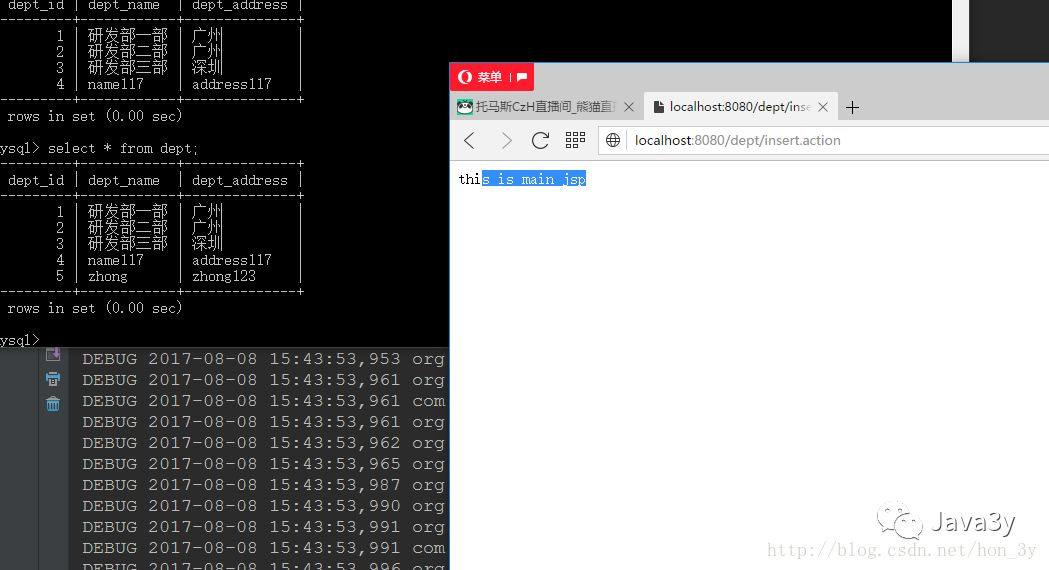
main.jsp页面:
<%@ page language="java" import="java.util.*" pageEncoding="utf-8"%><html><head></head><body> this is main jsp</body></html>
<html>
<head>
</head>
<body>
 this is main jsp
</body>
</html>
优化
如果想要Spring与Mybatis更加完美地结合,其实我们的Dao并不需要写实现,直接写接口和映射文件就行了,这样一来,我们就可以舍弃DaoImpl了。
在Spring配置文件中加入以下的代码:
    <!-- 配置 转换器,对于在basePackage设置的包(包括子包)下的接口类,        如果接口类的全类名在Mapper.xml文件中和定义过命名空间一致,        将被转换成spring的BEAN,在调用的地方通过@Autowired方式将可以注入接口实例 -->    <bean class="org.mybatis.spring.mapper.MapperScannerConfigurer">        <property name="sqlSessionFactory" ref="sqlSessionFactory" />        <!--这里包名留意要不要改-->        <property name="basePackage" value="zhongfucheng.dao" />    </bean>
    <bean class="org.mybatis.spring.mapper.MapperScannerConfigurer">
        <property name="sqlSessionFactory" ref="sqlSessionFactory" />

        <!--这里包名留意要不要改-->
        <property name="basePackage" value="zhongfucheng.dao" />
    </bean>
我们的映射文件中把命名空间写成是Dao的全路径
//Dao的全路径,那么Spring就会自动帮我们创建对象,注入进去<mapper namespace="zhongfucheng.dao.DeptDao">    <resultMap type="Dept" id="deptResultMap">        <id property="deptId" column="dept_id" />        <result property="deptName" column="dept_name" />        <result property="deptAddress" column="dept_address" />    </resultMap>    <!-- id和命名空间用来定位SQL语句,parameterType表示参数的类型,resultMap返回类型 -->    <select id="selectDept" parameterType="Integer" resultMap="deptResultMap">        <!--参数的写法#{deptID} -->        select * from dept where dept_id=#{deptID}    </select>    <insert id="insertDept" parameterType="Dept">        insert into dept(dept_name,dept_address) values(#{deptName},#{deptAddress});    </insert></mapper><mapper namespace="zhongfucheng.dao.DeptDao">
    <resultMap type="Dept" id="deptResultMap">
        <id property="deptId" column="dept_id" />
        <result property="deptName" column="dept_name" />
        <result property="deptAddress" column="dept_address" />
    </resultMap>

    <!-- id和命名空间用来定位SQL语句,parameterType表示参数的类型,resultMap返回类型 -->
    <select id="selectDept" parameterType="Integer" resultMap="deptResultMap">
        <!--参数的写法#{deptID} -->
        select * from dept where dept_id=#{deptID}
    </select>

    <insert id="insertDept" parameterType="Dept">
        insert into dept(dept_name,dept_address) values(#{deptName},#{deptAddress});
    </insert>

</mapper>
在配置工厂的时候,我们可以配置mapperLocations属性,这样一来,我们就不用在Mybatis中逐个加载配置文件了。
    <!-- 配置session工厂 -->    <bean id="sqlSessionFactory" class="org.mybatis.spring.SqlSessionFactoryBean">        <property name="dataSource" ref="dataSource" />        <!--这里的路径和名字留意要不要改-->        <property name="configLocation" value="classpath:myBatis-config.xml" />        <!--配置扫描式加载SQL映射文件,记得去掉mybatis-config配置,使用了这个,在Mybatis配置文件中就不用加载对应的映射文件了-->        <!--这里留意路径是否要改-->        <property name="mapperLocations" value="classpath:zhongfucheng/dao/*.xml"/>    </bean>
    <bean id="sqlSessionFactory" class="org.mybatis.spring.SqlSessionFactoryBean">
        <property name="dataSource" ref="dataSource" />
        <!--这里的路径和名字留意要不要改-->
        <property name="configLocation" value="classpath:myBatis-config.xml" />

        <!--配置扫描式加载SQL映射文件,记得去掉mybatis-config配置,使用了这个,在Mybatis配置文件中就不用加载对应的映射文件了-->
        <!--这里留意路径是否要改-->
        <property name="mapperLocations" value="classpath:zhongfucheng/dao/*.xml"/>
    </bean>
总结
SSM整合和SSH整合的步骤差不多
如果文章有错的地方欢迎指正,大家互相交流。习惯在微信看技术文章,想要获取更多的Java资源的同学,可以关注微信公众号:Java3y
 280


 扫一扫


 被折叠的 条评论
为什么被折叠?
 到【灌水乐园】发言


