



生成Word文件
一、环境
<!-- springboot父依赖 -->
<parent>
        <groupId>org.springframework.boot</groupId>
        <artifactId>spring-boot-starter-parent</artifactId>
        <version>2.0.6.RELEASE</version>
        <relativePath/> <!-- lookup parent from repository -->
</parent>

<!-- springboot启动器依赖 -->
<dependency>
      <groupId>org.springframework.boot</groupId>
      <artifactId>spring-boot-starter</artifactId>
</dependency>


<!-- freemarker依赖 ★★★★★ -->
<dependency>
       <groupId>org.springframework.boot</groupId>
       <artifactId>spring-boot-starter-freemarker</artifactId>
</dependency>
二、创建模板
1.简单模板: 固定
未使用占位符
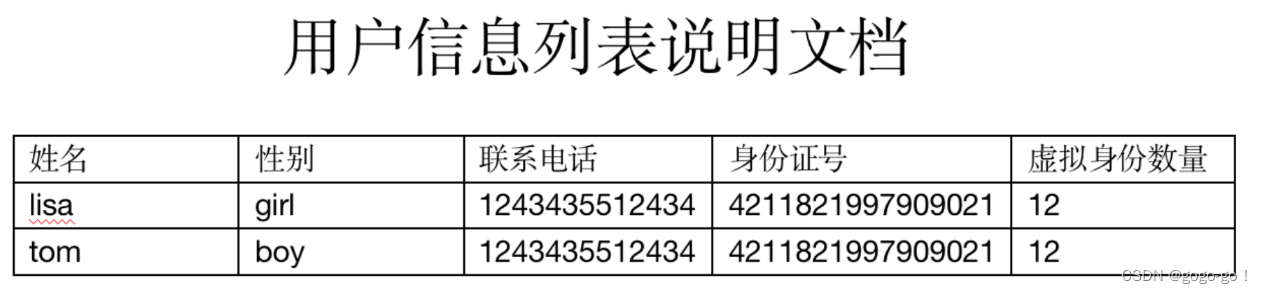
使用占位符

2.加强模板:动态行
1.首先手动创建Word文件, 格式、样式、假数据, 给写进Word中, 例如以下表格
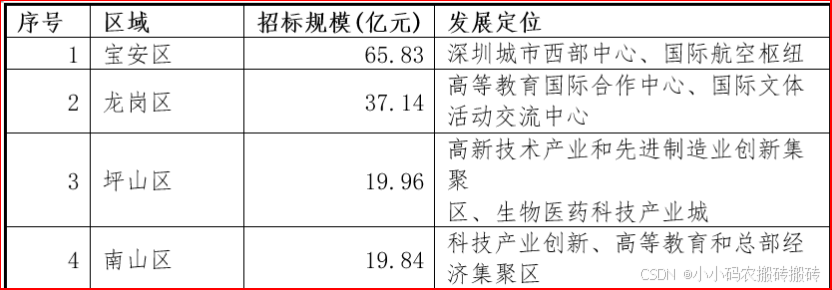
2.Word文件另存为XML文件, 并且将XML文件修改为
ftl文件
- 例如
marketAnaly.ftl3.将ftl文件移动到项目中: resources/templates/ftl
4.打开
ftl文件
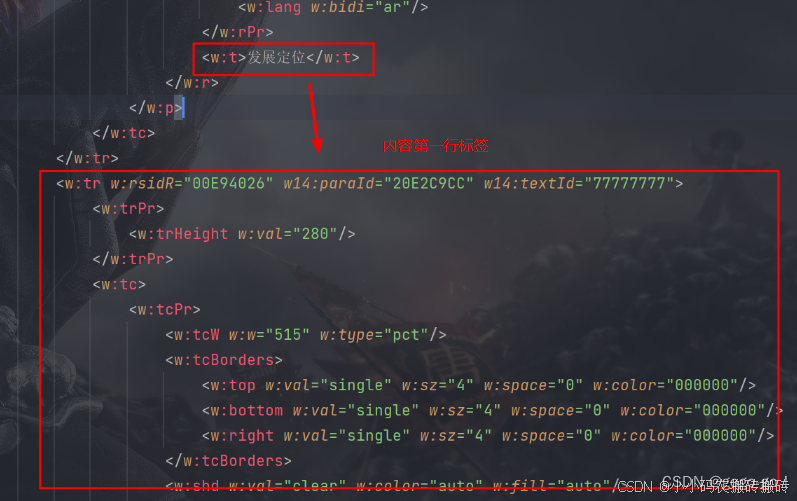
- 把表格删除剩余一行表头,一行内容 (若Word文档就是一行内容则不用管)
- 找到对应需要动态的内容, 使用
FTL占位符替换- 若需要使表格动态行, 那么需要
把整个行的开闭合标签都使用 FLT 循环占位符包裹例如:
>
**注意: ** 1.因用户列表是list集合遍历的形式动态展示,所以需要遍历列表标签并展示数据。遍历的语法如下:<#list 集合 as 对象名> </#list>
2.注意此处对象别名要和生成word占位符的属性对应上,不然取不到值
3.标签是行的意思,遍历的范围要对,不然word打不开或者后台报错
三、封装工具类
1.直接响应给用户
注意: 以下有可能在服务器中读取不到ftl模板文件, 可以借鉴封装工具类.2来解决
import freemarker.template.Configuration;
import freemarker.template.Template;
import javax.servlet.ServletOutputStream;
import javax.servlet.http.HttpServletRequest;
import javax.servlet.http.HttpServletResponse;
import java.io.*;
import java.util.Map;

public class WordUtil {

    protected static Logger logger = LoggerFactory.getLogger(WordUtil.class);

    //配置信息
    private static Configuration configuration = null;

    private static final String templateFolder = WordUtil.class.getResource("/templates").getPath();

    static {
        configuration = new Configuration();
        configuration.setDefaultEncoding(CharsetNames.UTF_8);
        try {
            configuration.setDirectoryForTemplateLoading(new File(templateFolder));
        } catch (IOException e) {
            e.printStackTrace();
        }
    }

    private WordUtil() {}

    /**
     * 导出Word
     *
     * @param response 		响应体
     * @param map			word文档中参数
     * @param ftlName 		为模板的名字  例如xxx.ftl
     * @param fileName 		是word 文件的名字 格式为:"xxxx.doc"
     * @param tempName 			是临时的文件名, 可随意定义
     * @throws IOException
     */
    public static void exportMillCertificateWord(HttpServletResponse response,
                                                 Map map,
                                                 String ftlName,
                                                 String fileName,
                                                 String tempName) throws IOException {
        Template freemarkerTemplate = configuration.getTemplate(ftlName);
        File file = null;
        InputStream is = null;
        OutputStream os = null;
        try {
            // 调用工具类的createDoc方法生成Word文档
            file = createDoc(map,freemarkerTemplate,tempName);
            is = new FileInputStream(file);
            // 设置响应头, 指定文件类型和处理方式
            fileName = "attachment;filename=" + URLEncoder.encode(fileName, CharEncoding.UTF_8);
            response.setHeader("Content-Disposition", new String(fileName.getBytes(), StandardCharsets.UTF_8));
            // 设置响应信息
            response.setCharacterEncoding(CharsetNames.UTF_8);
            response.setContentType("application/msword");
            os = response.getOutputStream();
            // 获取相应输出流, 并进行相应
            byte[] bys = new byte[512];
            int len;
            // 通过循环将读入的Word文件的内容输出到浏览器中
            while((len = is.read(bys)) != -1) {
                os.write(bys, 0, len);
            }
        } finally {
            close(is, out, file);
        }
    }

    /**
     * 生成Doc文件
     *
     * @param dataMap  word文档中参数
     * @param template 模板
     * @param filePath 文件路径
     * @return
     */
    private static File createDoc(Map<?, ?> dataMap, Template template, String tempName) {
        File f = new File(tempName);
        Template t = template;
        try {
            // 这个地方不能使用FileWriter因为需要指定编码类型否则生成的Word文档会因为有无法识别的编码而无法打开
            Writer w = new OutputStreamWriter(new FileOutputStream(f), StandardCharsets.UTF_8);
            t.process(dataMap, w);
            w.close();
        } catch (Exception ex) {
            ex.printStackTrace();
            throw new RuntimeException(ex);
        }
        return f;
    }

    /**
     * 关闭资源
     *
     * @param is   输入流
     * @param os   输出流
     * @param file 文件
     */
    private static void close(InputStream is, OutputStream os, File file) {
        try {
            if (is != null) {
                is.close();
            }
        } catch (Exception e) {
            logger.error("", e);
        }
        try {
            if (os != null) {
                os.close();
            }
        } catch (Exception e) {
            logger.error("", e);
        }
        try {
            if (file != null) {
                file.delete();
            }
        } catch (Exception e) {
            logger.error("", e);
        }
    }
}
2.上传到服务器,通过下载方式
import freemarker.template.Configuration;
import freemarker.template.Template;
import org.apache.commons.compress.utils.CharsetNames;
import org.slf4j.Logger;
import org.slf4j.LoggerFactory;
import java.io.*;
import java.nio.charset.StandardCharsets;
import java.util.Map;

public class WordUtil {

    protected static Logger logger = LoggerFactory.getLogger(WordUtil.class);

    private WordUtil() {
    }

    /**
     * 导出Word文件
     *
     * @param map      word文档中参数
     * @param ftlName  ftl模板
     * @param destPath 绝对路径
     */
    public static void exportMillCertificateWord(Map map, String ftlName, String destPath, String wordName) throws IOException {
        Configuration configuration = new Configuration(Configuration.VERSION_2_3_31);
        configuration.setDefaultEncoding("UTF-8");
        // 获取模板文件的输入流
        InputStream inputStream = WordUtil.class.getResourceAsStream("/template/ftl/" + ftlName);
        InputStreamReader reader = new InputStreamReader(inputStream, StandardCharsets.UTF_8);
        // 创建 Template 对象
        Template freemarkerTemplate = new Template(ftlName, reader, configuration);
        // 检测当前文件是否存在
        File file = new File(destPath);
        if (!file.exists()){
            file.mkdirs();
        }
        // 调用工具类的createDoc方法生成Word文档
        String filePath = destPath + File.separator + wordName;
        createDoc(map, freemarkerTemplate, filePath);
    }

    /**
     * 生成Doc文件
     *
     * @param dataMap  word文档中参数
     * @param template 模板
     * @param filePath 文件路径
     * @return
     */
    private static File createDoc(Map<?, ?> dataMap, Template template, String filePath) {
        File file = new File(filePath);
        Template temp = template;
        try {
            // 这个地方不能使用FileWriter因为需要指定编码类型否则生成的Word文档会因为有无法识别的编码而无法打开
            Writer writer = new OutputStreamWriter(new FileOutputStream(file), StandardCharsets.UTF_8);
            temp.process(dataMap, writer);
            writer.close();
        } catch (Exception ex) {
            ex.printStackTrace();
            throw new RuntimeException(ex);
        }
        return file;
    }

    /**
     * 关闭资源
     *
     * @param is   输入流
     * @param os   输出流
     */
    private static void close(InputStream is, OutputStream os) {
        try {
            if (is != null) {
                is.close();
            }
        } catch (Exception e) {
            logger.error("", e);
        }
        try {
            if (os != null) {
                os.close();
            }
        } catch (Exception e) {
            logger.error("", e);
        }
    }
}
四、调用测试
对应封装"工具类1-模板2"
import com.example.word_download.dao.InterfaceWord;
import com.example.word_download.dao.Parameter;
import com.example.word_download.dao.User;
import com.example.word_download.util.WordUtil;
import org.springframework.web.bind.annotation.GetMapping;
import org.springframework.web.bind.annotation.RequestMapping;
import org.springframework.web.bind.annotation.RestController;
import javax.servlet.http.HttpServletRequest;
import javax.servlet.http.HttpServletResponse;
import java.io.IOException;
import java.util.ArrayList;
import java.util.HashMap;
import java.util.List;
import java.util.Map;

@RestController
@RequestMapping("/testControllerDownload")
public class wordController {

    /**
     * 生成Word
     */
    @GetMapping("/getWord")
    public void getWord(HttpServletResponse response) throws IOException {
        // 封装集合
        List<Region> list = new ArrayList<>();
        list.add(new Region("宝安区", "65.83", "深圳市西部中心"));
        list.add(new Region("龙岗区", "6.83", "深圳市西部中心"));
        list.add(new Region("坪山区", "650.83", "深圳市西部中心"));
        list.add(new Region("南山区", "63.83", "深圳市西部中心"));
        // 封装对象
        Map<String, Object> map = new HashMap<>();
        map.put("region", list);
        // 封装Word模板结果
        HashMap<String, Object> dataMap = new HashMap<>();
        dataMap.put("biddingScale", map);
        // 模板名
        String wordName = "marketAnalysis.ftl";
        // 导出文件名
        String fileName = "导出文件.doc";
        // 临时文件名
        String tempName = "tempName";
        // 生成文件
        WordUtil.exportMillCertificateWord(response, dataMap, wordName, fileName, tempName);
    }
}
五、FTL指令常用标签及语法
1、字符输出
${emp.name?if_exists}        // 变量存在,输出该变量,否则不输出
${emp.name!}              // 变量存在,输出该变量,否则不输出
${emp.name?default("xxx")}        // 变量不存在,取默认值xxx
${emp.name!"xxx"}            // 变量不存在,取默认值xxx
常用内部函数
${"123<br>456"?html}      // 对字符串进行HTML编码,对html中特殊字符进行转义
${"str"?cap_first}        // 使字符串第一个字母大写
${"Str"?lower_case}        // 将字符串转换成小写
${"Str"?upper_case}        // 将字符串转换成大写
${"str"?trim}              // 去掉字符串前后的空白字符
字符串的两种拼接方式拼接
$ {"你好${emp.name!}"} //输出你好+变量名
$ {"hello"+ emp.name!} //使用+号来连接,输出你好+变量名
可以通过如下语法来截取子串
<#assign str =“abcdefghijklmn”/>
//方法1
$ {str?substring(0,4)} //输出abcd
//方法2
$ { str [ 0 ] } $ {str [4]} //结果是ae
$ {str [1..4]} //结果是bcde
//返回指定字符的索引
$ {str?index_of("n")}
2.日期输出
$ {emp.date?string('yyyy -MM-dd')} //日期格式
3.数字输出(以数字20为例)
$ {emp.name?string.number} //输出20
$ {emp.name?string.currency} //¥20.00
$ {emp.name?string.percent} // 20%
$ {1.222?int} //将小数转为int,输出1

<#setting number_format =“percent”/> //设置数字默认输出方式('percent',百分比)
<#assign answer = 42 /> //声明变量回答42
#{answer} //输出4,200%
$ {answer?string} //输出4,200%
$ {answer?string.number} //输出42
$ {answer?string.currency} //输出¥42.00
$ {answer?string.percent} //输出4,200%
#{answer} //输出42

数字格式化插值可采用#{expr; format}形式来格式化数字,其中格式可以是:
mX:小数部分最小X位
MX:小数部分最大X位
如下面的例子:
<#assign x = 2.582 /> <#assign y = 4 />
# {x; M2} //输出2.58
# {y; M2} //输出4
# {x; m2} //输出2.58
#{Y; m2} //输出4.0
# {x; m1M2} //输出2.58
# {x; m1M2} //输出4.0
4.申明变量
<#assign foo = false /> //声明变量,插入布尔值进行显示,注意不要用引号
$ {foo?string(“yes”,“no”)} //当为真时输出“yes”,否则输出“no”
申明变量的几种方式
<#assign name = value>
<#assign name1 = value1 name2 = value2 ... nameN = valueN>
<#assign same as above... in namespacehash>

<#assign name>
 capture this
</#assign>

<#assign name in namespacehash>
capture this
</#assign>
5.比较运算算符
表达式中支持的比较运算符符如下几个:
=或==:判断两个值是否相等。
!=:判断两个值是否不等。
>或gt:判断左边值是否大于右边值>
<=或lte:判断左边值是否小于等于右边值
6.算术运算符
FreeMarker表达式中完全支持算术运算,
FreeMarker支持的算术运算符包括:+, - ,*,/,%
注意:
(1)运算符两边必须是数字
(2)使用+运算符时,如果一边是数字,一边是字符串,就会自动将数字转换为字符串再连接,
     如:$ {3 +“5”},结果是:35
7.逻辑运算符
逻辑运算符有如下几个:
逻辑与:&&
逻辑或:||
逻辑非:!
逻辑运算符只能作用于布尔值,否则将产生错误
8.FreeMarker中的运算符优先级如下(由高到低排列)
①,一元运算符:!
②,内建函数:
③,乘除法:*,/,%
④,加减法: - ,+
⑤,比较:>,<,> =,<=(lt,lte,gt,gte)
⑥,相等:==,=, !=
⑦,逻辑与:&&
⑧,逻辑或:||
⑨,数字范围:.. 实际上,我们在开发过程中应该使用括号来严格区分,这样的可读性好,出错少
9.if逻辑判断(注意:elseif不加空格)
<#if condition>
...
<#elseif condition2>
...
<#elseif condition3>
...
<#else>
...
</#if>
if 空值判断

// 当 photoList 不为空时
<#if photoList??>...</#if>

值得注意的是,${..}只能用于文本部分,不能用于表达式,下面的代码是错误的:
<#if ${isBig}>Wow!</#if>
<#if "${isBig}">Wow!</#if>

// 正确写法
<#if isBig>Wow!</#if>
10.switch (条件可为数字,可为字符串)
<#switch value>
<#case refValue1>
....
<#break>
<#case refValue2>
....
<#break>
<#case refValueN>
....
<#break>
<#default>
....
</#switch>
11.集合 & 循环
// 遍历集合:
<#list empList! as emp>
    ${emp.name!}
</#list>

// 可以这样遍历集合:
<#list 0..(empList!?size-1) as i>
    ${empList[i].name!}
</#list>

// 与jstl循环类似,也可以访问循环的状态。

empList?size    // 取集合的长度
emp_index:     // int类型,当前对象的索引值
emp_has_next:     // boolean类型,是否存在下一个对象

// 使用<#break>跳出循环
<#if emp_index = 0><#break></#if>

// 集合长度判断
<#if empList?size != 0></#if> // 判断=的时候,注意只要一个=符号,而不是==

<#assign l=0..100/>    // 定义一个int区间的0~100的集合,数字范围也支持反递增,如100..2
<#list 0..100 as i>   // 等效于java for(int i=0; i <= 100; i++)
  ${i}
</#list>

// 截取子集合:
empList[3..5] //返回empList集合的子集合,子集合中的元素是empList集合中的第4-6个元素

// 创建集合:
<#list ["星期一", "星期二", "星期三", "星期四", "星期五", "星期六", "星期天"] as x>

// 集合连接运算,将两个集合连接成一个新的集合
<#list ["星期一","星期二","星期三"] + ["星期四","星期五","星期六","星期天"] as x>

// 除此之外,集合元素也可以是表达式,例子如下:
[2 + 2, [1, 2, 3, 4], "whatnot"]

// seq_contains:判断序列中的元素是否存在
<#assign x = ["red", 16, "blue", "cyan"]>
${x?seq_contains("blue")?string("yes", "no")}    // yes
${x?seq_contains("yellow")?string("yes", "no")}  // no
${x?seq_contains(16)?string("yes", "no")}        // yes
${x?seq_contains("16")?string("yes", "no")}      // no

// seq_index_of:第一次出现的索引
<#assign x = ["red", 16, "blue", "cyan", "blue"]>
${x?seq_index_of("blue")}  // 2

// sort_by:排序(升序)
<#list movies?sort_by("showtime") as movie></#list>

// sort_by:排序(降序)
<#list movies?sort_by("showtime")?reverse as movie></#list>

// 具体介绍:
// 不排序的情况:
<#list movies as moive>
  <a href="${moive.url}">${moive.name}</a>
</#list>

//要是排序,则用
<#list movies?sort as movie>
  <a href="${movie.url}">${movie.name}</a>
</#list>

// 这是按元素的首字母排序。若要按list中对象元素的某一属性排序的话,则用
<#list moives?sort_by(["name"]) as movie>
  <a href="${movie.url}">${movie.name}</a>
</#list>

//这个是按list中对象元素的[name]属性排序的,是升序,如果需要降序的话,如下所示:
<#list movies?sort_by(["name"])?reverse as movie>
  <a href="${movie.url}">${movie.name}</a>
</#list>
六、动态生成图片 (渲染)
方案一 (通过HTML渲染图片)
弊端: 如果HTML是通过script进行渲染的, 那么多半是获取不到script加载完后的图片 (博主我没找到方式…)
1.引入依赖
<!-- 模版引擎 -->
<dependency>
    <groupId>org.springframework.boot</groupId>
    <artifactId>spring-boot-starter-freemarker</artifactId>
</dependency>

<!-- 渲染器 -->
<dependency>
    <groupId>org.xhtmlrenderer</groupId>
    <artifactId>core-renderer</artifactId>
    <version>R8</version>
</dependency>

<!-- io常用工具类 -->
<dependency>
    <groupId>commons-io</groupId>
    <artifactId>commons-io</artifactId>
    <version>2.8.0</version>
</dependency>
2.创建word文件 (转成FTL)
示例就不使用动态数据了, 若需要使用, 也是在文档中编写FTL语句即可
<!DOCTYPE html>
<html lang="en">
<head>
    <meta charset="text/html;charset=UTF-8"/>
    <meta http-equiv="X-UA-Compatible" content="IE=edge"/>
    <meta name="viewport" content="width=device-width, initial-scale=1.0"/>
    <title>Document</title>
</head>
<body>
<!-- 用于测试使用渲染器获取图片后, 不是全部白屏 (能看见一些HTML的样式) -->
<div style="width: 50px; height: 50px; background-color: red"></div>

<!-- Echarts画布, 通过script渲染出来的 -->
<div id="pie" style="width: 500px; height: 500px"></div>
<script src = "https://cdn.bootcdn.net/ajax/libs/echarts/5.1.0/echarts.min.js"></script>
<script>
    const option = {
        xAxis: {
            type: 'category',
            data: ["Mon", 'Tue', 'Wed', 'Thu', 'Fri', 'Sat', 'Sun']
        },
        yAxis: {
            type: 'value'
        },
        series: [
            {
                animation: false,
                data: ["151", "130", 150, 80, 70, 110, 130],
                type: 'bar'
            }
        ]
    };
    var chartDom = document.getElementById('pie');
    var myChart = echarts.init(chartDom);
    myChart.setOption(option);
</script>
</body>
</html>
将文件添加到项目, 我是添加到了 resources/template/ftl/index.ftl
3.创建工具类
package com.park.common.domain.tool;

import com.park.common.domain.tool.WordUtil;
import freemarker.template.Configuration;
import freemarker.template.Template;
import lombok.extern.slf4j.Slf4j;
import org.w3c.dom.Document;
import org.xhtmlrenderer.layout.SharedContext;
import org.xhtmlrenderer.swing.Java2DRenderer;

import javax.imageio.ImageIO;
import javax.xml.parsers.DocumentBuilder;
import javax.xml.parsers.DocumentBuilderFactory;
import javax.xml.parsers.ParserConfigurationException;
import java.awt.*;
import java.awt.image.BufferedImage;
import java.io.*;
import java.nio.charset.StandardCharsets;
import java.util.Base64;
import java.util.HashMap;
import java.util.Map;
import java.util.UUID;

@Slf4j
public class HtmlUtil {

    /**
     * 将数据填充进模板文件 (返回HTML代码)
     *
     * @param ftlName 模板名字
     * @param params  填充数据
     * @return
     * @throws Exception
     */
    public static String generate(String ftlName, Map params) throws Exception {
        Configuration configuration = new Configuration(Configuration.VERSION_2_3_31);
        configuration.setDefaultEncoding("UTF-8");
        // 获取模板文件的输入流
        InputStream inputStream = WordUtil.class.getResourceAsStream("/template/ftl/" + ftlName);
        InputStreamReader reader = new InputStreamReader(inputStream, StandardCharsets.UTF_8);
        // 创建 Template 对象
        Template freemarkerTemplate = new Template(ftlName, reader, configuration);
        StringWriter stringWriter = new StringWriter();
        String htmlStr;
        try {
            freemarkerTemplate.process(params, stringWriter);
            htmlStr = stringWriter.toString();
            stringWriter.flush();
        } finally {
            stringWriter.close();
        }
        return htmlStr;
    }

    /**
     * 将html转成base64字节
     *
     * @param html
     * @param width
     * @param height
     * @return
     * @throws Exception
     */
    public static String html2ImgBase64(String html, int width, int height) throws Exception {
        byte[] bytes = html.getBytes();
        BufferedImage img;
        try (ByteArrayInputStream bin = new ByteArrayInputStream(bytes)) {
            DocumentBuilderFactory factory = DocumentBuilderFactory.newInstance();
            DocumentBuilder builder = factory.newDocumentBuilder();
            Document document = builder.parse(bin);
            Java2DRenderer renderer = new Java2DRenderer(document, width, height);
            SharedContext sharedContext = renderer.getSharedContext();
            sharedContext.setDotsPerPixel(3);
            sharedContext.setDPI(523);
            img = renderer.getImage();
        }
        return bufferedImageToBase64(img);
    }

    /**
     * 把BufferedImage 图片转base64
     *
     * @param bufferedImage
     * @return
     * @throws Exception
     */
    private static String bufferedImageToBase64(BufferedImage bufferedImage) throws Exception {
        String png_base64;//转换成base64串
        //io流
        try (ByteArrayOutputStream baos = new ByteArrayOutputStream()) {
            ImageIO.write(bufferedImage, "png", baos);//写入流中
            byte[] bytes = baos.toByteArray();//转换成字节
            png_base64 = Base64.getEncoder().encodeToString(bytes);
            png_base64 = png_base64.replaceAll("\n", "").replaceAll("\r", "");//删除 \r\n
        }
        return "data:image/jpg;base64," + png_base64;
    }

    /**
     * 将数据填充进模板文件并输出到指定目录
     *
     * @param ftlName       模板名字
     * @param map           填充数据
     * @param destPath      目标路径
     * @param htmlName      输出文件名
     * @throws Exception
     */
    public static void generateHTML(String ftlName, Map map, String destPath, String htmlName) throws Exception {
        Configuration configuration = new Configuration(Configuration.VERSION_2_3_31);
        configuration.setDefaultEncoding("UTF-8");
        // 获取模板文件的输入流
        InputStream inputStream = WordUtil.class.getResourceAsStream("/template/ftl/" + ftlName);
        InputStreamReader reader = new InputStreamReader(inputStream, StandardCharsets.UTF_8);
        // 创建 Template 对象
        Template template = new Template(ftlName, reader, configuration);
        StringWriter stringWriter = new StringWriter();
        // 检测当前文件是否存在
        File file = new File(destPath);
        if (!file.exists()){
            file.mkdirs();
        }
        // 调用工具类的createHTML方法生成Html文件
        String filePath = destPath + File.separator + htmlName;
        createHTML(template, map, filePath);
    }

    /**
     * 创建HTML文件
     *
     * @param map      传参参数
     * @param template 模板
     * @param filePath 文件路径
     * @return
     */
    private static File createHTML(Template template, Map map, String filePath) {
        File file = new File(filePath);
        Template temp = template;
        try {
            // 这个地方不能使用FileWriter因为需要指定编码类型否则生成的HTML文档会因为有无法识别的编码而无法打开
            Writer writer = new OutputStreamWriter(new FileOutputStream(file), StandardCharsets.UTF_8);
            temp.process(map, writer);
            writer.close();
        } catch (Exception ex) {
            ex.printStackTrace();
            throw new RuntimeException(ex);
        }
        return file;
    }
}
4.创建Controller层
package com.park.garden.controller;

import com.park.common.domain.basics.BaseController;
import com.park.common.domain.tool.HtmlUtil;
import io.swagger.annotations.Api;
import io.swagger.annotations.ApiOperation;
import lombok.extern.slf4j.Slf4j;
import org.springframework.web.bind.annotation.GetMapping;
import org.springframework.web.bind.annotation.RequestMapping;
import org.springframework.web.bind.annotation.RestController;

import java.util.HashMap;
import java.util.Map;

@Slf4j
@RestController
@RequestMapping("/report")
@Api(tags = "文件报告")
public class FileReportController extends BaseController {

    @GetMapping("/test")
    @ApiOperation("测试")
    public String test() throws Exception {
        // FTL映射字段
        Map<String, Object> resultMap = new HashMap<>();
        // 获取生成路径
        String htmlStr = HtmlUtil.generate("index.ftl", resultMap);
        String htmlBase64 = HtmlUtil.html2ImgBase64(htmlStr, 220, 150);
        return htmlBase64;
    }
}
方案二 (通过 Java WebFx)
可以等待HTML进行渲染完毕后, 在生成图片
代码有问题… 就不展示了… 不过也是一种方案
方案三 (通过 phantomjs 插件)
弊端: 需要使用第三方插件, 需要下载安装, 配置环境变量, 并且在2018年就已经停止更新
参考文档: https://www.jianshu.com/p/dfc28fd7d786
方案四 (通过 wkhtmltoimage 插件)
弊端: 需要使用第三方插件, 需要安装, 并且配置环境变量
参考文档: https://blog.youkuaiyun.com/qq_38225558/article/details/119641142
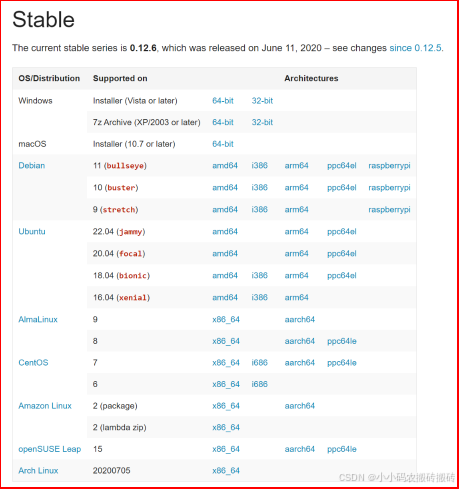
1.wkhtmltopdfimage 下载地址
https://wkhtmltopdf.org/downloads.html
Windows
解压就可以直接使用Linux
# 下载
wget https://github.com/wkhtmltopdf/packaging/releases/download/0.12.6-1/wkhtmltox-0.12.6-1.centos7.x86_64.rpm

# 安装
yum install xorg-x11-fonts-75dpi.noarch
rpm -Uvh wkhtmltox-0.12.6-1.centos7.x86_64.rpm

# 查看安装位置
whereis wkhtmltoimage

# 测试
wkhtmltoimage --crop-w 1000 --crop-h 1000 --quality 100 https://www.baidu.com/
Linux - 解决中文不显示问题
# 查看是否有中文字体
fc-list :lang=zh

# 下载中文字体`simsun.ttc`,放到`/usr/share/fonts`目录下
cd /usr/share/fonts

# 注:在此字体目录下直接下载,可能存在识别不出字体情况,需要手动将`simsun.ttc`字体放到`/usr/share/fonts`目录下
wget https://gitee.com/zhengqingya/java-developer-document/blob/master/%E5%B7%A5%E5%85%B7/wkhtmltopdf/simsun.ttc
2.创建word文件 (转成FTL)
使用FTL动态展示数据
<!DOCTYPE html>
<html lang="en">
<head>
    <meta charset="text/html;charset=UTF-8"/>
    <meta http-equiv="X-UA-Compatible" content="IE=edge"/>
    <meta name="viewport" content="width=device-width, initial-scale=1.0"/>
    <title>Document</title>
</head>
<body>
<div id="pie" style="width: 500px; height: 500px"></div>
<script src = "https://cdn.bootcdn.net/ajax/libs/echarts/5.1.0/echarts.min.js"></script>
<script>
    const option = {
        xAxis: {
            type: 'category',
            data: [
                <#if oneList?size != 0>
                    <#list oneList as one>
                        <#if one_index != oneList?size -1>${"'"+ one.name + "', "}<#else>${"'"+ one.name + "'"}</#if>
                    </#list>
                </#if>
            ]
        },
        yAxis: {
            type: 'value'
        },
        series: [
            {
                animation: false,
                data: [
                    <#if oneList?size != 0>
                    <#list oneList as one>
                    <#if one_index != oneList?size -1>${"'"+ one.value + "', "}<#else>${"'"+ one.value + "'"}</#if>
                    </#list>
                    </#if>
                ],
                type: 'bar'
            }
        ]
    };
    var chartDom = document.getElementById('pie');
    var myChart = echarts.init(chartDom);
    myChart.setOption(option);
</script>
</body>
</html>
将文件添加到项目, 我是添加到了 resources/template/ftl/index.ftl
3.创建工具类
用于生成HTML
package com.park.common.domain.tool;

import com.park.common.domain.tool.WordUtil;
import freemarker.template.Configuration;
import freemarker.template.Template;
import lombok.extern.slf4j.Slf4j;
import org.w3c.dom.Document;
import org.xhtmlrenderer.layout.SharedContext;
import org.xhtmlrenderer.swing.Java2DRenderer;

import javax.imageio.ImageIO;
import javax.xml.parsers.DocumentBuilder;
import javax.xml.parsers.DocumentBuilderFactory;
import javax.xml.parsers.ParserConfigurationException;
import java.awt.*;
import java.awt.image.BufferedImage;
import java.io.*;
import java.nio.charset.StandardCharsets;
import java.util.Base64;
import java.util.HashMap;
import java.util.Map;
import java.util.UUID;

@Slf4j
public class HtmlUtil {

    /**
     * 将数据填充进模板文件 (返回HTML代码)
     *
     * @param ftlName 模板名字
     * @param params  填充数据
     * @return
     * @throws Exception
     */
    public static String generate(String ftlName, Map params) throws Exception {
        Configuration configuration = new Configuration(Configuration.VERSION_2_3_31);
        configuration.setDefaultEncoding("UTF-8");
        // 获取模板文件的输入流
        InputStream inputStream = WordUtil.class.getResourceAsStream("/template/ftl/" + ftlName);
        InputStreamReader reader = new InputStreamReader(inputStream, StandardCharsets.UTF_8);
        // 创建 Template 对象
        Template freemarkerTemplate = new Template(ftlName, reader, configuration);
        StringWriter stringWriter = new StringWriter();
        String htmlStr;
        try {
            freemarkerTemplate.process(params, stringWriter);
            htmlStr = stringWriter.toString();
            stringWriter.flush();
        } finally {
            stringWriter.close();
        }
        return htmlStr;
    }

    /**
     * 将html转成base64字节
     *
     * @param html
     * @param width
     * @param height
     * @return
     * @throws Exception
     */
    public static String html2ImgBase64(String html, int width, int height) throws Exception {
        byte[] bytes = html.getBytes();
        BufferedImage img;
        try (ByteArrayInputStream bin = new ByteArrayInputStream(bytes)) {
            DocumentBuilderFactory factory = DocumentBuilderFactory.newInstance();
            DocumentBuilder builder = factory.newDocumentBuilder();
            Document document = builder.parse(bin);
            Java2DRenderer renderer = new Java2DRenderer(document, width, height);
            SharedContext sharedContext = renderer.getSharedContext();
            sharedContext.setDotsPerPixel(3);
            sharedContext.setDPI(523);
            img = renderer.getImage();
        }
        return bufferedImageToBase64(img);
    }

    /**
     * 把BufferedImage 图片转base64
     *
     * @param bufferedImage
     * @return
     * @throws Exception
     */
    private static String bufferedImageToBase64(BufferedImage bufferedImage) throws Exception {
        String png_base64;//转换成base64串
        //io流
        try (ByteArrayOutputStream baos = new ByteArrayOutputStream()) {
            ImageIO.write(bufferedImage, "png", baos);//写入流中
            byte[] bytes = baos.toByteArray();//转换成字节
            png_base64 = Base64.getEncoder().encodeToString(bytes);
            png_base64 = png_base64.replaceAll("\n", "").replaceAll("\r", "");//删除 \r\n
        }
        return "data:image/jpg;base64," + png_base64;
    }

    /**
     * 将数据填充进模板文件并输出到指定目录
     *
     * @param ftlName       模板名字
     * @param map           填充数据
     * @param destPath      目标路径
     * @param htmlName      输出文件名
     * @throws Exception
     */
    public static void generateHTML(String ftlName, Map map, String destPath, String htmlName) throws Exception {
        Configuration configuration = new Configuration(Configuration.VERSION_2_3_31);
        configuration.setDefaultEncoding("UTF-8");
        // 获取模板文件的输入流
        InputStream inputStream = WordUtil.class.getResourceAsStream("/template/ftl/" + ftlName);
        InputStreamReader reader = new InputStreamReader(inputStream, StandardCharsets.UTF_8);
        // 创建 Template 对象
        Template template = new Template(ftlName, reader, configuration);
        StringWriter stringWriter = new StringWriter();
        // 检测当前文件是否存在
        File file = new File(destPath);
        if (!file.exists()){
            file.mkdirs();
        }
        // 调用工具类的createHTML方法生成Html文件
        String filePath = destPath + File.separator + htmlName;
        createHTML(template, map, filePath);
    }

    /**
     * 创建HTML文件
     *
     * @param map      传参参数
     * @param template 模板
     * @param filePath 文件路径
     * @return
     */
    private static File createHTML(Template template, Map map, String filePath) {
        File file = new File(filePath);
        Template temp = template;
        try {
            // 这个地方不能使用FileWriter因为需要指定编码类型否则生成的HTML文档会因为有无法识别的编码而无法打开
            Writer writer = new OutputStreamWriter(new FileOutputStream(file), StandardCharsets.UTF_8);
            temp.process(map, writer);
            writer.close();
        } catch (Exception ex) {
            ex.printStackTrace();
            throw new RuntimeException(ex);
        }
        return file;
    }
}
用于根据生成的HTML调用第三方
wkhtmltoimage生成图片
package com.park.common.domain.tool;

import cn.hutool.core.io.FileUtil;
import com.park.common.exception.ServiceException;
import lombok.extern.slf4j.Slf4j;
import org.springframework.beans.factory.annotation.Value;
import org.springframework.stereotype.Component;

/**
 * @Description: 通过'wkhtmltoimage'生成图片 工具类
 * 帮助 wkhtmltopdf -h 或 wkhtmltoimage -h
 */
@Slf4j
@Component
public class ImageUtil {

    /**
     * 工具根目录
     */
    private static final String TOOL_WIN_ROOT_DIRECTORY = "D:\\home\\park\\wkhtmltox\\bin\\";

//    public static void main(String[] args) {
//        // 需要截图的路径 (本地保存的HTML文件, 也可以使用浏览器地址)
//        String sourceFilePath = "D:\\home\\park\\image\\cs.html";
//        // 目标路径 (PNG)
//        String targetPngFilePath = "D:\\home\\park\\image\\cs.png";
//        // 设置宽高
//        String cmdByImage = "--crop-w 1000 --crop-h 1000 --quality 100";
//        byte[] imageBytes = html2ImageBytes(cmdByImage, sourceFilePath, targetPngFilePath);
//    }

    /**
     * html转图片
     *
     * @param cmd               工具操作指令
     * @param sourceFilePath    html源资源
     * @param targetFilePath    生成目标资源
     * @return
     */
    public static byte[] html2ImageBytes(String cmd, String sourceFilePath, String targetFilePath) {
        return baseTool("wkhtmltoimage", cmd, sourceFilePath, targetFilePath);
    }

    /**
     * 根据cmd命令执行截图指令
     *
     * @param cmd               工具操作指令
     * @param sourceFilePath    html源资源
     * @param targetFilePath    生成目标资源
     * @return
     */
    private static byte[] baseTool(String appName, String cmd, String sourceFilePath, String targetFilePath) {
        try {
            // 先创建父目录
            FileUtil.mkParentDirs(targetFilePath);
            String command = String.format("%s %s %s %s", TOOL_WIN_ROOT_DIRECTORY + appName, cmd, sourceFilePath, targetFilePath);
            Process process = Runtime.getRuntime().exec(command);
            // 等待当前命令执行完,再往下执行
            process.waitFor();
            log.info("=============== FINISH: [{}] ===============", command);
        } catch (Exception e) {
            throw new ServiceException("工具丢失,请联系系统管理员!");
        }
        return FileUtil.readBytes(targetFilePath);
    }

}
4.创建Controller层
package com.park.garden.controller;

import cn.hutool.core.io.FileUtil;
import com.park.common.domain.basics.BaseController;
import com.park.common.domain.tool.HtmlUtil;
import com.park.common.domain.tool.ImageUtil;
import io.swagger.annotations.Api;
import io.swagger.annotations.ApiOperation;
import lombok.extern.slf4j.Slf4j;
import org.springframework.web.bind.annotation.GetMapping;
import org.springframework.web.bind.annotation.RequestMapping;
import org.springframework.web.bind.annotation.RestController;

import java.io.File;
import java.util.*;

@Slf4j
@RestController
@RequestMapping("/report")
@Api(tags = "文件报告")
public class FileReportController extends BaseController {


    @GetMapping("/test")
    @ApiOperation("测试")
    public String test() throws Exception {
        // 模拟动态数据
        Map<String, Object> resultMap = new HashMap<>();
        List<Map<String, String>> test = new ArrayList<>();
        Map<String, String> Mon = new HashMap<>();
        Mon.put("name", "Mon");
        Mon.put("value", "150");
        Map<String, String> Tue = new HashMap<>();
        Tue.put("name", "Tue");
        Tue.put("value", "130");
        Map<String, String> Wed = new HashMap<>();
        Wed.put("name", "Wed");
        Wed.put("value", "110");
        Map<String, String> Thu = new HashMap<>();
        Thu.put("name", "Thu");
        Thu.put("value", "90");
        Map<String, String> Fri = new HashMap<>();
        Fri.put("name", "Fri");
        Fri.put("value", "320");
        test.add(Mon);
        test.add(Tue);
        test.add(Wed);
        test.add(Thu);
        test.add(Fri);
        resultMap.put("oneList", test);

        // 设置HTML保存路径
        String destPath = "D:\\home\\park\\uploadPath\\upload\\2023\\12\\25";
        String htmlName = "cs.html";
        HtmlUtil.generateHTML("index.ftl", resultMap, destPath, htmlName);
        // 设置HTML目标路径
        String sourceFilePath = destPath + "\\" + htmlName;
        // 设置PNG输出路径
        String pngName = "cs.png";
        String targetPngFilePath = destPath + "\\" + pngName;
        // 设置宽高
        String cmdByImage = "--crop-w 500 --crop-h 500 --quality 100";
        // 获取图片并转为Base64 (图片会保存到指定位置)
        byte[] imageBytes = ImageUtil.html2ImageBytes(cmdByImage, sourceFilePath, targetPngFilePath);
        String png_base64 = Base64.getEncoder().encodeToString(imageBytes);
        png_base64 = png_base64.replaceAll("\n", "").replaceAll("\r", "");//删除 \r\n
        // 删除指定文件
        FileUtil.del(new File(destPath + "\\" + htmlName));
        FileUtil.del(new File(destPath + "\\" + pngName));
        return "data:image/jpg;base64," + png_base64;
    }
}
七、动态生成图片 (截图)
方案一 WebDriver 网页截图 (谷歌)
1.下载谷歌对应驱动
(博主谷歌版本): 120.0.6099.130 (正式版64位)
驱动官网路径: https://googlechromelabs.github.io/chrome-for-testing/
博主下载驱动路径: https://edgedl.me.gvt1.com/edgedl/chrome/chrome-for-testing/120.0.6099.109/win64/chromedriver-win64.zip
2.引入依赖
<dependency>
    <groupId>org.seleniumhq.selenium</groupId>
    <artifactId>selenium-java</artifactId>
    <version>3.141.59</version>
</dependency>
3.测试代码
package com.park.garden.controller;

import com.park.common.domain.basics.BaseController;
import io.swagger.annotations.Api;
import io.swagger.annotations.ApiOperation;
import lombok.extern.slf4j.Slf4j;
import org.apache.commons.io.FileUtils;
import org.openqa.selenium.OutputType;
import org.openqa.selenium.chrome.ChromeDriver;
import org.openqa.selenium.chrome.ChromeOptions;
import org.springframework.web.bind.annotation.GetMapping;
import org.springframework.web.bind.annotation.RequestMapping;
import org.springframework.web.bind.annotation.RequestParam;
import org.springframework.web.bind.annotation.RestController;

import java.io.File;
import java.text.SimpleDateFormat;
import java.util.Date;

@Slf4j
@RestController
@RequestMapping("/report")
@Api(tags = "文件报告")
public class FileReportController extends BaseController {

	/**
     * 测试网页截图
     *
     * @param url 截图网页地址
     * @return
     * @throws Exception
     */
    @GetMapping("/test1")
    @ApiOperation("测试1")
    public String test1(@RequestParam(value = "url", defaultValue = "http://116.204.91.141/login") String url) throws Exception {
        // 设置驱动位置
        System.setProperty("webdriver.chrome.driver", "C:\\Program Files\\Google\\Chrome\\Application\\chromedriver-win64\\chromedriver.exe");
        // 设置 options 窗口状态
        ChromeOptions options = new ChromeOptions();
        options.addArguments("--headless"); 				// 浏览器不提供可视化页面. linux下如果系统不支持可视化不加这条会启动失败
        options.addArguments("--window-size=1920,1080");	// 不提供可视化页面时, 截图分辨率不对的话, 可以设置大小
        options.addArguments("--disable-gpu");  // 谷歌文档提到需要加上这个属性来规避bug
        options.addArguments("--no-sandbox");   // 解决DevToolsActivePort文件不存在的报错
        // 设置驱动
        ChromeDriver driver = new ChromeDriver(options);
        driver.manage().window().maximize();
        //设置需要访问的地址
        driver.get(url);
		// 获取文件名
        Date date = new Date();
        SimpleDateFormat sdf = new SimpleDateFormat("yyyy-MM-dd_HH-mm-ss");
        String strTime = sdf.format(date);
		// 获取文件
        File img = driver.getScreenshotAs(OutputType.FILE);
        // 保存文件到指定目录
        FileUtils.copyFile(img, new File(strTime + ".png"));
        // 获取标题
        return driver.getTitle();
    }

}
4.options参数设置
--disable-infobars			# 禁止策略化

--no-sandbox				# 解决DevToolsActivePort文件不存在的报错

--window-size=1920x3000		# 指定浏览器分辨率

--disable-gpu				# 谷歌文档提到需要加上这个属性来规避bug

--incognito					# 隐身模式(无痕模式)

--disable-javascript		# 禁用javascript

--headless					# 浏览器不提供可视化页面. linux下如果系统不支持可视化不加这条会启动失败
5.等待页面加载 (参数)
 1 package com.test.elementwait;
 2
 3 import org.openqa.selenium.By;
 4 import org.openqa.selenium.WebDriver;
 5 import org.openqa.selenium.firefox.FirefoxDriver;
 6 import org.openqa.selenium.support.ui.ExpectedCondition;
 7 import org.openqa.selenium.support.ui.ExpectedConditions;
 8 import org.openqa.selenium.support.ui.WebDriverWait;
 9
10 public class ExplicitWait {
11
12     public static void main(String[] args) {
13         WebDriver driver = new FirefoxDriver();
14         driver.get("http://www.baidu.com");
15         driver.manage().window().maximize();
16
17         //标题是不是“百度一下,你就知道”
18         new WebDriverWait(driver,5).until(ExpectedConditions.titleIs("百度一下,你就知道"));

19         //标题是不是包含“百度一下”
20         new WebDriverWait(driver,5).until(ExpectedConditions.titleContains("百度一下"));

21         //判断该元素是否被加载在DOM中,并不代表该元素一定可见
22         new WebDriverWait(driver,5).until(ExpectedConditions.presenceOfElementLocated(By.xpath("//*[@id='kw']")));

23         //判断元素(定位后)是否可见
24         new WebDriverWait(driver,5).until(ExpectedConditions.visibilityOf(driver.findElement(By.xpath("//*[@id='kw']"))));

25         //判断元素是否可见(非隐藏,并且元素的宽和高都不等以0)
26         new WebDriverWait(driver,5).until(ExpectedConditions.visibilityOfElementLocated(By.xpath("//*[@id='kw']")));

27         //只要存在一个就是true
28         ExpectedConditions.presenceOfAllElementsLocatedBy(By.xpath("//*[@id='kw']"));

29         //元素中的text是否包含语气的字符串
30         ExpectedConditions.textToBePresentInElementLocated(By.xpath("//*[@id='kw']"), "百度一下");

31         //元素的value属性中是否包含语气的字符串
32         ExpectedConditions.textToBePresentInElementValue(By.xpath("//*[@id='kw']"), "***");

33         //判断该表单是否可以切过去,可以就切过去并返回true,否则放回false
34         ExpectedConditions.frameToBeAvailableAndSwitchToIt(By.id("**"));

35         //判断某个元素是否不存在于DOM或不可见
36         ExpectedConditions.invisibilityOfElementLocated(By.xpath("//*[@id='kw']"));

37         //判断元素是否可以点击
38         ExpectedConditions.elementToBeClickable(By.xpath("//*[@id='kw']"));

39         //等到一个元素从DOM中移除
40         ExpectedConditions.stalenessOf(driver.findElement(By.xpath("//*[@id='kw']")));

41         //判断某个元素是否被选中,一般用在下拉列表
42         ExpectedConditions.elementToBeSelected(By.xpath("//*[@id='kw']"));

43         //判断某个元素的选中状态是否符合预期
44         ExpectedConditions.elementSelectionStateToBe(By.xpath("//*[@id='kw']"), true);

45         //判断某个元素(已定位)的选中状态是否符合预期
46         ExpectedConditions.elementSelectionStateToBe(driver.findElement(By.xpath("//*[@id='kw']")), false);

47         //判断页面中是否存在alert
48         new WebDriverWait(driver,5).until(ExpectedConditions.alertIsPresent());

49         //--------------------自定义判断条件-----------------------------
50         WebDriverWait wait = new WebDriverWait(driver, 3);
51         wait.until(new ExpectedCondition<Boolean>() {
52              public Boolean apply(WebDriver driver) {
53                  return !driver.findElement(By.xpath("//*[@id='kw']")).getAttribute("class").contains("x-form-invalid-field");
54                              }
55                  });
56     }
57
58 }
6.加强版测试代码 自动登录&截图
package com.park.garden.controller;

import com.park.common.domain.basics.BaseController;
import io.swagger.annotations.Api;
import io.swagger.annotations.ApiOperation;
import lombok.extern.slf4j.Slf4j;
import org.apache.commons.io.FileUtils;
import org.openqa.selenium.By;
import org.openqa.selenium.OutputType;
import org.openqa.selenium.WebElement;
import org.openqa.selenium.chrome.ChromeDriver;
import org.openqa.selenium.chrome.ChromeOptions;
import org.openqa.selenium.support.ui.ExpectedConditions;
import org.openqa.selenium.support.ui.WebDriverWait;
import org.springframework.web.bind.annotation.GetMapping;
import org.springframework.web.bind.annotation.RequestMapping;
import org.springframework.web.bind.annotation.RequestParam;
import org.springframework.web.bind.annotation.RestController;

import java.io.File;
import java.text.SimpleDateFormat;
import java.util.Date;
import java.util.concurrent.TimeUnit;

@Slf4j
@RestController
@RequestMapping("/report")
@Api(tags = "文件报告")
public class FileReportController extends BaseController {


    @GetMapping("/test1")
    @ApiOperation("测试1")
    public String test1(@RequestParam(value = "headless", defaultValue = "true") Boolean headless,
                        @RequestParam(value = "url", defaultValue = "http://116.204.91.141/login") String url) throws Exception {
        // 设置驱动
        System.setProperty("webdriver.chrome.driver", "C:\\Program Files\\Google\\Chrome\\Application\\chromedriver-win64\\chromedriver.exe");
        // 设置窗口状态
        ChromeOptions options = new ChromeOptions();
        if (headless) {
            options.addArguments("--headless"); // 浏览器不提供可视化页面. linux下如果系统不支持可视化不加这条会启动失败
        }
        options.addArguments("--window-size=1920,1080");
        options.addArguments("--disable-gpu");  // 谷歌文档提到需要加上这个属性来规避bug
        options.addArguments("--no-sandbox");   // 解决DevToolsActivePort文件不存在的报错

        // 设置驱动
        ChromeDriver driver = new ChromeDriver(options);
        driver.manage().window().maximize();
        // 设置需要访问的地址
        driver.get(url);

        // 定位到账号框
        WebElement userName = driver.findElementByXPath("/html/body/div/div/div/div/div/form/div[1]/div/div/input");
        userName.sendKeys("test1");
        // 定位到密码框
        WebElement passWord = driver.findElementByXPath("/html/body/div/div/div/div/div/form/div[2]/div/div/input");
        passWord.sendKeys("Pass1234");
		// 定位到确认按钮
        WebElement btn = driver.findElementByXPath("/html/body/div/div/div/div/div/form/div[4]/div/button");
        btn.click();
		// 等待200毫秒
        TimeUnit.MILLISECONDS.sleep(200);
        // 打开到指定路径
        driver.get("http://iop.dev.greatld.com/yuntu/move");

        // 创建监听 等待5秒 判断指定Element是否加载出来  (5秒后未响应抛出异常)
        WebDriverWait wait = new WebDriverWait(driver, 5);
        wait.until(ExpectedConditions.presenceOfElementLocated(By.xpath("//*[@id=\"mapChart\"]/div[1]/canvas")));

		// 创建文件名
        Date date = new Date();
        SimpleDateFormat sdf = new SimpleDateFormat("yyyy-MM-dd_HH-mm-ss");
        String strTime = sdf.format(date);
		// 截图
        File img = driver.getScreenshotAs(OutputType.FILE);
        FileUtils.copyFile(img, new File("D:\\home\\park\\image\\" + strTime + ".png"));
        System.out.println(driver.getTitle());
        driver.close();
    	driver.quit();
        return "完成!";
    }

}
7.加强版测试代码 滑动定位截图
public static void main(String[] args) throws IOException {
    // 设置驱动
    System.setProperty("webdriver.chrome.driver", "park-module-garden/src/main/resources/driver/chromedriver-win64/chromedriver.exe");

    // 设置窗口状态
    ChromeOptions options = new ChromeOptions();
    //options.addArguments("--headless"); // 浏览器不提供可视化页面. linux下如果系统不支持可视化不加这条会启动失败
    options.addArguments("--window-size=1920,1080");
    options.addArguments("--disable-gpu");  // 谷歌文档提到需要加上这个属性来规避bug
    options.addArguments("--no-sandbox");   // 解决DevToolsActivePort文件不存在的报错

    // 设置驱动
    ChromeDriver driver = new ChromeDriver(options);

    // 窗口大小
    driver.manage().window().maximize();
    // 设置需要访问的地址
    driver.get("https://cloud.tencent.com/developer/ask/sof/101186901");
    // 两个xpath路径
    List<String> xpathList = Arrays.asList("//*[@id=\"__next\"]/div/div[1]/div[4]/div/div[1]/div[3]/div/div[1]/pre",
                                           "//*[@id=\"__next\"]/div/div[1]/div[4]/div/div[1]/div[6]/div[2]/div/div[2]/div[1]/div/div/pre");
    // 循环截图
    for (int i = 0; i < xpathList.size(); i++) {
        String xpath = xpathList.get(i);
        // 获取文件名 &生成路径
        Date date = new Date();
        SimpleDateFormat sdf = new SimpleDateFormat("yyyy-MM-dd_HH-mm-ss");
        String strTime = sdf.format(date) + ".png";
        // 获取生成路径
        String filePath = ParkConfig.getUploadPath() + "/" + DateUtils.datePath() + File.separator + strTime;
        // 需要截取的元素
        WebElement element = driver.findElement(By.xpath(xpath));
        // 滑动定位
        ((JavascriptExecutor) driver).executeScript("return arguments[0].scrollIntoView();", element);
        // 全屏截图
        TakesScreenshot scrShot =((TakesScreenshot) driver);
        File img = scrShot.getScreenshotAs(OutputType.FILE);
        // 区域定位 + 重新获取图片
        Rectangle rect = element.getRect();
        BufferedImage dest = ImageIO.read(img).getSubimage(rect.getX(), 0, rect.getWidth(), rect.getHeight());
        ImageIO.write(dest, "png", img);
        FileUtils.copyFile(img, new File(filePath));
    }
    driver.close();
    driver.quit();
}
8.加强版测试代码 网页长截图
方案二 Docker WebDriver 网页截图 (谷歌) (推荐)
1.拉取谷歌镜像
DockerHub路径: https://hub.docker.com/
使用镜像: selenium/standalone-chrome
# 1.搭建Docker
省略..

# 镜像命令拉取镜像
docker pull selenium/standalone-chrome:latest

# 启动容器
# -p 代表端口映射,格式为 宿主机映射端口:容器运行端口
# -e 代表添加环境变量 MYSQL_ROOT_PASSWORD 是root用户远程登陆密码
# -d 创建守护式容器 ,并且通过 docker ps 查看是否映射成功
# --shm-size="2g"   当对包含浏览器的映像执行docker运行时,请使用标志——shm-size=2g来使用主机的共享内存。
docker run -d -p 4444:4444 --shm-size="2g" --name chrome  selenium/standalone-chrome:latest

# 打开页面测试  (会跳转到 )
http://localhost:4444
2.引入依赖
<dependency>
    <groupId>org.seleniumhq.selenium</groupId>
    <artifactId>selenium-java</artifactId>
    <version>3.141.59</version>
</dependency>
3.测试代码
package com.park.garden.controller;

import com.park.common.domain.basics.BaseController;
import io.swagger.annotations.Api;
import io.swagger.annotations.ApiOperation;
import lombok.extern.slf4j.Slf4j;
import org.apache.commons.io.FileUtils;
import org.openqa.selenium.OutputType;
import org.openqa.selenium.chrome.ChromeDriver;
import org.openqa.selenium.chrome.ChromeOptions;
import org.springframework.web.bind.annotation.GetMapping;
import org.springframework.web.bind.annotation.RequestMapping;
import org.springframework.web.bind.annotation.RequestParam;
import org.springframework.web.bind.annotation.RestController;

import java.io.File;
import java.text.SimpleDateFormat;
import java.util.Date;

@Slf4j
@RestController
@RequestMapping("/report")
@Api(tags = "文件报告")
public class FileReportController extends BaseController {

	/**
     * 测试网页截图
     *
     * @param url 截图网页地址
     * @return
     * @throws Exception
     */
    @GetMapping("/test1")
    @ApiOperation("测试1")
    public String test1(@RequestParam(value = "url", defaultValue = "http://116.204.91.141/login") String url) throws Exception {
		// 设置谷歌地址
        DesiredCapabilities capabilities = DesiredCapabilities.chrome();
        WebDriver driver = new RemoteWebDriver(new URL("http://116.204.91.141:6901"), capabilities);
        driver.manage().window().maximize();
        //设置需要访问的地址
        driver.get(url);
		// 获取文件名
        Date date = new Date();
        SimpleDateFormat sdf = new SimpleDateFormat("yyyy-MM-dd_HH-mm-ss");
        String strTime = sdf.format(date);
		// 获取文件
        File img = driver.getScreenshotAs(OutputType.FILE);
        // 保存文件到指定目录
        FileUtils.copyFile(img, new File(strTime + ".png"));
        // 获取标题
        return driver.getTitle();
    }

}
4.等待页面加载 (参数)
 1 package com.test.elementwait;
 2
 3 import org.openqa.selenium.By;
 4 import org.openqa.selenium.WebDriver;
 5 import org.openqa.selenium.firefox.FirefoxDriver;
 6 import org.openqa.selenium.support.ui.ExpectedCondition;
 7 import org.openqa.selenium.support.ui.ExpectedConditions;
 8 import org.openqa.selenium.support.ui.WebDriverWait;
 9
10 public class ExplicitWait {
11
12     public static void main(String[] args) {
13         WebDriver driver = new FirefoxDriver();
14         driver.get("http://www.baidu.com");
15         driver.manage().window().maximize();
16
17         //标题是不是“百度一下,你就知道”
18         new WebDriverWait(driver,5).until(ExpectedConditions.titleIs("百度一下,你就知道"));

19         //标题是不是包含“百度一下”
20         new WebDriverWait(driver,5).until(ExpectedConditions.titleContains("百度一下"));

21         //判断该元素是否被加载在DOM中,并不代表该元素一定可见
22         new WebDriverWait(driver,5).until(ExpectedConditions.presenceOfElementLocated(By.xpath("//*[@id='kw']")));

23         //判断元素(定位后)是否可见
24         new WebDriverWait(driver,5).until(ExpectedConditions.visibilityOf(driver.findElement(By.xpath("//*[@id='kw']"))));

25         //判断元素是否可见(非隐藏,并且元素的宽和高都不等以0)
26         new WebDriverWait(driver,5).until(ExpectedConditions.visibilityOfElementLocated(By.xpath("//*[@id='kw']")));

27         //只要存在一个就是true
28         ExpectedConditions.presenceOfAllElementsLocatedBy(By.xpath("//*[@id='kw']"));

29         //元素中的text是否包含语气的字符串
30         ExpectedConditions.textToBePresentInElementLocated(By.xpath("//*[@id='kw']"), "百度一下");

31         //元素的value属性中是否包含语气的字符串
32         ExpectedConditions.textToBePresentInElementValue(By.xpath("//*[@id='kw']"), "***");

33         //判断该表单是否可以切过去,可以就切过去并返回true,否则放回false
34         ExpectedConditions.frameToBeAvailableAndSwitchToIt(By.id("**"));

35         //判断某个元素是否不存在于DOM或不可见
36         ExpectedConditions.invisibilityOfElementLocated(By.xpath("//*[@id='kw']"));

37         //判断元素是否可以点击
38         ExpectedConditions.elementToBeClickable(By.xpath("//*[@id='kw']"));

39         //等到一个元素从DOM中移除
40         ExpectedConditions.stalenessOf(driver.findElement(By.xpath("//*[@id='kw']")));

41         //判断某个元素是否被选中,一般用在下拉列表
42         ExpectedConditions.elementToBeSelected(By.xpath("//*[@id='kw']"));

43         //判断某个元素的选中状态是否符合预期
44         ExpectedConditions.elementSelectionStateToBe(By.xpath("//*[@id='kw']"), true);

45         //判断某个元素(已定位)的选中状态是否符合预期
46         ExpectedConditions.elementSelectionStateToBe(driver.findElement(By.xpath("//*[@id='kw']")), false);

47         //判断页面中是否存在alert
48         new WebDriverWait(driver,5).until(ExpectedConditions.alertIsPresent());

49         //--------------------自定义判断条件-----------------------------
50         WebDriverWait wait = new WebDriverWait(driver, 3);
51         wait.until(new ExpectedCondition<Boolean>() {
52              public Boolean apply(WebDriver driver) {
53                  return !driver.findElement(By.xpath("//*[@id='kw']")).getAttribute("class").contains("x-form-invalid-field");
54                              }
55                  });
56     }
57
58 }
5.加强版测试代码 自动登录&截图
package com.park.garden.controller;

import com.park.common.domain.basics.BaseController;
import io.swagger.annotations.Api;
import io.swagger.annotations.ApiOperation;
import lombok.extern.slf4j.Slf4j;
import org.apache.commons.io.FileUtils;
import org.openqa.selenium.By;
import org.openqa.selenium.OutputType;
import org.openqa.selenium.WebElement;
import org.openqa.selenium.chrome.ChromeDriver;
import org.openqa.selenium.chrome.ChromeOptions;
import org.openqa.selenium.support.ui.ExpectedConditions;
import org.openqa.selenium.support.ui.WebDriverWait;
import org.springframework.web.bind.annotation.GetMapping;
import org.springframework.web.bind.annotation.RequestMapping;
import org.springframework.web.bind.annotation.RequestParam;
import org.springframework.web.bind.annotation.RestController;

import java.io.File;
import java.text.SimpleDateFormat;
import java.util.Date;
import java.util.concurrent.TimeUnit;

@Slf4j
@RestController
@RequestMapping("/report")
@Api(tags = "文件报告")
public class FileReportController extends BaseController {


    @GetMapping("/test1")
    @ApiOperation("测试1")
    public String test1(@RequestParam(value = "url", defaultValue = "http://116.204.91.141/login") String url) throws Exception {
        // 设置谷歌地址
        DesiredCapabilities capabilities = DesiredCapabilities.chrome();
        WebDriver driver = new RemoteWebDriver(new URL("http://116.204.91.141:6901"), capabilities);
        driver.manage().window().maximize();
        // 设置需要访问的地址
        driver.get(url);

        // 定位到账号框
        WebElement userName = driver.findElementByXPath("/html/body/div/div/div/div/div/form/div[1]/div/div/input");
        userName.sendKeys("test1");
        // 定位到密码框
        WebElement passWord = driver.findElementByXPath("/html/body/div/div/div/div/div/form/div[2]/div/div/input");
        passWord.sendKeys("Pass1234");
		// 定位到确认按钮
        WebElement btn = driver.findElementByXPath("/html/body/div/div/div/div/div/form/div[4]/div/button");
        btn.click();
		// 等待200毫秒
        TimeUnit.MILLISECONDS.sleep(200);
        // 打开到指定路径
        driver.get("http://iop.dev.greatld.com/yuntu/move");

        // 创建监听 等待5秒 判断指定Element是否加载出来  (5秒后未响应抛出异常)
        WebDriverWait wait = new WebDriverWait(driver, 5);
        wait.until(ExpectedConditions.presenceOfElementLocated(By.xpath("//*[@id=\"mapChart\"]/div[1]/canvas")));

		// 创建文件名
        Date date = new Date();
        SimpleDateFormat sdf = new SimpleDateFormat("yyyy-MM-dd_HH-mm-ss");
        String strTime = sdf.format(date);
		// 截图
        File img = driver.getScreenshotAs(OutputType.FILE);
        FileUtils.copyFile(img, new File("D:\\home\\park\\image\\" + strTime + ".png"));
        System.out.println(driver.getTitle());
        driver.close();
    	driver.quit();
        return "完成!";
    }

}
6.加强版测试代码 滑动定位截图
public static void main(String[] args) throws IOException {
    // 设置谷歌地址
    DesiredCapabilities capabilities = DesiredCapabilities.chrome();
    WebDriver driver = new RemoteWebDriver(new URL("http://116.204.91.141:6901"), capabilities);
    driver.manage().window().maximize();
    // 设置需要访问的地址
    driver.get("https://cloud.tencent.com/developer/ask/sof/101186901");
    // 两个xpath路径
    List<String> xpathList = Arrays.asList("//*[@id=\"__next\"]/div/div[1]/div[4]/div/div[1]/div[3]/div/div[1]/pre",
                                           "//*[@id=\"__next\"]/div/div[1]/div[4]/div/div[1]/div[6]/div[2]/div/div[2]/div[1]/div/div/pre");
    // 循环截图
    for (int i = 0; i < xpathList.size(); i++) {
        String xpath = xpathList.get(i);
        // 获取文件名 &生成路径
        Date date = new Date();
        SimpleDateFormat sdf = new SimpleDateFormat("yyyy-MM-dd_HH-mm-ss");
        String strTime = sdf.format(date) + ".png";
        // 获取生成路径
        String filePath = ParkConfig.getUploadPath() + "/" + DateUtils.datePath() + File.separator + strTime;
        // 需要截取的元素
        WebElement element = driver.findElement(By.xpath(xpath));
        // 滑动定位
        ((JavascriptExecutor) driver).executeScript("return arguments[0].scrollIntoView();", element);
        // 全屏截图
        TakesScreenshot scrShot =((TakesScreenshot) driver);
        File img = scrShot.getScreenshotAs(OutputType.FILE);
        // 区域定位 + 重新获取图片
        Rectangle rect = element.getRect();
        BufferedImage dest = ImageIO.read(img).getSubimage(rect.getX(), 0, rect.getWidth(), rect.getHeight());
        ImageIO.write(dest, "png", img);
        FileUtils.copyFile(img, new File(filePath));
    }
    driver.close();
    driver.quit();
}
方案三 通过FTL生成HTML & 通过HTML和wkhtmltoimage生成图片
1、通过FTL模板动态生成HTML
1.引入依赖
<!-- 渲染器 -->
<dependency>
    <groupId>org.xhtmlrenderer</groupId>
    <artifactId>core-renderer</artifactId>
    <version>R8</version>
</dependency>

<!-- freemarker依赖  -->
<dependency>
       <groupId>org.springframework.boot</groupId>
       <artifactId>spring-boot-starter-freemarker</artifactId>
</dependency>
2.工具类
package com.park.common.domain.tool;

import freemarker.template.Configuration;
import freemarker.template.Template;
import lombok.extern.slf4j.Slf4j;
import org.w3c.dom.Document;
import org.xhtmlrenderer.layout.SharedContext;
import org.xhtmlrenderer.swing.Java2DRenderer;

import javax.imageio.ImageIO;
import javax.xml.parsers.DocumentBuilder;
import javax.xml.parsers.DocumentBuilderFactory;
import java.awt.image.BufferedImage;
import java.io.*;
import java.nio.charset.StandardCharsets;
import java.util.Base64;
import java.util.Map;

@Slf4j
public class HtmlUtil {

    /**
     * 将数据填充进模板文件 (返回HTML代码)
     *
     * @param ftlName 模板名字
     * @param params  填充数据
     * @return
     * @throws Exception
     */
    public static String generate(String ftlName, Map params) throws Exception {
        Configuration configuration = new Configuration(Configuration.VERSION_2_3_31);
        configuration.setDefaultEncoding("UTF-8");
        // 获取模板文件的输入流
        InputStream inputStream = WordUtil.class.getResourceAsStream("/template/ftl/" + ftlName);
        InputStreamReader reader = new InputStreamReader(inputStream, StandardCharsets.UTF_8);
        // 创建 Template 对象
        Template freemarkerTemplate = new Template(ftlName, reader, configuration);
        StringWriter stringWriter = new StringWriter();
        String htmlStr;
        try {
            freemarkerTemplate.process(params, stringWriter);
            htmlStr = stringWriter.toString();
            stringWriter.flush();
        } finally {
            stringWriter.close();
        }
        return htmlStr;
    }

    /**
     * 将html转成base64字节
     *
     * @param html
     * @param width
     * @param height
     * @return
     * @throws Exception
     */
    public static String html2ImgBase64(String html, int width, int height) throws Exception {
        byte[] bytes = html.getBytes();
        BufferedImage img;
        try (ByteArrayInputStream bin = new ByteArrayInputStream(bytes)) {
            DocumentBuilderFactory factory = DocumentBuilderFactory.newInstance();
            DocumentBuilder builder = factory.newDocumentBuilder();
            Document document = builder.parse(bin);
            Java2DRenderer renderer = new Java2DRenderer(document, width, height);
            SharedContext sharedContext = renderer.getSharedContext();
            sharedContext.setDotsPerPixel(3);
            sharedContext.setDPI(523);
            img = renderer.getImage();
        }
        return bufferedImageToBase64(img);
    }

    /**
     * 把BufferedImage 图片转base64
     *
     * @param bufferedImage
     * @return
     * @throws Exception
     */
    private static String bufferedImageToBase64(BufferedImage bufferedImage) throws Exception {
        String png_base64;//转换成base64串
        //io流
        try (ByteArrayOutputStream baos = new ByteArrayOutputStream()) {
            ImageIO.write(bufferedImage, "png", baos);//写入流中
            byte[] bytes = baos.toByteArray();//转换成字节
            png_base64 = Base64.getEncoder().encodeToString(bytes);
            png_base64 = png_base64.replaceAll("\n", "").replaceAll("\r", "");//删除 \r\n
        }
        return "data:image/jpg;base64," + png_base64;
    }

    /**
     * 将数据填充进模板文件并输出到指定目录
     *
     * @param ftlName       模板名字
     * @param map           填充数据
     * @param destPath      目标路径
     * @param htmlName      输出文件名
     * @throws Exception
     */
    public static void generateHTML(String ftlName, Map map, String destPath, String htmlName) throws Exception {
        Configuration configuration = new Configuration(Configuration.VERSION_2_3_31);
        configuration.setDefaultEncoding("UTF-8");
        // 获取模板文件的输入流
        InputStream inputStream = WordUtil.class.getResourceAsStream("/template/ftl/" + ftlName);
        InputStreamReader reader = new InputStreamReader(inputStream, StandardCharsets.UTF_8);
        // 创建 Template 对象
        Template template = new Template(ftlName, reader, configuration);
        StringWriter stringWriter = new StringWriter();
        // 检测当前文件是否存在
        File file = new File(destPath);
        if (!file.exists()){
            file.mkdirs();
        }
        // 调用工具类的createHTML方法生成Html文件
        String filePath = destPath + File.separator + htmlName;
        createHTML(template, map, filePath);
    }

    /**
     * 创建HTML文件
     *
     * @param map      传参参数
     * @param template 模板
     * @param filePath 文件路径
     * @return
     */
    private static File createHTML(Template template, Map map, String filePath) {
        File file = new File(filePath);
        Template temp = template;
        try {
            // 这个地方不能使用FileWriter因为需要指定编码类型否则生成的HTML文档会因为有无法识别的编码而无法打开
            Writer writer = new OutputStreamWriter(new FileOutputStream(file), StandardCharsets.UTF_8);
            temp.process(map, writer);
            writer.close();
        } catch (Exception ex) {
            ex.printStackTrace();
            throw new RuntimeException(ex);
        }
        return file;
    }
}
2、通过wkhtmltoimage方式 (HTML转图片)
1.下载文件
下载地址: https://wkhtmltopdf.org/downloads.html
其他文档: https://blog.youkuaiyun.com/qq_38225558/article/details/119641142
其他文档: https://blog.youkuaiyun.com/lsyhaoshuai/article/details/119843380
其他文档: https://blog.youkuaiyun.com/qq_38230416/article/details/132021400
其他文档: https://blog.youkuaiyun.com/gyxh10086/article/details/128490340
2.工具类
package com.park.common.domain.tool;

import cn.hutool.core.io.FileUtil;
import com.park.common.config.ParkConfig;
import com.park.common.exception.ServiceException;
import lombok.extern.slf4j.Slf4j;
import org.springframework.stereotype.Component;

/**
 * @Description: 通过'wkhtmltoimage'生成图片 工具类
 * 帮助 wkhtmltopdf -h 或 wkhtmltoimage -h
 */
@Slf4j
@Component
public class ImageUtil {

//    public static void main(String[] args) {
//        // 需要截图的路径 (本地保存的HTML文件, 也可以使用浏览器地址)
//        String sourceFilePath = "D:\\home\\park\\image\\cs.html";
//        // 目标路径 (PNG)
//        String targetPngFilePath = "D:\\home\\park\\image\\cs.png";
//        // 设置宽高
//        String cmdByImage = "--crop-w 1000 --crop-h 1000 --quality 100";
//        byte[] imageBytes = html2ImageBytes(cmdByImage, sourceFilePath, targetPngFilePath);
//    }

    /**
     * html转图片
     *
     * @param cmd               工具操作指令
     * @param sourceFilePath    html源资源
     * @param targetFilePath    生成目标资源
     * @return
     */
    public static byte[] html2ImageBytes(String cmd, String sourceFilePath, String targetFilePath) {
        return baseTool("wkhtmltoimage", cmd, sourceFilePath, targetFilePath);
    }

    /**
     * 根据cmd命令执行截图指令
     *
     * @param cmd               工具操作指令
     * @param sourceFilePath    html源资源
     * @param targetFilePath    生成目标资源
     * @return
     */
    private static byte[] baseTool(String appName, String cmd, String sourceFilePath, String targetFilePath) {
        try {
            // 先创建父目录
            FileUtil.mkParentDirs(targetFilePath);
            // wkhtmltoimage地址
            String command = String.format("%s %s %s %s", ParkConfig.getToolDirectoryWkhtmltox() + appName, cmd, sourceFilePath, targetFilePath);
            Process process = Runtime.getRuntime().exec(command);
            // 等待当前命令执行完,再往下执行
            process.waitFor();
            log.info("=============== FINISH: [{}] ===============", command);
        } catch (Exception e) {
            throw new ServiceException("工具丢失,请联系系统管理员!");
        }
        return FileUtil.readBytes(targetFilePath);
    }

}
3、测试代码
1.Controller
@GetMapping("/test")
@ApiOperation("测试")
public String test() throws Exception {
	// 模拟动态数据
	Map<String, Object> resultMap = new HashMap<>();
	List<Map<String, String>> test = new ArrayList<>();
	Map<String, String> Mon = new HashMap<>();
	Mon.put("name", "Mon");
	Mon.put("value", "150");
	Map<String, String> Tue = new HashMap<>();
	Tue.put("name", "Tue");
	Tue.put("value", "130");
	Map<String, String> Wed = new HashMap<>();
	Wed.put("name", "Wed");
	Wed.put("value", "110");
	Map<String, String> Thu = new HashMap<>();
	Thu.put("name", "Thu");
	Thu.put("value", "90");
	Map<String, String> Fri = new HashMap<>();
	Fri.put("name", "Fri");
	Fri.put("value", "320");
	test.add(Mon);
	test.add(Tue);
	test.add(Wed);
	test.add(Thu);
	test.add(Fri);
	resultMap.put("oneList", test);

	// 设置HTML保存路径
	String destPath = "D:\\home\\park\\uploadPath\\upload\\2023\\12\\25";
	String htmlName = "cs.html";
	HtmlUtil.generateHTML("index.ftl", resultMap, destPath, htmlName);
	// 设置HTML目标路径
	String sourceFilePath = destPath + "\\" + htmlName;
	// 设置PNG输出路径
	String pngName = "cs.png";
	String targetPngFilePath = destPath + "\\" + pngName;
	// 设置宽高
	String cmdByImage = "--crop-w 10000 --crop-h 1000 --quality 100";
	// 获取图片并转为Base64 (图片会保存到指定位置)
	byte[] imageBytes = ImageUtil.html2ImageBytes(cmdByImage, sourceFilePath, targetPngFilePath);
	String png_base64 = Base64.getEncoder().encodeToString(imageBytes);
	png_base64 = png_base64.replaceAll("\n", "").replaceAll("\r", "");//删除 \r\n
	// 删除指定文件
	FileUtil.del(new File(destPath + "\\" + htmlName));
	FileUtil.del(new File(destPath + "\\" + pngName));
	return "data:image/jpg;base64," + png_base64;
}
2.FTL模板
资源路径: resources/template/ftl/index.ftl
<!DOCTYPE html>
<html lang="en">
<head>
<meta charset="text/html;charset=UTF-8"/>
<meta http-equiv="X-UA-Compatible" content="IE=edge"/>
<meta name="viewport" content="width=device-width, initial-scale=1.0"/>
<title>Document</title>
<style>
.box {
display: -webkit-box;
}
.item {
width: 100px;
height: 100px;
background-color: red;
margin-left: 10px;
}
</style>
</head>
<body>
<div class="box">
<div class="item">1</div>
<div class="item">2</div>
<div class="item">3</div>
<div class="item">4</div>
</div>
<#--<iframe style="width: 1000px; height: 1000px"-->
<#-- onload="loadIframe"-->
<#-- src="http://116.204.91.141:8102/plugin-login?key=aaa78ed9b05711eb990b0c42a106ce72&token=EQzMvILqGCtlfcbJ0AZ15sbXQX2twn2%2Bwgw6WQUn%2FFuVUaTvemlwIMvD8M2MS38AD8Vdd3CrzGM3aenrvch9XI47upKdrNIEMnkjh0%2FJKE%2BpAKa7uxXlh6CEQlahdNyzAAp4s7UPKDOUFyvo5Qob6g%3D%3D&returnUrl=%2Finvestigation%2Fcustomer-manage"-->
<#-- class="__app-iframe-container"></iframe>-->
<div id="pie" style="width: 500px; height: 500px"></div>
<script src="https://cdn.bootcdn.net/ajax/libs/echarts/5.1.0/echarts.min.js"></script>
<script>
const option = {
xAxis: {
type: 'category',
data: [
<#if oneList?size != 0>
<#list oneList as one>
<#if one_index != oneList?size -1>${"'"+ one.name + "', "}<#else>${"'"+ one.name + "'"}</#if>
</#list>
</#if>
]
},
yAxis: {
type: 'value'
},
series: [
{
animation: false,
data: [
<#if oneList?size != 0>
<#list oneList as one>
<#if one_index != oneList?size -1>${"'"+ one.value + "', "}<#else>${"'"+ one.value + "'"}</#if>
</#list>
</#if>
],
type: 'bar'
}
]
};
var chartDom = document.getElementById('pie');
var myChart = echarts.init(chartDom);
myChart.setOption(option);
function loadIframe() {
window.status = 'ready_to_print';
}
</script>
</body>
</html>





 扫一扫
扫一扫


 1万+
1万+

 被折叠的 条评论
为什么被折叠?
被折叠的 条评论
为什么被折叠?
 到【灌水乐园】发言





