 Zabbix分布式监控系统:代理配置与数据同步



 本文详细介绍了如何配置Zabbix的分布式监控系统,包括代理(proxy)的安装、数据库的设置、代理模式的选择以及与Zabbix Server的数据交互。通过设置代理服务器,实现了对多个客户端的监控数据的统一管理和展示。在案例中,配置了被动模式的代理,将客户端的监控数据转发给Zabbix Server,并展示了配置过程中涉及的日志和数据库操作。
分布式:所谓的分布式,其实指的是,多台分布在不同位置的zabbix主机,通过 间接模式 合理的组合在一起,实现监控数据的统一管理方式。适用场景:多机房、多区域、多网络等
简介:Zabbix 代理是一种可以代表 Zabbix 服务器从终端设备收集性能和可用性数据的服务。这样,代理可以自己承担一些收集数据的负载甚至在某种程度上替代 Zabbix 服务器。
proxy模式
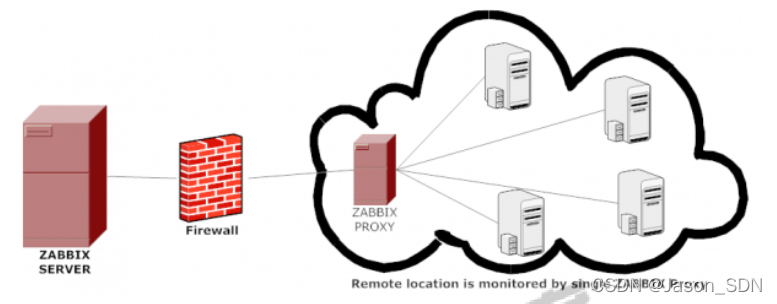
proxy 可以有多个,每个proxy收集并保存其可以连接的agent,然后将数据统一发送给给zabbix
server进行展示。其实,我们可以将 proxy 理解为一个精简版的zabbix server。
案例1:被动模式代理
代理服务器 10.0.0.13 proxy
zabbix    10.0.0.12 zabbix-server
client    10.0.0.14
client    10.0.0.15
a.配置代理服务器(proxy-server)
1.配置数据库
[root@proxy ~]#apt -y install mariadb-server
[root@proxy ~]#mysql_secure_installation
NOTE: RUNNING ALL PARTS OF THIS SCRIPT IS RECOMMENDED FOR ALL MariaDB
SERVERS IN PRODUCTION USE! PLEASE READ EACH STEP CAREFULLY!
In order to log into MariaDB to secure it, we'll need the current
password for the root user. If you've just installed MariaDB, and
you haven't set the root password yet, the password will be blank,
so you should just press enter here.
Enter current password for root (enter for none):
OK, successfully used password, moving on...
Setting the root password ensures that nobody can log into the MariaDB
root user without the proper authorisation.
Set root password? [Y/n] y
New password: #数据库密码为123456
Re-enter new password:
Password updated successfully!
Reloading privilege tables..
... Success!
By default, a MariaDB installation has an anonymous user, allowing anyone
to log into MariaDB without having to have a user account created for
them. This is intended only for testing, and to make the installation
go a bit smoother. You should remove them before moving into a
production environment.
Remove anonymous users? [Y/n]
... Success!
Normally, root should only be allowed to connect from 'localhost'. This
ensures that someone cannot guess at the root password from th 最低0.47元/天 解锁文章






 扫一扫
扫一扫


 1323
1323

 被折叠的 条评论
为什么被折叠?
被折叠的 条评论
为什么被折叠?
 到【灌水乐园】发言





