



背景介绍
一、SMB协议
SMB协议是基于TCP-NETBIOS下的,一般端口使用为139,445。
服务器信息块(SMB)协议是一种IBM协议,用于在计算机间共享文件、打印机、串口等。SMB 协议可以用在因特网的TCP/IP协议之上,也可以用在其它网络协议如IPX和NetBEUI 之上。
SMB 一种客户机/服务器、请求/响应协议。通过 SMB 协议,客户端应用程序可以在各种网络环境下读、写服务器上的文件,以及对服务器程序提出服务请求。此外通过 SMB 协议,应用程序可以访问远程服务器端的文件、以及打印机、邮件槽(mailslot)、命名管道(named pipe)等资源。
在 TCP/IP 环境下,客户机通过 NetBIOS over TCP/IP(或 NetBEUI/TCP 或 SPX/IPX)连接服务器。一旦连接成功,客户机可发送 SMB 命令到服务器上,从而客户机能够访问共享目录、打开文件、读写文件,以及一切在文件系统上能做的所有事情。
从 Windows 95 开始,Microsoft Windows 操作系统(operating system)都包括了客户机和服务器 SMB 协议支持。Microsoft 为 Internet 提供了 SMB 的开源版本,即通用 Internet 文件系统 (CIFS)。与现有 Internet 应用程序如文件传输协议(FTP)相比, CIFS 灵活性更大。对于 UNIX 系统,可使用一种称为 Samba 的共享软件
二、CIFS(Common Internet File System) 协议
CIFS 是一个新提出的协议,它使程序可以访问远程Internet计算机上的文件并要求此计算机的服务。CIFS 使用客户/服务器模式。客户程序请求远在服务器上的服务器程序为它提供服务。服务器获得请求并返回响应。CIFS是公共的或开放的SMB协议版本,并由Microsoft使用。SMB协议现在是局域网上用于服务器文件访问和打印的协议。象SMB协议一样,CIFS在高层运行,而不象TCP/IP协议那样运行在底层。CIFS可以看做是应用程序协议如文件传输协议和超文本传输协议的一个实现。
三、NETBios协议
Netbios (网络基本输入/输出系统)最初由 IBM,Sytek 作为API开发,使用户软件能使用局域网的资源。自从诞生,Netbios成为许多其他网络应用程序的基础。严格意义上,Netbios 是接入网络服务的接口标准。
Netbios 原来是作为THE网络控制器为 IBM 局域网设计的,是通过特定硬件用来和网络操作系统 连接的软件层。Netbios经扩展,允许程序使用Netbios接口来操作IBM令牌环结构。Netbios 已被公认为工业标准,通常参照 Netbios-compatible LANs。
它提供给网络程序一套方法,相互通讯及传输数据。基本上,Netbios 允许程序和网络会话。它的目的是把程序和任何类型的硬件属性分开。它也使软件开发员可以免除以下负担:开发网络错误修复,低层信息寻址和路由。使用Netbios接口,可以为软件开发员做许多工作。
Netbios使程序和局域网操作能力之间的接口标准化。有它们可以将程序细化到为OSI模型的哪一层所写,使程序能移植到其他网络上。在Netbios局域网环境下,计算机通过名字被系统知道。网络中每台计算机都有通过不同方法编的永久性名称。这些名称将在下面做进一步讨论。
通过使用Netbios的数据报或广播方式,在Netbios局域网上的pc机建立会话彼此联络。会话允许更多的信息被传送,探测错误,和纠正。通信是在一对一的基础上的。数据报或广播方式允许一台计算机和多台其他的计算机同时通信,但信息大小受限。使用数据报或广播方式没有探测错误和纠正。然而,数据报通信可以不必建立一个会话。
在这种环境下所有的通信以一种称为“网络控制块“的格式提交给NetBIOS。内存中这些块的分配依赖于用户程序。这些“网络控制块“分配到域中,分别为输入/输出保留。
在当今的环境中,NetBIOS是使用很普遍的协议。以太网,令牌环,IBM PC网都支持NetBIOS。在它原始版本中,它仅作为程序和网络适配器的接口。从那以后,传输类功能加入NetBIOS,使它功能日益增多。
在NetBIOS里,面向连接(tcp)和无连接(udp)通信均支持。它支持广播和复播,支持三个分开的服务:命名,会话,数据报。
操作
一、添加依赖
去maven Repository找对应的版本
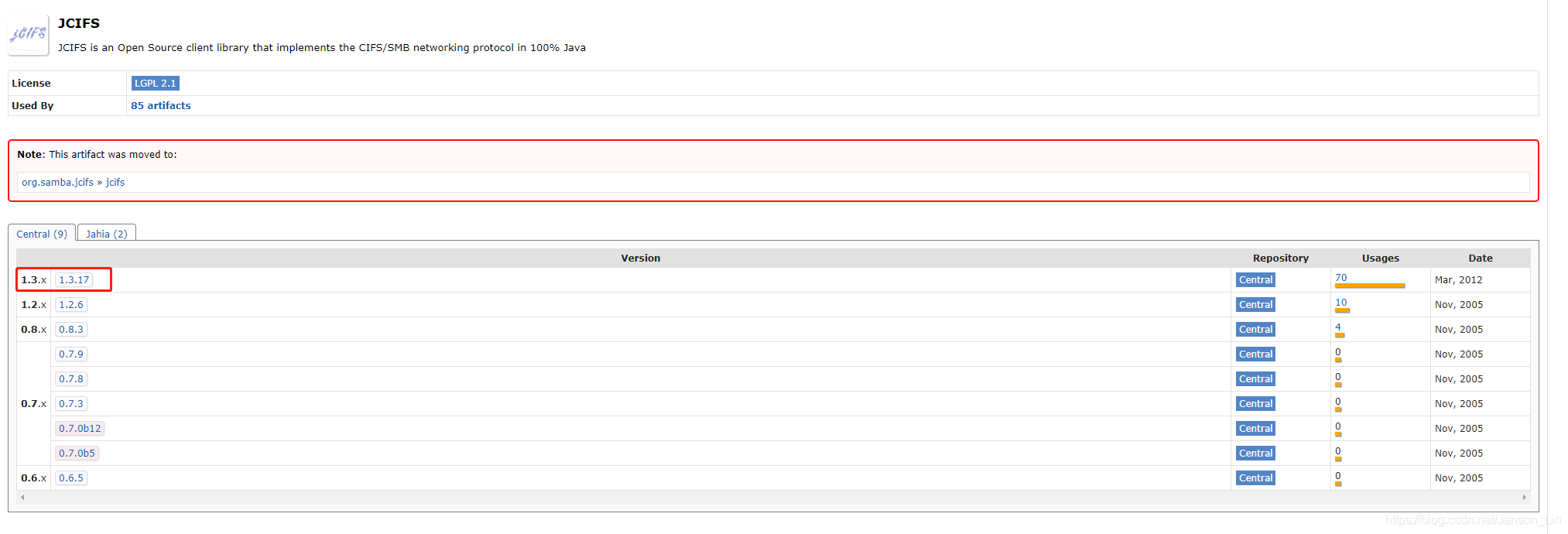
<dependency>
       <groupId>jcifs</groupId>
       <artifactId>jcifs</artifactId>
       <version>1.3.17</version>
</dependency>
二、读取文件
/**
  * 读取共享文件夹下的所有文件(文件夹)的名称
  * @param remoteUrl
  */
public static void getSharedFileList(String remoteUrl) {
    SmbFile smbFile;
    try {
        // smb://userName:passWord@host/path/
        smbFile = new SmbFile(remoteUrl);
        if (!smbFile.exists()) {
            System.out.println("no such folder");
        } else {
            SmbFile[] files = smbFile.listFiles();
            for (SmbFile f : files) {
                System.out.println(f.getName());
            }
        }
    } catch (MalformedURLException e) {
        e.printStackTrace();
    } catch (SmbException e) {
        e.printStackTrace();
    }
}
三、创建文件夹
/**
 * 创建文件夹
 * @param remoteUrl
 * @param folderName
 * @return
 */
public static void smbMkDir(String remoteUrl, String folderName) {
    SmbFile smbFile;
    try {
        // smb://userName:passWord@host/path/folderName
        smbFile = new SmbFile(remoteUrl + folderName);
        if (!smbFile.exists()) {
            smbFile.mkdir();
        }
    } catch (MalformedURLException e) {
        e.printStackTrace();
    } catch (SmbException e) {
        e.printStackTrace();
    }
}
四、上传文件
/**
  * 上传文件
  * @param remoteUrl
  * @param shareFolderPath
  * @param localFilePath
  * @param fileName
  */
public static void uploadFileToSharedFolder(String remoteUrl, String shareFolderPath, String localFilePath, String fileName) {
    InputStream inputStream = null;
    OutputStream outputStream = null;
    try {
        File localFile = new File(localFilePath);
        inputStream = new FileInputStream(localFile);
        // smb://userName:passWord@host/path/shareFolderPath/fileName
        SmbFile smbFile = new SmbFile(remoteUrl + shareFolderPath + "/" + fileName);
        smbFile.connect();
        outputStream = new SmbFileOutputStream(smbFile);
        byte[] buffer = new byte[4096];
        int len = 0; // 读取长度
        while ((len = inputStream.read(buffer, 0, buffer.length)) != -1) {
            outputStream.write(buffer, 0, len);
        }
        // 刷新缓冲的输出流
        outputStream.flush();
    } catch (FileNotFoundException e) {
        e.printStackTrace();
    } catch (MalformedURLException e) {
        e.printStackTrace();
    } catch (IOException e) {
        e.printStackTrace();
    } finally {
        try {
            outputStream.close();
            inputStream.close();
        } catch (IOException e) {
            e.printStackTrace();
        }
    }
}
五、下载文件
/**
  * 下载文件到浏览器
  * @param httpServletResponse
  * @param remoteUrl
  * @param shareFolderPath
  * @param fileName
  */
public static void downloadFileToBrowser(HttpServletResponse httpServletResponse, String remoteUrl, String shareFolderPath, String fileName) {
    SmbFile smbFile;
    SmbFileInputStream smbFileInputStream = null;
    OutputStream outputStream = null;
    try {
        // smb://userName:passWord@host/path/shareFolderPath/fileName
        smbFile = new SmbFile(remoteUrl + shareFolderPath + "/" + fileName);
        smbFileInputStream = new SmbFileInputStream(smbFile);
        httpServletResponse.setHeader("content-type", "application/octet-stream");
        httpServletResponse.setContentType("application/vnd.ms-excel;charset=UTF-8");
        httpServletResponse.setHeader("Content-disposition", "attachment; filename=" + fileName);
        // 处理空格转为加号的问题
        httpServletResponse.setHeader("Content-Disposition", "attachment; fileName=" + fileName + ";filename*=utf-8''" + URLEncoder.encode(fileName, "UTF-8").replaceAll("\\+", "%20"));
        outputStream = httpServletResponse.getOutputStream();
        byte[] buff = new byte[2048];
        int len;
        while ((len = smbFileInputStream.read(buff)) != -1) {
            outputStream.write(buff, 0, len);
        }
    } catch (MalformedURLException e) {
        e.printStackTrace();
    } catch (SmbException e) {
        e.printStackTrace();
    } catch (UnknownHostException e) {
        e.printStackTrace();
    } catch (IOException e) {
        e.printStackTrace();
    }
    finally {
        try {
            outputStream.close();
            smbFileInputStream.close();
        } catch (IOException e) {
            e.printStackTrace();
        }
    }
}

/**
  * 下载文件到指定文件夹
  * @param remoteUrl
  * @param shareFolderPath
  * @param fileName
  * @param localDir
  */
public static void downloadFileToFolder(String remoteUrl, String shareFolderPath, String fileName, String localDir) {
    InputStream in = null;
    OutputStream out = null;
    try {
        SmbFile remoteFile = new SmbFile(remoteUrl + shareFolderPath + File.separator + fileName);
        File localFile = new File(localDir + File.separator + fileName);
        in = new BufferedInputStream(new SmbFileInputStream(remoteFile));
        out = new BufferedOutputStream(new FileOutputStream(localFile));
        byte[] buffer = new byte[1024];
        while (in.read(buffer) != -1) {
            out.write(buffer);
            buffer = new byte[1024];
        }
    } catch (Exception e) {
        e.printStackTrace();
    } finally {
        try {
            out.close();
            in.close();
        } catch (IOException e) {
            e.printStackTrace();
        }
    }
}
六、删除文件
/**
  * 删除文件
  * @param remoteUrl
  * @param shareFolderPath
  * @param fileName
  */
public static void deleteFile(String remoteUrl, String shareFolderPath, String fileName) {
    SmbFile SmbFile;
    try {
        // smb://userName:passWord@host/path/shareFolderPath/fileName
        SmbFile = new SmbFile(remoteUrl + shareFolderPath + "/" + fileName);
        if (SmbFile.exists()) {
            SmbFile.delete();
        }
    } catch (MalformedURLException e) {
        e.printStackTrace();
    } catch (SmbException e) {
    e.printStackTrace();
    }
}


/**
  * 删除文件夹
  * @param remoteUrl
  * @param shareFolderPath
  */
public static void deleteFile(String remoteUrl, String shareFolderPath) {
    SmbFile SmbFile;
    try {
        // smb://userName:passWord@host/path/shareFolderPath
        SmbFile = new SmbFile(remoteUrl + shareFolderPath);
        if (SmbFile.exists()) {
            SmbFile.delete();
        }
    } catch (MalformedURLException e) {
        e.printStackTrace();
    } catch (SmbException e) {
    e.printStackTrace();
    }
}





 扫一扫
扫一扫


 3273
3273

 被折叠的 条评论
为什么被折叠?
被折叠的 条评论
为什么被折叠?
 到【灌水乐园】发言





