



 本文介绍了DOM的基本操作,如通过id、class、tagName等获取节点,使用querySelector和querySelectorAll进行更复杂的查询。此外,还讲解了如何修改节点内容和属性,添加及删除节点。接着,文章讨论了DOM事件,包括鼠标事件和事件传播机制,以及addEventListener与onclick的区别。最后,提到了BOM(BrowserObjectModel)的相关概念,如location、navigator和window的一些方法,以及AJAX的基础用法。
DOM基础
document object model
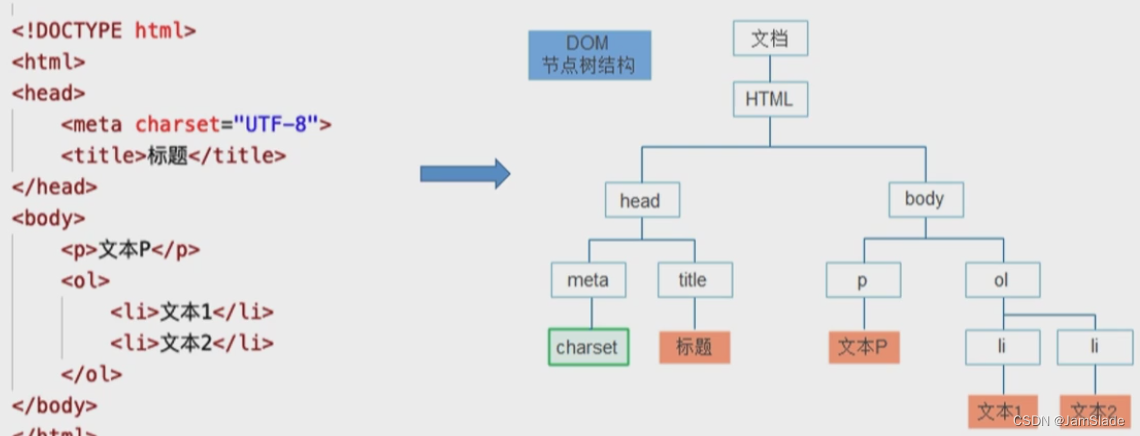
基本操作
- 增
- 删
- 改
- 查
查:
- document成员函数传入 id class tagName等内容获取DOM节点
- css选择去查询节点
- 获取的DOM对象访问DOM对象的成员
let domResult;
domResult = document.getElementsByTagName('li');
//返回一个类数组对象 NodeList 获取所有li元素
domResult = document.querySelector('li');
//CSS选择器 查询第一个标签名为p的节点
domResult = document.querySelectorAll('li');
//所有

domResult = document.querySelectorAll("main > *")
//匹配<main>中所有子元素 不包括子元素的子元素
domResult = document.querySelectorAll("main *")
//匹配<main>中所有子孙元素
domResult = document.querySelectorAll("main a")
//匹配<main>中所有a元素
domResult = document.querySelectorAll("img+h3")
//匹配跟在img后方的h3元素
domResult = document.querySelectorAll("[date-index]")
//匹配跟在data-index属性元素
domResult = document.querySelectorAll("[date-index]='1'")
//匹配跟在data-index属性=1的元素
let ulDomResult = document.getElementsByTagName('ul')[0];
//获取对象的其中一个节点
console.log(ulDomResult.parentNode);//父节点 如果ul被main包围,就输出main
改
//改
let titleDemo = document.getElementById('sth');
titleDemo.innerHTML = "<strong> a test </strong>" ;//改样式和内容
titleDemo.innerContent = "<strong> a test </strong>"; //只改内容
titleDemo.style = 'color : blue';
titleDemo.setAttribute("an_attribute", "value");
console.log(titleDemo.getAttribute(an_attribute));
增
//增
let newDome = document.createElement('p');
let da = Date();
newDome.textContent = "当前时间为" + [ da.getHours(), da.getMinutes(),  da.getSeconds()].join(':');
document.body.appendChild(newDome);
删
//删
let toRemove = document.getElementsByTagName('li')[0];
console.log(toRemove);
toRemove.remove();
DOM事件
- 鼠标
// 1. 用DOM对象onclikc成员赋值为函数监听事件
let clickDemo = document.getElementById('an id');
clickDemo.onclick = function(event)
{//浏览器帮你执行这个函数
    alert('点击响应事件');
    console.log('li响应click事件');
};//onclick的事件绑定只能绑定一个函数,后续的函数会覆盖之前的函数
- 触摸
- 键盘
- 媒体
- 剪切板
- 资源
事件传播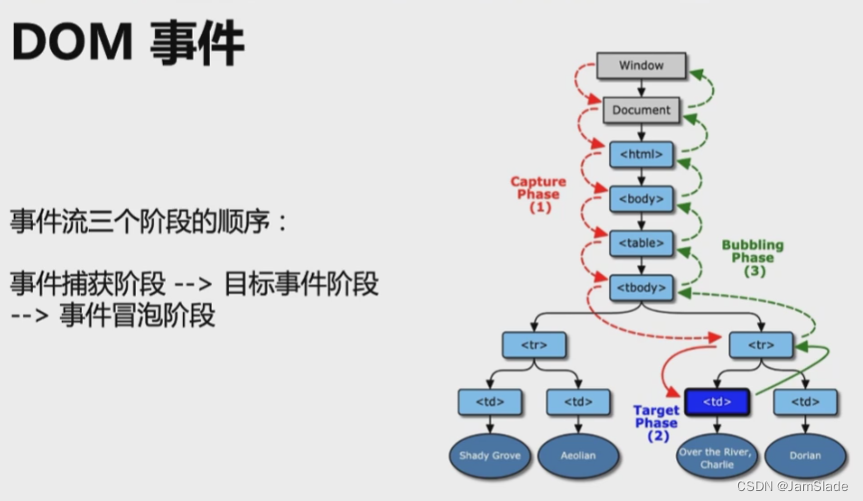
除了DOM成员函数,还可以用addEventListener
let imgDemo = document.getElementsByTagName("img")[0];
imgDemo.addEventListener("click", function(event)
    {
        console.log("addEventListerner 产生的事件触发");
    }
)//可以重复绑定多个相同的事件,会按顺序运行函数
//但是onclick的事件绑定只能绑定一个函数,后续的函数会覆盖之前的函数
onclick是0级
addEventListener是2级
BOM
browser object model
控制浏览器行为
- location
- navigator
- screen
- alter prompt confirm
- localStorage
alter
window.alter('welcome');
//浏览器出现一个弹窗
prompt
let proptResult = window.prompt("请输入你的名字" , "Your name");
console.log(proptResult);
//弹出一个对话框,可编辑Your name的部分
confirm
let confirmResult = window.confirm("是否要跳转百度?");
if(confirmResult)
{
	window.location.herf = "http://www.baidu.com";
}
navigator
let info = window.navigator.userAgent;
let infoDemo = document.createElement('footer');
infoDemo.textContent = "浏览器信息为:" + info;
document.body.appendChild(infoDemo);
location的属性
loaction.herf //当前url
location.protocal //协议
location.host //域名
location.pathname //路径
location.search //参数
location.hash //哈希值
其他API
主要讲AJAX
异步的Js和XML
js请求服务器数据,数据更新到网页
- XMLHttpRequest
- Fetch
let httpReq = new XMLHttpRequest();
if(httpReq)//先判断
{
    alter("浏览器不支持XMLHttpRequest");
}
else
{
    httpReq.onreadystatechange = function()
    {
        if(httpReq.readyState === httpReq.DONE)
        {
            if(httpReq.status === 200)
            {
                console.log(httpReq.responseText);
            }
            else
            {
                console.log("some problems occures with the request.")
            }
        }
        else
        {
            console.log('readyStat change:', httpReq.readyState);
        }

    };
    httpReq.open(
        'GET',
        'HTTPS'
    );
    httpReq.send();
}
//fetch
fetch("https...",)
    .then(function(response)
        {
            return response.json();
        }
    )
    .then(function(myJson)
        {
            console.log(myJson);
        }
    )





 扫一扫
扫一扫


 1605
1605

 被折叠的 条评论
为什么被折叠?
被折叠的 条评论
为什么被折叠?
 到【灌水乐园】发言





