


paddingis the space between the content and theborder, whereasmariginis the space outside the border.
padding是内容和边框之间的区域, 而marigin是边框之外的区域
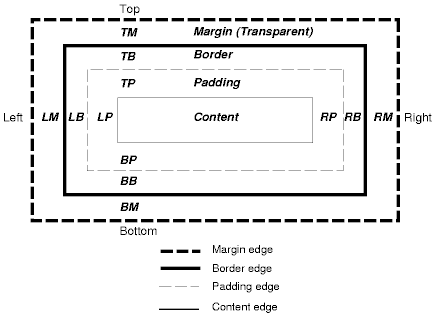
让我们验证一下, 快速新建一个文件, 内容结构如下
import React from 'react';
import './App.css';

export default function App() {
  return (
    <div className='outer'>
      <div className='inner'>
        content
      </div>
    </div>
  )
}
对应的css文件为
.outer {
  border: 5px solid;
}

.inner {
  border: 5px solid rgb(158, 14, 14);
  background-color: yellowgreen;
  padding: 50px 0;
  margin: 0 50px;
}
可以看到此时网页为

content距离上下border的距离均为50px, 但是在inner-border内, inner的background-color都可以发挥作用
而content左右,距离outer的距离均为50px, 且没有背景颜色, 证明margin是border距离outer的距离
从控制台可以很清晰的看到这些
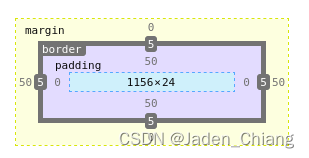
但是, margin还有一个特点, 那就是margin-top和margin-bottom是collapsible(可折叠的), 举个例子, 有如下两个组件
<div className="topDiv"></div>
<div className="bottomDiv"></div>
其css样式如下:
.topDiv {
  border: 5px solid;
  min-height: 15px;
  margin-bottom: 20px;
}

.bottomDiv {
  border: 5px solid;
  min-height: 15px;
  margin-top: 50px
}
在topiv中, 有一个margin-bottom设置为20px, 在bottoDiv中, 有一个margin-top设置为50px, 正常来说, 两个div的上下距离应该为20+50=70px, 但实际上, 两者之间的距离为50px
不过margin-left和margin-right并没有这个特点!






 扫一扫
扫一扫


 208
208

 被折叠的 条评论
为什么被折叠?
被折叠的 条评论
为什么被折叠?
 到【灌水乐园】发言





