



 本文深入讲解Python中的数据容器,包括列表、元组、字典和集合的创建、操作及应用场景,适合初学者和进阶者巩固知识。
Python的数据容器
Python的数据容器
大一下学期选修的Python课程,以后就用发日志的方式总结一些Python的知识点,当作自己的学习笔记了。
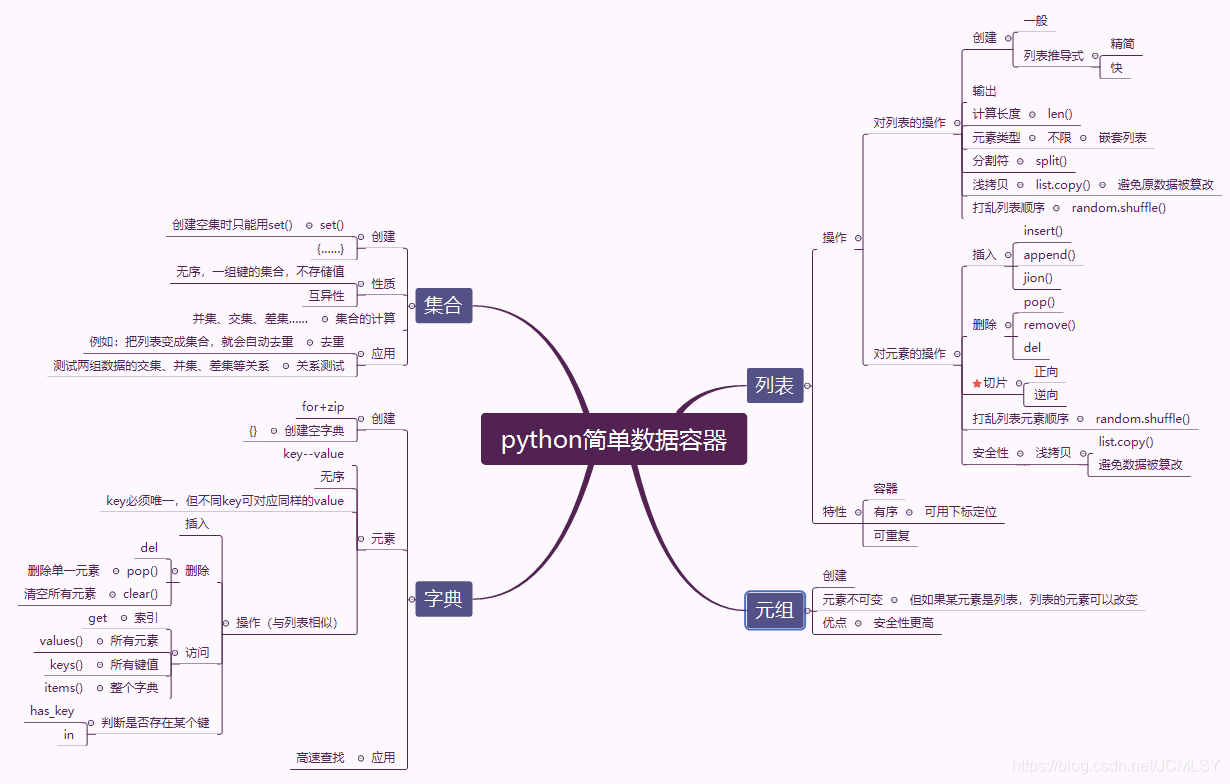
列表
列表:由一系列按特定顺序排列的元素组成。可以创建包含字符、数字的列表,只要你想,任何东西都可以装进列表,其中的元素也可以没有任何关系。列表让我们可以在一个地方存储成组的信息,其中可以只包含几个元素,也可以包含数百万个元素。
访问列表和列表元素
对于一个已经定义的列表,可以直接用print(List)输出,但是输出结果会有[]和’’。
大多数时候,我们只需要访问列表中的某些元素。可以通过方括号[]和元素的索引来实现这一目的,特别注意:列表的索引是从0开始的。
List=['abc','bcd','cde','def','efg','fgh']
print(List)
print(List[0])
print(List[4])
对列表元素的操作
修改列表元素
列表与元组最大的区别就在于列表的元素是可修改的,而元组的元素不能随意修改(如果元组的某一元素是列表,是否可以修改这个列表的元素?答案是:可以!)
列表元素的修改,只需要用=重新对元素赋值
List=['abc','bcd','cde','def','efg','fgh']
print(List[2])
List[2]='hello world'
print(List[2])
在列表中添加元素
| 名称 | 作用 | 用法 |
|---|---|---|
| append() | 在列表末尾添加元素 | List.append(‘new’) |
| insert() | 在列表的任意位置插入元素 | List.insert(num,‘new’) |
List=['abc','bcd','cde','def','efg','fgh']
print(List)
List.append('new')
print(List)
List.insert(1,'hello world')
print(List)
从列表中删除元素
| 名称 | 作用 | 用法 | 备注 |
|---|---|---|---|
| del | 删除位置已知的元素 | del List[num] | del 删除的元素,不可再访问 |
| pop() | 删除并使用位置已知的元素 | List.pop() | 使用pop()删除元素,如果不加索引,默认为删除列表的最后一个元素。 |
| remove() | 根据值删除元素 | List.remove(‘name’) | 使用remove()删除元素时,也可以接着使用它的值。remove()只能删除第一个指定的值,如果要删除的值在列表中出现多次,需要用循环来实现全部删除。 |
List = ['abc','bcd','cde','def','efg','fgh']
print(List)
del List[0]
print(List)
a = List.pop()
print(a)
print(List)
b = List.pop(2)
print(b)
print(List)
c = List.remove('efg')
print(c)#可以看见此处remove使用被删除元素的用法有别于pop
print(List)
d = 'bcd'
List.remove('bcd')
print(d)
print(List)
总结,如果你要从列表中删除一个元素,且不在以任何方式使用它,就使用del 语句,否则应使用pop()或remove()。del和pop()是根据元素的索引来删除,remove()是根据元素具体的值。
列表元素的排序
| 名称 | 作用 | 用法 |
|---|---|---|
| sort() | 对列表进行永久性排序(按字母顺序) | List.sort() |
| 反向排序 | List.sort(reverse=True) | |
| sorted | 对列表进行临时排序临时排序 | sorted(List) |
| 反向排序 | sorted(List,reverse=True) | |
| reverse() | 对列表进行永久性的前后反转(注意是反转不是反向排序!) | List.reverse() |
cars = ['bmw','audi','toyota','subaru']
cars.sort()
print(cars)
cars = ['bmw','audi','toyota','subaru']
cars.sort(reverse = True)
print(cars)
cars=['bmw','audi','toyota','subaru']
print(sorted(cars))
cars=['bmw','audi','toyota','subaru']
print(sorted(cars,reverse = True))
cars=['bmw','audi','toyota','subaru']
cars.reverse()
print(cars)
确定列表的长度
使用函数len()
List = ['abc','bcd','cde','def','efg','fgh']
print(len(List))
对列表的操作
列表的遍历
使用for循环
List = ['abc','bcd','cde','def','efg','fgh']
for item in List:
    print(item)
数字列表的创建
使用range()函数,或采用列表解析
使用方法:list(range(起始数值,终止数值,步长))
注:最终生成的列表的最后一个值小于终止数值;步长默认为1
List = list(range(1,11,2))
print(List)
或利用循环生成列表
List = []
for value in range(1,11):
   List.append(value**2)
print(List)
还可以利用列表解析,这种方法显然简洁的多
List = [value**2 for value in range(1,11)]
print(List)
列表切片
列表切片–处理列表的部分元素
要创建切片,需要指定要使用的第一个元素和最后一个元素。而且结果中,不包含上述最后一个元素。
List = ['abc','bcd','cde','def','efg','fgh']
print(List[2:5])
逆向切片
List = ['abc','bcd','cde','def','efg','fgh']
print(List[-5:-2])
同时列表切片也可以在最后加一个步长参数,这一特点可用于输出一个反转的列表(不改变原有列表)
 List = ['abc','bcd','cde','def','efg','fgh']
print(List[0:5:2])
print(List[::-1])
元组
元组本质上是不可更改元素的列表。
定义元组
dim1 = (1,2,3,4,5)
print(dimention[0])
print(dimention[3])
#dimention[1] = 10   #如果尝试修改元组的元素值,会报错

list = [1,2,3,4]
dim2 = (list,2,3,4)
list[2] = 10   #值得注意的是,如果元组的元素是列表,那么该列表的元素是可以更改的
修改元组变量
虽然元组的元素是不可更改的,但是可以给存储元组的变量重新赋值,类似于重新定义整个元组
dim = (200,50)
print(dim)
dim = (100,30)
print(dim)
遍历元组
元组的遍历方法类似于列表,仍然可以使用for
dim = (1,2,3,4,5)
for i in dim:
    print(i)
判断元组是否存在某个值
dim = (1,3,5,7,9)
print(5 in dim)
print(0 in dim)
字典
- 字典的本质是一种哈希映射。
- 字典是一种大小可变的键值对集,其中的键key与值value都是Python对象
- 应用:高速查找
字典的创建
一般方法
dict = {1:"hello",4:"hello",2:"world",3:"!"}
print(dict)
**字典的数据元素是无序的,并不会按照初始化的顺序排列**
**不同的key可以对应相同的value,但一个value只能对应一个key**
利用for循环和zip()函数快速创建字典
dict_key = [1,2,3,4]
dict_value = ['hello','world','hello','BUPT']
dict = {}
for key,value in zip(dict_key,dict_value):
    dict[key] = value
print(dict)
**注意{}只可用于创建空字典,不能用来创建空集合**
字典元素的访问
字典的元素访问、插入、设置与列表相同。但是,列表和元组的索引是按顺序自动生成的,而字典的索引号就是键key。
dict = {1:"hello",4:"hello",2:"world",3:"!"}
print(dict[4])
访问字典元素,除了用索引,还可以通过get()方法,如果字典不包含某个键,会返回None,或自己指定的值。
dict = {1:"hello",4:"hello",2:"world",3:"!"}
print(dict.get(4))
print(dict.get(1,2))
字典元素的删减
| 名称 | 作用 |
|---|---|
| del函数 | 删除单一元素或整个字典 |
| pop()方法 | 删除单一元素 |
| clear()方法 | 清空字典所有元素 |
dict = {1:"hello",4:"hello",2:"world",3:"!"}
del dict[1]
print(dict)
del dic
print(dict)

dict = {1:"hello",4:"hello",2:"world",3:"!"}
dict.pop(4)
print(dict)

dict = {1:"hello",4:"hello",2:"world",3:"!"}
dict.clear()
print(dict)
判断字典是否存在某个键
dict = {1:"hello",4:"hello",2:"world",3:"!"}
print(5 in dict)
print(1 in dict)

#也可以使用内置的 has_key() 方法
print(dict.das_key(1))

#可以用 keys() 方法和 values() 方法获取所有的key和value
print('keys are: ',dict.keys())
print('values are: ',dict.values())
将字典转化为元组列表
可以通过items()方法取出字典中所有的key-value对,并保存为一个元组列表。
dict = {1:"hello",4:"hello",2:"world",3:"!"}
dict.items()
集合
- 集合是一种无序集,它是一组键的集合,不存储值
- 集合的元素是互异的,将列表转化为集合可用来去除列表中的重复值
- 集合也可以进行相应的数学运算:交集、并集、差集、补集
集合的创建
集合的创建有两种方法:利用set()函数,或直接用 {}
myset1 = set()
myset2 = set(["hello","1","2","world"])
myset3 = {"hello","1","2","world"}
print(myset1)
print(myset2)
print(myset3)
**创建空集合只能用 set()**
集合的运算
set1 = {'abc','hello','world','i','u'}
set2 = {'i','love','u','123'}
print(set1)
print(set2)
print('并集-或 ',set1 | set2)
print('交集-与 ',set1 & set2)
print('差集 ',set1 - set2)
print('对称差 ',set1 ^ set2)





 扫一扫
扫一扫


 405
405

 被折叠的 条评论
为什么被折叠?
被折叠的 条评论
为什么被折叠?
 到【灌水乐园】发言





