





 本文详细介绍如何在Spring Boot项目中整合RabbitMQ,包括添加依赖、配置RabbitMQ、自定义配置类、使用RabbitTemplate发送接收消息、替换默认的MessageConverter、基于注解的RabbitMQ使用方法及AmqpAdmin的编码创建交换器、队列和绑定。
【1】添加starter导入组件
pom文件如下:
<dependency>
	<groupId>org.springframework.boot</groupId>
	<artifactId>spring-boot-starter-cache</artifactId>
</dependency>
<dependency>
	<groupId>org.springframework.boot</groupId>
	<artifactId>spring-boot-starter-amqp</artifactId>
</dependency>
<!--<dependency>-->
	<!--<groupId>javax.cache</groupId>-->
	<!--<artifactId>cache-api</artifactId>-->
<!--</dependency>-->
<dependency>
	<groupId>org.springframework.boot</groupId>
	<artifactId>spring-boot-starter-web</artifactId>
</dependency>
<dependency>
	<groupId>org.mybatis.spring.boot</groupId>
	<artifactId>mybatis-spring-boot-starter</artifactId>
	<version>1.3.2</version>
</dependency>
<dependency>
	<groupId>org.springframework.boot</groupId>
	<artifactId>spring-boot-starter-data-redis</artifactId>
</dependency>
<dependency>
	<groupId>mysql</groupId>
	<artifactId>mysql-connector-java</artifactId>
	<scope>runtime</scope>
</dependency>
<dependency>
	<groupId>org.springframework.boot</groupId>
	<artifactId>spring-boot-starter-test</artifactId>
	<scope>test</scope>
</dependency>
【2】RabbitMQ配置
application.properties中配置如下:
spring.rabbitmq.host=192.168.2.110
spring.rabbitmq.username=guest
spring.rabbitmq.password=guest
# 下面两个是默认值,可以不用显示指定
spring.rabbitmq.port=5672
spring.rabbitmq.virtual-host=/
自定义RabbitMQ配置类
如下实例,自定义了连接工厂和SimpleRabbitListenerContainerFactory 以及在项目启动时初始化了交换器、队列并进行了路由绑定。当然,如果MQ服务器实现配置了好交换机、路由以及绑定规则,则不需要这些自定义配置,直接使用消息模板进行发送即可。
@Configuration
public class MQConfig {

	public static final String MIAOSHA_QUEUE = "miaosha.queue";
	public static final String QUEUE = "queue";
	public static final String TOPIC_QUEUE1 = "topic.queue1";
	public static final String TOPIC_QUEUE2 = "topic.queue2";
	public static final String HEADER_QUEUE = "header.queue";
	public static final String TOPIC_EXCHANGE = "topicExchage";
	public static final String FANOUT_EXCHANGE = "fanoutxchage";
	public static final String HEADERS_EXCHANGE = "headersExchage";

	@Bean
	public ConnectionFactory connectionFactory() {
	    CachingConnectionFactory connectionFactory = new CachingConnectionFactory();
	    connectionFactory.setUsername("admin");
	    connectionFactory.setPassword("123456");
	    connectionFactory.setVirtualHost("/");
	    connectionFactory.setPublisherConfirms(true);
	    connectionFactory.setAddresses("192.168.18.128:5672");//集群
	    return connectionFactory;
	}

	@Bean
    public SimpleRabbitListenerContainerFactory myFactory(
            SimpleRabbitListenerContainerFactoryConfigurer configurer) {
        SimpleRabbitListenerContainerFactory factory =
                new SimpleRabbitListenerContainerFactory();
        configurer.configure(factory, connectionFactory());
//        factory.setMessageConverter(myMessageConverter());
        return factory;
    }
	/**
	 * Direct模式 交换机Exchange
	 */
	@Bean
	public Queue miaoshaQueue() {
		return new Queue("miaosha.queue", true);
	}

	@Bean
	public Queue queue() {
		return new Queue(QUEUE, true);
	}

	/**
	 * Topic模式 交换机Exchange
	 * */
	@Bean
	public Queue topicQueue1() {
		return new Queue(TOPIC_QUEUE1, true);
	}
	@Bean
	public Queue topicQueue2() {
		return new Queue(TOPIC_QUEUE2, true);
	}
	@Bean
	public TopicExchange topicExchage(){
		return new TopicExchange(TOPIC_EXCHANGE);
	}
	@Bean
	public Binding topicBinding1() {
		return BindingBuilder.bind(topicQueue1()).to(topicExchage()).with("topic.key1");
	}
	@Bean
	public Binding topicBinding2() {
		return BindingBuilder.bind(topicQueue2()).to(topicExchage()).with("topic.#");
	}
	/**
	 * Fanout模式 交换机Exchange
	 * */
	@Bean
	public FanoutExchange fanoutExchage(){
		return new FanoutExchange(FANOUT_EXCHANGE);
	}

	/**
	 * 广播模式不再需要路由键
	 * @return
	 */
	@Bean
	public Binding FanoutBinding1() {
		return BindingBuilder.bind(topicQueue1()).to(fanoutExchage());
	}
	@Bean
	public Binding FanoutBinding2() {
		return BindingBuilder.bind(topicQueue2()).to(fanoutExchage());
	}
	/**
	 * Header模式 交换机Exchange
	 * */
	@Bean
	public HeadersExchange headersExchage(){
		return new HeadersExchange(HEADERS_EXCHANGE);
	}
	@Bean
	public Queue headerQueue1() {
		return new Queue(HEADER_QUEUE, true);
	}
	@Bean
	public Binding headerBinding() {
		Map<String, Object> map = new HashMap<String, Object>();
		map.put("header1", "value1");
		map.put("header2", "value2");
		return BindingBuilder.bind(headerQueue1()).to(headersExchage()).whereAll(map).match();
	}

}
【3】测试发送接收消息
引入rabbitmq相关的starter后,RabbitAutoConfiguration就会默认对RabbitMQ进行配置。
主要配置如下:
- 自动配置了连接工厂ConnectionFactory;
- RabbitProperties封装了RabbitMQ的属性配置;
- RabbitTemplate用来发送接收消息;
- AmqpAdmin–RabbitMQ系统管理功能组件。
这里使用RabbitTemplate测试消息发送和接收,源码如下:
@RunWith(SpringRunner.class)
@SpringBootTest
public class SpringBootRabbitMQTests {

    @Autowired
    RabbitTemplate rabbitTemplate;

    @Test
    public void testSend(){
        Map<String,Object> map = new HashMap<>();
        map.put("msg","第一条消息");
        map.put("data", Arrays.asList("hello",true,"中"));
        rabbitTemplate.convertAndSend("exchange.direct","rabbitmq",map);
    }

    @Test
    public void testReceive(){
        Object o = rabbitTemplate.receiveAndConvert("rabbitmq");
        System.out.println(o.getClass());
        System.out.println(o);
    }
}
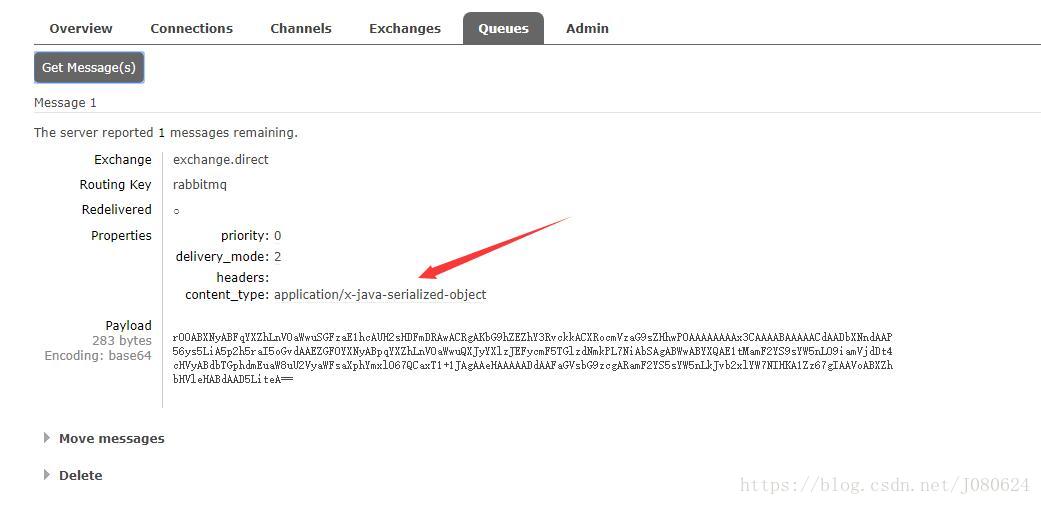
发送后查看后台队列并获取消息如下图:
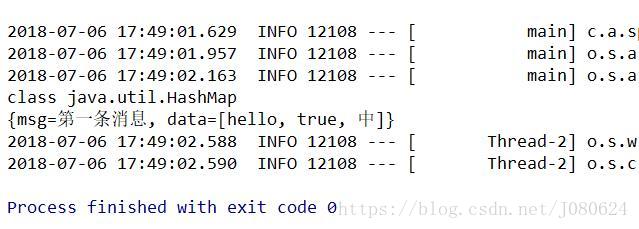
接收如下图所示:
RabbitTemplate使用详解
先看启类继承图:
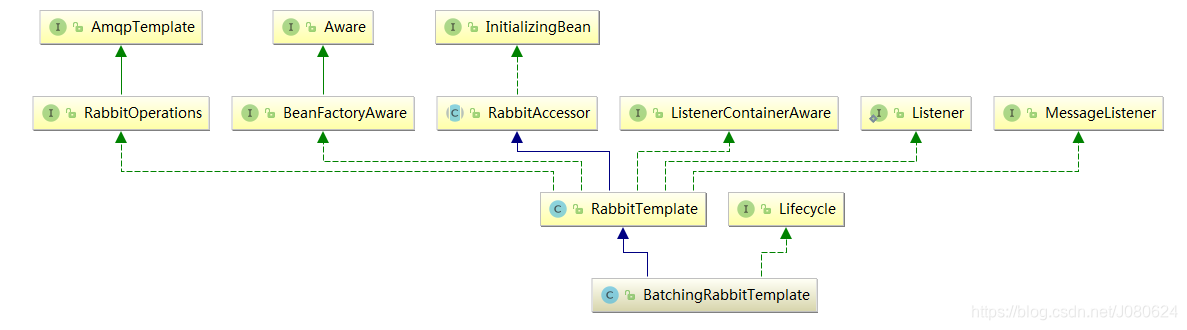
可以看到其主要实现了AmqpTemplate接口的一些抽象方法,故而也可以使用如下方式引入消息模板,debug发现其实现类为RabbitTemplate:
@Autowired
AmqpTemplate amqpTemplate ;

public void sendMiaoshaMessage(MiaoshaMessage mm) {
	String msg = RedisService.beanToString(mm);
	log.info("send message:"+msg);
	//使用默认交换机,参数为路由键和消息体
	amqpTemplate.convertAndSend(MQConfig.MIAOSHA_QUEUE, msg);
}
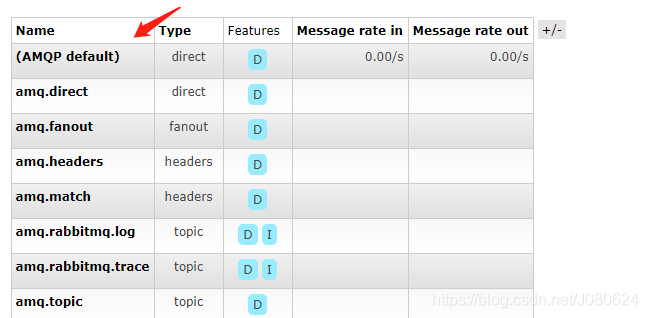
这里需要注意下,如果没有指定交换机(exchange),那么将会使用默认的交换机,默认交换机将会根据路由键的名字寻找对应的queue把消息转发过去。默认的交换机是direct机制(根据名字精确匹配),如下图所示:
指定交换器名字发送消息
参数为交换器名字,路由键以及消息体
public void sendTopic(Object message) {
	String msg = RedisService.beanToString(message);
	log.info("send topic message:"+msg);
	amqpTemplate.convertAndSend(MQConfig.TOPIC_EXCHANGE, "topic.key1", msg+"1");
	amqpTemplate.convertAndSend(MQConfig.TOPIC_EXCHANGE, "topic.key2", msg+"2");
}
【4】替换默认的MessageConverter
如下图所示,RabbitTemplate默认使用的是SimpleMessageConverter:
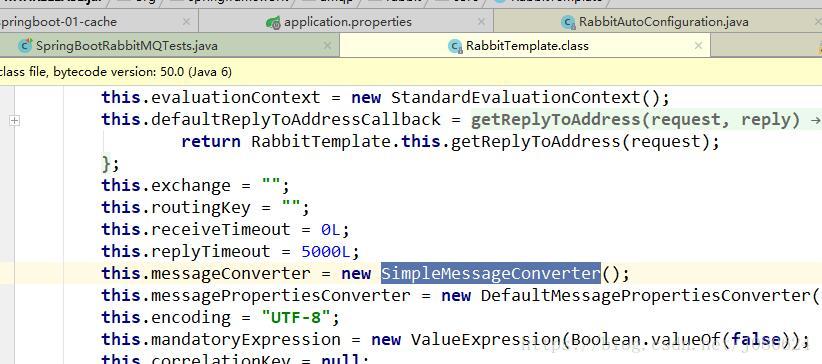
该转换器默认使用SerializationUtils进行序列化和反序列化。这里如果想将数据序列化为JSON格式,方便查看,可以注册自定义的转换器(ampq包下的转换器)。
源码示例如下:
import org.springframework.amqp.support.converter.Jackson2JsonMessageConverter;
import org.springframework.amqp.support.converter.MessageConverter;
import org.springframework.context.annotation.Bean;
import org.springframework.context.annotation.Configuration;

/**
 * Created by Janus on 2018/7/6.
 */
@Configuration
public class MyAMQPConfig {

    @Bean
    public MessageConverter messageConverter(){
        return new Jackson2JsonMessageConverter();
    }
}
再次发送消息后台管理页面查看队列:
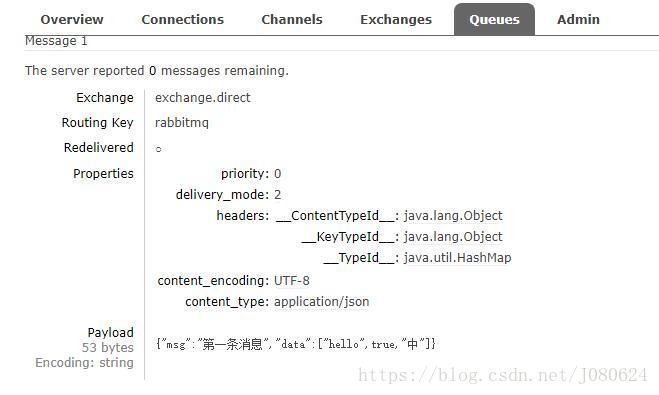
其他交换器类型的发送和接收,与上面相同,只是改一下对应交换器的名字即可。
【5】基于注解的RabbitMQ
① @EnableRabbit注解开启基于注解的RabbitMQ
@SpringBootApplication
@EnableCaching
@EnableRabbit
public class SpringBoot01CacheApplication {

	public static void main(String[] args) {
		SpringApplication.run(SpringBoot01CacheApplication.class, args);
	}
}
② @RabbitListener
源码如下:
@Target({ElementType.TYPE, ElementType.METHOD, ElementType.ANNOTATION_TYPE})
@Retention(RetentionPolicy.RUNTIME)
@MessageMapping
@Documented
@Repeatable(RabbitListeners.class)
public @interface RabbitListener {
    String id() default "";

    String containerFactory() default "";

    String[] queues() default {};

    boolean exclusive() default false;

    String priority() default "";

    String admin() default "";

    QueueBinding[] bindings() default {};

    String group() default "";
}
测试实例如下:
@Service
public class RabbitListenerService {

    @RabbitListener(queues = {"rabbitmq"})
    public void receive(Map<String,Object> map){

        System.out.println("从队列rabbitmq获取到数据 : "+map);
    }
}
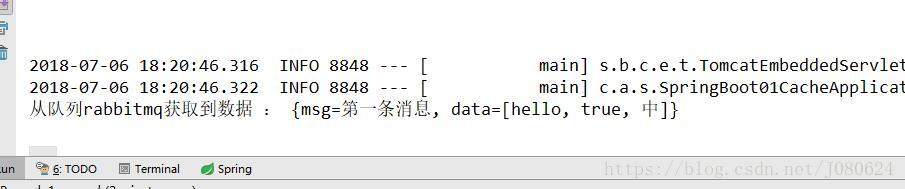
启动项目,一旦rabbitmq队列中有消息, 即会获取并打印,测试结果如下:
③ 获取消息头信息
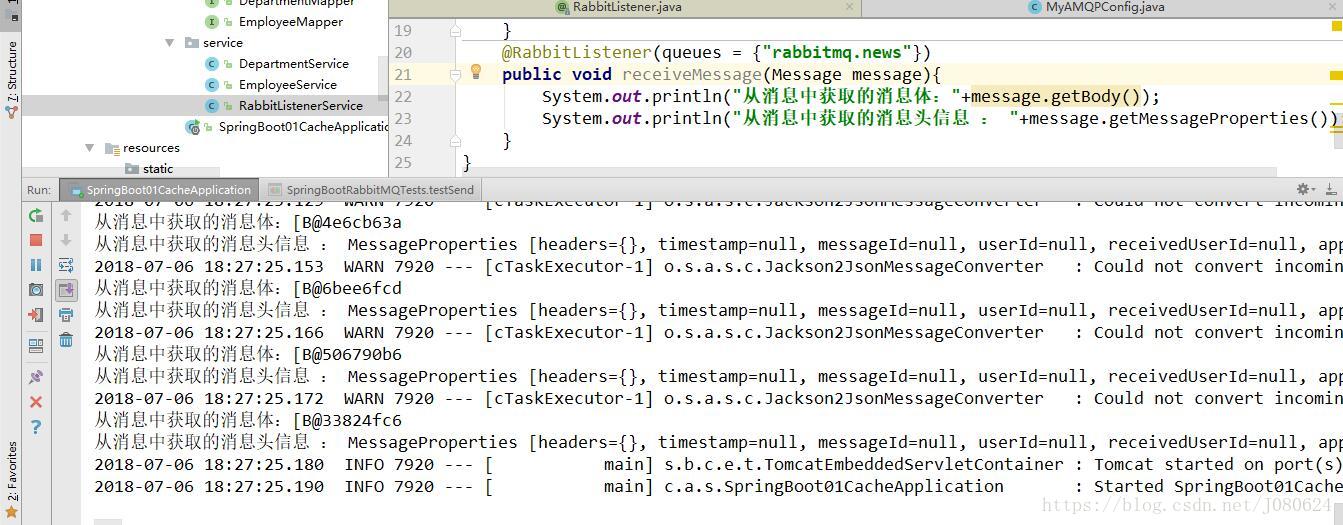
不光可以直接获取消息体信息,还可以使用Message作为参数,从中分别获取消息体和消息头,源码示例如下:
 @RabbitListener(queues = {"rabbitmq.news"})
 public void receiveMessage(Message message){
      System.out.println("从消息中获取的消息体:"+message.getBody());
      System.out.println("从消息中获取的消息头信息 : "+message.getMessageProperties());
  }
测试结果如下图:
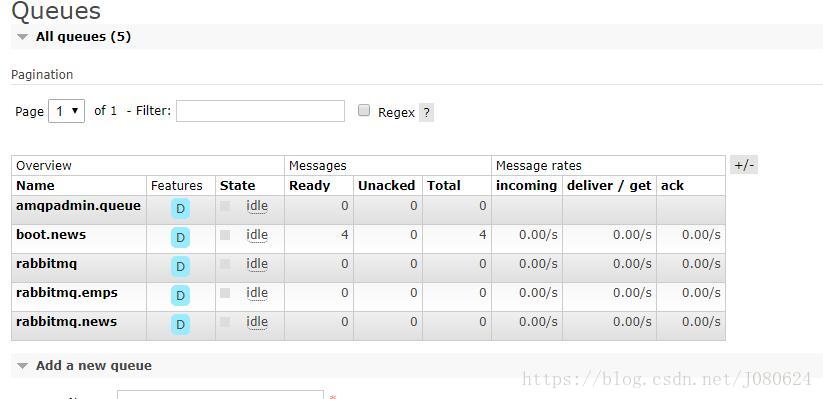
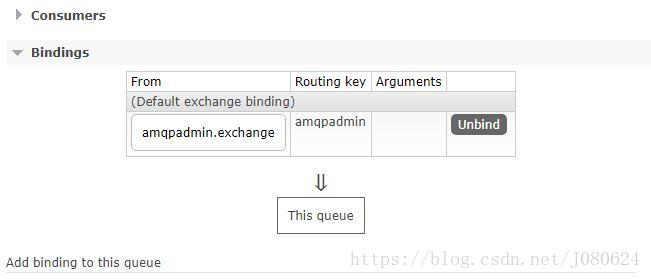
【6】AmqpAdmin编码创建交换器、队列并进行绑定
使用AmqpAdmin创建交换器、队列并将其进行了绑定,源码示例如下:
	@Autowired
    AmqpAdmin amqpAdmin;

    @Test
    public void createByAmqpAdmin(){
        //创建交换器
        amqpAdmin.declareExchange(new DirectExchange("amqpadmin.exchange"));
        System.out.println("创建交换器完成");
        //创建队列
        amqpAdmin.declareQueue(new Queue("amqpadmin.queue",true));
        Binding binding = new Binding("amqpadmin.queue", Binding.DestinationType.QUEUE,"amqpadmin.exchange","amqpadmin",null);
        amqpAdmin.declareBinding(binding);
    }
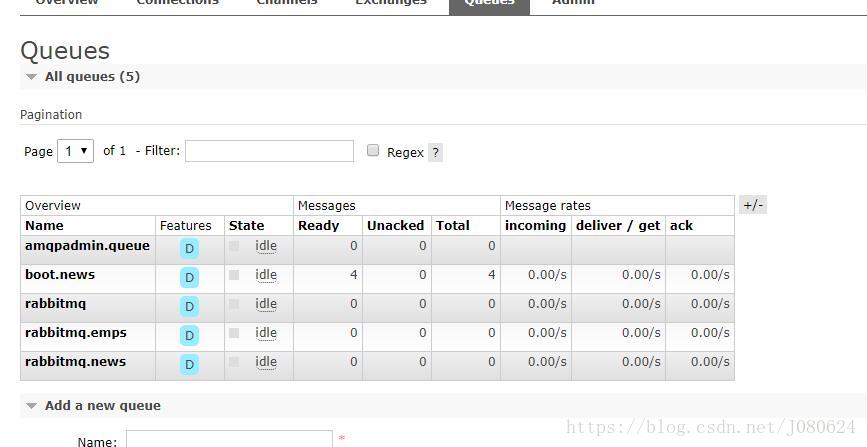
测试结果如下:





 扫一扫
扫一扫


 820
820

 被折叠的 条评论
为什么被折叠?
被折叠的 条评论
为什么被折叠?
 到【灌水乐园】发言





