



 本文介绍了MapReduce的入门案例WordCount,包括数据格式准备、Mapper、Reducer和Job提交。接着,详细讲解了MapReduce的运行模式,如集群和本地模式。重点讨论了MapReduce的分区,通过彩票中奖结果统计案例展示了如何自定义Partitioner和Reducer。最后,探讨了MapReduce中的计数器,提供了两种统计map接收到的数据记录条数的方法。
1.入门案例-WordCount
需求: 在一堆给定的文本文件中统计输出每一个单词出现的总次数
1. 数据格式准备
- 创建一个新的文件
cd /export/servers
vim wordcount.txt
- 向其中放入以下内容并保存
hello,world,hadoop
hive,sqoop,flume,hello
kitty,tom,jerry,world
hadoop
- 上传到 HDFS
hdfs dfs -mkdir /wordcount/
hdfs dfs -put wordcount.txt /wordcount/
2. Mapper
/**
*LongWritable   k1类型(偏移量)(不应Long,是为了序列化不臃肿)
*Text	V2类型(文本内容)
*Text	k2类型
*LongWritable	V2类型
*k1,v1--->k2,v2
**/
public class WordCountMapper extends Mapper<LongWritable,Text,Text,LongWritable> {
    /*
    key---->k1
    value---->v1
    context----->上下文对象
    */
    @Override
    public void map(LongWritable key, Text value, Context context) throws IOException, InterruptedException {
        Text text = new Text();
        LongWritable longWritable =new LongWritable();
        String line = value.toString();
        String[] split = line.split(",");
        text.set(word);
        longWritable.set(1);
        for (String word : split) {
            //上下文:环境,域对象,在一定范围内存值和取值
            //context.write(new Text(word),new LongWritable(1));
            context.write(text,longWritable);
        }

    }
}
//为什么要序列化?
//数据在不同node之间网络传输,需要序列化,IO流传输;
3. Reducer
/**
*新的k2,新的v2,k3,v3
*这个新的k2,v2是由k2,v2经过shuffle的分区、排序、规约、分组(必定有)形成的
**/
public class WordCountReducer extends Reducer<Text,LongWritable,Text,LongWritable> {
    /**
     * 自定义我们的reduce逻辑
     * 所有的key都是我们的单词,所有的values都是我们单词出现的次数
     * @param key  新的k2
     * @param values	新的v2
     * @param context	上下文
     * @throws IOException
     * @throws InterruptedException
     */
    @Override
    protected void reduce(Text key, Iterable<LongWritable> values, Context context) throws IOException, InterruptedException {

        long count = 0;
        for (LongWritable value : values) {
            count += value.get();
        }

        context.write(key,new LongWritable(count));
    }
}
4. 定义主类, 描述 Job 并提交 Job
public class JobMain extends Configured implements Tool {
    @Override
    public int run(String[] args) throws Exception {
        Job job = Job.getInstance(super.getConf(), JobMain.class.getSimpleName());
        //打包到集群上面运行时候,必须要添加以下配置,指定程序的main函数
        job.setJarByClass(JobMain.class);
        //第一步:读取输入文件解析成key,value对
        job.setInputFormatClass(TextInputFormat.class);
        TextInputFormat.addInputPath(job,new Path("hdfs://192.168.52.250:8020/wordcount"));

        //第二步:设置我们的mapper类
        job.setMapperClass(WordCountMapper.class);
        //设置我们map阶段完成之后的输出类型
        job.setMapOutputKeyClass(Text.class);
        job.setMapOutputValueClass(LongWritable.class);
        //第三步,第四步,第五步,第六步,省略
        //第七步:设置我们的reduce类
        job.setReducerClass(WordCountReducer.class);
        //设置我们reduce阶段完成之后的输出类型
        job.setOutputKeyClass(Text.class);
        job.setOutputValueClass(LongWritable.class);
        //第八步:设置输出类以及输出路径
        job.setOutputFormatClass(TextOutputFormat.class);
        TextOutputFormat.setOutputPath(job,new Path("hdfs://192.168.52.250:8020/wordcount_out"));
        boolean b = job.waitForCompletion(true);
        return b?0:1;
    }

    /**
     * 程序main函数的入口类
     * @param args
     * @throws Exception
     */
    public static void main(String[] args) throws Exception {
        Configuration configuration = new Configuration();
        Tool tool  =  new JobMain();
        int run = ToolRunner.run(configuration, tool, args);
        System.exit(run);
    }
}
2. MapReduce的运行模式
2.1 集群运行模式
- 将 MapReduce 程序提交给 Yarn 集群, 分发到很多的节点上并发执行
- 处理的数据和输出结果应该位于 HDFS 文件系统
- 提交集群的实现步骤: 将程序打成JAR包,并上传,然后在集群上用hadoop命令启动
hadoop jar hadoop_hdfs_operate-1.0-SNAPSHOT.jar cn.itcast.mapreduce.JobMain
2.2 本地运行模式
- MapReduce 程序是在本地以单进程的形式运行
- 处理的数据及输出结果在本地文件系统
- 本地模式运行的job不会出现在jobhistory的页面中
TextInputFormat.addInputPath(job,new Path("file:///E:\\mapreduce\\input"));
TextOutputFormat.setOutputPath(job,new Path("file:///E:\\mapreduce\\output"));
3. MapReduce的分区
3.1分区概述
在 MapReduce 中, 通过我们指定分区, 会将同一个分区的数据发送到同一个 Reduce 当中进行处理
例如: 为了数据的统计, 可以把一批类似的数据发送到同一个 Reduce 当中, 在同一个 Reduce 当中统计相同类型的数据, 就可以实现类似的数据分区和统计等
其实就是相同类型的数据, 有共性的数据, 送到一起去处理。Reduce 当中默认的分区只有一个

3.2 分区案例-彩票中奖结果统计
需求:将以下数据进行分开处理
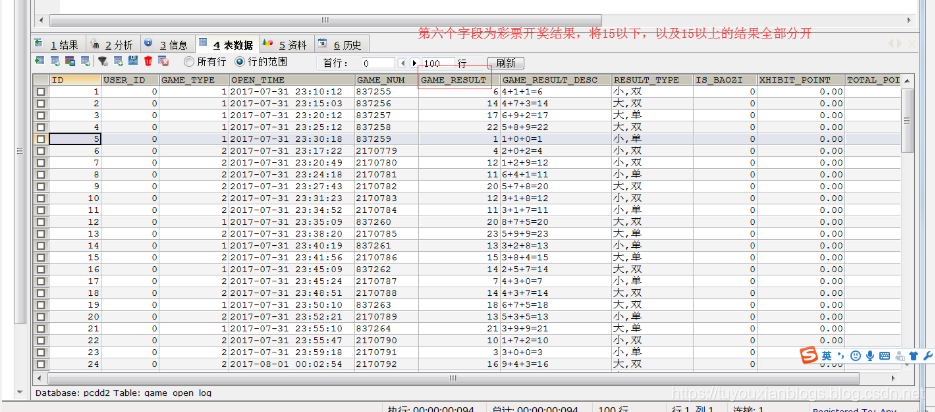
详细数据参见partition.csv 这个文本文件,其中第五个字段表示开奖结果数值,现在需求将15以上的结果以及15以下的结果进行分开成两个文件进行保存
1. 定义 Mapper
这个 Mapper 程序不做任何逻辑, 也不对 Key-Value 做任何改变, 只是接收数据, 然后往下发送
public class MyMapper extends Mapper<LongWritable,Text,Text,NullWritable>{
    @Override
    protected void map(LongWritable key, Text value, Context context) throws IOException, InterruptedException {
        context.write(value,NullWritable.get());
    }
}
2. 自定义 Partitioner
主要的逻辑就在这里, 这也是这个案例的意义, 通过 Partitioner 将数据分发给不同的 Reducer
/**
 * 这里的输入类型与我们map阶段的输出类型相同
 */
public class MyPartitioner extends Partitioner<Text,NullWritable>{
    /**
     * 返回值表示我们的数据要去到哪个分区
     * 返回值只是一个分区的标记,标记所有相同的数据去到指定的分区
     */
    @Override
    public int getPartition(Text text, NullWritable nullWritable, int i) {
        String result = text.toString().split("\t")[5];
        if (Integer.parseInt(result) > 15){
            return 1;
        }else{
            return 0;
        }
    }
}
3. 定义 Reducer 逻辑
这个 Reducer 也不做任何处理, 将数据原封不动的输出即可
public class MyReducer extends Reducer<Text,NullWritable,Text,NullWritable> {
    @Override
    protected void reduce(Text key, Iterable<NullWritable> values, Context context) throws IOException, InterruptedException {
        //不进行分组,使用NullWritable做value
        context.write(key,NullWritable.get());
    }
}
4. 主类中设置分区类和ReduceTask个数
public class PartitionMain  extends Configured implements Tool {
    public static void main(String[] args) throws  Exception{
        int run = ToolRunner.run(new Configuration(), new PartitionMain(), args);
        System.exit(run);
    }
    @Override
    public int run(String[] args) throws Exception {
        Job job = Job.getInstance(super.getConf(), PartitionMain.class.getSimpleName());
        job.setJarByClass(PartitionMain.class);
        job.setInputFormatClass(TextInputFormat.class);
        job.setOutputFormatClass(TextOutputFormat.class);
        TextInputFormat.addInputPath(job,new Path("hdfs://192.168.52.250:8020/partitioner"));
        TextOutputFormat.setOutputPath(job,new Path("hdfs://192.168.52.250:8020/outpartition"));
        job.setMapperClass(MyMapper.class);
        job.setMapOutputKeyClass(Text.class);
        job.setMapOutputValueClass(NullWritable.class);
        job.setOutputKeyClass(Text.class);
        job.setMapOutputValueClass(NullWritable.class);
        job.setReducerClass(MyReducer.class);
        /**
         * 设置我们的分区类,以及我们的reducetask的个数,注意reduceTask的个数一定要与我们的
         * 分区数保持一致
         */
        job.setPartitionerClass(MyPartitioner.class);
        job.setNumReduceTasks(2);
        boolean b = job.waitForCompletion(true);
        return b?0:1;
    }
}
4. MapReduce 中的计数器
计数器是收集作业统计信息的有效手段之一,用于质量控制或应用级统计。计数器还可辅助诊断系统故障。如果需要将日志信息传输到 map 或 reduce 任务, 更好的方法通常是看能否用一个计数器值来记录某一特定事件的发生。对于大型分布式作业而言,使用计数器更为方便。除了因为获取计数器值比输出日志更方便,还有根据计数器值统计特定事件的发生次数要比分析一堆日志文件容易得多。
hadoop内置计数器列表
| MapReduce任务计数器 | org.apache.hadoop.mapreduce.TaskCounter |
|---|---|
| 文件系统计数器 | org.apache.hadoop.mapreduce.FileSystemCounter |
| FileInputFormat计数器 | org.apache.hadoop.mapreduce.lib.input.FileInputFormatCounter |
| FileOutputFormat计数器 | org.apache.hadoop.mapreduce.lib.output.FileOutputFormatCounter |
| 作业计数器 | org.apache.hadoop.mapreduce.JobCounter |
每次mapreduce执行完成之后,我们都会看到一些日志记录出来,其中最重要的一些日志记录如下截图
[外链图片转存失败(img-eD8FgX29-1567901621698)(assets/1565967787848.png)]
所有的这些都是MapReduce的计数器的功能,既然MapReduce当中有计数器的功能,我们如何实现自己的计数器???
需求:以以上分区代码为案例,统计map接收到的数据记录条数
第一种方式
定义计数器,通过context上下文对象可以获取我们的计数器,进行记录
通过context上下文对象,在map端使用计数器进行统计
public class PartitionMapper  extends Mapper<LongWritable,Text,Text,NullWritable>{
    //map方法将K1和V1转为K2和V2
    @Override
    protected void map(LongWritable key, Text value, Context context) throws Exception{
        Counter counter = context.getCounter("MR_COUNT", "MyRecordCounter");
        counter.increment(1L);
        context.write(value,NullWritable.get());
    }
}
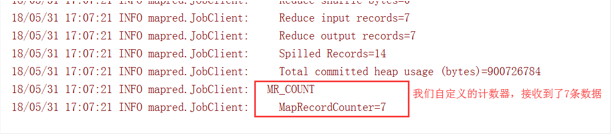
运行程序之后就可以看到我们自定义的计数器在map阶段读取了七条数据
第二种方式
通过enum枚举类型来定义计数器
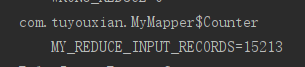
统计reduce端数据的输入的key有多少个
public class PartitionerReducer extends Reducer<Text,NullWritable,Text,NullWritable> {
   public static enum Counter{
       MY_REDUCE_INPUT_RECORDS,MY_REDUCE_INPUT_BYTES
   }
    @Override
    protected void reduce(Text key, Iterable<NullWritable> values, Context context) throws IOException, InterruptedException {
       context.getCounter(Counter.MY_REDUCE_INPUT_RECORDS).increment(1L);
       context.write(key, NullWritable.get());
    }
}






 扫一扫
扫一扫


 916
916

 被折叠的 条评论
为什么被折叠?
被折叠的 条评论
为什么被折叠?
 到【灌水乐园】发言





