


一、MySQL Galera Cluster简介
MySQL Galera Cluster 是一个高可用、同步复制的数据库解决方案,基于 Galera Library 和 MySQL 数据库。它设计用于提供高可用性、负载均衡和数据一致性,特别适合需要高写入负载和多主节点支持的场景。
主要特点
1. 同步复制:
- 所有的写操作(包括插入、更新、删除)在集群中的所有节点上都是同步的。这意味着每个节点上的数据是完全一致的。
2. 多主节点(Multi-Master):
- 集群中的每个节点都是主节点。所有节点都可以处理读写请求,从而实现负载均衡和高可用性。
3. 自动故障转移:
- 如果一个节点发生故障,其他节点会自动接管,确保系统持续可用。
4. 自动节点加入:
- 新节点可以自动加入集群,并同步到当前集群状态。
5. 数据一致性:
- 使用基于事务的复制保证数据一致性,所有事务在所有节点上以相同的顺序执行。
6. 容错性:
- 集群能够处理网络分区和节点故障,确保集群的健壮性。
组件
1. Galera Library:
- 提供了同步复制功能和事务一致性。Galera Library 负责复制和应用事务。
2. MySQL 数据库:
- 提供数据库管理功能,包括 SQL 支持、查询优化等。
3. State Snapshot Transfer (SST) 和 Incremental State Transfer (IST):
- SST 用于将新节点与集群中的现有数据进行同步,IST 用于在集群中节点之间进行增量数据传输。
工作流程
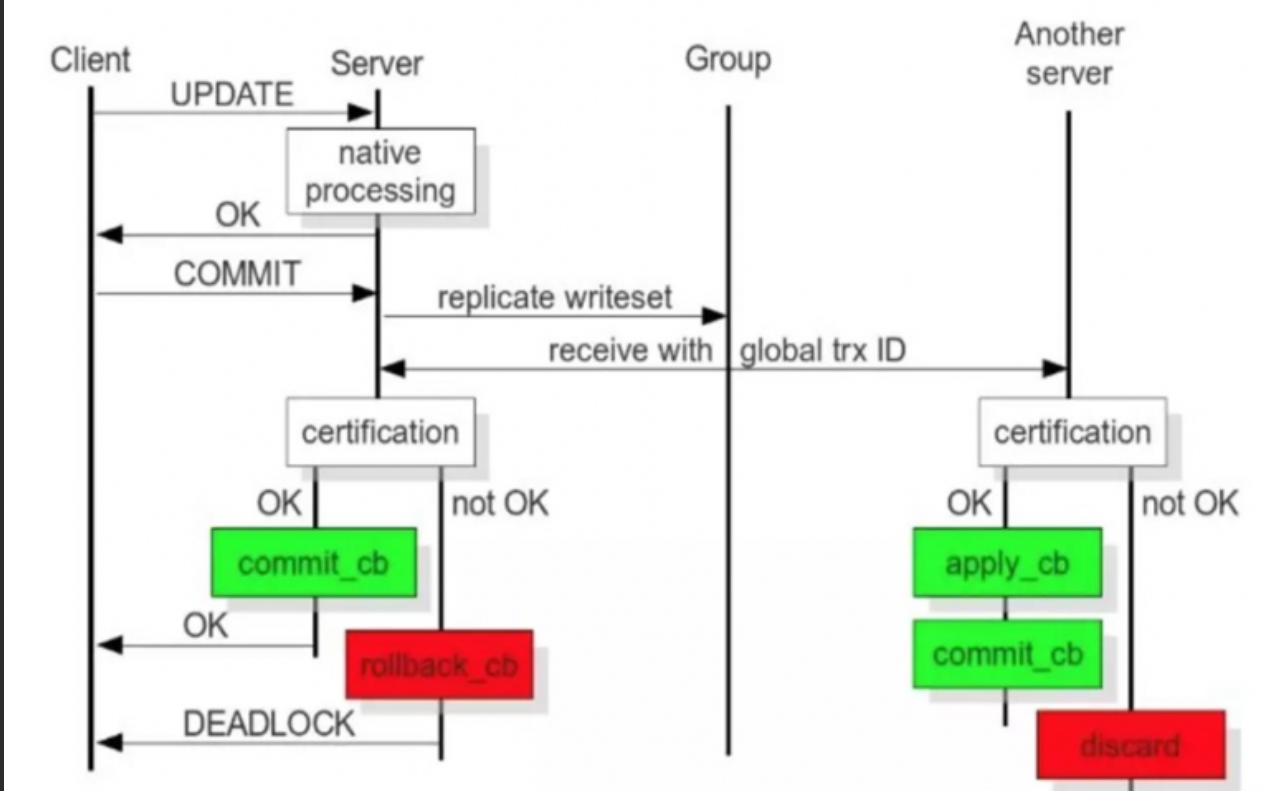
MySQL Galera 高可用的核心是同步多主复制,所有节点均可读写,通过“写集复制”保证数据强一致性,工作流程分三大阶段:
二、MySQL Galera Cluster部署
1、 环境准备
| 主机名 | Ip | 软件版本 | 配置信息 | |
|
galera1 |
192.168.166.139 | Rocky_linux9.4 | mysql-wsrep-8.0 galera-26.4.14-1 | 2核4G |
| galera2 | 192.168.166.140 | Rocky_linux9.4 | mysql-wsrep-8.0 galera-26.4.14-1 | 2核4G |
| galera3 | 192.168.166.141 | Rocky_linux9.4 | mysql-wsrep-8.0 galera-26.4.14-1 | 2核4G |
| galera4 | 192.168.129.139 | Rocky_linux9.4 | mysql-wsrep-8.0 galera-26.4.14-1 | 2核4G |
注意:关闭防火墙和selinux,进行时间同步。
sed -i 's/#PermitRootLogin prohibit-password/PermitRootLogin yes/' /etc/ssh/sshd_config
systemctl restart sshd
systemctl disable --now firewalld.service
setenforce 0
主机解析:
[root@galera1 ~]# cat <<e >/etc/hosts
127.0.0.1   localhost localhost.localdomain localhost4 localhost4.localdomain4
::1         localhost localhost.localdomain localhost6 localhost6.localdomain6
192.168.166.139 galera1
192.168.166.140 galera2
192.168.166.141 galera3
192.168.129.139 galera4
e
[root@galera2 ~]# cat /etc/hosts
127.0.0.1   localhost localhost.localdomain localhost4 localhost4.localdomain4
::1         localhost localhost.localdomain localhost6 localhost6.localdomain6
192.168.166.139 galera1
192.168.166.141 galera3
192.168.129.139 galera4
[root@galera3 ~]# cat /etc/hosts
127.0.0.1   localhost localhost.localdomain localhost4 localhost4.localdomain4
::1         localhost localhost.localdomain localhost6 localhost6.localdomain6
192.168.166.140 galera2
192.168.166.139 galera1
192.168.129.139 galera4
[root@galera4 ~]# cat /etc/hosts
127.0.0.1   localhost localhost.localdomain localhost4 localhost4.localdomain4
::1         localhost localhost.localdomain localhost6 localhost6.localdomain6
192.168.166.140 galera2
192.168.166.141 galera3
192.168.166.139 galera1
四台虚拟机都导入创建该服务的yum源
[root@galera1 ~]# cat  <<e >> /etc/yum.repos.d/mysql-wsrep.repo
[galera]
name=galera
baseurl=http://releases.galeracluster.com/mysql-wsrep-8.0/redhat/8/x86_64/
enabled=1
gpgcheck=0
e

####rocky8安装时
[galera]
name=galera
baseurl=http://releases.galeracluster.com/mysql-wsrep-5.7.44-25.36/redhat/7/x86_64/
enabled=1
gpgcheck=0

##需要禁用myql模块
dnf module disable -y mysql
四台虚拟机都下载mysql-wsrep-8.0和galera
[root@galera1 ~]# yum install -y mysql-wsrep-8.0 galera

##Rocky8安装
yum install -y mysql-wsrep-5.7 galera
- mysql-wsrep-8.0:
- mysql-wsrep-8.0 是 MySQL 8.0 版本的一个变体,集成了 WSREP(Write Set Replication)协议。这是一个用于数据库集群的复制协议,允许 MySQL 数据库节点之间的同步复制。
- 这个版本的 MySQL 是通过 WSREP 协议来实现数据的一致性和高可用性。WSREP 协议确保了所有节点的数据库状态保持一致,支持事务的自动同步和冲突解决。
- 通常,这种版本的 MySQL 是在集群配置中使用的,旨在提高系统的容错能力和可扩展性。
- Galera:
- Galera 是一个用于 MySQL 数据库的同步复制插件,它实现了 WSREP 协议。Galera 提供了一个多主节点的数据库集群方案,允许所有节点同时进行读写操作,并且确保数据在所有节点之间保持一致。
- 它主要用于提高数据库的可用性、容错性和扩展性。Galera 使得所有节点都能够同时处理读写请求,这比传统的主从复制模式更具灵活性。
- Galera 可以与 MySQL 以及 MariaDB 配合使用,它的主要特点包括全同步复制、自动节点加入、冲突检测和解决等。
2、配置
四台虚拟器都启动服务,并改个密码
[root@galera1 ~]# systemctl start mysqld
# 获取数据库初始化密码的步骤

[root@galera1 ~]# password=$(cat /var/log/mysqld.log  | awk '/[^_]password/{print $NF}' | tr -d ' ')
[root@galera1 ~]# echo $password
wIaPk8H8eo:I

#改密码
[root@galera1 ~]# mysqladmin -p password 'Q1w2e3@123!!!!!'

password=$(cat /var/log/mysqld.log  | awk '/[^_]password/{print $NF}' | tr -d ' ')

mysqladmin -p"$password" password 'Q1w2e3@123!!!!!'
四台服务都配置一个远程用户并授权,采用脚本方式执行
[root@galera1 ~]# vim user.sh   #每台都要执行一次,用来创建远程用户并授权
#!/bin/bash

# MySQL 连接参数

MYSQL_USER="root"
MYSQL_PASS='Q1w2e3@123!!!!!'  # 替换为实际的 root 密码
MYSQL_HOST="localhost"           # 或者使用 IP 地址

# 创建远程用户和授予权限的 SQL 命令

SQL_COMMANDS="
CREATE USER 'syncuser'@'%' IDENTIFIED BY 'Q1w2e3@123!!!!!';
GRANT ALL PRIVILEGES ON *.* TO 'syncuser'@'%';
FLUSH PRIVILEGES;
"

# 执行 SQL 命令

mysql -u "$MYSQL_USER" -p"$MYSQL_PASS" -h "$MYSQL_HOST" -e "$SQL_COMMANDS"
[root@galera1 ~]# sh user.sh
四台虚拟机服务都先停止
[root@galera1 ~]# systemctl stop mysqld
2.1、配置 galera1 主机的my.cnf的文件
server-id=1  # 服务器 ID,用于唯一标识 MySQL 服务器
binlog_format=row  # 二进制日志格式,行级别;statement:基于sql语句的复制;row:基于行的复制;mixed:混合复制
innodb_file_per_table=1  # 为每个 InnoDB 表使用一个独立的表空间文件
innodb_autoinc_lock_mode=2  # 自增锁模式,2表示更高效的锁模式

wsrep_on=ON  # 启用 Galera 集群
wsrep_provider=/usr/lib64/galera/libgalera_smm.so  # Galera 提供者库的路径
wsrep_cluster_name='galera'  # Galera 集群的名称
wsrep_cluster_address='gcomm://'  # Galera 集群的地址,通常为 `gcomm://` 表示集群初始节点
wsrep_node_name='galera1'  # 当前节点的名称
wsrep_node_address='192.168.166.139'  # 当前节点的 IP 地址
wsrep_sst_auth=syncuser:'Q1w2e3@123!!!!!'  # SST(状态快照传输)认证信息
wsrep_sst_method=rsync  # SST 方法,使用 rsync 进行状态快照传输
启动galera1主机的mysql
[root@galera1 ~]# systemctl start mysqld
[root@galera1 ~]# ss -tnlp
State               Recv-Q              Send-Q                            Local Address:Port                              Peer Address:Port              Process
LISTEN              0                   4096                                    0.0.0.0:4567                                   0.0.0.0:*                  users:(("mysqld",pid=5145,fd=9))
LISTEN              0                   128                                     0.0.0.0:22                                     0.0.0.0:*                  users:(("sshd",pid=819,fd=3))
LISTEN              0                   70                                            *:33060                                        *:*                  users:(("mysqld",pid=5145,fd=33))
LISTEN              0                   128                                        [::]:22                                        [::]:*                  users:(("sshd",pid=819,fd=4))
LISTEN              0                   151                                           *:3306                                         *:*                  users:(("mysqld",pid=5145,fd=35))


#4567: 用于 Galera 集群的内部通信。
#33060: 用于 MySQL X Protocol。这是 MySQL 的 X Plugin 端口,主要用于 MySQL 的 X Protocol (MySQL Shell、MySQL Router 和其他 MySQL X API 客户端) 的连接。
#3306: 用于 MySQL 数据库客户端连接。这是 MySQL 数据库的默认端口,用于客户端连接 MySQL 数据库。所有的 SQL 查询和数据库操作通过这个端口进行。
2.2、配置 galera2 主机的my.cnf的文件
[root@galera2 ~]# systemctl start mysqld
server-id=2
binlog_format=row
innodb_file_per_table=1
innodb_autoinc_lock_mode=2

wsrep_on=ON
wsrep_provider=/usr/lib64/galera/libgalera_smm.so
wsrep_cluster_name='galera'
wsrep_cluster_address='gcomm://galera1,galera3'
wsrep_node_name='galera2'
wsrep_node_address='192.168.166.140'
wsrep_sst_auth=syncuser:'Q1w2e3@123!!!!!'
wsrep_sst_method=rsync
启动galera2主机的mysql
[root@galera2 ~]# systemctl start mysqld
2.3、配置 galera3 主机的my.cnf的文件
[root@galera3 ~]# vim /etc/my.cnf
server-id=3
binlog_format=row
innodb_file_per_table=1
innodb_autoinc_lock_mode=2

wsrep_on=ON
wsrep_provider=/usr/lib64/galera/libgalera_smm.so
wsrep_cluster_name='galera'
wsrep_cluster_address='gcomm://galera1,galera2,galera4'
wsrep_node_name='galera3'
wsrep_node_address='192.168.166.141'
wsrep_sst_auth=syncuser:'Q1w2e3@123!!!!!'
wsrep_sst_method=rsync
启动galera3主机的mysql
[root@galera3 ~]# systemctl start mysqld
2.4、配置 galera4 主机的my.cnf的文件
[root@galera3 ~]# vim /etc/my.cnf
server-id=4
binlog_format=row
innodb_file_per_table=1
innodb_autoinc_lock_mode=2

wsrep_on=ON
wsrep_provider=/usr/lib64/galera/libgalera_smm.so
wsrep_cluster_name='galera'
wsrep_cluster_address='gcomm://galera2,galera3,galera1'
wsrep_node_name='galera4'
wsrep_node_address='192.168.129.139'
wsrep_sst_auth=syncuser:'Q1w2e3@123!!!!!'
wsrep_sst_method=rsync
启动galera4主机的mysql
[root@galera4 ~]# systemctl start mysqld
2.4、在给galera1 主机的my.cnf的文件增加节点
[root@galera1 ~]# vim /etc/my.cnf  #增加上节点,即修改这行内容如下,或见下图所示:

wsrep_cluster_address='gcomm://galera2,galera3,galera4'  # Galera 集群的地址,通常为 `gcomm://` 表示集群初始节点
[root@galera1 ~]# systemctl restart mysqld
2.5、写入数据验证同步
在 galera1主机写入数据,创建一个库
[root@galera2 ~]# mysql -uroot -p
mysql: [Warning] Using a password on the command line interface can be insecure.
Welcome to the MySQL monitor.  Commands end with ; or \g.
Your MySQL connection id is 14
Server version: 8.0.37 Galera Cluster for MySQL

Copyright (c) 2000, 2024, Oracle and/or its affiliates.

Oracle is a registered trademark of Oracle Corporation and/or its
affiliates. Other names may be trademarks of their respective
owners.

Type 'help;' or '\h' for help. Type '\c' to clear the current input statement.

mysql> show databases;
+--------------------+
| Database           |
+--------------------+
| database_name      |
| information_schema |
| mysql              |
| performance_schema |
| sys                |
+--------------------+
5 rows in set (0.00 sec)
[root@galera3 ~]# mysql -uroot -p"Q1w2e3@123!!!!!"
mysql: [Warning] Using a password on the command line interface can be insecure.
Welcome to the MySQL monitor.  Commands end with ; or \g.
Your MySQL connection id is 14
Server version: 8.0.37 Galera Cluster for MySQL

Copyright (c) 2000, 2024, Oracle and/or its affiliates.

Oracle is a registered trademark of Oracle Corporation and/or its
affiliates. Other names may be trademarks of their respective
owners.

Type 'help;' or '\h' for help. Type '\c' to clear the current input statement.

mysql> show databases;
+--------------------+
| Database           |
+--------------------+
| database_name      |
| information_schema |
| mysql              |
| performance_schema |
| sys                |
+--------------------+
5 rows in set (0.00 sec)
2.6、配置 galera4 主机的my.cnf的文件
[root@galera4 ~]# vim /etc/my.cnf
server-id=4
binlog_format=row
innodb_file_per_table=1
innodb_autoinc_lock_mode=2

wsrep_on=ON
wsrep_provider=/usr/lib64/galera/libgalera_smm.so
wsrep_cluster_name='galera'
wsrep_cluster_address='gcomm://galera1,galera2,galera3'
wsrep_node_name='galera1'
wsrep_node_address='192.168.129.139'
wsrep_sst_auth=syncuser:'Q1w2e3@123!!!!!'
wsrep_sst_method=rsync
[root@galera4 ~]# systemctl start mysqld
2.4、在给galera1 主机的my.cnf的文件增加节点
[root@galera1 ~]# vim /etc/my.cnf  #增加上节点,即修改这行内容如下,或见下图所示:

wsrep_cluster_address='gcomm://galera2,galera3,galera4'  # Galera 集群的地址,通常为 `gcomm://` 表示集群初始节点
[root@galera1 ~]# systemctl restart mysqld
2.5、写入数据验证同步
在 galera1主机写入数据,创建一个库
在 galera2和galera3主机查看
[root@galera2 ~]# mysql -uroot -p
mysql: [Warning] Using a password on the command line interface can be insecure.
Welcome to the MySQL monitor.  Commands end with ; or \g.
Your MySQL connection id is 14
Server version: 8.0.37 Galera Cluster for MySQL

Copyright (c) 2000, 2024, Oracle and/or its affiliates.

Oracle is a registered trademark of Oracle Corporation and/or its
affiliates. Other names may be trademarks of their respective
owners.

Type 'help;' or '\h' for help. Type '\c' to clear the current input statement.

mysql> show databases;
+--------------------+
| Database           |
+--------------------+
| database_name      |
| information_schema |
| mysql              |
| performance_schema |
| sys                |
+--------------------+
5 rows in set (0.00 sec)
[root@galera3 ~]# mysql -uroot -p"Q1w2e3@123!!!!!"
mysql: [Warning] Using a password on the command line interface can be insecure.
Welcome to the MySQL monitor.  Commands end with ; or \g.
Your MySQL connection id is 14
Server version: 8.0.37 Galera Cluster for MySQL

Copyright (c) 2000, 2024, Oracle and/or its affiliates.

Oracle is a registered trademark of Oracle Corporation and/or its
affiliates. Other names may be trademarks of their respective
owners.

Type 'help;' or '\h' for help. Type '\c' to clear the current input statement.

mysql> show databases;
+--------------------+
| Database           |
+--------------------+
| database_name      |
| information_schema |
| mysql              |
| performance_schema |
| sys                |
+--------------------+
5 rows in set (0.00 sec)
[root@galera3 ~]# mysql -uroot -p"Q1w2e3@123!!!!!"
mysql: [Warning] Using a password on the command line interface can be insecure.
Welcome to the MySQL monitor.  Commands end with ; or \g.
Your MySQL connection id is 14
Server version: 8.0.37 Galera Cluster for MySQL

Copyright (c) 2000, 2024, Oracle and/or its affiliates.

Oracle is a registered trademark of Oracle Corporation and/or its
affiliates. Other names may be trademarks of their respective
owners.

Type 'help;' or '\h' for help. Type '\c' to clear the current input statement.

mysql> show databases;
+--------------------+
| Database           |
+--------------------+
| database_name      |
| information_schema |
| mysql              |
| performance_schema |
| sys                |
+--------------------+
5 rows in set (0.00 sec)
可以看到在 galera1主机创建的库,同步写入到了其他节点的mysql中。
2.6、配置 galera4 主机的my.cnf的文件
[root@galera4 ~]# vim /etc/my.cnf
server-id=4
binlog_format=row
innodb_file_per_table=1
innodb_autoinc_lock_mode=2

wsrep_on=ON
wsrep_provider=/usr/lib64/galera/libgalera_smm.so
wsrep_cluster_name='galera'
wsrep_cluster_address='gcomm://galera1,galera2,galera3'
wsrep_node_name='galera1'
wsrep_node_address='192.168.129.139'
wsrep_sst_auth=syncuser:'Q1w2e3@123!!!!!'
wsrep_sst_method=rsync
[root@galera4 ~]# systemctl start mysqld
登录数据库查看数据
[root@galera4 ~]# mysql -uroot -p"Q1w2e3@123!!!!!"
mysql: [Warning] Using a password on the command line interface can be insecure.
Welcome to the MySQL monitor.  Commands end with ; or \g.
Your MySQL connection id is 13
Server version: 8.0.37 Galera Cluster for MySQL

Copyright (c) 2000, 2024, Oracle and/or its affiliates.

Oracle is a registered trademark of Oracle Corporation and/or its
affiliates. Other names may be trademarks of their respective
owners.

Type 'help;' or '\h' for help. Type '\c' to clear the current input statement.

mysql> show databases;
+--------------------+
| Database           |
+--------------------+
| database_name      |
| information_schema |
| mysql              |
| performance_schema |
| sys                |
+--------------------+
5 rows in set (0.00 sec)
如此验证成功,新启动的mysql即为新加入集群的msyql,启动即发现,并完成同步数据。





 扫一扫
扫一扫


 855
855

 被折叠的 条评论
为什么被折叠?
被折叠的 条评论
为什么被折叠?
 到【灌水乐园】发言





