



第三篇:国际化多语言系统设计(i18n)
在企业级官网中,国际化不是“加个翻译文件”这么简单。
本篇目标:
构建一套 可扩展、可维护、对 SEO 友好 的国际化体系。
我们将实现:
-
完整 i18n 架构设计
-
URL / Cookie / LocalStorage 三端同步
-
Header / Footer / 表单文案国际化
-
与 App Router 深度结合
一、i18n 技术选型
在 Next.js App Router 下,推荐方案只有一个:
next-intl
原因:
-
官方支持 App Router
-
支持 Server / Client Components
-
SEO 友好(基于 URL)
-
类型安全
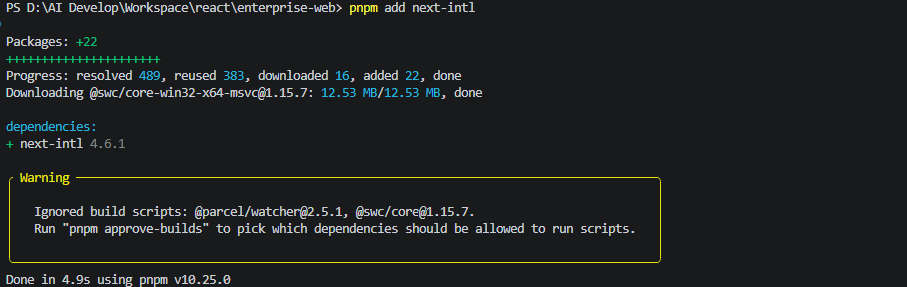
安装依赖:
pnpm add next-intl
二、国际化整体架构设计
1.语言维度的三层同步
| 层级 | 用途 |
|---|---|
| URL | SEO / 首屏渲染 |
| Cookie | Server 侧读取 |
| LocalStorage | Client 侧记忆 |
URL 是唯一真源(Single Source of Truth)。
正确顺序永远是:
URL(SEO / SSR)
 ↓
Cookie(Server 读取)
 ↓
LocalStorage(Client 体验)
2.目录结构规划
将app/layout.tsx和app/page.tsx移动到app/[locale]/下
src/
 ├─ app/
 │   └─ [locale]/
 │       ├─ layout.tsx
 │       ├─ page.tsx      ← 真首页
 │       ├─ products
 │       └─ ...
 │
 ├─ i18n/
 │   ├─ config.ts
 │   ├─ request.ts
 │   └─ messages/
 │       ├─ zh.json
 │       └─ en.json
 │
 ├─ proxy.ts    ← 关键
三、i18n 基础配置
i18n/config.ts
export const locales = ['zh', 'en'] as const
export const defaultLocale = 'zh'

export type Locale = (typeof locales)[number]
i18n/messages/zh.json
{
  "nav": {
    "products": "产品",
    "news": "新闻",
    "careers": "招聘",
    "docs": "文档"
  },
  "user_menu": {
    "profile": "个人资料",
    "user_center": "用户中心",
    "login_setting": "登录设置",
    "payment_method": "支付方式"
  },
  "auth": {
    "login": "登录",
    "logout": "退出登录"
  },
  "footer": {
    "address": "北京市朝阳区某某科技园",
    "phone": "电话",
    "copyright": "版权所有"
  }
}
i18n/messages/en.json
{
  "nav": {
    "products": "Products",
    "news": "News",
    "careers": "Careers",
    "docs": "Docs"
  },
  "user_menu": {
    "profile": "Profile",
    "user_center": "User Center",
    "login_setting": "Login Setting",
    "payment_method": "Payment Method",
  },
  "auth": {
    "login": "Login",
    "logout": "Logout"
  },
  "footer": {
    "address": "Beijing Chaoyang Tech Park",
    "phone": "phone",
    "copyright": "All rights reserved"
  }
}
四、Server 端国际化加载
i18n/request.ts
import { getRequestConfig } from 'next-intl/server'
import { locales, defaultLocale, Locale } from './config'

export default getRequestConfig(async ({ locale }) => {
    if (!locales.includes(locale as Locale)) {
        locale = defaultLocale
    }

    return {
        locale: locale as Locale,
        messages: (await import(`./messages/${locale}.json`)).default
    }
})
五、App Router 中的 Locale Layout
app/[locale]/layout.tsx
import '@/app/globals.css'

import { NextIntlClientProvider } from 'next-intl'
import { notFound } from 'next/navigation'
import { Locale, locales } from '@/i18n/config'
import { Header } from '@/components/layout/Header'
import { Footer } from '@/components/layout/Footer'

export default async function LocaleLayout({
  children,
  params
}: {
  children: React.ReactNode
  params: Promise<{ locale: Locale }>
}) {
  const { locale } = await params

  if (!locales.includes(locale as Locale)) {
    notFound()
  }

  const messages = (await import(`@/i18n/messages/${locale}.json`)).default

  return (
    <html lang={locale}>
      <body className="min-h-screen bg-background text-foreground">
        <NextIntlClientProvider locale={locale} messages={messages}>
          <Header />
          {children}
          <Footer />
        </NextIntlClientProvider>
      </body>
    </html>
  )
}
六、Header 文案国际化改造
Header.tsx
'use client'

import Link from 'next/link'
import { MainNav } from './MainNav'
import { UserMenu } from './UserMenu'
import { useTranslations } from 'next-intl'

// 临时模拟登录态(后续会替换为真实 auth)
const mockUser = {
  email: 'user@example.com',
}

export function Header() {
  const isLoggedIn = Boolean(mockUser)
  const t = useTranslations()

  return (
    <header className="border-b">
      <div className="mx-auto flex h-16 max-w-7xl items-center justify-between px-6">
        <div className="flex items-center space-x-8">
          <Link href="/" className="text-lg font-bold">
            Enterprise
          </Link>
          <MainNav />
        </div>

        <div>
          {!isLoggedIn ? (
            <Link href="/login" className="text-sm font-medium">
              {t('auth.login')}
            </Link>
          ) : (
            <div className="flex items-center space-x-3">
              <Link href="/user" className="text-sm">
                {t('user_menu.user_center')}
              </Link>
              <span className="text-muted-foreground">|</span>
              <UserMenu email={mockUser.email} />
            </div>
          )}
        </div>
      </div>
    </header>
  )
}
MainNav.tsx
import { useTranslations } from 'next-intl'
import Link from 'next/link'

export function MainNav() {
  const t = useTranslations('nav')

  return (
    <nav className="flex space-x-6">
      <Link href="/products">{t('products')}</Link>
      <Link href="/news">{t('news')}</Link>
      <Link href="/careers">{t('careers')}</Link>
      <Link href="/docs">{t('docs')}</Link>
    </nav>
  )
}
UserMenu.tsx
import { Menu, MenuButton, MenuItem, MenuItems } from '@headlessui/react'
import Link from 'next/link'
import { maskEmail } from '@/lib/utils/mask-email'
import { useTranslations } from 'next-intl'

interface UserMenuProps {
  email: string
}

export function UserMenu({ email }: UserMenuProps) {
  const t = useTranslations()

  return (
    <Menu as="div" className="relative">
      <MenuButton className="flex items-center space-x-2 text-sm">
        <span>{maskEmail(email)}</span>
        <span>▼</span>
      </MenuButton>

      <MenuItems className="absolute right-0 mt-2 w-40 rounded-md border bg-background shadow">
        <MenuItem>
          {({ focus }) => (
            <Link
              href="/user"
              className={`block px-3 py-2 text-sm ${focus ? 'bg-secondary' : ''}`}
            >
              {t('user_menu.user_center')}
            </Link>
          )}
        </MenuItem>

        <MenuItem>
          {({ focus }) => (
            <Link
              href="/user/settings"
              className={`block px-3 py-2 text-sm ${focus ? 'bg-secondary' : ''}`}
            >
              {t('user_menu.login_setting')}
            </Link>
          )}
        </MenuItem>

        <MenuItem>
          {({ focus }) => (
            <Link
              href="/user/payment"
              className={`block px-3 py-2 text-sm ${focus ? 'bg-secondary' : ''}`}
            >
              {t('user_menu.payment_method')}
            </Link>
          )}
        </MenuItem>

        <MenuItem>
          {({ focus }) => (
            <button
              className={`w-full text-left px-3 py-2 text-sm ${focus ? 'bg-secondary' : ''}`}
            >
              {t('auth.logout')}
            </button>
          )}
        </MenuItem>
      </MenuItems>
    </Menu>
  )
}
七、Footer 文案国际化
'use client'
import { useTranslations } from 'next-intl'
import { LanguageSwitcher } from './LanguageSwitcher'

export function Footer() {
  const t = useTranslations('footer')

  return (
    <footer className="border-t">
      <div className="mx-auto flex max-w-7xl items-center justify-between px-6 py-6 text-sm">
        <div className="space-y-1">
          <p>{t('address')}</p>
          <p>{t('phone')}: 010-12345678</p>
          <p>© 2025 Enterprise · {t('copyright')}</p>
        </div>

        <LanguageSwitcher />
      </div>
    </footer>

  )
}
八、语言切换组件实现
LanguageSwitcher.tsx
'use client'

import { usePathname, useRouter } from 'next/navigation'
import { locales } from '@/i18n/config'

export function LanguageSwitcher() {
  const router = useRouter()
  const pathname = usePathname()

  const switchLocale = (locale: string) => {
    const segments = pathname.split('/')
    segments[1] = locale
    const newPath = segments.join('/')

    const setCookie = (name: string, value: string, path: string = '/') => {
      document.cookie = `${name}=${value}; path=${path}`;
    };

    setCookie('locale', locale);
    localStorage.setItem('locale', locale);

    router.push(newPath)
  }

  return (
    <div className="flex space-x-2">
      {locales.map(locale => (
        <button
          key={locale}
          onClick={() => switchLocale(locale)}
          className="text-sm underline"
        >
          {locale.toUpperCase()}
        </button>
      ))}
    </div>
  )
}
九、重点说明
useTranslations、useLocale等next-intl客户端钩子必须在客户端组件(带'use client')中使用。- 根布局(
layout.tsx)是服务端组件,需通过NextIntlClientProvider为客户端组件提供国际化上下文。 - 客户端组件必须被
NextIntlClientProvider包裹。
十、表单文案国际化示例
'use client'

const t = useTranslations('auth')

<button>{t('login')}</button>
后续所有表单 + 校验提示 全部从 i18n 读取。
十一、写 proxy:自动决定语言
src/proxy.ts
import createMiddleware from 'next-intl/middleware'
import { locales, defaultLocale } from '@/i18n/config'
import { NextRequest } from 'next/server';

const intlMiddleware = createMiddleware({
    locales,
    defaultLocale,
    localePrefix: 'always'
})

// Next.js 15+ proxy 约定:导出默认函数处理请求
export default function proxy(request: NextRequest) {
    // 用 next-intl 中间件处理所有请求
    return intlMiddleware(request);
}

export const config = {
    matcher: ['/((?!api|_next/static|_next/image|favicon.ico).*)']
}
效果
| 访问 | 实际行为 |
|---|---|
/ | 重定向到 /zh |
/en | 保持 /en |
/zh | 保持 /zh |
/products | /zh/products |
localePrefix: 'always' 是关键点
| 模式 | 行为 |
|---|---|
'always' | 所有 URL 都必须带 locale(推荐) |
'as-needed' | 默认语言不带 locale(⚠️复杂) |
'never' | 不使用 locale 路由 |
十二、扩展
新建 src/i18n/navigation.ts
import { createNavigation } from 'next-intl/navigation'
import { locales, defaultLocale } from './config'

export const {
    Link,
    redirect,
    usePathname,
    useRouter
} = createNavigation({
    locales,
    defaultLocale
})
替换 Link 来源
// 原来
import Link from 'next/link'

// 改成
import { Link } from '@/lib/i18n/navigation'
MainNav 改造示例
import { useTranslations } from 'next-intl'
import { Link } from '@/i18n/navigation'

export function MainNav() {
  const t = useTranslations('nav')

  return (
    <nav className="flex space-x-6">
      <Link href="/products">{t('products')}</Link>
      <Link href="/news">{t('news')}</Link>
      <Link href="/careers">{t('careers')}</Link>
      <Link href="/docs">{t('docs')}</Link>
    </nav>
  )
}
自动生成:
-
/en/products -
/zh/products
locale 永远正确
不需要手拼路径
十三、本篇总结

你已经完成:
-
企业级 i18n 架构设计
-
URL / Cookie / LocalStorage 三端同步
-
Header / Footer 文案国际化
-
表单文案国际化基础能力
这套方案:
-
SEO 友好
-
Server / Client 兼容
-
易扩展
下一篇预告
第四篇:登录 / 注册系统(React Hook Form + Zod)
-
表单抽象设计
-
Headless UI + Shadcn 风格
-
多语言校验错误提示
-
图形验证码架构





 扫一扫
扫一扫


 被折叠的 条评论
为什么被折叠?
被折叠的 条评论
为什么被折叠?
 到【灌水乐园】发言





