



第4章:统一的代码风格与严格的代码质量检查,为项目安装配置ESLint和Prettier
在现代前端项目中,ESLint 与 Prettier 的工程化整合非常关键,它决定了:
-
团队代码是否统一
-
自动化格式化是否生效
-
是否能在 VSCode + Git Hooks 中自动检查
-
是否能在持续集成(CI)中保证质量
本章将带你建立一套完全现代化的代码规范体系,基于:
-
ESLint 9(Flat Config)
-
Prettier 3
-
TypeScript
-
React 19
-
Tailwind CSS
-
ShadCN UI
最终项目具备:
✔ 统一代码风格
✔ VSCode 自动格式化
✔ Git 提交自动检查
✔ Tailwind class 排序
✔ import 顺序优化
✔ 生产工程可复用
4.1 为什么需要 ESLint 与 Prettier?
ESLint
用于检查代码中潜在的错误与不规范用法,例如:
-
未使用的变量
-
React Hook 用法错误
-
类型错误(TypeScript)
-
import 顺序问题
-
逻辑潜在危险代码
Prettier
用于格式化代码,使团队代码风格统一,例如:
-
换行策略
-
引号单双
-
尾随逗号
-
缩进格式化
-
JSX 排版
为什么要一起使用?
ESLint 负责“正确性”,Prettier 负责“风格格式化”。
二者如果配置不当会冲突,需要通过插件让它们协同工作。
4.2 安装 ESLint 依赖
运行:
pnpm add -D eslint @eslint/js eslint-plugin-react eslint-plugin-react-hooks eslint-plugin-react-refresh eslint-plugin-jsx-a11y @typescript-eslint/parser @typescript-eslint/eslint-plugin eslint-plugin-import eslint-import-resolver-typescript eslint-plugin-tailwindcss typescript
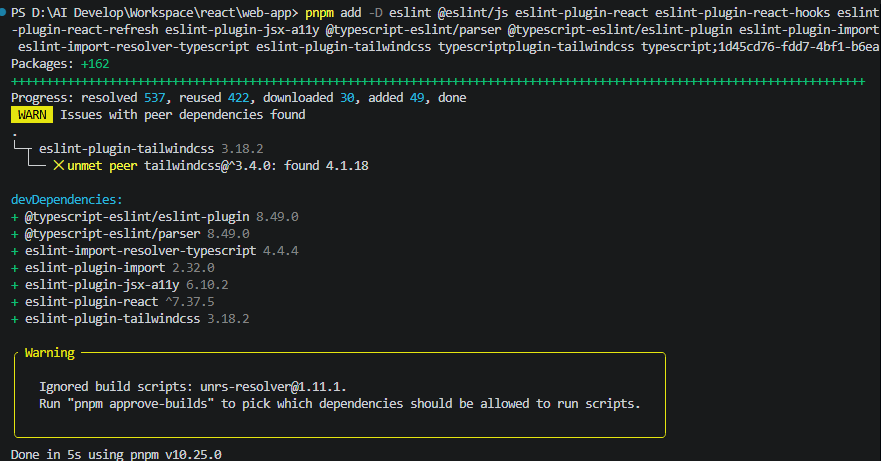
必要说明:
| 包名 | 说明 |
|---|---|
| eslint | 让 ESLint 能解析 TS/TSX |
| @eslint/js | TypeScript 规则集 |
| typescript-eslint | |
| eslint-plugin-react | React 专用规则 |
| eslint-plugin-react-hooks | Hook 规则(非常重要) |
| eslint-plugin-react-refresh | Vite react-refresh 热更新规则 |
| eslint-plugin-react | |
| eslint-plugin-import | import 语法检查 |
| eslint-plugin-tailwindcss | Tailwind 类名排序与错误提示 |
4.3 安装 Prettier 及其插件
pnpm add -D prettier eslint-plugin-prettier eslint-config-prettier eslint-plugin-tailwindcss
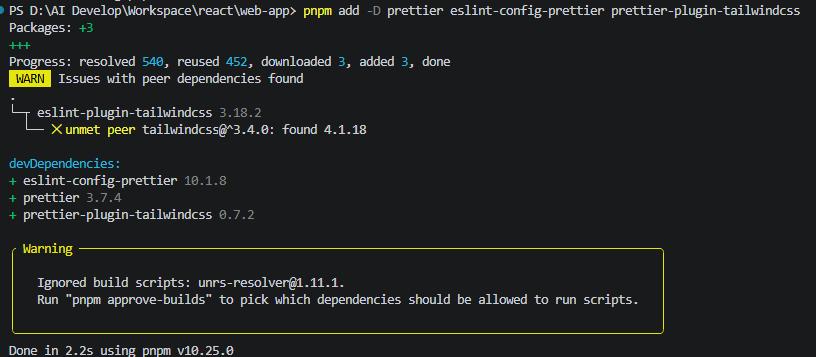
说明:
| 包名 | 功能 |
|---|---|
| prettier | 代码格式化工具 |
| eslint-plugin-prettier | |
| eslint-config-prettier | 关闭 ESLint 中与 Prettier 冲突的规则 |
| prettier-plugin-tailwindcss | Tailwind class 自动排序(强烈推荐) |
4.4 修改 eslint.config.js 配置文件
在项目根目录找到:
.eslint.config.js
import js from '@eslint/js'
import globals from 'globals'
import reactHooks from 'eslint-plugin-react-hooks'
import reactRefresh from 'eslint-plugin-react-refresh'
import tseslint from 'typescript-eslint'
import { defineConfig, globalIgnores } from 'eslint/config'

export default defineConfig([
  globalIgnores(['dist']),
  {
    files: ['**/*.{ts,tsx}'],
    extends: [
      js.configs.recommended,
      tseslint.configs.recommended,
      reactHooks.configs.flat.recommended,
      reactRefresh.configs.vite,
    ],
    languageOptions: {
      ecmaVersion: 2020,
      globals: globals.browser,
    },
  },
])
改为:
import js from '@eslint/js'
import globals from 'globals'
import reactHooks from 'eslint-plugin-react-hooks'
import reactRefresh from 'eslint-plugin-react-refresh'
import tseslint from 'typescript-eslint'
import pluginReact from 'eslint-plugin-react'
import jsxA11y from 'eslint-plugin-jsx-a11y'
import importPlugin from 'eslint-plugin-import'

export default [
  {
    ignores: ['dist']
  },
  js.configs.recommended,
  ...tseslint.configs.recommended,
  {
    files: ['**/*.{ts,tsx}'],
    plugins: {
      react: pluginReact,
      'react-hooks': reactHooks,
      'react-refresh': reactRefresh,
      'jsx-a11y': jsxA11y,
      import: importPlugin
    },
    languageOptions: {
      ecmaVersion: 2020,
      sourceType: 'module',
      globals: globals.browser,
      parser: tseslint.parser,
      parserOptions: {
        project: './tsconfig.app.json',
        ecmaFeatures: {
          jsx: true
        }
      }
    },
    settings: {
      react: {
        version: 'detect'
      },
      'import/resolver': {
        typescript: {
          project: './tsconfig.app.json'
        }
      }
    },
    rules: {
      // React 19 不需要 React in scope
      'react/react-in-jsx-scope': 'off',

      // React Hook 规则
      'react-hooks/rules-of-hooks': 'error',
      'react-hooks/exhaustive-deps': 'warn',

      // TypeScript
      '@typescript-eslint/no-unused-vars': ['warn', { argsIgnorePattern: '^_' }],

      // import 规则
      'import/order': [
        'warn',
        {
          groups: ['builtin', 'external', 'internal', 'parent', 'sibling', 'index'],
          alphabetize: { order: 'asc', caseInsensitive: true }
        }
      ]
    }
  }
]
4.5 创建 .prettierrc
{
  "semi": true,
  "singleQuote": true,
  "printWidth": 100,
  "tabWidth": 2,
  "trailingComma": "all",
  "jsxSingleQuote": false,
  "arrowParens": "always"
}
4.6 创建 .prettierignore
dist
node_modules
pnpm-lock.yaml
.env*
*.png
*.svg
4.7 配置 VS Code 自动格式化(关键)
在 .vscode/settings.json 中配置:
{
  // Editor settings
  "editor.formatOnSave": true,
  "editor.codeActionsOnSave": {
    "source.fixAll": "explicit",
    "source.fixAll.eslint": "explicit"
  },

  "editor.defaultFormatter": "esbenp.prettier-vscode",

  // ESLint settings
  "eslint.enable": true,
  "eslint.validate": ["javascript", "javascriptreact", "typescript", "typescriptreact"],
  "eslint.run": "onType",
  "eslint.workingDirectories": [{ "mode": "auto" }]
}
4.8 package.json 脚本(lint + format)
在 package.json:
{
  "scripts": {
    // Lint 检查
    "lint": "eslint \"src/**/*.{ts,tsx}\"",
    "lint:fix": "eslint \"src/**/*.{ts,tsx}\" --fix",

    // Prettier 格式化
    "format": "prettier --write \"src/**/*.{ts,tsx,js,jsx,css,md,html,json}\"",
    "format:check": "prettier --check \"src/**/*.{ts,tsx,js,jsx,css,md,html,json}\""
  }
}
4.9 Tailwind 与 ESLint 的联动(自动排序 classNames)
以下规则来自 eslint-plugin-tailwindcss:
"tailwindcss/classnames-order": "warn",
效果:
<div className="p-4 flex bg-red-500 text-center" />
会自动变成:
<div className="flex p-4 bg-red-500 text-center" />
对 ShadCN UI 组件场景尤为重要。
4.10 Git 提交强制检查(可选)
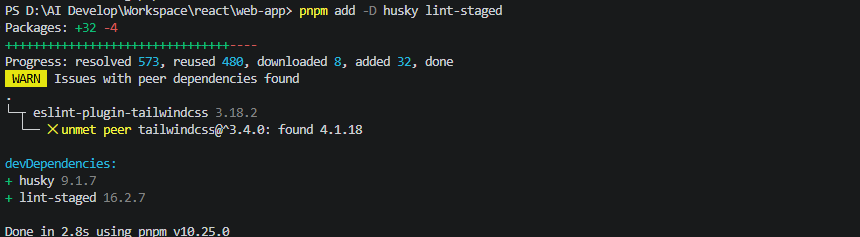
如果你的工程使用 Husky + lint-staged:
安装
pnpm add -D husky lint-staged
npx husky init
建立 .lintstagedrc:
{
  "src/**/*.{ts,tsx}": [
    "eslint --fix",
    "prettier --write"
  ]
}
现在 commit 时会自动 lint + 格式化。
4.11 CI 检查(可选,用于 GitHub Actions)
- name: Lint
  run: pnpm lint

- name: Prettier Check
  run: pnpm format:check
4.12 最终文件结构(新增部分)
.
├── .vscode/
│   └── settings.json
├── src/
├── .lintstagedrc
├── .prettierrc
├── .prettierignore
├── .eslint.config.js
├── package.json
└── ...
4.12 本章总结
本章构建了完整的现代化 ESLint + Prettier 工程体系:
✔ ESLint Flat Config
✔ TypeScript 全量规则
✔ React 19 最佳实践
✔ React Hooks / Refresh
✔ Tailwind class 排序
✔ import 顺序优化
✔ Prettier 集成
✔ VSCode 格式化
✔ Git 提交检查
✔ CI 流程
即日起你的项目将获得:
-
统一的代码风格
-
即时错误提示
-
自动排版(含 Tailwind)
-
import 顺序自动规范化
-
React Hook 误用自动警告
这套体系完全适用于:
-
企业级后台
-
大型前端团队协作
-
现代 SPA 工程
-
现代 React(包括 Server Components)





 扫一扫
扫一扫


 1125
1125

 被折叠的 条评论
为什么被折叠?
被折叠的 条评论
为什么被折叠?
 到【灌水乐园】发言





