


 本文介绍如何在屏幕宽度小于600px时,调整HTML/CSS代码实现响应式导航,重点讲解了@media查询、浮动布局和移动端适配策略,确保网站在不同设备上用户体验良好。

  <style>
        .center {
            width: 100%;
            height: 40px;
            background-color: green;
        }

        .box {
            width: 1000px;
            height: 40px;
            background-color: green;
            margin: 0 auto;
            /* overflow: auto; */
        }

        .box a {
            display: inline-block;
            width: 150px;
            height: 40px;
            text-align: center;
            text-decoration: none;
            line-height: 40px;
            color: white;
        }

        .box a:first-child {
            font-size: 18px;
            font-weight: bold;
        }

        .box a:not(:first-child):hover {
            background-color: red;
            color: blue;
        }

        @media screen and (max-width:600px) {
            .box {
                width: 100%;
                height: 300px;
            }
            .box a {
                float: left;
                width: 100%;
                color: black;
                text-align: left;
            }
            .box a:first-child {
                border: 1px solid white;
            }
        }
    </style>
</head>

<body>
    <div class="center">
        <div class="box">
            <a href="">Home</a>
            <a href="">首页</a>
            <a href="">关于我们</a>
            <a href="">新闻咨询</a>
            <a href="">联系电话</a>
        </div>
    </div>
</body>

</html>
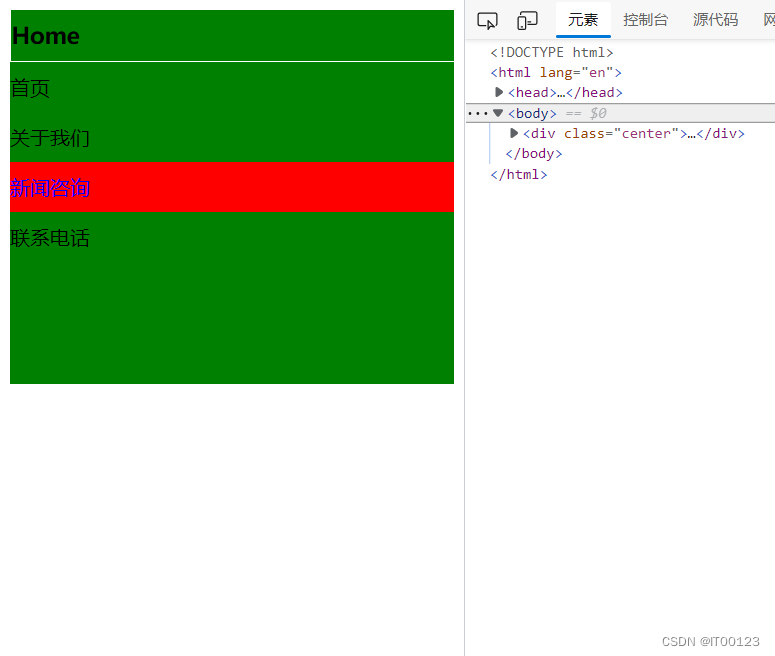
@media screen and (max-width:600px) 小于600px后变化





 扫一扫
扫一扫


 被折叠的 条评论
为什么被折叠?
被折叠的 条评论
为什么被折叠?
 到【灌水乐园】发言





