


文章目录
VSCode在Windows中的配置与运行
版本信息: Windows 10 Professional ; OS Inter Version 19045.6093; UX Windows Feature Experience Pack 1000.19062.1000.0
公司电脑(租赁)系统操作被进行定制,我使用时设置了一个用户并且在设置专有目录(加密)
VSCode版本: Visual Studio Code Version: 1.102.3(user setup); Electron: 35.6.0; OS: Windows_NT x64 10.0.19045
今日感想:在成为用技术与学识服务人民、造福世界(人生理想)的道路上,一定会碰到非常多的难点。但是我回想起来:在自己的规划上做事情,会走在错误的道路上而不自知,知道被别人提醒被什么裹挟着前进的时候才发现自己走错、做错了,我不知道如何才是正确的路,自己又以什么为根本呢?除了“路途”我还会思考人生的下一个地方“我该去哪里”的问题,是啊,我脱离的学校、母亲,脚又要走向哪里呢?这不仅仅是我要思考的,诸君也应当一同思考。
我很担心自己改变,变成了“钱袋子”,那种无尽的索取,我想在索取后,我也要无偿奉献同等的价值
问题点
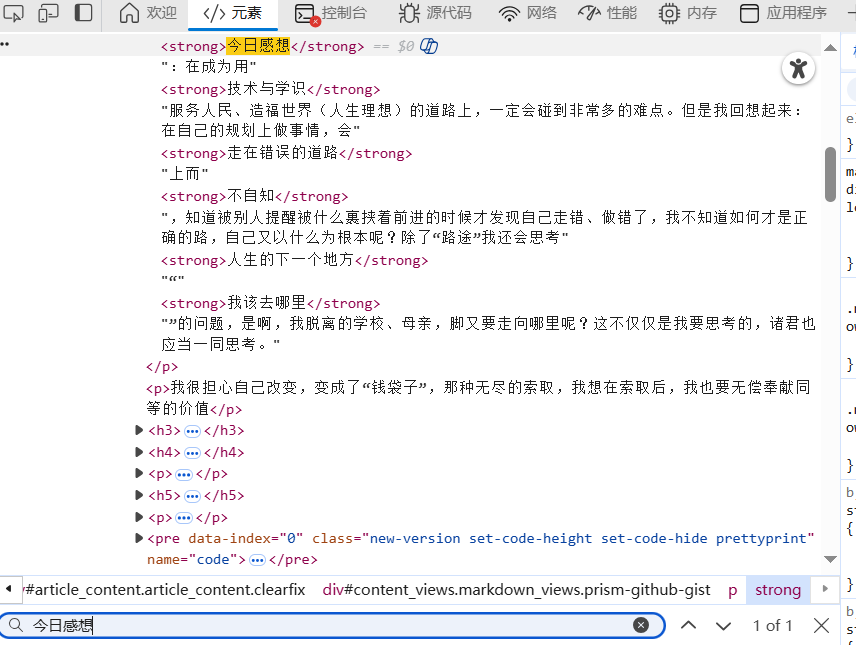
如果需要复制内容请使用 F12 点击“元素”再按下 Ctrl+ Alt+F出现搜索框直接搜索内容
问题1 VSCode运行Git
在VSCode中运行Git ,首先需要下载Git
Github访问慢及原因
在访问Github时会出现Github页面图片加载不出来和访问慢的问题
我的解决办法:GitHub图片加载不出来解决方案(超详细图文教程),将下面这段放入 C:\windows\system32\drivers\etc\hosts文件中(需要管理员权限)
199.232.96.133 scoopraw.githubusercontent.com
199.232.96.133 avators.githubusercontent.com
199.232.96.133 releases.githubusercontent.com
199.232.96.133 2021-01-29-----2021-01-31github-releases.githubusercontent.com
199.232.96.133 github-releases.githubusercontent.com
199.232.96.133 avaters.githubusercontent.com
199.232.96.133 ocame.githubusercontent.com
199.232.96.133 github.comraw.githubusercontent.com
199.232.96.133 vatars5.githubusercontent.com
199.232.96.133 cano.githubusercontent.com
199.232.96.133 vatars3.githubusercontent.com
199.232.96.133 usr-image.githubusercontent.com
199.232.96.133 war.githubusercontent.com
199.232.96.133 avatar6.githubusercontent.com
199.232.96.133 avatar7.githubusercontent.com
199.232.96.133 clound.githubusercontent.com
199.232.96.133 r-images.githubusercontent.com
199.232.96.133 2017-12-14-----2020-12-22raw.githubusercontent.com
199.232.96.133 raww.githubusercontent.com
199.232.96.133 avastar0.githubusercontent.com
199.232.96.133 ccraw.githubusercontent.com
199.232.96.133 1h3.githubusercontent.com
199.232.96.133 came.githubusercontent.com
199.232.96.133 marketplace-images.githubusercontent.com
199.232.96.133 desktep.githubusercontent.com
199.232.96.133 eaw.githubusercontent.com
199.232.96.133 rawxx.githubusercontent.com
199.232.96.133 user.githubusercontent.com
199.232.96.133 git.githubusercontent.com
199.232.96.133 giraw.githubusercontent.com
199.232.96.133 avatars56.githubusercontent.com
199.232.96.133 image.githubusercontent.com
199.232.96.133 windowsraw.githubusercontent.com
199.232.96.133 ist.githubusercontent.com
199.232.96.133 raw.githubraw.githubusercontent.com
199.232.96.133 images.githubusercontent.com
199.232.96.133 avatar3.githubusercontent.com
199.232.96.133 avatar5.githubusercontent.com
199.232.96.133 avatar4.githubusercontent.com
199.232.96.133 avatar9.githubusercontent.com
199.232.96.133 avatars10000000000000000000000000000.githubusercontent.com
199.232.96.133 avatars40.githubusercontent.com
199.232.96.133 avatars10000000000000000000000000000000000000000.githubusercontent.com
199.232.96.133 avatars900.githubusercontent.com
199.232.96.133 avatars10000.githubusercontent.com
199.232.96.133 avatars1000.githubusercontent.com
199.232.96.133 avatars80.githubusercontent.com
199.232.96.133 avatars100000000.githubusercontent.com
199.232.96.133 avatars500.githubusercontent.com
199.232.96.133 codeload.githubusercontent.com
199.232.96.133 house.githubusercontent.com
199.232.96.133 httpsraw.githubusercontent.com
199.232.96.133 gaw.githubusercontent.com
199.232.96.133 user-image.githubusercontent.com
199.232.96.133 actions.githubusercontent.com
199.232.96.133 ser-images.githubusercontent.com
199.232.96.133 awe.githubusercontent.com
199.232.96.133 rawraw.githubusercontent.com
199.232.96.133 w.githubusercontent.com
199.232.96.133 rqw.githubusercontent.com
199.232.96.133 coma.githubusercontent.com
199.232.96.133 raws.githubusercontent.com
199.232.96.133 rapid.githubusercontent.com
199.232.96.133 avatar.githubusercontent.com
199.232.96.133 www.avatars0.githubusercontent.com
199.232.96.133 assets-cdn.githubusercontent.com
199.232.96.133 cone.githubusercontent.com
199.232.96.133 favicons.githubusercontent.com
199.232.96.133 pkg.githubusercontent.com
199.232.96.133 rwa.githubusercontent.com
199.232.96.133 raw.raw.githubusercontent.com
199.232.96.133 avatar0.githubusercontent.com
199.232.96.133 avatar2.githubusercontent.com
199.232.96.133 avatar1.githubusercontent.com
199.232.96.133 1raw.githubusercontent.com
199.232.96.133 row.githubusercontent.com
199.232.96.133 github.githubusercontent.com
199.232.96.133 cam.githubusercontent.com
199.232.96.133 api.githubusercontent.com
199.232.96.133 wwwcamo.githubusercontent.com
199.232.96.133 www.camo.githubusercontent.com
199.232.96.133 avatars99.githubusercontent.com
199.232.96.133 avatars19.githubusercontent.com
199.232.96.133 avatars16.githubusercontent.com
199.232.96.133 avatars13.githubusercontent.com
199.232.96.133 avatars12.githubusercontent.com
199.232.96.133 avatars20.githubusercontent.com
199.232.96.133 avatars17.githubusercontent.com
199.232.96.133 avatars11.githubusercontent.com
199.232.96.133 avatars15.githubusercontent.com
199.232.96.133 avatars14.githubusercontent.com
199.232.96.133 avatars18.githubusercontent.com
199.232.96.133 avatars800.githubusercontent.com
199.232.96.133 marketplace-screenshots.githubusercontent.com
199.232.96.133 repository-images.githubusercontent.com
199.232.96.133 gits.githubusercontent.com
199.232.96.133 rraw.githubusercontent.com
199.232.96.133 avatars.githubusercontent.com
199.232.96.133 aw.githubusercontent.com
199.232.96.133 avatars100.githubusercontent.com
199.232.96.133 pipelines.actions.githubusercontent.com
199.232.96.133 user-images.githubusercontent.com
199.232.96.133 media.githubusercontent.com
199.232.96.133 vatars0.githubusercontent.com
199.232.96.133 render.githubusercontent.com
199.232.96.133 www.raw.githubusercontent.com
199.232.96.133 avatars8.githubusercontent.com
199.232.96.133 avatars7.githubusercontent.com
199.232.96.133 avatars9.githubusercontent.com
199.232.96.133 avatars6.githubusercontent.com
199.232.96.133 avatars5.githubusercontent.com
199.232.96.133 avatars10.githubusercontent.com
199.232.96.133 avatars4.githubusercontent.com
199.232.96.133 gist.githubusercontent.com
199.232.96.133 www.githubusercontent.com
199.232.96.133 desktop.githubusercontent.com
199.232.96.133 avatars3.githubusercontent.com
199.232.96.133 avatars0.githubusercontent.com
199.232.96.133 avatars1.githubusercontent.com
199.232.96.133 cloud.githubusercontent.com
199.232.96.133 camo.githubusercontent.com
199.232.96.133 githubusercontent.com
199.232.96.133 avatars2.githubusercontent.com
199.232.96.133 raw.githubusercontent.com
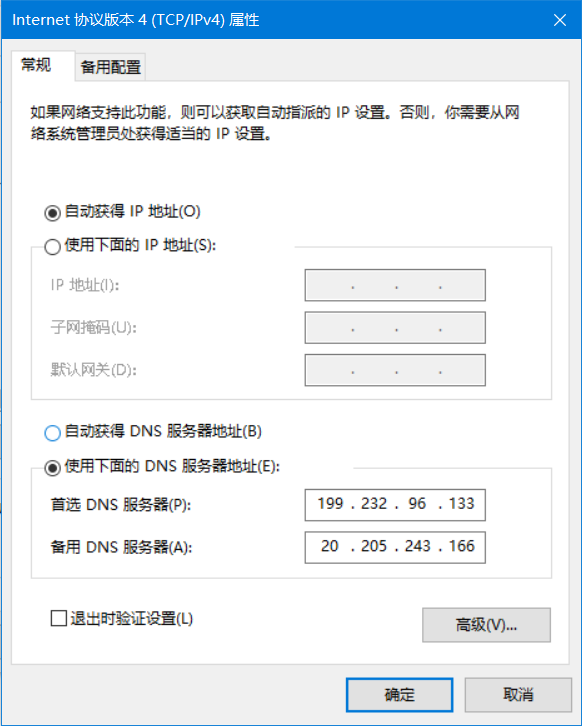
之后将网关改为199.232.96.133,操作如下:
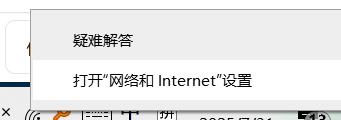
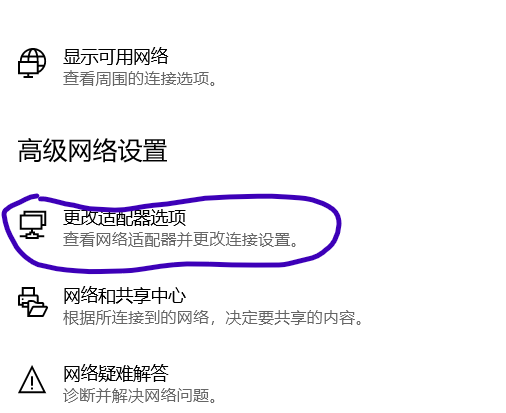
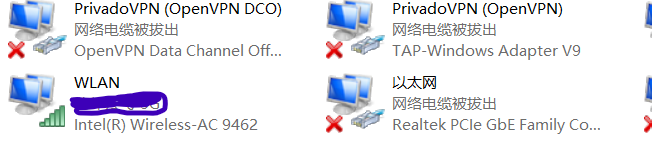
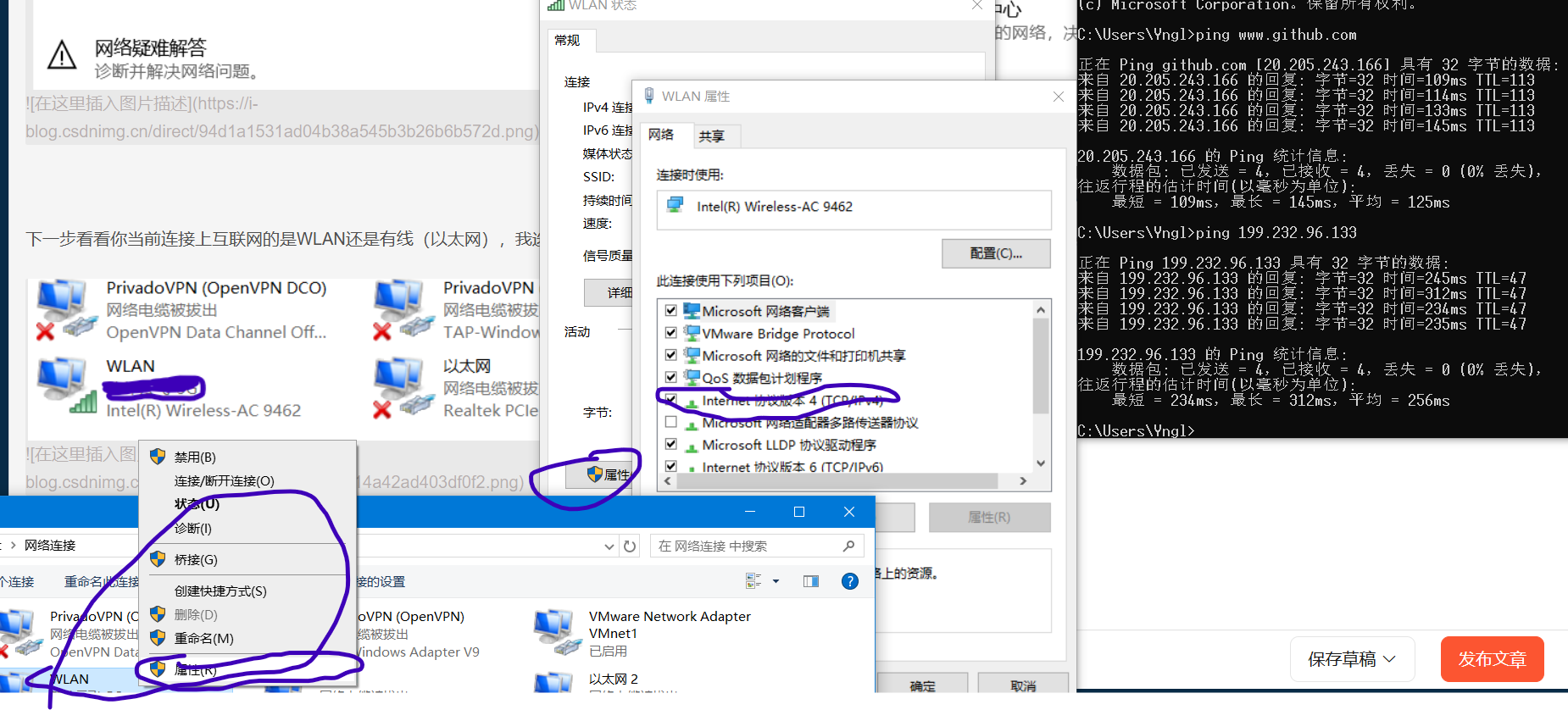
下一步看看你当前连接上互联网的是WLAN还是有线(以太网),我选择WLAN
下一步以此从WLAN右键 “属性” 再点击“属性”,(在我的计算机写作风格中 “ ”里面括号起来的是可以在界面中找到的),再点击“Internet 协议版本4(TCP/IPv4)
这时除了设置199.232.96.133外,我们还需要使用CMD 去Ping一下当前网络与Github的联通性
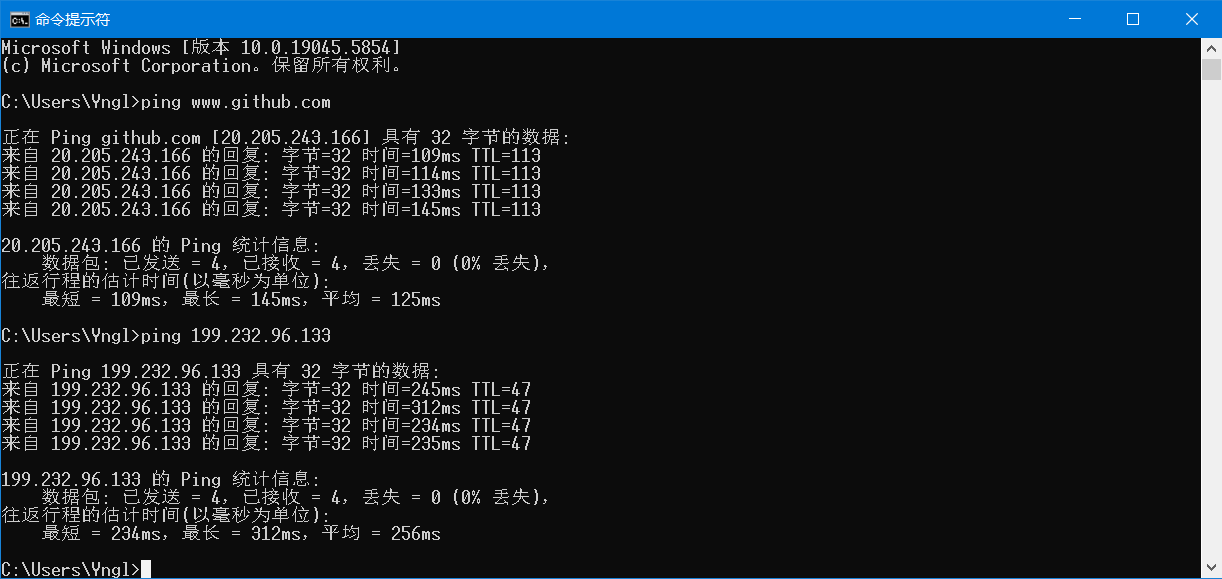
可以看到四个报文都顺利接受到了,将现在的20.205.243.166设为下游DNS,199类IP设置为上游(当让如果像这样设置还没有访问成功可以调换)
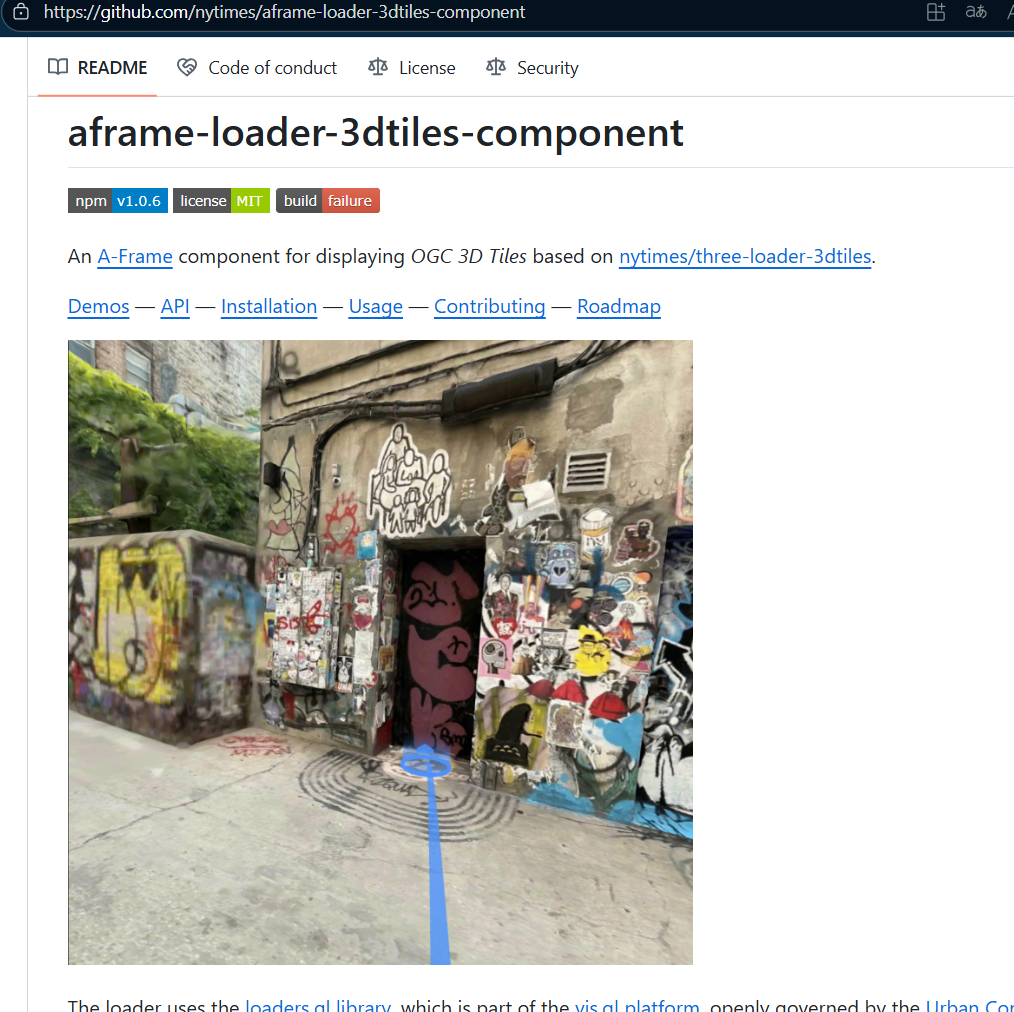
再次访问Github The New York times
我们应当注意,任何网页加载出来后资源都会被浏览器”保存“下载,我们发现有的网页我们第一次访问比较慢,但是第二次之后会较快。我们可以这样设想:飞鸽传书时鸽子不知道要去哪里,需要照着信件的目的地询问经过的鸽子,这样经过的鸽子再询问下一个,一个个传递直到有正确的鸽子告诉了传书的鸽子,让后才知道飞去哪里,这就是路由寻址。第一次飞过去很慢,第二次之后路途都是固定的相当于记住了就看”身体”能跑多快了。
当我们使用 Ctrl+ Alt+ Del时删除所有内容也将我们访问过的网页的内容删除了,这时删除了我们本地内容,还有我们的数据有一份在网页提供商那边。
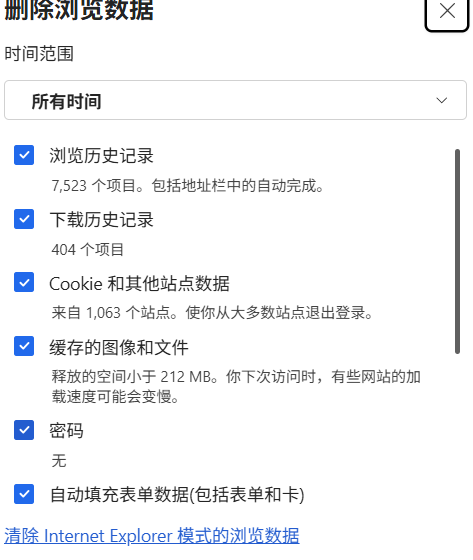
实际上Github网站访问不慢,只是被 DNS污染 ,这是题外话。
问题1-续 VSCode使用Git
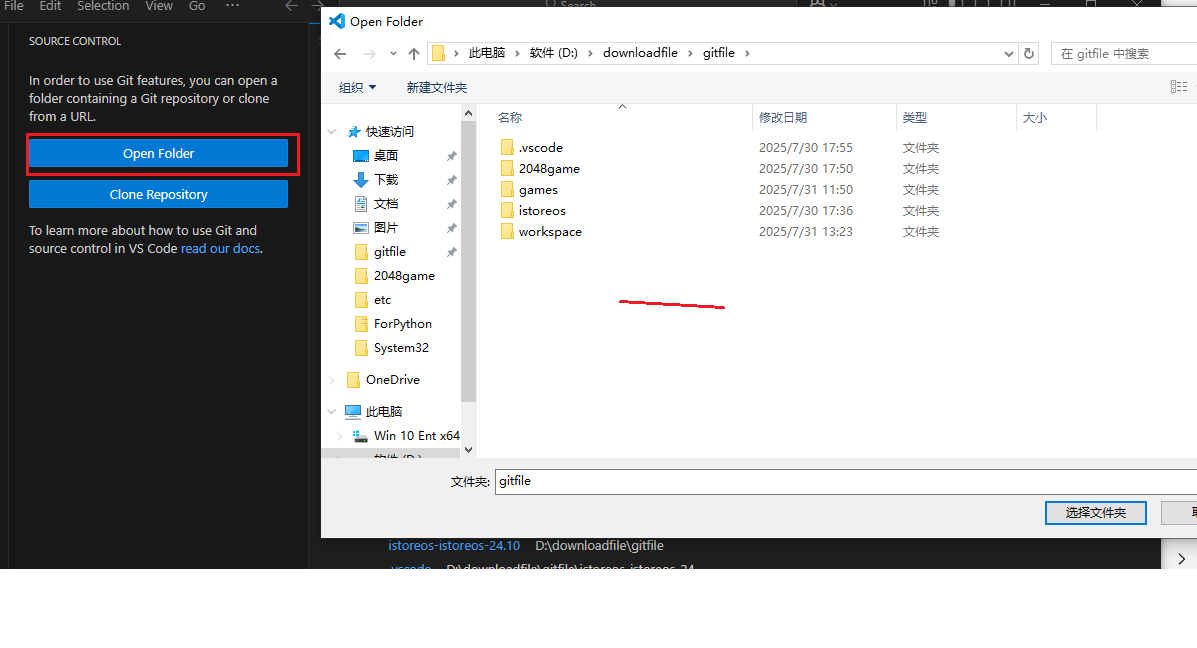
上图显示要打开一个目录,我选择一个。
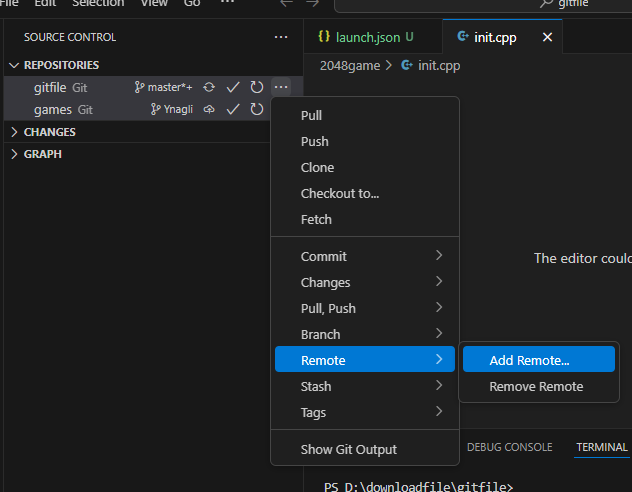
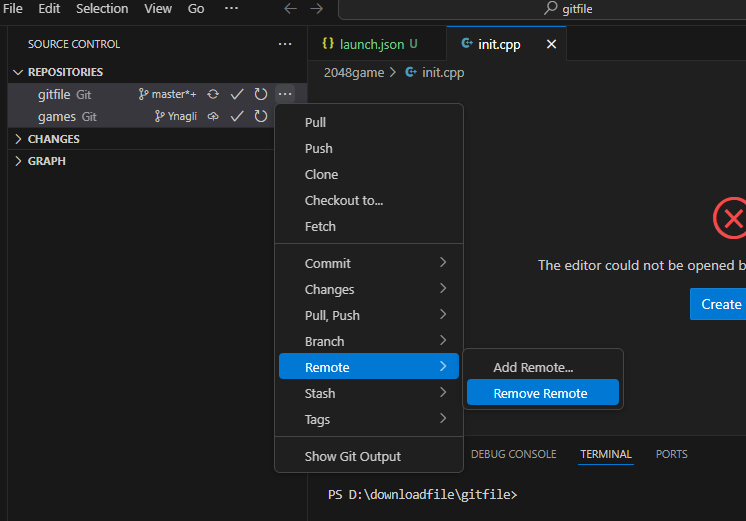
上图显示“master"因为我之间有操作过,所以它出现了,刚开始配置的读者可以忽略,那么将目录选好后,我们进入”Remote“ - ”Add Remote“

一种是直接在出现的输入框中输入Github地址,这个地址在:
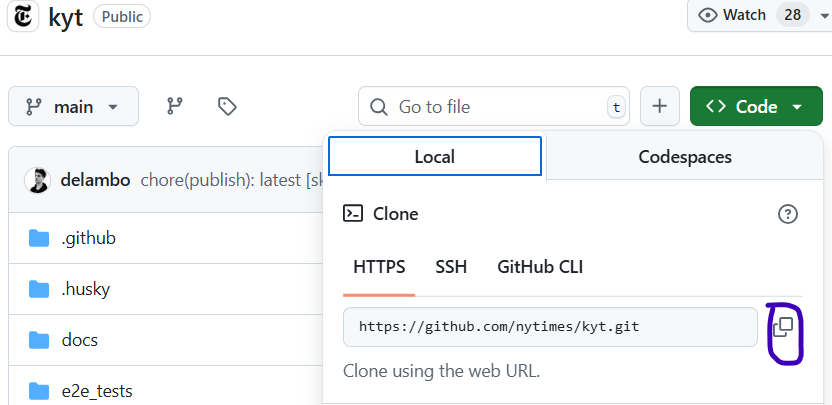
还有一种点击” Add remote from GitHub"

下一步确认,之后输入remote 名

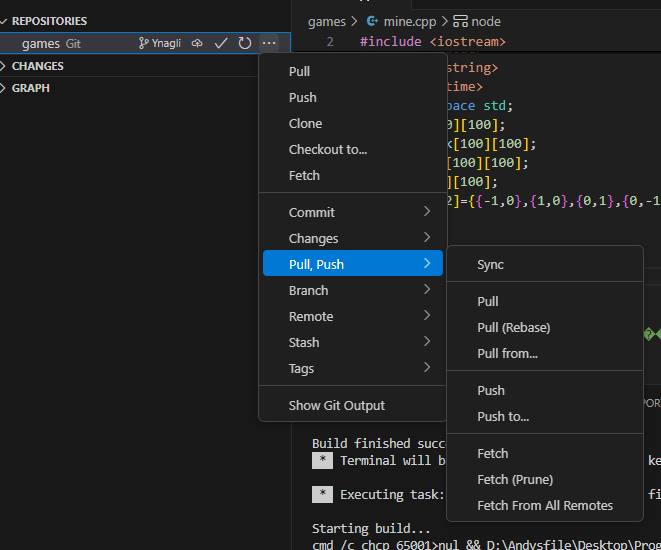
这时候可以pull/push
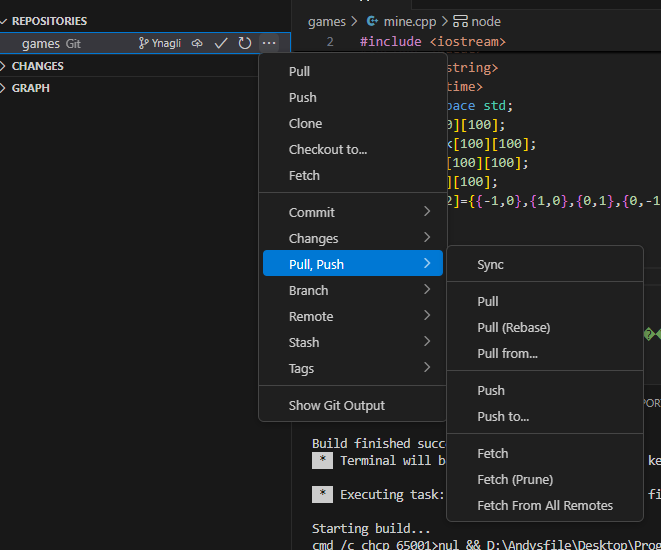
在remote中还可以显示添加过的remote

问题1-续 VSCode出现的问题
- 提示you repository has no remotes configured to pull from
- 期间出现 git 443 after 21118
- Failed to connect to github.com port 443
- Clone 项目 出现Could not connect to server
- ssh: Could not resolve hostname https: Name or service not known
- Fatal: unable to access “https://github.com/…/.git”:recv failure Connection was rese
- git command vsc86436 not found
解决
明晚再详细发布
问题2 VSCode中使用Git下载项目源码运行CPP出错
刚开始使用VSCode时,没有安装Mingw,gitbash,只是使用VSCode自带的c/c++ extension pack
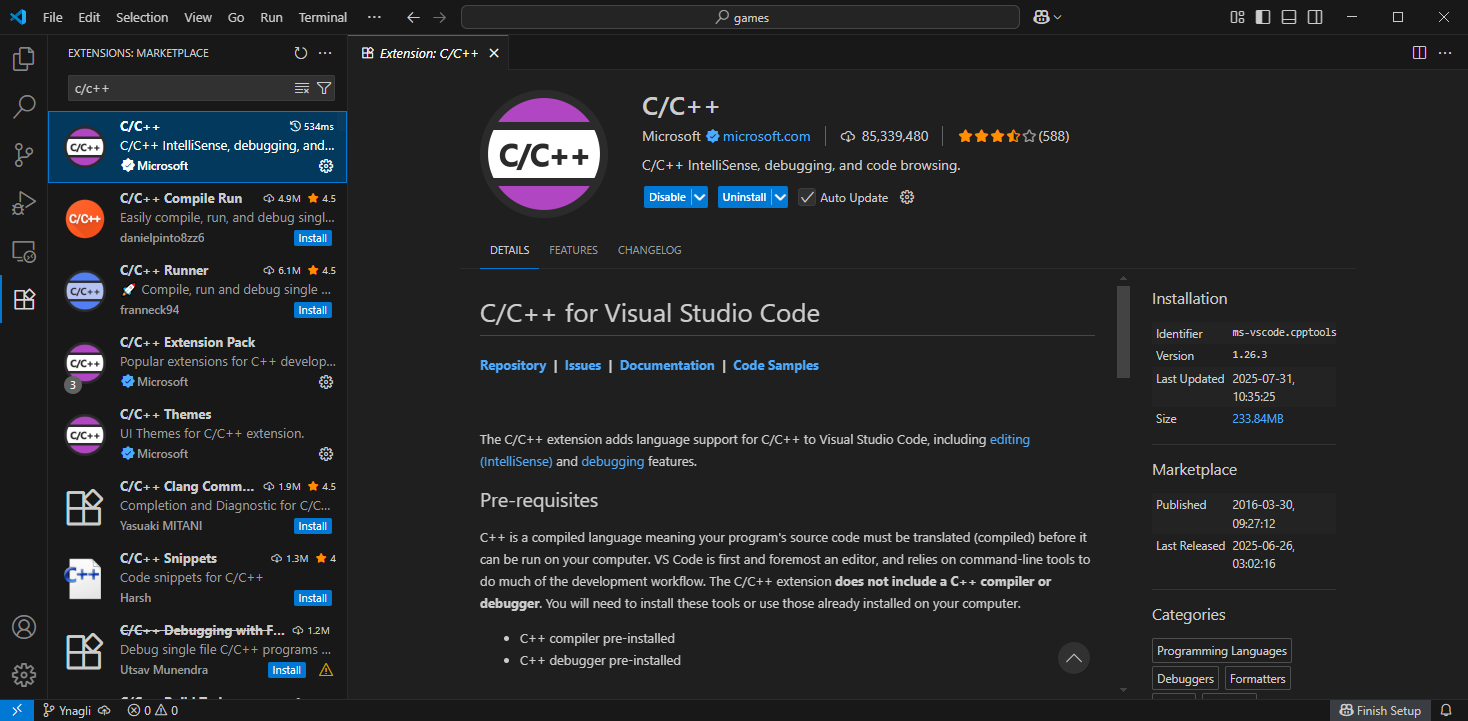
运行后出现如下问题:
- C++ launch program enter program name for …
- unable to start debugging
- launch:program… does not exist
- VSCode中检测到#include 错误 请更新includePath
解决
先安装Mingw,选择Basic 和g++ Compiler

之后返回VSCode配置Launch.json,这个tasks.json刚开始没有出现,在我安装了Mingw之后才有,这时候VSCode中再安装c/c++ extension pack
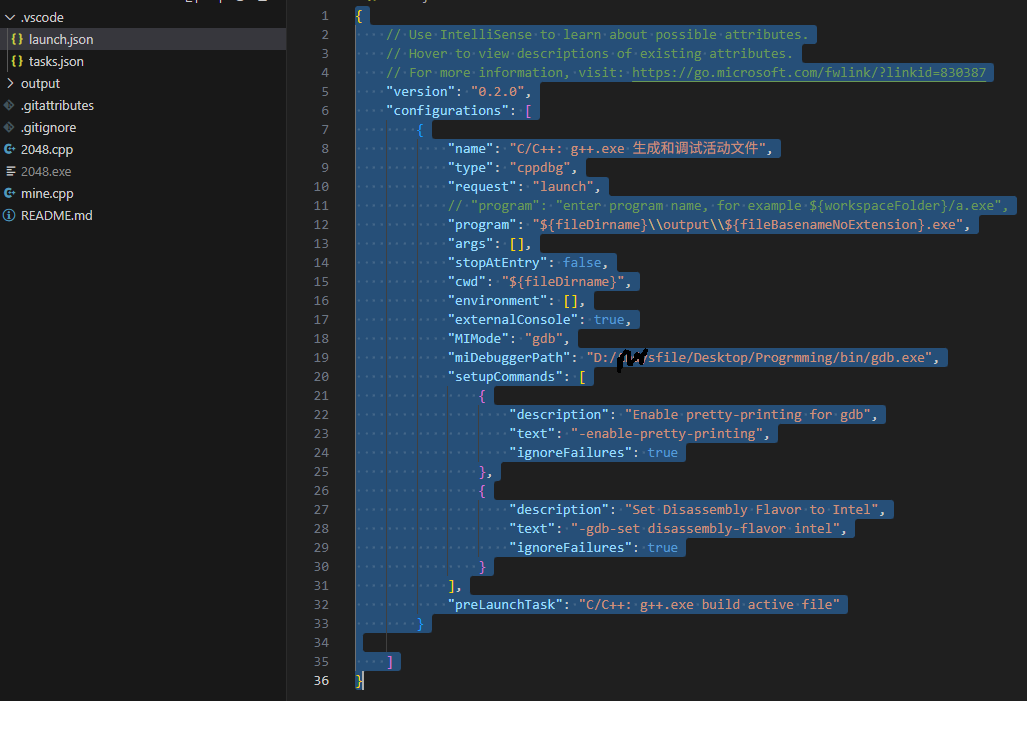
{
    // Use IntelliSense to learn about possible attributes.
    // Hover to view descriptions of existing attributes.
    // For more information, visit: https://go.microsoft.com/fwlink/?linkid=830387
    "version": "0.2.0",
    "configurations": [
        {
            "name": "C/C++: g++.exe 生成和调试活动文件",
            "type": "cppdbg",
            "request": "launch",
            // "program": "enter program name, for example ${workspaceFolder}/a.exe",
            "program": "${fileDirname}\\output\\${fileBasenameNoExtension}.exe",
            "args": [],
            "stopAtEntry": false,
            "cwd": "${fileDirname}",
            "environment": [],
            "externalConsole": true,
            "MIMode": "gdb",
            "miDebuggerPath": "D:/yourfiles/bin/gdb.exe",
            "setupCommands": [
                {
                    "description": "Enable pretty-printing for gdb",
                    "text": "-enable-pretty-printing",
                    "ignoreFailures": true
                },
                {
                    "description": "Set Disassembly Flavor to Intel",
                    "text": "-gdb-set disassembly-flavor intel",
                    "ignoreFailures": true
                }
            ],
            "preLaunchTask": "C/C++: g++.exe build active file"
        }
    ]
}
很多时候时 gcc没改,改成g++,如tasks.json
{
    "tasks": [
        {
            "type": "cppbuild",
            "label": "C/C++: g++.exe build active file",
            "command": "D:\\yourfiles\\bin\\g++.exe",
            "args": [
                "-fdiagnostics-color=always",
                "-g",
                "${file}",
                "-o",
                "${fileDirname}\\output\\${fileBasenameNoExtension}.exe"
            ],
            "options": {
                "cwd": "${fileDirname}"
            },
            "problemMatcher": [
                "$g++"
            ],
            "group": {
                "kind": "build",
                "isDefault": true
            },
            "detail": "Task generated by Debugger."
        }
    ],
    "version": "2.0.0"
}
在tasks中有一个"${fileDirname}\\output\\${fileBasenameNoExtension}.exe" output文件夹这个是g++编译后生成的exe目录。
问题3 在VSCode中找不到run code in terminal
这个属性只有安装code Runner 才有。





 扫一扫
扫一扫


 被折叠的 条评论
为什么被折叠?
被折叠的 条评论
为什么被折叠?
 到【灌水乐园】发言





