



 本文详细介绍如何使用CSS3的translate()函数实现元素的水平垂直居中,通过具体代码示例,展示了在未知元素宽高情况下,如何精确调整元素位置至页面中心。
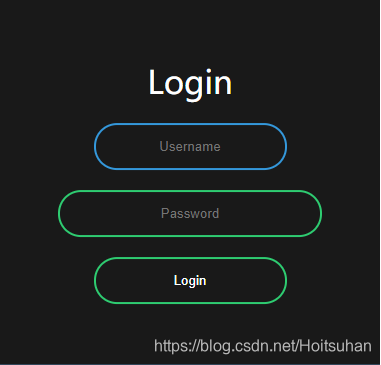
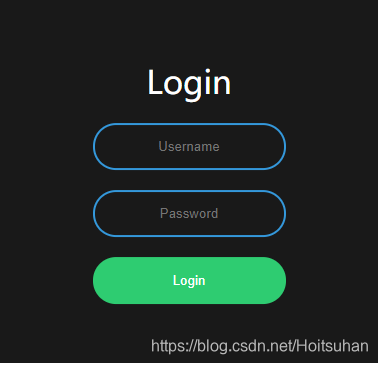
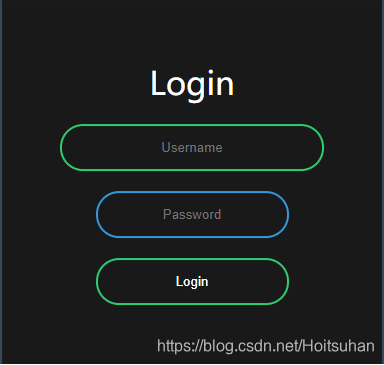
body {
	margin: 0;
	padding: 0;
	font-family: sans-serif;
	background-color: #34495e;
}
.box {
	background-color: #191919;
	width: 300px;
	padding: 40px;
	position: absolute;
	top: 50%;
	left: 50%;
	transform: translate(-50%,-50%);
	text-align: center;
	/*
		translate()函数是css3的新特性.在不知道自身宽高的情况下,可以利用它来进行水平垂直居中.。
		当使用:top: 50%;left: 50%;, 是以左上角为原点,故不处于中心位置
		translate(-50%,-50%) 作用是,往上(x轴),左(y轴)移动自身长宽的 50%,以使其居于中心位置。
	 */
}
.box input {
	border: 0;
	background: none;
	display: block;
	margin: 20px auto;
	text-align: center;
	border: #3498db 2px solid;
	padding: 14px 10px;
	/* width: 200px; */
	width: auto;
	outline: none;
	color: white;
	border-radius: 24px;
	/* 圆角弧度24px */
	transition: 0.25s;
}
.box h1 {
	color: white;
	font-weight: 500;
}
.box input:hover {
	/* width: auto; */
	width: 240px;
	border-color: #2ECC71;

}
.box input[type="submit"] {
	width: 193px;
	border-color: #2ecc71;
	cursor: pointer;
}
.box input[type="submit"]:hover {
	background-color: #2ECC71;
}
<!DOCTYPE html>
<html>
	<head>
		<meta charset="utf-8">
		<title>Login</title>
		<link rel="stylesheet" type="text/css" href="login_style.css"/>
		<script>
			fuction f() {
				alert("你还真点了啊");
			}
		</script>
	</head>
	<body>
		<form action="" method="" class="box">
			<h1>Login</h1>
			<input type="text" name="" id="" placeholder="Username" />
			<input type="password" name="" id="" placeholder="Password" />
			<input type="submit" name="" id="" value="Login" onclick="f()"/>
		</form>
	</body>
</html>





 扫一扫
扫一扫


 5933
5933

 被折叠的 条评论
为什么被折叠?
被折叠的 条评论
为什么被折叠?
 到【灌水乐园】发言





