


openGuass问题:fe sendauth: invalid authentication request from server: AUTH_REQ_SASL_CONT without AUTH_REQ_SASL
问题:
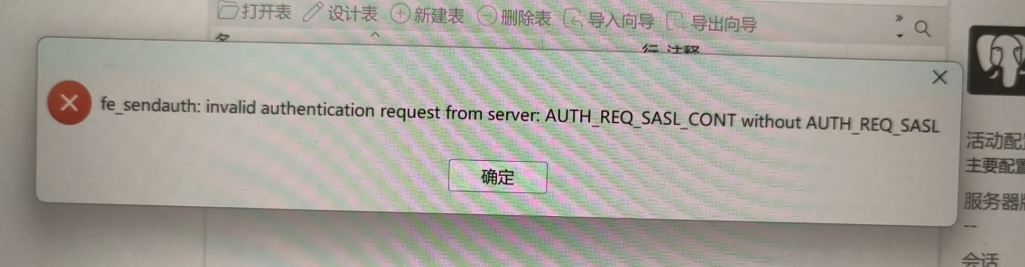
step1:修改加密方式和监听配置(已经做了可以跳过)
具体参考:
openGuass配置文件修改.pdf
注意:比之前增加了一步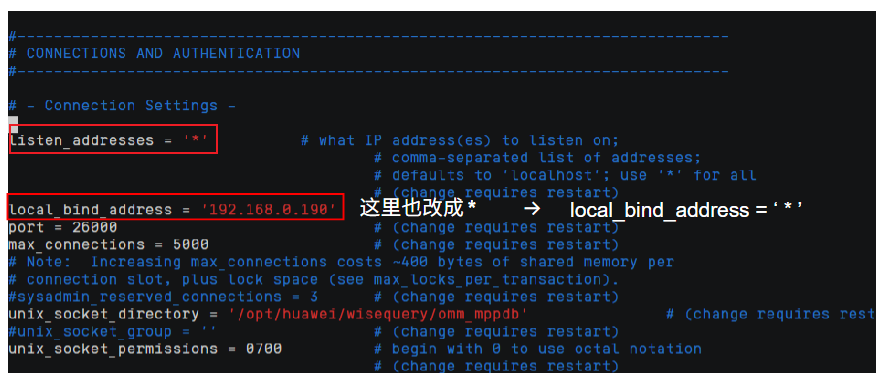
step2:防火墙设置(之后每次启动需要登录omm后重启[gs_om -t restart]一次即可)
在omm用户下以此输入
su - omm
systemctl status firewalld 查看防火墙状态
systemctl stop firewalld 停止防火墙
systemctl disable firewalld
setenforce 0
sed -i ‘s/SELINUX=enforcing/SELINUX=disabled/g’ /etc/selinux/config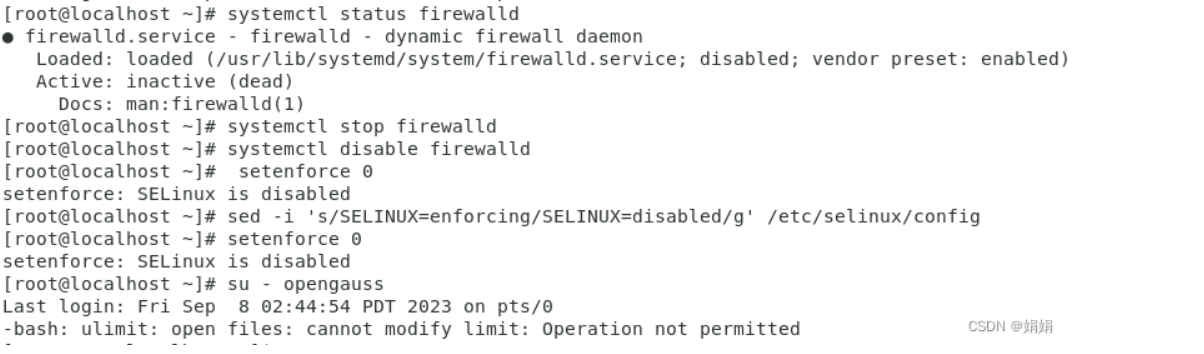
之后每次启动需要登录omm后重启[gs_om -t restart]一次即可
来源:Navicat连接openGauss数据库报错_fe sendauth: invalid authentication request from s-优快云博客
step3:创建用户授权(赋予远程连接权限)
GRANT ALL PRIVILEGES TO [你创建的用户名]
tips:设置schema
每次登录后需要set固定的schema[模式](部分实验需要另外创建schema,同理)来管理其下的tables[表]。因为:用户>数据库>模式>表 & [role>database>schema>table]
su - omm
gs_om -t restart
gsql -d [你的数据库名称] -p 26000 -U [用户名] -W [对应密码]
结果如下:
[此处为你的数据库名]=#
set search_path to [刚刚登录用户已创建的schema名字];
之后创建或者其他的更新就都在这个schema名下啦(超方便的说)





 扫一扫
扫一扫


 5733
5733


 到【灌水乐园】发言




