



 通过WMIC命令在Windows中可以方便地管理WiFi状态。首先使用wmicnicgetname,index获取WiFi接口的索引,例如索引为2。然后,可以执行wmicpathwin32_networkadapterwhereindex=2callenable来开启WiFi,或者使用wmicpathwin32_networkadapterwhereindex=2calldisable来禁用它。
参考了网页:https://www.instructables.com/How-to-Turn-Wifi-OnOff-Using-Command-Prompt/
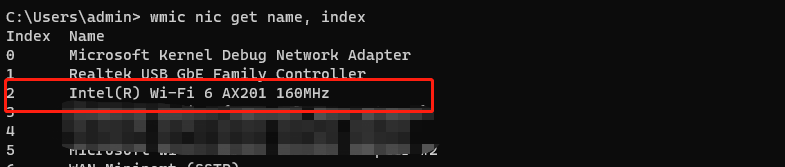
要点为:(1)通过在cmd窗口运行:wmic nic get name, index 获取wifi 信息索引信息,如我的电脑对应索引为2.
(2)开启WIFI
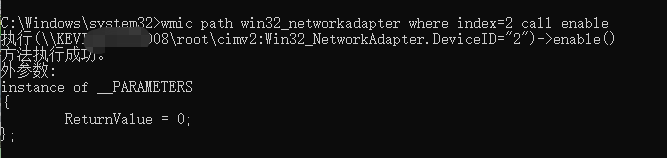
wmic path win32_networkadapter where index=2 call enable,结果如下:
(3)禁用WIFI
wmic path win32_networkadapter where index=2 call disable





 扫一扫
扫一扫


 5628
5628


 到【灌水乐园】发言




