


崩溃恢复之日志解析
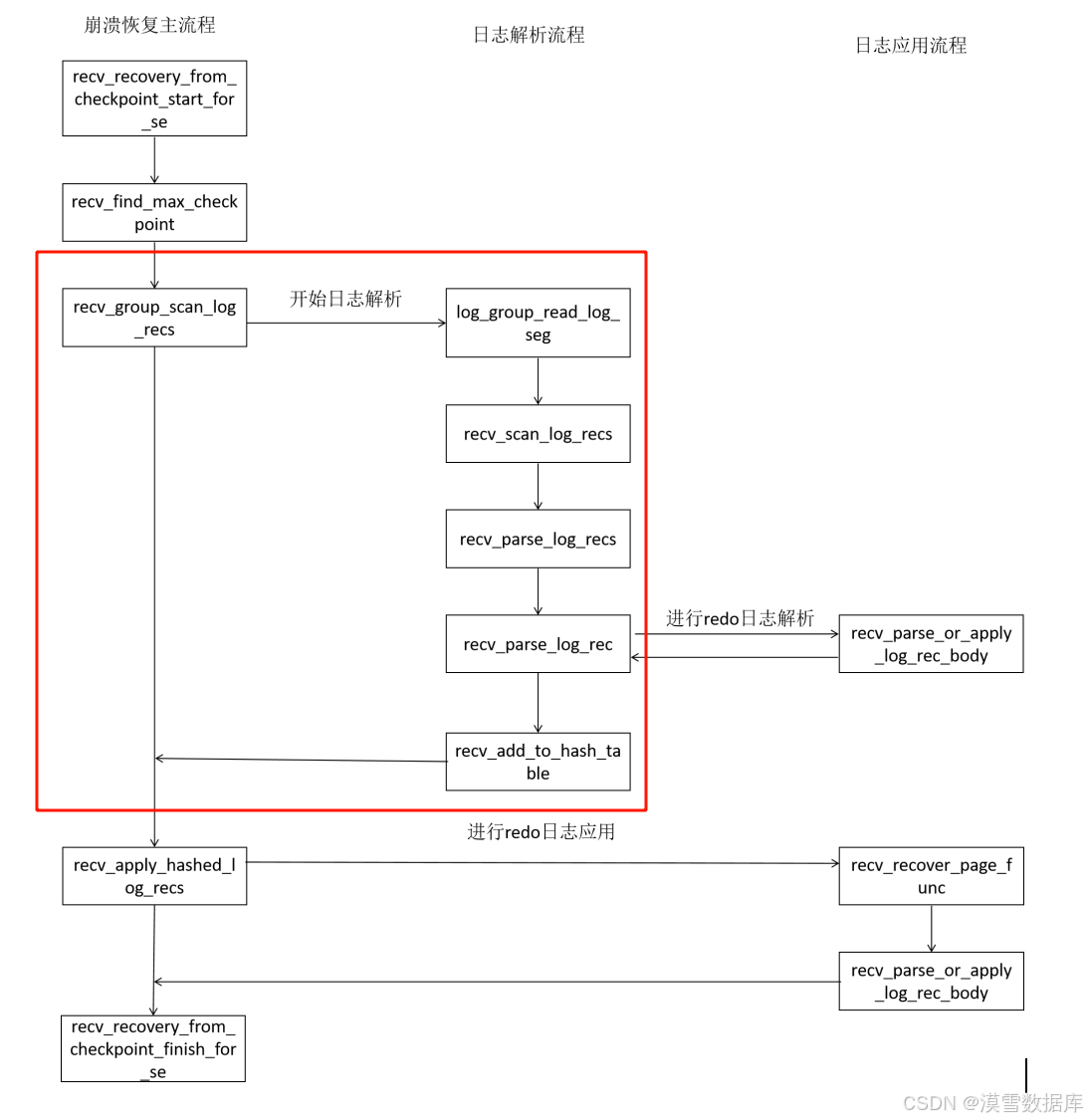
MySQL redo日志崩溃恢复整体流程如图所示,本文将针对日志解析过程中涉及到的几个函数源码进行详细解析。
1. recv_group_scan_log_recs()函数流程
static
bool
recv_group_scan_log_recs(
	log_group_t*	group,
	lsn_t*		contiguous_lsn,
	bool		last_phase)         // 接收并扫描日志组中的日志记录
{
	DBUG_ENTER("recv_group_scan_log_recs");
	assert(!last_phase || recv_sys->mlog_checkpoint_lsn > 0);

	mutex_enter(&recv_sys->mutex);
	recv_sys->len = 0;
	recv_sys->recovered_offset = 0;
	recv_sys->n_addrs = 0;
	recv_sys_empty_hash();
	srv_start_lsn = *contiguous_lsn;
	recv_sys->parse_start_lsn = *contiguous_lsn;
	recv_sys->scanned_lsn = *contiguous_lsn;
	recv_sys->recovered_lsn = *contiguous_lsn;
	recv_sys->scanned_checkpoint_no = 0;
	recv_previous_parsed_rec_type = MLOG_SINGLE_REC_FLAG;
	recv_previous_parsed_rec_offset	= 0;
	recv_previous_parsed_rec_is_multi = 0;
	ut_ad(recv_max_page_lsn == 0);
	ut_ad(last_phase || !recv_writer_thread_active);
	mutex_exit(&recv_sys->mutex);

	lsn_t	checkpoint_lsn	= *contiguous_lsn;
	lsn_t	start_lsn;
	lsn_t	end_lsn;
	store_t	store_to_hash	= last_phase ? STORE_IF_EXISTS : STORE_YES;
	ulint	available_mem	= UNIV_PAGE_SIZE
		* (buf_pool_get_n_pages()
		   - (recv_n_pool_free_frames * srv_buf_pool_instances));

	end_lsn = *contiguous_lsn = ut_uint64_align_down(
		*contiguous_lsn, OS_FILE_LOG_BLOCK_SIZE);

	do {
		if (last_phase && store_to_hash == STORE_NO) {
			store_to_hash = STORE_IF_EXISTS;
			/* We must not allow change buffer
			merge here, because it would generate
			redo log records before we have
			finished the redo log scan. */
			recv_apply_hashed_log_recs(FALSE);
		}

		start_lsn = end_lsn;
		end_lsn += RECV_SCAN_SIZE;

		log_group_read_log_seg(
			log_sys->buf, group, start_lsn, end_lsn);
	} while (!recv_scan_log_recs(
			 available_mem, &store_to_hash, log_sys->buf,
			 RECV_SCAN_SIZE,
			 checkpoint_lsn,
			 start_lsn, contiguous_lsn, &group->scanned_lsn));

	if (recv_sys->found_corrupt_log || recv_sys->found_corrupt_fs) {
		DBUG_RETURN(false);
	}

	DBUG_PRINT("ib_log", ("%s " LSN_PF
			      " completed for log group " ULINTPF,
			      last_phase ? "rescan" : "scan",
			      group->scanned_lsn, group->id));

	DBUG_RETURN(store_to_hash == STORE_NO);
}
1、参数验证和初始化:
- 使用
assert断言来确保如果last_phase为真,则必须有有效的检查点LSNrecv_sys->mlog_checkpoint_lsn。 - 初始化接收系统
recv_sys的一些关键成员变量,比如长度、恢复偏移量、地址数量等,并清空哈希表。设置一些起始LSN比如srv_start_lsn、recv_sys->parse_start_lsn等为传入的contiguous_lsn值。
2、内存和资源准备:
- 计算可用的内存量,这是基于缓冲池的总页数减去为接收保留的空闲帧数。
3、日志扫描循环:
- 调整
end_lsn为contiguous_lsn向下对齐到日志块大小OS_FILE_LOG_BLOCK_SIZE。
	end_lsn = *contiguous_lsn = ut_uint64_align_down(
		*contiguous_lsn, OS_FILE_LOG_BLOCK_SIZE);
- 在一个循环中,不断读取日志段
log_group_read_log_seg,并处理日志记录recv_scan_log_recs。如果是在最后阶段且之前设置为不存储到哈希表STORE_NO,则更改为STORE_IF_EXISTS,并应用已哈希的日志记录。
	do {
		if (last_phase && store_to_hash == STORE_NO) {
            /* 如果满足条件,在日志解析中间,先进行日志应用操作
            如果日志缓冲区满,将更改store_to_hash策略为STORE_NO,且满足last_parse条件
            调用日志应用函数recv_apply_hashed_log_recs()*/
			store_to_hash = STORE_IF_EXISTS;
			recv_apply_hashed_log_recs(FALSE);
		}

		start_lsn = end_lsn;
		end_lsn += RECV_SCAN_SIZE;

		log_group_read_log_seg(
			log_sys->buf, group, start_lsn, end_lsn);  // 读取日志文件将start_lsn到end_lsn的日志读取到log_sys->buf

	} while (!recv_scan_log_recs(
			 available_mem, &store_to_hash, log_sys->buf,
			 RECV_SCAN_SIZE,
			 checkpoint_lsn,
			 start_lsn, contiguous_lsn, &group->scanned_lsn));  // while条件为日志解析函数入口
4、错误处理和返回:
- 如果在扫描过程中发现损坏的日志或文件系统,则返回
false。 - 打印日志信息,表示扫描或重新扫描完成。
- 返回
store_to_hash == STORE_NO的值,这可能表示是否还有更多日志需要处理。
2. recv_scan_log_recs()函数流程
static
bool
recv_scan_log_recs(   // 接收并扫描日志记录的函数
/*===============*/
	ulint		available_memory,/*!< in: we let the hash table of recs
					to grow to this size, at the maximum */
	store_t*	store_to_hash,	/*!< in,out: whether the records should be
					stored to the hash table; this is reset
					if just debug checking is needed, or
					when the available_memory runs out */
	const byte*	buf,		/*!< in: buffer containing a log
					segment or garbage */
	ulint		len,		/*!< in: buffer length */
	lsn_t		checkpoint_lsn,	/*!< in: latest checkpoint LSN */
	lsn_t		start_lsn,	/*!< in: buffer start lsn */
	lsn_t*		contiguous_lsn,	/*!< in/out: it is known that all log
					groups contain contiguous log data up
					to this lsn */
	lsn_t*		group_scanned_lsn)/*!< out: scanning succeeded up to
					this lsn */
{
	const byte*	log_block	= buf;
	ulint		no;
	lsn_t		scanned_lsn	= start_lsn;
	bool		finished	= false;
	ulint		data_len;
	bool		more_data	= false;
	ulint		recv_parsing_buf_size = RECV_PARSING_BUF_SIZE;

	ut_ad(start_lsn % OS_FILE_LOG_BLOCK_SIZE == 0);
	ut_ad(len % OS_FILE_LOG_BLOCK_SIZE == 0);
	ut_ad(len >= OS_FILE_LOG_BLOCK_SIZE);

	do {
		ut_ad(!finished);
		no = log_block_get_hdr_no(log_block);
		ulint expected_no = log_block_convert_lsn_to_no(scanned_lsn);
		if (no != expected_no) {
			finished = true;
			break;
		}

		if (!log_block_checksum_is_ok(log_block)) {
			ib::error() << "Log block " << no <<
				" at lsn " << scanned_lsn << " has valid"
				" header, but checksum field contains "
				<< log_block_get_checksum(log_block)
				<< ", should be "
				<< log_block_calc_checksum(log_block);
			finished = true;
			break;
		}

		if (log_block_get_flush_bit(log_block)) {

			if (scanned_lsn > *contiguous_lsn) {
				*contiguous_lsn = scanned_lsn;
			}
		}

		data_len = log_block_get_data_len(log_block);

		if (scanned_lsn + data_len > recv_sys->scanned_lsn
		    && log_block_get_checkpoint_no(log_block)
		    < recv_sys->scanned_checkpoint_no
		    && (recv_sys->scanned_checkpoint_no
			- log_block_get_checkpoint_no(log_block)
			> 0x80000000UL)) {

			/* Garbage from a log buffer flush which was made
			before the most recent database recovery */
			finished = true;
			break;
		}

		if (!recv_sys->parse_start_lsn
		    && (log_block_get_first_rec_group(log_block) > 0)) {

			/* We found a point from which to start the parsing
			of log records */

			recv_sys->parse_start_lsn = scanned_lsn
				+ log_block_get_first_rec_group(log_block);
			recv_sys->scanned_lsn = recv_sys->parse_start_lsn;
			recv_sys->recovered_lsn = recv_sys->parse_start_lsn;
		}

		scanned_lsn += data_len;

		if (scanned_lsn > recv_sys->scanned_lsn) {

			DBUG_EXECUTE_IF(
				"reduce_recv_parsing_buf",
				recv_parsing_buf_size
					= (70 * 1024);
				);

			if (recv_sys->len + 4 * OS_FILE_LOG_BLOCK_SIZE
			    >= recv_parsing_buf_size) {
				ib::error() << "Log parsing buffer overflow."
					" Recovery may have failed!";

				recv_sys->found_corrupt_log = true;

			} else if (!recv_sys->found_corrupt_log) {
				more_data = recv_sys_add_to_parsing_buf(
					log_block, scanned_lsn);
			}

			recv_sys->scanned_lsn = scanned_lsn;
			recv_sys->scanned_checkpoint_no
				= log_block_get_checkpoint_no(log_block);
		}

		if (data_len < OS_FILE_LOG_BLOCK_SIZE) {
			/* Log data for this group ends here */
			finished = true;
			break;
		} else {
			log_block += OS_FILE_LOG_BLOCK_SIZE;
		}
	} while (log_block < buf + len);

	*group_scanned_lsn = scanned_lsn;

	if (recv_needed_recovery
	    || (recv_is_from_backup && !recv_is_making_a_backup)) {
		recv_scan_print_counter++;

		if (finished || (recv_scan_print_counter % 80 == 0)) {

			ib::info() << "Doing recovery: scanned up to"
				" log sequence number " << scanned_lsn;
		}
	}

	if (more_data && !recv_sys->found_corrupt_log) {
		/* Try to parse more log records */

		if (recv_parse_log_recs(checkpoint_lsn,
					*store_to_hash)) {
			ut_ad(recv_sys->found_corrupt_log
			      || recv_sys->found_corrupt_fs
			      || recv_sys->mlog_checkpoint_lsn
			      == recv_sys->recovered_lsn);
			return(true);
		}

		if (*store_to_hash != STORE_NO
		    && mem_heap_get_size(recv_sys->heap) > available_memory) {
			*store_to_hash = STORE_NO;
		}

		if (recv_sys->recovered_offset > recv_parsing_buf_size / 4) {
			/* Move parsing buffer data to the buffer start */

			recv_sys_justify_left_parsing_buf();
		}
	}

	return(finished);
}
1、初始化:设置日志块指针、扫描LSN、完成标志等。
2、循环处理日志块:
- 检验日志块头部的
no字段和尾部的checksum字段
    no = log_block_get_hdr_no(log_block);
    ulint expected_no = log_block_convert_lsn_to_no(scanned_lsn);
    if (no != expected_no) {
        /* 检查日志块头部no字段*/
        finished = true;
        break;
    }
    if (!log_block_checksum_is_ok(log_block)) {
        ib::error() << "Log block " << no <<
            " at lsn " << scanned_lsn << " has valid"
            " header, but checksum field contains "
            << log_block_get_checksum(log_block)
            << ", should be "
            << log_block_calc_checksum(log_block);
        /* Garbage or an incompletely written log block.

        This could be the result of killing the server
        while it was writing this log block. We treat
        this as an abrupt end of the redo log. */
        finished = true;
        break;
    }
- 检验当前块是否具有
flush bit。具有flush bit的块,表示是某次将Log buffer中的block刷新到磁盘时的第一个被刷入的块。如果块具有flush bit,则更新contiguous_lsn,表示当前scanned_lsn之前的日志都是连续的。
    if (log_block_get_flush_bit(log_block)) {

        if (scanned_lsn > *contiguous_lsn) {
            *contiguous_lsn = scanned_lsn;
        }
    }
- 如果找到开始解析日志记录的点,则更新相关状态信息。
    if (!recv_sys->parse_start_lsn
        && (log_block_get_first_rec_group(log_block) > 0)) {

        /* We found a point from which to start the parsing
        of log records */

        recv_sys->parse_start_lsn = scanned_lsn
            + log_block_get_first_rec_group(log_block);
        recv_sys->scanned_lsn = recv_sys->parse_start_lsn;
        recv_sys->recovered_lsn = recv_sys->parse_start_lsn;
    }
- 更新扫描LSN,并根据需要添加日志数据到解析缓冲区。
more_data = recv_sys_add_to_parsing_buf(
					log_block, scanned_lsn);
3、处理结束:
- 更新
group_scanned_lsn。
*group_scanned_lsn = scanned_lsn;
- 根据恢复需求打印恢复进度。
- 如果还有更多数据且未发现损坏日志,则尝试解析更多日志记录。
    if (more_data && !recv_sys->found_corrupt_log) {
		/* Try to parse more log records */

		if (recv_parse_log_recs(checkpoint_lsn,
					*store_to_hash)) {
			ut_ad(recv_sys->found_corrupt_log
			      || recv_sys->found_corrupt_fs
			      || recv_sys->mlog_checkpoint_lsn
			      == recv_sys->recovered_lsn);
			return(true);
		}

		if (*store_to_hash != STORE_NO
		    && mem_heap_get_size(recv_sys->heap) > available_memory) {   // 根据内存使用情况决定是否继续存储到哈希表。
			*store_to_hash = STORE_NO;
		}

		if (recv_sys->recovered_offset > recv_parsing_buf_size / 4) {    // 如果解析缓冲区中的数据较多,则调整数据位置。
			/* Move parsing buffer data to the buffer start */

			recv_sys_justify_left_parsing_buf();
		}
	}
3.recv_parse_log_recs()函数流程
static MY_ATTRIBUTE((warn_unused_result))
bool
recv_parse_log_recs(
	lsn_t		checkpoint_lsn,
	store_t		store)   // 解析日志记录
{
	byte*		ptr;
	byte*		end_ptr;
	bool		single_rec;
	ulint		len;
	lsn_t		new_recovered_lsn;
	lsn_t		old_lsn;
	mlog_id_t	type;
	ulint		space;
	ulint		page_no;
	byte*		body;

	ut_ad(log_mutex_own());
	ut_ad(recv_sys->parse_start_lsn != 0);
loop:
	ptr = recv_sys->buf + recv_sys->recovered_offset;

	end_ptr = recv_sys->buf + recv_sys->len;

	if (ptr == end_ptr) {

		return(false);
	}

	switch (*ptr) {
	case MLOG_CHECKPOINT:
#ifdef UNIV_LOG_LSN_DEBUG
	case MLOG_LSN:
#endif /* UNIV_LOG_LSN_DEBUG */
	case MLOG_DUMMY_RECORD:
		single_rec = true;
		break;
	default:
		single_rec = !!(*ptr & MLOG_SINGLE_REC_FLAG);
	}

	if (single_rec) {
		/* The mtr did not modify multiple pages */

		old_lsn = recv_sys->recovered_lsn;

		len = recv_parse_log_rec(&type, ptr, end_ptr, &space,
					 &page_no, true, &body);

		if (len == 0) {
			return(false);
		}

		if (recv_sys->found_corrupt_log) {
			recv_report_corrupt_log(
				ptr, type, space, page_no);
			return(true);
		}

		if (recv_sys->found_corrupt_fs) {
			return(true);
		}

		new_recovered_lsn = recv_calc_lsn_on_data_add(old_lsn, len);

		if (new_recovered_lsn > recv_sys->scanned_lsn) {

			return(false);
		}

		recv_previous_parsed_rec_type = type;
		recv_previous_parsed_rec_offset = recv_sys->recovered_offset;
		recv_previous_parsed_rec_is_multi = 0;

		recv_sys->recovered_offset += len;
		recv_sys->recovered_lsn = new_recovered_lsn;

		switch (type) {
			lsn_t	lsn;
		case MLOG_DUMMY_RECORD:
			...
	} else {

		ulint	total_len	= 0;
		ulint	n_recs		= 0;
		bool	only_mlog_file	= true;
		ulint	mlog_rec_len	= 0;

		for (;;) {
			len = recv_parse_log_rec(
				&type, ptr, end_ptr, &space, &page_no,
				false, &body);

			if (len == 0) {
				return(false);
			}

			if (recv_sys->found_corrupt_log
			    || type == MLOG_CHECKPOINT
			    || (*ptr & MLOG_SINGLE_REC_FLAG)) {
				recv_sys->found_corrupt_log = true;
				recv_report_corrupt_log(
					ptr, type, space, page_no);
				return(true);
			}

			if (recv_sys->found_corrupt_fs) {
				return(true);
			}

			recv_previous_parsed_rec_type = type;
			recv_previous_parsed_rec_offset
				= recv_sys->recovered_offset + total_len;
			recv_previous_parsed_rec_is_multi = 1;

			if (type != MLOG_FILE_NAME && only_mlog_file == true) {
				only_mlog_file = false;
			}

			if (only_mlog_file) {
				new_recovered_lsn = recv_calc_lsn_on_data_add(
					recv_sys->recovered_lsn, len);
				mlog_rec_len += len;
				recv_sys->recovered_offset += len;
				recv_sys->recovered_lsn = new_recovered_lsn;
			}

			total_len += len;
			n_recs++;

			ptr += len;

			if (type == MLOG_MULTI_REC_END) {
				DBUG_PRINT("ib_log",
					   ("scan " LSN_PF
					    ": multi-log end"
					    " total_len " ULINTPF
					    " n=" ULINTPF,
					    recv_sys->recovered_lsn,
					    total_len, n_recs));
				total_len -= mlog_rec_len;
				break;
			}

			DBUG_PRINT("ib_log",
				   ("scan " LSN_PF ": multi-log rec %s"
				    " len " ULINTPF
				    " page " ULINTPF ":" ULINTPF,
				    recv_sys->recovered_lsn,
				    get_mlog_string(type), len, space, page_no));
		}

		new_recovered_lsn = recv_calc_lsn_on_data_add(
			recv_sys->recovered_lsn, total_len);

		if (new_recovered_lsn > recv_sys->scanned_lsn) {
			/* The log record filled a log block, and we require
			that also the next log block should have been scanned
			in */

			return(false);
		}

		/* Add all the records to the hash table */

		ptr = recv_sys->buf + recv_sys->recovered_offset;

		for (;;) {
			old_lsn = recv_sys->recovered_lsn;

			len = recv_parse_log_rec(
				&type, ptr, end_ptr, &space, &page_no,
				true, &body);

			if (recv_sys->found_corrupt_log
			    && !recv_report_corrupt_log(
				    ptr, type, space, page_no)) {
				return(true);
			}

			if (recv_sys->found_corrupt_fs) {
				return(true);
			}

			ut_a(len != 0);
			ut_a(!(*ptr & MLOG_SINGLE_REC_FLAG));

			recv_sys->recovered_offset += len;
			recv_sys->recovered_lsn
				= recv_calc_lsn_on_data_add(old_lsn, len);

			switch (type) {
			case MLOG_MULTI_REC_END:
				...
				}
			}

			ptr += len;
		}
	}

	goto loop;
}
1、循环解析日志记录:
- 使用一个标签
loop:开始一个无限循环,用于连续解析日志记录,直到没有更多记录可以解析。
2、解析单个或多个日志记录:
- 根据日志记录的第一个字节,判断这是一个单条记录还是多条记录的开始。
single_rec = !!(*ptr & MLOG_SINGLE_REC_FLAG);
- 对于单条记录,直接解析并处理。
len = recv_parse_log_rec(&type, ptr, end_ptr, &space,
                &page_no, true, &body);
- 对于多条记录,由
MLOG_MULTI_REC_START标记开始,循环解析直到遇到MLOG_MULTI_REC_END。
for (;;) {
    len = recv_parse_log_rec(
        &type, ptr, end_ptr, &space, &page_no,
        false, &body);

    if (len == 0) {   // 没有更多日志记录可以解析
        return(false);
    }

    if (recv_sys->found_corrupt_log
        || type == MLOG_CHECKPOINT
        || (*ptr & MLOG_SINGLE_REC_FLAG)) {   // 处理损坏的日志
        recv_sys->found_corrupt_log = true;
        recv_report_corrupt_log(
            ptr, type, space, page_no);
        return(true);
    }

    if (recv_sys->found_corrupt_fs) {
        return(true);
    }

    recv_previous_parsed_rec_type = type;
    recv_previous_parsed_rec_offset
        = recv_sys->recovered_offset + total_len;
    recv_previous_parsed_rec_is_multi = 1;

    if (type != MLOG_FILE_NAME && only_mlog_file == true) {
        only_mlog_file = false;
    }

    if (only_mlog_file) {
        new_recovered_lsn = recv_calc_lsn_on_data_add(
            recv_sys->recovered_lsn, len);
        mlog_rec_len += len;
        recv_sys->recovered_offset += len;
        recv_sys->recovered_lsn = new_recovered_lsn;
    }

    total_len += len;
    n_recs++;

    ptr += len;

    ...
}

new_recovered_lsn = recv_calc_lsn_on_data_add(
    recv_sys->recovered_lsn, total_len);  // 计算基于总长度的lsn

if (new_recovered_lsn > recv_sys->scanned_lsn) {
    /* 如果新的LSN大于已扫描的LSN,则表示日志块已填满,
    但下一个日志块尚未扫描完毕,因此返回false。*/

    return(false);
}
3、错误处理和日志记录:
- 如果在解析过程中发现日志损坏(recv_sys->found_corrupt_log),则报告错误并可能返回。
- 如果发现文件系统损坏(recv_sys->found_corrupt_fs),则同样返回。
4、更新恢复状态:
- 解析每条记录后,更新
recv_sys中的recovered_offset和recovered_lsn,以反映当前恢复的进度。
for (;;) {
    old_lsn = recv_sys->recovered_lsn;
    len = recv_parse_log_rec(
        &type, ptr, end_ptr, &space, &page_no,
        true, &body);

    if (recv_sys->found_corrupt_log
        && !recv_report_corrupt_log(
            ptr, type, space, page_no)) {
        return(true);
    }

    if (recv_sys->found_corrupt_fs) {
        return(true);
    }

    ut_a(len != 0);
    ut_a(!(*ptr & MLOG_SINGLE_REC_FLAG));

    recv_sys->recovered_offset += len;
    recv_sys->recovered_lsn
        = recv_calc_lsn_on_data_add(old_lsn, len);
    ...
}
5、处理特定类型的日志记录:
- 根据解析出的日志记录类型,执行特定的处理逻辑。
6、返回:
- 如果成功解析完所有日志记录,或者由于某些原因不能继续,函数将返回
true或false。
4、recv_parse_log_rec()函数流程
static
ulint
recv_parse_log_rec(  // 解析单条日志记录
	mlog_id_t*	type,
	byte*		ptr,
	byte*		end_ptr,
	ulint*		space,
	ulint*		page_no,
	bool		apply,
	byte**		body)
{
	byte*	new_ptr;

	*body = NULL;

	UNIV_MEM_INVALID(type, sizeof *type);
	UNIV_MEM_INVALID(space, sizeof *space);
	UNIV_MEM_INVALID(page_no, sizeof *page_no);
	UNIV_MEM_INVALID(body, sizeof *body);

	if (ptr == end_ptr) {

		return(0);
	}

	switch (*ptr) {
#ifdef UNIV_LOG_LSN_DEBUG
	case MLOG_LSN | MLOG_SINGLE_REC_FLAG:
	case MLOG_LSN:
		new_ptr = mlog_parse_initial_log_record(
			ptr, end_ptr, type, space, page_no);
		if (new_ptr != NULL) {
			const lsn_t	lsn = static_cast<lsn_t>(
				*space) << 32 | *page_no;
			ut_a(lsn == recv_sys->recovered_lsn);
		}

		*type = MLOG_LSN;
		return(new_ptr - ptr);
#endif /* UNIV_LOG_LSN_DEBUG */
	case MLOG_MULTI_REC_END:
	case MLOG_DUMMY_RECORD:
		*type = static_cast<mlog_id_t>(*ptr);
		return(1);
	case MLOG_CHECKPOINT:
		if (end_ptr < ptr + SIZE_OF_MLOG_CHECKPOINT) {
			return(0);
		}
		*type = static_cast<mlog_id_t>(*ptr);
		return(SIZE_OF_MLOG_CHECKPOINT);
	case MLOG_MULTI_REC_END | MLOG_SINGLE_REC_FLAG:
	case MLOG_DUMMY_RECORD | MLOG_SINGLE_REC_FLAG:
	case MLOG_CHECKPOINT | MLOG_SINGLE_REC_FLAG:
		recv_sys->found_corrupt_log = true;
		return(0);
	}

	new_ptr = mlog_parse_initial_log_record(ptr, end_ptr, type, space,
						page_no);
	*body = new_ptr;

	if (UNIV_UNLIKELY(!new_ptr)) {

		return(0);
	}

	new_ptr = recv_parse_or_apply_log_rec_body(
		*type, new_ptr, end_ptr, *space, *page_no, NULL, NULL);

	if (UNIV_UNLIKELY(new_ptr == NULL)) {

		return(0);
	}

	return(new_ptr - ptr);
}
1、switch(type)对所有不需要进行应用的日志进行处理,需要应用的日志不在switch结构中处理
2、解析出日志的表空间、页号字段
new_ptr = mlog_parse_initial_log_record(ptr, end_ptr, type, space,
						page_no);
3、解析日志内容,此时该函数传入参数block为NULL,应此只进行日志解析不进行日志应用
new_ptr = recv_parse_or_apply_log_rec_body(
		*type, new_ptr, end_ptr, *space, *page_no, NULL, NULL);
5、recv_add_to_hash_table()函数流程
static
void
recv_add_to_hash_table(  // 向哈希表中添加日志记录
/*===================*/
	mlog_id_t	type,		/*!< in: log record type */
	ulint		space,		/*!< in: space id */
	ulint		page_no,	/*!< in: page number */
	byte*		body,		/*!< in: log record body */
	byte*		rec_end,	/*!< in: log record end */
	lsn_t		start_lsn,	/*!< in: start lsn of the mtr */
	lsn_t		end_lsn)	/*!< in: end lsn of the mtr */
{
	recv_t*		recv;
	ulint		len;
	recv_data_t*	recv_data;
	recv_data_t**	prev_field;
	recv_addr_t*	recv_addr;

	ut_ad(type != MLOG_FILE_DELETE);
	ut_ad(type != MLOG_FILE_CREATE2);
	ut_ad(type != MLOG_FILE_RENAME2);
	ut_ad(type != MLOG_FILE_NAME);
	ut_ad(type != MLOG_DUMMY_RECORD);
	ut_ad(type != MLOG_CHECKPOINT);
	ut_ad(type != MLOG_INDEX_LOAD);
	ut_ad(type != MLOG_TRUNCATE);

	len = rec_end - body;

	recv = static_cast<recv_t*>(
		mem_heap_alloc(recv_sys->heap, sizeof(recv_t)));

	recv->type = type;
	recv->len = rec_end - body;
	recv->start_lsn = start_lsn;
	recv->end_lsn = end_lsn;

	recv_addr = recv_get_fil_addr_struct(space, page_no);

	if (recv_addr == NULL) {
		recv_addr = static_cast<recv_addr_t*>(
			mem_heap_alloc(recv_sys->heap, sizeof(recv_addr_t)));

		recv_addr->space = space;
		recv_addr->page_no = page_no;
		recv_addr->state = RECV_NOT_PROCESSED;

		UT_LIST_INIT(recv_addr->rec_list, &recv_t::rec_list);

		HASH_INSERT(recv_addr_t, addr_hash, recv_sys->addr_hash,
			    recv_fold(space, page_no), recv_addr);
		recv_sys->n_addrs++;
#if 0
		fprintf(stderr, "Inserting log rec for space %lu, page %lu\n",
			space, page_no);
#endif
	}

	UT_LIST_ADD_LAST(recv_addr->rec_list, recv);

	prev_field = &(recv->data);

	/* Store the log record body in chunks of less than UNIV_PAGE_SIZE:
	recv_sys->heap grows into the buffer pool, and bigger chunks could not
	be allocated */

	while (rec_end > body) {

		len = rec_end - body;

		if (len > RECV_DATA_BLOCK_SIZE) {
			len = RECV_DATA_BLOCK_SIZE;
		}

		recv_data = static_cast<recv_data_t*>(
			mem_heap_alloc(recv_sys->heap,
				       sizeof(recv_data_t) + len));

		*prev_field = recv_data;

		memcpy(recv_data + 1, body, len);

		prev_field = &(recv_data->next);

		body += len;
	}

	*prev_field = NULL;
}
1、使用recv_sys的堆,为当前日志分配一个recv_t空间,并初始化
	recv = static_cast<recv_t*>(
		mem_heap_alloc(recv_sys->heap, sizeof(recv_t)));

	recv->type = type;
	recv->len = rec_end - body;
	recv->start_lsn = start_lsn;
	recv->end_lsn = end_lsn;
2、调用recv_get_fil_addr_struct(),在哈希表中获取该数据页的链表
recv_addr = recv_get_fil_addr_struct(space, page_no);
3、如果数据页没在哈希表中,在哈希表中创建该节点
HASH_INSERT宏将新创建的链表添加到recv_sys->addr_hash的哈希桶中,通过(spacd,page_no)计算哈希值,获取recv_sys->addr_hash中的位置。如果当前位置为NULL,直接插入;如果产生哈希冲突,是链表的方式解决哈希冲突,进行插入。recv_sys->n_addrs表示当前崩溃恢复哈希表中的要进行应用的数据页数量
if (recv_addr == NULL) {
		recv_addr = static_cast<recv_addr_t*>(
			mem_heap_alloc(recv_sys->heap, sizeof(recv_addr_t)));

		recv_addr->space = space;
		recv_addr->page_no = page_no;
		recv_addr->state = RECV_NOT_PROCESSED;

		UT_LIST_INIT(recv_addr->rec_list, &recv_t::rec_list);

		HASH_INSERT(recv_addr_t, addr_hash, recv_sys->addr_hash,
			    recv_fold(space, page_no), recv_addr);
		recv_sys->n_addrs++;
	}
4、将当前日志添加到链表中
UT_LIST_ADD_LAST(recv_addr->rec_list, recv);
5、将日志内容拷贝到recv->data,如果日志长度过长,采用链表的形式链接起来
UT_LIST_ADD_LAST(recv_addr->rec_list, recv);

prev_field = &(recv->data);

/* Store the log record body in chunks of less than UNIV_PAGE_SIZE:
recv_sys->heap grows into the buffer pool, and bigger chunks could not
be allocated */

while (rec_end > body) {

    len = rec_end - body;

    if (len > RECV_DATA_BLOCK_SIZE) {
        len = RECV_DATA_BLOCK_SIZE;
    }

    recv_data = static_cast<recv_data_t*>(
        mem_heap_alloc(recv_sys->heap,
                    sizeof(recv_data_t) + len));

    *prev_field = recv_data;

    memcpy(recv_data + 1, body, len);

    prev_field = &(recv_data->next);

    body += len;
}
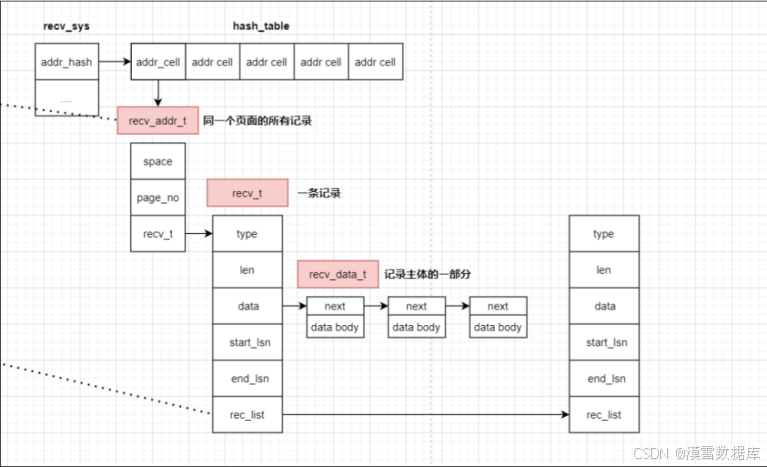
redo日志最终存储在recv_sys->addr_hash哈希表结构如下所示:
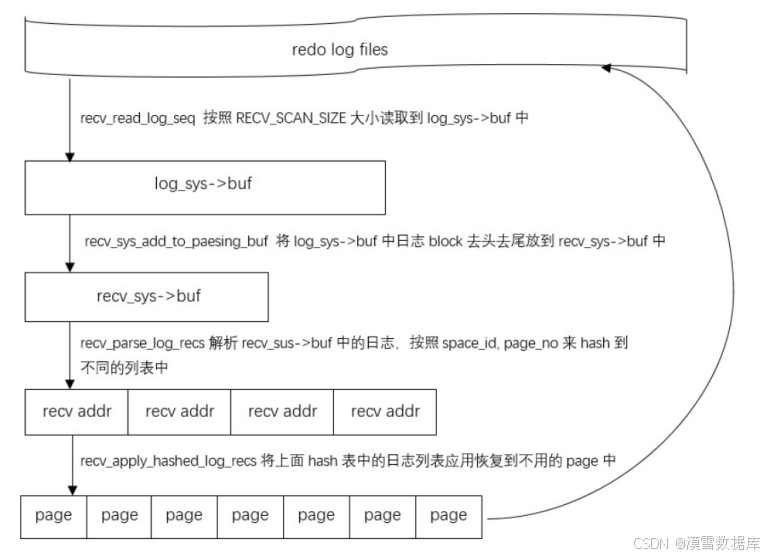
日志解析过程中,redo日志位置变化:





 扫一扫
扫一扫


 1082
1082

 被折叠的 条评论
为什么被折叠?
被折叠的 条评论
为什么被折叠?
 到【灌水乐园】发言





