 Matplotlib字体与TeX整合





 本文介绍如何在Matplotlib中实现Times New Roman字体与TeX公式的完美结合,特别是在图例(legend)中使用数学文本(mathtext)。通过调整配置参数和设置字体样式,使得图例中的文本能够斜体显示,并保持与非数学文本一致的字体。
[1] 解决了 title 用 tex 和 x、y 轴 label 字体用 Times New Roman 的问题,但 legend 的 prop 参数中 不能设 usetex(即 legend 似乎不能像 [1] 中 title 那样单独启用 usetex)。参考 [3],matplotlib 其实不启用 usetex 也可以用 mathtext 写 tex 公式,但字体要调一下。
这里记录一种组合解决方案,使 legend 中的 mathtext 达到类似 [1] 中 title 的效果。用到两个设置的组合:
matplotlib.rcParams['mathtext.default'] = 'regular',使 mathtext 字体同非 mathtext 字体,本文即 Times New Roman;- 传给 legend 的
prop参数的 dict 中,用'style': 'italic'使字变斜;
Rendering
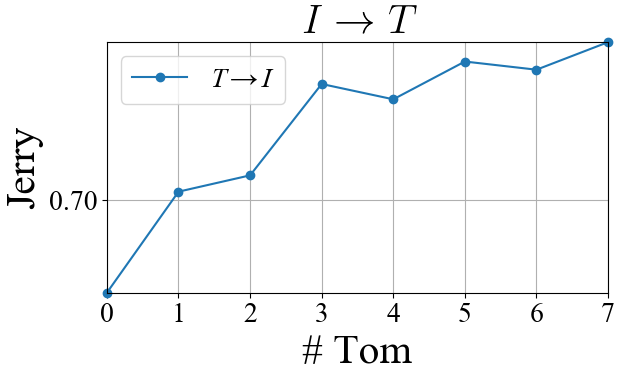
Code
- 对照 [1]
import os
import numpy as np
import matplotlib
matplotlib.use("Agg")
matplotlib.rcParams['font.family'] = 'Times New Roman'
# 使字体同非 mathtext 字的字体,此处即 Times New Roman
matplotlib.rcParams['mathtext.default'] = 'regular'
import matplotlib.pyplot as plt
from matplotlib.pyplot import MultipleLocator


Y = [0.6819, 0.7017, 0.7049, 0.7228, 0.7198, 0.7272, 0.7256, 0.731]
X = list(range(len(Y)))


font_title = {
    'family': 'Times New Roman',
    'weight': 'normal',
    'size': 30,
    # 'style': 'italic'
    'usetex' : True,  # title 可以单独启用 usetex
}


font_legend = {
    'family': 'Times New Roman',
    'weight': 'normal',
    'size': 20,
    'style': 'italic'  # 使字变斜
    # 'usetex' : True,  # legend 无得设 `usetex` 这项
}


fig = plt.figure()
plt.plot(X, Y, marker="o", clip_on=False,
    label=r"$T\rightarrow I$")  # legend 亦画箭头

plt.xlim((X[0], X[-1]))
plt.ylim((min(Y), max(Y)))
plt.title("$I\\rightarrow T$", font_title)  # title 设置
plt.xlabel("# Tom", fontsize=30)
plt.ylabel("Jerry", fontsize=30)
plt.grid()

plt.legend(loc="best", prop=font_legend)  # legend 设置

ax = plt.gca()

grid_margin = MultipleLocator(0.05)
# ax.xaxis.set_major_locator(grid_margin)
ax.yaxis.set_major_locator(grid_margin)
ax.set_aspect(0.5 / ax.get_data_ratio(), adjustable='box')

for tick in ax.xaxis.get_major_ticks():
    tick.label.set_fontsize(20)
for tick in ax.yaxis.get_major_ticks():
    tick.label.set_fontsize(20)
plt.tight_layout()

fig.savefig('legend.png', bbox_inches='tight', pad_inches=0.05)
plt.close(fig)





 扫一扫
扫一扫


 895
895

 被折叠的 条评论
为什么被折叠?
被折叠的 条评论
为什么被折叠?
 到【灌水乐园】发言





