 Java远程文件下载



java下载远程url文件保存到本地 使用URL下载远程文件保存到本地
一、需求说明
1、项目中使用到一个第三方插件,因插件经常更新,人工一次次的替换,很麻烦。于是乎有了需求,使用代码实现后台自动下载更新。
2、因是java的服务端项目,这里使用JDK提供的 java.net.* 包的,URL和 HttpURLConnection 实现文件下载。
二、代码如下
1、使用url 下载远程文件
/**
	 * description: 使用url 下载远程文件
	 * @param urlPath  --- url资源
	 * @param targetDirectory --- 目标文件夹
	 * @throws Exception
	 * @return void
	 * @version v1.0
	 * @author w
	 * @date 2019年9月3日 下午8:29:01
	 */
	public static void download(String urlPath , String targetDirectory) throws Exception {
		// 解决url中可能有中文情况
		System.out.println("url:"+ urlPath);
		URL url = new URL(urlPath);
		HttpURLConnection http = (HttpURLConnection)url.openConnection();
		http.setConnectTimeout(3000);
		// 设置 User-Agent 避免被拦截
		http.setRequestProperty("User-Agent", "Mozilla/4.0 (compatible; MSIE 9.0; Windows NT 6.1; Trident/5.0)");
		String contentType = http.getContentType();
		System.out.println("contentType: "+ contentType);
		// 获取文件大小
		long length = http.getContentLengthLong();
		System.out.println("文件大小:"+(length / 1024)+"KB");
		// 获取文件名
		String fileName = getFileName(http , urlPath);
		InputStream inputStream = http.getInputStream();
		byte[] buff = new byte[1024*10];
		OutputStream out = new FileOutputStream(new File(targetDirectory,fileName));
		int len ;
		int count = 0; // 计数
		while((len = inputStream.read(buff)) != -1) {
			out.write(buff, 0, len);
			out.flush();
			++count ;
		}
		System.out.println("count:"+ count);
		// 关闭资源
		out.close();
		inputStream.close();
		http.disconnect();
	}
2、获取文件名
/**
	 * description: 获取文件名
	 * @param http
	 * @param urlPath
	 * @throws UnsupportedEncodingException
	 * @return String
	 * @version v1.0
	 * @author w
	 * @date 2019年9月3日 下午8:25:55
	 */
	private static String getFileName(HttpURLConnection http , String urlPath) throws UnsupportedEncodingException {
		String headerField = http.getHeaderField("Content-Disposition");
		String fileName = null ;
		if(null != headerField) {
			String decode = URLDecoder.decode(headerField, "UTF-8");
			fileName = decode.split(";")[1].split("=")[1].replaceAll("\"", "");
			System.out.println("文件名是: "+ fileName);
		}
		if(null == fileName) {
			// 尝试从url中获取文件名
			String[] arr  = urlPath.split("/");
			fileName = arr[arr.length - 1];
			System.out.println("url中获取文件名:"+ fileName);
		}
		return fileName;
	}
3、测试
public static void main(String[] args) {
	Map<String,String> map = new HashMap<>();
	map.put("下载图片", "http://i1.zhiaigou.com/uploads/tu/201908/9999/152a0cd3b5.jpg");
	map.put("下载中文图片", "http://47.93.217.218/chapter/downloadServlet?fileName=%E4%B8%AD%E6%96%87%E5%9B%BE%E7%89%87.jpg");
	map.put("下载QQ软件", "https://qd.myapp.com/myapp/qqteam/pcqq/PCQQ2019.exe");
	map.put("下载带中文文件", "http://32204.xc.mieseng.com/xiaz/%E8%BF%85%E9%9B%B7%E5%A4%8D%E6%B4%BB%E7%89%88@68_416334.exe");
map.put("该资源无法下载", "https://www.csc108.com/announcementNotice/showFile.json?id=685");
	try {
		for(String urlStr : map.values()) {
			download(urlStr, "E:/");
		}
	} catch (Exception e) {
		e.printStackTrace();
	}

	System.out.println("process over ...");
}
4、效果如下:
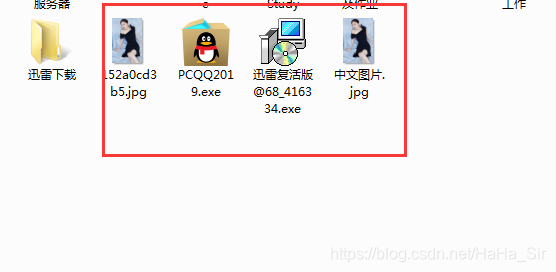
三、总结
1、这里只是用简单的使用 HttpURLConnection 实现从远程服务端获取文件下载,若有更高级需求,比如 爬虫,可以考虑使用 jsoup 来实现。
2、【二-2】中获取文件名,静态资源直接从url中获取,动态返回的文件流资源,需要从header中获取。 比如参考:https://blog.youkuaiyun.com/HaHa_Sir/article/details/79258556
3、若服务端设置了禁用java等方式访问,该代码可能无效,回抛出异常: Server returned HTTP response code: 521 for URL: xxx . 该示例代码中没有解决这个问题!





 扫一扫
扫一扫


 2487
2487

 被折叠的 条评论
为什么被折叠?
被折叠的 条评论
为什么被折叠?
 到【灌水乐园】发言





