运行nist-data-mirror.jar下载提示unable to find valid certification path to requested target解决办法

本文介绍如何通过java程序nist-data-mirror.jar搭建OWASPDependency-Check的内部漏洞库,并解决因证书问题导致的下载失败错误。具体步骤包括从官方网站导出证书、使用keytool命令将证书导入到JDK中。

前言

最近使用OWASP Dependency-Check 做漏洞检测,由于网络问题,需要搭建内部漏洞库,官方给出一个java程序 nist-data-mirror.jar 来将漏洞库下载到本地 ,官方地址:
https://github.com/stevespringett/nist-data-mirror/
运行命令:

java -jar nist-data-mirror.jar C:\nist-data#本地存放路径

结果报错,提示unable to find valid certification path to requested targe,

解决办法

这个是由于找不到证书引起的,我们打开报错的链接
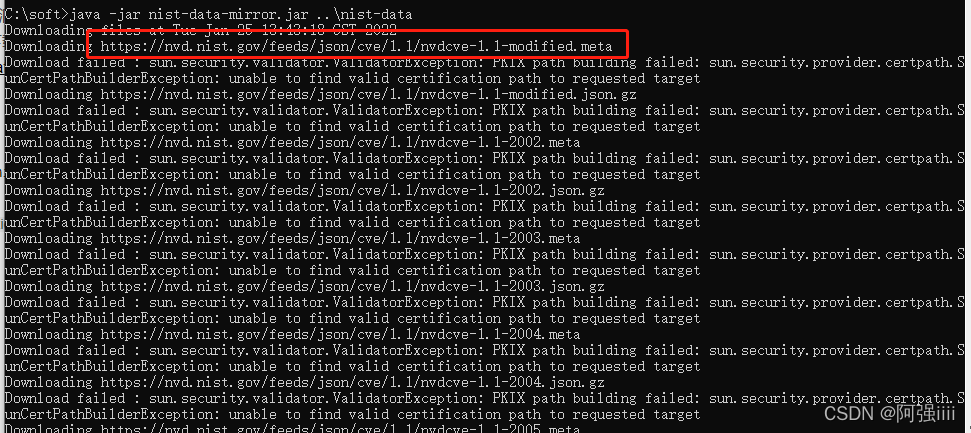
在这里插入图片描述
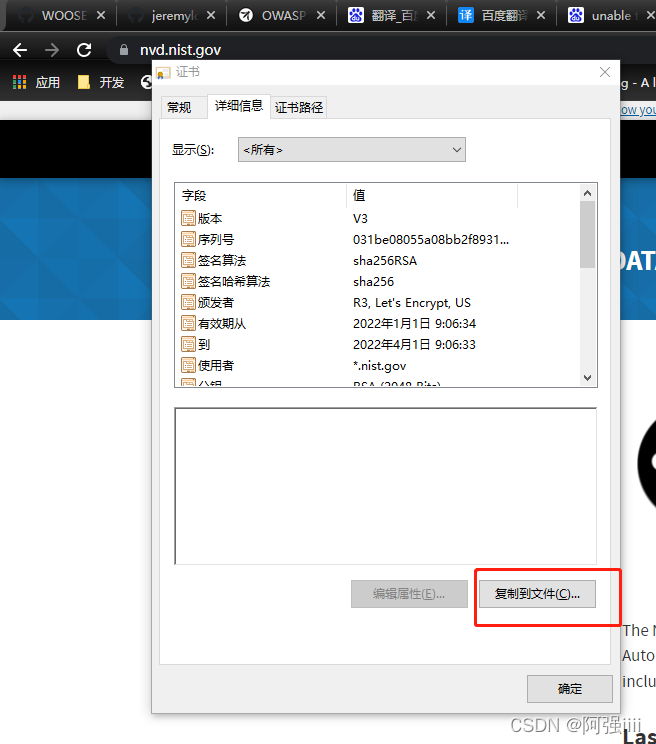
点击网站上的小锁图标(Chrome浏览器),点击进入连接是安全的证书有效详细信息复制到文件

在这里插入图片描述
导出向导第一步直接点下一页,第二步,导出Base64编码X.509(.CER)(S)格式证书
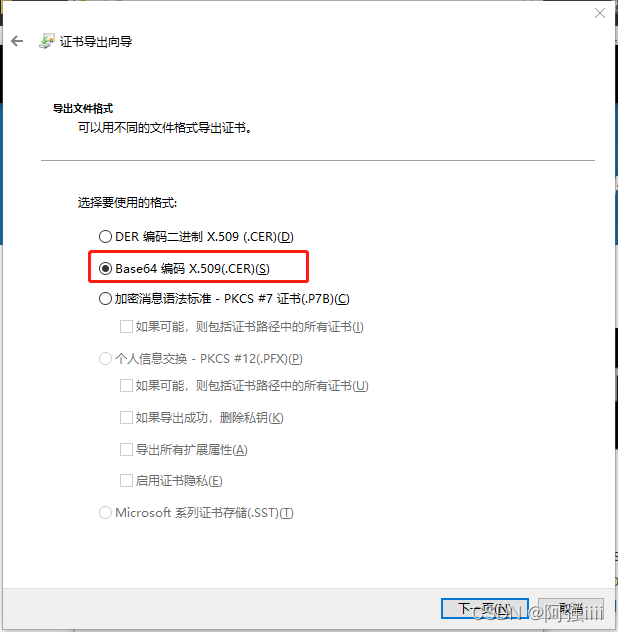
在这里插入图片描述
选择目录然后导出。

接下来我们把下载的证书导入到jdk中,切换到${JAVA_HOME}/jre/lib/security目录下,执行导入证书命令

keytool -import -alias [别名] -keystore cacerts -file [证书路径]

-alias 指定别名
-keystore 指定密钥库的名称(就像数据库一样的证书库,可以有很多个证书,cacerts这个文件是jre自带的,你也可以使用其它文件名字,如果没有这个文件名字,它会创建这样一个)
-file 指定证书文件全路径(证书文件所在的目录)

例如:

keytool -import -alias nvd -keystore cacerts -file C:\soft\nvd.cer

回车提示输入口令,cacerts证书库默认口令为:changeit,输入后回车,证书就导入完成了。我们继续执行之前的下载命令,
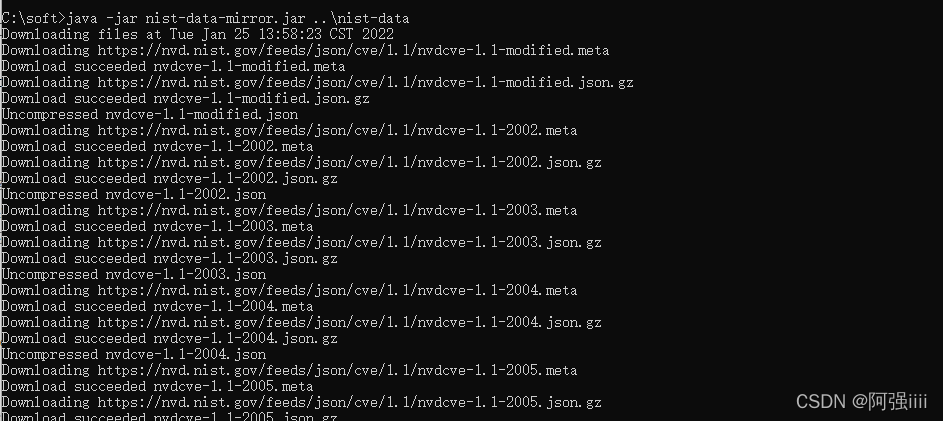
在这里插入图片描述
发现已经没有问题了。

2025-09-22 10:56:15.635 [job-1392] ERROR RetryUtil - Exception when calling callable. Retry Attempt: 1 will start soon. 7 attempts in total. This attempt planned to wait for [1,000]ms, and actually waited for [1,000]ms. Exception Msg: [Web request failed: sun.security.validator.ValidatorException: PKIX path building failed: sun.security.provider.certpath.SunCertPathBuilderException: unable to find valid certification path to requested target]. 2025-09-22 10:56:17.648 [job-1392] ERROR RetryUtil - Exception when calling callable. Retry Attempt: 2 will start soon. 7 attempts in total. This attempt planned to wait for [2,000]ms, and actually waited for [2,000]ms. Exception Msg: [Web request failed: sun.security.validator.ValidatorException: PKIX path building failed: sun.security.provider.certpath.SunCertPathBuilderException: unable to find valid certification path to requested target]. 2025-09-22 10:56:21.662 [job-1392] ERROR RetryUtil - Exception when calling callable. Retry Attempt: 3 will start soon. 7 attempts in total. This attempt planned to wait for [4,000]ms, and actually waited for [4,000]ms. Exception Msg: [Web request failed: sun.security.validator.ValidatorException: PKIX path building failed: sun.security.provider.certpath.SunCertPathBuilderException: unable to find valid certification path to requested target]. 2025-09-22 10:56:29.676 [job-1392] ERROR RetryUtil - Exception when calling callable. Retry Attempt: 4 will start soon. 7 attempts in total. This attempt planned to wait for [8,000]ms, and actually waited for [8,000]ms. Exception Msg: [Web request failed: sun.security.validator.ValidatorException: PKIX path building failed: sun.security.provider.certpath.SunCertPathBuilderException: unable to find valid certification path to requested target]. 2025-09-22 10:56:45.687 [job-1392] ERROR RetryUtil - Exception when calling callable. Retry Attempt: 5 will start soon. 7 attempts in total. This attempt planned to wait for [16,000]ms, and actually waited for [16,000]ms. Exception Msg: [Web request failed: sun.security.validator.ValidatorException: PKIX path building failed: sun.security.provider.certpath.SunCertPathBuilderException: unable to find valid certification path to requested target]. 2025-09-22 10:57:17.700 [job-1392] ERROR RetryUtil - Exception when calling callable. Retry Attempt: 6 will start soon. 7 attempts in total. This attempt planned to wait for [32,000]ms, and actually waited for [32,000]ms. Exception Msg: [Web request failed: sun.security.validator.ValidatorException: PKIX path building failed: sun.security.provider.certpath.SunCertPathBuilderException: unable to find valid certification path to requested target]. 2025-09-22 10:57:17.713 [job-1392] ERROR JobContainer - Exception when job run com.alibaba.datax.common.exception.DataXException: Code:[LogHuReader-00], Description:[The value you configured is invalid.]. - get LogStore[adash_cronlog] error, please check ! detail error messsage: com.aliyun.openservices.log.exception.LogException: Web request failed: sun.security.validator.ValidatorException: PKIX path building failed: sun.security.provider.certpath.SunCertPathBuilderException: unable to find valid certification path to requested target
最新发布
09-23
你提供的日志是来自 **DataX** 数据同步任务的错误输出,核心问题是: > ✅ **SSL/TLS 证书验证失败:无法建立到目标服务器的信任链(PKIX path building failed)** --- ### 🔍 错误详细解析 #### 日志关键信息提取: ```log Exception Msg: [Web request failed: sun.security.validator.ValidatorException: PKIX path building failed: sun.security.provider.certpath.SunCertPathBuilderException: unable to find valid certification path to requested target] ``` 这表示 Java 应用在尝试通过 HTTPS 访问某个远程服务(如阿里云 Log Service / SLS)时,**JVM 无法验证该服务的 SSL 证书路径**,即找不到受信任的根证书来验证目标服务器的身份。 --- ### 📌 根本原因分析 1. ### ⚠️ JVM 缺少必要的 CA 证书 - Java 使用内置的 `cacerts` 信任库(位于 `$JAVA_HOME/jre/lib/security/cacerts`)来验证 HTTPS 服务器证书。 - 如果目标服务器使用的是私有 CA、内部 CA 或较新的公共 CA 证书,而你的 JVM 中没有这些证书,则会报此错误。 2. ### 🔄 自动重试机制说明 - DataX 的 `RetryUtil` 正在按指数退避策略重试连接(1s → 2s → 4s → 8s → 16s → 32s),共 7 次。 - 所有重试都失败了,最终抛出 `DataXException`,导致任务终止。 3. ### ❌ 最终异常堆栈 ```java DataXException: Code:[LogHuReader-00], Description:[The value you configured is invalid.] - get LogStore[adash_cronlog] error ``` 这个描述虽然写的是“配置无效”,但实际上是底层网络层 SSL 握手失败导致的误报或封装不准确。真实原因是后面的 `LogException` 引发的。 --- ### ✅ 解决方案 #### ✅ 方案一:将目标服务的证书导入 JVM 的信任库(推荐) ##### 步骤如下: 1. **获取目标服务器的证书链** ```bash echo | openssl s_client -connect your-logservice-endpoint.aliyuncs.com:443 2>/dev/null | openssl x509 > logservice.crt ``` 替换 `your-logservice-endpoint.aliyuncs.com` 为实际访问的域名,例如: - `cn-beijing.log.aliyuncs.com` - `your-project.cn-beijing.log.aliyuncs.com` 2. **找到你的 DataX 使用的 JRE 路径** 确保你知道运行 DataX 时使用的 `$JAVA_HOME`。 3. **导入证书到 JVM 的 truststore** ```bash keytool -importcert \ -alias logservice-cert \ -keystore $JAVA_HOME/jre/lib/security/cacerts \ -file logservice.crt \ -storepass changeit \ -noprompt ``` > 默认密码是 `changeit`,这是 JDK 提供的默认密钥库密码。 4. **重启 DataX 任务** ✅ 完成后,Java 将信任该服务器的证书,SSL 握手成功。 --- #### ✅ 方案二:跳过 SSL 验证(仅用于测试环境!⚠️ 不推荐生产使用) 如果你只是做测试,并且可以接受安全风险,可以通过自定义 HTTP Client 忽略证书验证。 但这需要修改 DataX 插件源码(如 `LogHubReader`),添加不验证证书的逻辑,例如: ```java // 示例代码片段(非直接可用) SSLContext sslContext = SSLContext.getInstance("TLS"); sslContext.init(null, new TrustManager[]{new X509TrustManager() { public void checkClientTrusted(X509Certificate[] chain, String authType) {} public void checkServerTrusted(X509Certificate[] chain, String authType) {} public X509Certificate[] getAcceptedIssuers() { return new X509Certificate[0]; } }}, new SecureRandom()); HttpsURLConnection.setDefaultSSLSocketFactory(sslContext.getSocketFactory()); HttpsURLConnection.setDefaultHostnameVerifier((hostname, session) -> true); ``` > ⛔ 注意:这种方式极易被中间人攻击,**绝对禁止在生产环境中使用**。 --- #### ✅ 方案三:升级 JDK 版本 某些旧版本 JDK(如 JDK 8u101 之前)可能缺少对新 CA 的支持。建议使用最新的 **LTS 版本 JDK 8u302+ 或 JDK 11/17**,它们自带更完整的信任证书列表。 --- #### ✅ 方案四:检查系统时间是否正确 SSL 证书依赖于时间有效性。如果服务器时间错误(比如相差几年),也会导致“无法建立信任链”。 请确保运行 DataX 的机器时间准确: ```bash date # 同步时间 sudo ntpdate -s time.nist.gov ``` --- ### ✅ 补充建议 | 建议项 | 说明 | |------|------| | 使用 `curl` 测试连通性 | `curl -v https://your-logservice-endpoint.aliyuncs.com` 查看是否能正常建立 TLS | | 检查防火墙或代理 | 是否有中间代理篡改证书?企业内网常见问题 | | 使用浏览器打开地址 | 下载证书并比对是否一致 | ---
评论
成就一亿技术人!
拼手气红包6.0元
还能输入1000个字符
 
红包 添加红包
表情包 插入表情
 条评论被折叠 查看
添加红包

请填写红包祝福语或标题

红包个数最小为10个

红包金额最低5元

当前余额3.43前往充值 >
需支付:10.00
成就一亿技术人!
领取后你会自动成为博主和红包主的粉丝 规则
hope_wisdom
发出的红包
实付
使用余额支付
点击重新获取
扫码支付
钱包余额 0

抵扣说明:

1.余额是钱包充值的虚拟货币,按照1:1的比例进行支付金额的抵扣。
2.余额无法直接购买下载,可以购买VIP、付费专栏及课程。

余额充值