



 本文详细介绍了在SpringBoot中如何使用Thymeleaf,从依赖导入、配置方法到具体使用,包括Thymeleaf的语法、后端返回值的获取、静态资源处理、header和footer片段引用、条件判断及循环遍历等关键知识点。
SpringBoot中使用thymeleaf
官网地址:
https://www.thymeleaf.org/
参考手册地址:
链接:https://pan.baidu.com/s/1OmV3t2XVQzTuDrrrMLJRFg
提取码:9zpr
1.依赖导入
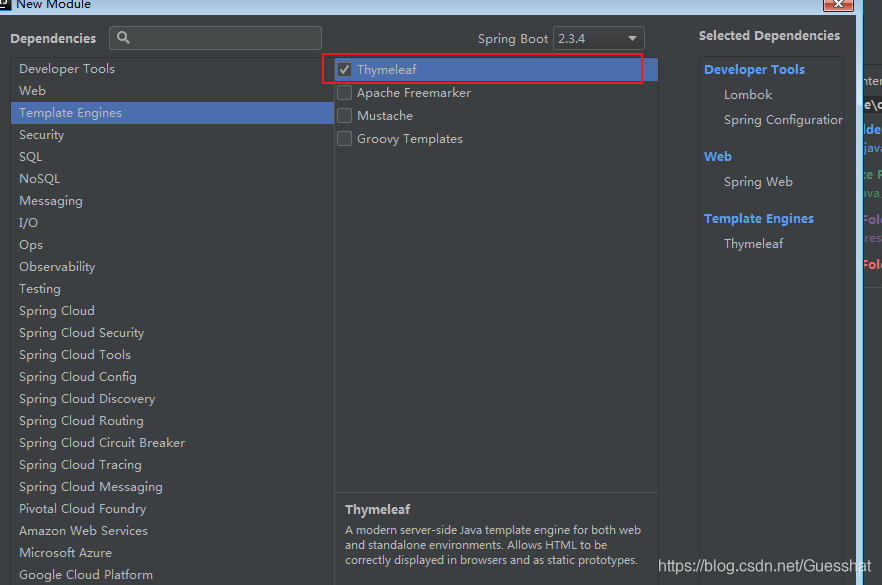
        <dependency>
            <groupId>org.springframework.boot</groupId>
            <artifactId>spring-boot-starter-thymeleaf</artifactId>
        </dependency>
2.在配置文件中的配置方法和属性
找到SpringBoot的自动配置包

找到关于Thymeleaf的配置类,可以看出在application.properties中配置时需要使用spring.thymeleaf前缀,其余配置项都在该类中有说明

自动配置类:

3. Thymeleaf存放位置:
src/main/resources/templates

4.简单访问案例
- 项目结构
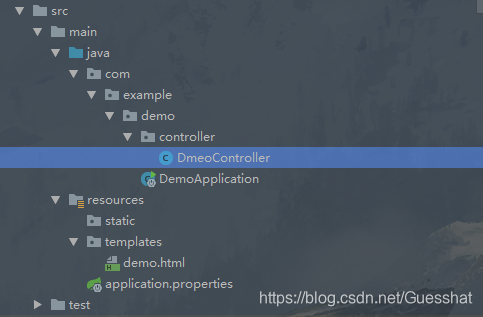
- controller
@Controller
public class DmeoController {
    @GetMapping("/demo1")
    public String m1(){
        return "demo";
    }
}
- DemoApplication
@SpringBootApplication
public class DemoApplication {

    public static void main(String[] args) {
        SpringApplication.run(DemoApplication.class, args);
    }

}
- demo.html
<!DOCTYPE html>
<html lang="en">
<head>
    <meta charset="UTF-8">
    <title>Title</title>
</head>
<body>
    <h1>thymeleaf</h1>
</body>
</html>
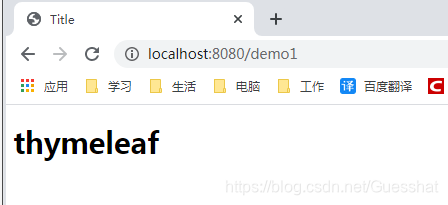
- 显示结果:
5.Thymeleaf语法
-
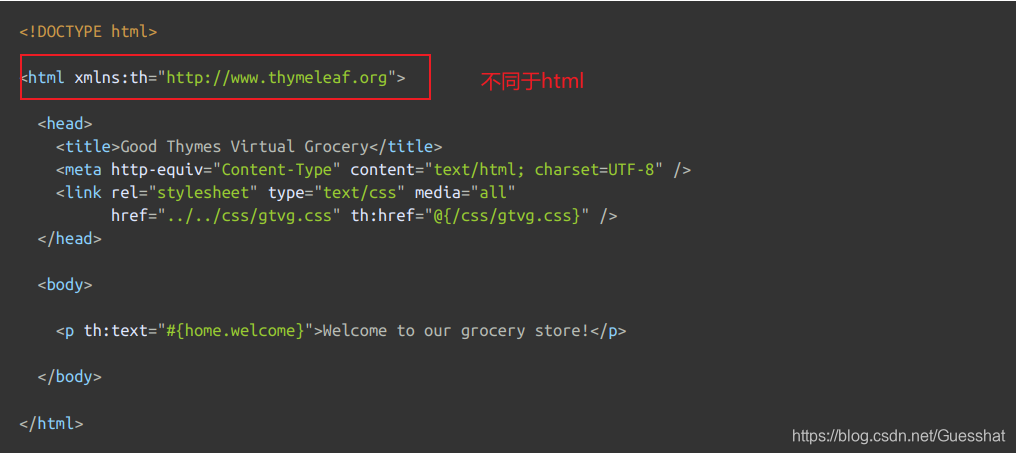
不同于html的是
<html xmlns:th="http://www.thymeleaf.org">
-
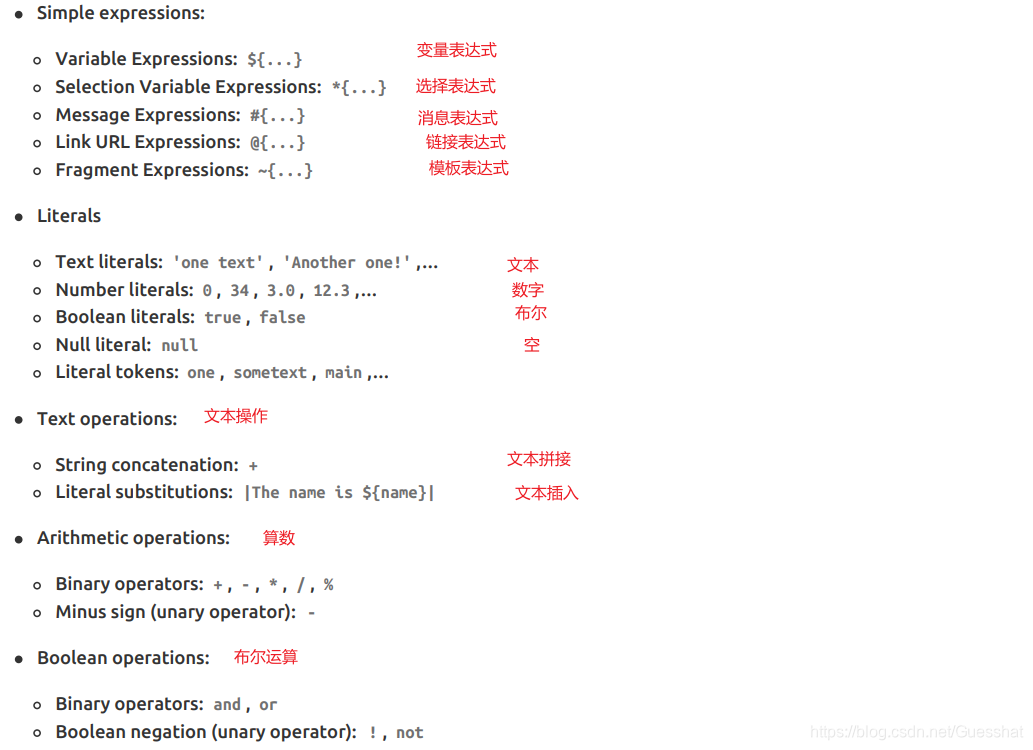
表达式:
- Simple expressions:
- Variable Expressions: ${…}
- Selection Variable Expressions: *{…}
- Message Expressions: #{…}
- Link URL Expressions: @{…}
- Fragment Expressions: ~{…}
- Literals:
- Text literals: ‘one text’ , ‘Another one!’ ,…
- Number literals: 0 , 34 , 3.0 , 12.3 ,…
- Boolean literals: true , false
- Null literal: null
- Literal tokens: one , sometext , main ,…
- Text operations:
- String concatenation: +
- Literal substitutions: |The name is ${name}|
- Arithmetic operations:
- Binary operators: + , - , * , / , %
- Minus sign (unary operator): -
- Boolean operations:
- Binary operators: and , or
- Boolean negation (unary operator): ! , not
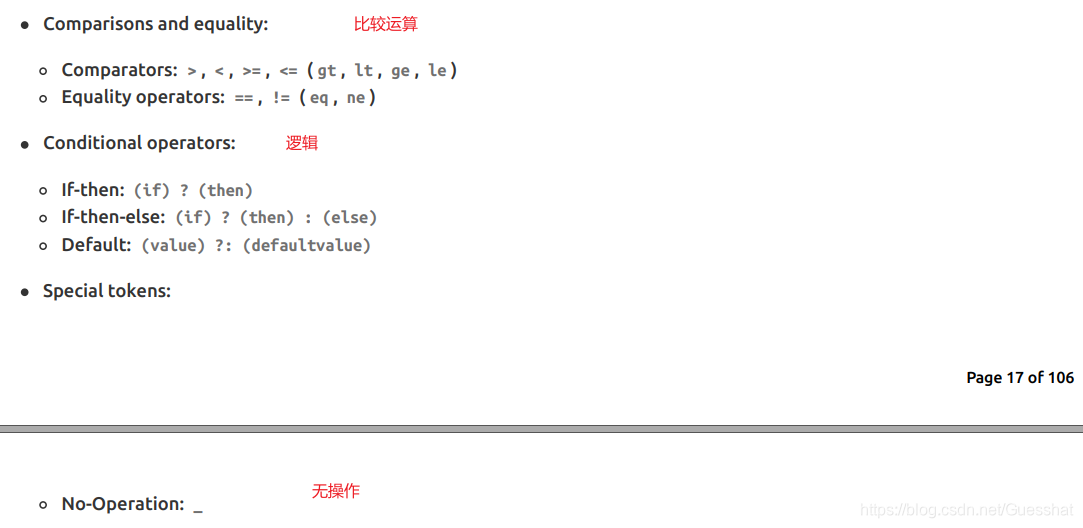
- Comparisons and equality:
- Comparators: > , < , >= , <= ( gt , lt , ge , le )
- Equality operators: == , != ( eq , ne )
- Conditional operators:
- If-then: (if) ? (then)
- If-then-else: (if) ? (then) : (else)
- Default: (value) ?: (defaultvalue)
- Special tokens:
- No-Operation: _
6.使用
6.1 后端返回值的获取
controller中放入值
@Controller
public class DmeoController {
    @GetMapping("/demo1")
    public String m1(Model model){
        Map user = new HashMap();
        user.put("name","张三");
        model.addAttribute("user",user);
        return "demo";
    }
}
html中获取${}
<!DOCTYPE html>
<html xmlns:th="http://www.thymeleaf.org">
<head>
    <meta charset="UTF-8">
    <title>Title</title>
</head>
<body>
    <h1>thymeleaf</h1>
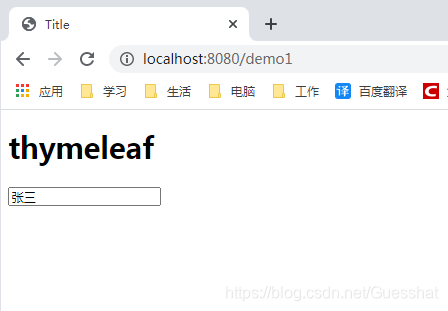
    <input name="text" value="" th:value="${user.name}" >
</body>
</html>
显示结果:
6.2静态资源的获取
<link rel="stylesheet" th:href="@{/css.css}">
<!DOCTYPE html>
<html xmlns:th="http://www.thymeleaf.org">
<head>
    <meta charset="UTF-8">
    <title>Title</title>
    <!--引用静态资源 ,路径相对于static-->
    <link rel="stylesheet" th:href="@{/css.css}">
</head>
<body>
    <h1>thymeleaf</h1>
    <input name="text" value="" th:value="${user.name}" >
</body>
</html>
6.3 header 和 footer 片段引用
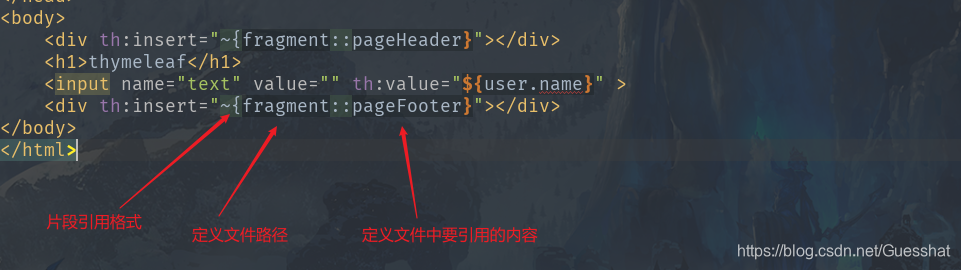
上述案例中fragment是要引用的html名称,如果存在上级路径不一致还需要将路径加进去
定义头部和底部信息的Thymeleaf
fragment.html
<!DOCTYPE html>
<html xmlns:th="http://www.thymeleaf.org">
<head>
    <meta charset="UTF-8">
    <title>Title</title>
</head>
<body>
    <div th:fragment="pageHeader">头部信息</div>
    <div th:fragment="pageFooter">底部信息</div>
</body>
</html>
引用:
<!DOCTYPE html>
<html xmlns:th="http://www.thymeleaf.org">
<head>
    <meta charset="UTF-8">
    <title>Title</title>
    <!--引用静态资源 ,路径相对于static-->
    <link rel="stylesheet" th:href="@{/css.css}">
</head>
<body>
    <div th:insert="~{fragment::pageHeader}"></div>
    <h1>thymeleaf</h1>
    <input name="text" value="" th:value="${user.name}" >
    <div th:insert="~{fragment::pageFooter}"></div>
</body>
</html>
显示结果:
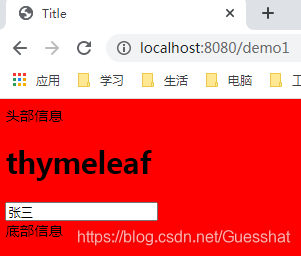
th:insert 将内容插入到所属标签内部作为子标签
th:replace 将内容直接替换所在的标签
<th:block>标签相当于虚拟标签,不会影响网页结构
<th:block th:insert="~{fragment::pageHeader}" />
6.4 判断
th:text 相当于 innerText
th:utext 防转义 相当于 innerHtml
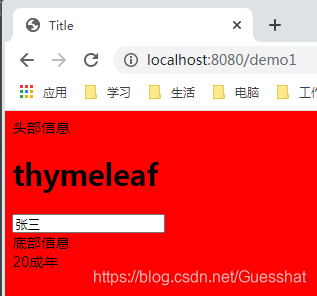
    <div th:if="${user.age>18}" th:text="${user.age}+'成年'"></div>
    <div th:if="${user.age<18}" th:text="|${user.age} 未成年|"></div>
6.5 循环遍历
@Controller
public class DmeoController {
    @GetMapping("/demo1")
    public String m1(Model model){
        Map user = new HashMap();
        user.put("name","张三");
        user.put("age",20);
        //遍历内容
        user.put("friends", Arrays.asList("李四","王五","赵六"));
        model.addAttribute("user",user);
        return "demo";
    }
}
<!DOCTYPE html>
<html xmlns:th="http://www.thymeleaf.org">
<head>
    <meta charset="UTF-8">
    <title>Title</title>
    <!--引用静态资源 ,路径相对于static-->
    <link rel="stylesheet" th:href="@{/css.css}">
</head>
<body>
    <div th:insert="~{fragment::pageHeader}"></div>
    <h1>thymeleaf</h1>
    <input name="text" value="" th:value="${user.name}" >
    <div th:insert="~{fragment::pageFooter}"></div>

    <div th:if="${user.age>18}" th:text="${user.age}+'成年'"></div>
    <div th:if="${user.age<18}" th:text="|${user.age} 未成年|"></div>

    <ul>
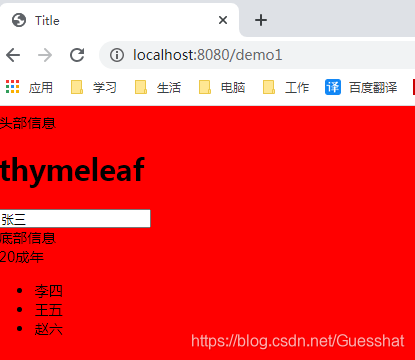
        <li th:each="f:${user.friends}" th:text="${f}"></li>
    </ul>

</body>
</html>
<li th:each="f:${user.friends}" th:text="${f}"></li>
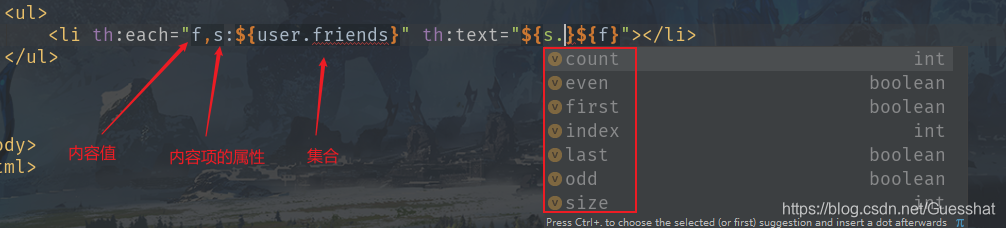
如果f 是一个对象,想要使用它的属性可以是${f.属性名}
或者用*{属性名}
       <li th:each="f:${user.friends}" th:object="${f}">
            <a th:text="*{name}"></a>
        </li>
7.内置对象
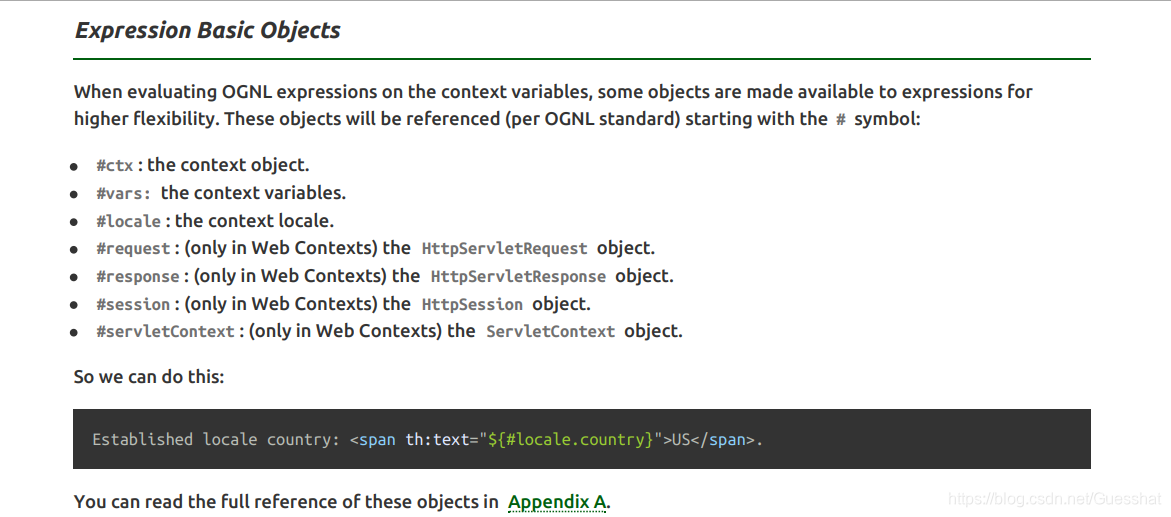
- #ctx : the context object.
- #vars: the context variables.
- #locale : the context locale.
- #request : (only in Web Contexts) the HttpServletRequest object.
- #response : (only in Web Contexts) the HttpServletResponse object.
- #session : (only in Web Contexts) the HttpSession object.
- #servletContext : (only in Web Contexts) the ServletContext object
${#session.getAttribute('user').name}
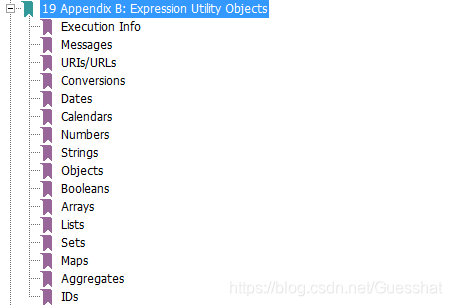
8.工具类





 扫一扫
扫一扫


 21万+
21万+

 被折叠的 条评论
为什么被折叠?
被折叠的 条评论
为什么被折叠?
 到【灌水乐园】发言





