


 本文介绍了如何在uni-app中使用scroll-view组件实现滚动到顶部和任意位置的功能。在物资列表盘点场景中,通过JS代码实现在重新打开单据时自动返回上次浏览位置。
1.滚动到顶部:




//页面
<scroll-view scroll-y="true" :scroll-top="scrollTop" @scroll="onscroll">
</srcoll-view>

//js
export default{
    data() {
			return {
				scrollTop:0
			}
		},
		methods: {
			handleScrollViewToTop(){
				this.scrollTop = 0;
			},
			onscroll({target:{scrollTop}}){
				this.scrollTop = scrollTop;
			}
		}
}
2.滚动到任意位置:
需求:对物资列表进行盘点的时候,退出了盘点,再重新打开单据时,能自动跳转到上一次退出的位置上
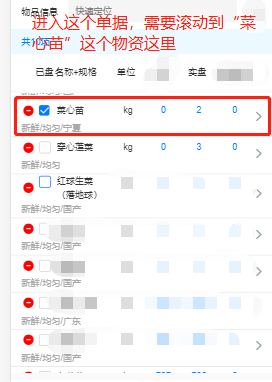
使用的是uni-app 的scroll-view组件
页面
//将需要滚动到具体位置的物资列表包裹scroll-view组件(给一个高度)
<scroll-view scroll-y  style="height:400px" :scroll-top="scrollTop" @scroll="scroll">

	 <view class="cu-list menu sm-border">
		 <block v-for="(item,oIndex) in detailList" :key="oIndex">
				<view class="cu-item arrow" style="padding-right: 30px;">
					<view class="content flex">
						<view style="flex:1; margin-bottom:2px;" >
							<checkbox-group @change="countedChange">
							  <checkbox  :checked="item.counted" :value="item.id+''" @tap="countedInput(item.id)" :disabled="banEdit"/>
							</checkbox-group>
						</view>
						<view style="flex:3;" >{{item.itemName || ''}}</view>
						<view class="flex-twice text-center ">{{item.unitName}}</view>
						<view class="flex-twice text-blue text-center ">{{item.qty || 0}}</view>

					</view>
				</view>
		</block>
	  </view>

</scroll-view>
JS部分
export default{
   data(){
      return{
        scrollTop:0,
		oldScrollTop:0,
      }
   },
  methods:{
    //获得物资列表
    queryList(){
      //定位到最后盘点/盘存位置
	  let countedMaterial=0
	  countedMaterial=res.data.result.detailList.reduce((prev,item,index)=>{
	       if(item.counted){
				return prev=index
			}else{
				return prev
			}

		},0)
      //视图会发生重新渲染
	  this.scrollTop = this.oldScrollTop
	  this.$nextTick(() =>{
      //当视图渲染结束 重新设置为计算得到的具体位置
	  this.scrollTop = 53*countedMaterial   //53是列表每一个单项的高度
     },

     //scroll-view组件的方法
     scroll(e){
      //记录scroll  位置
      this.oldScrollTop=e.detail.scrollTop	//确定滚动条的位置
      }
   }
 }





 扫一扫
扫一扫


 1898
1898

 被折叠的 条评论
为什么被折叠?
被折叠的 条评论
为什么被折叠?
 到【灌水乐园】发言





