


1.效果展示
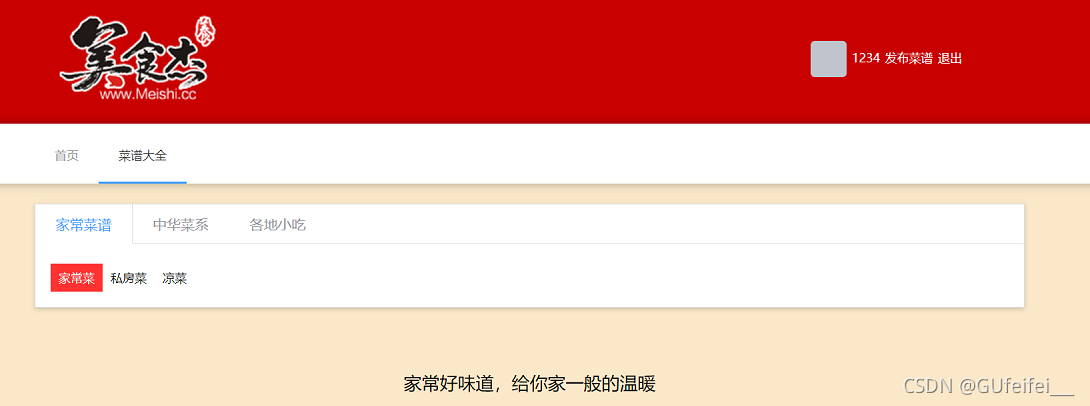
1.1需要实现的效果
1.先进行数据渲染
2.点击家常菜谱跳转对应的路由
3.点击当前添加对应的背景颜色
2.在recipe.vue页中写
    <div class="recipe">
        <!-- v-model="activeName" -->
        <!-- 菜谱分类 start -->
        <el-tabs  type="border-card" v-model="classifyName">
            <el-tab-pane
                v-for="item in classify"
                :key="item.parent_type"
                :label="item.parent_name"
                :name="item.parent_type"
                >
                <div class="recipe-link">
                      <router-link v-for="option of item.list"
                            :to='{query:{...$router.query,classify:option.type}}'
                            :key="option.type"
                            :class="{active:classifyType == option.type}"
                        >
                       {{option.name}}
                    </router-link>
                </div>
            </el-tab-pane>
        </el-tabs>
        <!-- 菜谱分类 end -->
        <h2>家常好味道,给你家一般的温暖</h2>
<script>
    import MenuCard from '@/components/menu-card.vue'
    import {getClassify, getProperty, getMenus} from '@/service/api';

    export default {
        components: {MenuCard},
        data() {
            return {
                classify:[],//存储tab切换的所有数据
                classifyType:'1-1',//tab切换选中项(二级路由)
                classifyName:'1',//定义刷新tab得值(一级路由)
                //属性
                properties:[], //存储属性中的所有数据
                propertyType:{},//存储属性的分类,例如:{cr:1-4,fc=2-1}
                propertyActiveName:[]
            }
        },
        watch: {
            $route: {
                handler(){
                    const {classify}=this.$route.query;
                    if(classify){
                       this.classifyType=classify; //1-1
                       this.classifyName=classify[0];  //1
                    }
                    this.ThisgetMenus
                },
                immediate:true
            }
        },
        mounted() {
            getClassify().then(({data})=>{
                console.log(data);
                this.classify=data;
                if(!this.$route.query.classify){
                   this.classifyType=this.classify[0].list[0].type;
                   this.classifyName=this.classify[0].parent_type;
                   this.$router.push({
                       query:{
                         classify:this.classifyType,
                         page:1
                       }
                   })
                }
            });
            getProperty().then(({data})=>{
            //    console.log(data);
               this.properties=data;
               const {query} = this.$route;
                this.propertyType = this.properties.reduce((o,item)=>{
                    //  item.title :  工艺,难度,口味,人数
                    o[item.title] = query[item.title] ? query[item.title]: "";
                    if(o[item.title]){
                        this.propertyActiveName.push(o[item.title][0])
                    }
                    return o;
                },{});
            })
        },
        methods: {
           selectedTag(option){
              let query={...this.$route.query}
              //判断是否点击,如果点击过:取消,否则选中
              if(this.propertyType[option.title]==option.type){
                  this.propertyType[option.title]="";
                  delete query[option.title];
              }else{
                  this.propertyType[option.title]=option.type;
                  query[option.title]=option.type;
              }
              this.$router.push({
                  query

              })
           },

           ThisgetMenus(){
               const query ={...this.$route.query}
               const params={
                   page:query.page||'1',
                   classify:query.classif
               }
               getMenus(params).then(({data})=>{
                  console.log(data)
               })


           }

        }
    }
</script>
3.效果展示
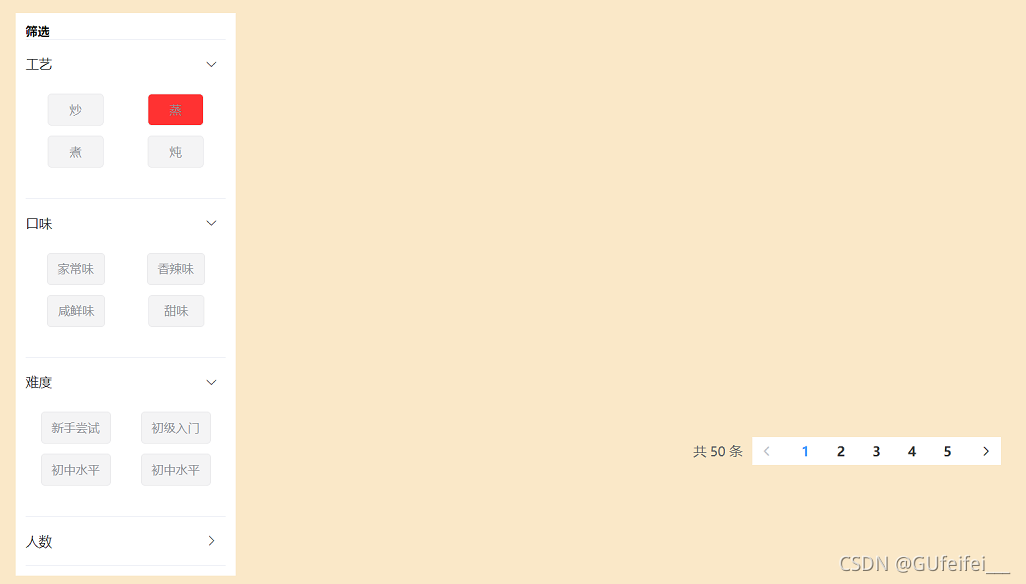
3.1先进行数据渲染
绑定点击事件,判断是否点击,如果点击过:取消,否则选中添加背景颜色
<el-container>
            <el-aside width="220px" class="recipe-aside">
                <div class="filter-box">
                    <h4>筛选</h4>
                    <!-- v-model="activeName" -->
                    <!-- 筛选 start -->
                    <el-collapse v-model="propertyActiveName">
                        <el-collapse-item
                            v-for="item of properties"
                            :key="item.parent_type"
                            :title="item.parent_name"
                            :name="item.parent_type"
                        >
                            <div class="filter-tags">
                                <el-tag type="info"
                                    v-for="option in item.list"
                                    :key="option.type"
                                    @click="selectedTag(option)"
                                    :class="{'tag-selected':propertyType[option.title]===option.type}"
                                >
                                {{option.name}}
                                </el-tag>
                            </div>
                        </el-collapse-item>
                    </el-collapse>
                    <!-- 筛选 end -->
                </div>
            </el-aside>
            <el-main class="filter-menus-box">
<!--                <div class="menu-empty">暂时没有过滤出菜谱信息,请选择其他的筛选条件</div>-->
                <menu-card style="min-height: 75%;" :info="list"></menu-card>
                <div style="text-align: right;">
                    <el-pagination
                            style="display: inline-block;"
                            page-size="10"
                            layout="total, prev, pager, next"
                            :total="50">
                    </el-pagination>
                </div>
            </el-main>
        </el-container>
    </div>
</template>
<script>
    import MenuCard from '@/components/menu-card.vue'
    import {getClassify, getProperty, getMenus} from '@/service/api';

    export default {
        components: {MenuCard},
        data() {
            return {
                classify:[],//存储tab切换的所有数据
                classifyType:'1-1',//tab切换选中项(二级路由)
                classifyName:'1',//定义刷新tab得值(一级路由)
                //属性
                properties:[], //存储属性中的所有数据
                propertyType:{},//存储属性的分类,例如:{cr:1-4,fc=2-1}
                propertyActiveName:[]
            }
        },
        watch: {
            $route: {
                handler(){
                    const {classify}=this.$route.query;
                    if(classify){
                       this.classifyType=classify; //1-1
                       this.classifyName=classify[0];  //1
                    }
                    this.ThisgetMenus
                },
                immediate:true
            }
        },
        mounted() {
            getClassify().then(({data})=>{
                console.log(data);
                this.classify=data;
                if(!this.$route.query.classify){
                   this.classifyType=this.classify[0].list[0].type;
                   this.classifyName=this.classify[0].parent_type;
                   this.$router.push({
                       query:{
                         classify:this.classifyType,
                         page:1
                       }
                   })
                }
            });
            getProperty().then(({data})=>{
            //    console.log(data);
               this.properties=data;
               const {query} = this.$route;
                this.propertyType = this.properties.reduce((o,item)=>{
                    //  item.title :  工艺,难度,口味,人数
                    o[item.title] = query[item.title] ? query[item.title]: "";
                    if(o[item.title]){
                        this.propertyActiveName.push(o[item.title][0])
                    }
                    return o;
                },{});
            })
        },
        methods: {
           selectedTag(option){
              let query={...this.$route.query}
              //判断是否点击,如果点击过:取消,否则选中
              if(this.propertyType[option.title]==option.type){
                  this.propertyType[option.title]="";
                  delete query[option.title];
              }else{
                  this.propertyType[option.title]=option.type;
                  query[option.title]=option.type;
              }
              this.$router.push({
                  query

              })
           },

           ThisgetMenus(){
               const query ={...this.$route.query}
               const params={
                   page:query.page||'1',
                   classify:query.classif
               }
               getMenus(params).then(({data})=>{
                  console.log(data)
               })


           }

        }
    }
</script>





 扫一扫
扫一扫


 652
652

 被折叠的 条评论
为什么被折叠?
被折叠的 条评论
为什么被折叠?
 到【灌水乐园】发言





