



 本文介绍了一种使用Java Graphics2D API创建矩形归档图片的方法,详细展示了如何设置图片尺寸、背景颜色、绘制线条及添加文本内容。通过调整参数,可以灵活地生成不同布局和内容的图片。
import javax.imageio.ImageIO;
import java.awt.*;
import java.awt.image.BufferedImage;
import java.io.File;
import java.io.IOException;
import java.util.ArrayList;
import java.util.List;

/**
 * 生成矩形归档图片
 */
public class Graphics2DRectangleImage {
    /**
     * 生成归档章
     * @param allValue  内容
     * @param totalcol  总列数
     * @param imagePath 归档章保存路径
     * @return
     * @throws Exception
     */
    public static boolean graphicsGeneration(List<Object> allValue, int totalcol, String imagePath){
        // 实际数据行数+标题+备注
        int imageWidth = 200;//图片宽度 图片宽度有文字的长度绝定
        int imageHeight = 2 * 30;//高度 30字体
        int startHeight = 1;//起始高 y
        int startWidth = 1;//起始宽 x

        int context=0;
        if(totalcol==2){//归档章三种情况 固定2行  不固定2列 3列 4列的
            context=100;
        }else if(totalcol==3){
            context=70;
        }else if(totalcol==4){
            context=60;
        }

        // 定义图像buffer
        BufferedImage buffImg = new BufferedImage(imageWidth, imageHeight, BufferedImage.TYPE_INT_RGB);
        Graphics2D graphics = buffImg.createGraphics();
        //生成图片的大小
        graphics.fillRect(0, 0, imageWidth, imageHeight);
        //start  增加下面代码使得背景透明
        buffImg = graphics.getDeviceConfiguration().createCompatibleImage(imageWidth, imageHeight, Transparency.TRANSLUCENT);
        graphics = buffImg.createGraphics();
        //end    背景透明代码结束

        // 画横线
        graphics.setColor(Color.RED);
        graphics.drawRect(startWidth, startHeight, imageWidth - 2, imageHeight - 2);//绘制长方形 -1防止右下角两条边线绘制不出
        graphics.drawLine(startWidth, imageHeight / 2, imageWidth, imageHeight / 2);//绘制中间的分割线 防止线与线不重叠变粗

        // 画竖线
        int tempWLineA = 0;
        for (int i = 0; i < totalcol; i++) {
            graphics.drawRect(startWidth, startHeight, tempWLineA- 2, imageHeight- 2);
            tempWLineA=context+tempWLineA;
        }

        // 写入内容
        if(allValue!=null){
            tempWLineA = 1;
            int tempWLineB = 1;
            graphics.setFont(new Font("宋体", Font.PLAIN, 12));
            for (int i = 0; i < allValue.size(); i++) {//imageHeight
                if(totalcol>=i+1){
                    graphics.drawString(String.valueOf(allValue.get(i)), tempWLineA+15, imageHeight / 2 - 10);//x y 都是字体左下角的位置
                    tempWLineA = context + tempWLineA;
                }else{
                    graphics.drawString(String.valueOf(allValue.get(i)), tempWLineB+15, imageHeight - 10);
                    tempWLineB = context + tempWLineB;
                }
            }
        }
        boolean bool=true;
        try {
            ImageIO.write(buffImg, "png", new File(imagePath));
        } catch (IOException e) {
            bool=false;
        }
        return bool;
    }

    /**
     * 测试
     * 初始化数据
     * @param path 保存路径
     * @throws Exception
     */
    public static boolean initChartData(String path) {
        List<Object> allValue = new ArrayList<>();
        allValue.add("投资处");
        allValue.add("2019");
        allValue.add("永久");
        allValue.add("888");
        allValue.add("永久");
        allValue.add("888");
        return graphicsGeneration(allValue, allValue.size()/2, path);
    }

    public static void main(String[] args) throws Exception {
        File file = new File("D:\\archiveseal\\" + 1 + ".png");
        if (!file.exists()) {
            file.mkdirs();
        }
        boolean imagepath = Graphics2DRectangleImage.initChartData(file.getPath());//生成图片水印

    }

}
效果: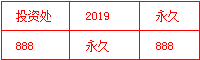





 扫一扫
扫一扫


 171万+
171万+

 被折叠的 条评论
为什么被折叠?
被折叠的 条评论
为什么被折叠?
 到【灌水乐园】发言





