



 本文围绕Python的进程和线程展开。回顾了线程和进程共享全局变量的差异,介绍了进程对象及其方法、进程池和线程池的概念与使用,阐述了进程池间的通信需用特定队列。还给出多任务文件夹复制案例,最后讲解了GIL全局解释器锁,指出其并非Python特性,会影响多线程多核利用。
Day11 PythonWeb全栈课程课堂内容
1. 课前回顾。
-
线程里面,共享全局变量。
-
进程里面,不共享全局变量。
-
在windows系统下面,进程运行函数必须放在
if __name__ == '__main__':下面,即main函数下面。而在Linux和Unix系统下,不用放在if __name__ == '__main__':下面。 -
线程运行
main函数时,任何系统下都不需要放在if __name__ == '__main__':下面,即main函数下面。
2. 进程对象及其方法
from multiprocessing import Process, current_process
import time


def task():
	print('%s is running.'% current_process().pid) # 打印子进程号。
	time.sleep(30)

if __name__ == "__main__":
	p = Process(target=task)
	p.start
	print('Main', current_process().pid) # 打印主进程
- 从上一个程序中我们得出
current_process可以查看当前进程的PID进程号,同时子进程内无法显示其父进程的PID进程号。
- 通过使用
os模块来子进程的父进程PID进程号。os.getpid()显示当前进程PID,os.getppid()显示当前父进程PID。
from multiprocessing import Process, current_process
import time
from os

def task():
	print('Subprocess is %s' % os.getpid()) # 获得当前子进程PID
	print('Parent process is %s' % os.getppid()) # 获得当前子进程的父进程PID
	time.sleep(30)

if __name__ == "__main__":
	p = Process(target=task)
	p.start
	print('Main process', os.getpid())
- 最终结果可以子进程的父进程PID进程号,与主进程的PID进程号相同,所以证明子进程的父进程就是
main函数下的主进程。
如何查看PID进程号?
- windows系统查看PID进程号,在任务管理其中输入
tasklist查看当前电脑运行的所有进程的PID进程号。 - 输入
tasklist | findstr [PID]查询当前PID进程号的程序名称。 - 当进程结束之后,通过
tasklist | findstr [PID]就查找不到对应的PID进程号的程序名称。
- 判断当前进程是否进行中
is_alive方法, 关闭进程terminate方法。
from multiprocessing import Process, current_process
import time
from os

def task():
	print('Subprocess is %s' % os.getpid())
	print('Parent process is %s' % os.getppid())
	time.sleep(30)

if __name__ == "__main__":
	p = Process(target=task)
	p.start
	print(p.is_alive())
	print('Main process', os.getpid())
- 此时
is_alive()显示的内容为True,表示当前进程还在进行中。
from multiprocessing import Process, current_process
import time
from os

def task():
	print('Subprocess is %s' % os.getpid())
	print('Parent process is %s' % os.getppid())


if __name__ == "__main__":
	p = Process(target=task)
	p.start
	print('Main process', os.getpid())
	time.sleep(1)
	print(p.is_alive())
- 此时
is_alive()显示的内容为False。当子进程走完之后,系统显示没有进程执行。
from multiprocessing import Process, current_process
import time
from os

def task():
	print('Subprocess is %s' % os.getpid())
	print('Parent process is %s' % os.getppid())


if __name__ == "__main__":
	p = Process(target=task)
	p.start
	p.terminate() # 杀死当前进程
	print('Main process', os.getpid())
	print(p.is_alive())
- 此时
is_alive()显示的内容为True。原因系统结束当前进程是需要一定的时间,而代码进行特别快。显示依旧为True。 - 在
print('Main process', os.getpid())代码后面加上一定的延时time.sleep(0.01),最后is_alive()显示的内容为False。
3. 进程池
- 概念:当需要创建的子进程数量不多时,可以直接利用
multiprocessing中的Process动态生成多个进程,但是如果是数量较大时,手动去创建进程的工作量巨大,此时就可以利用multiprocessing模块提供的Pool方法,即为进程池。 - 初始化Pool时,可以指定一个最大进程数,当有新的请求提交到
Pool中时,如果池还没有满,那么就会创建一个新的进程来执行请求,但是如果进程池中的进程已经达到指定的最大值,则该请求就会等待,直到Pool中右进程结束,才会执行新的进程任务。
import os
import time
import multiprocessing


def worker(msg):
	t_start = time.time()
	print(f"{msg} start, and PID is {os.getpid()}")

	time.sleep(2)
	t_stop = time.time()

	print(msg, f"Have done, and time-consiming is {t_stop-t_start}")

if __name__ == "__main__":
	po = multiprocessing.Pool(3)
    for i in range(10):
        po.apply_async(worker, (i, )) # 提交任务 异步提交。

    po.close() # 关闭进程池,不在接收新的请求。
    po.join() # 等待进程池中的进程执行完成,必须放在close的后面。
-
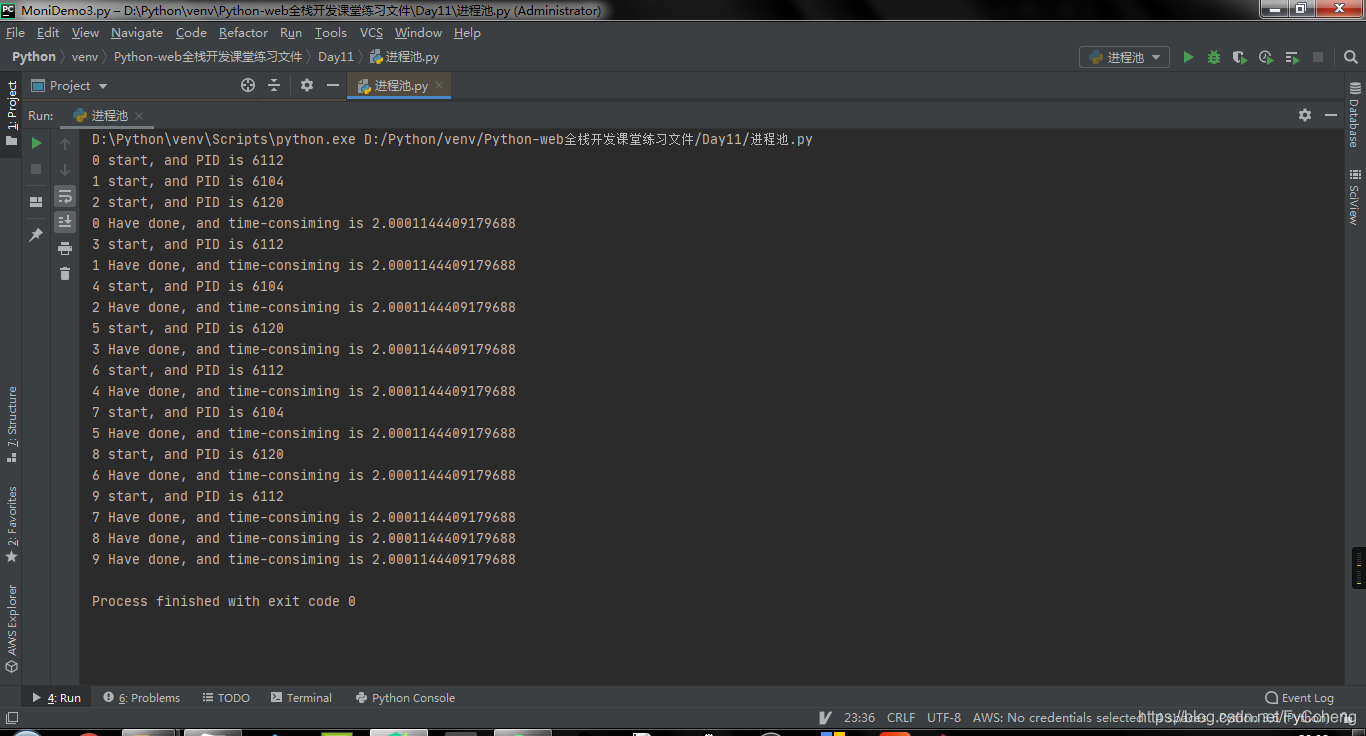
进程号你可以发现只有 6112、6104和6120。
-
去除
join之后程序直接结束,不会等待进程的运行。 -
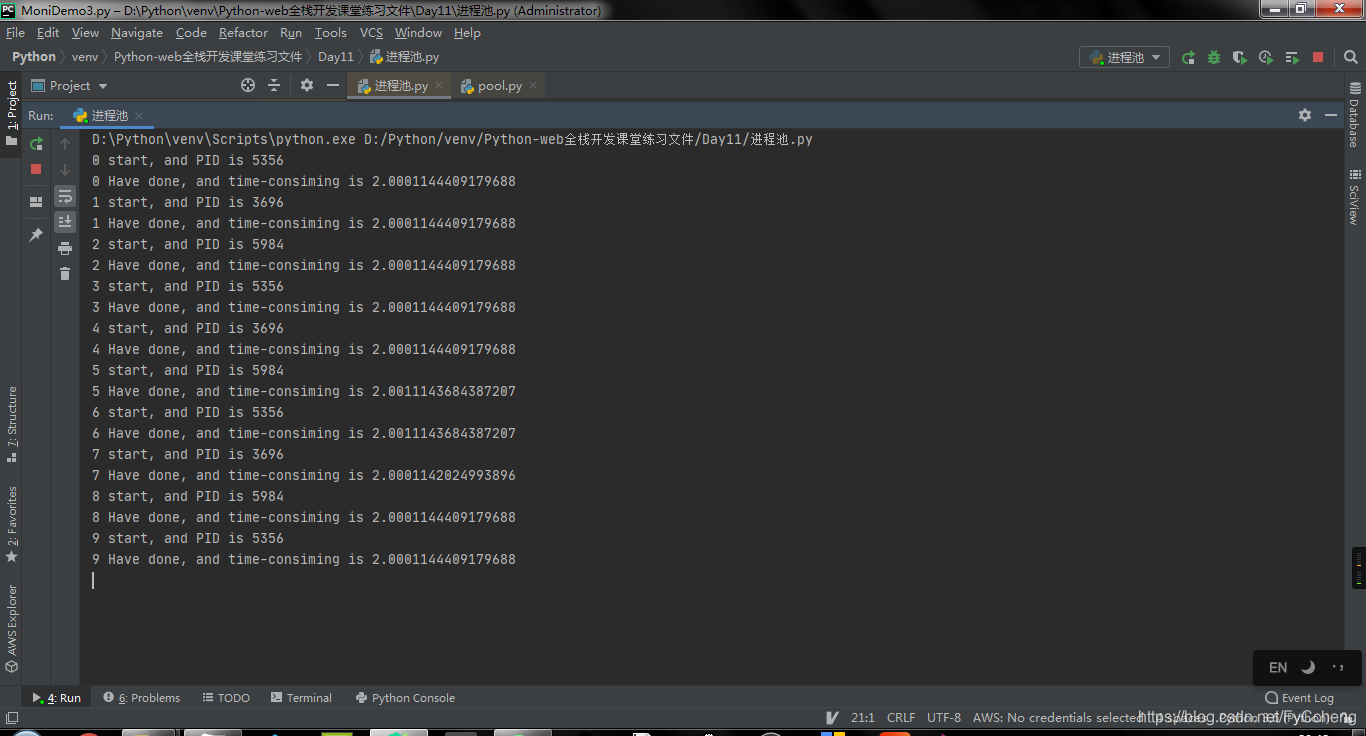
同步:任务提交之后,原地等待结果,等待的过程中不做任何事情。
异步:任务提交之后,不在原地等待,直接完成其他事情。
# 同步提交
import os
import time
import multiprocessing


def worker(msg):
	t_start = time.time()
	print(f"{msg} start, and PID is {os.getpid()}")

	time.sleep(2)
	t_stop = time.time()

	print(msg, f"Have done, and time-consiming is {t_stop-t_start}")

if __name__ == "__main__":
	po = multiprocessing.Pool(3)
    for i in range(10):
        po.apply(worker, (i, )) # 提交任务 同步提交。

    po.close() # 关闭进程池,不在接收新的请求。
    po.join() # 等待进程池中的进程执行完成,必须放在close的后面。
4. 进程池之间的通信
-
进程池之间的通信得用到
multiprocessing.Manager().Queue()队列,这是用于进程池之间的通信,而常规的multiprocessing.Queue()只使用与进程之间的通信,而Queue普通的队列,不能完成进程之间的通信,也不能完成进程池中的进程通信。 -
在框架内十分常见。
import multiprocessing


def task1(q):
    q.put('hello')


def task2(q):
    print(q.get())


if __name__ == '__main__':
    # q = multiprocessing.Queue() # 进程之间的通信
    q = multiprocessing.Manager().Queue() # 进程池之间的通信
    po = multiprocessing.Pool(3)
    po.apply_async(task1, args=(q,))
    po.apply_async(task2, args=(q,))
    po.close()
    po.join()
5. 线程池
简单的线程池
from concurrent.futures import ThreadPoolExecutor, ProcessPoolExecutor
import time
import os


po = ThreadPoolExecutor(5)


def task(n):
    print(n)


if __name__ == '__main__':
    for i in range(10):
        po.submit(task, i)
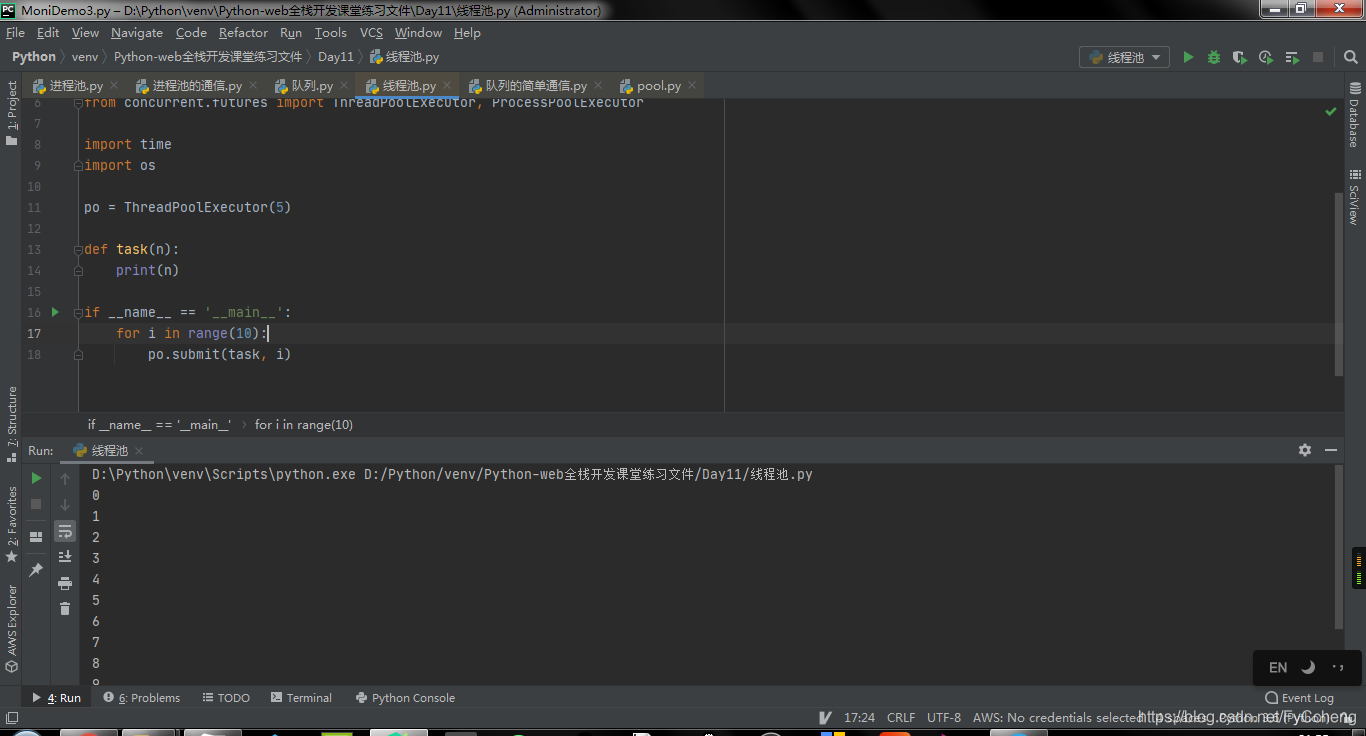
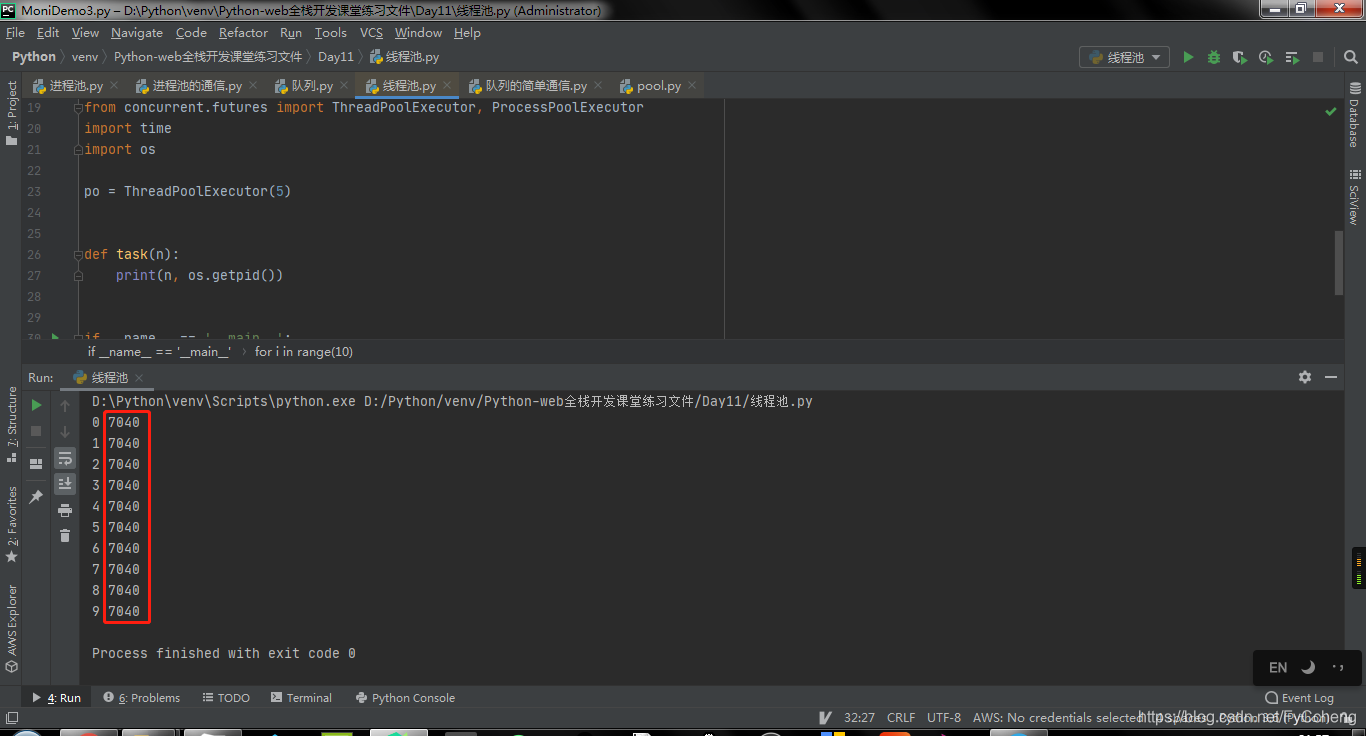
- 由于是线程,所以所有的进程号都是相同的。
from concurrent.futures import ThreadPoolExecutor, ProcessPoolExecutor
import time
import os


po = ThreadPoolExecutor(5)


def task(n):
    print(n, os.getpid())


if __name__ == '__main__':
    for i in range(10):
        po.submit(task, i)
创建一个程序查看所有幂。submit是异步提交,而经过result之后变成同步了。
from concurrent.futures import ThreadPoolExecutor, ProcessPoolExecutor
import time
import os


po = ThreadPoolExecutor(5)


def task(n):
    print(n, os.getpid())
    return n ** n


if __name__ == '__main__':
    for i in range(10):
        res = po.submit(task, i) # 异步提交
        print(res.result())	# 同步提交
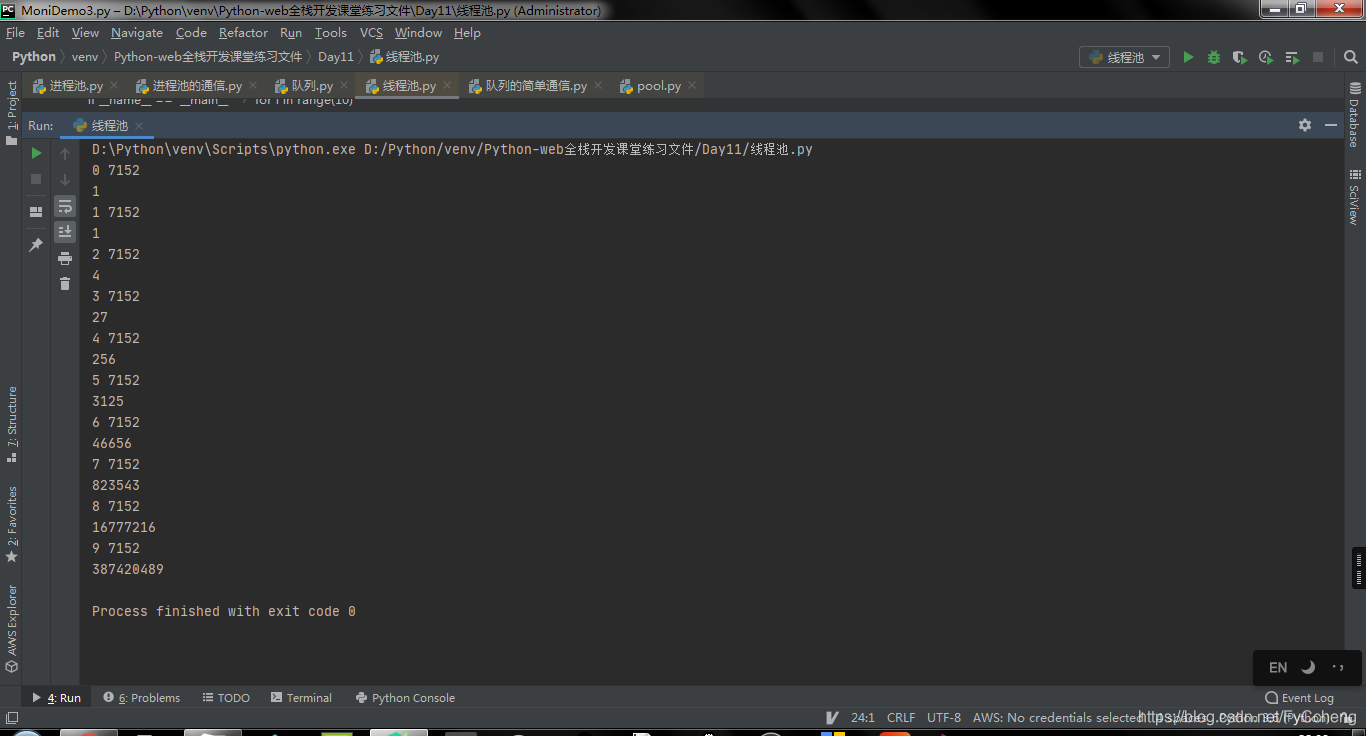
- 如果不想做到同步,就添加列表和循环,来进行异步进行。
from concurrent.futures import ThreadPoolExecutor, ProcessPoolExecutor
import time
import os


po = ThreadPoolExecutor(5)


def task(n):
    print(n, os.getpid())
    return n ** n


if __name__ == '__main__':
    t_list = []
    for i in range(10):
        res = po.submit(task, i)
        t_list.append(res)

    for t in t_list:
        print('>>>', t.result())

- 使用
shutdown可以关闭当前线程。
from concurrent.futures import ThreadPoolExecutor, ProcessPoolExecutor
import time
import os


po = ThreadPoolExecutor(5)


def task(n):
    print(n, os.getpid())
    return n ** n


if __name__ == '__main__':
    t_list = []
    for i in range(10):
        res = po.submit(task, i)
        t_list.append(res)

    po.shutdown()
    for t in t_list:
        print('>>>', t.result())
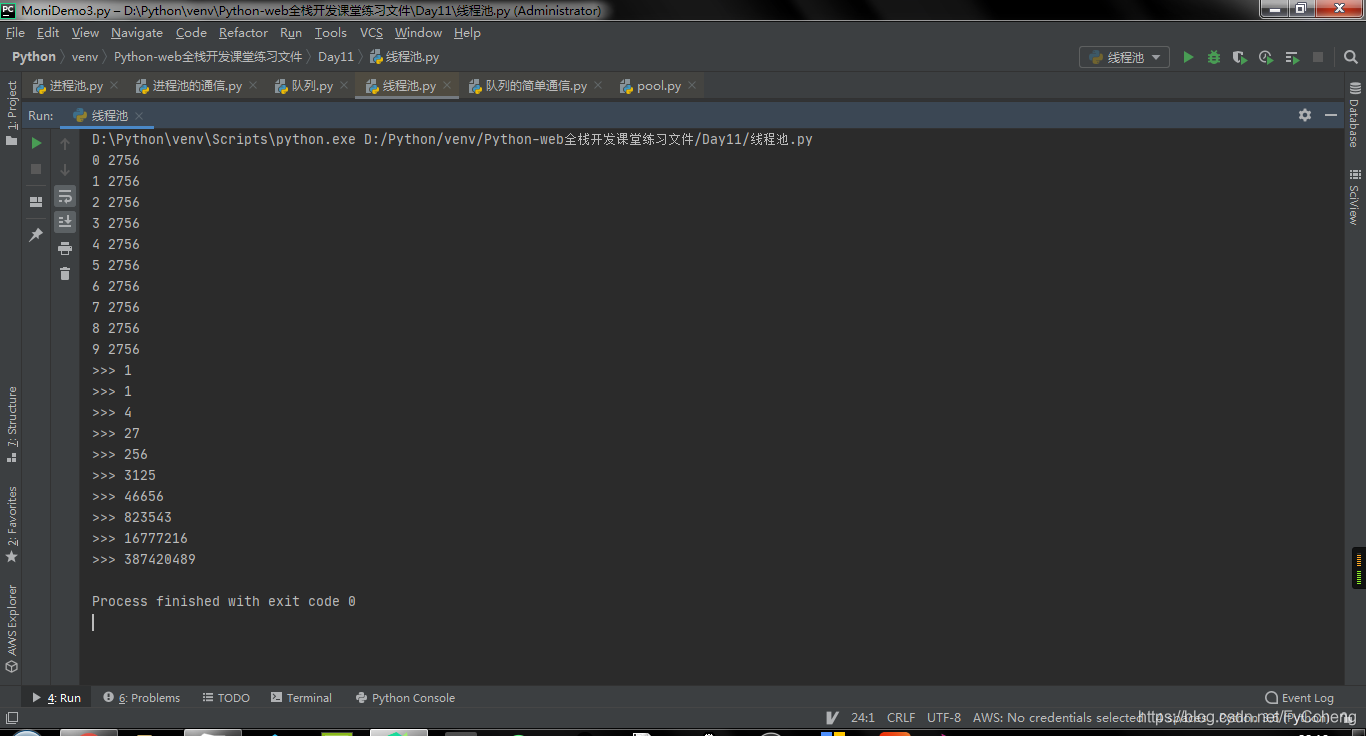
- 当添加好
shutdown方法之后,就发现结果与不添加时的结果有所区别。原因是shutdown的功能不光能关闭线程池,同样可以等待线程池中的任务运行完毕之后。
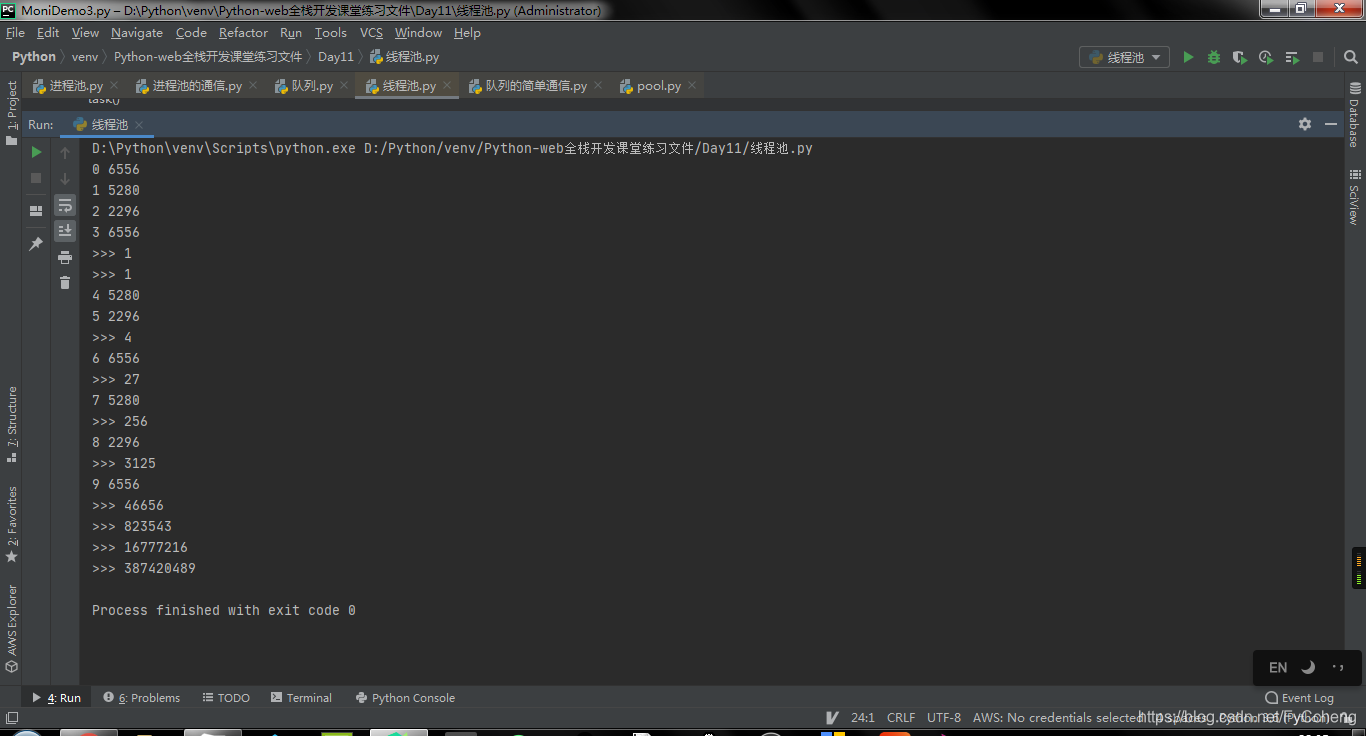
# 异步进程池
from concurrent.futures import ThreadPoolExecutor, ProcessPoolExecutor
import time
import os


po = ProcessPoolExecutor(3)


def task(n):
    print(n, os.getpid())
    return n ** n


def call_back(n):
    print('>>>', n.result())


if __name__ == '__main__':
    for i in range(10):
        res = po.submit(task, i).add_done_callback(call_back)
6. 案例
多任务文件夹复制
需求1:实现多任务文件夹复制
- 获取用户要复制的文件夹名字
- 创建一个新的文件夹
- 获取文件夹所有待拷贝的文件名字
- 创建进程池
- 添加拷贝任务
# @Time : 2021/1/12 22:48
# @Author : Sam
# @File : 多任务文件夹的复制.py
# @Software: PyCharm

'''
需求1:实现多任务文件夹复制
- 获取用户要复制的文件夹名字				result
- 创建一个新的文件夹             	result[复制]
- 获取文件夹所有待拷贝的文件名字   	os
- 读取文件内容,写入新的文件夹内  	 	执行任务
- 创建进程池
- 进程池中添加拷贝任务
'''

import os
import multiprocessing


def copy_file(old_folder_name, new_folder_name, file_name):
    '''copy file'''
    print("从%s到%s拷贝文件名称为:%s"%(old_folder_name, new_folder_name, file_name))

    old_file = open(old_folder_name + '/' + file_name, 'r')
    content = old_file.read()
    old_file.close()

    new_file = open(new_folder_name + '/' + file_name, 'w')
    new_file.write(content)
    new_file.close()

def main():
    # 1.获取用户要复制的文件夹名字
    old_folder_name = input("输入要复制的文件夹名字:")
    # 2.创建一个新的文件夹
    new_folder_name = old_folder_name + '[复制]'
    # 存在文件夹,返回True,不存在则返回False。
    # print(os.path.exists(old_folder_name)) # 判断当前位置是否有文件夹。
    if not os.path.exists(new_folder_name):
        os.mkdir(new_folder_name)

    # 3.获取文件夹所有待拷贝的文件名字
    file_names = os.listdir(old_folder_name)
    # print(file_name)  # 所有文件名

    # 4.读取文件内容,写入新的文件夹内

    # 5.创建进程池
    po = multiprocessing.Pool(5)
    #
    for file_name in file_names:
        po.apply_async(copy_file,args=(old_folder_name, new_folder_name, file_name))

    po.close()
    po.join()

if __name__ == '__main__':
    main()
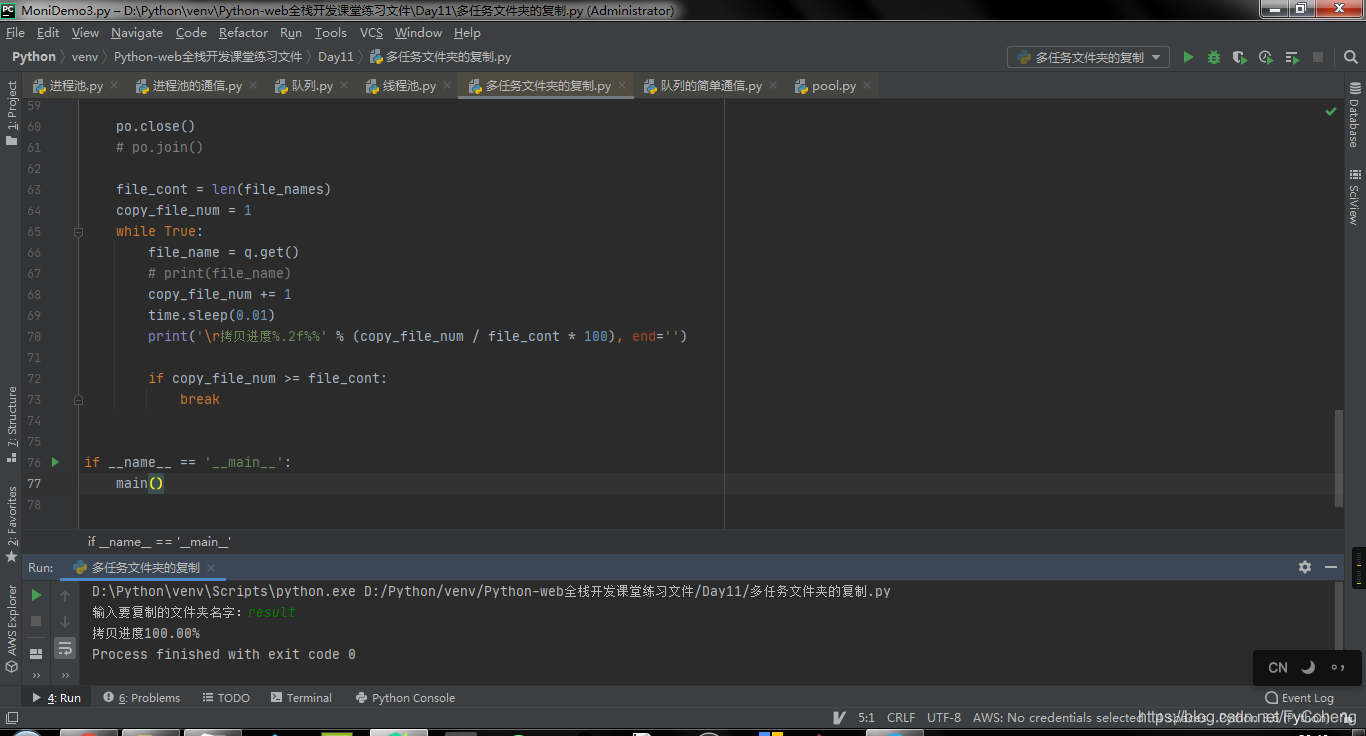
需求2:实现进度条
import os
import multiprocessing
import time

def copy_file(old_folder_name, new_folder_name, file_name, q):
    '''copy file'''
    # print("从%s到%s拷贝文件名称为:%s" % (old_folder_name, new_folder_name, file_name))

    old_file = open(old_folder_name + '/' + file_name, 'r')
    content = old_file.read()
    old_file.close()

    new_file = open(new_folder_name + '/' + file_name, 'w')
    new_file.write(content)
    new_file.close()

    q.put(file_name)


def main():
    # 1.获取用户要复制的文件夹名字
    old_folder_name = input("输入要复制的文件夹名字:")
    # 2.创建一个新的文件夹
    new_folder_name = old_folder_name + '[复制]'
    # 存在文件夹,返回True,不存在则返回False。
    # print(os.path.exists(old_folder_name)) # 判断当前位置是否有文件夹。
    if not os.path.exists(new_folder_name):
        os.mkdir(new_folder_name)

    # 3.获取文件夹所有待拷贝的文件名字
    file_names = os.listdir(old_folder_name)
    # print(file_name)  # 所有文件名

    # 4.读取文件内容,写入新的文件夹内

    # 5.创建进程池
    po = multiprocessing.Pool(5)

    q = multiprocessing.Manager().Queue()
    # 提交任务
    for file_name in file_names:
        po.apply_async(copy_file,
                       args=(old_folder_name, new_folder_name, file_name, q))

    po.close()
    # po.join()

    file_cont = len(file_names)
    copy_file_num = 1
    while True:
        file_name = q.get()
        # print(file_name)
        copy_file_num += 1
        time.sleep(0.01)
        print('\r拷贝进度%.2f%%' % (copy_file_num / file_cont * 100), end='')

        if copy_file_num >= file_cont:
            break


if __name__ == '__main__':
    main()
7. GIL全局解释器锁
In CPython, the global interpreter lock, or GIL, is a mutex that prevents multiple
native threads from executing Python bytecodes at once. This lock is necessary mainly
because CPython’s memory management is not thread-safe. (However, since the GIL
exists, other features have grown to depend on the guarantees that it enforces.)
-
结论:在Cpython解释器中,同一个进程下开启的多线程,同一时刻只能有一个线程执行,无法利用多核优势
-
首先需要明确的一点是
GIL并不是Python的特性,它是在实现Python解析器(CPython)时所引入的一个概念。就好比C++是一套语言(语法)标准,但是可以用不同的编译器来编译成可执行代码。有名的编译器例如GCC,INTEL C++,Visual C++等。Python也一样,同样一段代码可以通过CPython,PyPy,Psyco等不同的Python执行环境来执行。像其中的JPython就没有GIL。然而因为CPython是大部分环境下默认的Python执行环境。所以在很多人的概念里CPython就是Python,也就想当然的把GIL归结为Python语言的缺陷。所以这里要先明确一点:GIL并不是Python的特性,Python完全可以不依赖于GIL
GIL介绍
- GIL本质就是一把互斥锁,既然是互斥锁,所有互斥锁的本质都一样,都是将并发运行变成串行,以此来控制同一时间内共享数据只能被一个任务所修改,进而保证数据安全。
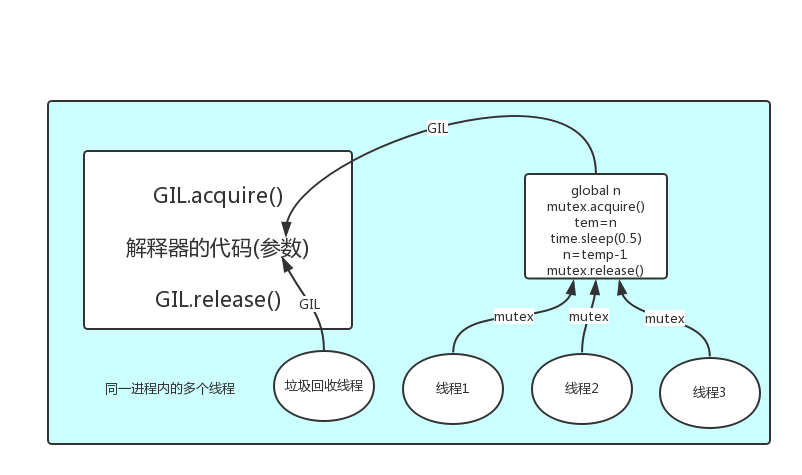
总结:
1.GIL不是Python语言的特点,而是Cpython解释器的特点
2.GIL是保证解释器级别的数据安全
3.GIL会导致同一个进程下的多线程无法利用多核优势
计算密集型, 不适合多线程,适合多进程 因为没有延迟
IO密集型, 适合多线程






 扫一扫
扫一扫


 748
748

 被折叠的 条评论
为什么被折叠?
被折叠的 条评论
为什么被折叠?
 到【灌水乐园】发言





