



前言
- 由于本人水平有限,难免出现错漏,敬请批评改正。
- 更多精彩内容,可点击进入Python日常小操作专栏、OpenCV-Python小应用专栏、YOLO系列专栏、自然语言处理专栏或我的个人主页查看
- YOLOv8 Ultralytics:使用Ultralytics框架训练RT-DETR实时目标检测模型
- 基于DETR的人脸伪装检测
- YOLOv7训练自己的数据集(口罩检测)
- YOLOv8训练自己的数据集(足球检测)
- YOLOv5:TensorRT加速YOLOv5模型推理
- YOLOv5:IoU、GIoU、DIoU、CIoU、EIoU
- 玩转Jetson Nano(五):TensorRT加速YOLOv5目标检测
- YOLOv5:添加SE、CBAM、CoordAtt、ECA注意力机制
- YOLOv5:yolov5s.yaml配置文件解读、增加小目标检测层
- Python将COCO格式实例分割数据集转换为YOLO格式实例分割数据集
- YOLOv5:使用7.0版本训练自己的实例分割模型(车辆、行人、路标、车道线等实例分割)
- 使用Kaggle GPU资源免费体验Stable Diffusion开源项目
前提条件
- 熟悉Python
相关介绍
Python是一种跨平台的计算机程序设计语言。是一个高层次的结合了解释性、编译性、互动性和面向对象的脚本语言。最初被设计用于编写自动化脚本(shell),随着版本的不断更新和语言新功能的添加,越多被用于独立的、大型项目的开发。
PyTorch 是一个深度学习框架,封装好了很多网络和深度学习相关的工具方便我们调用,而不用我们一个个去单独写了。它分为 CPU 和 GPU 版本,其他框架还有 TensorFlow、Caffe 等。PyTorch 是由 Facebook 人工智能研究院(FAIR)基于 Torch 推出的,它是一个基于 Python 的可续计算包,提供两个高级功能:1、具有强大的 GPU 加速的张量计算(如 NumPy);2、构建深度神经网络时的自动微分机制。
YOLO是一种单阶段目标检测算法,它是一个在COCO数据集上预训练的物体检测架构和模型系列,代表了Ultralytics对未来视觉AI方法的开源研究,其中包含了经过数千小时的研究和开发而形成的经验教训和最佳实践。
Labelme是一款图像标注工具,由麻省理工(MIT)的计算机科学和人工智能实验室(CSAIL)研发。它是用Python和PyQT编写的,开源且免费。Labelme支持Windows、Linux和Mac等操作系统。
YOLO格式的分割标签(用于实例分割任务)与目标检测的标签格式有所不同,主要区别在于 分割任务需要更精细的多边形坐标标注,而不仅仅是边界框(Bounding Box)。以下是详细说明:
1. YOLO 分割标签的基本格式 每个标签文件是一个
.txt文件,与对应的图像文件同名(如image.jpg对应image.txt)。文件中每一行表示一个对象的标注信息,格式如下:
<class_id> <x1> <y1> <x2> <y2> <x3> <y3> ... <xn> <yn>
class_id:类别编号(从 0 开始),表示该对象所属的类别。
x1, y1, x2, y2, ..., xn, yn:多边形顶点的归一化坐标(相对于图像宽度和高度),成对出现,每对(x, y)表示一个多边形顶点。
2. 关键概念说明
(1) 归一化坐标
所有坐标值是 相对于图像宽度和高度的归一化值,范围在
[0, 1]之间。计算公式:
x = pixel_x / image_widthy = pixel_y / image_height(2) 多边形顶点顺序
多边形顶点需要按 顺时针或逆时针顺序排列,以确保形成闭合区域。
顶点数量不限,但需足够多以精确描述对象轮廓。
3. 实例分割标签示例
假设有一张图像(尺寸为 800x600),标注一个类别为 0 的对象,其多边形顶点坐标如下(像素坐标):
| 像素坐标 (x, y) | 归一化坐标 (x, y) |
|---|---|
| (100, 150) | 0.125,0.25 |
| (300, 150) | 0.375, 0.25 |
| (300, 400) | 0.375, 0.6667 |
| (100, 400) | 0.125, 0.6667 |
对应的 YOLO 分割标签文件内容为: 0 0.125 0.25 0.375 0.25 0.375 0.6667 0.125 0.6667
总结:YOLO 分割标签的核心是用多边形顶点的归一化坐标描述对象轮廓,相比目标检测的边界框标注更为精细。通过合理标注和转换数据,可以训练出高精度的实例分割模型(如 YOLOv8-seg)。
实验环境
- Python 3.x (面向对象的高级语言)
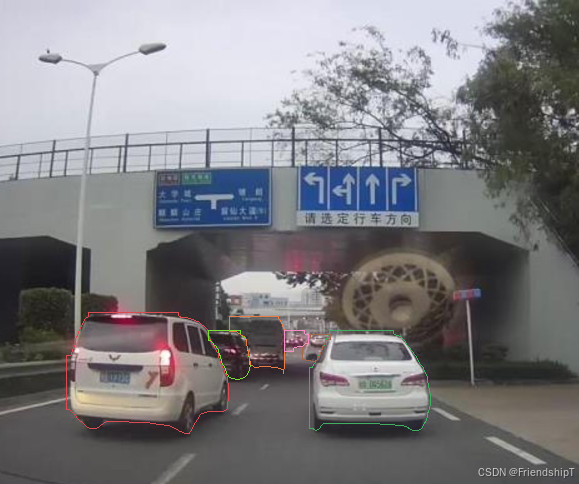
Python将YOLO格式分割标签绘制到对应的图片上

实例分割标签:
2 0.56875 0.683181 0.56875 0.688788 0.567187 0.690657 0.567187 0.692526 0.565625 0.694396 0.565625 0.698134 0.564063 0.700003 0.564063 0.701872 0.5625 0.703742 0.5625 0.70748 0.560937 0.709349 0.560937 0.713088 0.559375 0.714957 0.559375 0.716826 0.55625 0.720564 0.55625 0.722434 0.554688 0.724303 0.554688 0.726172 0.553125 0.728041 0.553125 0.72991 0.551562 0.731779 0.551562 0.733649 0.55 0.735518 0.55 0.739256 0.548438 0.741125 0.548438 0.742994 0.545312 0.746733 0.545312 0.748602 0.542187 0.75234 0.542187 0.756079 0.539062 0.759817 0.534375 0.759817 0.534375 0.885053 0.540625 0.885053 0.542187 0.886922 0.54375 0.886922 0.545312 0.888791 0.546875 0.888791 0.548438 0.886922 0.55 0.886922 0.559375 0.875707 0.65625 0.875707 0.657813 0.877576 0.68125 0.877576 0.682812 0.879445 0.696875 0.879445 0.698437 0.881315 0.701562 0.881315 0.703125 0.883184 0.704688 0.883184 0.70625 0.885053 0.707812 0.885053 0.709375 0.886922 0.710938 0.886922 0.7125 0.888791 0.723437 0.888791 0.725 0.886922 0.726562 0.886922 0.729687 0.883184 0.729687 0.881315 0.73125 0.879445 0.73125 0.877576 0.732812 0.875707 0.732812 0.873838 0.734375 0.871969 0.734375 0.870099 0.735938 0.86823 0.735938 0.864492 0.7375 0.862623 0.7375 0.857015 0.739062 0.855146 0.739062 0.853277 0.740625 0.851408 0.740625 0.847669 0.742188 0.8458 0.742188 0.840192 0.74375 0.838323 0.74375 0.812155 0.742188 0.810285 0.742188 0.802809 0.740625 0.800939 0.740625 0.791593 0.739062 0.789724 0.739062 0.784117 0.7375 0.782247 0.7375 0.778509 0.735938 0.77664 0.735938 0.772902 0.734375 0.771032 0.734375 0.769163 0.732812 0.767294 0.732812 0.765425 0.73125 0.763556 0.73125 0.759817 0.728125 0.756079 0.728125 0.75421 0.725 0.750471 0.725 0.748602 0.723437 0.746733 0.723437 0.744864 0.71875 0.739256 0.71875 0.737387 0.717187 0.735518 0.717187 0.733649 0.714062 0.72991 0.714062 0.728041 0.709375 0.722434 0.709375 0.720564 0.70625 0.716826 0.70625 0.714957 0.7 0.70748 0.7 0.705611 0.692187 0.696265 0.690625 0.696265 0.6875 0.692526 0.684375 0.692526 0.682812 0.690657 0.68125 0.690657 0.679688 0.688788 0.679688 0.683181
2 0.153125 0.645797 0.153125 0.653273 0.151562 0.655143 0.15 0.655143 0.145312 0.66075 0.145312 0.662619 0.14375 0.664489 0.14375 0.666358 0.142187 0.668227 0.142187 0.670096 0.140625 0.671965 0.140625 0.673835 0.139063 0.675704 0.139063 0.679442 0.1375 0.681311 0.1375 0.683181 0.135937 0.68505 0.135937 0.688788 0.134375 0.690657 0.134375 0.694396 0.132812 0.696265 0.132812 0.698134 0.13125 0.700003 0.13125 0.703742 0.129687 0.705611 0.129687 0.711218 0.128125 0.713088 0.128125 0.716826 0.126562 0.718695 0.126562 0.720564 0.125 0.722434 0.125 0.726172 0.123438 0.728041 0.123438 0.731779 0.120312 0.735518 0.115625 0.735518 0.115625 0.8458 0.120312 0.8458 0.125 0.851408 0.125 0.853277 0.139063 0.870099 0.140625 0.870099 0.151562 0.883184 0.153125 0.883184 0.154688 0.885053 0.167187 0.885053 0.16875 0.883184 0.170313 0.883184 0.175 0.877576 0.176562 0.877576 0.18125 0.871969 0.182812 0.871969 0.184375 0.870099 0.221875 0.870099 0.223438 0.871969 0.239063 0.871969 0.240625 0.873838 0.257812 0.873838 0.259375 0.875707 0.26875 0.875707 0.270313 0.877576 0.282812 0.877576 0.284375 0.879445 0.292187 0.879445 0.29375 0.881315 0.296875 0.881315 0.298437 0.883184 0.3 0.883184 0.301563 0.885053 0.303125 0.885053 0.304688 0.886922 0.30625 0.886922 0.309375 0.890661 0.310937 0.890661 0.3125 0.89253 0.314062 0.89253 0.315625 0.894399 0.317188 0.894399 0.31875 0.896268 0.326562 0.896268 0.329687 0.89253 0.329687 0.890661 0.33125 0.888791 0.33125 0.886922 0.332813 0.885053 0.332813 0.883184 0.334375 0.881315 0.334375 0.879445 0.335938 0.877576 0.335938 0.875707 0.3375 0.873838 0.3375 0.871969 0.339062 0.870099 0.339062 0.86823 0.342187 0.864492 0.342187 0.862623 0.348438 0.855146 0.35 0.855146 0.353125 0.851408 0.35625 0.851408 0.357812 0.849538 0.385937 0.849538 0.3875 0.847669 0.389062 0.847669 0.392187 0.843931 0.392187 0.842062 0.39375 0.840192 0.39375 0.828977 0.395313 0.827108 0.395313 0.791593 0.39375 0.789724 0.39375 0.784117 0.392187 0.782247 0.392187 0.778509 0.390625 0.77664 0.390625 0.774771 0.389062 0.772902 0.389062 0.771032 0.3875 0.769163 0.3875 0.765425 0.385937 0.763556 0.385937 0.761686 0.384375 0.759817 0.384375 0.757948 0.382812 0.756079 0.382812 0.75234 0.38125 0.750471 0.38125 0.746733 0.379688 0.744864 0.379688 0.741125 0.378125 0.739256 0.378125 0.735518 0.376562 0.733649 0.376562 0.72991 0.373437 0.726172 0.373437 0.724303 0.371875 0.722434 0.371875 0.720564 0.370312 0.718695 0.370312 0.716826 0.36875 0.714957 0.36875 0.713088 0.365625 0.709349 0.365625 0.70748 0.364063 0.705611 0.364063 0.701872 0.3625 0.700003 0.3625 0.696265 0.360937 0.694396 0.360937 0.690657 0.359375 0.688788 0.359375 0.68505 0.357812 0.683181 0.357812 0.681311 0.345312 0.666358 0.34375 0.666358 0.342187 0.664489 0.339062 0.664489 0.3375 0.662619 0.335938 0.662619 0.334375 0.66075 0.33125 0.66075 0.329687 0.658881 0.325 0.658881 0.323437 0.657012 0.31875 0.657012 0.317188 0.655143 0.3125 0.655143 0.310937 0.653273 0.309375 0.653273 0.307812 0.651404 0.307812 0.645797
2 0.359375 0.683181 0.359375 0.703742 0.364063 0.703742 0.36875 0.709349 0.36875 0.711218 0.373437 0.716826 0.373437 0.718695 0.376562 0.722434 0.376562 0.724303 0.378125 0.726172 0.378125 0.728041 0.379688 0.72991 0.379688 0.733649 0.38125 0.735518 0.38125 0.741125 0.382812 0.742994 0.382812 0.748602 0.384375 0.750471 0.384375 0.75234 0.385937 0.75421 0.385937 0.756079 0.3875 0.757948 0.3875 0.759817 0.389062 0.761686 0.389062 0.765425 0.390625 0.767294 0.390625 0.771032 0.395313 0.77664 0.395313 0.778509 0.396875 0.780378 0.398438 0.780378 0.4 0.782247 0.404687 0.782247 0.40625 0.784117 0.414062 0.784117 0.415625 0.782247 0.41875 0.782247 0.420312 0.780378 0.421875 0.780378 0.428125 0.772902 0.428125 0.771032 0.429688 0.769163 0.429688 0.767294 0.43125 0.765425 0.43125 0.759817 0.432812 0.757948 0.432812 0.75421 0.43125 0.75234 0.43125 0.739256 0.429688 0.737387 0.429688 0.726172 0.428125 0.724303 0.428125 0.714957 0.426563 0.713088 0.426563 0.709349 0.425 0.70748 0.425 0.703742 0.423437 0.701872 0.423437 0.700003 0.421875 0.698134 0.421875 0.696265 0.420312 0.694396 0.41875 0.694396 0.415625 0.690657 0.415625 0.683181
7 0.396875 0.653273 0.396875 0.68505 0.407812 0.68505 0.409375 0.686919 0.410938 0.686919 0.4125 0.688788 0.414062 0.688788 0.417187 0.692526 0.41875 0.692526 0.423437 0.698134 0.423437 0.700003 0.425 0.701872 0.425 0.705611 0.426563 0.70748 0.426563 0.713088 0.428125 0.714957 0.428125 0.722434 0.429688 0.724303 0.429688 0.735518 0.43125 0.737387 0.43125 0.744864 0.432812 0.746733 0.432812 0.75234 0.439062 0.759817 0.446875 0.759817 0.448438 0.757948 0.467187 0.757948 0.46875 0.759817 0.479688 0.759817 0.48125 0.761686 0.484375 0.761686 0.485938 0.763556 0.4875 0.763556 0.489062 0.765425 0.489062 0.771032 0.489062 0.763556 0.490625 0.761686 0.490625 0.759817 0.492188 0.757948 0.492188 0.688788 0.490625 0.686919 0.490625 0.681311 0.489062 0.679442 0.489062 0.675704 0.4875 0.673835 0.4875 0.670096 0.485938 0.668227 0.485938 0.666358 0.484375 0.664489 0.484375 0.662619 0.48125 0.658881 0.48125 0.653273
2 0.535937 0.690657 0.535937 0.698134 0.532813 0.701872 0.532813 0.703742 0.529687 0.70748 0.529687 0.711218 0.526562 0.714957 0.521875 0.714957 0.521875 0.742994 0.528125 0.742994 0.529687 0.744864 0.535937 0.744864 0.5375 0.746733 0.54375 0.746733 0.545312 0.744864 0.546875 0.744864 0.548438 0.742994 0.548438 0.741125 0.55 0.739256 0.55 0.737387 0.551562 0.735518 0.551562 0.733649 0.553125 0.731779 0.553125 0.728041 0.554688 0.726172 0.554688 0.724303 0.55625 0.722434 0.55625 0.720564 0.557812 0.718695 0.557812 0.716826 0.559375 0.714957 0.559375 0.713088 0.560937 0.711218 0.560937 0.709349 0.5625 0.70748 0.5625 0.705611 0.565625 0.701872 0.570312 0.701872 0.570312 0.690657
2 0.490625 0.683181 0.490625 0.726172 0.50625 0.726172 0.50625 0.720564 0.507812 0.718695 0.5125 0.718695 0.514062 0.716826 0.521875 0.716826 0.528125 0.709349 0.532813 0.709349 0.532813 0.690657 0.528125 0.690657 0.526562 0.688788 0.526562 0.683181
代码实现
import cv2
import numpy as np
import os
import random

def get_color(class_id, unique=False):
    """根据模式返回颜色"""
    if not unique:
        return (random.randint(50, 255), random.randint(50, 255), random.randint(50, 255))
    else:
        # 每个多边形颜色都不同
        return (random.randint(50, 255), random.randint(50, 255), random.randint(50, 255))


if __name__ == "__main__":
    # === 配置路径 ===
    input_dir = r'./images'  # 输入图像文件夹路径
    label_dir = r'./labels'  # 标签文件夹路径(与图像同名但扩展名为 .txt)
    output_dir = r'./output'  # 输出文件夹路径

    # 确保输出目录存在
    if not os.path.exists(output_dir):
        os.makedirs(output_dir)

    # === 设置选项:是否每个多边形使用不同颜色 ===
    USE_UNIQUE_COLOR_PER_POLYGON = True  # 修改为 False 则按类别上色

    # 获取输入目录中所有的图像文件
    image_files = [f for f in os.listdir(input_dir) if os.path.isfile(os.path.join(input_dir, f))]

    for image_file in image_files:
        print(f"Processing {image_file}...")

        # 构造对应的标签文件路径和输出文件路径
        label_path = os.path.join(label_dir, os.path.splitext(image_file)[0] + '.txt')
        output_path = os.path.join(output_dir, image_file)

        # 检查对应的标签文件是否存在
        if not os.path.exists(label_path):
            print(f"Warning: Label file {label_path} does not exist. Skipping...")
            continue

        # === 读取图像 ===
        img = cv2.imread(os.path.join(input_dir, image_file))
        if img is None:
            print(f"Error: Cannot load image {image_file}. Skipping...")
            continue

        height, width = img.shape[:2]

        # === 读取并解析标签文件 ===
        with open(label_path, 'r') as f:
            lines = f.readlines()

        for line in lines:
            data = list(map(float, line.strip().split()))
            class_id = int(data[0])
            coords = np.array(data[1:], dtype=np.float32).reshape(-1, 2)

            # 将归一化坐标转换为像素坐标
            coords[:, 0] *= width
            coords[:, 1] *= height
            coords = coords.astype(np.int32)

            # 获取颜色
            color = get_color(class_id, unique=USE_UNIQUE_COLOR_PER_POLYGON)

            # 绘制多边形
            # cv2.polylines(img, [coords], isClosed=True, color=color, thickness=2)
            cv2.polylines(img, [coords], isClosed=True, color=color, thickness=1)

            # # 可选:绘制类别文字
            # label = f"class_{class_id}"
            # cv2.putText(img, label, tuple(coords[0]), cv2.FONT_HERSHEY_SIMPLEX,
            #             0.5, (0, 0, 0), 1, cv2.LINE_AA)  # 黑色文字背景

        # === 保存结果 ===
        cv2.imwrite(output_path, img)
        print(f"✅ Processed and saved to: {output_path}")

    print("All images have been processed.")
输出结果
- 由于本人水平有限,难免出现错漏,敬请批评改正。
- 更多精彩内容,可点击进入Python日常小操作专栏、OpenCV-Python小应用专栏、YOLO系列专栏、自然语言处理专栏或我的个人主页查看
- YOLOv8 Ultralytics:使用Ultralytics框架训练RT-DETR实时目标检测模型
- 基于DETR的人脸伪装检测
- YOLOv7训练自己的数据集(口罩检测)
- YOLOv8训练自己的数据集(足球检测)
- YOLOv5:TensorRT加速YOLOv5模型推理
- YOLOv5:IoU、GIoU、DIoU、CIoU、EIoU
- 玩转Jetson Nano(五):TensorRT加速YOLOv5目标检测
- YOLOv5:添加SE、CBAM、CoordAtt、ECA注意力机制
- YOLOv5:yolov5s.yaml配置文件解读、增加小目标检测层
- Python将COCO格式实例分割数据集转换为YOLO格式实例分割数据集
- YOLOv5:使用7.0版本训练自己的实例分割模型(车辆、行人、路标、车道线等实例分割)
- 使用Kaggle GPU资源免费体验Stable Diffusion开源项目







 扫一扫
扫一扫


 1746
1746

 被折叠的 条评论
为什么被折叠?
被折叠的 条评论
为什么被折叠?
 到【灌水乐园】发言





