



 本文详细介绍了Java中的异常处理机制,包括异常的基本概念、分类、避免、捕获、抛出以及自定义异常等内容,并深入讲解了File类的使用方法。
目录
第十六章 异常机制和File类
16.1 异常机制(重点)
16.1.1 基本概念
- 异常就是"不正常"的含义,在Java语言中主要指程序执行中发生的不正常情况。
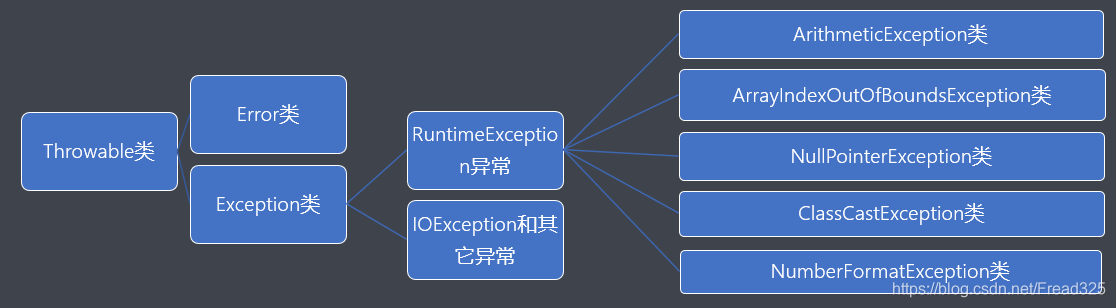
- java.lang.Throwable类是Java语言中错误(Error)和异常(Exception)的超类。
- 其中Error类主要用于描述Java虚拟机无法解决的严重错误,通常无法编码解决,如:JVM挂掉了 等。
- 其中Exception类主要用于描述因编程错误或偶然外在因素导致的轻微错误,通常可以编码解决, 如:0作为除数等。
16.1.2 异常的分类
- java.lang.Exception类是所有异常的超类,主要分为以下两种:
RuntimeException - 运行时异常,也叫作非检测性异常
IOException和其它异常 - 其它异常,也叫作检测性异常,所谓检测性异常就是指在编译阶段都能 被编译器检测出来的异常。
- 其中RuntimeException类的主要子类:
ArithmeticException类 - 算术异常
ArrayIndexOutOfBoundsException类 - 数组下标越界异常
NullPointerException - 空指针异常
ClassCastException - 类型转换异常
NumberFormatException - 数字格式异常
- 注意:
当程序执行过程中发生异常但又没有手动处理时,则由Java虚拟机采用默认方式处理异常,而默认 处理方式就是:打印异常的名称、异常发生的原因、异常发生的位置以及终止程序。
代码: 异常的分类, 测试
package com.lagou.task16;

/**
 * @author  Lemon.Wong
 * @date 2020/12/5 16:02
 */
public class ExcepetionTest {

    public static void main(String[] args) {

        //1.见识下非检测性异常/运行时异常
//        System.out.println(5 /0); // java.lang.ArithmeticException: / by zero 编译OK,运行阶段会发生算术异常,后续代码不会执行

        //2.检测性异常
//        Thread.sleep(1000); // java.lang.InterruptedException 编译错误,不处理就无法到运行阶段
        System.out.println("程序正常结束!");
    }
}
16.1.3 异常的避免
- 在以后的开发中尽量使用if条件判断来避免异常的发生。
- 但是过多的if条件判断会导致程序的代码加长、臃肿,可读性差。
代码: 异常的避免 if 语句
package com.lagou.task16;

import java.io.IOException;

/**
 * @author  Lemon.Wong
 * @date 2020/12/5 16:15
 */
public class ExceptionPreventTest {

    public static void main(String[] args) {

        // 算术异常 ArithmeticException: / by zero
        int ia = 10;
        int ib = 0;
        if (0 != ib) {
            System.out.println(ia / ib);
        }

        // 数组下标越界异常 ArrayIndexOutOfBoundsException: Index 5 out of bounds for length 5
        int[] arr = new int[5];
        int pos = 5;
        if (pos >= 0 && pos < 5) {
            System.out.println(arr[pos]);
        }

        //空指针异常 NullPointerException
        String str = null;
        if (null != str) {
            System.out.println(str.length());
        }

        //类型转换异常 ClassCastException: class java.lang.Exception cannot be cast to class java.io.IOException
        Exception ex = new Exception();
        if (ex instanceof IOException) {
            IOException ie = (IOException)ex;
        }

        //数字格式异常 NumberFormatException: For input string: "123a"
        String str2 = "123a";
        if (str2.matches("\\d+")) {
            System.out.println(Integer.parseInt(str2));
        }

        System.out.println("程序正常结束。");
    }
}
16.1.4 异常的捕获
- 语法格式
try {
编写可能发生异常的代码;
}
catch(异常类型 引用变量名) {
编写针对该类异常的处理代码;
}
...
finally {
编写无论是否发生异常都要执行的代码;
}
- 注意事项
a. 当需要编写多个catch分支时,切记小类型应该放在大类型的前面;
b. 懒人的写法:
catch(Exception e) { }
c. finally通常用于进行善后处理,如:关闭已经打开的文件等。
- 执行流程
try {
a;
b; - 可能发生异常的语句
c;
}catch(Exception ex) {
d;
}finally {
e;
}
当没有发生异常时的执行流程:a b c e;
当发生异常时的执行流程:a b d e;
代码: 异常的捕获
package com.lagou.task16;

/**
 * @author  Lemon.Wong
 * @description
 * @date 2020/12/6 15:14
 */
public class ExceptionFinallyTest {

    public static int test() {
        try {
            int[] arr = new int[5];
            System.out.println(arr[5]);
            return  0 ;
        }catch (ArrayIndexOutOfBoundsException e) {
            e.printStackTrace();
            return 1;
        }finally {
            return 2; // 提前结束方法并返回数据
        }
    }
    public static void main(String[] args) {

        try  {
            int ia = 10;
            int ib = 0;
            System.out.println(ia / ib);
        }catch (ArithmeticException e) {
            e.printStackTrace();

            String str1 = null;
//            str1.length();//NullPointerException
        }finally {
            System.out.println("无论是否发生异常,都执行。");
        }

        System.out.println("Over!");
        int test = test();
        System.out.println("test " + test); // 2
    }
}
16.1.5 异常的抛出
- 基本概念
在某些特殊情况下有些异常不能处理或者不便于处理时,就可以将该异常转移给该方法的调用者,
这种方法就叫异常的抛出。当方法执行时出现异常,则底层生成一个异常类对象抛出,
此时异常代码后续的代码就不再执行。
- 语法格式
访问权限 返回值类型 方法名称(形参列表) throws 异常类型1,异常类型2,...{ 方法体; }
如:
public void show() throws IOException{}
- 方法重写的原则
a.要求方法名相同、参数列表相同以及返回值类型相同,从jdk1.5开始支持返回子类类型;
b.要求方法的访问权限不能变小,可以相同或者变大;
c.要求方法不能抛出更大的异常;
- 注意:
子类重写的方法不能抛出更大的异常、不能抛出平级不一样的异常,
但可以抛出一样的异常、更小 的异常以及不抛出异常。
- 经验分享
若父类中被重写的方法没有抛出异常时,则子类中重写的方法只能进行异常的捕获处理。
若一个方法内部又以递进方式分别调用了好几个其它方法,则建议这些方法内可以使用抛出 的方法处理到最后一层进行捕获方式处理。
代码: 异常的抛出, 重写规则,
package com.lagou.task16;

import java.io.FileInputStream;
import java.io.IOException;

/**
 * @author  Lemon.Wong
 * @description
 * @date 2020/12/6 15:31
 */
public class ExceptionThrowsTest {

    public static void show() throws IOException {
        FileInputStream fis = new FileInputStream("d:/a.txt");
        System.out.println("测试异常之后代码是否继续向下执行?"); // 抛出异常后没有执行这个语句
        fis.close();
    }

    public static void test() throws IOException {
        show();
    }

    public static void test1() throws IOException {
        test();
    }

    public static void test2() throws IOException {
        test1();
    }

    //不建议在main方法中抛出异常 JVM负担很重
    public static void main(String[] args) /*throws IOException*/ {
        try {
            show();
        } catch (IOException e) {
            e.printStackTrace();
        }
        //若一个方法内部又以递进方式分别调用了好几个其它方法,则建议这些方法内可以使用抛出 的方法处理到最后一层进行捕获方式处理。
        try {
            test2();
        } catch (IOException e) {
            e.printStackTrace();
        }
    }
}
package com.lagou.task16;

import java.io.IOException;

/**
 * @author  Lemon.Wong
 * @description
 * @date 2020/12/6 15:56
 */
public class ExceptionMethod {
    public void show() throws IOException{}
}
package com.lagou.task16;

/**
 * @author  Lemon.Wong
 * @description
 * @date 2020/12/6 15:59
 */
public class SubExceptionMethod extends ExceptionMethod{

//    @Override
//    public void show() throws IOException {} // 子类重写的方法可以抛出和父类方法中一样的异常
//    public void show() throws FileNotFoundException {} // 子类重写的方法可以抛出更小的异常
//    public void show() {} // 子类重写的方法可以不抛出异常
//    public void show() throws ClassNotFoundException {} // 子类重写的方法不可以抛出平级不一样的异常
//    public void show() throws Exception {} // 子类重写的方法不可以抛出更大的异常
}
16.1.6 自定义异常
- 基本概念
当需要在程序中表达年龄不合理的情况时,而Java官方又没有提供这种针对性的异常,
此时就需要 程序员自定义异常加以描述。
- 实现流程
a. 自定义xxxException异常类继承Exception类或者其子类。
b. 提供两个版本的构造方法,一个是无参构造方法,另外一个是字符串作为参数的构造方法。
- 异常的产生
throw new 异常类型(实参);
如:
throw new AgeException("年龄不合理!!!");
- Java采用的异常处理机制是将异常处理的程序代码集中在一起,与正常的程序代码分开,使得程序 简洁、优雅,并易于维护。
代码: 自定义异常
package com.lagou.task16;

/**
 * @author  Lemon.Wong
 * @description
 * @date 2020/12/6 16:11
 */
public class AgeException extends Exception{
    static final long serialVersionUID = -3387516993124229948L; // 序列化版本号 与序列化操作有关
    public AgeException() {}

    public  AgeException(String message) {super(message);}
}
package com.lagou.task16;

/**
 * @author  Lemon.Wong
 * @description
 * @date 2020/12/6 16:17
 */
public class Person {
    private String name;
    private int age;

    public Person(String name, int age) /*throws AgeException*/ {
        setName(name);
        setAge(age);
    }

    public String getName() {
        return name;
    }

    public void setName(String name) {
        this.name = name;
    }

    public int getAge() {
        return age;
    }

    public void setAge(int age) /*throws AgeException*/ {
        if (age >0 && age< 150) {
            this.age = age;
        } else {
//            System.out.println("年龄不合理哦。");
            try {
                throw new AgeException("年龄不合理哦。");
            } catch (AgeException e) {
                e.printStackTrace();
            }
        }
    }

    @Override
    public String toString() {
        return "Person{" +
                "name='" + name + '\'' +
                ", age=" + age +
                '}';
    }
}
package com.lagou.task16;

/**
 * @author  Lemon.Wong
 * @description
 * @date 2020/12/6 16:20
 */
public class PersonTest {

    public static void main(String[] args) {
/*        Person p1 = null;
        try {
            p1 = new Person("zhangfei",-30);
        } catch (AgeException e) {
            e.printStackTrace();
        }
        System.out.println("p1 = " + p1); // p1 = null*/

        Person p1 = new Person("zhangfei",-30);
        System.out.println("p1 = " + p1); // p1 = Person{name='zhangfei', age=0}
    }
}
16.2 File类(重点)
16.2.1 基本概念
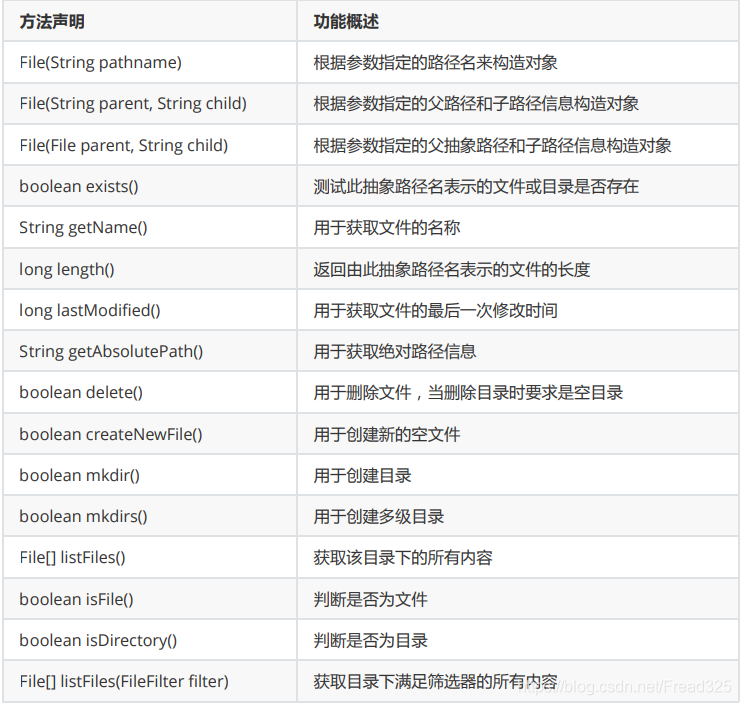
- java.io.File类主要用于描述文件或目录路径的抽象表示信息,可以获取文件或目录的特征信息, 如:大小等。
16.2.2 常用的方法
- 案例题目
遍历指定目录以及子目录中的所有内容并打印出来。
代码: File 类的测试
package com.lagou.task16;

import java.io.File;
import java.io.FileFilter;
import java.io.IOException;
import java.text.SimpleDateFormat;
import java.util.Date;

/**
 * @author  Lemon.Wong
 * @description
 * @date 2020/12/6 17:06
 */
public class FileTest {

    //自定义成员方法实现指定目录以及子目录的所有内容并打印
    public static void show(File file) {
        // 获取目录f3下的所有内容并记录到一维数组中
        File[] filesArray = file.listFiles();
        // 遍历数组
        for (File tf: filesArray) {
            String name = tf.getName();
            if (tf.isFile()) {
                System.out.println(name);
            }
            if (tf.isDirectory()) {
                System.out.println("[" + name + "]");
                show(tf);
            }
        }
    }

    public static void main(String[] args) throws IOException {

        // 1.构造File类型的对象与d:/a.txt文件关联
        File f1 = new File("d:/a.txt");
        // 2.若文件存在则获取文件的相关特性信息并打印后删除文件
        if (f1.exists()) {
            System.out.println("文件的名称是:" + f1.getName());
            System.out.println("文件的大小是:" + f1.length());
            Date ldt = new Date(f1.lastModified());
            SimpleDateFormat sdf = new SimpleDateFormat("yyyy-MM-dd HH:mm:SS");
            System.out.println("文件的最后一次修改时间是:" + sdf.format(ldt));
            //绝对路径: 主要指以根目录开始的路径信息,如:c:/ d:/ /..
            //相对路径: 主要指以当前目录所在位置开始的路径信息,如:./ ../
            System.out.println("文件的绝对路径信息是:" + f1.getAbsolutePath());
            System.out.println(f1.delete()?"文件删除成功":"文件呢删除失败");
        } else {
            // 3.若文件不存在则创建新的空文件
            System.out.println(f1.createNewFile()?"文件创建成功":"文件创建失败");
        }

        System.out.println("--------------------------------------------------");
        // 4.实现目录的删除与创建
        File f2 = new File("d:/捣乱");
//        File f2 = new File("d:/捣乱/捣乱/捣乱");
        if (f2.exists()) {
            System.out.println("目录名称是:" + f2.getName());
//            System.out.println(f2.delete()?"目录删除成功":"目录删除失败");
        } else {
            System.out.println(f2.mkdir()?"目录创建成功":"目录创建失败"); // 创建单层目录
//            System.out.println(f2.mkdirs()?"目录创建成功":"目录创建失败"); // 创建多层目录
        }

        System.out.println("---------------------------------------------------");
        // 5.实现将指定目录中的所有内容打印出来
        File f3 = new File("d:/捣乱");
        // 获取目录f3下的所有内容并记录到一维数组中
        File[] filesArray = f3.listFiles();
        // 遍历数组
        for (File tf: filesArray) {
            String name = tf.getName();
            if (tf.isFile()) {
                System.out.println(name);
            }
            if (tf.isDirectory()) {
                System.out.println("[" + name + "]");
            }
        }

        System.out.println("----------------------------------------------------");
        // 6.实现目录中所有内容的获取的同时进行过滤
        // 匿名内部类的语法格式:接口/父类类型 引用变量名 = new 接口/父类类型() {方法的重写}
      /*  FileFilter fileFilter = new FileFilter() {
            @Override
            public boolean accept(File pathname) {
                //若文件名是以.avi为结尾的,则返回true表示保留 否则返回false表示丢弃
                return pathname.getName().endsWith(".avi");
            }
        };*/
        // Lambda表达式的格式:(参数列表) -> {方法体};
        FileFilter fileFilter = (File pathname) -> {return pathname.getName().endsWith(".avi");};
        File[] filesArray2 = f3.listFiles(fileFilter);
        for (File tf : filesArray2) {
            System.out.println(tf);
        }

        System.out.println("-----------------------------------------------------");
        // 7.使用递归思想获取目录及子目录中的所有内容
        show(new File("d:/捣乱"));
    }
}





 扫一扫
扫一扫


 5290
5290

 被折叠的 条评论
为什么被折叠?
被折叠的 条评论
为什么被折叠?
 到【灌水乐园】发言





