


本文旨在 总结 Thread 类的基本用法
1.线程创建
创建线程有5种方法
1.1 方法1
创建 Thread 类的子类, 在子类中重写 run 方法
class MyThread extends Thread {
    @Override
    public void run() {
        while (true) {
            System.out.println("线程调动中...");
            try {
                Thread.sleep(1000);
            } catch (InterruptedException e) {
                throw new RuntimeException(e);
            }
        }
    }
}

public class demo1 {
    public static void main(String[] args) throws InterruptedException {
        // 1. 创建 Thread 类的子类, 在子类中重写 run 方法
        Thread t = new MyThread();
        t.start();
        while (true) {
            System.out.println("主函数调用中...");
            Thread.sleep(1000);
        }
    }
}
1.2 方法2
实现 Runnable, 重写 run
class MyRunnable implements Runnable {
    @Override
    public void run() {
        while (true) {
            System.out.println("hello Thread");
            try {
                Thread.sleep(1000);
            } catch (InterruptedException e) {
                throw new RuntimeException(e);
            }
        }
    }
}
public class demo2 {
    //实现 Runnable, 重写 run
    public static void main(String[] args) throws InterruptedException {
        Runnable runnable =new MyRunnable();
        Thread t =new Thread(runnable);
        t.start();
        while (true) {
            System.out.println("hello main");
            Thread.sleep(1000);
        }
    }
}
1.3 方法3
基于方法1 定义匿名内部类 继承 Thread 重写run方法
public class demo3 {
    //继承 Thread, 重写 run, 使用匿名内部类
    public static void main(String[] args) throws InterruptedException {
        Thread t =new Thread(){
            @Override
            public void run() {
                while (true) {
                    System.out.println("hello Thread");
                    try {
                        Thread.sleep(1000);
                    } catch (InterruptedException e) {
                        throw new RuntimeException(e);
                    }
                }
            }
        };

        t.start();

        while (true) {
            System.out.println("hello main");
            Thread.sleep(1000);
        }
    }
}
1.4 方法4
基于方法2 实现 Runnable, 重写 run, 使用匿名内部类
public class demo4 {
    //实现 Runnable, 重写 run, 使用匿名内部类
    public static void main(String[] args) {
        Runnable runnable =new Runnable() {
            @Override
            public void run() {
                while (true) {
                    System.out.println("hello thread");
                    try {
                        Thread.sleep(1000);
                    } catch (InterruptedException e) {
                        throw new RuntimeException(e);
                    }
                }
            }
        };

        Thread t =new Thread(runnable);
        t.start();

        while (true) {
            System.out.println("hello main");
            try {
                Thread.sleep(1000);
            } catch (InterruptedException e) {
                throw new RuntimeException(e);
            }
        }
    }
}
1.5方法5(推荐!!!)
使用 lambda 表达式
public class demo5 {
    //使用 lambda 表达式
    public static void main(String[] args) throws InterruptedException {
        Thread t =new Thread(()->{
            while (true) {
                System.out.println("hello Thread");
                try {
                    Thread.sleep(1000);
                } catch (InterruptedException e) {
                    throw new RuntimeException(e);
                }
            }
        } );
        t.start();

        while (true) {
            System.out.println("hello main");
            Thread.sleep(1000);
        }
    }
}
其中lamabda表达式 本质上是一个“匿名函数” 其主要作用是作为一个“回调函数”
很多语言都有,Java中方法必须依靠 类 来存在 ——“函数式接口 ”
()-> { }
创建一个匿名的函数式接口的子类,并且创建对应实例,且重写里面的方法。
Thread t =new Thread(()->{
    具体逻辑
} );
2.线程启动与中断
2.1启动一个线程
每个Thread对象 都只能start一次
每想创建一个新线程,都要创建一个新Thread对象来引用(不可重复利用)
Thread t =new Thread();
t.start();
start 和 run 的区别
- run是线程的入口方法,不需要手动调用
- start是调用系统的API
2.2中断一个线程
此处的中断 意味着终止 不可恢复
常见方法
1.使用 自定义变量 作为标志位

while (!isfinished) {
System.out.println("hello Thread");
try {
Thread.sleep(1000);
} catch (InterruptedException e) {
throw new RuntimeException(e);
}
}
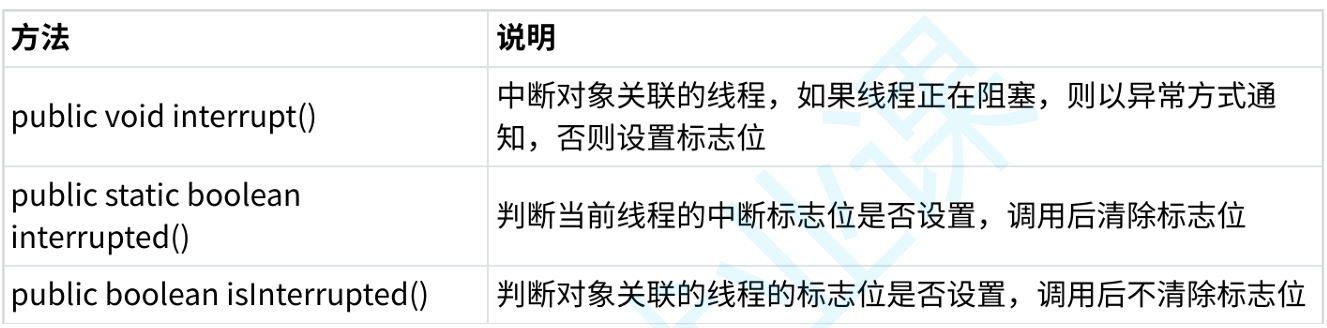
2.调用interrupt() 方法
使用 Thread.interrupted() 或者 Thread.currentThread.isInterrupted( ) 代替自定义标志位
3.线程等待 join()
有时,我们需要等待⼀个线程完成它的⼯作后,才能进⾏⾃⼰的下⼀步⼯作。例如,张三只有等李四 转账成功,才决定是否存钱,这时我们需要⼀个⽅法明确等待线程的结束。
| 方法 | 说明 |
| public void join( ) | 等待线程结束 |
| public void join(x millis ) | 至多等待线程 x毫秒 |
| public void join(x millis ,y nanos ) | 至多等待线程 x毫秒 + y 纳秒 |
在 join()方法中 添加参数 表示至多等待线程 x的时间
如果上一个线程在参数时间内结束 主线程开始使用cpu资源 开始跑起来
如果上一个线程还没有结束 主线程不再等待 仍然开始跑
4.线程休眠
4.1常规Sleep()
使用sleep方法 休眠 x 毫秒
Thread.sleep(1000);
由于线程调度不可控,此方法只能保证实际休眠时间大于参数设置时间
代码调用sleep, 相当于 命令当前线程让出 CPU资源
后续时间到了,需要操作系统内核 把此线程重新调到CPU上 令其继续执行
( 时间到了 意味着允许被调度 不是立刻执行 会有毫秒级别的延迟)
4.2 Sleep(0)
特殊写法 表明 让当前线程 立即放弃CPU资源,等待操作系统重新调度
把CPU让给别人 更多的执行机会
5.获取线程实例
Thread.currentThead()就能够获取到当前线程的引用
一般可以用于 引用main线程 区别于其他线程





 扫一扫
扫一扫


 1293
1293

 被折叠的 条评论
为什么被折叠?
被折叠的 条评论
为什么被折叠?
 到【灌水乐园】发言





