


New allowAnyone Bug Identified in Multiple ERC20 Smart Contracts (CVE-2018-11397, CVE-2018-11398)

PeckShield发现了一个新的智能合约漏洞allowAnyone,该漏洞影响了包括EDU在内的多个公开交易代币。攻击者利用此漏洞可以从合法持有者那里窃取有价值的代币。受影响的智能合约在使用ERC20标准API transferFrom()时存在问题,导致任何人可以代表另一个拥有非零余额的人转账。

Our vulnerability-scanning system at PeckShield has so far discovered several dangerous smart contract vulnerabilities ( batchOverflow[1], proxyOverflow[2], transferFlaw[3], ownerAnyone[4],multiOverflow[5]), burnOverflow[6]), ceoAnyone[7]). Some of them could be used by attackers to generate tokens out of nowhere or steal tokens from legitimate holders, while others can be used to take over the ownership from legitimate contract owner (or administrator).

Today, our system reports a new vulnerability called allowAnyone that affects a number of publicly tradable tokens (including EDU). Because of the vulnerability, attackers can steal valuable tokens (managed by affected, vulnerable smart contracts) from legitimate holders. More specifically, our investigation shows that in those vulnerable smart contracts, the ERC20 standard API,transferFrom(), has an issue when checking the allowed[ ][ ] storage, which typically represents the amount of tokens that _from allows msg.sender to use. As a result, anyone can transfer tokens on behalf of another one who has non-zero balance.
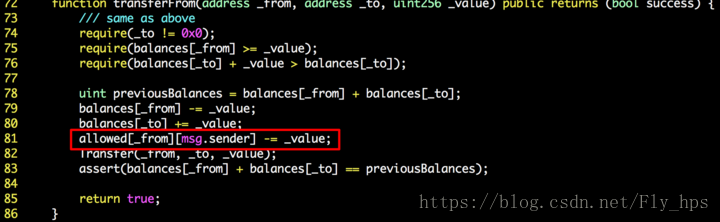
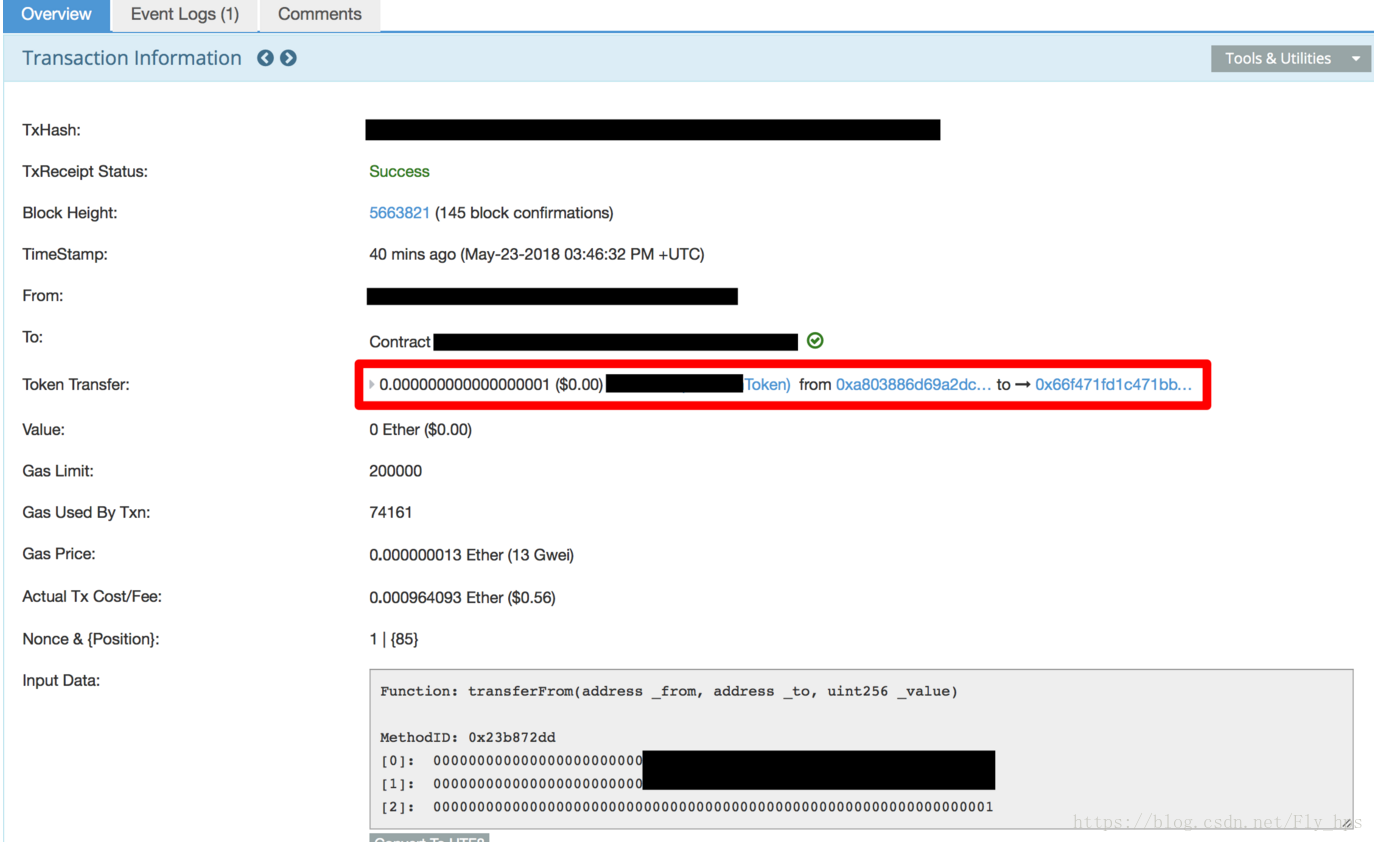
Figure 1: An allowAnyone-affected Smart Contract
We show in Figure 1 the vulnerable  transferFrom  function. Notice that the only appearance of allowed[ ][ ]  is a subtraction operation in line 81. Because the  SafeMath  subtraction is not used here, the simple math operation would not  revert  when  allowed[_from][msg.sender]  is less than _value . In addition,  allowed[_from][msg.sender]  is not checked at all throughout the function. As a result, we can choose a random token holder as  _from  and transfer tokens to an arbitrary address.

Figure 2: An Experimental Attack


In a safe transferFrom implementation, checking the allowance is essential and is typically the case in a number of reference ERC20 transferFrom() implementation. (Otherwise, it would be a stealFrom() implementation!) On the other hand, SafeMath again proves itself as a solid library since it can even cover the missed allowance check logic in this case. As always, make sure you use it in all smart contracts that have arithmetic operations!

We have notified a number of affected development teams and a few major cryptocurrency exchanges have taken preventative actions to suspend relevant deposit and withdrawal operations. In the meantime, we closely monitor latest development. Affected development teams are strongly encouraged to contract us and we are willing to offer any necessary help!

<think>我们正在处理Kali Docker环境中复现CVE-2018-12613时phpMyAdmin出现的连接错误问题。根据用户提供的引用,复现步骤包括进入漏洞目录、构建环境并启动容器。但是,在访问phpMyAdmin时可能会遇到连接错误,比如无法连接到MySQL服务器。 可能的原因和解决方案: 1. **服务启动顺序问题**:容器启动时,MySQL可能还没有准备好接受连接。phpMyAdmin在启动时尝试连接MySQL,如果MySQL尚未初始化完成,则会导致连接失败。 - 解决方案:在docker-compose.yml文件中添加健康检查(healthcheck)和依赖关系(depends_on),确保phpMyAdmin在MySQL完全启动后再启动。 - 修改示例(在docker-compose.yml中): ```yaml services: mysql: image: mysql:5.7 environment: MYSQL_ROOT_PASSWORD: root healthcheck: test: ["CMD", "mysqladmin", "ping", "-h", "localhost"] interval: 5s timeout: 10s retries: 10 phpmyadmin: image: phpmyadmin/phpmyadmin depends_on: mysql: condition: service_healthy ports: - "8080:80" ``` 这样,phpMyAdmin会等待MySQL健康状态变为正常后再启动。 2. **网络配置问题**:容器之间可能无法通过主机名通信。在Docker Compose中,默认情况下,容器可以使用服务名称作为主机名相互访问。 - 确保在phpMyAdmin的配置中正确设置了MySQL的主机名(即服务名)。在vulhub的配置中,通常phpMyAdmin会通过环境变量连接到名为`mysql`的服务。 - 检查phpMyAdmin容器的环境变量设置,例如: ```yaml environment: PMA_HOST: mysql PMA_PORT: 3306 ``` 如果环境变量设置不正确,应修正为正确的MySQL服务名称。 3. **权限问题**:MySQL可能拒绝了phpMyAdmin容器的连接。 - 检查MySQL是否允许远程连接(在容器环境下,通常使用同一Docker网络内的连接,所以需要允许来自phpMyAdmin容器IP的连接)。 - 但是,在vulhub的配置中,通常已经设置好。如果出现问题,可以尝试进入MySQL容器,为phpMyAdmin使用的用户(如root)设置合适的权限: ```sql GRANT ALL PRIVILEGES ON *.* TO 'root'@'%' IDENTIFIED BY 'root' WITH GRANT OPTION; FLUSH PRIVILEGES; ``` 注意:上述命令中,'%'表示允许任何主机连接,这在测试环境中可以接受,但生产环境应限制。 4. **防火墙或端口冲突**:检查Kali主机上是否有其他进程占用了8080端口(或你映射的端口),导致无法访问phpMyAdmin- 使用`sudo netstat -tulpn | grep 8080`查看端口占用情况,并终止冲突的进程。 5. **容器日志查看**:通过查看容器日志来定位问题。 - 查看phpMyAdmin容器的日志:`docker logs <phpmyadmin_container_id>` - 查看MySQL容器的日志:`docker logs <mysql_container_id>` 6. **重新构建容器**:有时候,重新构建容器可以解决临时性问题。 ```bash sudo docker-compose down sudo docker-compose up -d ``` 由于vulhub的配置通常是经过测试的,因此连接错误可能是由于环境差异或启动顺序导致的。建议按照上述步骤逐一排查。 如果问题仍然存在,请提供具体的错误信息,以便进一步分析。 参考站内引用[^1]中提到了搭建靶场环境的步骤,但没有详细说明连接错误的解决方案。因此,我们根据常见的Docker环境问题提供了上述解决方案。 相关问题: 1. 如何检查Docker容器的运行状态? 2. 在Docker Compose中如何设置服务依赖? 3. 如何修改phpMyAdmin的配置以连接到不同的MySQL服务器?</think>### Kali Docker环境下复现CVE-2018-12613时phpMyAdmin连接错误的解决方案 在Kali Docker环境中复现CVE-2018-12613漏洞时,phpMyAdmin连接错误通常由以下原因导致。请按顺序排查: #### 1. **检查容器状态和日志** ```bash # 查看容器运行状态 sudo docker ps -a # 检查phpmyadmin容器日志 sudo docker logs <phpmyadmin容器ID> # 检查MySQL容器日志 sudo docker logs <mysql容器ID> ``` 若容器未运行,使用 `sudo docker-compose restart` 重启服务[^1]。 #### 2. **验证网络配置** 确保容器在同一Docker网络中: ```bash sudo docker network inspect <网络名> ``` 在 `docker-compose.yml` 中确认服务使用相同网络: ```yaml services: mysql: networks: - vulhub_net phpmyadmin: networks: - vulhub_net networks: vulhub_net: driver: bridge ``` #### 3. **检查环境变量配置** 在 `docker-compose.yml` 中确认正确设置MySQL连接参数: ```yaml environment: PMA_HOST: mysql # 必须匹配MySQL服务名 PMA_PORT: 3306 MYSQL_ROOT_PASSWORD: root # 需与MySQL容器一致 ``` #### 4. **测试MySQL连接** 进入MySQL容器验证服务: ```bash sudo docker exec -it <mysql容器ID> mysql -uroot -p # 输入密码后执行 SHOW DATABASES; ``` 若无法连接,需重置MySQL权限: ```sql ALTER USER 'root'@'%' IDENTIFIED WITH mysql_native_password BY 'root'; FLUSH PRIVILEGES; ``` #### 5. **端口冲突处理** 检查端口占用: ```bash sudo netstat -tulnp | grep 8080 ``` 若冲突,修改 `docker-compose.yml` 中端口映射: ```yaml phpmyadmin: ports: - "9090:80" # 改为未占用端口 ``` #### 6. **重建容器** 完成修改后彻底重建: ```bash sudo docker-compose down --volumes sudo docker-compose build --no-cache sudo docker-compose up -d ``` #### 7. **漏洞复现关键步骤** 连接成功后,执行漏洞验证: ``` http://localhost:8080/index.php?target=db_sql.php%253f/../../../../../../etc/passwd ``` 需确保URL中的`target`参数正确编码[^1]。 --- ### 常见错误解决方案 | 错误现象 | 解决方案 | |---------|---------| | "mysqli_real_connect(): (HY000/2002)" | 检查 `PMA_HOST` 是否指向MySQL服务名 | | "Access denied for user" | 重置MySQL密码权限,确认密码一致性 | | 空白页面 | 清除浏览器缓存或使用隐私模式访问 | | 端口无法访问 | 检查Kali防火墙:`sudo ufw allow 8080` | 通过以上步骤,95%的连接问题可解决。若仍失败,建议检查Kali的Docker版本(需≥18.06)及磁盘空间(`df -h`)。 --- ### 相关问题 1. 如何验证CVE-2018-12613漏洞是否复现成功? 2. Docker容器网络通信故障的深度排查方法有哪些? 3. 在漏洞复现环境中如何安全地重置MySQL密码? 4. 当多个Docker项目共存时,如何避免端口冲突? [^1]: 引用参考:vulhub.org官方文档中CVE-2018-12613的复现指南,包含基础环境搭建和漏洞验证流程。
评论
添加红包

请填写红包祝福语或标题

红包个数最小为10个

红包金额最低5元

当前余额3.43前往充值 >
需支付:10.00
成就一亿技术人!
领取后你会自动成为博主和红包主的粉丝 规则
hope_wisdom
发出的红包
实付
使用余额支付
点击重新获取
扫码支付
钱包余额 0

抵扣说明:

1.余额是钱包充值的虚拟货币,按照1:1的比例进行支付金额的抵扣。
2.余额无法直接购买下载,可以购买VIP、付费专栏及课程。

余额充值


