


防火墙iptable、selinux、时间同步 是配置主机的基础
初始化:
- 关闭SELinux
- 关闭iptables,firewalld
- 配置chrony
时间同步
NTP(Network Time Protocol,网络时间协议)是用来使网络中的各个计算机时间同步的一种协议。它的用途是把计算机的时钟同步到世界协调时UTC,其精度在局域网内可达0.1ms,在互联网上绝大多数的地方其精度可以达到1-50ms
时间同步实现工具
-
ntp:精度在局域网内可达0.1ms,在互联网上精度在1-50ms,但是同步时间长,逐渐同步
-
chrony:实现NTP协议的软件,在互联网同步两台机器之间的精度在几毫秒,在LAN中,精度为几十微秒。CentOS7后系统自带
-
两者本质既是客户端也是服务器,客户端持续运行
clock与date命令的区别:
-
clock是显示硬件时间
-
data是显示操作系统时间,在没有配置网络时间的情况下,data会读取硬件时间
NTP
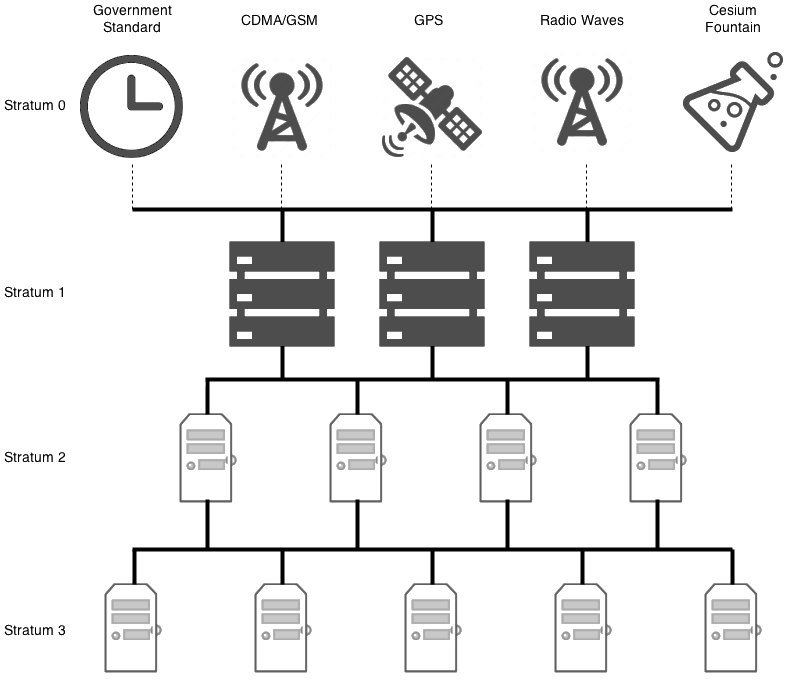
NTP服务是利用NTP协议提供时间同步服务的
NTP服务安装
yum install ntp -y
NTP配置
备份配置文件
[root@localhost ~]#cp /etc/ntp.conf{,.bak}
[root@localhost ~]#ls /etc/ntp.conf*
/etc/ntp.conf  /etc/ntp.conf.bak
查看配置文件
# For more information about this file, see the man pages
# ntp.conf(5), ntp_acc(5), ntp_auth(5), ntp_clock(5), ntp_misc(5), ntp_mon(5).

driftfile /var/lib/ntp/drift

# Permit time synchronization with our time source, but do not
# permit the source to query or modify the service on this system.
# 不允许其他主机查询我的主机时间并修改
# restrict default nomodify notrap nopeer noquery

# Permit all access over the loopback interface.  This could
# be tightened as well, but to do so would effect some of
# the administrative functions.
restrict 127.0.0.1
restrict ::1

# Hosts on local network are less restricted.
# 允许内网其他机器同步时间
#restrict 192.168.1.0 mask 255.255.255.0 nomodify notrap

# Use public servers from the pool.ntp.org project.
# Please consider joining the pool (http://www.pool.ntp.org/join.html).
# 指定互联网上时间服务器进行时间同步服务,iburst提高时间同步效率
# server 0.centos.pool.ntp.org iburst
# server 1.centos.pool.ntp.org iburst
# server 2.centos.pool.ntp.org iburst
# server 3.centos.pool.ntp.org iburst

# 其他主机和此主机时间同步,可以将IP设置为该主机IP

# 自己指定同步阿里云的ntp服务器
server ntp1.aliyun.com iburst
server ntp2.aliyun.com iburst

#broadcast 192.168.1.255 autokey    # broadcast server
#broadcastclient            # broadcast client
#broadcast 224.0.1.1 autokey        # multicast server
#multicastclient 224.0.1.1      # multicast client
#manycastserver 239.255.254.254     # manycast server
#manycastclient 239.255.254.254 autokey # manycast client

# 允许上层时间服务器主动修改本机时间
restrict time1.aliyun.com  nomodify notrap noquery
restrict ntp1.aliyun.com  nomodify notrap noquery

# 外部时间服务器不可用时,以本地时间作为时间服务
server  127.127.1.0
fudge   127.127.1.0 stratum 10

# Enable public key cryptography.
#crypto

includefile /etc/ntp/crypto/pw

# Key file containing the keys and key identifiers used when operating
# with symmetric key cryptography.
keys /etc/ntp/keys

# Specify the key identifiers which are trusted.
#trustedkey 4 8 42

# Specify the key identifier to use with the ntpdc utility.
#requestkey 8

# Specify the key identifier to use with the ntpq utility.
#controlkey 8

# Enable writing of statistics records.
#statistics clockstats cryptostats loopstats peerstats

# Disable the monitoring facility to prevent amplification attacks using ntpdc
# monlist command when default restrict does not include the noquery flag. See
# CVE-2013-5211 for more details.
# Note: Monitoring will not be disabled with the limited restriction flag.
disable monitor
iburst 选项
# 一次发送8个数据包
启动ntp服务
[root@localhost ~]#service ntpd status
Redirecting to /bin/systemctl status ntpd.service
● ntpd.service - Network Time Service
   Loaded: loaded (/usr/lib/systemd/system/ntpd.service; disabled; vendor preset: disabled)
   Active: inactive (dead)

[root@localhost ~]#chkconfig ntpd on
Note: Forwarding request to 'systemctl enable ntpd.service'.
Created symlink from /etc/systemd/system/multi-user.target.wants/ntpd.service to /usr/lib/systemd/system/ntpd.service.

[root@localhost ~]#service ntpd start
Redirecting to /bin/systemctl start ntpd.service

[root@localhost ~]#service ntpd status
Redirecting to /bin/systemctl status ntpd.service
● ntpd.service - Network Time Service
   Loaded: loaded (/usr/lib/systemd/system/ntpd.service; enabled; vendor preset: disabled)
   Active: active (running) since Wed 2020-06-03 09:59:17 CST; 2s ago
  Process: 9790 ExecStart=/usr/sbin/ntpd -u ntp:ntp $OPTIONS (code=exited, status=0/SUCCESS)
 Main PID: 9793 (ntpd)
    Tasks: 1
   CGroup: /system.slice/ntpd.service
           └─9793 /usr/sbin/ntpd -u ntp:ntp -g

Jun 03 09:59:17 localhost.localdomain ntpd[9793]: Listen and drop on 1 v6wildcard :: UDP 123
Jun 03 09:59:17 localhost.localdomain ntpd[9793]: Listen normally on 2 lo 127.0.0.1 UDP 123
Jun 03 09:59:17 localhost.localdomain ntpd[9793]: Listen normally on 3 ens33 192.168.33.128 UDP 123
Jun 03 09:59:17 localhost.localdomain ntpd[9793]: Listen normally on 4 virbr0 192.168.122.1 UDP 123
Jun 03 09:59:17 localhost.localdomain ntpd[9793]: Listen normally on 5 lo ::1 UDP 123
Jun 03 09:59:17 localhost.localdomain ntpd[9793]: Listen normally on 6 ens33 fe80::298d:cfea:e788:42...123
Jun 03 09:59:17 localhost.localdomain ntpd[9793]: Listening on routing socket on fd #23 for interfac...tes
Jun 03 09:59:17 localhost.localdomain ntpd[9793]: 0.0.0.0 c016 06 restart
Jun 03 09:59:17 localhost.localdomain ntpd[9793]: 0.0.0.0 c012 02 freq_set kernel 0.000 PPM
Jun 03 09:59:17 localhost.localdomain ntpd[9793]: 0.0.0.0 c011 01 freq_not_set
Hint: Some lines were ellipsized, use -l to show in full.
设置ntpd为开机启动
[root@localhost ~]#systemctl enable ntpd
查看同步情况
[root@localhost ~]#ntpq -p
     remote           refid      st t when poll reach   delay   offset  jitter
==============================================================================
*120.25.115.20   10.137.53.7      2 u    5   64    1   18.014   -7.647   0.454
# 带*说明同步了
ntp服务停止
[root@localhost ~]#service ntpd stop
chrony

chrony是一个开源的自由软件,它能保持系统时钟与时钟服务器(NTP)同步,让时间保持精确。
它由两个程序组成:chronyd和chronyc。
chronyd是一个后台运行的守护进程,用于调整内核中运行的系统时钟和时钟服务器同步。它确定计算机增减时间的比率,并对此进行补偿。
chrony是CentOS7.x上自带的时间同步软件
配置chrony服务,实现服务器时间自动同步
chrony服务安装
# 查询是否存在chrony
[root@localhost ~]#rpm -q chrony
chrony-3.4-1.el7.x86_64

# 不存在的话直接安装
yum install chrony -y
查看当前chrony服务状态
[root@localhost ~]#systemctl status chrony
Unit chrony.service could not be found.
启动chrony服务
[root@localhost ~]#systemctl start chronyd
设置为开机启动
[root@localhost ~]#systemctl enable chronyd
服务unit文件
/usr/lib/ststemd/system/chronyd.service
监听端口
323/udp
123/udp
配置文件
/etc/chrony.conf
chrony服务配置
chrony服务使用的配置文件为/etc/chrony.conf内容格式和ntp配置文件相似。
备份配置文件
[root@localhost ~]#cp /etc/chrony.conf{,.bak}
[root@localhost ~]#ls /etc/chrony.conf*
/etc/chrony.conf  /etc/chrony.conf.bak
查看配置文件内容
[root@localhost ~]#vim /etc/chrony.conf

  1 # Use public servers from the pool.ntp.org project.
  2 # Please consider joining the pool (http://www.pool.ntp.org/join.html).
  3 #server 0.centos.pool.ntp.org iburst
  4 #server 1.centos.pool.ntp.org iburst
  5 server ntp1.aliyun.com iburst
  6 server ntp2.aliyun.com iburst
  7

  8 # Record the rate at which the system clock gains/losses time.
  9 driftfile /var/lib/chrony/drift
 10
 11 # Allow the system clock to be stepped in the first three updates
 12 # if its offset is larger than 1 second.
 13 makestep 1.0 3
 14
 15 # Enable kernel synchronization of the real-time clock (RTC).
 16 rtcsync
 17
 18 # Enable hardware timestamping on all interfaces that support it.
 19 #hwtimestamp *
 20
 21 # Increase the minimum number of selectable sources required to adjust
 22 # the system clock.
 23 #minsources 2
 24
 25 # Allow NTP client access from local network.
 	# 允许哪个NTP客户端访问你的主机,当不能同步互联网服务器时,该主机无法作为时间服务器
 26 allow 192.168.0.0/16
 27
 28 # Serve time even if not synchronized to a time source.
 	# 此无服务作为时间服务器主机,启动后,当与互联网联结断开时,该主机也可以作为时间服务器
 29 local stratum 10
 30
 31 # Specify file containing keys for NTP authentication.
 32 #keyfile /etc/chrony.keys
 33
 34 # Specify directory for log files.
 35 logdir /var/log/chrony
 36
 37 # Select which information is logged.
 38 #log measurements statistics tracking
查看同步情况
[root@localhost ~]#chronyc sources -v
210 Number of sources = 4

  .-- Source mode  '^' = server, '=' = peer, '#' = local clock.
 / .- Source state '*' = current synced, '+' = combined , '-' = not combined,
| /   '?' = unreachable, 'x' = time may be in error, '~' = time too variable.
||                                                 .- xxxx [ yyyy ] +/- zzzz
||      Reachability register (octal) -.           |  xxxx = adjusted offset,
||      Log2(Polling interval) --.      |          |  yyyy = measured offset,
||                                \     |          |  zzzz = estimated error.
||                                 |    |           \
MS Name/IP address         Stratum Poll Reach LastRx Last sample
===============================================================================
^- 5.79.108.34                   2   8   377   202  +1695us[+1695us] +/-  196ms
^- 94.130.49.186                 3   7   367   332    +12ms[  +13ms] +/-  118ms
^+ 203.107.6.88                  2   6   377    12  +1033us[+1033us] +/-   23ms
^* 120.25.115.20                 2   8   377   208  +1011us[+1620us] +/-   11ms
公共NTP服务
阿里云时间服务器
#阿里云提供了7个NTP时间服务器也就是Internet时间同步服务器地址

ntp1.aliyun.com
ntp2.aliyun.com
ntp3.aliyun.com
ntp4.aliyun.com
ntp5.aliyun.com
ntp6.aliyun.com
ntp7.aliyun.com

# windows类
time.pool.aliyun.com
pool.ntp.org 一个提供可靠易用的NTP服务的虚拟集群
cn.pool.ntp.org
0-3.cn.pool.ntp.org
大学ntp服务
s1a.time.edu.cn	#北京邮电大学
s1b.time.edu.cn	#清华大学
s1c.time.edu.cn	#北京大学
国家授时中心服务器
210.72.145.44

 12万+


 扫一扫


 被折叠的 条评论
为什么被折叠?
 到【灌水乐园】发言


