



 本文介绍了一款自定义虚拟键盘的开发过程,支持任意大小写、特殊字符及中文输入,采用Qt Quick进行界面设计,通过QML与C++交互实现拼音输入等功能,展示了键盘的布局逻辑和核心代码。
首先声明拼音是拿的谷歌源码,其次布局-界面-逻辑都是本人所写.
本键盘主要开发的功能:
1.支持任意大小写,及特殊字符的输入
2.支持中文输入
3.支持快捷选项
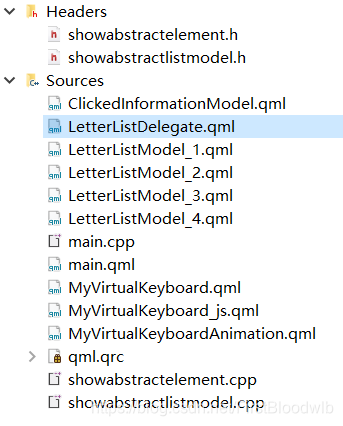
上图大致分为两部分{ cpp,qml }
1.abstractlistelement.cpp,abstractlistmodel.cpp这两个cpp是与QML交互拼音接口
2. 主插件:MyVirtualKeyboard.qml
3. 子插件: {
3.1 ClickedInformationModel.qml : 代理显示字符
3.2 LetterListDelegate.qml: 代理点击组件
3.3 {LetterListModel_1.qml,LetterListModel_2.qml
,LetterListModel_3.qml,LetterListModel_4.qml} : 代理键盘
3.4 MyVirtualKeyboard_js.qml : 处理界面逻辑
3.5 MyVirtualKeyboardAnimation.qml: 处理界面动画
}
主插件源码:
import QtQuick 2.12
import QtQuick.Controls 2.5
Rectangle{
    function showAnimation(){
        myVirtualKeyboardAnimation.showAnimation()
    }

    signal clickedEnglishKeyValueSignal(string keyValue,int stringPosition)
    signal clickedLastRemoveSignal()

    MyVirtualKeyboard_js{ id: myVirtualKeyboard_js}
    MyVirtualKeyboardAnimation{ id: myVirtualKeyboardAnimation }

    property int  widthRatio: width / 13 //13
    property int  heightRatio: height / 7//7
    property bool isChineseFlag: false
    property int  inputMaxLetterNumber: 6
    property int  nowCharNumber: 0
    id: keyboardBackgroundRectangle
    width: 400 ; height: 0.0 ; color: "black" ; radius: 5 ; opacity: 0.8 ; //visible: false

  Rectangle{
        z : 1 ; color: "black" ;radius: 5
        anchors.horizontalCenter: parent.horizontalCenter ; anchors.top: parent.top ; anchors.topMargin: heightRatio + 10
        width: keyboardBackgroundRectangle.width ; height: keyboardBackgroundRectangle.height - heightRatio - 10;
        visible: !showTotal_pinyin_Button.isDown ? true : false ;
    GridView{
        id: total_pinyin_ListView
        anchors.fill: parent
        cellWidth: 50; cellHeight: 50
        boundsBehavior: Flickable.StopAtBounds ; clip: true;  model: showAbstractListModel
        delegate: Text{
                      text: myVirtualKeyboard_js.disposeSuperLongString(chineseString) ; color: "white" ; width: total_pinyin_ListView.cellWidth ; height: total_pinyin_ListView.cellHeight ;
                      horizontalAlignment: Text.AlignHCenter ; verticalAlignment: Text.AlignVCenter
                      MouseArea{ anchors.fill:parent ; hoverEnabled: true ; onClicked: {
                                 keyboardBackgroundRectangle.nowCharNumber += parent.text.length
                                 keyboardBackgroundRectangle.clickedEnglishKeyValueSignal(parent.text,keyboardBackgroundRectangle.nowCharNumber - parent.text.length)
                                 clickedInformationModel.clear();showAbstractListModel.parseLetter("") ; myVirtualKeyboard_js.switchTotal_pinyin_Button(); }
                                 onEntered: {parent.font.bold = true} onExited: {parent.font.bold = false }
                      }
        }
     }
  }

    Column{
        spacing: 8
        anchors.fill:parent
        Row{
            id: row
            anchors.horizontalCenter: parent.horizontalCenter
            topPadding: 5
            spacing: 5
            ListView{
                id: clickedInformationListView
                width: widthRatio * 2 ; height: heightRatio
                boundsBehavior: Flickable.StopAtBounds ; orientation: ListView.Horizontal
                spacing: 5 ; clip: true ; model: ClickedInformationModel{ id: clickedInformationModel}
                delegate: Text{color: "white" ;  height: heightRatio / 2 + 20 ; text: clickedElement ;
                               verticalAlignment: Text.AlignVCenter ; horizontalAlignment: Text.AlignHCenter}
            }
            ListView{
                id: pinyin_ListView
                width: keyboardBackgroundRectangle.width - (widthRatio / 2 + widthRatio * 2 + 20) ;height: heightRatio
                boundsBehavior: Flickable.StopAtBounds ; orientation: ListView.Horizontal ; interactive: showTotal_pinyin_Button.isDown ? true : false
                spacing: 20 ; model:showAbstractListModel ; /*ShowAbstractListModel{ id: showAbstractListModel}*/ clip: true
                delegate: Text{
                                 height: heightRatio / 2 + 20; text: chineseString ;
                                 verticalAlignment: Text.AlignVCenter ; horizontalAlignment: Text.AlignHCenter
                                 MouseArea{ anchors.fill:parent ; hoverEnabled: true ; onClicked: {
                                            keyboardBackgroundRectangle.nowCharNumber+= parent.text.length ;
                                            keyboardBackgroundRectangle.clickedEnglishKeyValueSignal(parent.text,keyboardBackgroundRectangle.nowCharNumber - parent.text.length)
                                            clickedInformationModel.clear();showAbstractListModel.parseLetter("") ;
                                            if(!showTotal_pinyin_Button.isDown) myVirtualKeyboard_js.switchTotal_pinyin_Button()}
                                            onEntered: {parent.font.bold = true} onExited: {parent.font.bold = false }
                                 }
                                 Component.onCompleted:{
                                     switch(index){
                                         case 0 : color = "yellow" ; break;
                                         default: color = "white" ; break ;
                                     }
                                 }
                           }
            }
            Button{
                property bool  isDown: true
                id: showTotal_pinyin_Button
                width: widthRatio / 2 ; height: heightRatio;
                background: Image{ id: background ; anchors.centerIn: parent ; width: widthRatio / 1.4 ; height: heightRatio /1.2
                                   source: "file:/C:/Users/FirstBoold-WANG/Desktop/MyKeyboardPackage/MyVirtualKeyboard/MyVirtualKeyboardIcon/HideTotal_pinyin_Icon.png"
                                 }
                onClicked: {
                    myVirtualKeyboard_js.switchTotal_pinyin_Button()
                }
            }
        }

        ListView{
            id: letterListView1
            anchors.horizontalCenter: parent.horizontalCenter
            //anchors.horizontalCenterOffset: widthRatio / 2 + widthRatio / 5
            width: widthRatio * letterListModel_1.count +63  ; height:  heightRatio
            boundsBehavior: Flickable.StopAtBounds ; orientation: ListView.Horizontal
            spacing: 7 ; model: LetterListModel_1{ id: letterListModel_1}
            delegate: LetterListDelegate{}
        }
        ListView{
            id: letterListView2
            anchors.horizontalCenter: parent.horizontalCenter
            //anchors.horizontalCenterOffset: widthRatio / 5 * -1
            width:widthRatio * letterListModel_2.count + 58; height: heightRatio
            boundsBehavior: Flickable.StopAtBounds ; orientation: ListView.Horizontal
            spacing: 7 ; model: LetterListModel_2{ id: letterListModel_2}
            delegate: LetterListDelegate{}
        }
        ListView{
            id: letterListView3
            anchors.left: letterListView_4.left
            width:keyboardBackgroundRectangle.width; height: heightRatio ;
            boundsBehavior: Flickable.StopAtBounds ; orientation: ListView.Horizontal ; //interactive: false
            spacing: parent.width / 57  ; model: LetterListModel_3{ id: letterListModel_3}
            delegate: LetterListDelegate{
                Component.onCompleted:{
                    switch(index){
                        case 0: width = widthRatio * 2 ; return ;
                        case letterListModel_3.count - 1 : width = widthRatio * 2 ; return ;
                        default: break;
                    }
                }
            }
        }
        ListView{
            id: letterListView_4
            anchors.horizontalCenter: parent.horizontalCenter ;
            width:keyboardBackgroundRectangle.width -10; height: heightRatio ;
            boundsBehavior: Flickable.StopAtBounds ; orientation: ListView.Horizontal
            spacing: 4 ; model: LetterListModel_4{ id: letterListModel_4}
            delegate: LetterListDelegate{
                Component.onCompleted:{
                    switch(index){
                        case 0: width = widthRatio * 2 ; break ;
                        case 1: width = widthRatio * 2 - widthRatio / 2 ; break ;
                        case 2: width = keyboardBackgroundRectangle.width - widthRatio * 4 - ((widthRatio * 2 - widthRatio / 2) * 2) - 30 ; break ;
                        case 3: width = widthRatio * 2 - widthRatio / 2; break ;
                        case 4: width = widthRatio * 2 ; break ;
                        default: break;
                    }
                }
            }
        }
    }
}
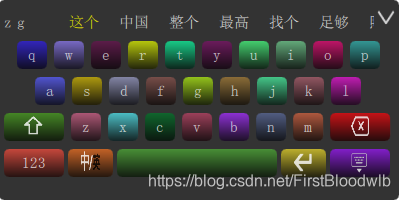
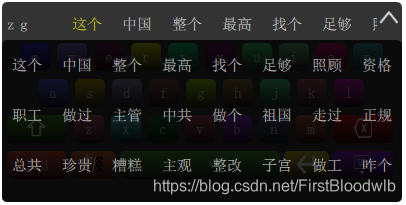
展示一下效果图





 扫一扫
扫一扫


 689
689

 被折叠的 条评论
为什么被折叠?
被折叠的 条评论
为什么被折叠?
 到【灌水乐园】发言





