



 本文介绍了如何使用Nginx的ngx_http_upstream_module配置负载均衡,包括基础应用、加权轮询、客户端IP调度、健康检查及手动标记状态。同时,展示了如何结合proxy_cache实现缓存机制,提高服务器响应速度。
ngx_http_upstream_module模块:Nginx负载均衡模块
Syntax: upstreamname { ... }
Default: —
Context: http
Defines a group of servers. Servers can listen ondifferent ports. In addition, servers listening on TCP and UNIX-domain socketscan be mixed.
简单示例:
upstream backend {
server backend1.example.com weight=5;
server 127.0.0.1:8080 max_fails=3 fail_timeout=30s;
server unix:/tmp/backend3;
server backup1.example.com backup;
}
配置示例:
upstream backend {
server backend1.example.com weight=5;
server backend2.example.com:8080;
server unix:/tmp/backend3;
server backup1.example.com:8080 backup;
server backup2.example.com:8080 backup;
}
server {
location / {
proxy_pass http://backend;
}
}
前置条件,编辑后端web 服务器测试页面
nginx作为后端web服务器:192.168.88.130:8080 test.field.com
[root@testhtml]# pwd
/usr/share/nginx/html
[root@testhtml]# cat index.html
<h1>Welcometo Nginx on test.field.com!!</h1>
<p><em>If you see this page,test OK! </em></p>
<p>Thank you!</p>
[root@test html]#
Http作为后端web服务器:192.168.88.129:80 web2.field.com
[root@web2html]# pwd
/var/www/html
[root@web2html]# cat index.html
<h1>Welcometo Http on web2.field.com!!</h1>
<p>If yousee this page,test ok. </p>
<p><em>Thank you!</em></p>
案例1、负载均衡基础应用
编辑nginx.conf,添加如下内容:
upstreamupservers {
server 192.168.88.129;
server 192.168.88.130:8080;
}
编辑conf.d/default.conf,添加如下内容:
location/field/ {
proxy_pass http://upservers/;
}
location ~*\.(jpg|png|gif)$ {
proxy_pass http://upservers;
}
[root@wwwnginx]# vi nginx.conf
user nginx;
worker_processes 1;
error_log /var/log/nginx/error.log warn;
pid /var/run/nginx.pid;
events {
worker_connections 1024;
}
http {
include /etc/nginx/mime.types;
default_type application/octet-stream;
log_format main '$remote_addr - $remote_user[$time_local] "$request" $http_host '
'$status $body_bytes_sent"$http_referer" '
'"$http_user_agent""$http_x_forwarded_for"';
access_log /var/log/nginx/access.log main;
proxy_cache_path /cache/nginx/ levels=1:1keys_zone=mycache:32m;
upstream upservers {
server 192.168.88.129;
server 192.168.88.130:8080;
}
sendfile on;
#tcp_nopush on;
keepalive_timeout 65;
#gzip on;
include /etc/nginx/conf.d/*.conf;
}
[root@wwwconf.d]# vi default.conf
server {
listen 8080;
server_name localhost;
#charset koi8-r;
#access_log /var/log/nginx/log/host.access.log main;
location / {
root /usr/share/nginx/html;
# proxy_pass http://192.168.88.130/;
index index.html index.php index.htm;
}
location /field/ {
proxy_pass http://upservers/;
proxy_set_header Host $host;
proxy_set_header X-Real-IP $remote_addr;
}
location ~* \.(jpg|png|gif)$ {
proxy_pass http://upservers;
proxy_set_header X-Real-IP $remote_addr;
}
error_page 500 502 503 504 /50x.html;
location = /50x.html {
root /usr/share/nginx/html;
}
}
[root@wwwconf.d]# service nginx restart
停止 nginx:[确定]
正在启动 nginx:[确定]
[root@wwwconf.d]#
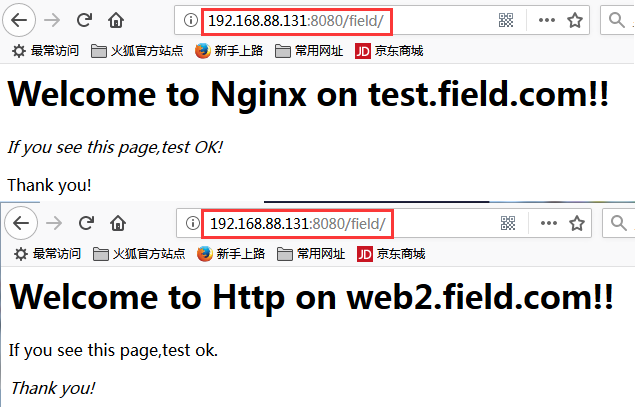
wind7访问 http://192.168.88.131:8080/field/
刷新页面,页面内容会在【Welcome to Http on web2.field.com!!!】和【Welcome to Nginx on test.field.com!!】上跳转
案例2、负载均衡定义加权轮询
定义加权轮询,默认为轮询
upstream upservers {
server 192.168.88.129 weight=n;
server 192.168.88.130 weight=m;
}
[root@wwwnginx]# vim nginx.conf
upstream upservers {
server 192.168.88.129 weight=2;
server 192.168.88.130:8080 weight=1;
}
[root@wwwnginx]# service nginx reload
重新载入 nginx:[确定]
Win7访问http://www.field.com/field/
依次刷新页面,页面内容会在【Welcome to Http on web2.field.com!!!】和【Welcome to Nginx on test.field.com!!】上以2:1跳转
案例3、负载均衡定义根据客户端IP进行调度
ip_hash:根据客户端IP进行调度:
每一个客户端访问时都生成一个hash码,来自同一客户端的定向到同一服务器
upstream upservers {
ip_hash;
}
[root@wwwnginx]# vim nginx.conf
upstream upservers {
ip_hash;
server 192.168.88.129 weight=2;
server 192.168.88.130:8080 weight=1;
}
[root@wwwnginx]# service nginx configtest
nginx: theconfiguration file /etc/nginx/nginx.conf syntax is ok
nginx:configuration file /etc/nginx/nginx.conf test is successful
[root@wwwnginx]# service nginx reload
重新载入 nginx:[确定]
win7访问http://192.168.88.131:8080/field/
始终定位到【Welcome to Http on web2.field.com!!!】页面
130主机用curl访问http://192.168.88.131:8080/field/
始终定位到【Welcome to Nginx on test.field.com!!】页面
[root@testconf.d]# curl http://192.168.88.131:8080/field/
<h1>Welcometo Nginx on test.field.com!!</h1>
<p><em>If you see this page,test OK! </em></p>
<p>Thankyou!</p>
[root@testconf.d]#
案例4、后端服务器健康状态检测:
max_fails=number 检查number次失败时定义为真实失败;
fail_timeout=time 每次检查失败的超时时间;
[root@wwwnginx]# vim nginx.conf
upstream upservers {
server 192.168.88.129 weight=2 max_fails=2 fail_timeout=1;
server 192.168.88.130:8080 weight=1 max_fails=2 fail_timeout=1;
}
[root@wwwnginx]# service nginx reload
重新载入 nginx:[确定]
wind7访问 http://www.field.com:8080/field/
刷新页面,页面内容会在【Welcome to Http on web2.field.com!!!】和【Welcome to Nginx on test.field.com!!】上以2:1跳转
测试:
1).关闭后端httpd服务
[root@web2html]# service httpd stop
停止 httpd:[确定]
[root@web2html]#
wind7访问 http://www.field.com:8080/field/
页面只显示【Welcome to Nginx on test.field.com!!】
2).关闭后端Nginx服务
[root@testconf.d]# service nginx stop
停止 nginx:[确定]
[root@testconf.d]#
wind7访问 http://www.field.com:8080/field/,
无法访问,页面显示【An error occurred.】
3).依次开启后端httpd、Nginx服务,访问恢复。
案例5、手动标记状态
backup:备用
down:下线
[root@wwwnginx]# vim nginx.conf
upstream upservers {
server 192.168.88.129 max_fails=2 fail_timeout=1;
server 192.168.88.130:8080 max_fails=2 fail_timeout=1 backup;
}
[root@wwwnginx]# service nginx configtest
nginx: theconfiguration file /etc/nginx/nginx.conf syntax is ok
nginx:configuration file /etc/nginx/nginx.conf test is successful
[root@wwwnginx]# service nginx reload
重新载入 nginx:[确定]
测试:
1).服务器正常,只上线129主机的http服务
win7访问http://192.168.88.131:8080/field/,刷新页面,始终定位到【Welcome to Http onweb2.field.com!!!】页面
130主机用curl访问http://192.168.88.131:8080/field/,始终定位到【Welcome to Http on web2.field.com!!!】页面
[root@testconf.d]# curl http://192.168.88.131:8080/field/
<h1>Welcometo Http on web2.field.com!!</h1>
<p>If yousee this page,test ok. </p>
<p><em>Thankyou!</em></p>
[root@testconf.d]#
2).关闭后端httpd服务,备用的130主机会上线。
[root@web2html]# service httpd stop
停止 httpd:[确定]
win7访问http://192.168.88.131:8080/field/,刷新页面,始终定位到【Welcome to Nginx ontest.field.com!!】页面
129主机用curl访问http://192.168.88.131:8080/field/,始终定位到【Welcome to Nginx on test.field.com!!】页面
[root@web2html]# curl http://192.168.88.131:8080/field/
<h1>Welcometo Nginx on test.field.com!!</h1>
<p><em>If you see this page,test OK! </em></p>
<p>Thankyou!</p>
3).开启129主主机后端httpd服务,备用的130主机会下线,129主机上线。
[root@web2html]# service httpd start
正在启动 httpd:[确定]
win7访问http://192.168.88.131:8080/field/,刷新页面,始终定位到【Welcome to Http on web2.field.com!!!】页面
案例6、自定义相应报文首部:
编辑default.conf,添加如下内容:
add_header X-Via $server_addr;
add_header X-Cache $upstream_cache_status;
[root@wwwconf.d]# vi default.conf
server {
listen 8080;
server_name localhost;
add_headerX-Via $server_addr;
add_headerX-Cache $upstream_cache_status;
#charset koi8-r;
#access_log /var/log/nginx/log/host.access.log main;
location / {
root /usr/share/nginx/html;
# proxy_pass http://192.168.88.130/;
index index.html index.php index.htm;
}
location /field/ {
proxy_pass http://upservers/;
proxy_set_header Host $host;
proxy_set_header X-Real-IP $remote_addr;
proxy_set_header X-Forwarded-For $proxy_add_x_forwarded_for;
}
location ~* \.(jpg|png|gif)$ {
proxy_pass http://upservers;
proxy_set_header X-Real-IP $remote_addr;
}
}
[root@wwwconf.d]# service nginx reload
重新载入 nginx:[确定]
[root@wwwconf.d]#
win7访问http://192.168.88.131:8080/field/,F12打开控制台
可以看到报文首部:
X-Via:192.168.88.131
案例7、负载均衡加入缓存机制
Syntax: proxy_cache_path path [levels=levels][use_temp_path=on|off] keys_zone=name:size [inactive=time] [max_size=size][manager_files=number] [manager_sleep=time] [manager_threshold=time][loader_files=number] [loader_sleep=time] [loader_threshold=time][purger=on|off] [purger_files=number] [purger_sleep=time][purger_threshold=time];
Default: —
Context: http
缓存文件路径定义levels=1:2,一级子目录一个字符表示,2级子目录两个字符表示
总共有62*62*62个文件
proxy_cache_path /data/nginx/cache levels=1:2 keys_zone=one:10m;
file names in a cache will look like this:
/data/nginx/cache/c/29/b7f54b2df7773722d382f4809d65029c
$upstream_cache_status 包含以下几种状态:
MISS:未命中,请求被传送到后端
HIT:缓存命中
EXPIRED:缓存已经过期请求被传送到后端
UPDATING:正在更新缓存,将使用旧的应答
STALE:后端将得到过期的应答
简单配置如下:
配置缓存:nginx.conf
proxy_cache_path /cache/nginx/ levels=1:1keys_zone=mycache:32m;
加入头信息:default.conf
add_header X-Via $server_addr;
add_header X-Cache $upstream_cache_status;
启用缓存:
proxy_cache mycache;
proxy_cache_valid 200 1d;
#200 1d 表示这个zone中返回200的缓存文件如果在1天内没有被访问,那么文件会被cache manager进程删除掉
proxy_cache_valid 301 302 10m;
proxy_cache_valid any 1m;
proxy_cache_use_stale error http_500 http_502 http_503 http_504
[root@www nginx]#vi nginx.conf
proxy_cache_path /cache/nginx/levels=1:2 keys_zone=mycache:32m;
upstream upservers {
server 192.168.88.129 max_fails=2 fail_timeout=1;
server 192.168.88.130:8080 max_fails=2 fail_timeout=1 backup;
}
[root@wwwconf.d]# vi default.conf
server {
listen 8080;
server_name localhost;
add_headerX-Via $server_addr;
add_headerX-Cache $upstream_cache_status;
#charset koi8-r;
#access_log /var/log/nginx/log/host.access.log main;
location / {
root /usr/share/nginx/html;
# proxy_pass http://192.168.88.130/;
index index.html index.php index.htm;
}
location /field/ {
proxy_cache mycache;
proxy_cache_valid 200 1d;
proxy_cache_valid 301 302 10m;
proxy_cache_valid any 1m;
proxy_cache_use_stale error http_500 http_502 http_503 http_504;
proxy_pass http://upservers/;
proxy_set_header Host $host;
proxy_set_header X-Real-IP $remote_addr;
proxy_set_header X-Forwarded-For $proxy_add_x_forwarded_for;
}
location ~* \.(jpg|png|gif)$ {
proxy_cache mycache;
proxy_cache_valid 200 1d;
proxy_cache_valid 301 302 10m;
proxy_cache_valid any 1m;
proxy_cache_use_stale error http_500 http_502 http_503 http_504;
proxy_pass http://upservers;
proxy_set_header X-Real-IP $remote_addr;
}
error_page 500 502 503 504 /50x.html;
location = /50x.html {
root /usr/share/nginx/html;
}
}
访问http://www.field.com:8080/field/,F12打开控制台
可以看到
X-Cache:MISS
X-Via:192.168.88.131
#MISS:缓存未命中,请求被传送到后端
此时已经在Nginx代理服务器形成缓存文件
[root@www ba]#pwd
/cache/nginx/5/ba
[root@www ba]#ll
总用量 4
-rw-------. 1nginx nginx 546 4月 20 16:43141b735b7bb97cf9c8914596bd253ba5
[root@www ba]#cat 141b735b7bb97cf9c8914596bd253ba5
KEY:http://upservers/
HTTP/1.1 200 OK
Date: Fri, 20Apr 2018 08:43:20 GMT
Server:Apache/2.2.15 (CentOS)
Last-Modified:Fri, 20 Apr 2018 07:28:38 GMT
ETag:"dbec8-6e-56a42a2f67580"
Accept-Ranges:bytes
Content-Length:110
Connection:close
Content-Type:text/html; charset=UTF-8
<h1>Welcometo Http on web2.field.com!!</h1>
<p>If yousee this page,test ok. </p>
<p><em>Thankyou!</em></p>
再刷新一次页面,可以看到:
X-Cache:HIT
X-Via:192.168.88.131
缓存命中,此时请求不会被传送到后端。





 扫一扫
扫一扫


 250
250

 被折叠的 条评论
为什么被折叠?
被折叠的 条评论
为什么被折叠?
 到【灌水乐园】发言





