



 在Vue项目中使用axios进行API请求时遇到了CORS错误:'Access-Control-Allow-Origin' header缺失导致请求被阻止。该问题源于前后端不同端口引起的跨域访问。尝试使用@CrossOrigin注解解决,但未成功。解决跨域问题需要正确配置允许跨域的响应头。
遇到的问题一
Access to XMLHttpRequest at ‘http://localhost:8081/order/no’ from origin ‘http://localhost:8080’ has been blocked by CORS policy: No ‘Access-Control-Allow-Origin’ header is present on the requested resource.
翻译:通过CORS策略已阻止从源"http:// localhost:8080"访问"http:// localhost:8081/order/no"处的XMLHttpRequest:所请求的资源上不存在"Access-Control-Allow-Origin"标头。
理解:因为vue跟后端服务的端口不一样,所以访问就是跨域访问,它要求访问的请求头里有Access-Control-Allow-Origin,而这个不配置就没有
解决的方法
@Configuration
@EnableWebSecurity
public class WebSecurityConfig extends WebSecurityConfigurerAdapter {
    @Override
    protected void configure(HttpSecurity http) throws Exception {
        http.csrf().disable(); //开启跨域访问
        http.cors(); //开启跨域资源共享
    }
}
- 也许这个解决方法有效但我并没成功用它解决问题:
@CrossOrigin注解*
@CrossOrigin(allowedHeaders = {"Authorization"})
@GetMapping("/res")
public ResponseResult<List<vongCover>> pages(){
        return new ResponseResult<List<vongCover>>(Integer.valueOf(HttpStatus.OK.value()), HttpStatus.OK.toString(), vongCoverService.selectAll());
}
- 这是我对注解的源码的翻译,仅供参考学习
    /**
	 * {@link #origins}的别名。
	 */
	@AliasFor("origins")
	String[] value() default {};

	/**
	 * 特定来源的允许来源列表,例如
	 * {@code“ https://domain1.com”},或所有来源的{@code“ *”}。
	 * <p>在{@code Access-Control-Allow-Origin}中列出了匹配的来源
	 * preflight实际CORS请求的响应标头。
	 * <p>默认情况下,所有来源都允许。
	 * <p> <strong>注意:</ strong>:CORS检查“转发”中的使用值
	 * (<a href="https://tools.ietf.org/html/rfc7239"> RFC 7239 </a>),
	 * X-Forwarded-Host”,“ X-Forwarded-Port”和“ X-Forwarded-Proto”标头,
	 * (如果存在),以反映客户端起源的地址。
	 * 考虑使用{@code ForwardedHeaderFilter},以便从
	 * 是否提取和使用或丢弃此类标头的中心位置。
	 * 有关此过滤器的更多信息,请参见Spring Framework参考。
	 * @see #value
	 */
	@AliasFor("value")
	String[] origins() default {};

	/**
	 * 实际请求中允许的请求标头列表,
	 * 可能{@code“ *”}以允许所有标头。
	 * <p>允许的标头列在{@code Access-Control-Allow-Headers}中
	 * 预检请求的响应标头。
	 * <p>如果标头名称是以下之一,则不需要列出标头名称:
	 * {@code Cache-Control},{@ code Content-Language},{@ code Expires},
	 * {@code Last-Modified}或{@code Pragma}(根据CORS规范)。
	 * <p>默认情况下,所有请求的标头都是允许的。
	 */
	String[] allowedHeaders() default {};

	/**
	 * 用户代理将允许客户端的响应头列表
	 * 访问实际响应,而不是“简单”标头,即
	 * {@code Cache-Control},{@ code Content-Language},{@ code Content-Type},
	 * {@code Expires},{@ code Last-Modified}或{@code Pragma},
	 * <p>公开的标题在{@code Access-Control-Expose-Headers}中列出
	 *实际CORS请求的响应标头。
	 * <p>默认情况下,没有标头显示为公开。
	 */
	String[] exposedHeaders() default {};

	/**
	 * 支持的HTTP请求方法的列表。
	 * <p>默认情况下,受支持的方法与
	 * 控制器方法已映射。
	 */
	RequestMethod[] methods() default {};

	/**
	 * 浏览器是否应发送凭证,例如cookie和
	 * 跨域请求,到带注释的端点。配置值是
	 * 在{@code Access-Control-Allow-Credentials}响应标头上设置
	 * preflight要求。
	 * <p> <strong>注意:</ strong>:请注意,此选项会建立一个较高的
	 * 与已配置域的信任级别,并且还增加了范围
	 * 通过暴露敏感的特定于用户的攻击来攻击Web应用程序
	 * 信息,例如cookie和CSRF令牌。
	 * <p>默认情况下未设置
	 * {@code Access-Control-Allow-Credentials}标头也未设置,并且
	 * 因此,不允许使用凭据。
	 */
	String allowCredentials() default "";

	/**
	 * preflight响应的缓存持续时间的最长期限(以秒为单位)。
	 * <p>此属性控制{@code Access-Control-Max-Age}的值
	 * 预检请求的响应标头。
	 * <p>将此值设置为合理的值可以减少预检次数
	 * 浏览器所需的请求/响应交互。
	 * 负值表示<em> undefined </ em>。
	 * <p>默认情况下,此时间设置为{@code 1800}秒(30分钟)。
	*/
	long maxAge() default -1;
这里说的preflight指的是CORS跨域中的preflight请求,详细了解请查阅这里
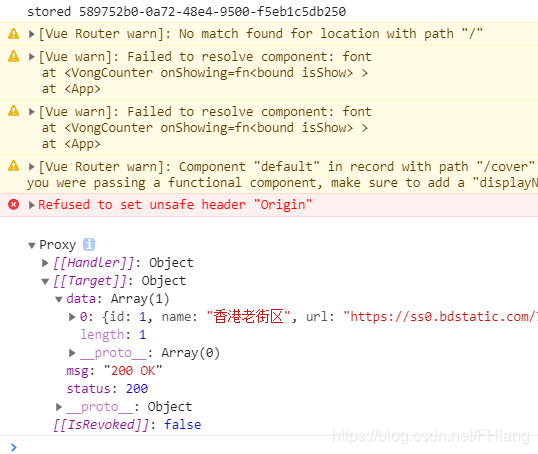
结果
		this.$axios.get(url, {
                    params: {
                        username: this.loginForm.username,
                        password: this.loginForm.password
                    }
                }).then(res => {
                    this.message = '登录成功';
                    let data = reactive(res.data);
                    this.$store.commit('set_token', data.access_token);
                    if (this.$store.state.token) {
                        alert(this.message);
                        this.$emit('showing', true);
                        this.$router.push('/')
                    } else {
                        this.message = '身份认证已失效';
                        alert(this.message);
                        this.$router.replace('/login');
                    }
                })
                .catch(e => {
                    console.log(e);
                    alert(this.message);
                })
	 mounted() {
            this.$axios.get("http://localhost:8070/res", {}
            ).then(res => {
                let data = reactive(res.data);
                console.log(data);
            })
            .catch(e => {
                console.log(e);
            });
        }






 扫一扫
扫一扫


 1万+
1万+

 被折叠的 条评论
为什么被折叠?
被折叠的 条评论
为什么被折叠?
 到【灌水乐园】发言





