



 本文分享了使用Bartender进行打印开发的两种方法:通过引用Bartender自带DLL及利用COM组件。并详细介绍了每种方法的具体实现步骤,同时记录了在远程调用Bartender打印时遇到的权限问题及其解决方案。
Bartender 打印开发遇到的坑
打印的写法,目前知道两种实现
1.引用 插入Bartender 自带dll,写法如下:

(一般在安装SDK里,可以找到dll)
using (Engine btEngine = new Engine())
{
btEngine.Start();
//Lable 路径
LabelFormatDocument btFormat = btEngine.Documents.Open(@“C:\Users\Administrator\Desktop\Bartender_\Labels\Outer.btw”);
//如何传参 命名具名数据源 赋予对应的 key<>value
btFormat.SubStrings[“ProductName”].Value = “test1”;
//传入打印机名称
btFormat.PrintSetup.PrinterName = “ZDesigner ZT410-300dpi ZPL”;
//打印张数
btFormat.PrintSetup.IdenticalCopiesOfLabel = 1;
btFormat.Print(“UID Printing Job”, 1);
btFormat.Close(SaveOptions.DoNotSaveChanges);
btEngine.Stop();
}
2.用 COM Bartender,写法如下:
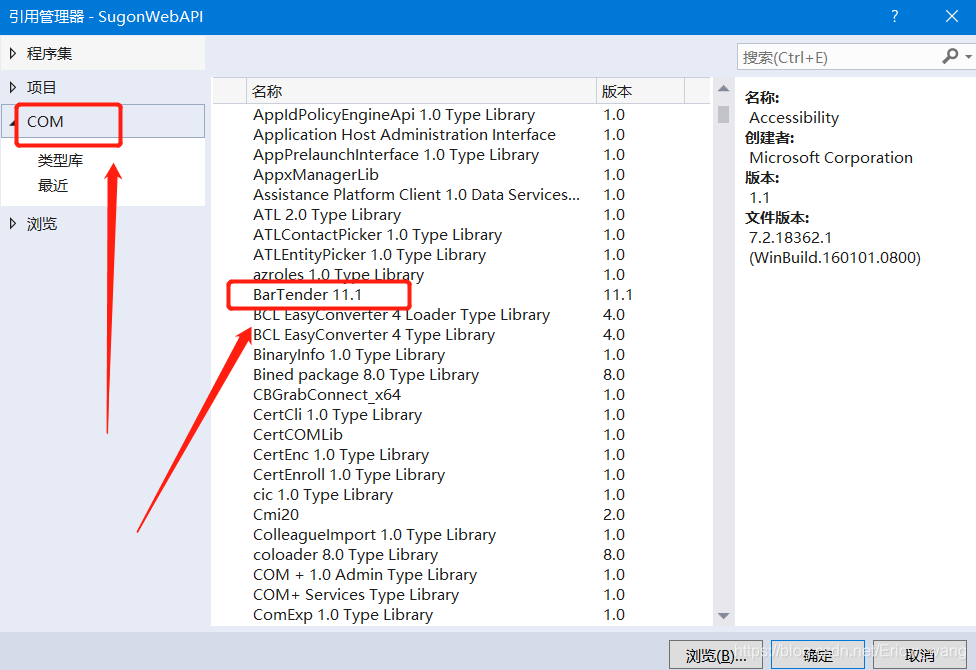
(这个需要安装Bartender软件,自动寻找)
// Declare a BarTender application variable
BarTender.Application btApp;
BarTender.Format bFormat;
//Label路径位置
string strPath = @"";
// Create a new instance of BarTender
btApp = new BarTender.Application();
//打开label
bFormat = btApp.Formats.Open(strPath,false, “”);
//传入打印机名称
bFormat.Printer = “ZDesigner ZT410-300dpi ZPL”;
// 将对应变量赋值
bFormat.SetNamedSubStringValue(“ProductName”, “66666666666999”);
//打印张数
bFormat.IdenticalCopiesOfLabel = 1;
bFormat.PrintOut(false, false);
bFormat.Close(BarTender.BtSaveOptions.btDoNotSaveChanges); //退出时是否保存标签
btApp.Quit(BarTender.BtSaveOptions.btDoNotSaveChanges);
####### 在执行第二种方法时遇到点问题,我的业务场景是:我需要远程去调服务器上的Bartender打印,然后报错权限,错误如下:
Retrieving the COM class factory for component with CLSID {B9425246-4131-11D2-BE48-004005A04EDF} failed due to the following error: 80070005 Access is denied. (Exception from HRESULT: 0x80070005 (E_ACCESSDENIED)).
(百度了半天,才知道好像是权限问题)
解决如下—
<参考:https://blog.youkuaiyun.com/lllljz/article/details/44917545 (小生在这里谢过这位大神)>





 扫一扫
扫一扫


 6804
6804

 被折叠的 条评论
为什么被折叠?
被折叠的 条评论
为什么被折叠?
 到【灌水乐园】发言





