



 本文详细介绍了Elasticsearch的索引操作,包括查询、创建、删除、修改等,并探讨了Elasticsearch与MySQL的区别。还讨论了Elasticsearch的性能优化策略,如硬件选择、内存设置、路由计算以及脑裂问题的解决方案。同时,提到了数据建模在Elasticsearch 7以下版本的方法和最佳实践。
elasticsearch与MySQl
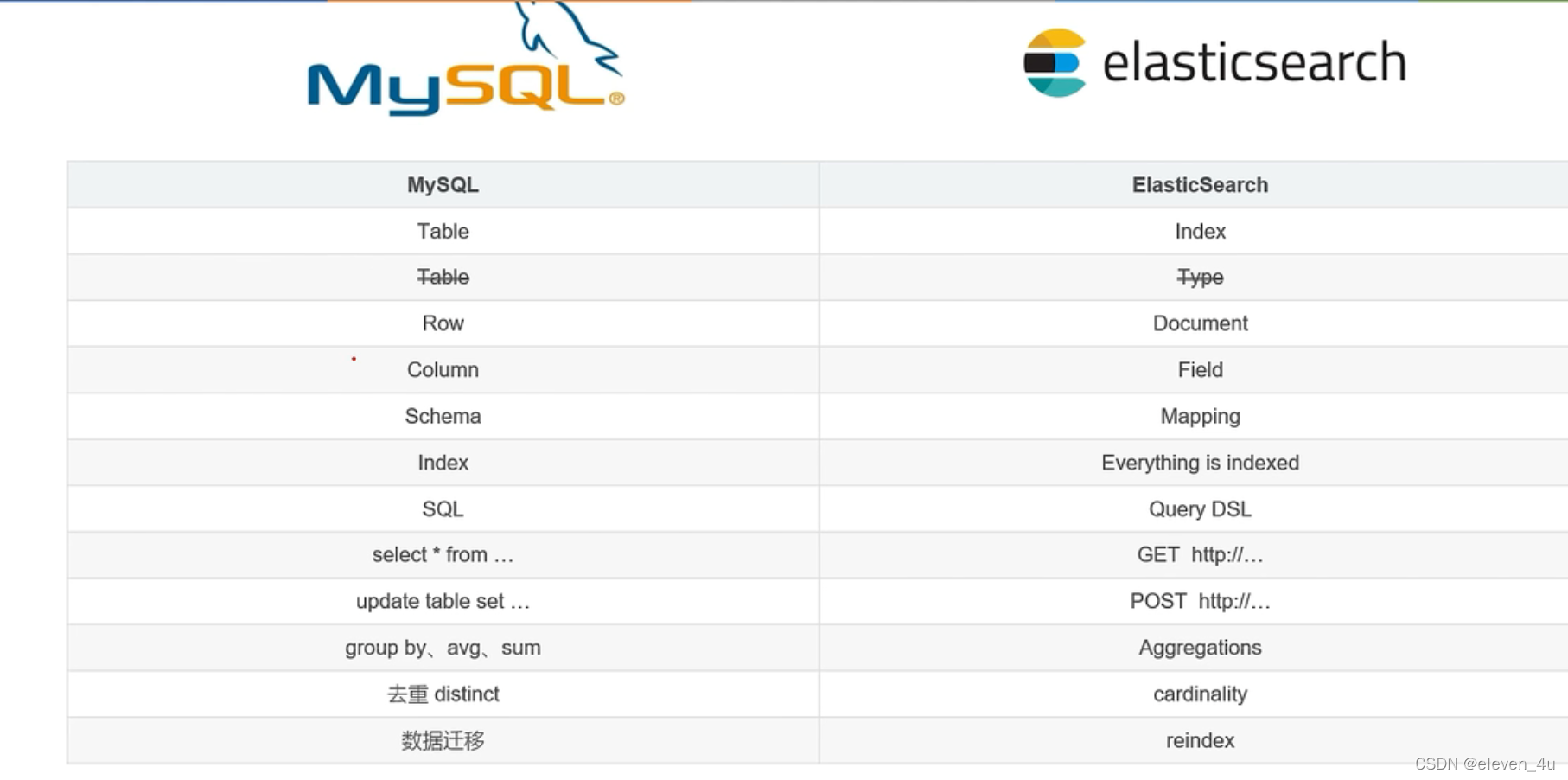
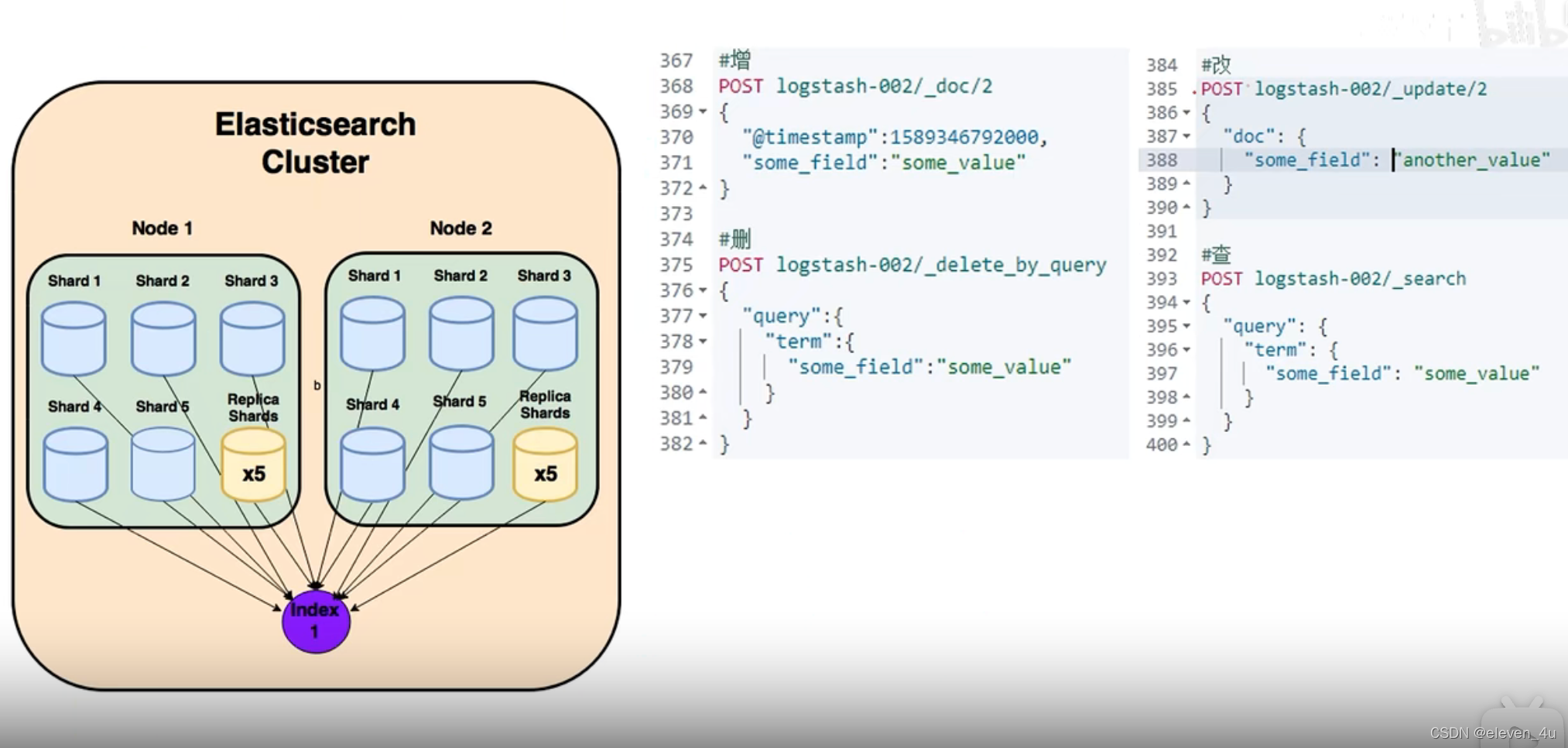
索引操作
查询索引
GET /_cat/indices?v
创建索引
PUT http://localhost:9200/shopping
添加数据
POST /shopping/_doc/1002
{
    "title": "小米手机",
    "category": "小米",
    "images": "http://www.gulixueyuan.com/xm.jpg",
    "price": 3999.00
}
删除数据
DELETE /shopping/_doc/1002
局部修改
POST /shopping/_update/1001
{
    "doc":{
        "title":"华为手机1111"
    }
}
修改全部
PUT /shopping/_doc/1001
{
    "title": "小米手机",
    "category": "小米",
    "images": "http://www.gulixueyuan.com/xm.jpg",
    "price": 4999.00
}
查询单个
GET /shopping/_doc/1001
查询所有
GET /shopping/_search/
查询所有-全文检索
/shopping/_search
GET {
    "query": {
        "match": {
            "category": "小华"
        }
    }
}
查询所有-完全匹配&高亮
GET /shopping/_search
{
    "query": {
        "match_phrase": {
            "category": "小米"
        }
    },
    "highlight": {
        "fields": {
            "category": {}
        }
    }
}
分页查询
GET /shopping/_search
{
    "query": {
        "match_all": {}
    },
    "from": 0,
    "size": 2
}
分页查询排序
GET /shopping/_search
{
    "query": {
        "match_all": {}
    },
    "from": 0,
    "size": 2,
    "_source": "title",
    "sort": {
        "price": {
            "order": "desc"
        }
    }
}
查询多个条件must(and)
GET /shopping/_search
{
    "query": {
        "bool": {
            "must": [
                {
                    "match": {
                        "category": "小米"
                    }
                },
                {
                    "match": {
                        "price": "4999.0"
                    }
                }
            ]
        }
    }
}
查询多个条件should(or)
GET /shopping/_search
{
    "query": {
        "bool": {
            "should": [
                {
                    "match": {
                        "category": "小米"
                    }
                },
                {
                    "match": {
                        "category": "华为"
                    }
                }
            ]
        }
    }
}
查询多个条件should(or)范围
GET /shopping/_search
{
    "query": {
        "bool": {
            "should": [
                {
                    "match": {
                        "category": "小米"
                    }
                },
                {
                    "match": {
                        "category": "华为"
                    }
                }
            ],
            "filter": {
                "range": {
                    "price": {
                        "gt": 4000
                    }
                }
            }
        }
    }
}
创建mapping
POST /user/_mapping
{
    "properties": {
        "name": {
            "type": "text",
            "index": true
        },
        "sex": {
            "type": "keyword",
            "index": true
        },
        "tel": {
            "type": "keyword",
            "index": false
        }
    }
}
查询单个-mapping
GET /user/_search
{
    "query": {
        "match": {
            "sex": "男的"
        }
    }
}
创建mapping-添加数据
PUT /user/_create/10001
{
    "name": "小米",
    "sex": "男的",
    "tel": "12345"
}
-
matchQuery:会将搜索词分词,再与目标查询字段进行匹配,若分词中的任意一个词与目标字段匹配上,则可查询到。
-
termQuery:不会对搜索词进行分词处理,而是作为一个整体与目标字段进行匹配,若完全匹配,则可查询到。
路由计算
- 路由规则:hash(id)% 主分片数量
- 分片控制:轮询
优化
- 硬件选择
- 使用 SSD
#
# Path to directory where to store the data (separate multiple locations by comma):
#
#path.data: /path/to/data
#
# Path to log files:
#
#path.logs: /path/to/logs
- 分片策略
控制每个分片占用的硬盘容量不超过 ES 的最大 JVM 的堆空间设置(一般设置不超过 32G,参考下文
的 JVM 设置原则),因此,如果索引的总容量在 500G 左右,那分片大小在 16 个左右即可;当然,
最好同时考虑原则 2。
考虑一下 node 数量,一般一个节点有时候就是一台物理机,如果分片数过多,大大超过了节点数,
很可能会导致一个节点上存在多个分片,一旦该节点故障,即使保持了 1 个以上的副本,同样有可能
会导致数据丢失,集群无法恢复。所以, 一般都设置分片数不超过节点数的 3 倍。
主分片,副本和节点最大数之间数量,我们分配的时候可以参考以下关系:
节点数<=主分片数*(副本数+1)
- 推迟分片分配
PUT /_all/_settings
{
"settings": {
"index.unassigned.node_left.delayed_timeout": "5m"
} }
- 路由选择
shard = hash(routing) % number_of_primary_shards
routing 默认值是文档的 id,也可以采用自定义值,比如用户 id。
- 写入速度优化
加大 Translog Flush ,目的是降低 Iops、Writeblock。 增加 Index Refresh 间隔,目的是减少 Segment Merge 的次数。
调整 Bulk 线程池和队列。
优化节点间的任务分布。
优化 Lucene 层的索引建立,目的是降低 CPU 及 IO。
- 批量数据提交
ES 提供了 Bulk API 支持批量操作,当我们有大量的写任务时,可以使用 Bulk 来进
行批量写入。
通用的策略如下:Bulk 默认设置批量提交的数据量不能超过 100M。数据条数一般是
根据文档的大小和服务器性能而定的,但是单次批处理的数据大小应从 5MB~15MB 逐渐
增加,当性能没有提升时,把这个数据量作为最大值
- 优化存储设备
- ES 是一种密集使用磁盘的应用,在段合并的时候会频繁操作磁盘,所以对磁盘要求较
高,当磁盘速度提升之后,集群的整体性能会大幅度提高。
- ES 是一种密集使用磁盘的应用,在段合并的时候会频繁操作磁盘,所以对磁盘要求较
- 减少 Refresh 的次数
- Lucene 在新增数据时,采用了延迟写入的策略,默认情况下索引的 refresh_interval 为
1 秒。 Lucene 将待写入的数据先写到内存中,超过 1 秒(默认)时就会触发一次 Refresh,
然后 Refresh 会把内存中的的数据刷新到操作系统的文件缓存系统中。
如果我们对搜索的实效性要求不高,可以将 Refresh 周期延长,例如 30 秒。
这样还可以有效地减少段刷新次数,但这同时意味着需要消耗更多的 Heap 内存。
- Lucene 在新增数据时,采用了延迟写入的策略,默认情况下索引的 refresh_interval 为
- 加大 Flush 设置
- Flush 的主要目的是把文件缓存系统中的段持久化到硬盘,当 Translog 的数据量达到
512MB 或者 30 分钟时,会触发一次 Flush。
index.translog.flush_threshold_size 参数的默认值是 512MB,我们进行修改。
增加参数值意味着文件缓存系统中可能需要存储更多的数据,所以我们需要为操作系统
的文件缓存系统留下足够的空间。
- Flush 的主要目的是把文件缓存系统中的段持久化到硬盘,当 Translog 的数据量达到
- 内存设置
- ES 默认安装后设置的内存是 1GB,
- 确保 Xmx 和 Xms 的大小是相同的,
- 不要超过物理内存的 50%:Lucene 的设计目的是把底层 OS 里的数据缓存到内存中。
- 堆内存的大小最好不要超过 32GB:
- 重要配置

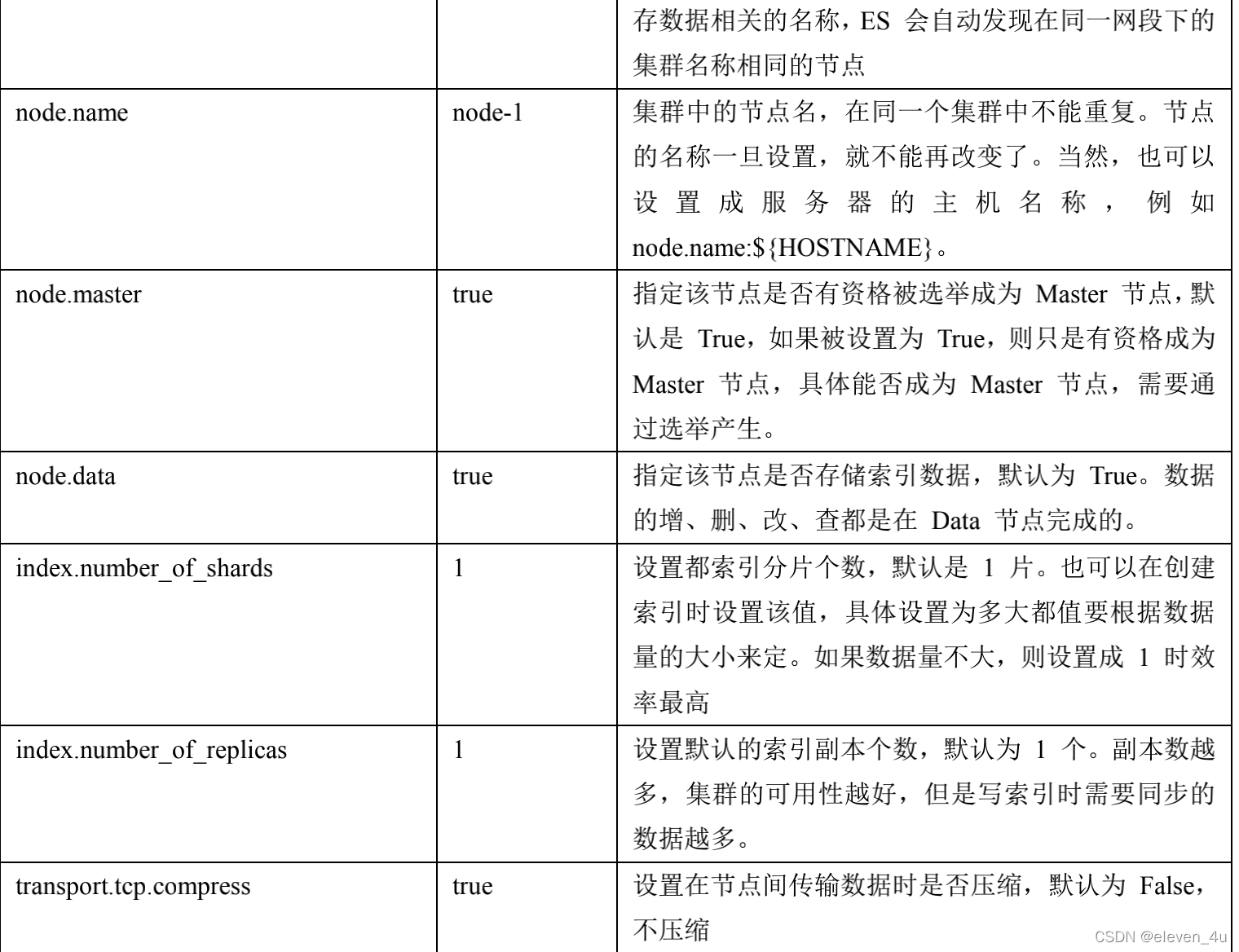
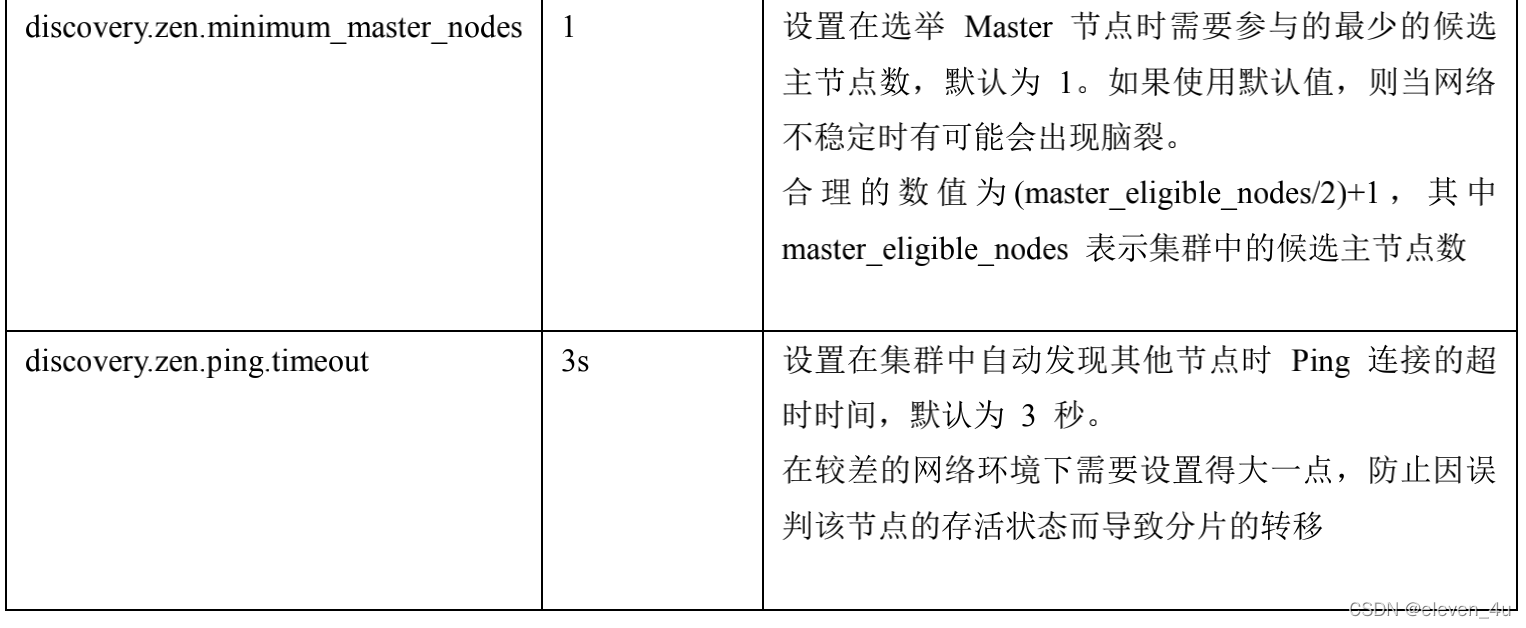
脑裂问题
- 原因
- 网络问题
- 节点负载:主节点的角色既为 master 又为 data,
- 内存回收:data 节点上的 ES 进程占用的内存较大,引发 JVM 的大规模内存回收,造成 ES 进程失去
响应。
- 减少误判:discovery.zen.ping_timeout 节点状态的响应时间,默认为 3s,可以适当调大,如果 master在该响应时间的范围内没有做出响应应答,判断该节点已经挂掉了。调大参数(如 6s,
discovery.zen.ping_timeout:6),可适当减少误判。 - 选举触发: discovery.zen.minimum_master_nodes:1
- 该参数是用于控制选举行为发生的最小集群主节点数量。当备选主节点的个数大于等于该参数的值,
且备选主节点中有该参数个节点认为主节点挂了,进行选举。官方建议为(n/2)+1,n 为主节点个数
(即有资格成为主节点的节点个数)
- 该参数是用于控制选举行为发生的最小集群主节点数量。当备选主节点的个数大于等于该参数的值,
- 角色分离:即 master 节点与 data 节点分离,限制角色
主节点配置为:node.master: true node.data: false
从节点配置为:node.master: false node.data: true
索引文档
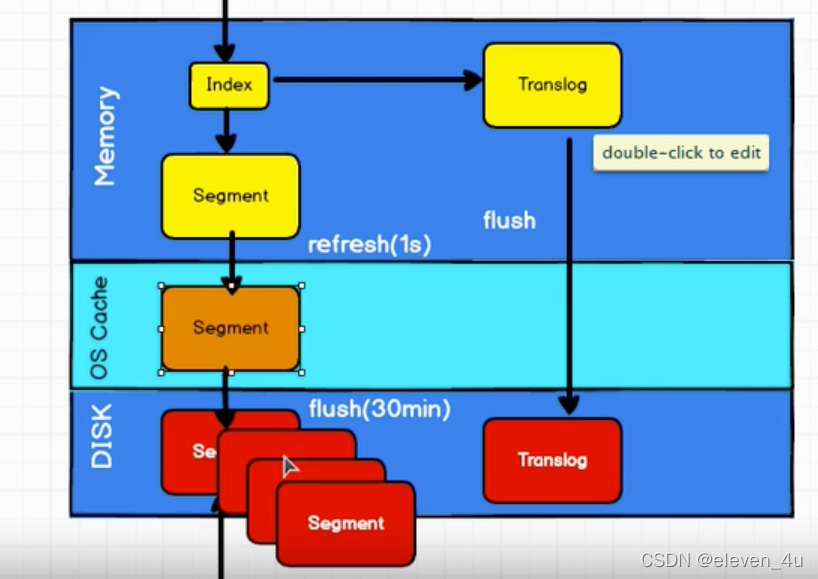
索引阶段性能提升方法
补充:索引阶段性能提升方法
使用批量请求并调整其大小:每次批量数据 5–15 MB 大是个不错的起始点。
存储:使用 SSD
段和合并:Elasticsearch 默认值是 20 MB/s,对机械磁盘应该是个不错的设置。如果你用的是 SSD,
可以考虑提高到 100–200 MB/s。如果你在做批量导入,完全不在意搜索,你可以彻底关掉合并限流。
另外还可以增加 index.translog.flush_threshold_size 设置,从默认的 512 MB 到更大一些的值,比如 1
GB,这可以在一次清空触发的时候在事务日志里积累出更大的段。
如果你的搜索结果不需要近实时的准确度,考虑把每个索引的 index.refresh_interval 改到 30s。 如果你在做大批量导入,考虑通过设置 index.number_of_replicas: 0 关闭副本。
Q
- Elasticsearch 对于大数据量(上亿量级)的聚合如何实现?
- Elasticsearch 提供的首个近似聚合是 cardinality 度量。它提供一个字段的基数,即该字段的 distinct
或者 unique 值的数目。它是基于 HLL 算法的。HLL 会先对我们的输入作哈希运算,然后根据哈希运算的
结果中的 bits 做概率估算从而得到基数。其特点是:可配置的精度,用来控制内存的使用(更精确 = 更
多内存);小的数据集精度是非常高的;我们可以通过配置参数,来设置去重需要的固定内存使用量。无
论数千还是数十亿的唯一值,内存使用量只与你配置的精确度相关
- Elasticsearch 提供的首个近似聚合是 cardinality 度量。它提供一个字段的基数,即该字段的 distinct
- 在并发情况下,Elasticsearch 如果保证读写一致?
- 可以通过版本号使用乐观并发控制,以确保新版本不会被旧版本覆盖,由应用层来处理具体的冲突;
另外对于写操作,一致性级别支持 quorum/one/all,默认为 quorum,即只有当大多数分片可用时才允
许写操作。但即使大多数可用,也可能存在因为网络等原因导致写入副本失败,这样该副本被认为故
障,分片将会在一个不同的节点上重建。
对于读操作,可以设置 replication 为 sync(默认),这使得操作在主分片和副本分片都完成后才会返回;
如果设置 replication 为 async 时,也可以通过设置搜索请求参数_preference 为 primary 来查询主分片,
确保文档是最新版本。
- 可以通过版本号使用乐观并发控制,以确保新版本不会被旧版本覆盖,由应用层来处理具体的冲突;
- 如何监控 Elasticsearch 集群状态
- elasticsearch-head 插件
通过 Kibana 监控 Elasticsearch。你可以实时查看你的集群健康状态和性能,也可以分析过去的集群、
索引和节点指标
- elasticsearch-head 插件
ES数据建模 es7以下
一对一
PUT person_index
{
  "mappings": {
    "persons" : {
      "properties": {
        "last_name" : {
          "type": "keyword"
        },
        "first_name" : {
          "type" : "keyword"
        },
        "age" : {
          "type" : "byte"
        },
        "identification_id" : {
          "properties": {
            "id_no" : {
              "type" : "keyword"
            },
            "address" : {
              "type" : "text",
              "analyzer" : "ik_max_word",
              "fields" : {
                "keyword" : {
                  "type" : "keyword"
                }
              }
            }
          }
        }
      }
    }
  }
}
一对多
PUT /user_index
{
  "mappings": {
    "users" : {
      "properties": {
        "login_name" : {
          "type" : "keyword"
        },
        "age " : {
          "type" : "short"
        },
        "address" : {
          "type": "nested", // nested
          "properties": {
            "province" : {
              "type" : "keyword"
            },
            "city" : {
              "type" : "keyword"
            },
            "street" : {
              "type" : "keyword"
            }
          }
        }
      }
    }
  }
}

// 查询
GET /user_index/_search
{
  "query": {
    "bool": {
      "must": [
        {
          "nested": {
            "path": "address",
            "query": {
              "bool": {
                "must": [
                  {
                    "match": {
                      "address.province": "北京"
                    }
                  },
                  {
                    "match": {
                      "address.city": "天津"
                    }
                  }
                ]
              }
            }
          }
        }
      ]
    }
  }
}
// 聚合
GET /user_index/_search
{
  "aggs": {
    "group_by_address": {
      "nested": {
        "path": "address"
      },
      "aggs": {
        "group_by_province": {
          "terms": {
            "field": "address.province"
          },
          "aggs": {
            "group_by_city": {
              "terms": {
                "field": "address.city"
              }
            }
          }
        }
      }
    }
  }
}
多对多
设计方案和一对多类似,相当于两个一对多
父子关系数据建模
PUT ecommerce_products_index
{
  "mappings": {
    "ecommerce" : {
      "properties": {
        "category_name" : {
          "type" : "text" ,
          "analyzer": "ik_max_word",
          "fields": {
            "keyword" : {
              "type" : "keyword"
            }
          }
        },
        "product_name" : {
          "type" : "text",
          "analyzer": "ik_max_word",
          "fields": {
            "keyword" : {
              "type" : "keyword"
            }
          }
        },
        "remark" : {
          "type" : "text",
          "analyzer": "ik_max_word"
        },
        "price" : {
          "type" : "long"
        },
        "sellpoint" : {
          "type" : "text",
          "analyzer": "ik_max_word",
          "fields": {
            "keyword" : {
              "type" : "keyword"
            }
          }
        },
        "ecommerce_join_field" : {
          "type" : "join",
          "relations" : {
            "category" : "product"
          }
        }
      }
    }
  }
}
// 查询
GET ecommerce_products_index/_search
{
  "query": {
    "parent_id" : {
      "type" : "product",
      "id" : 1
    }
  }
}

GET ecommerce_products_index/_search
{
  "query": {
    "has_child": {
      "type": "product",
      "query": {
        "range": {
          "price": {
            "gte": 500000,
            "lte": 1000000
          }
        }
      }
    }
  }
}


GET ecommerce_products_index/_search
{
  "query": {
    "has_parent": {
      "parent_type": "category",
      "query": {
        "match": {
          "category_name": "电脑"
        }
      }
    }
  }
}


注意,在父子关系数据模
型中,要求有关系的父子数据必须在同一个shard中保存,否则ES无法实现数据的关联管理,所以在保存子数据的时候,必须使用其对应的父数据在存储时使用的routing。
默认情况下,ES使用document的id作为routing值,所以子数据在保存的时候,必须使用父数据的id作为routing才可,否则无法建立父子关系。
祖孙三代关系数据模型
PUT company_index
{
  "mappings": {
    "structure" : {
      "properties": {
        "country_name" : {
          "type" : "keyword"
        },
        "department_name" : {
          "type" : "keyword"
        },
        "employee_name" : {
          "type" : "keyword"
        },
        "employee_age" : {
          "type" : "short"
        },
        "employee_join_date" : {
          "type" : "date",
          "format": "yyyy-MM-dd HH:mm:ss||yyyy-MM-dd||epoch_millis"
        },
        "company_join_field" : {
          "type" : "join",
          "relations" : {
            "country" : "department",
            "department" : "employee"
          }
        }
      }
    }
  }
}
**注意,要实现祖孙三代数据关系,必须保证祖孙数据都保存在同一个shard中,也就是三代数据都必须使用同一个routing值,如果是默认情况,则使用祖先数据的id作为子孙数据的routing值。**
建模规约
- https://www.bilibili.com/video/BV174411e74r?spm_id_from=333.880.my_history.page.click
- https://blog.51cto.com/u_12796481/2791087#41–%E5%A6%82%E4%BD%95%E5%A4%84%E7%90%86%E5%85%B3%E8%81%94%E5%85%B3%E7%B3%BB?tt_from=weixin&utm_source=weixin&utm_medium=toutiao_ios&utm_campaign=client_share&wxshare_count=1
- https://kaiwu.lagou.com/course/courseInfo.htm?courseId=1174#/detail/pc?id=8557





 扫一扫
扫一扫


 2440
2440

 被折叠的 条评论
为什么被折叠?
被折叠的 条评论
为什么被折叠?
 到【灌水乐园】发言





