



 本文介绍了一个基于EasyUI的智能销售系统菜单设计与实现,包括菜单布局、动态加载菜单项、选项卡管理以及使用Spring框架解决懒加载引发的no-session和no-serializer异常。同时,探讨了Shiro权限框架的集成与应用,实现用户认证、授权、会话管理和权限控制。
菜单页
- 将单个的页面集成到菜单页面上,方便用户查看并管理
- 使用layout布局 main.jsp
<body class="easyui-layout">
    <%--顶部标题--%>
    <div data-options="region:'north'" style="height:80px;color:deepskyblue;background-color: pink">
        <div align="center"><h1>AiSell智能销售系统</h1></div>
    </div>
    <%--左侧菜单栏--%>
    <div data-options="region:'west',title:'菜单栏',split:true" style="width:180px;background:bisque;">
        <ul id="menuId"></ul>
    </div>
    <%--选项卡--%>
    <div id="tabsId" class="easyui-tabs" data-options="region:'center'" style="background:#eee;">
        <div title="首页" style="padding:20px;display:none;">
            <img src="/images/head/3.jpg" alt="加载失败...." style="width: 100%;height: 100%">
        </div>
    </div>
</body>
- 菜单栏数据.json文件(以后从数据库读取数据)
[{
  "id": 1,
  "text": "系统管理",
  "state": "open",
  "children": [{
    "id": 12,
    "text": "部门管理",
    "iconCls":"icon-lock",
    "url":"/department/index"
  },{
    "id": 11,
    "text": "员工管理",
    "iconCls":"icon-man",
    "url":"/employee/index"
  }]
},{
  "id": 1,
  "text": "基本信息",
  "state": "open",
  "children": [{
    "id": 11,
    "text": "菜单管理",
    "iconCls":"icon-man",
    "url":"/user.action"
  },{
    "id": 12,
    "text": "角色管理",
    "iconCls":"icon-man",
    "url":"/customer/index"
  },{
    "id": 12,
    "text": "资源管理",
    "iconCls":"icon-man",
    "url":"/06_panel.jsp"
  }
  ]
}]
- main.js加载读取菜单页及显示数据
$(function () {
    $('#menuId').tree({
        url:'/json/menuTree.json',
        onClick: function(node){//点击菜单获取节点信息
            var url = node.url;//拿到地址
            var textName = node.text;//拿到点击选项的名字
            //如果有地址就是需要弹出的选项卡
            if(url){
                //如果出现已经存在的选项卡,选中它
                var tab = $('#tabsId').tabs("getTab",textName);
                if(tab){
                    //如果有已经存在的选项卡选中
                    $('#tabsId').tabs("select",textName);
                    return;
                }
                //有路径才打开新的选项卡
                $('#tabsId').tabs('add',{
                    title:textName, //名称
                    content:'<iframe frameborder="0" scrolling="auto" ' +
                    'src="'+url+'" style="height: 100%;width: 100%"></iframe>',//显示对应的模块
                    closable:true,//是否可以关闭
                });
            }
        }
    });
});
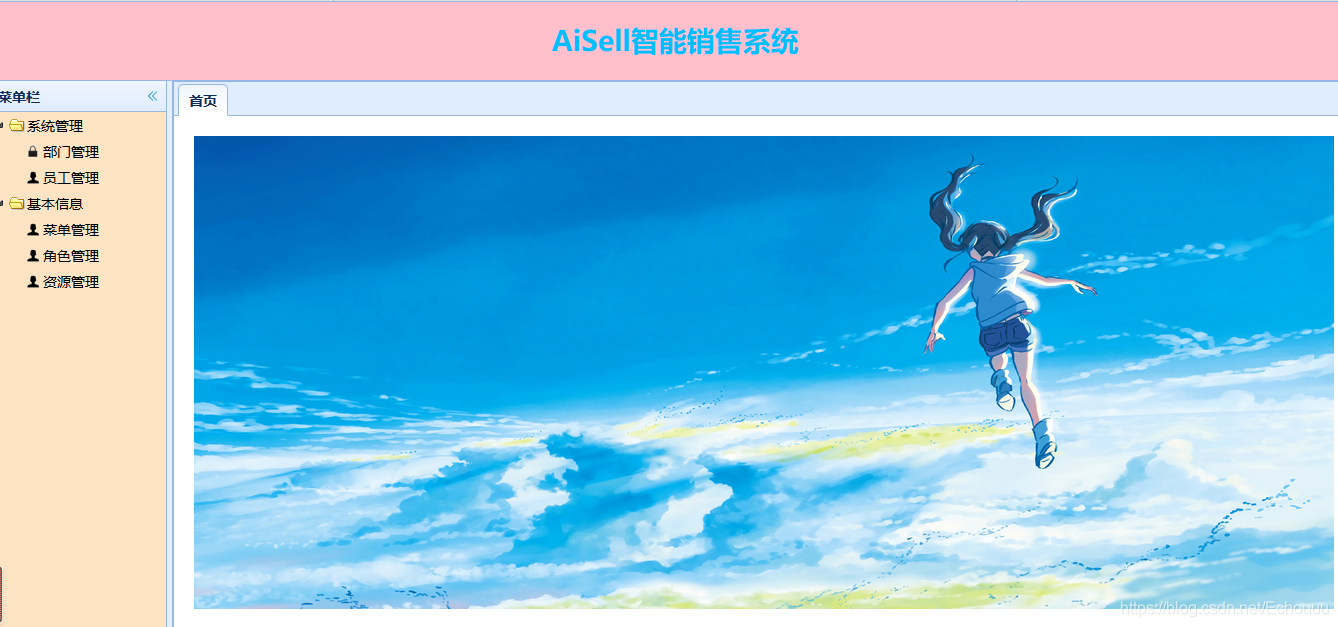
- 前台展示页面
异常处理
- 懒加载
- 产生原因
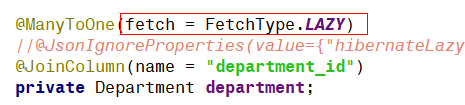
在有些时候我们不需要一次性把数据读取完毕,就会配置懒加载,配置了懒加载之后会出现no-session异常
no-session
在Employee中配置部门的懒加载之后前台展示页面读取不到数据
原因:
加了懒加载之后,EntityManager在展示数据之前关闭了,这时刷新页面就会报no-session
解决
在web.xml中配置Spring中已经有的过滤器,让Spring在请求时才创建EntityManager,响应完成之后才关闭;
配置web.xml
 <!--解决no-session问题 配置Spring准备好的过滤器-->
  <filter>
    <filter-name>openEntityManagerInViewFilter</filter-name>
    <filter-class>org.springframework.orm.jpa.support.OpenEntityManagerInViewFilter</filter-class>
  </filter>
  <filter-mapping>
    <filter-name>openEntityManagerInViewFilter</filter-name>
    <url-pattern>/*</url-pattern>
  </filter-mapping>
no-serializer
在解决了懒加载的no-session问题之后,又会产生一个新的问题no-serializer
原因:
配置了懒加载之后把部门交给jpa代理,jpa会增加一些没有序列化的属性,向前台返回json数据时Spring-mvc需要序列化的数据,而jpa增加的属性不是序列化的,所以报出异常no-serializer;
解决方式一
在部门字段上加注解 @JsonIgnoreProperties(value={“hibernateLazyInitializer”,“handler”,“fieldHandler”}),让Spring-mvc忽略jpa代理产生的没有序列化的字段
方式二
自定义一个类,继承ObjectMapper 配置applicationContext-mvc.xml
/*
 * 自定义映射,解决no-Serializa的问题
 */
public class CustomMapper extends ObjectMapper {
    public CustomMapper() {
        this.setSerializationInclusion(JsonInclude.Include.NON_NULL);
        // 设置 SerializationFeature.FAIL_ON_EMPTY_BEANS 为 false
        this.configure(SerializationFeature.FAIL_ON_EMPTY_BEANS, false);
    }
}
配置applicationContext-mvc.xml
 <mvc:annotation-driven>
        <mvc:message-converters>
            <bean class="org.springframework.http.converter.json.MappingJackson2HttpMessageConverter">
                <property name="supportedMediaTypes">
                    <list>
                        <value>application/json; charset=UTF-8</value>
                        <value>application/x-www-form-urlencoded; charset=UTF-8</value>
                    </list>
                </property>
                <!-- No serializer:配置 objectMapper 为我们自定义扩展后的 CustomMapper,解决了返回对象有关系对象的报错问题 -->
                <property name="objectMapper">
                    <bean class="cn.itsource.aisell.common.CustomMapper"></bean>
                </property>
            </bean>
        </mvc:message-converters>
    </mvc:annotation-driven>
n-to-n
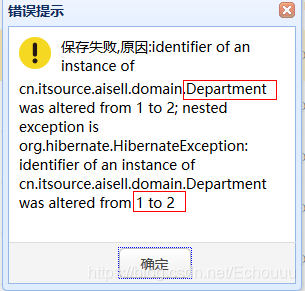
- 在前台进行部门修改操作时会报n-to-n错误
原因
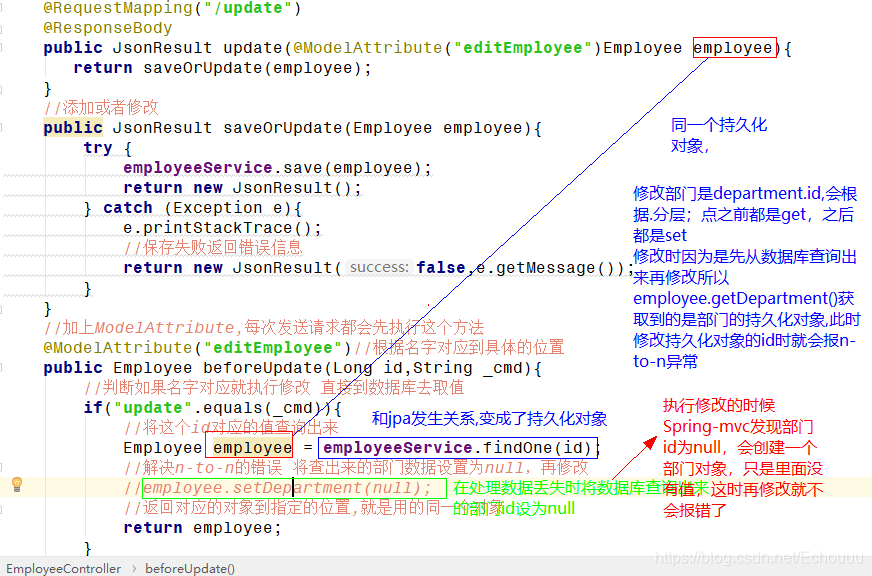
在处理数据丢失问题的异常时,让两个employee对象都变成了两个相同的持久化对象,在操作部门修改id时,改变了持久化对象的id,就会报n-to-n异常
在处理数据丢失的问题时,将和employee关联的持久化对象设置为null;
Spring-mvc发现部门id为null时,会创建一个部门对象,只是里面没有值,这时再修改部门就不会报错了;
shiro权限框架
shiro
shiro是轻量级的权限框架
shiro(轻量级,粗粒度) , Spring security(细粒度)
RBAC(Role-BasedAccess Control):权限(登录,授权) 用户(n)-角色(n)-权限(n)(资源);基于角色的访问控制,就是用户通过角色与权限进行关联;
shiro的四大基石
- 身份认证(登录) Authentication
- 授权(权限) Authorization
- 密码学 Cryptography
- 会话管理 Session Management
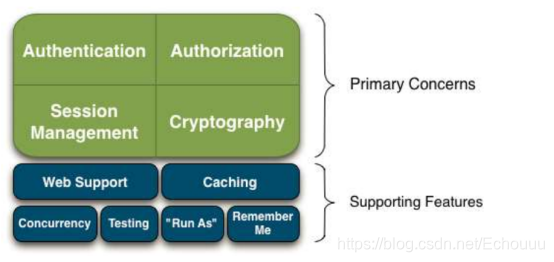 Web Support:
Shiro 的 web 支持的 API 能够轻松地帮助保护 Web 应用程序。
Caching:缓存是 Apache Shiro 中的第一层公民,来确保安全操作快速而又高效。
Concurrency:
Apache Shiro 利用它的并发特性来支持多线程应用程序。
Testing:
测试支持的存在来帮助你编写单元测试和集成测试,并确保你的能够如预期的一样安全。
“Run As”:
一个允许用户假设为另一个用户身份(如果允许)的功能,有时候在管理脚本很有用。
“Remember Me”:
在会话中记住用户的身份,所以他们只需要在强制时候登录。
shiro中重要的对象
-
宏观角度
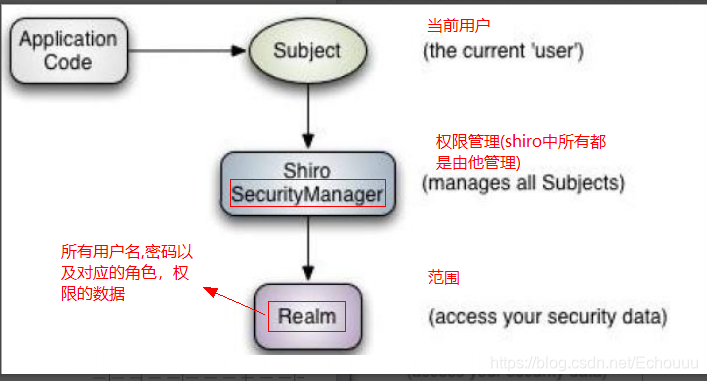
-
微观角度
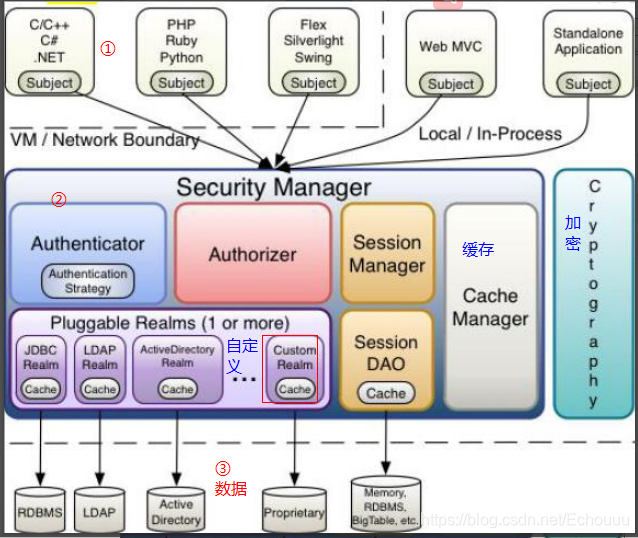
shiro初体验
在官方文档中查看权限写法
- 导包
<dependencies>
    <!--shiro的核心包-->
    <dependency>
        <groupId>org.apache.shiro</groupId>
        <artifactId>shiro-core</artifactId>
        <version>1.4.0</version>
    </dependency>
    <!--日志包-->
    <dependency>
        <groupId>commons-logging</groupId>
        <artifactId>commons-logging</artifactId>
        <version>1.2</version>
    </dependency>
    <!--测试包-->
    <dependency>
        <groupId>junit</groupId>
        <artifactId>junit</artifactId>
        <version>4.9</version>
    </dependency>
</dependencies>
- shiro.ini文件
里面存放用户角色密码等数据
# -----------------------------------------------------------------------------
# root(用户名) = 123456(密码), admin(角色),it(角色),...
# -----------------------------------------------------------------------------
[users]
root = 123456, admin
guest = guest, it
# -----------------------------------------------------------------------------
# admin的权限是*,所以它有所有功能
# it的权限是员工的所有操作
# ren的权限就是员工的添加
# -----------------------------------------------------------------------------
[roles]
admin = *
it = employee:*
ren = employee:delete
测试
- 验证登录功能
1.先获取工厂权限对象
2.获取权限管理器securityManager核心对象
3.将securityManager核心对象交给工具,以后我们使用工具
4.判断用户(可能是游客)是否登录,没有登录就让跳转登录
public class ShiroTest {

    @Test
    public void test(){
        //获取工厂权限对象
        Factory<SecurityManager> factory = new IniSecurityManagerFactory("classpath:shiro.ini");
        //获取权限管理器对象
        SecurityManager securityManager = factory.getInstance();
        //将securityManager放在工具里面,以后直接使用工具
        SecurityUtils.setSecurityManager(securityManager);
        //获取用户 也可能是游客
        Subject subject = SecurityUtils.getSubject();
        //判断是否登录
        System.out.println(subject.isAuthenticated());
        //没有登录就让他去登录
        if (!subject.isAuthenticated()){
            //准备令牌
            UsernamePasswordToken token = new UsernamePasswordToken("root","123456");
            //登录
            subject.login(token);
        }
        //检测是否登录
        System.out.println(subject.isAuthenticated());
    }
}





 扫一扫
扫一扫


 1万+
1万+

 被折叠的 条评论
为什么被折叠?
被折叠的 条评论
为什么被折叠?
 到【灌水乐园】发言





