



 Ansible是一款无代理的开源自动化工具,用于软件部署、配置管理和任务执行。它基于SSH协议,采用YAML和Jinja2模板进行配置。文章详细介绍了Ansible的概念、特点、系统架构,以及如何在Linux(如CentOS)环境中设置和部署Ansible,包括配置静态IP、主机名、时间同步,以及安装和配置Ansible的步骤。
1.什么是ansible
1.1概念
ansible是一款类unix系统中通过python所开发的自由开源的自动化管理工具,能够自动部署软件以及软件配置。是一款无代理(客户端程序)配置语法使用yaml及jinja2模板语言。
1.2特点
1、部署简单,只需在主控端部署Ansible环境,被控端无需做任何操作;
2、默认使用SSH协议对设备进行管理;
3、主从集中化管理;
4、配置简单、功能强大、扩展性强;
5、支持API及自定义模块,可通过Python轻松扩展;
6、通过Playbooks来定制强大的配置、状态管理
7、对云计算平台、大数据都有很好的支持;
8、支持非 root 用户管理操作, 支持 sudo
1.3Ansible系统架构
Ansible 是基于模块工作的, 本身没有批量部署的能力。 真正具有批量部署的是 Ansible 所运行的模块, Ansible只是提供一种框架。
Ansible 由以下各部分组成:

组成
• 核心引擎: 即 Ansible,执行工具;一次性或者临时执行的操作都是通过该命令进行。
• 剧本(playbook): 定义Ansible任务的配置文件,可以将多个任务定义在一个剧本中,Ansible自动执行,剧本执行支持多个任务,可以由控制主机运行多个任务,同时对多台远程主机进行管理。
 主机清单(host inventory): 定义Ansible管理的主机策略,默认是在Ansible的hosts配置文件中定义被管节点
• 核心模块(core modules ): 这些都是Ansible自带的模块。
• 自定义模块(custom modules): 如果核心模块不足以完成某种功能,可以添加自定义模块。
• 插件(plugins): 完成模块功能的补充,借助于插件完成记录日志,邮件等功能。
• 连接插件(connectior plugins) : Ansible 基于连接插件连接到各个主机上,负责和被管节点实现通信。
Ansible作用对象
Ansible的作用对象,不仅是Linux和非Linux操作系统的主机,同样也可以作用于各类公/私有云、商业/非商业设备的网络设施
ansible执行过程大体过程如下图,其中暖色调的代表已经模块化。
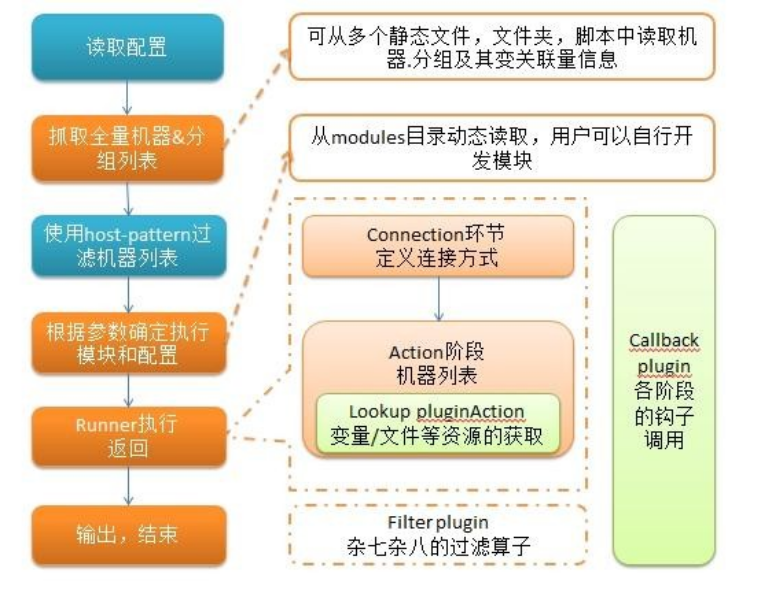
使用者使用ansible或ansible-playbook(会额外读取playbook文件)时,在服务器终端输入ansible的ad-hoc命令集或playbook后,ansible会遵循预先编排的规则将playbooks逐条拆解为play,再将play组织成ansible可识别的任务(task)。随后调用任务涉及的所有模块(module)和插件(plugin),根据inventory中定义的主机列表通过ssh将任务集以临时文件或命令的形式传输到远程客户端执行并返回执行结果,如果临时文件执行完毕则自动删除.
2.ansible环境部署
2.1Linux搭建服务器的准备工作
-
操作环境 : 创建完虚拟机,安装命令行界面的linux操作系统(centos8,rocky8,rhel8)
三台虚拟机 (RHEL8)
-
网络设置 :在NAT模式下,配置至少一个可上网的静态IP
-
写好yum源(本地源,网络源)
-
安装好相应的常用工具 :vim*,netstat==ss,bash-completion 主机重启后支持tab自动补齐
-
net-tools-
-
让你的系统时间可以自动根据时间服务器进行同步
-
做快照
| 角色 | 主机名 | ip地址 | 组名 |
|---|---|---|---|
| 控制主机 | server.example.com | 192.168.10.100 | server |
| 受控主机/被管节点 | node1.example.com | 192.168.10.111 | node1 |
| 受控主机/被管节点 | node2.example.com | 192.168.10.222 | node2 |
两台图形化主机server     node2
1.需要保准三台主机能够互相通信。设置同一种网络模式(nat)
2.配置静态ip地址
[root@localhost ~]# nmcli connection modify ens160  ipv4.addresses  192.168.10.100/24
[root@localhost ~]# nmcli connection modify ens160  ipv4.gateway 192.168.10.2 ipv4.dns 192.168.10.2 ipv4.method  manual connection.autoconnect yes
[root@localhost ~]# vim /etc/sysconfig/network-scripts/ifcfg-ens160
[root@localhost ~]# nmcli connection up ens160
server--192.168.10.100            node2---192.168.10.222
3.更改主机名
hostnamectl set-hostname server.exmaple.com
hostnamectl set-hostname node2.example.com
4.更改时间
timedatectl set-timezone Asia/Shanghai
命令行主机的配置
node1
1.需要保准三台主机能够互相通信。设置同一种网络模式(nat)
2.配置静态ip地址
[root@localhost ~]# nmcli connection modify ens160  ipv4.addresses  192.168.10.111/24
[root@localhost ~]# nmcli connection modify ens160  ipv4.gateway 192.168.10.2 ipv4.dns 192.168.10.2 ipv4.method  manual connection.autoconnect yes
[root@localhost ~]# nmcli connection up ens160
node---192.168.10.111
3.更改主机名
hostnamectl set-hostname node1.example.com
4.更改时间
timedatectl set-timezone Asia/Shanghai
5.安装常用软件工具
配置yum源安装常用软件工具
#yum install vim-enhanced  net-tools bash-completion   -y
#reboot
2.2安装ansible
#cd /etc/yum.repos.d
删除多余的(yum配置)源文件
[root@server yum.repos.d]# ll
-rw-r–r–. 1 root root 358 Dec 30 10:25 redhat.repo
2.2.1配置centos8基础源
(1)vim /etc/yum.repos.d/base.repo
[AppStream]
name=AppStream
baseurl=https://mirrors.aliyun.com/centos/8-stream/AppStream/x86_64/os/
gpgcheck=0
[BaseOS]
name=AppStream
baseurl=https://mirrors.aliyun.com/centos/8-stream/BaseOS/x86_64/os/
gpgcheck=0
2.2.2配置epel
(2)#yum install -y https://mirrors.aliyun.com/epel/epel-release-latest-8.noarch.rpm
[root@server yum.repos.d]# ll
total 28
-rw-r–r–. 1 root root 213 Dec 30 15:36 base.repo
-rw-r–r–. 1 root root 1692 Dec 30 15:32 epel-modular.repo
-rw-r–r–. 1 root root 1326 Dec 30 15:32 epel.repo
-rw-r–r–. 1 root root 1791 Dec 30 15:32 epel-testing-modular.repo
-rw-r–r–. 1 root root 1425 Dec 30 15:32 epel-testing.repo
-rw-r–r–. 1 root root 358 Dec 30 10:25 redhat.repo
(3)#sed -i ‘s|^#baseurl=https://download.example/pub|baseurl=https://mirrors.aliyun.com|’
/etc/yum.repos.d/epel*
(4)#sed -i ‘s|^metalink|#metalink|’ /etc/yum.repos.d/epel*
(5)#yum install ansible -y
(6)#ansible --version
案例一:
控制主机和受控主机通过root用户通过免密验证方式远程控住受控主机实施对应任务
(1)控住主机--server通过主机名匹配对应连接的受控主机
[root@server ~]#vim  /etc/hosts
192.168.10.111 node1 node1.exmaple.com
192.168.10.222 node2 node2.exmaple.com
(2)制作秘钥
[root@server ~]# ssh-keygen -t rsa -P '' -q -f ~/.ssh/id_rsa
(3)发送密钥
[root@server ~]# ssh-copy-id  -i node1
[root@server ~]# ssh-copy-id  -i node2
(4)验证免密
[root@server ~]# ssh node1
[root@server ~]# ssh node1 hostname
node1.example.com
[root@server ~]# ssh node2 hostname
node2.example.com
案例二:控制主机连接受控主机通过普通用户以免密验证远程控住受控主机实施特权指定操作。
(1)控住端和受控端都需要有对应的普通身份
(2)[redhat@server ~]$ ssh-keygen -t rsa -P '' -q -f ~/.ssh/id_rsa
[redhat@server ~]$ ll .ssh/
total 12
-rw-------. 1 redhat redhat 2610 Dec 30 16:57 id_rsa
-rw-r--r--. 1 redhat redhat  579 Dec 30 16:57 id_rsa.pub
-rw-r--r--. 1 redhat redhat  182 Dec 30 16:55 known_hosts
(3)[redhat@server ~]$ ssh-copy-id  -i redhat@node1
[redhat@server ~]$ ssh-copy-id  -i node2
(4)测试免密配置
[redhat@server ~]$ ssh node1 hostname
node1.example.com
(5)[redhat@server ~]$ ssh node1 sudo useradd user1    ---控制端主机sudo提权(----报错)
We trust you have received the usual lecture from the local System
Administrator. It usually boils down to these three things:

    #1) Respect the privacy of others.
    #2) Think before you type.
    #3) With great power comes great responsibility.

sudo: a terminal is required to read the password; either use the -S option to read from standard input or configure an askpass helper

所以在受控主机通过/etc/sudoers授权
第一种[root@node1 ~]# cat /etc/sudoers | grep -C 1 redhat   查看是否授权
root	ALL=(ALL) 	ALL
redhat  ALL=(ALL)      NOPASSWD: ALL

第二种[root@node2 ~]# cat  /etc/sudoers | grep wheel
## Allows people in group wheel to run all commands
%wheel	ALL=(ALL)	NOPASSWD: ALL
[root@node2 ~]# gpasswd -a redhat wheel
Adding user redhat to group wheel

[redhat@server ~]$ ssh node1 sudo useradd user1    --sudo授权成功
[redhat@server ~]$ ssh node1 id user1
uid=1001(user1) gid=1001(user1) groups=1001(user1)
3.注意
1.需要保准三台主机能够互相通信。设置同一种网络模式(nat)
2.配置静态ip地址
[root@localhost ~]# nmcli connection modify ens160  ipv4.addresses  192.168.10.100/24
[root@localhost ~]# nmcli connection modify ens160  ipv4.gateway 192.168.10.2 ipv4.dns 192.168.10.2 ipv4.method  manual connection.autoconnect yes
[root@localhost ~]# vim /etc/sysconfig/network-scripts/ifcfg-ens160
[root@localhost ~]# nmcli connection up ens160
server--192.168.10.100            node2---192.168.10.222
3.更改主机名
hostnamectl set-hostname server.exmaple.com
hostnamectl set-hostname node2.example.com
4.更改时间
timedatectl set-timezone Asia/Shanghai 命令行
node1
1.需要保准三台主机能够互相通信。设置同一种网络模式(nat)
2.配置静态ip地址
[root@localhost ~]# nmcli connection modify ens160  ipv4.addresses  192.168.10.111/24
[root@localhost ~]# nmcli connection modify ens160  ipv4.gateway 192.168.10.2 ipv4.dns 192.168.10.2 ipv4.method  manual connection.autoconnect yes
[root@localhost ~]# nmcli connection up ens160
node---192.168.10.111
3.更改主机名
hostnamectl set-hostname node1.example.com
4.更改时间
timedatectl set-timezone Asia/Shanghai
5.安装常用软件工具
配置yum源安装常用软件工具
#yum install vim-enhanced  net-tools bash-completion   -y
#reboot
配置centos基础源

wget -O /etc/yum.repos.d/CentOS-Base.repo https://mirrors.aliyun.com/repo/Centos-vault-8.5.2111.repo

或者

curl -o /etc/yum.repos.d/CentOS-Base.repo https://mirrors.aliyun.com/repo/Centos-vault-8.5.2111.repo

配置epel

yum install -y https://mirrors.aliyun.com/epel/epel-release-latest-8.noarch.rpm

sed -i 's|^#baseurl=https://download.example/pub|baseurl=https://mirrors.aliyun.com|'

/etc/yum.repos.d/epel*
sed -i 's|^metalink|#metalink|' /etc/yum.repos.d/epel*
2.2.1配置centos8基础源
vim  /etc/yum.repoes.d/base.repo
[AppStream]
name=AppStream
baseurl=https://mirrors.aliyun.com/centos/8-stream/AppStream/x86_64/os/
gpgcheck=0

[BaseOS]
name=AppStream
baseurl=https://mirrors.aliyun.com/centos/8-stream/BaseOS/x86_64/os/
gpgcheck=0

2.2.2配置epel

yum install -y https://mirrors.aliyun.com/epel/epel-release-latest-8.noarch.rpm
sed -i 's|^#baseurl=https://download.example/pub|baseurl=https://mirrors.aliyun.com|'
/etc/yum.repos.d/epel*
sed -i 's|^metalink|#metalink|' /etc/yum.repos.d/epel*





 扫一扫
扫一扫


 942
942

 被折叠的 条评论
为什么被折叠?
被折叠的 条评论
为什么被折叠?
 到【灌水乐园】发言





