



一、高性能web服务器
正常情况下的单此web服务访问流程
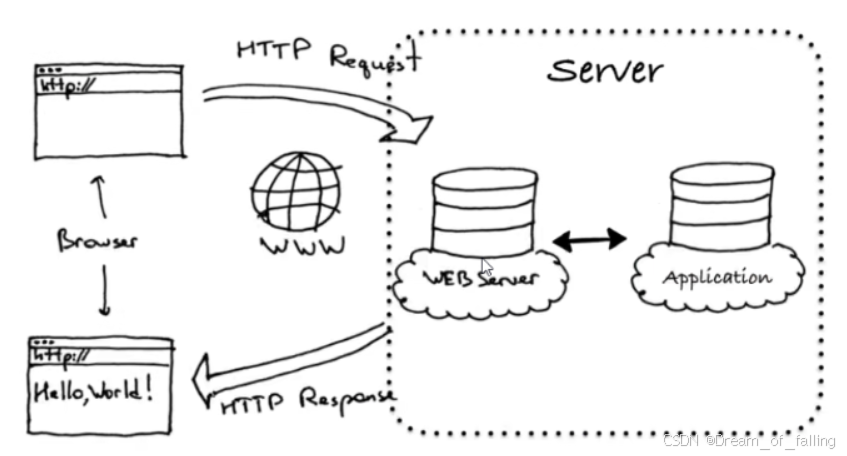
因为最大并发才1024,而企业追求的就是高并发,所以httpd被淘汰了
此处添加概念
nginx常用模块
nginx常用模块
[root@Nginx nginx-1.24.0]# ./configure  --prefix=/usr/local/nginx \
--user=nginx \                      # 指定nginx运行用户
--group=nginx \                     # 指定nginx运行组
--with-http_ssl_module \            # 支持https://
--with-http_v2_module \             # 支持http版本2
--with-http_realip_module \         # 支持ip透传
--with-http_stub_status_module \    # 支持状态页面
--with-http_gzip_static_module \    # 支持压缩
--with-pcre \                       # 支持正则
--with-stream \                     # 支持tcp反向代理
--with-stream_ssl_module \          # 支持tcp的ssl加密
--with-stream_realip_module         # 支持tcp的透传ip
1.1 web配置—nginx
环境
一台主机:linux9,nat模式,4g,处理器:2,172.25.254.100
[root@localhost ~]# vmset.sh eth0 172.25.254.100 nginx.timinglee.org
[root@nginx ~]# yum install lrzsz-0.12.20-55.el9.x86_64 -y
官方网站:nginx.org
配置
将nginx 1.24版本压缩包上传至linux中
解压:[root@nginx ~]# tar -xzf nginx-1.24.0.tar.gz
[root@nginx ~]# cd nginx-1.24.0/
先安装c语言编译环境
[root@nginx nginx-1.24.0]# dnf install gcc -y
在下载prce依赖包
[root@nginx nginx-1.24.0]# dnf install pcre-devel.x86_64 -y
再下载openssl依赖包
[root@nginx nginx-1.24.0]# dnf install openssl-devel.x86_64 -y
最后下载zlib依赖包
[root@nginx nginx-1.24.0]# dnf install zlib-devel -y
执行压缩包
[root@nginx nginx-1.24.0]# ./configure --prefix=/usr/local/nginx \
> --user=nginx \
> --group=nginx \
> --with-http_ssl_module \
> --with-http_v2_module \
> --with-http_realip_module \
> --with-http_stub_status_module \
> --with-http_gzip_static_module \
> --with-pcre \
> --with-stream \
> --with-stream_ssl_module

#以下专用来快捷复制
[root@nginx nginx-1.24.0]# ./configure --prefix=/usr/local/nginx --user=nginx --group=nginx --with-http_ssl_module --with-http_v2_module --with-http_realip_module --with-http_stub_status_module --with-http_gzip_static_module --with-pcre --with-stream --with-stream_ssl_module
表示通过
  nginx path prefix: "/usr/local/nginx"
  nginx binary file: "/usr/local/nginx/sbin/nginx"
  nginx modules path: "/usr/local/nginx/modules"
  nginx configuration prefix: "/usr/local/nginx/conf"
  nginx configuration file: "/usr/local/nginx/conf/nginx.conf"
  nginx pid file: "/usr/local/nginx/logs/nginx.pid"
  nginx error log file: "/usr/local/nginx/logs/error.log"
  nginx http access log file: "/usr/local/nginx/logs/access.log"
  nginx http client request body temporary files: "client_body_temp"
  nginx http proxy temporary files: "proxy_temp"
  nginx http fastcgi temporary files: "fastcgi_temp"
  nginx http uwsgi temporary files: "uwsgi_temp"
  nginx http scgi temporary files: "scgi_temp"
编译
[root@nginx nginx-1.24.0]# make -j2
将objs转存到/usr/local/nginx/中
[root@nginx nginx-1.24.0]# make install
[root@nginx nginx-1.24.0]# cd /usr/local/nginx/sbin/
[root@nginx sbin]# useradd -s /sbin/nologin -M nginx
查询用户nginx
[root@nginx sbin]# id nginx
uid=1001(nginx) gid=1001(nginx) groups=1001(nginx)
启动nginx
[root@nginx sbin]# ./nginx
查看进程和端口
[root@nginx sbin]# ps aux | grep nginx
root       43686  0.0  0.0   9864  2052 ?        Ss   12:41   0:00 nginx: master process ./nginx
nginx      43687  0.0  0.1  14196  5124 ?        S    12:41   0:00 nginx: worker process
root       43689  0.0  0.0 221664  2304 pts/2    S+   12:41   0:00 grep --color=auto nginx
[root@nginx sbin]# netstat -antlupe | grep nginx
tcp 0 0 0.0.0.0:80 0.0.0.0:* LISTEN 0 86481 43686/nginx: master
查看nginx内存大小
修改环境变量前:[root@nginx sbin]# du -sh nginx
修改环境变量后:[root@nginx nginx-1.24.0]# du -sh /usr/local/nginx/sbin/nginx
关闭debug功能
[root@nginx sbin]# /usr/local/nginx/sbin/nginx -s stop
开启debug功能
[root@nginx sbin]# /usr/local/nginx/sbin/nginx -s restart
删除编译的文件
[root@nginx nginx-1.24.0]# rm -fr /usr/local/nginx/
[root@nginx nginx-1.24.0]# make clean
关闭dubug,然后再编译
[root@nginx nginx-1.24.0]# vim auto/cc/gcc
# debug
#CFLAGS="$CFLAGS -g"
[root@nginx nginx-1.24.0]# ./configure --prefix=/usr/local/nginx --user=nginx --group=nginx --with-http_ssl_module --with-http_v2_module --with-http_realip_module --with-http_stub_status_module --with-http_gzip_static_module --with-pcre --with-stream --with-stream_ssl_module
[root@nginx nginx-1.24.0]# make && make install
把nginx软件的命令执行路径添加到环境路径中
[root@nginx nginx-1.24.0]# vim ~/.bash_profile
[root@nginx nginx-1.24.0]# vim ~/.bash_profile
# .bash_profile

# Get the aliases and functions
if [ -f ~/.bashrc ]; then
        . ~/.bashrc
fi

# User specific environment and startup programs
export PATH=$PATH:/usr/local/nginx/sbin
[root@nginx nginx-1.24.0]# source ~/.bash_profile
启动nginx
[root@nginx nginx-1.24.0]# nginx
查看当前nginx版本信息
[root@nginx nginx-1.26.1]# curl -I 172.25.254.100
1.2 平滑升级1.26版本和平滑回滚
再不影响业务运行的情况下,升级为新版本或添加新服务
将2个压缩包上传进去linux中

解压这两个压缩包
[root@nginx ~]# tar zxf echo-nginx-module-0.63.tar.gz
[root@nginx ~]# tar zxf nginx-1.26.1.tar.gz
[root@nginx ~]# cd nginx-1.26.1/
编译
[root@nginx nginx-1.26.1]# ./configure --prefix=/usr/local/nginx --user=nginx --group=nginx --add-module=/root/echo-nginx-module-0.63 --with-http_ssl_module --with-http_v2_module --with-http_realip_module --with-http_stub_status_module --with-http_gzip_static_module --with-pcre --with-stream --with-stream_ssl_module
[root@nginx nginx-1.26.1]# make #只要make无需要make install
查看两个版本
[root@nginx sbin]# ll objs/nginx /usr/local/nginx/sbin/nginx
rwxr-xr-x 1 root root 1239416 Jul 18 15:08 objs/nginx
-rwxr-xr-x 1 root root 5671488 Jul 18 11:41 /usr/local/nginx/sbin/nginx
把之前的旧版的nginx命令备份
[root@nginx sbin]# cd /usr/local/nginx/sbin/
[root@nginx sbin]# cp nginx nginx.bat
把新版本的nginx命令复制过去
[root@nginx sbin]# \cp -f /root/nginx-1.26.1/objs/nginx /usr/local/nginx/sbin/nginx
[root@nginx sbin]# ps aux | grep nginx
root       43592  0.0  0.0   9864  1924 ?        Ss   13:58   0:00 nginx: master process nginx
nginx      43593  0.0  0.1  14196  5380 ?        S    13:58   0:00 nginx: worker process
root       50984  0.0  0.0 221664  2304 pts/1    R+   14:07   0:00 grep --color=auto nginx
激活nginx 2.6版本
[root@ngix sbin]# kill -USR2 43592
[root@nginx sbin]# ps aux | grep nginx
root       43592  0.0  0.0   9864  2436 ?        Ss   13:58   0:00 nginx: master process nginx
nginx      43593  0.0  0.1  14196  5380 ?        S    13:58   0:00 nginx: worker process
root       50987  0.0  0.2   9764  6656 ?        S    14:08   0:00 nginx: master process nginx
nginx      50988  0.0  0.1  14228  5132 ?        S    14:08   0:00 nginx: worker process
root       50990  0.0  0.0 221796  2432 pts/1    S+   14:08   0:00 grep --color=auto nginx
回收旧版本
[root@nginx sbin]# kill -WINCH 43592
查看是否成功
[root@nginx sbin]# curl -I localhost
HTTP/1.1 200 OK
Server: nginx/1.26.1
Date: Thu, 15 Aug 2024 06:09:51 GMT
Content-Type: text/html
Content-Length: 615
Last-Modified: Thu, 15 Aug 2024 05:55:00 GMT
Connection: keep-alive
ETag: "66bd9834-267"
Accept-Ranges: bytes
隐藏自己使用的版本

版本回滚
激活旧版本
[root@nginx sbin]# kill -HUP 43592
回收新版本
[root@nginx sbin]# kill -WINCH 43592
[root@nginx sbin]# ps aux | grep nginx
[root@nginx sbin]# cp nginx nginx.new
[root@nginx sbin]# \cp -f nginx.old nginx
[root@nginx sbin]# ps aux | grep nginx
[root@nginx sbin]# kill -9 43592
二、I/O模型
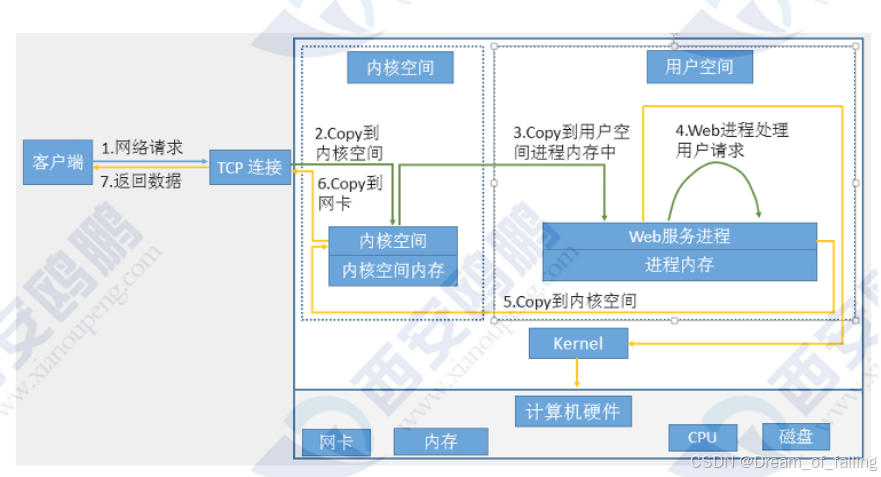
设定开机启动脚本配置
nginx若没有启动文件,编辑启动文件
[root@nginx sbin]# vim /lib/systemd/system/nginx.service
 [Unit]
 Description=The NGINX HTTP and reverse proxy server
 After=syslog.target network-online.target remote-fs.target nss-lookup.target
 Wants=network-online.target
 [Service]
 Type=forking
 PIDFile=/usr/local/nginx/logs/nginx.pid
 ExecStartPre=/usr/local/nginx/sbin/nginx -t
 ExecStart=/usr/local/nginx/sbin/nginx
 ExecReload=/usr/local/nginx/sbin/nginx -s reload
 ExecStop=/bin/kill -s QUIT $MAINPID
 PrivateTmp=true
 [Install]
 WantedBy=multi-user.target
[root@nginx sbin]# systemctl daemon-reload
[root@nginx sbin]# nginx -s stop
[root@nginx sbin]# systemctl enable --now nginx
[root@nginx sbin]# systemctl daemon-reload
[root@nginx sbin]# systemctl enable --now nginx
三、Nginx核心配置
3.1 location
作用:用于实现uri到文件系统的路径映射
前提
[root@nginx ~]# vim /usr/local/nginx/conf/nginx.conf
    #gzip  on;
    include "/usr/local/nginx/conf.d/*.conf";
[root@nginx ~]# nginx -s reload
[root@nginx ~]# mkdir -p /data/web/html
[root@nginx ~]# echo www.timinglee.org > /data/web/html/index.html
[root@nginx conf.d]# vim /etc/hosts
127.0.0.1   localhost localhost.localdomain localhost4 localhost4.localdomain4
::1         localhost localhost.localdomain localhost6 localhost6.localdomain6
172.25.254.100  nginx.timinglee.org www.timinglee.org
测试location参数配置
[root@nginx ~]# vim /usr/local/nginx/conf.d/vhost.conf
server {
        listen 80;
        server_name www.timinglee.org;
        root /data/web/html;
        index index.html;

        location = /test {
                root /data/web;
        }
}
[root@nginx ~]# nginx -s reload
[root@nginx ~]# mkdir /data/web/test -p
[root@nginx ~]# echo test page > /data/web/test/index.html
测试:
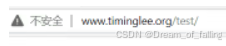
查看优先级,看哪个在生效
[root@nginx ~]# vim /usr/local/nginx/conf.d/vhost.conf
server {
        listen 80;
        server_name www.timinglee.org;
        root /data/web/html;
        index index.html;

        location /test {
                root /data/web1;
        }
        location = /test {
                root /data/web2;
        }
}
[root@nginx ~]# nginx -s reload
[root@nginx ~]# mkdir /data/web{1,2}
[root@nginx ~]# mkdir /data/web{1,2}/test
[root@nginx ~]# echo web1 test > /data/web1/test/index.html
[root@nginx ~]# echo web2 test > /data/web2/test/index.html
测试:

以t开头,才会识别该路径
[root@nginx ~]# vim /usr/local/nginx/conf.d/vhost.conf
server {
        listen 80;
        server_name www.timinglee.org;
        root /data/web/html;
        index index.html;

        location /test {
                root /data/web1;
        }

        location = /test {        #后面只能跟文件,不可以跟目录
                root /data/web2;
        }

        location ^~ /t{
                root /data/web1;
        }
}
[root@nginx ~]# nginx -s reload
[root@nginx ~]# mkdir -p /data/web1/{test1,tee}
[root@nginx ~]# echo test1 ? /data/web1/test1/index.html
test1 ? /data/web1/test1/index.html
[root@nginx ~]# echo test1 /data/web1/test1/index.html
test1 /data/web1/test1/index.html
[root@nginx ~]# echo test1 > /data/web1/test1/index.html
[root@nginx ~]# echo tee > /data/web1/tee/index.html
[root@nginx ~]# mkdir -p /data/web1/lee
[root@nginx ~]# echo lee > /data/web1/lee/index.html
[root@nginx ~]# nginx -s reload
测试”~“参数配置
[root@nginx ~]# vim /usr/local/nginx/conf.d/vhost.conf
server {
        listen 80;
        server_name www.timinglee.org;
        root /data/web/html;
        index index.html;

        location /test {
                root /data/web1;
        }

        location = /test {
                root /data/web2;
        }

        location ^~ /t{
                root /data/web1;
        }

        location ~ \.html$ {
                root /data/web1;
        }
}
[root@nginx ~]# nginx -s reload
测试

加上*号表示不区分大小写
[root@nginx ~]# vim /usr/local/nginx/conf.d/vhost.conf
server {
        listen 80;
        server_name www.timinglee.org;
        root /data/web/html;
        index index.html;

        location /test {
                root /data/web1;
        }

        location = /test {
                root /data/web2;
        }

        location ^~ /t{
                root /data/web1;
        }

        location ~*  \.HTML$ {
                root /data/web1;
        }
}
[root@nginx ~]# nginx -s reload
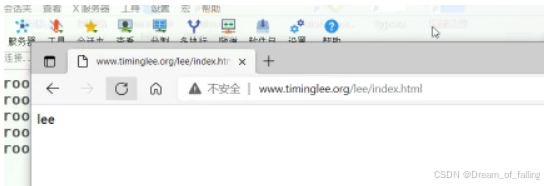
测试

[root@nginx ~]# echo index.lee > /data/web1/lee/index.lee
[root@nginx ~]# vim /usr/local/nginx/conf.d/vhost.conf
server {
        listen 80;
        server_name www.timinglee.org;
        root /data/web/html;
        index index.html;

        location /test {
                root /data/web1;
        }

        location = /test {
                root /data/web2;
        }

        location ^~ /t{
                root /data/web1;
        }

        location ~ .h.?l$ {
                root /data/web1;
        }
}
[root@nginx ~]# nginx -s reload
[root@nginx ~]# vim /usr/local/nginx/conf.d/vhost.conf
server {
        listen 80;
        server_name www.timinglee.org;
        root /data/web/html;
        index index.html;

        location /test {
                root /data/web1;
        }

        location = /test {
                root /data/web2;
        }

        location ^~ /t{
                root /data/web1;
        }

        location ~ .(html)$ {
                root /data/web1;
        }
}
[root@nginx ~]# nginx -s reload
查看哪个优先级高
[root@nginx ~]# vim /usr/local/nginx/conf.d/vhost.conf
server {
        listen 80;
        server_name www.timinglee.org;
        root /data/web/html;
        index index.html;

        location /test {
                root /data/web1;
        }

        location = /test {
                root /data/web2;
        }

        location ^~ /t{
                root /data/web3;
        }

        location ~ .html$ {
                root /data/web4;
        }

        location ~* .HTML$ {
                root /data/web5;
        }

}
[root@nginx ~]# nginx -s reload
建立实验环境
[root@nginx ~]# mkdir -p /data/web{1…5}
[root@nginx ~]# mkdir -p /data/web{1…5}/test
[root@nginx ~]# echo web1 > /data/web1/test/index.html
[root@nginx ~]# echo web2 > /data/web2/test/index.html
[root@nginx ~]# echo web3 > /data/web3/test/index.html
[root@nginx ~]# echo web4 > /data/web4/test/index.html
[root@nginx ~]# echo web5 > /data/web5/test/index.html
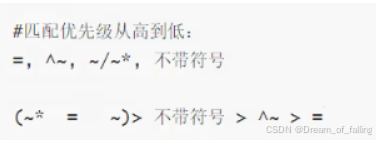
测试

然后注释掉

再次运行测试,直到测试完全部优先级

匹配优先级顺序
3.1.1 Nginx账户认证功能
还原环境
[root@nginx ~]# vim /usr/local/nginx/conf.d/vhost.conf
server {
        listen 80;
        server_name www.timinglee.org;
        root /data/web/html;
        index index.html;

}
[root@nginx ~]# nginx -s reload
创建默认认证文件,初次添加时
[root@nginx ~]# yum install httpd-tools
[root@nginx ~]# htpasswd -cm /usr/local/nginx/.htpasswd admin
New password:123456           #密文
Re-type new password:123456   #密文
Adding password for user admin
创建默认认证文件,再次添加时
[root@nginx ~]# htpasswd -m /usr/local/nginx/.htpasswd lee
New password:123456           #密文
Re-type new password:123456   #密文
Adding password for user admin
[root@nginx ~]# mkdir /data/web/lee
[root@nginx ~]# echo lee > /data/web/lee/index.html
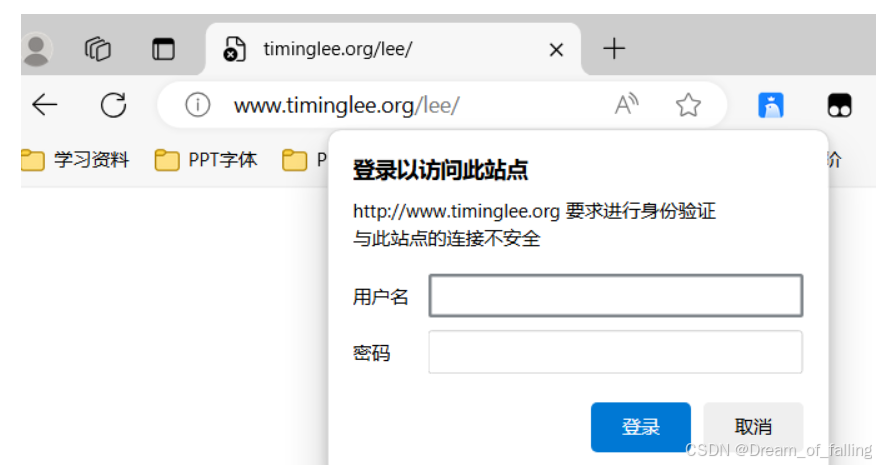
不想让所有人都访问该网页
[root@nginx ~]# vim /usr/local/nginx/conf.d/vhost.conf
server {
        listen 80;
        server_name www.timinglee.org;
        root /data/web/html;
        index index.html;

        location /lee {
                root /data/web;
                auth_basic "login password !!";
                auth_basic_user_file "/usr/local/nginx/.htpasswd";
        }

}
[root@nginx ~]# nginx -s reload
测试
3.1.2 自定义错误页面
[root@nginx ~]# mkdir -p /data/web/errorpage
[root@nginx ~]# echo error page > /data/web/errorpage/40x.html
[root@nginx ~]# vim /usr/local/nginx/conf.d/vhost.conf
server {
        listen 80;
        server_name www.timinglee.org;
        root /data/web/html;
        index index.html;
        error_page 404 /40x.html;

        location /lee {
                root /data/web;
                auth_basic "login password !!";
                auth_basic_user_file "/usr/local/nginx/.htpasswd";
        }

        location = /40x.html {
                root /data/web/errorpage;
        }

}
[root@nginx ~]# nginx -s reload
测试

3.1.3 自定义错误日志
[root@nginx ~]# mkdir /var/log/timinglee.org
[root@nginx ~]# vim /usr/local/nginx/conf.d/vhost.conf
server {
        listen 80;
        server_name www.timinglee.org;
        root /data/web/html;
        index index.html;
        error_page 404 /40x.html;
        error_log /var/log/timinglee.org/error.log;
        access_log /var/log/timinglee.org/access.log;

        location /lee {
                root /data/web;
                auth_basic "login password !!";
                auth_basic_user_file "/usr/local/nginx/.htpasswd";
        }

        location = /40x.html {
                root /data/web/errorpage;
        }
}
[root@nginx ~]# nginx -s reload
测试
[root@nginx ~]# curl www.timing.org
<html>
<head><title>301 Moved Permanently</title></head>
<body>
<center><h1>301 Moved Permanently</h1></center>
<hr><center>nginx/1.26.1</center>
</body>
</html>
3.1.4 检测文件是否存在
[root@nginx ~]# vim /usr/local/nginx/conf.d/vhost.conf
server {
        listen 80;
        server_name www.timinglee.org;
        root /data/web/html;
        index index.html;
        error_page 404 /40x.html;
        error_log /var/log/timinglee.org/error.log;
        access_log /var/log/timinglee.org/access.log;
        try_files $uri $uri.html $uri/index.html /error/default.html;

        location /lee {
                root /data/web;
                auth_basic "login password !!";
                auth_basic_user_file "/usr/local/nginx/.htpasswd";
        }

        location = /40x.html {
                root /data/web/errorpage;
        }
}
[root@nginx ~]# nginx -s reload
测试
[root@nginx ~]# curl www.timinglee.org
www.timinglee.org
[root@nginx ~]# mkdir /data/web/html/error
[root@nginx ~]# echo error default > /data/web/html/error/index.html
[root@nginx ~]# cat /data/web/html/error/index.html
error default
3.1.5 长连接
[root@nginx ~]# vim /usr/local/nginx/conf/nginx.conf
    #keepalive_timeout  0;
    keepalive_timeout  65;
    keepalive_requests 2;
下载测试工具
[root@nginx ~]# dnf install telnet -y
测试
[root@nginx ~]# telnet www.timinglee.org 80
[root@nginx ~]# telnet www.timinglee.org 80
Trying 172.25.254.100...
Connected to www.timinglee.org.
Escape character is '^]'.
GET / HTTP/1.1
host:www.timinglee.org ##两下回车

HTTP/1.1 200 OK
Server: nginx/1.26.1
Date: Fri, 16 Aug 2024 08:35:27 GMT
Content-Type: text/html
Content-Length: 18
Last-Modified: Fri, 16 Aug 2024 02:49:35 GMT
Connection: keep-alive
ETag: "66bebe3f-12"
Accept-Ranges: bytes

www.timinglee.org
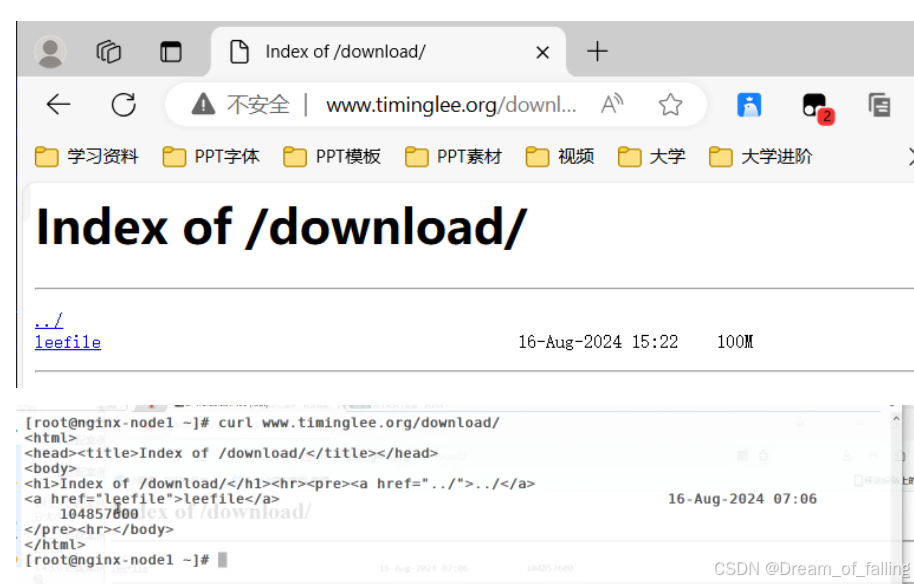
3.1.6 配置下载服务器
让别人能够访问到含有下载文件的网页
[root@nginx ~]# mkdir /data/web/download
[root@nginx ~]# dd if=/dev/zero of=/data/web/download/leefile bs=1M count=100
[root@nginx ~]# vim /usr/local/nginx/conf.d/vhost.conf
server {
        listen 80;
        server_name www.timinglee.org;
        root /data/web/html;
        index index.html;
        error_page 404 /40x.html;
        error_log /var/log/timinglee.org/error.log;
        access_log /var/log/timinglee.org/access.log;
        try_files $uri $uri.html $uri/index.html /error/default.html;

        location /lee {
                root /data/web;
                auth_basic "login password !!";
                auth_basic_user_file "/usr/local/nginx/.htpasswd";
        }

        location = /40x.html {
                root /data/web/errorpage;
        }

        location /download {
                root /data/web;
                autoindex on;     #允许网页下载文件
                autoindex_localtime on;    #修改时间
                autoindex_exact_size off;  #修改文件大小单位
                limit_rate 1024k;       #限速为每秒一兆
        }
}
[root@nginx ~]# nginx -s reload
测试
3.2 Nginx高级配置
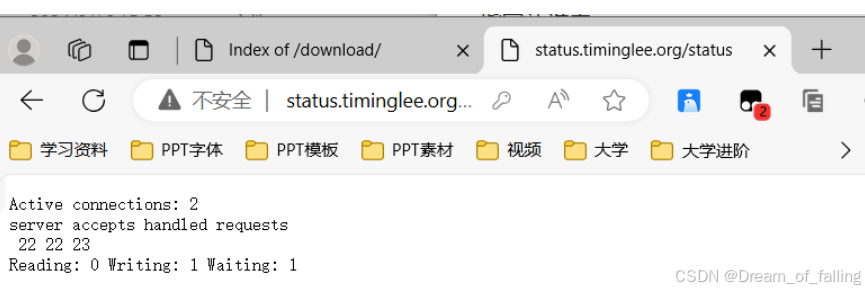
3.2.1 状态页
新建一个status.conf的配置文件
[root@nginx ~]# cd /usr/local/nginx/conf.d/
[root@nginx conf.d]# vim status.conf
server {
        listen 80;
        server_name status.timinglee.org;
        root /data/web/html;
        index index.html;

        location /status {
                stub_status;
                auth_basic "login";    #设定为加密
                auth_basic_user_file "/usr/local/nginx/.htpasswd"; #只允许指定目录下的用户观看
        }
}
[root@nginx conf.d]# nginx -s reload
配置解析
在C:\Windows\System32\drivers\etc路径下编辑hosts文件
172.25.254.100 www.timinglee.org www.timinglee.com bbs.timinglee.org status.timinglee.org
测试
指定让谁看
[root@nginx ~]# cd /usr/local/nginx/conf.d/
[root@nginx conf.d]# vim status.conf
server {
        listen 80;
        server_name status.timinglee.org;
        root /data/web/html;
        index index.html;

        location /status {
                stub_status;
                #auth_basic "login";    #设定为加密
                #auth_basic_user_file "/usr/local/nginx/.htpasswd"; #只允许指定目录下的用户观看
                allow 172.25.254.1;   #指定只有172.25.254.1能看
                deny all;   #其他用户全部拒绝

        }
}
[root@nginx conf.d]# nginx -s reload
测试
[root@nginx conf.d]# vim /etc/hosts
127.0.0.1   localhost localhost.localdomain localhost4 localhost4.localdomain4
::1         localhost localhost.localdomain localhost6 localhost6.localdomain6
172.25.254.100  nginx.timinglee.org www.timinglee.org status.timinglee.org
[root@nginx conf.d]# curl status.timinglee.org/status/
<html>
<head><title>403 Forbidden</title></head>
<body>
<center><h1>403 Forbidden</h1></center>
<hr><center>nginx/1.26.1</center>
</body>
</html>
3.2.2 nginx压缩功能
[root@nginx conf.d]# vim /usr/local/nginx/conf/nginx.conf
    #keepalive_timeout  0;
    keepalive_timeout  65;
    keepalive_requests 2;

    gzip  on;					#开启gzip压缩功能,
    gzip_comp_level 5;			#设定压缩比为5
    gzip_min_length 1k;			#小于1k的文件就不要压缩了
    gzip_http_version 1.1;		#协议版本设为1.1
    gzip_vary on;				#指定什么类型的文件会被压缩
    gzip_types text/plain application/javascript application/x-javascript text/css application/xml text/javascript application/x-httpd-php image/gif image/png;

    include "/usr/local/nginx/conf.d/*.conf";
[root@nginx conf.d]# nginx -t #检测是否成功
nginx: the configuration file /usr/local/nginx/conf/nginx.conf syntax is ok
nginx: configuration file /usr/local/nginx/conf/nginx.conf test is successful
[root@nginx conf.d]# nginx -s reload #重新加载
测试
大于1k的文件
[root@nginx conf.d]# echo hello timinglee > /data/web/html/small.html
[root@nginx conf.d]# du -sh /usr/local/nginx/logs/access.log
8.0K /usr/local/nginx/logs/access.log
小于1k的文件
[root@nginx conf.d]# cat /usr/local/nginx/logs/access.log > /data/web/html/big.html
查看压缩效果,–head表示只看响应报文的头部,big.html文件被压缩了
[root@nginx conf.d]# curl --head --compressed 172.25.254.100/small.html
HTTP/1.1 200 OK
Server: nginx/1.26.1
Date: Fri, 16 Aug 2024 08:26:41 GMT
Content-Type: text/html
Content-Length: 16
Last-Modified: Fri, 16 Aug 2024 08:23:38 GMT
Connection: keep-alive
ETag: "66bf0c8a-10"
Accept-Ranges: bytes
[root@nginx conf.d]# curl --head --compressed 172.25.254.100/big.html
HTTP/1.1 200 OK
Server: nginx/1.26.1
Date: Fri, 16 Aug 2024 08:26:50 GMT
Content-Type: text/html
Last-Modified: Fri, 16 Aug 2024 08:25:19 GMT
Connection: keep-alive
Vary: Accept-Encoding
ETag: W/"66bf0cef-1195"
Content-Encoding: gzip
四、反向代理
部署环境
停止服务,删掉/nginx/
[root@nginx ~]# systemctl stop nginx
[root@nginx ~]# cd /usr/local/
[root@nginx local]# rm -fr nginx/

[root@nginx ~]# tar zxf srcache-nginx-module-0.33.tar.gz
[root@nginx ~]# tar zxf memc-nginx-module-0.20.tar.gz
[root@nginx ~]# cd nginx-1.26.1/
编译,最好再开一个,用来复制粘贴
[root@nginx nginx-1.26.1]# ./configure --prefix=/usr/local/nginx --add-module=/root/echo-nginx-module-0.63 --add-module=/root/memc-nginx-module-0.20 --add-module=/root/srcache-nginx-module-0.33 --user=nginx --group=nginx --with-http_v2_module --with-http_realip_module --with-http_stub_status_module --with-http_gzip_static_module --with-stream --with-stream_ssl_module --with-stream_realip_module --with-pcre
[root@nginx nginx-1.26.1]# make && make install
4.1 实现FastCGI
启动nginx
[root@nginx ~]# nginx
killall后面可以接名字,能关掉所有相关进程
avahi        895  0.0  0.2  15928  6528 ?        Ss   10:12   0:00 avahi-daemon: running [nginx.local]
root        5982  0.0  0.0   9916  2072 ?        Ss   10:50   0:00 nginx: master process nginx
nginx       5983  0.0  0.1  14248  5144 ?        S    10:50   0:00 nginx: worker process
root        6084  0.0  0.0 221796  2432 pts/0    S+   10:53   0:00 grep --color=auto nginx
[root@nginx nginx-1.26.1]# killall -9 nginx
源码下载php
解压PHP

[root@nginx ~]# tar zxf php-8.3.9.tar.gz
下载相关依赖包
[root@nginx ~]# yum install -y bzip2 systemd-devel libxml2-devel sqlite-devel
libpng-devel libcurl-devel
[root@nginx php-8.3.9]# yum install libcurl-devel.x86_64 -y
从阿里云镜像站上下载oniguruma-devel-6.9.6-1.el9.5.0.1.x86_64.rpm依赖包
[root@nginx ~]# wget https://mirrors.aliyun.com/rockylinux/9.4/devel/x86_64/kickstart/Packages/o/oniguruma-devel-6.9.6-1.el9.5.x86_64.rpm
[root@nginx ~]# rpm -ivh oniguruma-devel-6.9.6-1.el9.5.x86_64.rpm
[root@nginx ~]# cd php-8.3.9/
[root@nginx php-8.3.9]# ./configure --prefix=/usr/local/php --with-config-file-path=/usr/local/php/etc --enable-fpm --with-fpm-user=nginx --with-fpm-group=nginx --with-curl --with-iconv --with-mhash --with-zlib --with-openssl --enable-mysqlnd --with-mysqli --with-pdo-mysql --disable-debug --enable-sockets --enable-soap --disable-xml --disable-ftp --disable-gd --disable-exif --enable-mbstring --enable-bcmath --with-fpm-systemd
[root@nginx php-8.3.9]# make && make install
4.2 PHP+nginx整合
[root@nginx php-8.3.9]# cd /usr/local/php/etc/
[root@nginx etc]# ls
php-fpm.conf.default php-fpm.d
[root@nginx etc]# cp -p php-fpm.conf.default php-fpm.conf
[root@nginx etc]# cd php-fpm.d/
[root@nginx php-fpm.d]# cp www.conf.default www.conf -p
[root@nginx php-fpm.d]# cd /root/php-8.3.9/
[root@nginx php-8.3.9]# cp php.ini-production /usr/local/php/etc/php.ini
修改主配置文件
[root@nginx php-8.3.9]# cd
[root@nginx ~]# cd /usr/local/php/etc
[root@nginx etc]# vim php.ini
[Date]
; Defines the default timezone used by the date functions
; https://php.net/date.timezone
date.timezone = Asia/Shanghai
生成启动脚本
[root@nginx etc]# cd /root/php-8.3.9/sapi/fpm
[root@nginx fpm]# cp php-fpm.service /lib/systemd/system/
[root@nginx fpm]# vim /lib/systemd/system/php-fpm.service
# Mounts the /usr, /boot, and /etc directories read-only for processes invoked by this unit.
#ProtectSystem=full
[root@nginx fpm]# systemctl daemon-reload
[root@nginx fpm]# systemctl start php-fpm
[root@nginx fpm]# netstat -antlupe | grep php
tcp 0 0 127.0.0.1:9000 0.0.0.0:* LISTEN 0 153112 194199/php-fpm: mas
[root@nginx fpm]# cd /usr/local/php/
[root@nginx php]# ls
bin etc include lib php sbin var
[root@nginx php]# cd etc/php-fpm.d/
[root@nginx php-fpm.d]# vim www.conf
; The address on which to accept FastCGI requests.
; Valid syntaxes are:
; 'ip.add.re.ss:port' - to listen on a TCP socket to a specific IPv4 address on
; a specific port;
; '[ip:6:addr:ess]:port' - to listen on a TCP socket to a specific IPv6 address on
; a specific port;
; 'port' - to listen on a TCP socket to all addresses
; (IPv6 and IPv4-mapped) on a specific port;
; '/path/to/unix/socket' - to listen on a unix socket.
; Note: This value is mandatory.
listen = 0.0.0.0:9000
[root@nginx php-fpm.d]# systemctl start php-fpm
[root@nginx php-fpm.d]# netstat -autlupe | grep php
tcp 0 0 localhost:cslistener 0.0.0.0:* LISTEN root 153112 194199/php-fpm: mas
准备PHP测试页
[root@nginx php-fpm.d]# cd
[root@nginx ~]# mkdir -p /data/web/php
[root@nginx ~]# cd /usr/local/php/bin/
[root@nginx bin]# vim ~/.bash_profile
# .bash_profile

# Get the aliases and functions
if [ -f ~/.bashrc ]; then
        . ~/.bashrc
fi

export PATH=$PATH:/usr/local/nginx/sbin:/usr/local/php/bin:/usr/local/php/sbin
#User specific environment and startup programs
[root@nginx bin]# source ~/.bash_profile
[root@nginx bin]# cd /data/web/php/
[root@nginx php]# vim index.php
<?php
  phpinfo();
?>
[root@nginx conf]# cd /usr/local/nginx
[root@nginx nginx]# mkdir conf.d
[root@nginx nginx]# vim conf/nginx.conf
 include "/usr/local/nginx/conf.d/*.conf";
    # another virtual host using mix of IP-, name-, and port-based configuration
    #
    #server {
    #    listen       8000;
    #    listen       somename:8080;
    #    server_name  somename  alias  another.alias;
[root@nginx nginx]# cd conf.d
[root@nginx conf.d]# vim vhosts.conf
server {
        listen 80;
        server_name www.timinglee.org;
        root /data/web/html;
        index index.html;

        location ~ \.php$ {
                root /data/web/php;
                fastcgi_pass 127.0.0.1:9000;
                fastcgi_index index.php;
                include fastcgi.conf;
        }
}
[root@nginx conf.d]# nginx -s reload
测试
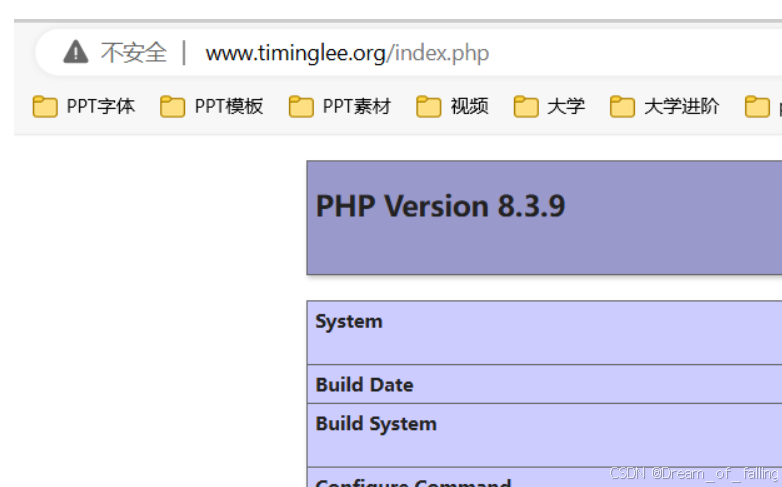
[root@nginx conf.d]# pwd
/usr/local/nginx/conf.d
[root@nginx conf.d]# vim vhosts.conf
server {
        listen 80;
        server_name www.timinglee.org;
        root /data/web/html;
        index index.html;

        location ~ \.php$ {
                root /data/web/php;
                fastcgi_pass 172.25.254.100:9000;
                fastcgi_index index.php;
                include fastcgi.conf;
        }
}
[root@nginx conf.d]# nginx -s reload
[root@nginx conf.d]# systemctl restart php-fpm.service
测试
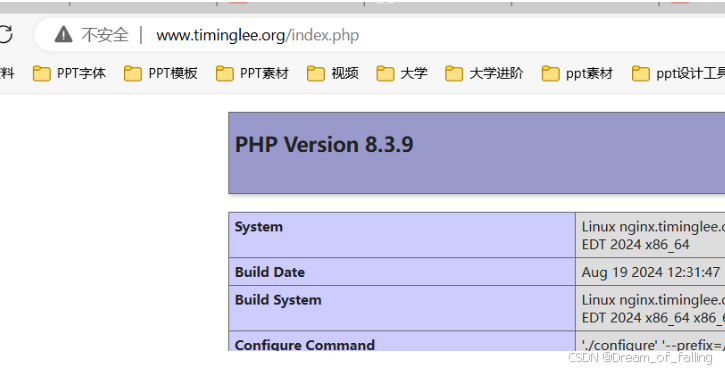
4.3 PHP 高速缓存

解压
[root@nginx ~]# tar zxf memcache-8.2.tgz
[root@nginx ~]# cd memcache-8.2/
[root@nginx memcache-8.2]# dnf install autoconf y
[root@nginx memcache-8.2]# phpize
[root@nginx memcache-8.2]# ls
autom4te.cache  config.h.in  configure.ac  docker       LICENSE       run-tests.php
build           config.m4    config.w32    Dockerfile   memcache.php  src
config9.m4      configure    CREDITS       example.php  README        tests

确认存在 configure
[root@nginx memcache-8.2]# ./configure && make && make install
[root@nginx memcache-8.2]# systemctl restart php-fpm.service
配置PHP加载memcache模块
[root@nginx memcache-8.2]# cd /usr/local/php/etc
[root@nginx etc]# vim php.ini
;zend_extension=opcache
extension=memcache
;;;;;;;;;;;;;;;;;;;
; Module Settings ;
;;;;;;;;;;;;;;;;;;;
[root@nginx etc]# systemctl restart php-fpm.service
检查
[root@nginx ~]# cd
[root@nginx ~]# dnf install memcached -y
编辑配置文件
[root@nginx ~]# vim /etc/sysconfig/memcached
PORT="11211"
USER="memcached"
MAXCONN="1024"
CACHESIZE="64"
OPTIONS="-l 127.0.0.1,::1"
[root@nginx ~]# systemctl start memcached.service
[root@nginx ~]# netstat -autlupe | grep mem
[root@nginx ~]# php -c php.ini -m
检查是否加载
4.4 使用memcache
[root@nginx ~]# cd /usr/local/nginx/conf.d
[root@nginx conf.d]# vim vhosts.conf
upstream {
        server 127.0.0.1:11211;
        keepalive 512;
}

server {
        listen 80;
        server_name www.timinglee.org;
        root /data/web/html;
        index index.html;

location /memc {
                internal;
                memc_connect_timeout 100ms;
                memc_send_timeout 100ms;
                memc_read_timeout 100ms;
                set $memc_key $query_string;
                set $memc_exptime 300;
                memc_pass memcache;
        }

        location ~ \.php$ {
                root /data/web/php;
                srcache_fetch GET /memc $key;
                srcache_store PUT /memc $key;
                fastcgi_pass 127.0.0.1:9000;
                fastcgi_index index.php;
                include fastcgi.conf;
        }
}
[root@nginx conf.d]# nginx -t
[root@nginx conf.d]# nginx -s reload
测试
[root@nginx conf.d]# ab -n500 -c10 http://www.timinglee.org/index.php
This is ApacheBench, Version 2.3 <$Revision: 1903618 $>
Copyright 1996 Adam Twiss, Zeus Technology Ltd, http://www.zeustech.net/
Licensed to The Apache Software Foundation, http://www.apache.org/

Benchmarking www.timinglee.org (be patient)
Completed 100 requests
Completed 200 requests
Completed 300 requests
Completed 400 requests
Completed 500 requests
Finished 500 requests


Server Software:        nginx/1.26.1
Server Hostname:        www.timinglee.org
Server Port:            80

Document Path:          /index.php
Document Length:        157 bytes

Concurrency Level:      10
Time taken for tests:   0.025 seconds
Complete requests:      500
Failed requests:        0
Non-2xx responses:      500
Total transferred:      154500 bytes
HTML transferred:       78500 bytes
Requests per second:    20028.84 [#/sec] (mean)
Time per request:       0.499 [ms] (mean)
Time per request:       0.050 [ms] (mean, across all concurrent requests)
Transfer rate:          6043.86 [Kbytes/sec] received

Connection Times (ms)
              min  mean[+/-sd] median   max
Connect:        0    0   0.1      0       3
Processing:     0    0   0.2      0       1
Waiting:        0    0   0.2      0       1
Total:          0    0   0.2      0       4

Percentage of the requests served within a certain time (ms)
  50%      0
  66%      0
  75%      0
  80%      1
  90%      1
  95%      1
  98%      1
  99%      1
 100%      4 (longest request)
4.5 编译安装openresty
[root@nginx conf.d]# systemctl stop nginx
查询nginx,关闭所有进程
[root@nginx ~]# netstat -autupe | grep nginx
[root@nginx ~]# killall -9 nginx
[root@nginx openresty-1.25.3.1]# ps aux | grep memcache
解压缩
[root@nginx ~]# tar zxf openresty-1.25.3.1.tar.gz
进入解压目录,编码安装
[root@nginx openresty-1.25.3.1]# ./configure --prefix=/usr/local/openresty --with-http_realip_module --with-http_sub_module --with-http_gzip_static_module --with-http_stub_status_module --without-http_memcached_module --with-stream --with-stream_ssl_module --with-stream_realip_module --with-pcre --with-http_ssl_module
[root@nginx openresty-1.25.3.1]# gmake -j2 && gmake install





 扫一扫
扫一扫


 670
670

 被折叠的 条评论
为什么被折叠?
被折叠的 条评论
为什么被折叠?
 到【灌水乐园】发言





