



Apache DolphinScheduler的Worker模块是其分布式调度系统的核心组件之一,负责任务执行、资源管理及集群动态调度。本文将通过源码剖析,揭示其设计思想与实现细节.
1、Worker接收Master RPC请求架构图
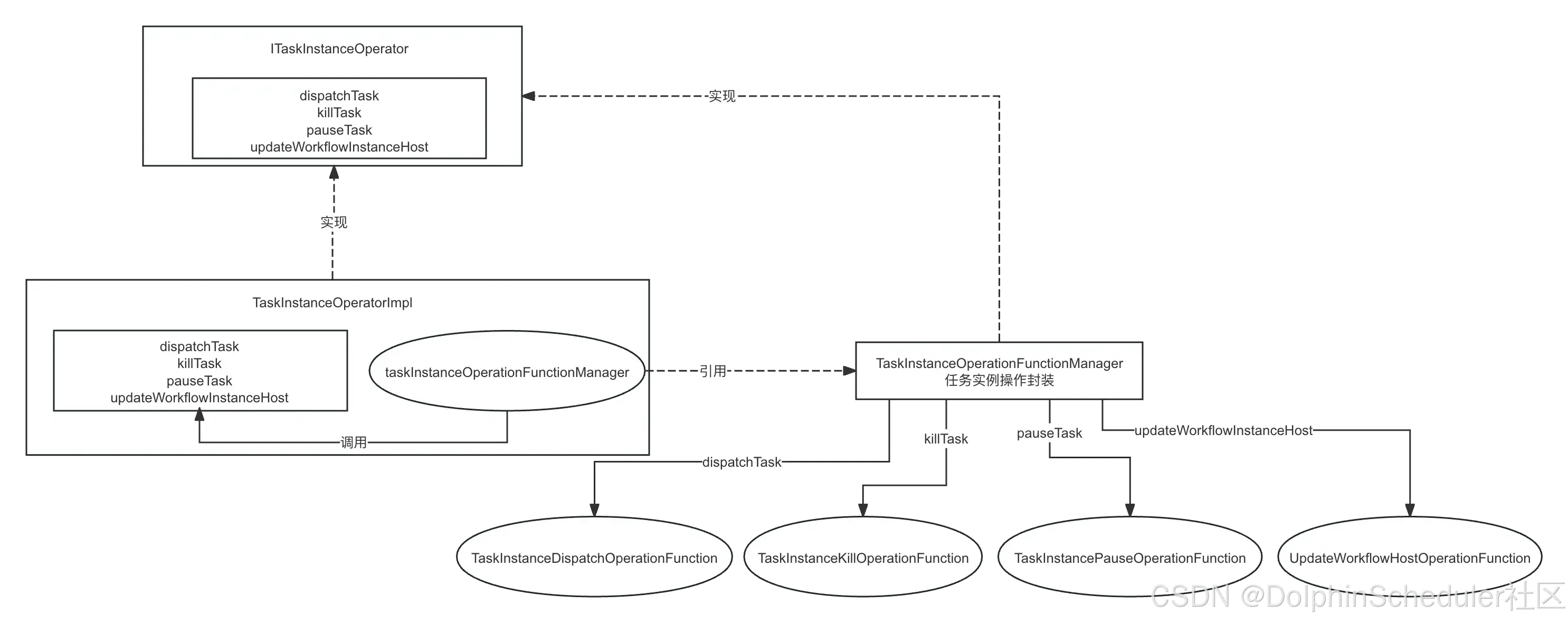
Worker服务的Netty提供和Master JDK动态代理接口调用,请参考Dolphinscheduler告警模块解说,不再重复地说。
简说 :
org.apache.dolphinscheduler.extract.worker.ITaskInstanceOperator
@RpcService
public interface ITaskInstanceOperator {

    @RpcMethod
    TaskInstanceDispatchResponse dispatchTask(TaskInstanceDispatchRequest taskInstanceDispatchRequest);

    @RpcMethod
    TaskInstanceKillResponse killTask(TaskInstanceKillRequest taskInstanceKillRequest);

    @RpcMethod
    TaskInstancePauseResponse pauseTask(TaskInstancePauseRequest taskPauseRequest);

    @RpcMethod
    UpdateWorkflowHostResponse updateWorkflowInstanceHost(UpdateWorkflowHostRequest updateWorkflowHostRequest);
}
对实现了@RpcService的接口和@RpcMethod的方法,进行Worker的Netty handler注入和Master动态代理实现。
2、分发任务
(TaskInstanceDispatchOperationFunction)
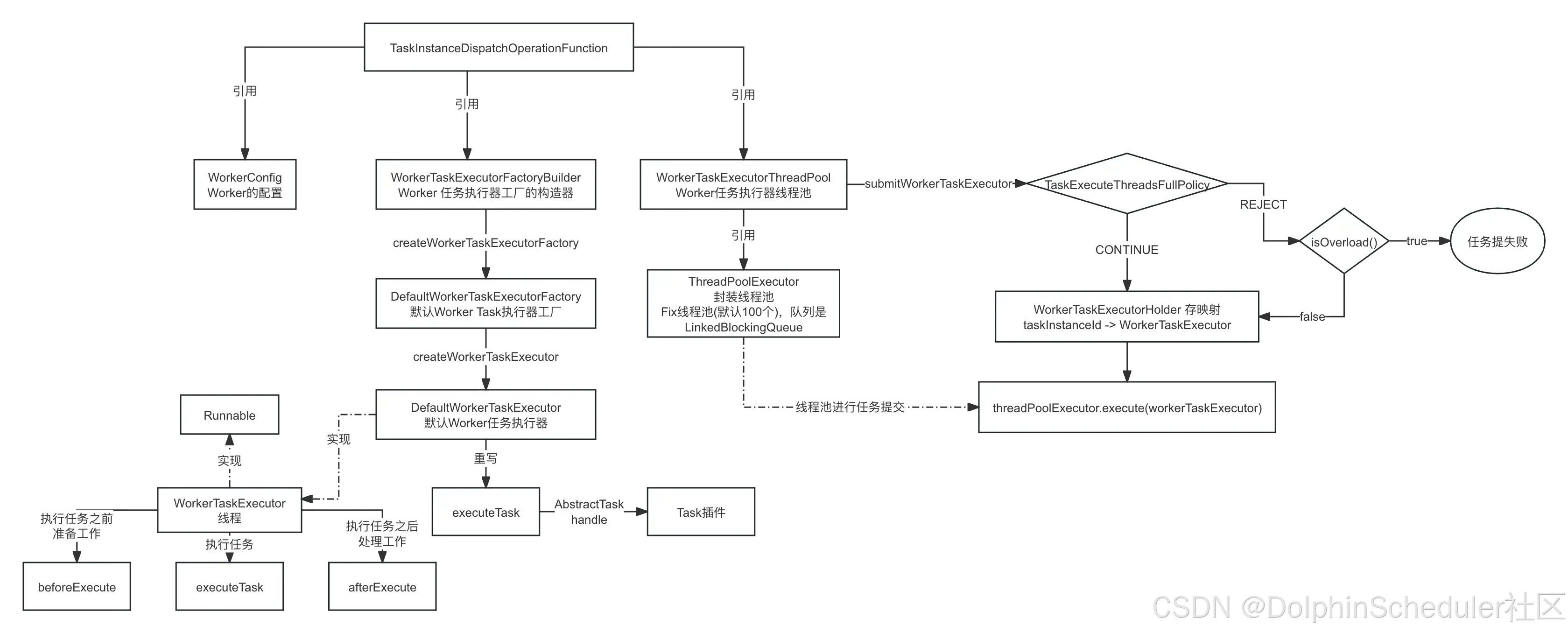
2.1、WorkerConfig
WorkerConfig : 其实就是从Worker模块下 application.yaml 下读取 worker 开头的配置
2.2、WorkerTaskExecutorFactoryBuilder
WorkerTaskExecutorFactoryBuilder : 是任务执行器工厂的构造器,里面封装了 DefaultWorkerTaskExecutorFactory(默认Worker任务执行器工厂) ,DefaultWorkerTaskExecutorFactory工厂又封装了 DefaultWorkerTaskExecutor 的创建。DefaultWorkerTaskExecutor 的父类是WorkerTaskExecutor,WorkerTaskExecutor又是一个线程。好玩不?
2.3、WorkerTaskExecutorThreadPool
WorkerTaskExecutorThreadPool : 其实就是Fixed线程池的封装而已
2.4、从operator开始说
public TaskInstanceDispatchResponse operate(TaskInstanceDispatchRequest taskInstanceDispatchRequest) {
    log.info("Receive TaskInstanceDispatchRequest: {}", taskInstanceDispatchRequest);
    // TODO 任务执行上下文
    TaskExecutionContext taskExecutionContext = taskInstanceDispatchRequest.getTaskExecutionContext();
    try {
        // TODO 设置worker地址
        taskExecutionContext.setHost(workerConfig.getWorkerAddress());
        // TODO 设置task日志存放路径
        taskExecutionContext.setLogPath(LogUtils.getTaskInstanceLogFullPath(taskExecutionContext));

        // TODO MDC中设置流程实例id和任务实例id,好像只是put,没有get使用
        LogUtils.setWorkflowAndTaskInstanceIDMDC(
                taskExecutionContext.getProcessInstanceId(),
                taskExecutionContext.getTaskInstanceId());

        // check server status, if server is not running, return failed to reject this task
        if (!ServerLifeCycleManager.isRunning()) {
            log.error("server is not running. reject task: {}", taskExecutionContext.getProcessInstanceId());
            return TaskInstanceDispatchResponse.failed(taskExecutionContext.getTaskInstanceId(),
                    "server is not running");
        }

        TaskMetrics.incrTaskTypeExecuteCount(taskExecutionContext.getTaskType());

        // TODO 通过WorkerTaskExecutorFactoryBuilder创建了一个WorkerTaskExecutor
        WorkerTaskExecutor workerTaskExecutor = workerTaskExecutorFactoryBuilder
                .createWorkerTaskExecutorFactory(taskExecutionContext)
                .createWorkerTaskExecutor();
        // todo: hold the workerTaskExecutor
        // TODO 直接进行任务的提交
        if (!workerTaskExecutorThreadPool.submitWorkerTaskExecutor(workerTaskExecutor)) {
            log.info("Submit task: {} to wait queue failed", taskExecutionContext.getTaskName());
            return TaskInstanceDispatchResponse.failed(taskExecutionContext.getTaskInstanceId(),
                    "WorkerManagerThread is full");
        } else {
            log.info("Submit task: {} to wait queue success", taskExecutionContext.getTaskName());
            return TaskInstanceDispatchResponse.success(taskExecutionContext.getTaskInstanceId());
        }
    } finally {
        LogUtils.removeWorkflowAndTaskInstanceIdMDC();
    }
}
LogUtils.getTaskInstanceLogFullPath(taskExecutionContext) 解析
org.apache.dolphinscheduler.plugin.task.api.utils.LogUtils#getTaskInstanceLogFullPath : 获取任务日志的全路径
/**
     * Get task instance log full path.
     *
     * @param taskExecutionContext task execution context.
     * @return task instance log full path.
     */
    public static String getTaskInstanceLogFullPath(TaskExecutionContext taskExecutionContext) {
        return getTaskInstanceLogFullPath(
                DateUtils.timeStampToDate(taskExecutionContext.getFirstSubmitTime()),
                taskExecutionContext.getProcessDefineCode(),
                taskExecutionContext.getProcessDefineVersion(),
                taskExecutionContext.getProcessInstanceId(),
                taskExecutionContext.getTaskInstanceId());
    }
org.apache.dolphinscheduler.plugin.task.api.utils.LogUtils#getTaskInstanceLogFullPath : 拼接出任务日志的全路径
/**
     * todo: Remove the submitTime parameter?
     * The task instance log full path, the path is like:{log.base}/{taskSubmitTime}/{workflowDefinitionCode}/{workflowDefinitionVersion}/{}workflowInstance}/{taskInstance}.log
     *
     * @param taskFirstSubmitTime       task first submit time
     * @param workflowDefinitionCode    workflow definition code
     * @param workflowDefinitionVersion workflow definition version
     * @param workflowInstanceId        workflow instance id
     * @param taskInstanceId            task instance id.
     * @return task instance log full path.
     */
    public static String getTaskInstanceLogFullPath(Date taskFirstSubmitTime,
                                                    Long workflowDefinitionCode,
                                                    int workflowDefinitionVersion,
                                                    int workflowInstanceId,
                                                    int taskInstanceId) {
        if (TASK_INSTANCE_LOG_BASE_PATH == null) {
            throw new IllegalArgumentException(
                    "Cannot find the task instance log base path, please check your logback.xml file");
        }
        final String taskLogFileName = Paths.get(
                String.valueOf(workflowDefinitionCode),
                String.valueOf(workflowDefinitionVersion),
                String.valueOf(workflowInstanceId),
                String.format("%s.log", taskInstanceId)).toString();
        return TASK_INSTANCE_LOG_BASE_PATH
                .resolve(DateUtils.format(taskFirstSubmitTime, DateConstants.YYYYMMDD, null))
                .resolve(taskLogFileName)
                .toString();
    }
org.apache.dolphinscheduler.plugin.task.api.utils.LogUtils#getTaskInstanceLogBasePath : 读取logback-spring.xml中的配置,获取任务实例日志的基础路径,其实就是获取根目录下/logs为基础路径
/**
     * Get task instance log base absolute path, this is defined in logback.xml
     *
     * @return
     */
    public static Path getTaskInstanceLogBasePath() {
        return Optional.of(LoggerFactory.getILoggerFactory())
                .map(e -> (AppenderAttachable<ILoggingEvent>) (e.getLogger("ROOT")))
                .map(e -> (SiftingAppender) (e.getAppender("TASKLOGFILE")))
                .map(e -> ((TaskLogDiscriminator) (e.getDiscriminator())))
                .map(TaskLogDiscriminator::getLogBase)
                .map(e -> Paths.get(e).toAbsolutePath())
                .orElse(null);
    }
worker的 logback-spring.xml :
<configuration scan="true" scanPeriod="120 seconds">
  <property name="log.base" value="logs"/>
  ...
  <appender name="TASKLOGFILE" class="ch.qos.logback.classic.sift.SiftingAppender">
          <filter class="org.apache.dolphinscheduler.plugin.task.api.log.TaskLogFilter"/>
          <Discriminator class="org.apache.dolphinscheduler.plugin.task.api.log.TaskLogDiscriminator">
              <key>taskInstanceLogFullPath</key>
              <logBase>${log.base}</logBase>
          </Discriminator>
          <sift>
              <appender name="FILE-${taskInstanceLogFullPath}" class="ch.qos.logback.core.FileAppender">
                  <file>${taskInstanceLogFullPath}</file>
                  <encoder>
                      <pattern>
                          [%level] %date{yyyy-MM-dd HH:mm:ss.SSS Z} - %message%n
                      </pattern>
                      <charset>UTF-8</charset>
                  </encoder>
                  <append>true</append>
              </appender>
          </sift>
      </appender>
  ...
  <root level="INFO">
      <appender-ref ref="STDOUT"/>
      <appender-ref ref="TASKLOGFILE"/>
  </root>

</configuration>
最终地址是:
/opt/dolphinscheduler/worker-server/logs/20240615/13929490938784/1/1815/1202.log
2.5、DefaultWorkerTaskExecutor解说
org.apache.dolphinscheduler.server.worker.runner.operator.TaskInstanceDispatchOperationFunction#operate
// TODO 通过WorkerTaskExecutorFactoryBuilder创建了一个WorkerTaskExecutor
            WorkerTaskExecutor workerTaskExecutor = workerTaskExecutorFactoryBuilder
                    .createWorkerTaskExecutorFactory(taskExecutionContext)
                    .createWorkerTaskExecutor();
            // todo: hold the workerTaskExecutor
            // TODO 直接进行任务的提交
            if (!workerTaskExecutorThreadPool.submitWorkerTaskExecutor(workerTaskExecutor)) {
                log.info("Submit task: {} to wait queue failed", taskExecutionContext.getTaskName());
                return TaskInstanceDispatchResponse.failed(taskExecutionContext.getTaskInstanceId(),
                        "WorkerManagerThread is full");
            } else {
                log.info("Submit task: {} to wait queue success", taskExecutionContext.getTaskName());
                return TaskInstanceDispatchResponse.success(taskExecutionContext.getTaskInstanceId());
            }
直接使用 workerTaskExecutorThreadPool.submitWorkerTaskExecutor(workerTaskExecutor)进行任务的提交
WorkerTaskExecutor 是一个线程,既然是线程,是不是要看一下run :
public void run() {
        try {
            // TODO MDC中设置流程实例和任务实例,其实就相当于是ThreadLocal使用一样
            LogUtils.setWorkflowAndTaskInstanceIDMDC(
                    taskExecutionContext.getProcessInstanceId(),
                    taskExecutionContext.getTaskInstanceId());

            // TODO MDC中设置任务的日志路径
            LogUtils.setTaskInstanceLogFullPathMDC(taskExecutionContext.getLogPath());

            // TODO 打印任务的头部
            TaskInstanceLogHeader.printInitializeTaskContextHeader();

            // TODO 进行任务的初始化,其实就是做了任务的开始时间和taskAppId(流程实例id + 任务实例id)
            initializeTask();

            // TODO DRY_RUN其实就是空跑,其实就是直接设置状态为成功
            if (DRY_RUN_FLAG_YES == taskExecutionContext.getDryRun()) {
                taskExecutionContext.setCurrentExecutionStatus(TaskExecutionStatus.SUCCESS);
                taskExecutionContext.setEndTime(System.currentTimeMillis());
                WorkerTaskExecutorHolder.remove(taskExecutionContext.getTaskInstanceId());
                // TODO 通过worker消息发送器将结果信息发送过去
                workerMessageSender.sendMessageWithRetry(taskExecutionContext,
                        ITaskInstanceExecutionEvent.TaskInstanceExecutionEventType.FINISH);
                log.info(
                        "The current execute mode is dry run, will stop the subsequent process and set the taskInstance status to success");
                return;
            }
            // TODO 打印任务插件的头部
            TaskInstanceLogHeader.printLoadTaskInstancePluginHeader();

            // TODO 执行之前
            beforeExecute();

            // TODO 回调函数
            TaskCallBack taskCallBack = TaskCallbackImpl.builder()
                    .workerMessageSender(workerMessageSender)
                    .taskExecutionContext(taskExecutionContext)
                    .build();

            TaskInstanceLogHeader.printExecuteTaskHeader();
            // TODO 执行
            executeTask(taskCallBack);

            TaskInstanceLogHeader.printFinalizeTaskHeader();

            // TODO 执行之后
            afterExecute();

            closeLogAppender();
        } catch (Throwable ex) {
            log.error("Task execute failed, due to meet an exception", ex);
            afterThrowing(ex);
            closeLogAppender();
        } finally {
            LogUtils.removeWorkflowAndTaskInstanceIdMDC();
            LogUtils.removeTaskInstanceLogFullPathMDC();
        }
    }
重点分析:
- 2.5.1、空跑
如果是空跑,任务直接成功,不执行
// TODO DRY_RUN其实就是空跑,其实就是直接设置状态为成功
            if (DRY_RUN_FLAG_YES == taskExecutionContext.getDryRun()) {
                taskExecutionContext.setCurrentExecutionStatus(TaskExecutionStatus.SUCCESS);
                taskExecutionContext.setEndTime(System.currentTimeMillis());
                WorkerTaskExecutorHolder.remove(taskExecutionContext.getTaskInstanceId());
                // TODO 通过worker消息发送器将结果信息发送过去
                workerMessageSender.sendMessageWithRetry(taskExecutionContext,
                        ITaskInstanceExecutionEvent.TaskInstanceExecutionEventType.FINISH);
                log.info(
                        "The current execute mode is dry run, will stop the subsequent process and set the taskInstance status to success");
                return;
            }
- 2.5.2、 beforeExecute()
执行之前的准备工作,比如说给Master汇报说自己正在运行、创建租户(linux上用户)、创建工作路径、下载所需资源文件、任务初始化**
protected void beforeExecute() {
// TODO 先设置为RUNNING状态
taskExecutionContext.setCurrentExecutionStatus(TaskExecutionStatus.RUNNING_EXECUTION);
// TODO 向Master发送消息,告诉Master这个任务正在运行
workerMessageSender.sendMessageWithRetry 最低0.47元/天 解锁文章






 扫一扫
扫一扫


 1252
1252

 被折叠的 条评论
为什么被折叠?
被折叠的 条评论
为什么被折叠?
 到【灌水乐园】发言





