


 本文介绍了使用scrapy框架模拟登录强智教务系统时遇到的302重定向问题及解决方案,包括在请求中处理重定向和解析响应头中的Location URL。此外,还提到了验证码识别问题,目前采用手工识别,但可通过调用验证码识别API实现自动化。
引言
前面已经分享过用requests库来模拟登陆强智,这次打算用scrapy框架试一下,结果遇到的坑还真不少。
思路分析
前面已经分享过了,这里就不重复造轮子了,请出门,然后右转。传送门
这篇文章的主要目的是记录用scrapy框架模拟登陆强智教务系统遇到的问题和解决方法。
问题分析
首先,遇到的最大问题就是302重定向,scrapy框架默认是不能处理302重定向的,需要在发送请求时,加入dont_redirect
meta={

   'dont_redirect': True, 'handle_httpstatus_list': [302]}
然后,需要在响应头中拿到Location的URL,这里要注意,拿到的URL是bytes类型,需要转换成str类型才能使用(decode一下就好了)。
location_url = bytes.decode(response.headers.getlist('Location')[0])
最后,验证码识别的问题,这里采用的是手工识别,如果想要实现自动化,可以去网上找验证码的识别平台,直接调用API接口即可。
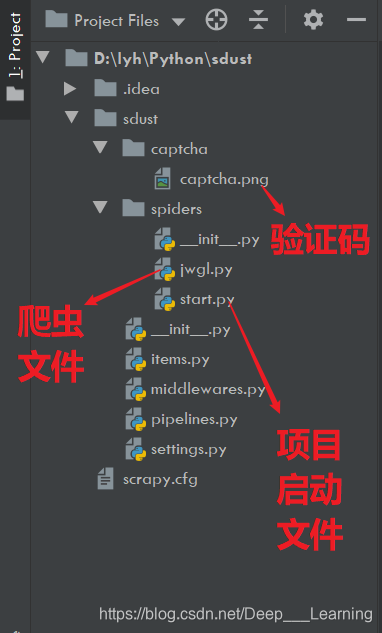
项目目录
代码
settings.py
# -*- coding: utf-8 -*-
# Scrapy settings for sdust project
#
# For simplicity, this file contains only settings considered important or
# commonly used. You can find more settings consulting the documentation:
#
# https://docs.scrapy.org/en/latest/topics/settings.html
# https://docs.scrapy.org/en/latest/topics/downloader-middleware.html
# https://docs.scrapy.org/en/latest/topics/spider-middleware.html
BOT_NAME = 'sdust'
SPIDER_MODULES = ['sdust.spiders']
NEWSPIDER_MODULE = 'sdust.spiders'
# Crawl responsibly by identifying yourself (and your website) on the user-agent
# USER_AGENT = 'sdust (+http://www.yourdomain.com)'
# Obey robots.txt rules
ROBOTSTXT_OBEY = False
# Configure maximum concurrent requests performed by Scrapy (default: 16)
# CONCURRENT_REQUESTS = 32
# Configure a delay for requests for the same website (default: 0)
# See https://docs.scrapy.org/en/latest/topics/settings.html#download-delay
# See also autothrottle settings and docs
# DOWNLOAD_DELAY = 1
# The download delay setting will honor only one of:
# CONCURRENT_REQUESTS_PER_DOMAIN = 16
# CONCURRENT_REQUESTS_PER_IP = 16
# Disable cookies (enabled by default)
# COOKIES_ENABLED = False
# Disable Telnet Console (enabled by default)
# TELNETCONSOLE_ENABLED = False
# Override the default request headers:
DEFAULT_REQUEST_HEADERS = {
'Accept': 'text/html,application/xhtml+xml,application/xml;q=0.9,*/*;q=0.8',
'Accept-Language': 'en',
'User-Agent': 'Mozilla/5.0 (Windows NT 最低0.47元/天 解锁文章






 扫一扫
扫一扫


 2658
2658

 被折叠的 条评论
为什么被折叠?
被折叠的 条评论
为什么被折叠?
 到【灌水乐园】发言





