


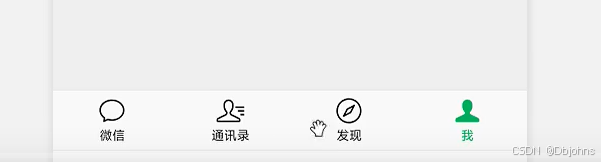
实现结果。实现这个底部导航的功能
实现思路: 按照传统的思路实现底部导航。四个盒子的方法实现 、
实现代码
<template>
    <view>
        <view class="mena">
            <view class="menc">
                <img src="static/images/classify1.jpg" alt="" />
                <p>微信</p>
            </view>
            <view class="menc">
                <img src="static/images/classify2.jpg" alt="" />
                <p>通讯录</p>
            </view>
            <view class="menc">
                <img src="static/images/classify1.jpg" alt="" />
                <p>发现</p>
            </view>
            <view class="menc">
                <img src="static/images/classify2.jpg" alt="" />
                <p>我</p>
            </view>
        </view>
    </view>
</template>

<script>
export default {
  data() {
    return {

    };
  },
  methods: {

  },
};
</script>

<style scoped>
 page{
     background: #f0f0f0;
 }
 img{
     width: 70rpx;
     height: 70rpx;
 }
 p{
     font-size: 20rpx;
 }
.mena{
    background: white;
    height: 120rpx;
    display: flex;
    justify-content: space-between;
    text-align: center;
    align-items: center;
    position: fixed;
    left: 0;
    bottom: 0;
    width: 100%;
}
</style>





 扫一扫
扫一扫


 3486
3486

 被折叠的 条评论
为什么被折叠?
被折叠的 条评论
为什么被折叠?
 到【灌水乐园】发言





