
Linux下安装新宋字体

1- 找到字体文件

可在win系统下搜索simsun.ttc

2- linux系统的字体一般在/usr/share/fonts,

在此文件夹新建文件winfont

mkdir winfont

3- 把字体文件上传到/usr/share/fonts/winfont下

4- 执行命令

fc-cache -fv

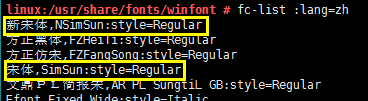
5- 查看 fc-list :lang=zh
    

<!--5f39ae17-8c62-4a45-bc43-b32064c9388a:W3siYmxvY2tUeXBlIjoiaW1hZ2UiLCJzdHlsZXMiOnsiaGVpZ2h0IjoxMDF9LCJibG9ja0lkIjoiMzUyOC0xNTE2NjEyNDUxNDg0Iiwic291cmNlIjoiMURCMzcyM0I0NkVENDRCNTk4NUE3M0I0MTdBNENBNTcifV0=-->


出现上图说明安装成功


注:安装完后无需重启系统,无需重启应用


系统版本:SUSE Linux Enterprise Server 11 (x86_64)


在 QML 文件中统一设置字体类型有多种方法,以下为详细介绍: #### 使用根对象属性 在根对象中定义一个字体类型属性,让所有需要统一字体类型的 `Text` 元素绑定到这个属性。示例代码如下: ```qml import QtQuick 2.15 Rectangle { id: page width: 500; height: 200 color: "lightgray" // 定义统一的字体类型属性 property string globalFontFamily: "Arial" Text { id: helloText text: "Hello world!" y: 30 anchors.horizontalCenter: page.horizontalCenter font.family: globalFontFamily; font.bold: true } Text { id: anotherText text: "Another text" y: 80 anchors.horizontalCenter: page.horizontalCenter font.family: globalFontFamily; } } ``` 在上述代码中,`globalFontFamily` 是根对象 `page` 的一个属性,所有 `Text` 元素的 `font.family` 都绑定到这个属性,修改 `globalFontFamily` 的值就能统一改变所有绑定元素的字体类型。 #### 使用自定义组件 创建一个自定义的 `Text` 组件,在组件内部统一设置字体类型。示例如下: ```qml // CustomText.qml import QtQuick 2.15 Text { property string defaultFontFamily: "Arial" font.family: defaultFontFamily } ``` 在主 QML 文件中使用这个自定义组件: ```qml import QtQuick 2.15 Rectangle { id: page width: 500; height: 200 color: "lightgray" CustomText { text: "Hello world!" y: 30 anchors.horizontalCenter: page.horizontalCenter font.bold: true } CustomText { text: "Another text" y: 80 anchors.horizontalCenter: page.horizontalCenter } } ``` 通过这种方式,所有使用 `CustomText` 组件的文本元素都会有统一的字体类型,若要修改字体类型,只需修改 `CustomText.qml` 中的 `defaultFontFamily` 属性。 #### 使用样式表(Qt Quick Controls 2) 如果使用 Qt Quick Controls 2,可通过样式表来统一设置字体类型。示例如下: ```qml import QtQuick 2.15 import QtQuick.Controls 2.15 ApplicationWindow { id: window width: 500 height: 200 visible: true style: ApplicationWindowStyle { font.family: "Arial" } Text { text: "Hello world!" y: 30 anchors.horizontalCenter: parent.horizontalCenter } Button { text: "Click me" anchors.centerIn: parent } } ``` 在上述代码中,`ApplicationWindowStyle` 里设置的 `font.family` 会应用到窗口内的所有控件和文本元素。 #### 在 C++ 中设置全局字体 在 C++ 代码中设置全局字体,QML 会自动使用该字体。示例如下: ```cpp #include <QApplication> #include <QFontDatabase> #include <QFont> #include <QQmlApplicationEngine> int main(int argc, char *argv[]) { QApplication app(argc, argv); // 添加需要的字体 int fontId = QFontDatabase::addApplicationFont(":/language/mbitmaproundhk-light.otf"); QStringList fontFamilies = QFontDatabase::applicationFontFamilies(fontId); QFont font; font.setFamily(""); // 设置全局字体 app.setFont(font); QQmlApplicationEngine engine; engine.load(QUrl(QStringLiteral("qrc:/main.qml"))); return app.exec(); } ``` 在上述 C++ 代码中设置了全局字体,QML 文件中的文本元素会使用该字体
评论
添加红包

请填写红包祝福语或标题

红包个数最小为10个

红包金额最低5元

当前余额3.43前往充值 >
需支付:10.00
成就一亿技术人!
领取后你会自动成为博主和红包主的粉丝 规则
hope_wisdom
发出的红包
实付
使用余额支付
点击重新获取
扫码支付
钱包余额 0

抵扣说明:

1.余额是钱包充值的虚拟货币,按照1:1的比例进行支付金额的抵扣。
2.余额无法直接购买下载,可以购买VIP、付费专栏及课程。

余额充值


