


1、按钮(Button)控件:
在Form1窗体中,添加30个Button控件,其中有10个数字按钮,16个运算按钮,一个用于计算的等号按钮,2个用于清空的按钮。
在Form2窗体中,添加17个Button控件,其中有10个数字按钮,4个运算按钮,一个用于计算的等号按钮,一个用于清空的按钮。
2、文本框(TextBox)控件:
Form1和Form2中分别添加一个TextBox控件,用于显示计算机的结果。
3、菜单栏(MunuStrip)控件:
在Form1和Form2中分别添加MenuStrip控件,并修改该控件中的ToolStripMunuItem菜单项的Text属性为“机型转换”。该控件可以实现两个窗体之间的相互转换。
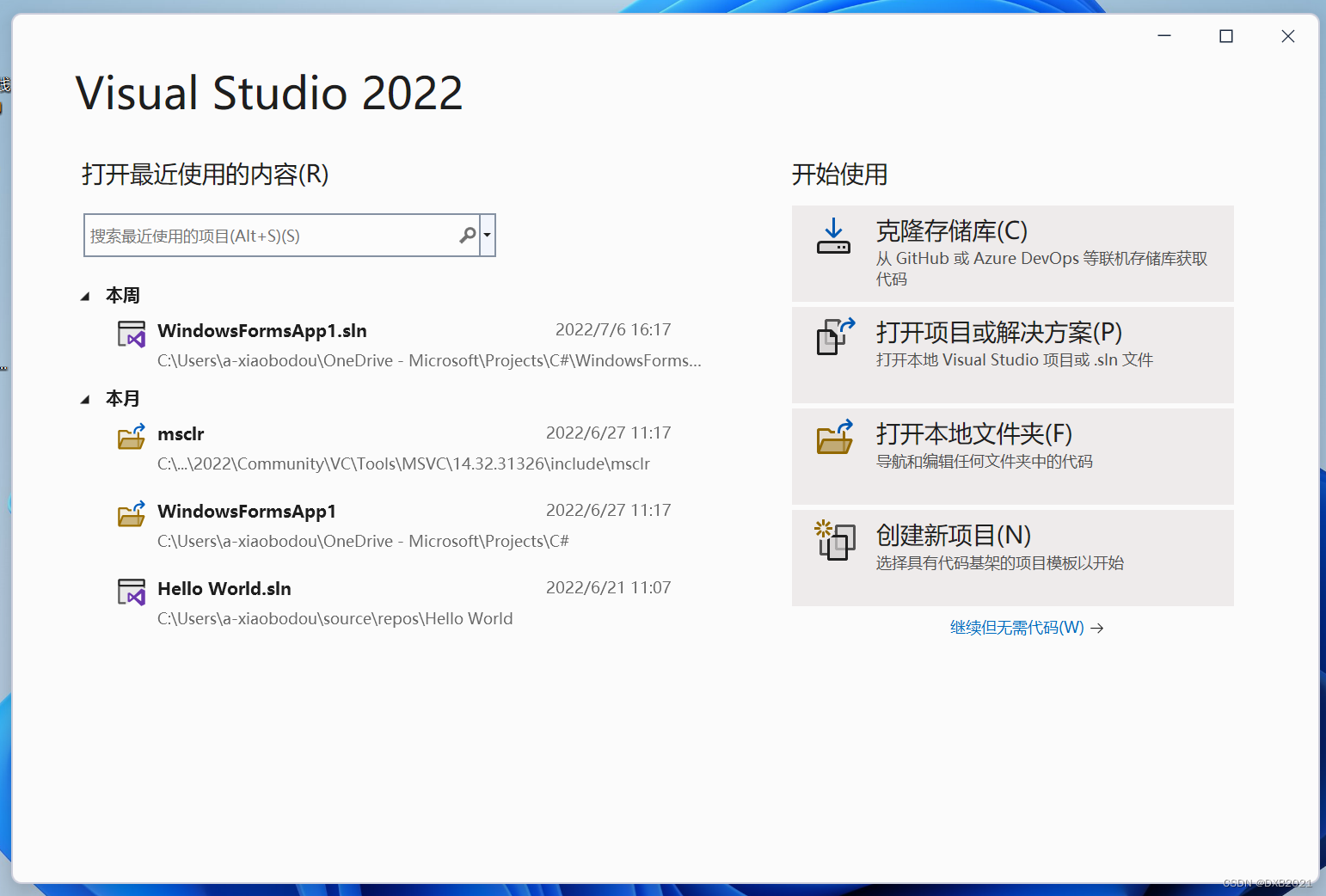
打开Visual Studio 2022,点击“创建新项目”
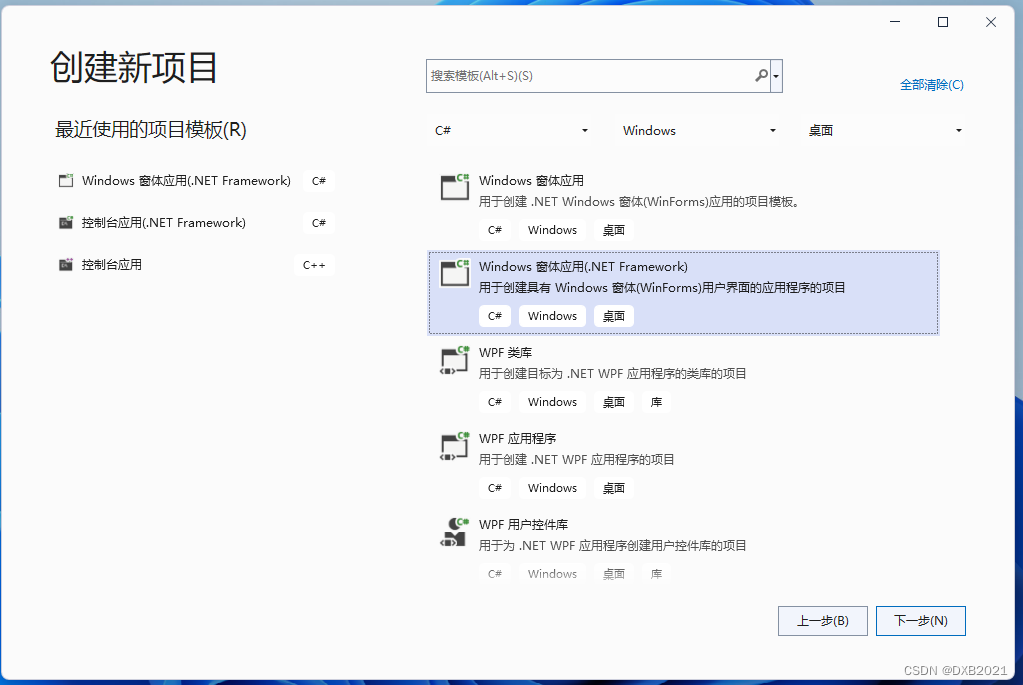
在C#--Windows--桌面,选择Windows窗体应用(.Net Framework),点击“下一步”。
在配置新项目中,项目名称上,输入Calculator,点击“创建”。
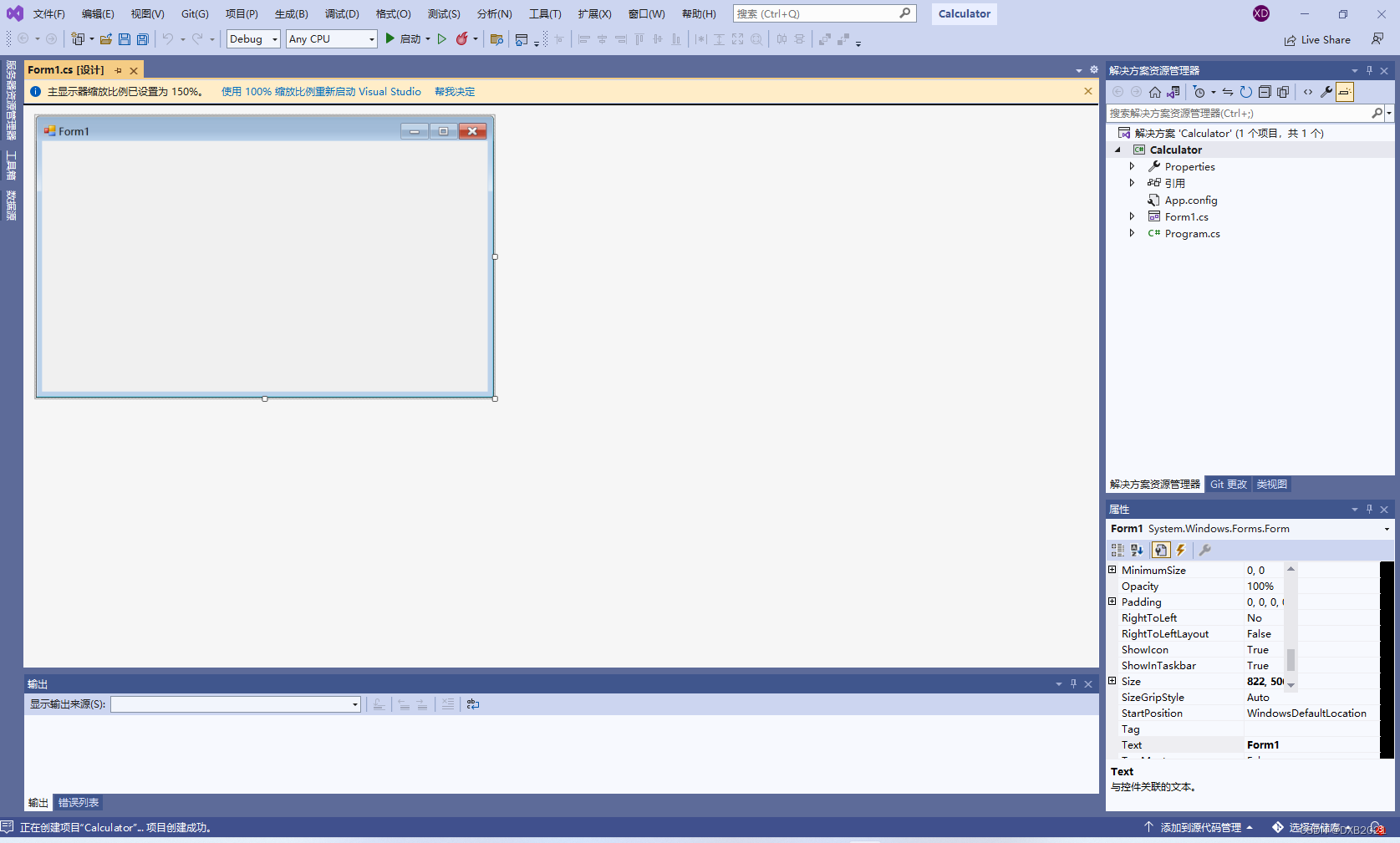 添加两个窗体控件Form1和Form2,分别 用来表示科学计算器和普通计算器。
在右上角的《解决方案资源管理器》,鼠标放在Calculator单词字样,点击右键,选择“添加"--“窗体(Windows窗体)”。
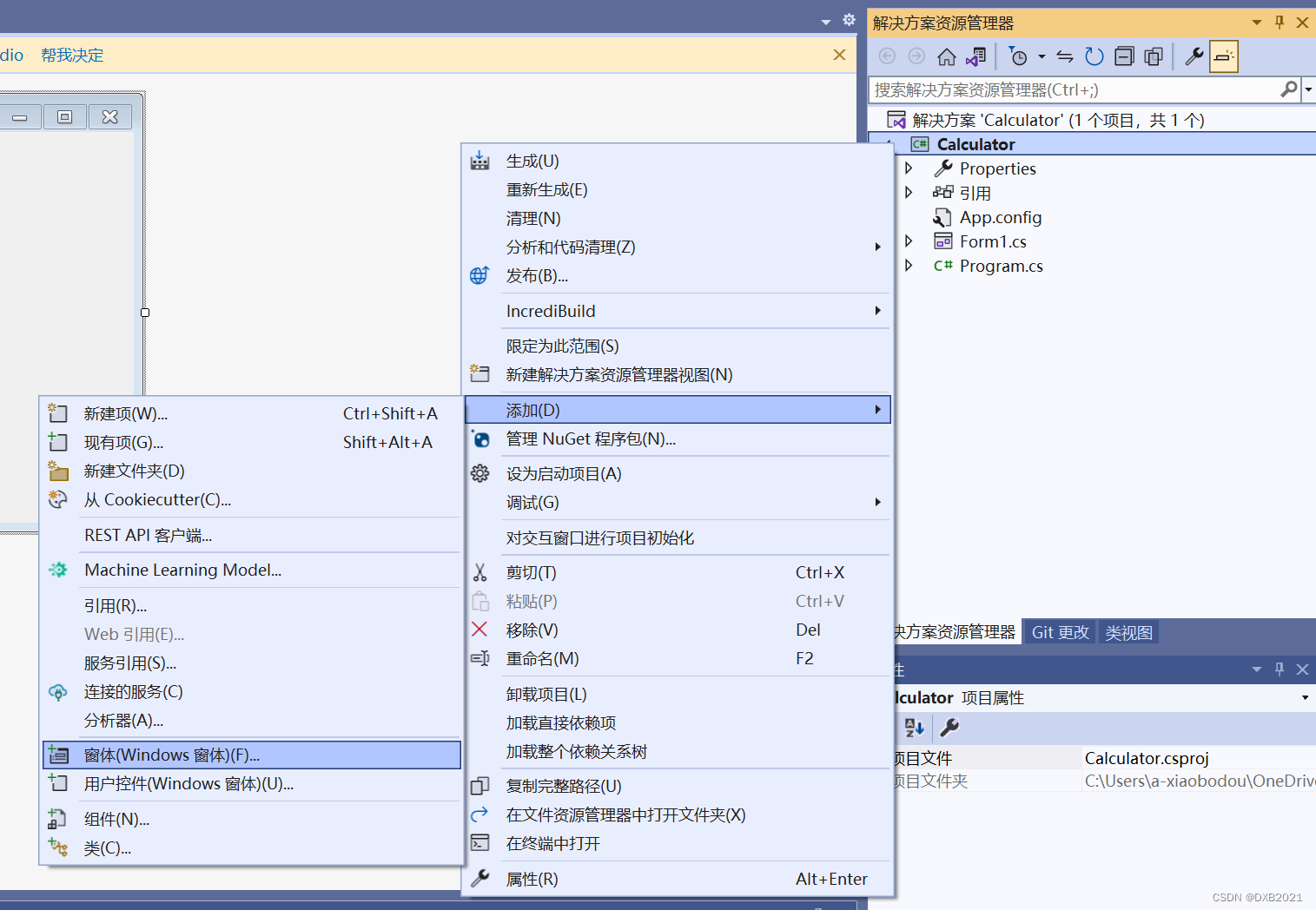
在《添加新项》中,选择“窗体(Windows窗体)”,名称默认:Form2.cs,点击“添加”。
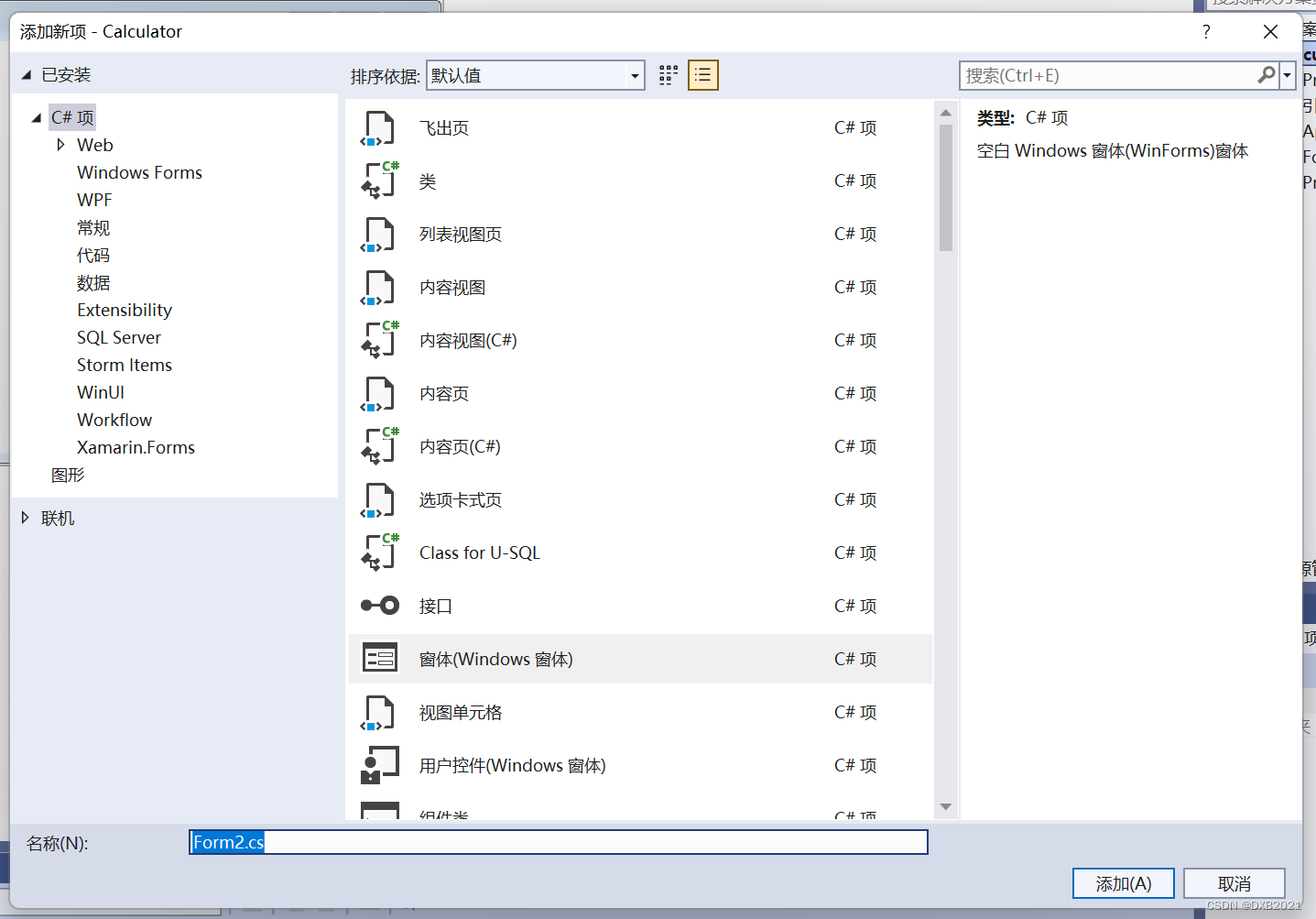
创建一个新的窗体控件Form2。
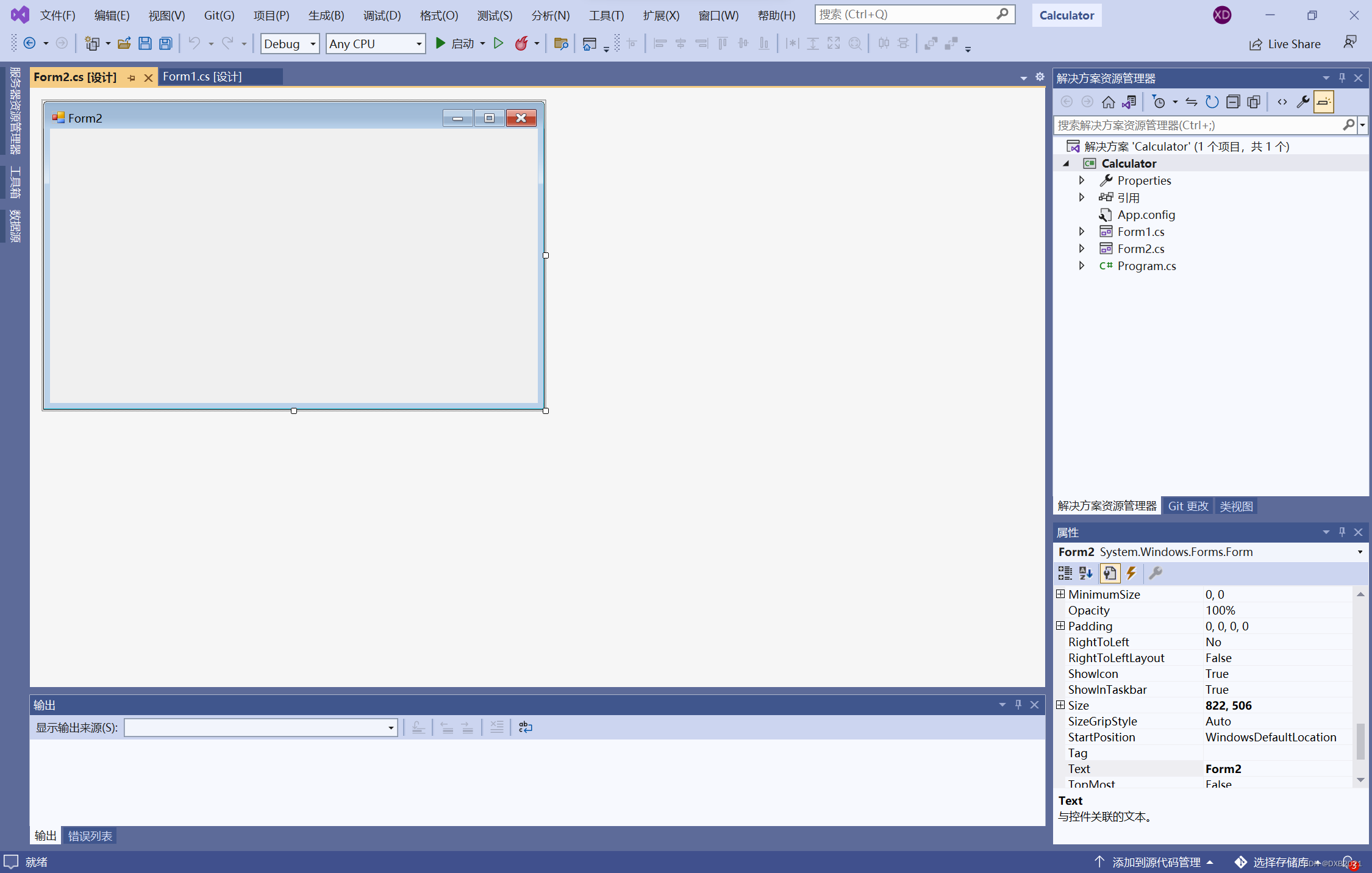
左侧有“工具箱”,点击“菜单和工具栏”,点击“MenuStrip”。
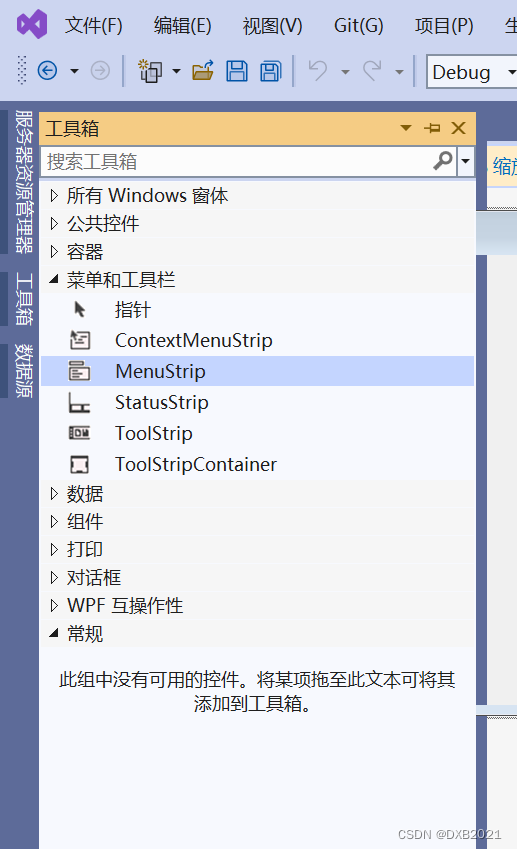
在Form1上添加MenuStrip控件,并修改该控件中的ToolStripMenuItem菜单项的Text属性为“机型转换”。
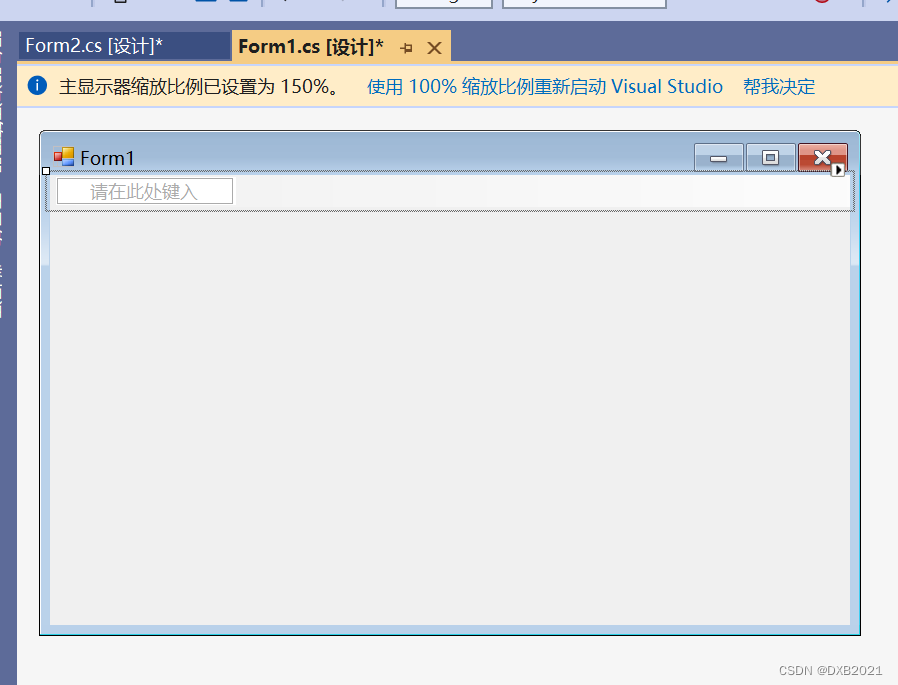
ToolStripMenuItem菜单项的Text属性为“机型转换”。
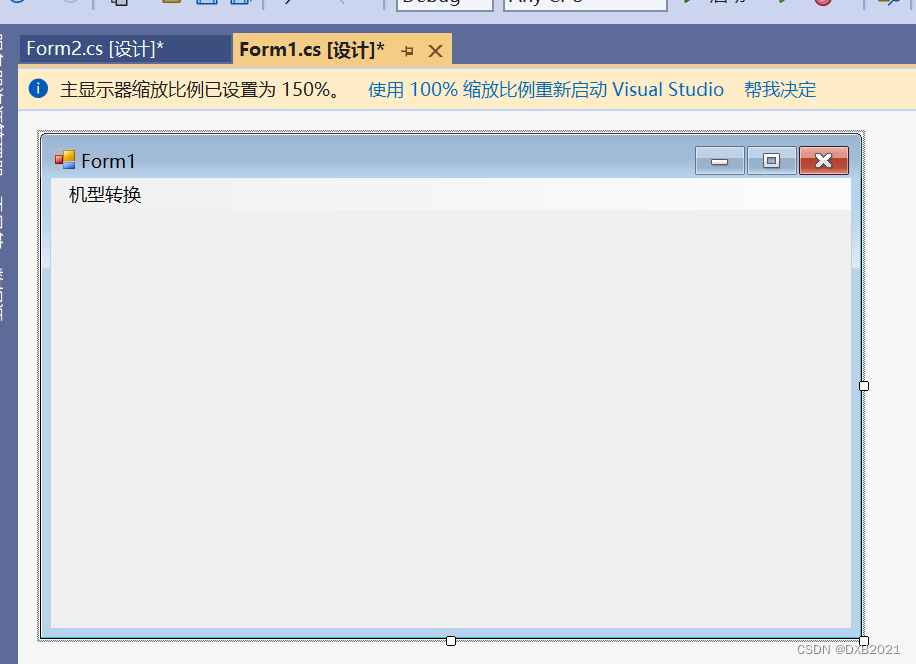
在Form2上添加MenuStrip控件,并修改该控件中的ToolStripMenuItem菜单项的Text属性为“机型转换”。
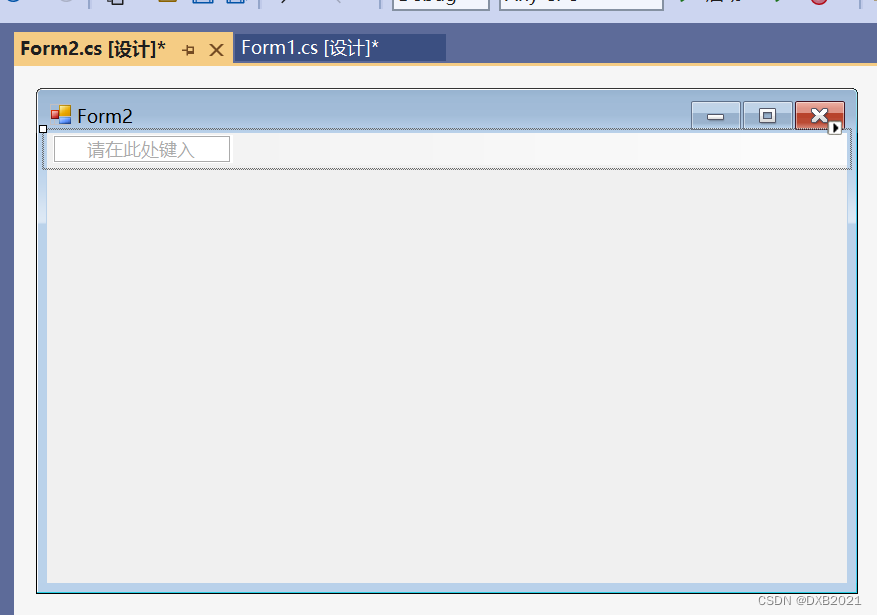
ToolStripMenuItem菜单项的Text属性为“机型转换”。
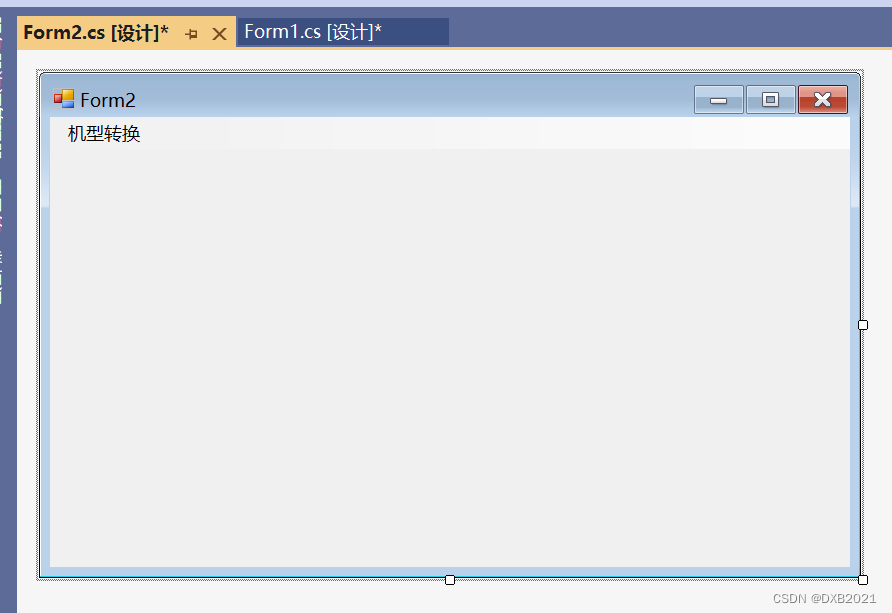
Form1和Form2都有MenuStrip控件,该控件可以实现两个窗体之间的相互转换。
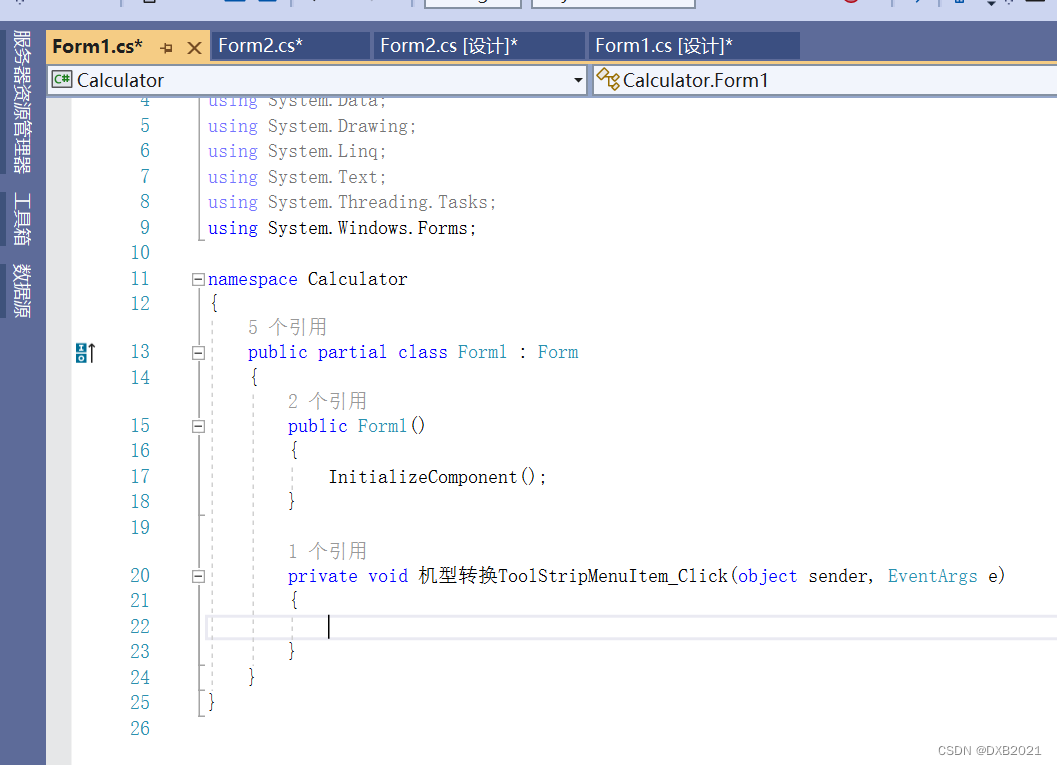
在Form1的机型转换ToolStripMenuItem创建Click事件,双击一下。
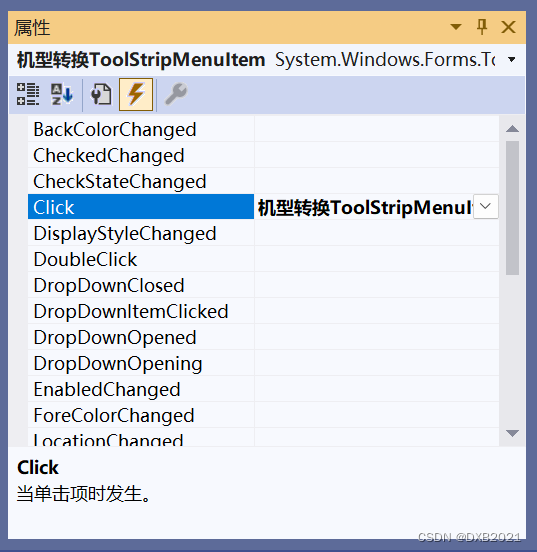
Form1的代码之前:
Form2的代码之后:
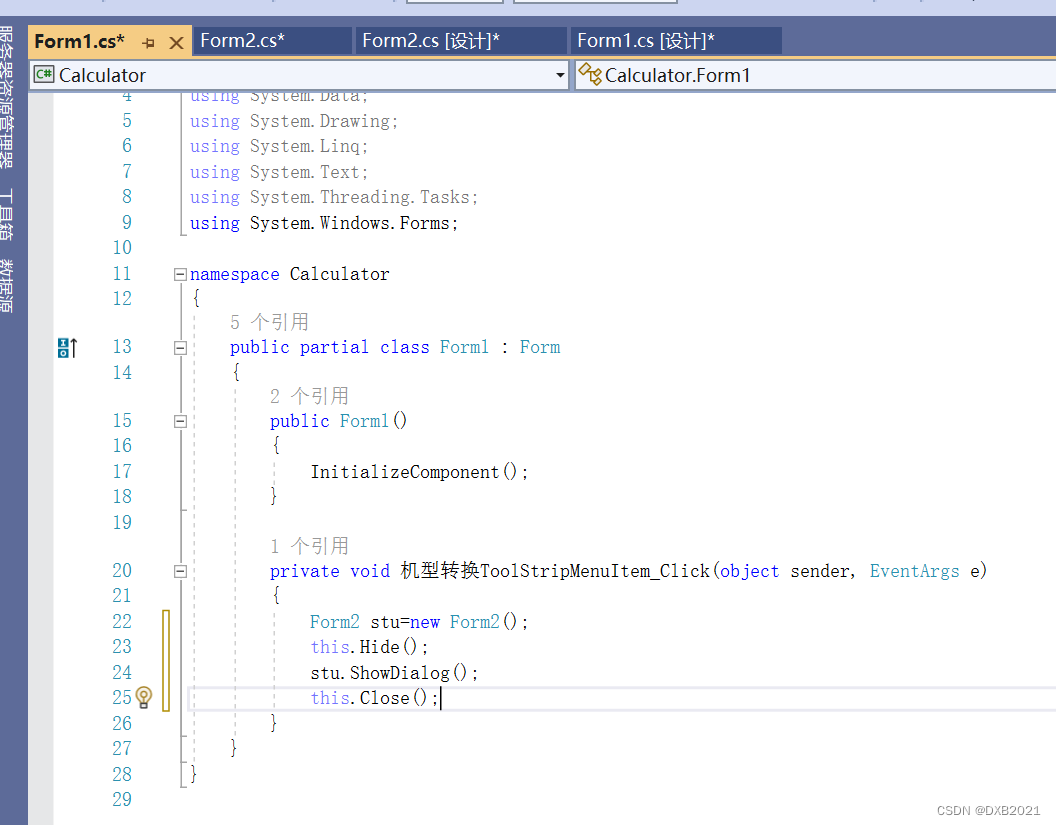
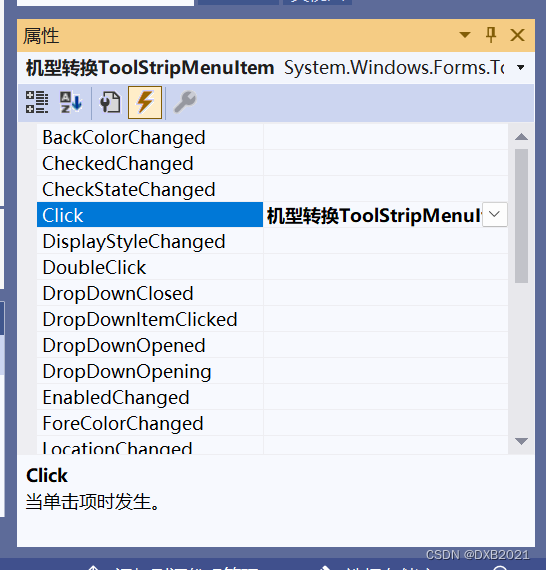
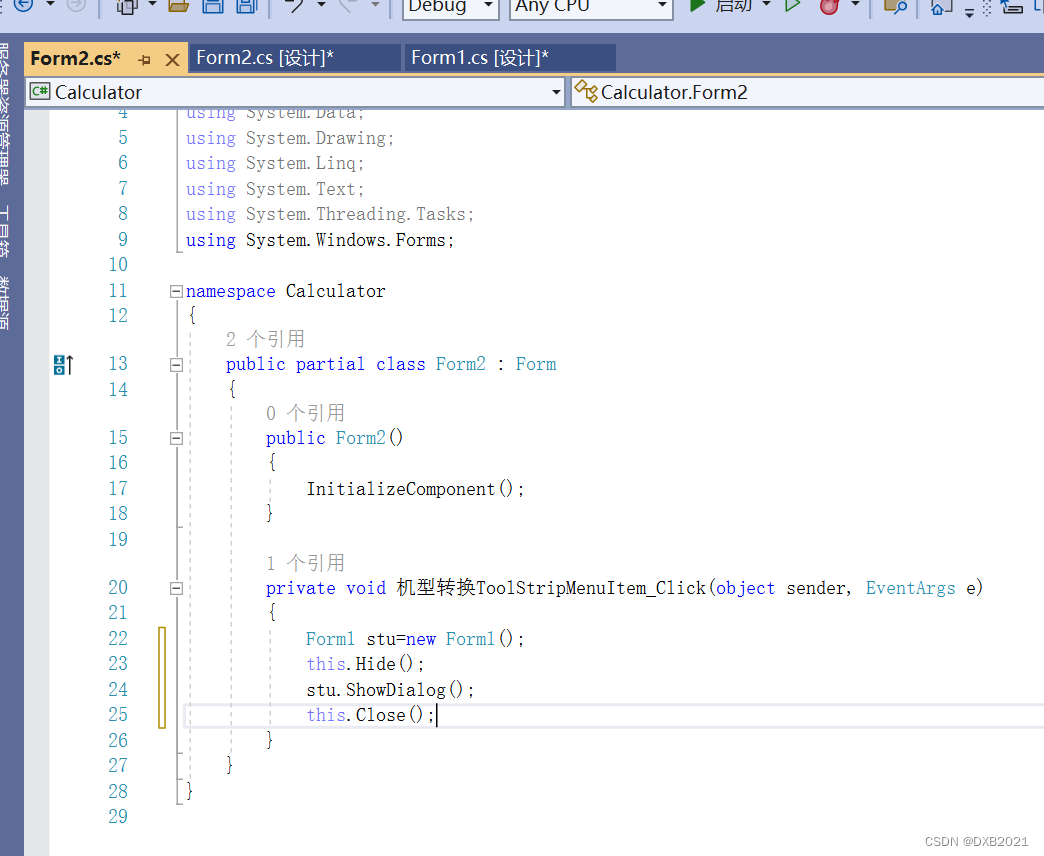
在Form2的机型转换ToolStripMenuItem创建Click事件,双击一下。
Form2的代码之前:
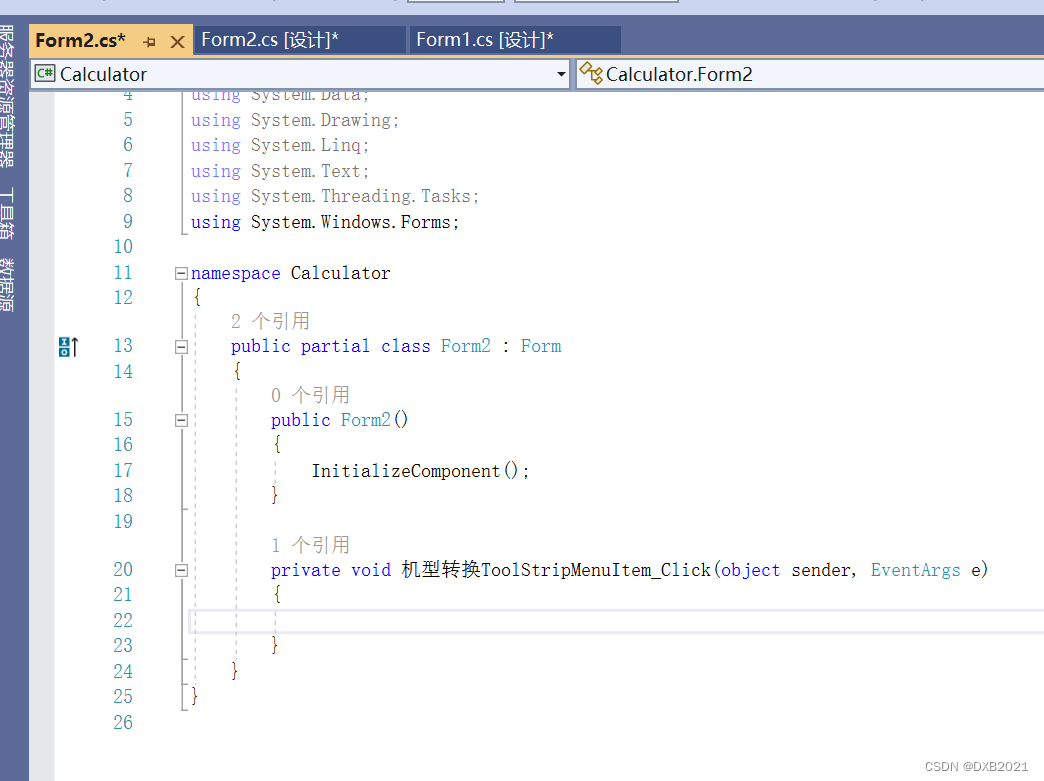
Form2的代码之后:
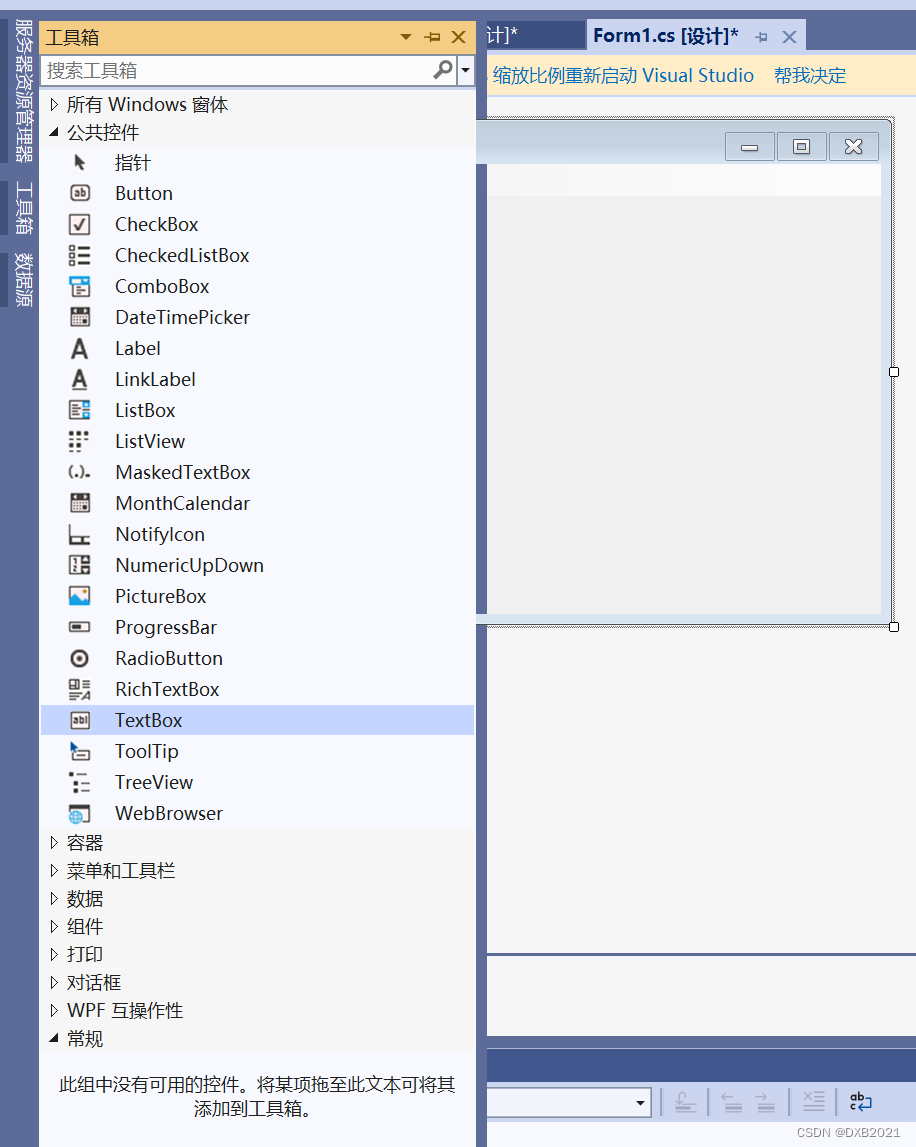
在Form1和Form2添加一个TextBox控件,用于显示计算结果。
在工具箱,公共控件中,点击TextBox。
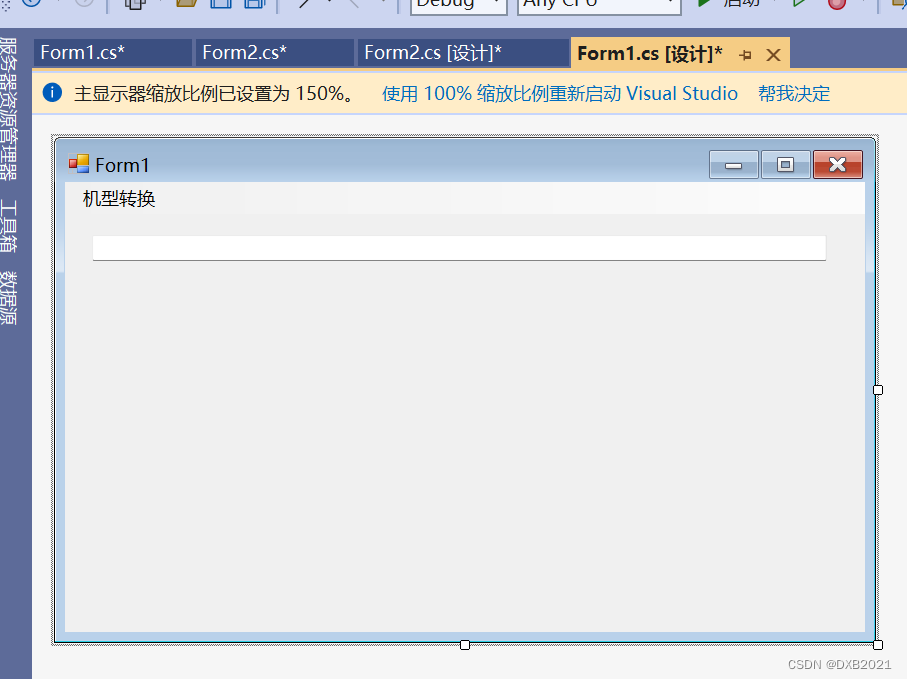
Form1:
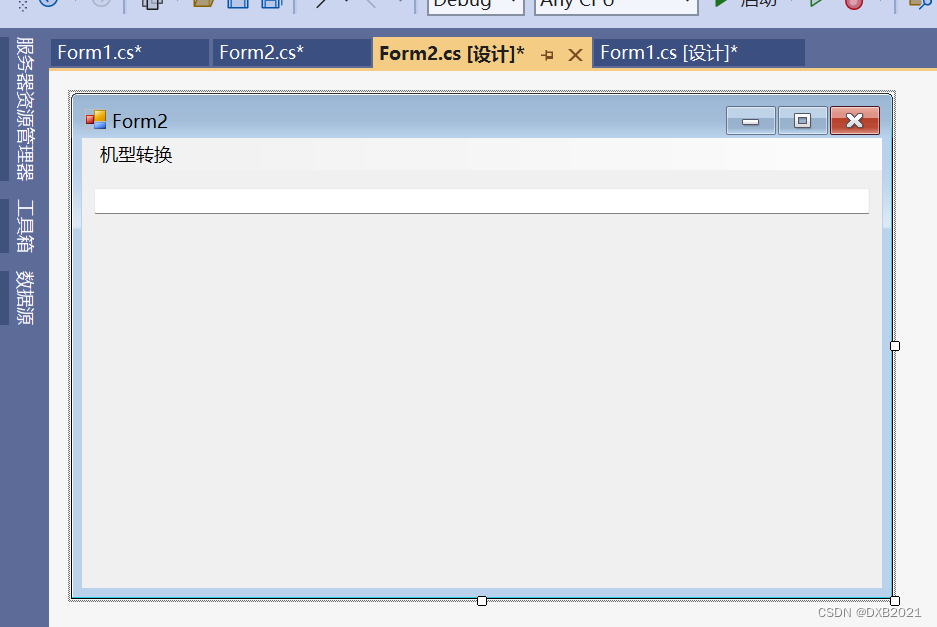
Form2:
在工具箱里,在公共控件中,点击Button。
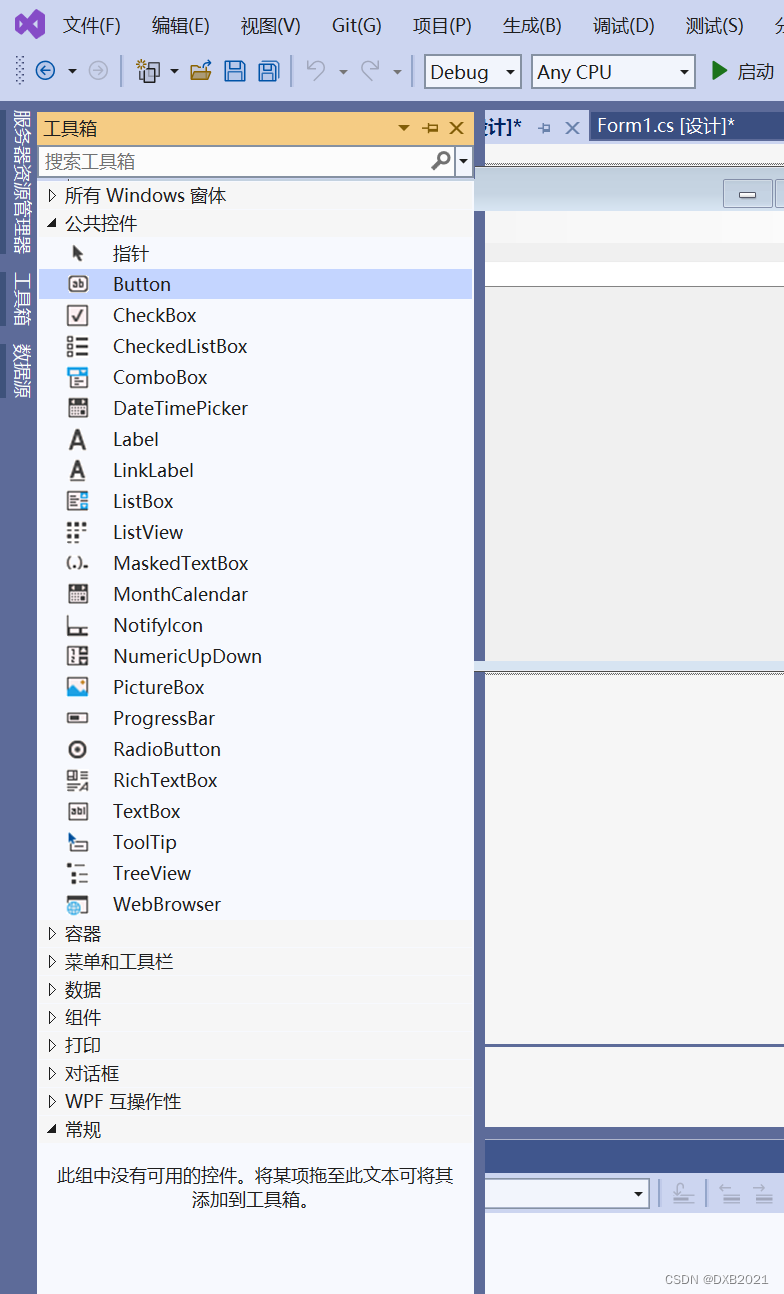
在Form1窗体中,添加30个Button控件,其中有10个数字按钮,16个运算按钮,一个用于计算的等号按钮,2个用于清空的按钮。
数字0~9的功能设计:对于计算机来说,当单击某个数字按钮后,结果显示区内应显示该按钮上的数字。
添加1的Button控件:
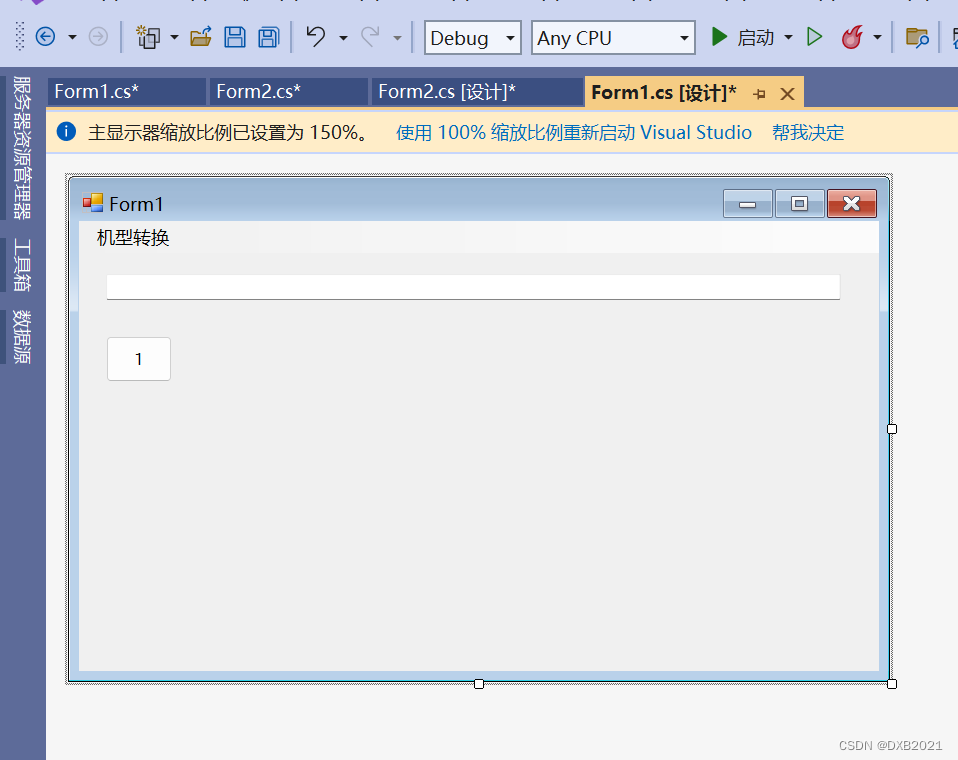
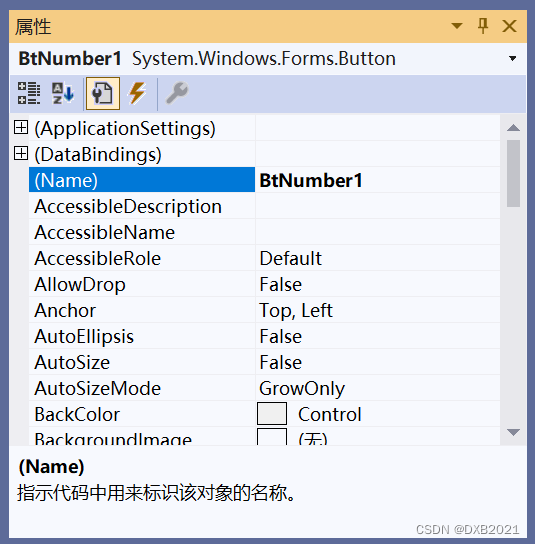
Name的属性,原本是Button1,在Name修改为BtNumber1。
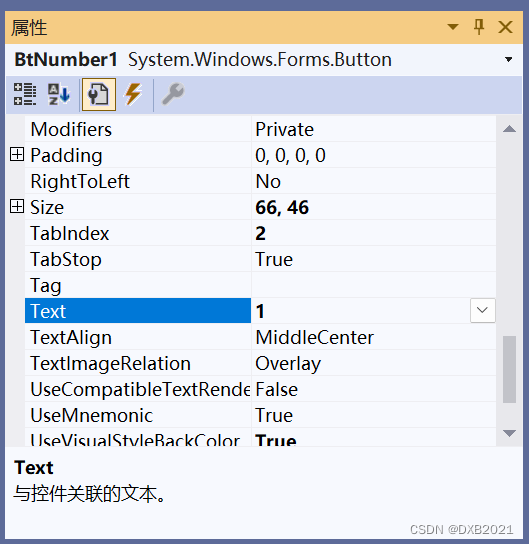
Text的属性改为1
0,2-9,与上面的1方法一样。
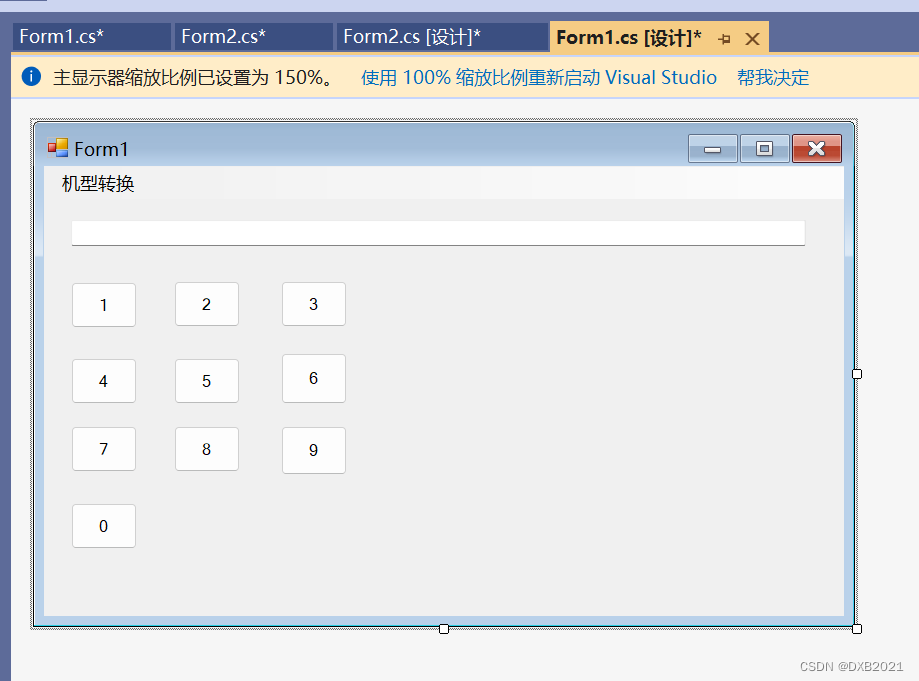
在BtNumber1创建Click事件,双击。或者说,可以双击按钮1,切换到代码编程器。
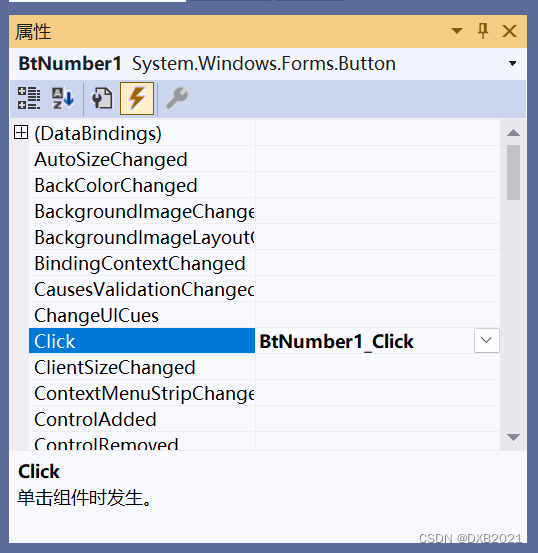
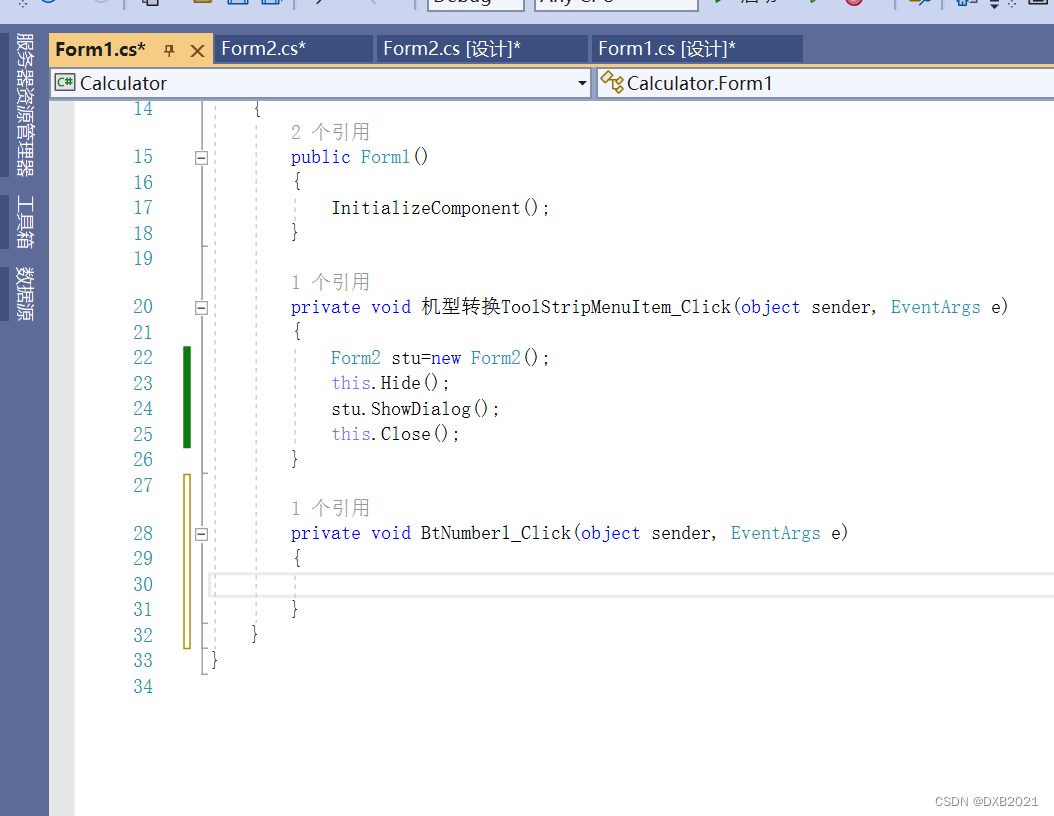
代码之前:
代码之后:
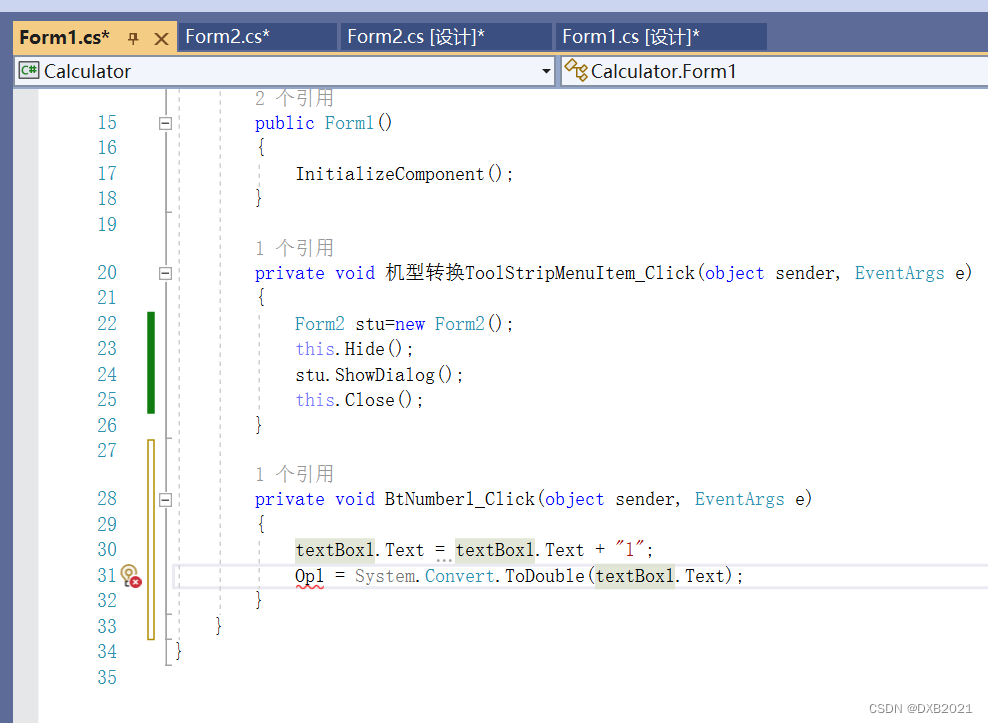
代码中出现Op1的下面有红色波浪线,应该在public form1()的上面,产生新的变量。
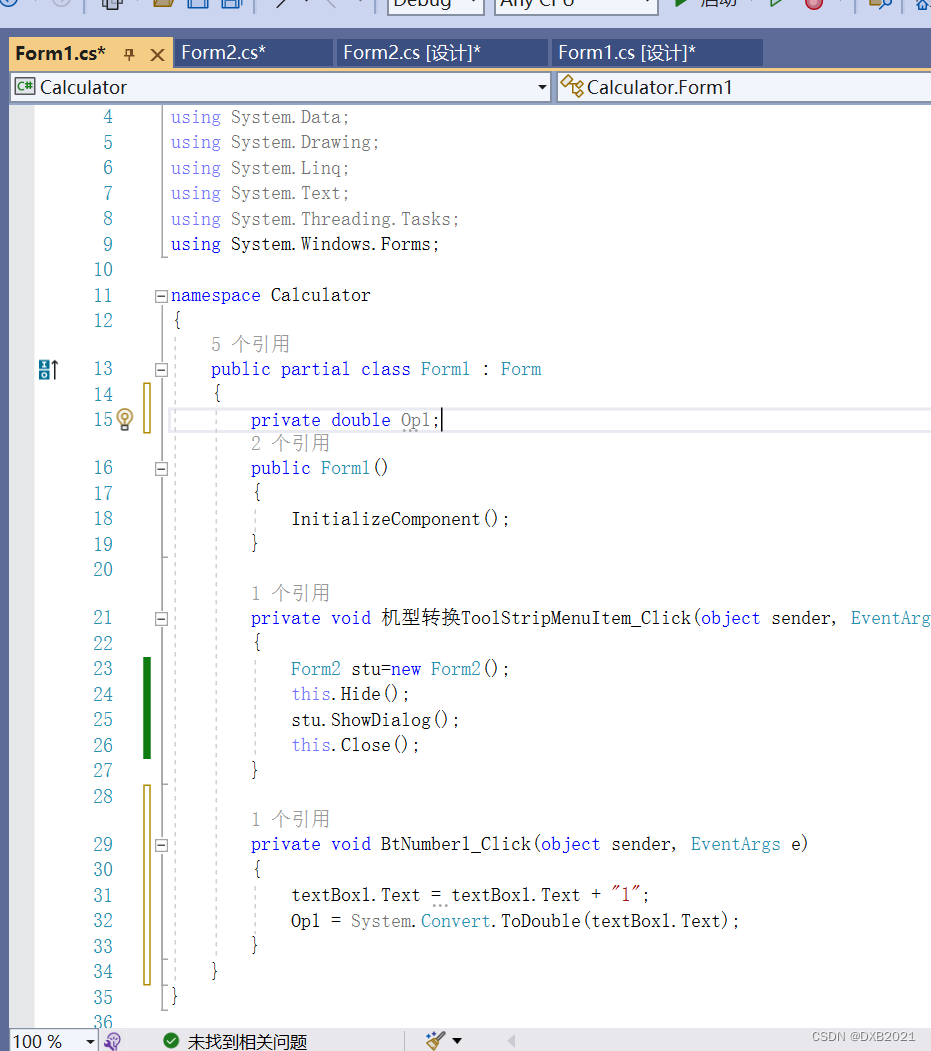
在代码中,数字键0~9只需将上述代码中的1改为相应的数字
小数点功能设计:
添加Button控件:
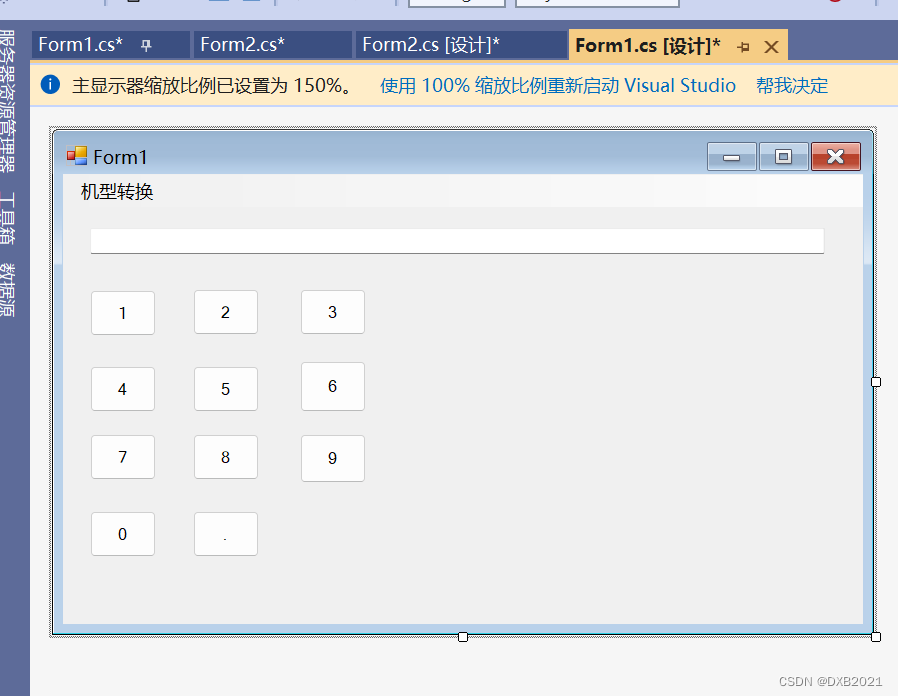
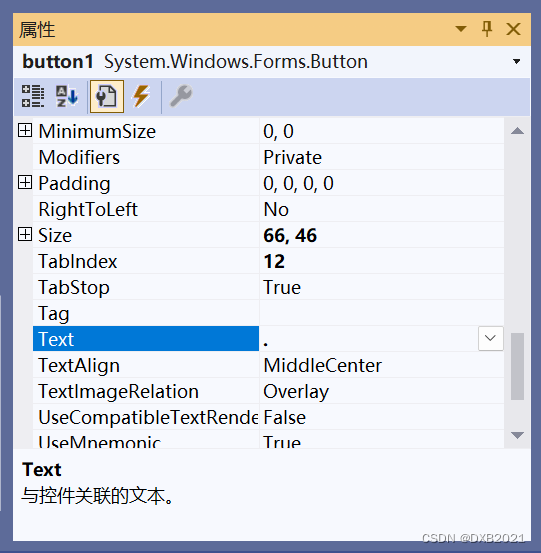
Text属性修改为.
Name属性修改为BtComma
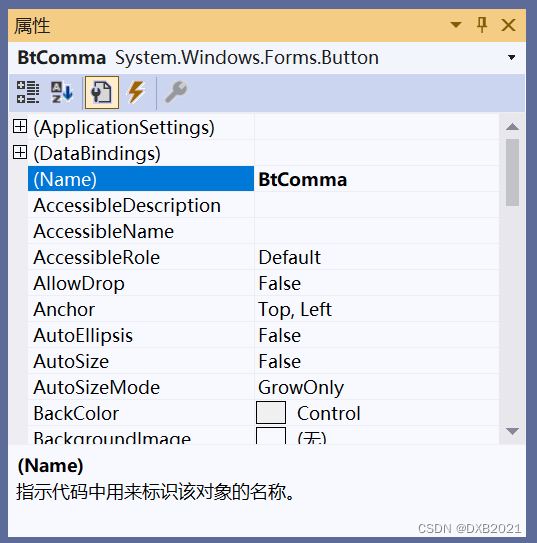
BtComma的属性:
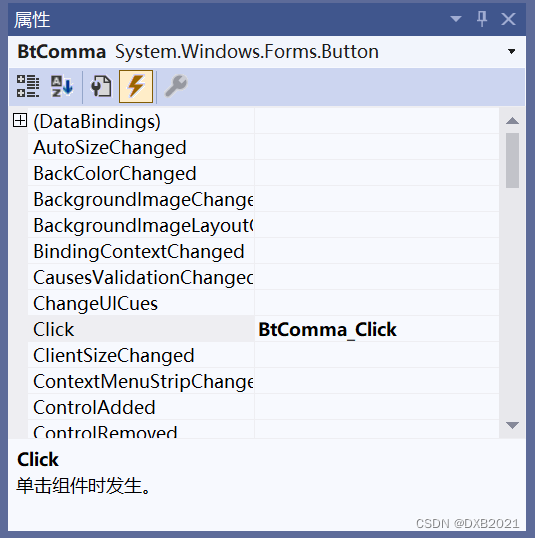
输入下列代码:
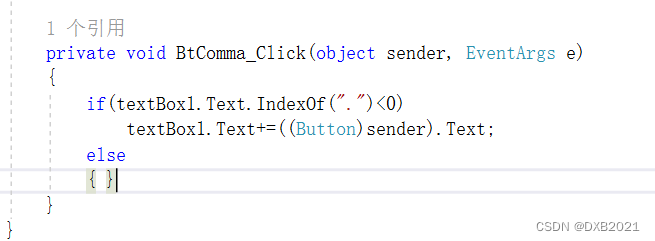
等于的设计:
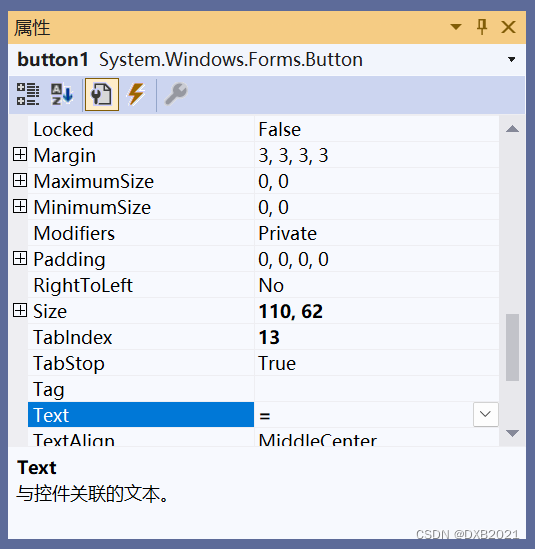
添加Button控件:
Text属性修改为=
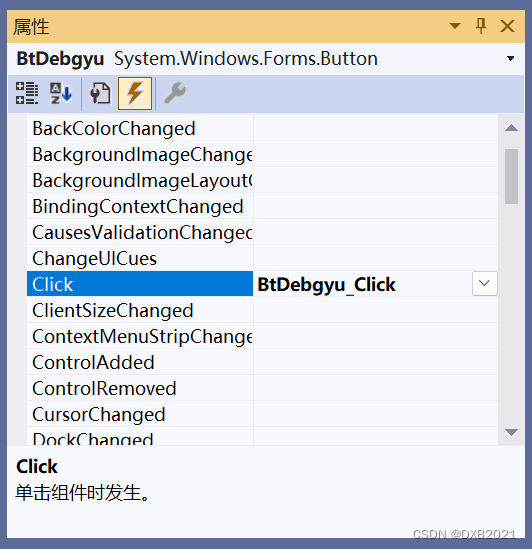
Name属性修改为BtDebgyu
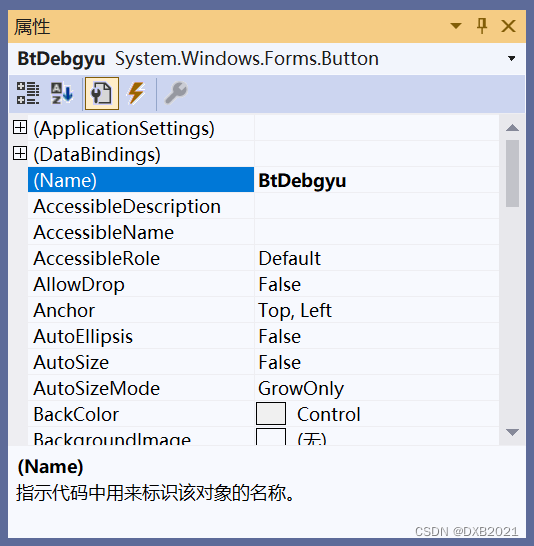
输入下代代码:
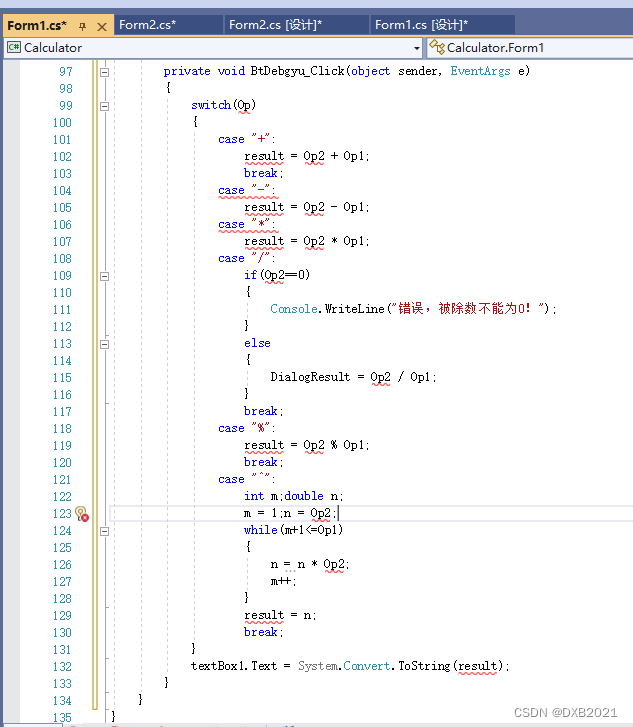
出现红色的波浪线,在publuc Form1的上面设置新的变量。
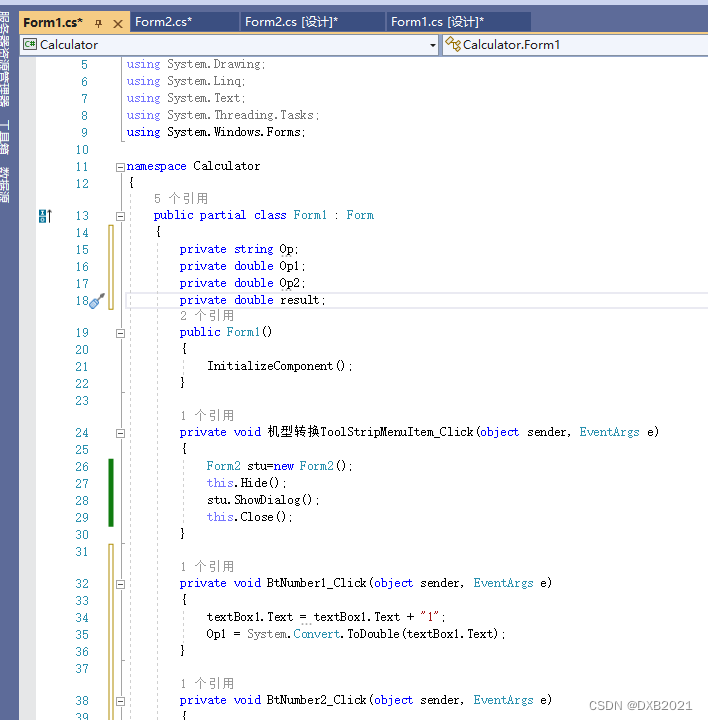
添加变量以后,出现 有三处红色的波浪线:
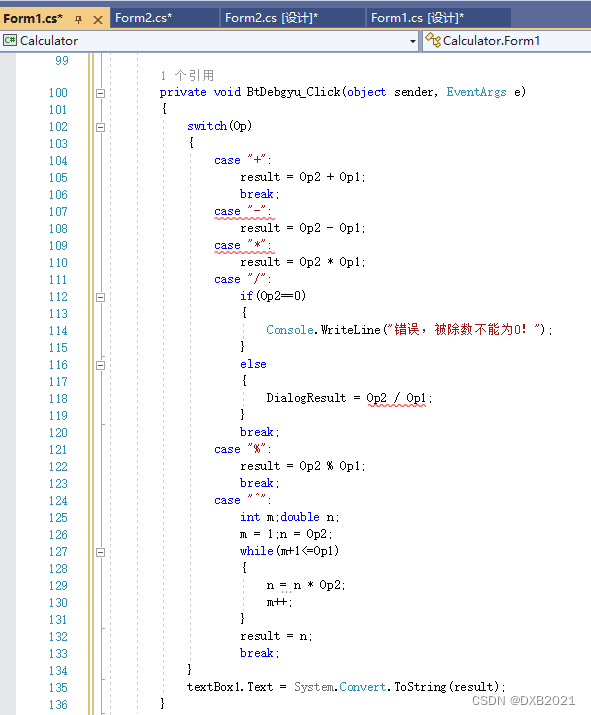
后来找到了,缺少break;用错单词,把DialogResult改为result
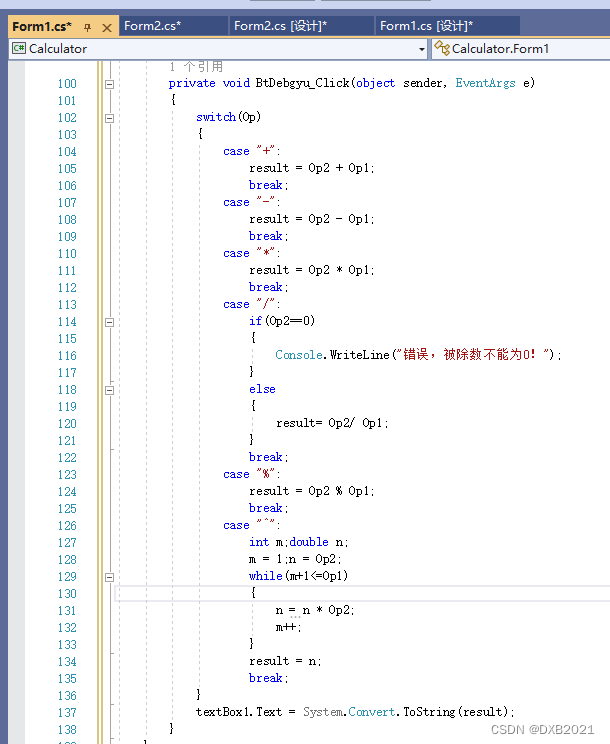
加减乘除的设计加设计
添加6个Button,Text属性分别 是+,-,*,/,%和^。Name属性分别是BtAdd、BtSubtract、BtMult、BtDivision、BtRemedial和BtPower。
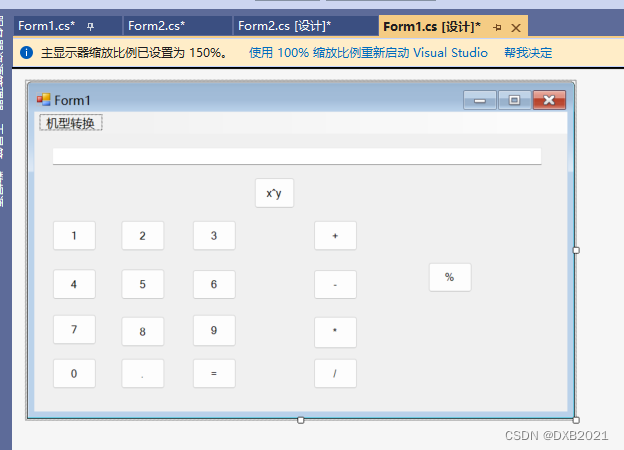
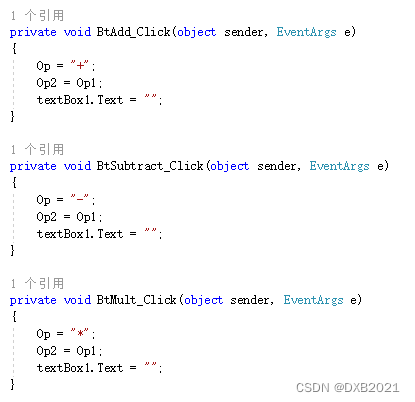
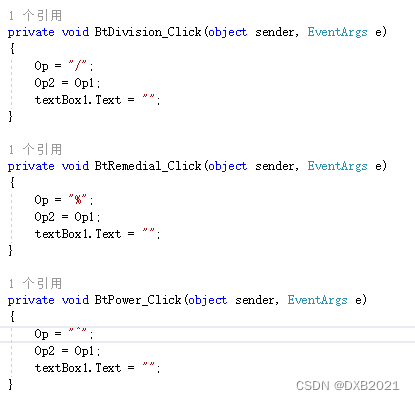
全部都发生Click事件,输入下列代码:
Del设计:
新键一个Button控件,Text属性是Del,Name属性是BtDel。
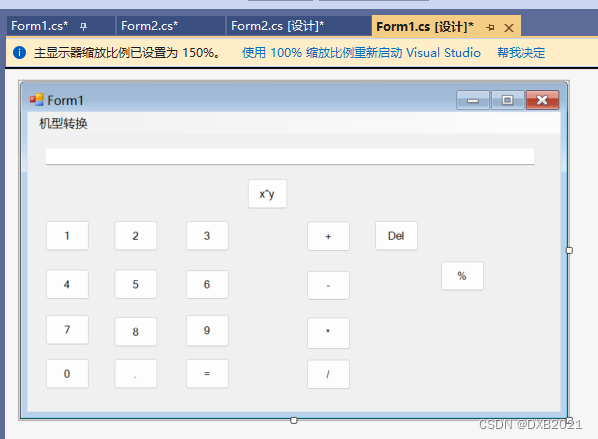
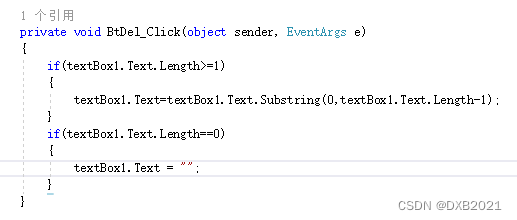
发生Click事件,输入下列代码:
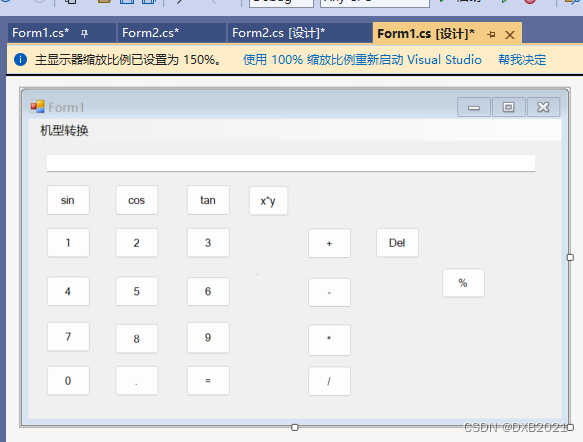
三角函数的设计Sin计划
新键三个Button控件,Text属性分别 是sin、cos和tan,Name属性分别是BtSin、Btcos和Bttan。
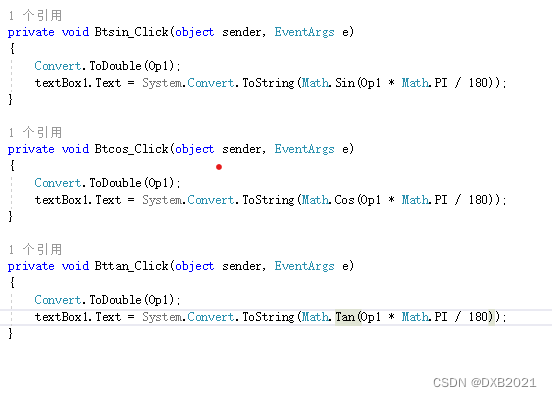
三个button控件发生click事件,输入下列代码如下:
阶乘和10^x的功能:
新键二个Button控件,Text属性分别 是sin、cos和tan,Name属性分别是BtSin、Btcos和Bttan。
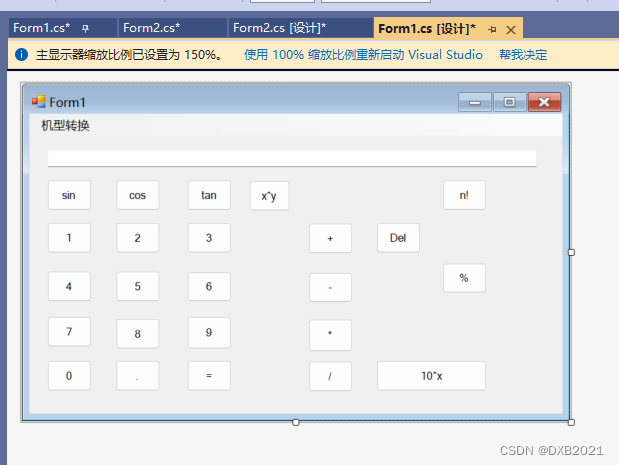
二个button控件发生click事件,输入下列代码如下:

平方、立方、PI、Log、ln的功能
新键五个Button控件,Text属性分别 是x^2、x^3、PI、Log和ln,Name属性分别是BtSquare、BtCube、BtPI、BtLog和Btln。
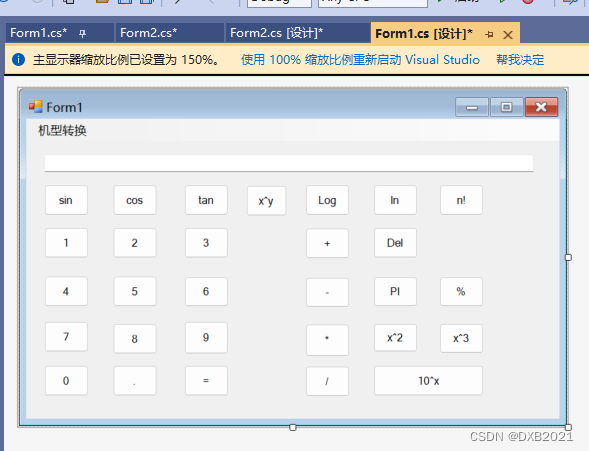
五个button控件发生click事件,输入下列代码如下:
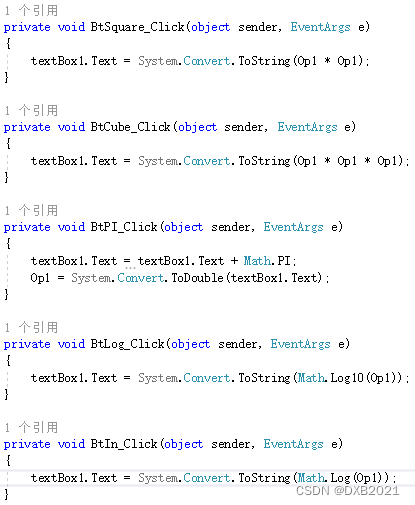
清屏功能:
添加一个Button,Text属性是C,Name属性是BtClear。
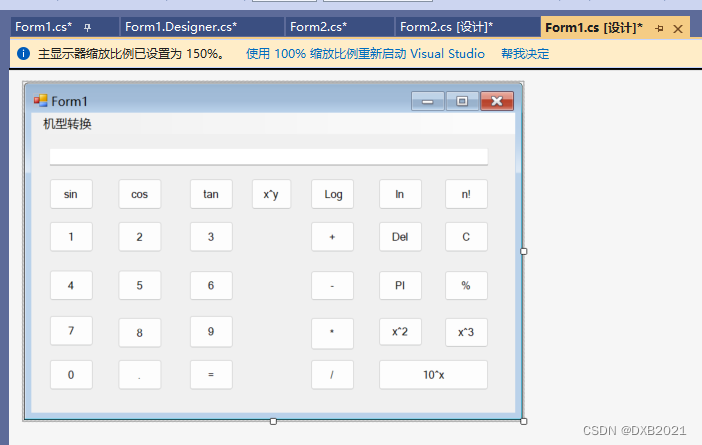
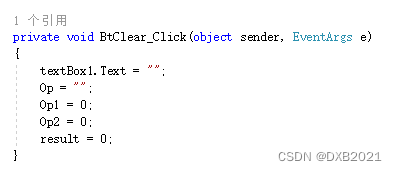
发生click事件,输入下列代码如下:
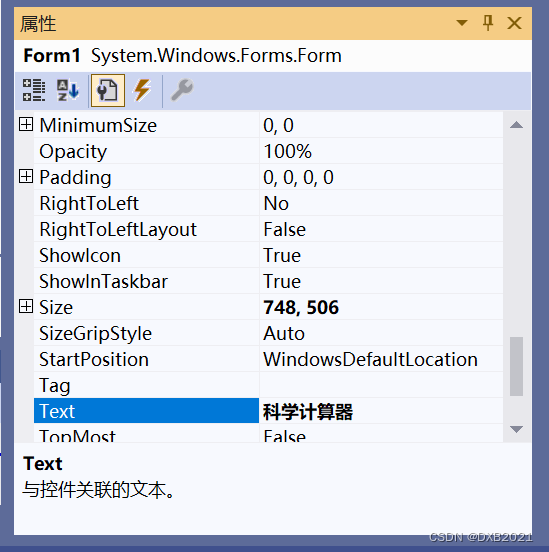
Form1窗体的Text属性改为科学计算器:
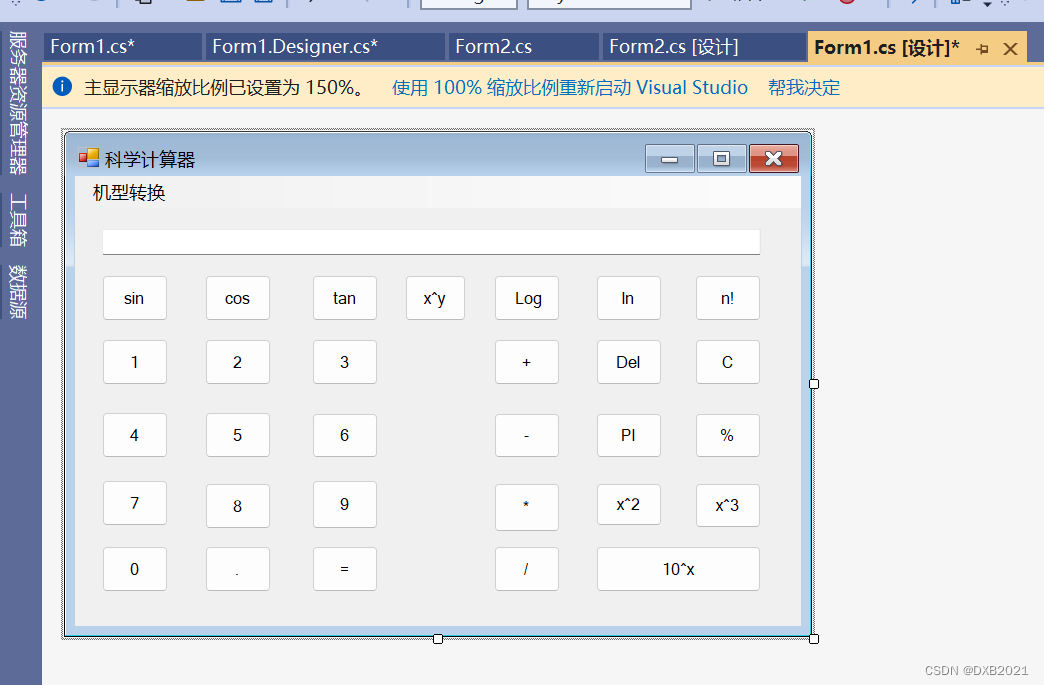
在Form2窗体中,添加17个Button控件,其中10个数字按钮,4个运算按钮,一个用于计算的等号按钮。
10个数字按钮:
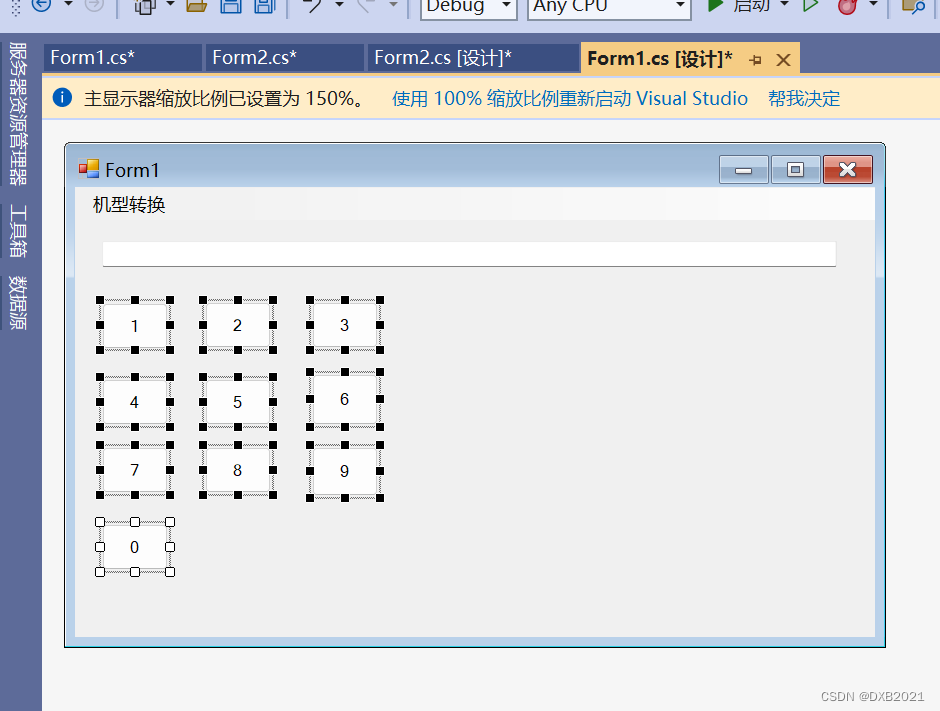
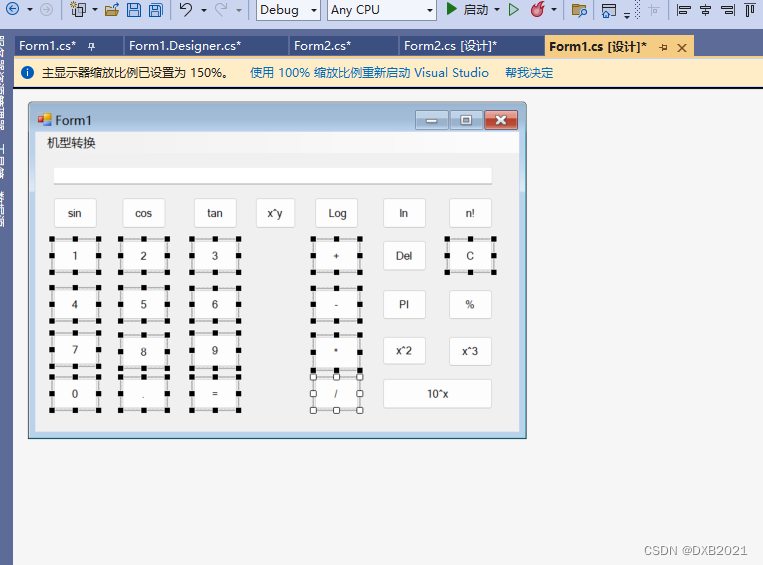
在Form1里,在鼠标全部选择,按下Ctrl+V,然后在Form2,按下粘贴,整理位置。
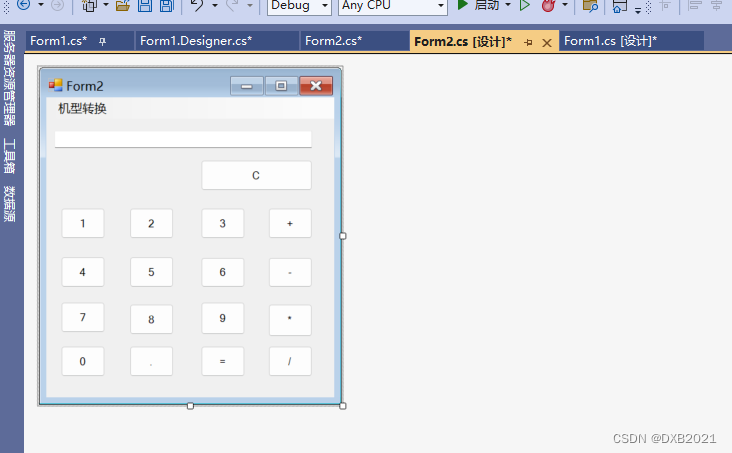
从Form1的部分代码复制到Form2,结果运行不行了。只能发生click事件操作,然后从Formr的部分代码复制到Form2,才能实现同样的功能。
Form2窗体的Text属性改为普通计算器:
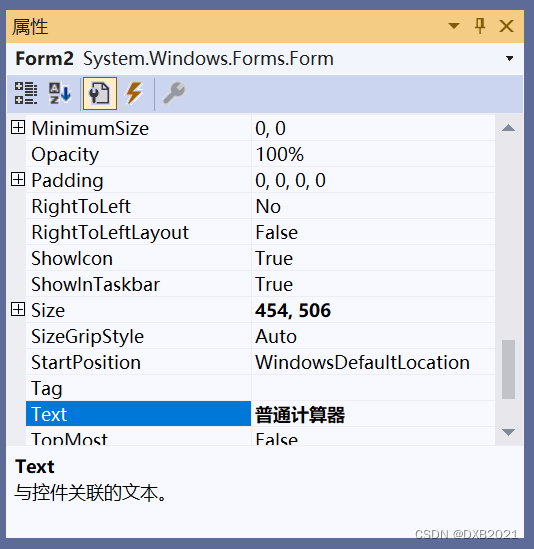
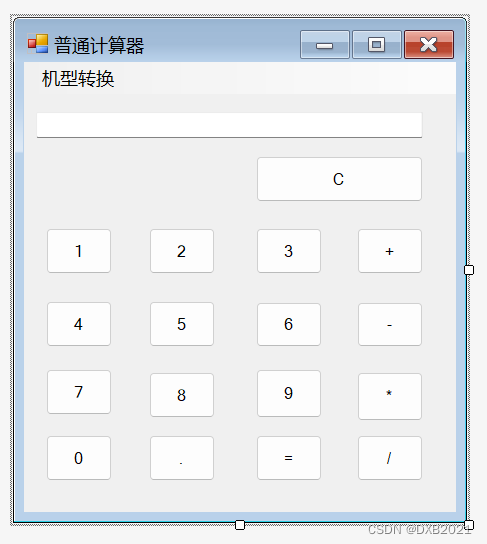
Form1.cs的完整代码:
using System;
using System.Collections.Generic;
using System.ComponentModel;
using System.Data;
using System.Drawing;
using System.Linq;
using System.Text;
using System.Threading.Tasks;
using System.Windows.Forms;

namespace Calculator
{
    public partial class Form1 : Form
    {
        private string Op;
        private double Op1;
        private double Op2;
        private double result;
        public Form1()
        {
            InitializeComponent();
        }

        private void 机型转换ToolStripMenuItem_Click(object sender, EventArgs e)
        {
            Form2 stu=new Form2();
            this.Hide();
            stu.ShowDialog();
            this.Close();
        }

        private void BtNumber1_Click(object sender, EventArgs e)
        {
            textBox1.Text = textBox1.Text + "1";
            Op1 = System.Convert.ToDouble(textBox1.Text);
        }

        private void BtNumber2_Click(object sender, EventArgs e)
        {
            textBox1.Text = textBox1.Text + "2";
            Op1 = System.Convert.ToDouble(textBox1.Text);
        }

        private void BtNumber3_Click(object sender, EventArgs e)
        {
            textBox1.Text = textBox1.Text + "3";
            Op1 = System.Convert.ToDouble(textBox1.Text);
        }

        private void BtNumber4_Click(object sender, EventArgs e)
        {
            textBox1.Text = textBox1.Text + "4";
            Op1 = System.Convert.ToDouble(textBox1.Text);
        }

        private void BtNumber5_Click(object sender, EventArgs e)
        {
            textBox1.Text = textBox1.Text + "5";
            Op1 = System.Convert.ToDouble(textBox1.Text);
        }

        private void BtNumber6_Click(object sender, EventArgs e)
        {
            textBox1.Text = textBox1.Text + "6";
            Op1 = System.Convert.ToDouble(textBox1.Text);
        }

        private void BtNumber7_Click(object sender, EventArgs e)
        {
            textBox1.Text = textBox1.Text + "7";
            Op1 = System.Convert.ToDouble(textBox1.Text);
        }

        private void BtNumber8_Click(object sender, EventArgs e)
        {
            textBox1.Text = textBox1.Text + "8";
            Op1 = System.Convert.ToDouble(textBox1.Text);
        }

        private void BtNumber9_Click(object sender, EventArgs e)
        {
            textBox1.Text = textBox1.Text + "9";
            Op1 = System.Convert.ToDouble(textBox1.Text);
        }

        private void BtNumber0_Click(object sender, EventArgs e)
        {
            textBox1.Text = textBox1.Text + "0";
            Op1 = System.Convert.ToDouble(textBox1.Text);
        }

        private void BtComma_Click(object sender, EventArgs e)
        {
            if(textBox1.Text.IndexOf(".")<0)
                textBox1.Text+=((Button)sender).Text;
            else
            { }
        }

        private void BtDebgyu_Click(object sender, EventArgs e)
        {
            switch(Op)
            {
                case "+":
                    result = Op2 + Op1;
                    break;
                case "-":
                    result = Op2 - Op1;
                    break;
                case "*":
                    result = Op2 * Op1;
                    break;
                case "/":
                    if(Op2==0)
                    {
                        Console.WriteLine("错误,被除数不能为0!");
                    }
                    else
                    {
                        result= Op2/ Op1;
                    }
                    break;
                case "%":
                    result = Op2 % Op1;
                    break;
                case "^":
                    int m;double n;
                    m = 1;n = Op2;
                    while(m+1<=Op1)
                    {
                        n = n * Op2;
                        m++;
                    }
                    result = n;
                    break;
            }
            textBox1.Text = System.Convert.ToString(result);
        }

        private void BtAdd_Click(object sender, EventArgs e)
        {
            Op = "+";
            Op2 = Op1;
            textBox1.Text = "";
        }

        private void BtSubtract_Click(object sender, EventArgs e)
        {
            Op = "-";
            Op2 = Op1;
            textBox1.Text = "";
        }

        private void BtMult_Click(object sender, EventArgs e)
        {
            Op = "*";
            Op2 = Op1;
            textBox1.Text = "";
        }

        private void BtDivision_Click(object sender, EventArgs e)
        {
            Op = "/";
            Op2 = Op1;
            textBox1.Text = "";
        }

        private void BtRemedial_Click(object sender, EventArgs e)
        {
            Op = "%";
            Op2 = Op1;
            textBox1.Text = "";
        }

        private void BtPower_Click(object sender, EventArgs e)
        {
            Op = "^";
            Op2 = Op1;
            textBox1.Text = "";
        }

        private void BtDel_Click(object sender, EventArgs e)
        {
            if(textBox1.Text.Length>=1)
            {
                textBox1.Text=textBox1.Text.Substring(0,textBox1.Text.Length-1);
            }
            if(textBox1.Text.Length==0)
            {
                textBox1.Text = "";
            }
        }

        private void Btsin_Click(object sender, EventArgs e)
        {
            Convert.ToDouble(Op1);
            textBox1.Text = System.Convert.ToString(Math.Sin(Op1 * Math.PI / 180));
        }

        private void Btcos_Click(object sender, EventArgs e)
        {
            Convert.ToDouble(Op1);
            textBox1.Text = System.Convert.ToString(Math.Cos(Op1 * Math.PI / 180));
        }

        private void Bttan_Click(object sender, EventArgs e)
        {
            Convert.ToDouble(Op1);
            textBox1.Text = System.Convert.ToString(Math.Tan(Op1 * Math.PI / 180));
        }

        private void BtFactorial_Click(object sender, EventArgs e)
        {
            int i, j;
            i = 1;j = 1;
            while(i<=Op1)
            {
                j *= i;
                i++;
            }
            textBox1.Text = System.Convert.ToString(j);
        }

        private void BtIndex_Click(object sender, EventArgs e)
        {
            int a, b;
            a = 1; b = 1;
            while (a <= Op1)
            {
                b *= 10;
                a++;
            }
            textBox1.Text = System.Convert.ToString(b);
        }

        private void BtSquare_Click(object sender, EventArgs e)
        {
            textBox1.Text = System.Convert.ToString(Op1 * Op1);
        }

        private void BtCube_Click(object sender, EventArgs e)
        {
            textBox1.Text = System.Convert.ToString(Op1 * Op1 * Op1);
        }

        private void BtPI_Click(object sender, EventArgs e)
        {
            textBox1.Text = textBox1.Text + Math.PI;
            Op1 = System.Convert.ToDouble(textBox1.Text);
        }

        private void BtLog_Click(object sender, EventArgs e)
        {
            textBox1.Text = System.Convert.ToString(Math.Log10(Op1));
        }

        private void BtIn_Click(object sender, EventArgs e)
        {
            textBox1.Text = System.Convert.ToString(Math.Log(Op1));
        }

        private void BtClear_Click(object sender, EventArgs e)
        {
            textBox1.Text = "";
            Op = "";
            Op1 = 0;
            Op2 = 0;
            result = 0;
        }
    }
}
Form1.Designer.cs的完整代码:
namespace Calculator
{
partial class Form1
{
/// <summary>
/// 必需的设计器变量。
/// </summary>
private System.ComponentModel.IContainer components = null;
/// <summary>
/// 清理所有正在使用的资源。
/// </summary>
/// <param name="disposing">如果应释放托管资源,为 true;否则为 false。</param>
protected override void Dispose(bool disposing)
{
if (disposing && (components != null))
{
components.Dispose();
}
base.Dispose(disposing);
}
#region Windows 窗体设计器生成的代码
/// <summary>
/// 设计器支持所需的方法 - 不要修改
/// 使用代码编辑器修改此方法的内容。
/// </summary>
private void InitializeComponent()
{
this.menuStrip1 = new System.Windows.Forms.MenuStrip();
this.机型转换ToolStripMenuItem = new System.Windows.Forms.ToolStripMenuItem();
this.textBox1 = new System.Windows.Forms.TextBox();
this.BtNumber1 = new System.Windows.Forms.Button();
this.BtNumber2 = new System.Windows.Forms.Button();
this.BtNumber3 = new System.Windows.Forms.Button();
this.BtNumber4 = new System.Windows.Forms.Button();
this.BtNumber5 = new System.Windows.Forms.Button();
this.BtNumber6 = new System.Windows.Forms.Button();
this.BtNumber7 = new System.Windows.Forms.Button();
this.BtNumber8 = new System.Windows.Forms.Button();
this.BtNumber9 = new System.Windows.Forms.Button();
this.BtNumber0 = new System.Windows.Forms.Button();
this.BtComma = new System.Windows.Forms.Button();
this.BtDebgyu = new System.Windows.Forms.Button();
this.BtAdd = new System.Windows.Forms.Button();
this.BtSubtract = new System.Windows.Forms.Button();
this.BtMult = new System.Windows.Forms.Button();
this.BtDivision = new System.Windows.Forms.Button();
this.BtRemedial = new System.Windows.Forms.Button();
this.BtPower = new System.Windows.Forms.Button();
this.BtDel = new System.Windows.Forms.Button();
this.Btsin = new System.Windows.Forms.Button();
this.Btcos = new System.Windows.Forms.Button();
this.Bttan = new System.Windows.Forms.Button();
this.BtFactorial = new System.Windows.Forms.Button();
this.BtIndex = new System.Windows.Forms.Button();
this.BtSquare = new System.Windows.Forms.Button();
this.BtCube = new System.Windows.Forms.Button();
this.BtPI = new System.Windows.Forms.Button();
this.BtLog = new System.Windows.Forms.Button();
this.BtIn = new System.Windows.Forms.Button();
this.BtClear = new System.Windows.Forms.Button();
this.menuStrip1.SuspendLayout();
this.SuspendLayout();
//
// menuStrip1
//
this.menuStrip1.GripMargin = new System.Windows.Forms.Padding(2, 2, 0, 2);
this.menuStrip1.ImageScalingSize = new System.Drawing.Size(24, 24);
this.menuStrip1.Items.AddRange(new System.Windows.Forms.ToolStripItem[] {
this.机型转换ToolStripMenuItem});
this.menuStrip1.Location = new System.Drawing.Point(0, 0);
this.menuStrip1.Name = "menuStrip1";
this.menuStrip1.Size = new System.Drawing.Size(726, 32);
this.menuStrip1.TabIndex = 0;
this.menuStrip1.Text = "menuStrip1";
//
// 机型转换ToolStripMenuItem
//
this.机型转换ToolStripMenuItem.Name = "机型转换ToolStripMenuItem";
this.机型转换ToolStripMenuItem.Size = new System.Drawing.Size(98, 28);
this.机型转换ToolStripMenuItem.Text = "机型转换";
this.机型转换ToolStripMenuItem.Click += new System.EventHandler(this.机型转换ToolStripMenuItem_Click);
//
// textBox1
//
this.textBox1.Location = new System.Drawing.Point(27, 53);
this.textBox1.Name = "textBox1";
this.textBox1.Size = new System.Drawing.Size(659, 26);
this.textBox1.TabIndex = 1;
//
// BtNumber1
//
this.BtNumber1.Location = new System.Drawing.Point(27, 163);
this.BtNumber1.Name = "BtNumber1";
this.BtNumber1.Size = new System.Drawing.Size(66, 46);
this.BtNumber1.TabIndex = 2;
this.BtNumber1.Text = "1";
this.BtNumber1.UseVisualStyleBackColor = true;
this.BtNumber1.Click += new System.EventHandler(this.BtNumber1_Click);
//
// BtNumber2
//
this.BtNumber2.Location = new System.Drawing.Point(130, 163);
this.BtNumber2.Name = "BtNumber2";
this.BtNumber2.Size = new System.Drawing.Size(66, 46);
this.BtNumber2.TabIndex = 3;
this.BtNumber2.Text = "2";
this.BtNumber2.UseVisualStyleBackColor = true;
this.BtNumber2.Click += new System.EventHandler(this.BtNumber2_Click);
//
// BtNumber3
//
this.BtNumber3.Location = new System.Drawing.Point(237, 163);
this.BtNumber3.Name = "BtNumber3";
this.BtNumber3.Size = new System.Drawing.Size(66, 46);
this.BtNumber3.TabIndex = 4;
this.BtNumber3.Text = "3";
this.BtNumber3.UseVisualStyleBackColor = true;
this.BtNumber3.Click += new System.EventHandler(this.BtNumber3_Click);
//
// BtNumber4
//
this.BtNumber4.Location = new System.Drawing.Point(27, 236);
this.BtNumber4.Name = "BtNumber4";
this.BtNumber4.Size = new System.Drawing.Size(66, 46);
this.BtNumber4.TabIndex = 5;
this.BtNumber4.Text = "4";
this.BtNumber4.UseVisualStyleBackColor = true;
this.BtNumber4.Click += new System.EventHandler(this.BtNumber4_Click);
//
// BtNumber5
//
this.BtNumber5.Location = new System.Drawing.Point(130, 236);
this.BtNumber5.Name = "BtNumber5";
this.BtNumber5.Size = new System.Drawing.Size(66, 46);
this.BtNumber5.TabIndex = 6;
this.BtNumber5.Text = "5";
this.BtNumber5.UseVisualStyleBackColor = true;
this.BtNumber5.Click += new System.EventHandler(this.BtNumber5_Click);
//
// BtNumber6
//
this.BtNumber6.Location = new System.Drawing.Point(237, 237);
this.BtNumber6.Name = "BtNumber6";
this.BtNumber6.Size = new System.Drawing.Size(66, 45);
this.BtNumber6.TabIndex = 7;
this.BtNumber6.Text = "6";
this.BtNumber6.UseVisualStyleBackColor = true;
this.BtNumber6.Click += new System.EventHandler(this.BtNumber6_Click);
//
// BtNumber7
//
this.BtNumber7.Location = new System.Drawing.Point(27, 304);
this.BtNumber7.Name = "BtNumber7";
this.BtNumber7.Size = new System.Drawing.Size(66, 46);
this.BtNumber7.TabIndex = 8;
this.BtNumber7.Text = "7";
this.BtNumber7.UseVisualStyleBackColor = true;
this.BtNumber7.Click += new System.EventHandler(this.BtNumber7_Click);
//
// BtNumber8
//
this.BtNumber8.Location = new System.Drawing.Point(130, 307);
this.BtNumber8.Name = "BtNumber8";
this.BtNumber8.Size = new System.Drawing.Size(66, 46);
this.BtNumber8.TabIndex = 9;
this.BtNumber8.Text = "8";
this.BtNumber8.UseVisualStyleBackColor = true;
this.BtNumber8.Click += new System.EventHandler(this.BtNumber8_Click);
//
// BtNumber9
//
this.BtNumber9.Location = new System.Drawing.Point(237, 304);
this.BtNumber9.Name = "BtNumber9";
this.BtNumber9.Size = new System.Drawing.Size(66, 49);
this.BtNumber9.TabIndex = 10;
this.BtNumber9.Text = "9";
this.BtNumber9.UseVisualStyleBackColor = true;
this.BtNumber9.Click += new System.EventHandler(this.BtNumber9_Click);
//
// BtNumber0
//
this.BtNumber0.Location = new System.Drawing.Point(27, 370);
this.BtNumber0.Name = "BtNumber0";
this.BtNumber0.Size = new System.Drawing.Size(66, 46);
this.BtNumber0.TabIndex = 11;
this.BtNumber0.Text = "0";
this.BtNumber0.UseVisualStyleBackColor = true;
this.BtNumber0.Click += new System.EventHandler(this.BtNumber0_Click);
//
// BtComma
//
this.BtComma.Location = new System.Drawing.Point(130, 370);
this.BtComma.Name = "BtComma";
this.BtComma.Size = new System.Drawing.Size(66, 46);
this.BtComma.TabIndex = 12;
this.BtComma.Text = ".";
this.BtComma.UseVisualStyleBackColor = true;
this.BtComma.Click += new System.EventHandler(this.BtComma_Click);
//
// BtDebgyu
//
this.BtDebgyu.Location = new System.Drawing.Point(237, 370);
this.BtDebgyu.Name = "BtDebgyu";
this.BtDebgyu.Size = new System.Drawing.Size(66, 46);
this.BtDebgyu.TabIndex = 13;
this.BtDebgyu.Text = "=";
this.BtDebgyu.UseVisualStyleBackColor = true;
this.BtDebgyu.Click += new System.EventHandler(this.BtDebgyu_Click);
//
// BtAdd
//
this.BtAdd.Location = new System.Drawing.Point(419, 163);
this.BtAdd.Name = "BtAdd";
this.BtAdd.Size = new System.Drawing.Size(66, 46);
this.BtAdd.TabIndex = 14;
this.BtAdd.Text = "+";
this.BtAdd.UseVisualStyleBackColor = true;
this.BtAdd.Click += new System.EventHandler(this.BtAdd_Click);
//
// BtSubtract
//
this.BtSubtract.Location = new System.Drawing.Point(419, 237);
this.BtSubtract.Name = "BtSubtract";
this.BtSubtract.Size = new System.Drawing.Size(66, 45);
this.BtSubtract.TabIndex = 15;
this.BtSubtract.Text = "-";
this.BtSubtract.UseVisualStyleBackColor = true;
this.BtSubtract.Click += new System.EventHandler(this.BtSubtract_Click);
//
// BtMult
//
this.BtMult.Location = new System.Drawing.Point(419, 307);
this.BtMult.Name = "BtMult";
this.BtMult.Size = new System.Drawing.Size(66, 49);
this.BtMult.TabIndex = 16;
this.BtMult.Text = "*";
this.BtMult.UseVisualStyleBackColor = true;
this.BtMult.Click += new System.EventHandler(this.BtMult_Click);
//
// BtDivision
//
this.BtDivision.Location = new System.Drawing.Point(419, 370);
this.BtDivision.Name = "BtDivision";
this.BtDivision.Size = new System.Drawing.Size(66, 46);
this.BtDivision.TabIndex = 17;
this.BtDivision.Text = "/";
this.BtDivision.UseVisualStyleBackColor = true;
this.BtDivision.Click += new System.EventHandler(this.BtDivision_Click);
//
// BtRemedial
//
this.BtRemedial.Location = new System.Drawing.Point(620, 237);
this.BtRemedial.Name = "BtRemedial";
this.BtRemedial.Size = new System.Drawing.Size(66, 45);
this.BtRemedial.TabIndex = 18;
this.BtRemedial.Text = "%";
this.BtRemedial.UseVisualStyleBackColor = true;
this.BtRemedial.Click += new System.EventHandler(this.BtRemedial_Click);
//
// BtPower
//
this.BtPower.Location = new System.Drawing.Point(330, 99);
this.BtPower.Name = "BtPower";
this.BtPower.Size = new System.Drawing.Size(61, 46);
this.BtPower.TabIndex = 19;
this.BtPower.Text = "x^y";
this.BtPower.UseVisualStyleBackColor = true;
this.BtPower.Click += new System.EventHandler(this.BtPower_Click);
//
// BtDel
//
this.BtDel.Location = new System.Drawing.Point(521, 163);
this.BtDel.Name = "BtDel";
this.BtDel.Size = new System.Drawing.Size(66, 46);
this.BtDel.TabIndex = 20;
this.BtDel.Text = "Del";
this.BtDel.UseVisualStyleBackColor = true;
this.BtDel.Click += new System.EventHandler(this.BtDel_Click);
//
// Btsin
//
this.Btsin.Location = new System.Drawing.Point(27, 99);
this.Btsin.Name = "Btsin";
this.Btsin.Size = new System.Drawing.Size(66, 46);
this.Btsin.TabIndex = 21;
this.Btsin.Text = "sin";
this.Btsin.UseVisualStyleBackColor = true;
this.Btsin.Click += new System.EventHandler(this.Btsin_Click);
//
// Btcos
//
this.Btcos.Location = new System.Drawing.Point(130, 99);
this.Btcos.Name = "Btcos";
this.Btcos.Size = new System.Drawing.Size(66, 46);
this.Btcos.TabIndex = 22;
this.Btcos.Text = "cos";
this.Btcos.UseVisualStyleBackColor = true;
this.Btcos.Click += new System.EventHandler(this.Btcos_Click);
//
// Bttan
//
this.Bttan.Location = new System.Drawing.Point(237, 99);
this.Bttan.Name = "Bttan";
this.Bttan.Size = new System.Drawing.Size(66, 46);
this.Bttan.TabIndex = 23;
this.Bttan.Text = "tan";
this.Bttan.UseVisualStyleBackColor = true;
this.Bttan.Click += new System.EventHandler(this.Bttan_Click);
//
// BtFactorial
//
this.BtFactorial.Location = new System.Drawing.Point(620, 99);
this.BtFactorial.Name = "BtFactorial";
this.BtFactorial.Size = new System.Drawing.Size(66, 46);
this.BtFactorial.TabIndex = 24;
this.BtFactorial.Text = "n!";
this.BtFactorial.UseVisualStyleBackColor = true;
this.BtFactorial.Click += new System.EventHandler(this.BtFactorial_Click);
//
// BtIndex
//
this.BtIndex.Location = new System.Drawing.Point(521, 370);
this.BtIndex.Name = "BtIndex";
this.BtIndex.Size = new System.Drawing.Size(165, 46);
this.BtIndex.TabIndex = 25;
this.BtIndex.Text = "10^x";
this.BtIndex.UseVisualStyleBackColor = true;
this.BtIndex.Click += new System.EventHandler(this.BtIndex_Click);
//
// BtSquare
//
this.BtSquare.Location = new System.Drawing.Point(521, 307);
this.BtSquare.Name = "BtSquare";
this.BtSquare.Size = new System.Drawing.Size(66, 43);
this.BtSquare.TabIndex = 26;
this.BtSquare.Text = "x^2";
this.BtSquare.UseVisualStyleBackColor = true;
this.BtSquare.Click += new System.EventHandler(this.BtSquare_Click);
//
// BtCube
//
this.BtCube.Location = new System.Drawing.Point(620, 307);
this.BtCube.Name = "BtCube";
this.BtCube.Size = new System.Drawing.Size(66, 45);
this.BtCube.TabIndex = 27;
this.BtCube.Text = "x^3";
this.BtCube.UseVisualStyleBackColor = true;
this.BtCube.Click += new System.EventHandler(this.BtCube_Click);
//
// BtPI
//
this.BtPI.Location = new System.Drawing.Point(521, 237);
this.BtPI.Name = "BtPI";
this.BtPI.Size = new System.Drawing.Size(66, 45);
this.BtPI.TabIndex = 28;
this.BtPI.Text = "PI";
this.BtPI.UseVisualStyleBackColor = true;
this.BtPI.Click += new System.EventHandler(this.BtPI_Click);
//
// BtLog
//
this.BtLog.Location = new System.Drawing.Point(419, 99);
this.BtLog.Name = "BtLog";
this.BtLog.Size = new System.Drawing.Size(66, 46);
this.BtLog.TabIndex = 29;
this.BtLog.Text = " Log";
this.BtLog.UseVisualStyleBackColor = true;
this.BtLog.Click += new System.EventHandler(this.BtLog_Click);
//
// BtIn
//
this.BtIn.Location = new System.Drawing.Point(521, 99);
this.BtIn.Name = "BtIn";
this.BtIn.Size = new System.Drawing.Size(66, 46);
this.BtIn.TabIndex = 30;
this.BtIn.Text = "ln";
this.BtIn.UseVisualStyleBackColor = true;
this.BtIn.Click += new System.EventHandler(this.BtIn_Click);
//
// BtClear
//
this.BtClear.Location = new System.Drawing.Point(620, 163);
this.BtClear.Name = "BtClear";
this.BtClear.Size = new System.Drawing.Size(66, 46);
this.BtClear.TabIndex = 31;
this.BtClear.Text = "C";
this.BtClear.UseVisualStyleBackColor = true;
this.BtClear.Click += new System.EventHandler(this.BtClear_Click);
//
// Form1
//
this.AutoScaleDimensions = new System.Drawing.SizeF(9F, 20F);
this.AutoScaleMode = System.Windows.Forms.AutoScaleMode.Font;
this.ClientSize = new System.Drawing.Size(726, 450);
this.Controls.Add(this.BtClear);
this.Controls.Add(this.BtIn);
this.Controls.Add(this.BtLog);
this.Controls.Add(this.BtPI);
this.Controls.Add(this.BtCube);
this.Controls.Add(this.BtSquare);
this.Controls.Add(this.BtIndex);
this.Controls.Add(this.BtFactorial);
this.Controls.Add(this.Bttan);
this.Controls.Add(this.Btcos);
this.Controls.Add(this.Btsin);
this.Controls.Add(this.BtDel);
this.Controls.Add(this.BtPower);
this.Controls.Add(this.BtRemedial);
this.Controls.Add(this.BtDivision);
this.Controls.Add(this.BtMult);
this.Controls.Add(this.BtSubtract);
this.Controls.Add(this.BtAdd);
this.Controls.Add(this.BtDebgyu);
this.Controls.Add(this.BtComma);
this.Controls.Add(this.BtNumber0);
this.Controls.Add(this.BtNumber9);
this.Controls.Add(this.BtNumber8);
this.Controls.Add(this.BtNumber7);
this.Controls.Add(this.BtNumber6);
this.Controls.Add(this.BtNumber5);
this.Controls.Add(this.BtNumber4);
this.Controls.Add(this.BtNumber3);
this.Controls.Add(this.BtNumber2);
this.Controls.Add(this.BtNumber1);
this.Controls.Add(this.textBox1);
this.Controls.Add(this.menuStrip1);
this.MainMenuStrip = this.menuStrip1;
this.Name = "Form1";
this.Text = "科学计算器";
this.menuStrip1.ResumeLayout(false);
this.menuStrip1.PerformLayout();
this.ResumeLayout(false);
this.PerformLayout();
}
#endregion
private System.Windows.Forms.MenuStrip menuStrip1;
private System.Windows.Forms.ToolStripMenuItem 机型转换ToolStripMenuItem;
private System.Windows.Forms.TextBox textBox1;
private System.Windows.Forms.Button BtNumber1;
private System.Windows.Forms.Button BtNumber2;
private System.Windows.Forms.Button BtNumber3;
private System.Windows.Forms.Button BtNumber4;
private System.Windows.Forms.Button BtNumber5;
private System.Windows.Forms.Button BtNumber6;
private System.Windows.Forms.Button BtNumber7;
private System.Windows.Forms.Button BtNumber8;
private System.Windows.Forms.Button BtNumber9;
private System.Windows.Forms.Button BtNumber0;
private System.Windows.Forms.Button BtComma;
private System.Windows.Forms.Button BtDebgyu;
private System.Windows.Forms.Button BtAdd;
private System.Windows.Forms.Button BtSubtract;
private System.Windows.Forms.Button BtMult;
private System.Windows.Forms.Button BtDivision;
private System.Windows.Forms.Button BtRemedial;
private System.Windows.Forms.Button BtPower;
private System.Windows.Forms.Button BtDel;
private System.Windows.Forms.Button Btsin;
private System.Windows.Forms.Button Btcos;
private System.Windows.Forms.Button Bttan;
private System.Windows.Forms.Button BtFactorial;
private System.Windows.Forms.Button BtIndex;
private System.Windows.Forms.Button BtSquare;
private System.Windows.Forms.Button BtCube;
private System.Windows.Forms.Button BtPI;
private System.Windows.Forms.Button BtLog;
private System.Windows.Forms.Button BtIn;
private System.Windows.Forms.Button BtClear;
}
}
Form2.cs的完整代码:
using System;
using System.Collections.Generic;
using System.ComponentModel;
using System.Data;
using System.Drawing;
using System.Linq;
using System.Text;
using System.Threading.Tasks;
using System.Windows.Forms;

namespace Calculator
{
    public partial class Form2 : Form
    {
        private string Op;
        private double Op1;
        private double Op2;
        private double result;
        public Form2()
        {
            InitializeComponent();
        }

        private void 机型转换ToolStripMenuItem_Click(object sender, EventArgs e)
        {
            Form1 stu=new Form1();
            this.Hide();
            stu.ShowDialog();
            this.Close();
        }

        private void BtNumber1_Click(object sender, EventArgs e)
        {
            textBox1.Text = textBox1.Text + "1";
            Op1 = System.Convert.ToDouble(textBox1.Text);
        }

        private void BtNumber2_Click(object sender, EventArgs e)
        {
            textBox1.Text = textBox1.Text + "2";
            Op1 = System.Convert.ToDouble(textBox1.Text);
        }

        private void BtNumber3_Click(object sender, EventArgs e)
        {
            textBox1.Text = textBox1.Text + "3";
            Op1 = System.Convert.ToDouble(textBox1.Text);
        }

        private void BtNumber4_Click(object sender, EventArgs e)
        {
            textBox1.Text = textBox1.Text + "4";
            Op1 = System.Convert.ToDouble(textBox1.Text);
        }

        private void BtNumber5_Click(object sender, EventArgs e)
        {
            textBox1.Text = textBox1.Text + "5";
            Op1 = System.Convert.ToDouble(textBox1.Text);
        }

        private void BtNumber6_Click(object sender, EventArgs e)
        {
            textBox1.Text = textBox1.Text + "6";
            Op1 = System.Convert.ToDouble(textBox1.Text);
        }

        private void BtNumber7_Click(object sender, EventArgs e)
        {
            textBox1.Text = textBox1.Text + "7";
            Op1 = System.Convert.ToDouble(textBox1.Text);
        }

        private void BtNumber8_Click(object sender, EventArgs e)
        {
            textBox1.Text = textBox1.Text + "8";
            Op1 = System.Convert.ToDouble(textBox1.Text);
        }

        private void BtNumber9_Click(object sender, EventArgs e)
        {
            textBox1.Text = textBox1.Text + "9";
            Op1 = System.Convert.ToDouble(textBox1.Text);
        }

        private void BtNumber0_Click(object sender, EventArgs e)
        {
            textBox1.Text = textBox1.Text + "0";
            Op1 = System.Convert.ToDouble(textBox1.Text);
        }

        private void BtComma_Click(object sender, EventArgs e)
        {
            if (textBox1.Text.IndexOf(".") < 0)
                textBox1.Text += ((Button)sender).Text;
            else
            { }
        }

        private void BtDebgyu_Click(object sender, EventArgs e)
        {
            switch (Op)
            {
                case "+":
                    result = Op2 + Op1;
                    break;
                case "-":
                    result = Op2 - Op1;
                    break;
                case "*":
                    result = Op2 * Op1;
                    break;
                case "/":
                    if (Op2 == 0)
                    {
                        Console.WriteLine("错误,被除数不能为0!");
                    }
                    else
                    {
                        result = Op2 / Op1;
                    }
                    break;
                case "%":
                    result = Op2 % Op1;
                    break;
                case "^":
                    int m; double n;
                    m = 1; n = Op2;
                    while (m + 1 <= Op1)
                    {
                        n = n * Op2;
                        m++;
                    }
                    result = n;
                    break;
            }
            textBox1.Text = System.Convert.ToString(result);
        }

        private void BtAdd_Click(object sender, EventArgs e)
        {
            Op = "+";
            Op2 = Op1;
            textBox1.Text = "";
        }

        private void BtSubtract_Click(object sender, EventArgs e)
        {
            Op = "-";
            Op2 = Op1;
            textBox1.Text = "";
        }

        private void BtMult_Click(object sender, EventArgs e)
        {
            Op = "*";
            Op2 = Op1;
            textBox1.Text = "";
        }

        private void BtDivision_Click(object sender, EventArgs e)
        {
            Op = "/";
            Op2 = Op1;
            textBox1.Text = "";
        }

        private void BtClear_Click(object sender, EventArgs e)
        {
            textBox1.Text = "";
            Op = "";
            Op1 = 0;
            Op2 = 0;
            result = 0;
        }
    }
}
Form2.Designer.cs的完整代码:
namespace Calculator
{
    partial class Form2
    {
        /// <summary>
        /// Required designer variable.
        /// </summary>
        private System.ComponentModel.IContainer components = null;

        /// <summary>
        /// Clean up any resources being used.
        /// </summary>
        /// <param name="disposing">true if managed resources should be disposed; otherwise, false.</param>
        protected override void Dispose(bool disposing)
        {
            if (disposing && (components != null))
            {
                components.Dispose();
            }
            base.Dispose(disposing);
        }

        #region Windows Form Designer generated code

        /// <summary>
        /// Required method for Designer support - do not modify
        /// the contents of this method with the code editor.
        /// </summary>
        private void InitializeComponent()
        {
            this.menuStrip1 = new System.Windows.Forms.MenuStrip();
            this.机型转换ToolStripMenuItem = new System.Windows.Forms.ToolStripMenuItem();
            this.textBox1 = new System.Windows.Forms.TextBox();
            this.BtClear = new System.Windows.Forms.Button();
            this.BtDivision = new System.Windows.Forms.Button();
            this.BtMult = new System.Windows.Forms.Button();
            this.BtSubtract = new System.Windows.Forms.Button();
            this.BtAdd = new System.Windows.Forms.Button();
            this.BtDebgyu = new System.Windows.Forms.Button();
            this.BtComma = new System.Windows.Forms.Button();
            this.BtNumber0 = new System.Windows.Forms.Button();
            this.BtNumber9 = new System.Windows.Forms.Button();
            this.BtNumber8 = new System.Windows.Forms.Button();
            this.BtNumber7 = new System.Windows.Forms.Button();
            this.BtNumber6 = new System.Windows.Forms.Button();
            this.BtNumber5 = new System.Windows.Forms.Button();
            this.BtNumber4 = new System.Windows.Forms.Button();
            this.BtNumber3 = new System.Windows.Forms.Button();
            this.BtNumber2 = new System.Windows.Forms.Button();
            this.BtNumber1 = new System.Windows.Forms.Button();
            this.menuStrip1.SuspendLayout();
            this.SuspendLayout();
            //
            // menuStrip1
            //
            this.menuStrip1.GripMargin = new System.Windows.Forms.Padding(2, 2, 0, 2);
            this.menuStrip1.ImageScalingSize = new System.Drawing.Size(24, 24);
            this.menuStrip1.Items.AddRange(new System.Windows.Forms.ToolStripItem[] {
            this.机型转换ToolStripMenuItem});
            this.menuStrip1.Location = new System.Drawing.Point(0, 0);
            this.menuStrip1.Name = "menuStrip1";
            this.menuStrip1.Size = new System.Drawing.Size(432, 32);
            this.menuStrip1.TabIndex = 0;
            this.menuStrip1.Text = "menuStrip1";
            //
            // 机型转换ToolStripMenuItem
            //
            this.机型转换ToolStripMenuItem.Name = "机型转换ToolStripMenuItem";
            this.机型转换ToolStripMenuItem.Size = new System.Drawing.Size(98, 28);
            this.机型转换ToolStripMenuItem.Text = "机型转换";
            this.机型转换ToolStripMenuItem.Click += new System.EventHandler(this.机型转换ToolStripMenuItem_Click);
            //
            // textBox1
            //
            this.textBox1.Location = new System.Drawing.Point(12, 50);
            this.textBox1.Name = "textBox1";
            this.textBox1.Size = new System.Drawing.Size(387, 26);
            this.textBox1.TabIndex = 1;
            //
            // BtClear
            //
            this.BtClear.Location = new System.Drawing.Point(232, 94);
            this.BtClear.Name = "BtClear";
            this.BtClear.Size = new System.Drawing.Size(167, 46);
            this.BtClear.TabIndex = 48;
            this.BtClear.Text = "C";
            this.BtClear.UseVisualStyleBackColor = true;
            this.BtClear.Click += new System.EventHandler(this.BtClear_Click);
            //
            // BtDivision
            //
            this.BtDivision.Location = new System.Drawing.Point(333, 373);
            this.BtDivision.Name = "BtDivision";
            this.BtDivision.Size = new System.Drawing.Size(66, 46);
            this.BtDivision.TabIndex = 47;
            this.BtDivision.Text = "/";
            this.BtDivision.UseVisualStyleBackColor = true;
            this.BtDivision.Click += new System.EventHandler(this.BtDivision_Click);
            //
            // BtMult
            //
            this.BtMult.Location = new System.Drawing.Point(333, 310);
            this.BtMult.Name = "BtMult";
            this.BtMult.Size = new System.Drawing.Size(66, 49);
            this.BtMult.TabIndex = 46;
            this.BtMult.Text = "*";
            this.BtMult.UseVisualStyleBackColor = true;
            this.BtMult.Click += new System.EventHandler(this.BtMult_Click);
            //
            // BtSubtract
            //
            this.BtSubtract.Location = new System.Drawing.Point(333, 240);
            this.BtSubtract.Name = "BtSubtract";
            this.BtSubtract.Size = new System.Drawing.Size(66, 45);
            this.BtSubtract.TabIndex = 45;
            this.BtSubtract.Text = "-";
            this.BtSubtract.UseVisualStyleBackColor = true;
            this.BtSubtract.Click += new System.EventHandler(this.BtSubtract_Click);
            //
            // BtAdd
            //
            this.BtAdd.Location = new System.Drawing.Point(333, 166);
            this.BtAdd.Name = "BtAdd";
            this.BtAdd.Size = new System.Drawing.Size(66, 46);
            this.BtAdd.TabIndex = 44;
            this.BtAdd.Text = "+";
            this.BtAdd.UseVisualStyleBackColor = true;
            this.BtAdd.Click += new System.EventHandler(this.BtAdd_Click);
            //
            // BtDebgyu
            //
            this.BtDebgyu.Location = new System.Drawing.Point(232, 373);
            this.BtDebgyu.Name = "BtDebgyu";
            this.BtDebgyu.Size = new System.Drawing.Size(66, 46);
            this.BtDebgyu.TabIndex = 43;
            this.BtDebgyu.Text = "=";
            this.BtDebgyu.UseVisualStyleBackColor = true;
            this.BtDebgyu.Click += new System.EventHandler(this.BtDebgyu_Click);
            //
            // BtComma
            //
            this.BtComma.Location = new System.Drawing.Point(125, 373);
            this.BtComma.Name = "BtComma";
            this.BtComma.Size = new System.Drawing.Size(66, 46);
            this.BtComma.TabIndex = 42;
            this.BtComma.Text = ".";
            this.BtComma.UseVisualStyleBackColor = true;
            this.BtComma.Click += new System.EventHandler(this.BtComma_Click);
            //
            // BtNumber0
            //
            this.BtNumber0.Location = new System.Drawing.Point(22, 373);
            this.BtNumber0.Name = "BtNumber0";
            this.BtNumber0.Size = new System.Drawing.Size(66, 46);
            this.BtNumber0.TabIndex = 41;
            this.BtNumber0.Text = "0";
            this.BtNumber0.UseVisualStyleBackColor = true;
            this.BtNumber0.Click += new System.EventHandler(this.BtNumber0_Click);
            //
            // BtNumber9
            //
            this.BtNumber9.Location = new System.Drawing.Point(232, 307);
            this.BtNumber9.Name = "BtNumber9";
            this.BtNumber9.Size = new System.Drawing.Size(66, 49);
            this.BtNumber9.TabIndex = 40;
            this.BtNumber9.Text = "9";
            this.BtNumber9.UseVisualStyleBackColor = true;
            this.BtNumber9.Click += new System.EventHandler(this.BtNumber9_Click);
            //
            // BtNumber8
            //
            this.BtNumber8.Location = new System.Drawing.Point(125, 310);
            this.BtNumber8.Name = "BtNumber8";
            this.BtNumber8.Size = new System.Drawing.Size(66, 46);
            this.BtNumber8.TabIndex = 39;
            this.BtNumber8.Text = "8";
            this.BtNumber8.UseVisualStyleBackColor = true;
            this.BtNumber8.Click += new System.EventHandler(this.BtNumber8_Click);
            //
            // BtNumber7
            //
            this.BtNumber7.Location = new System.Drawing.Point(22, 307);
            this.BtNumber7.Name = "BtNumber7";
            this.BtNumber7.Size = new System.Drawing.Size(66, 46);
            this.BtNumber7.TabIndex = 38;
            this.BtNumber7.Text = "7";
            this.BtNumber7.UseVisualStyleBackColor = true;
            this.BtNumber7.Click += new System.EventHandler(this.BtNumber7_Click);
            //
            // BtNumber6
            //
            this.BtNumber6.Location = new System.Drawing.Point(232, 240);
            this.BtNumber6.Name = "BtNumber6";
            this.BtNumber6.Size = new System.Drawing.Size(66, 45);
            this.BtNumber6.TabIndex = 37;
            this.BtNumber6.Text = "6";
            this.BtNumber6.UseVisualStyleBackColor = true;
            this.BtNumber6.Click += new System.EventHandler(this.BtNumber6_Click);
            //
            // BtNumber5
            //
            this.BtNumber5.Location = new System.Drawing.Point(125, 239);
            this.BtNumber5.Name = "BtNumber5";
            this.BtNumber5.Size = new System.Drawing.Size(66, 46);
            this.BtNumber5.TabIndex = 36;
            this.BtNumber5.Text = "5";
            this.BtNumber5.UseVisualStyleBackColor = true;
            this.BtNumber5.Click += new System.EventHandler(this.BtNumber5_Click);
            //
            // BtNumber4
            //
            this.BtNumber4.Location = new System.Drawing.Point(22, 239);
            this.BtNumber4.Name = "BtNumber4";
            this.BtNumber4.Size = new System.Drawing.Size(66, 46);
            this.BtNumber4.TabIndex = 35;
            this.BtNumber4.Text = "4";
            this.BtNumber4.UseVisualStyleBackColor = true;
            this.BtNumber4.Click += new System.EventHandler(this.BtNumber4_Click);
            //
            // BtNumber3
            //
            this.BtNumber3.Location = new System.Drawing.Point(232, 166);
            this.BtNumber3.Name = "BtNumber3";
            this.BtNumber3.Size = new System.Drawing.Size(66, 46);
            this.BtNumber3.TabIndex = 34;
            this.BtNumber3.Text = "3";
            this.BtNumber3.UseVisualStyleBackColor = true;
            this.BtNumber3.Click += new System.EventHandler(this.BtNumber3_Click);
            //
            // BtNumber2
            //
            this.BtNumber2.Location = new System.Drawing.Point(125, 166);
            this.BtNumber2.Name = "BtNumber2";
            this.BtNumber2.Size = new System.Drawing.Size(66, 46);
            this.BtNumber2.TabIndex = 33;
            this.BtNumber2.Text = "2";
            this.BtNumber2.UseVisualStyleBackColor = true;
            this.BtNumber2.Click += new System.EventHandler(this.BtNumber2_Click);
            //
            // BtNumber1
            //
            this.BtNumber1.Location = new System.Drawing.Point(22, 166);
            this.BtNumber1.Name = "BtNumber1";
            this.BtNumber1.Size = new System.Drawing.Size(66, 46);
            this.BtNumber1.TabIndex = 32;
            this.BtNumber1.Text = "1";
            this.BtNumber1.UseVisualStyleBackColor = true;
            this.BtNumber1.Click += new System.EventHandler(this.BtNumber1_Click);
            //
            // Form2
            //
            this.AutoScaleDimensions = new System.Drawing.SizeF(9F, 20F);
            this.AutoScaleMode = System.Windows.Forms.AutoScaleMode.Font;
            this.ClientSize = new System.Drawing.Size(432, 450);
            this.Controls.Add(this.BtClear);
            this.Controls.Add(this.BtDivision);
            this.Controls.Add(this.BtMult);
            this.Controls.Add(this.BtSubtract);
            this.Controls.Add(this.BtAdd);
            this.Controls.Add(this.BtDebgyu);
            this.Controls.Add(this.BtComma);
            this.Controls.Add(this.BtNumber0);
            this.Controls.Add(this.BtNumber9);
            this.Controls.Add(this.BtNumber8);
            this.Controls.Add(this.BtNumber7);
            this.Controls.Add(this.BtNumber6);
            this.Controls.Add(this.BtNumber5);
            this.Controls.Add(this.BtNumber4);
            this.Controls.Add(this.BtNumber3);
            this.Controls.Add(this.BtNumber2);
            this.Controls.Add(this.BtNumber1);
            this.Controls.Add(this.textBox1);
            this.Controls.Add(this.menuStrip1);
            this.MainMenuStrip = this.menuStrip1;
            this.Name = "Form2";
            this.Text = "普通计算器";
            this.menuStrip1.ResumeLayout(false);
            this.menuStrip1.PerformLayout();
            this.ResumeLayout(false);
            this.PerformLayout();

        }

        #endregion

        private System.Windows.Forms.MenuStrip menuStrip1;
        private System.Windows.Forms.ToolStripMenuItem 机型转换ToolStripMenuItem;
        private System.Windows.Forms.TextBox textBox1;
        private System.Windows.Forms.Button BtClear;
        private System.Windows.Forms.Button BtDivision;
        private System.Windows.Forms.Button BtMult;
        private System.Windows.Forms.Button BtSubtract;
        private System.Windows.Forms.Button BtAdd;
        private System.Windows.Forms.Button BtDebgyu;
        private System.Windows.Forms.Button BtComma;
        private System.Windows.Forms.Button BtNumber0;
        private System.Windows.Forms.Button BtNumber9;
        private System.Windows.Forms.Button BtNumber8;
        private System.Windows.Forms.Button BtNumber7;
        private System.Windows.Forms.Button BtNumber6;
        private System.Windows.Forms.Button BtNumber5;
        private System.Windows.Forms.Button BtNumber4;
        private System.Windows.Forms.Button BtNumber3;
        private System.Windows.Forms.Button BtNumber2;
        private System.Windows.Forms.Button BtNumber1;
    }
}

 3525


 扫一扫


 被折叠的 条评论
为什么被折叠?
 到【灌水乐园】发言


